All About ASP.NET 4.0HosamKamelSenior Software EngineerESRI Northeast Africa@HosamKamelhttp://Weblogs.asp.net/HosamKamel1
AgendaOverviewCore ServicesNew Features in the Microsoft Ajax LibraryWeb FormsDynamic DataVisual Studio 2010 Web Designer ImprovementsWeb Application Deployment with Visual Studio 2010Q and A2
Core Services
Core Service – Web.Config File MinificationWeb.config (Past)Contains all the configuration for a Web application.Grown considerably over the past few releases of the .NET Framework as new features have been added, such as AJAX, routing, and integration with IIS 7This has made it harder to configure or start new Web applications without a tool like Visual StudioWeb.config ( .NET Framework 4)The major configuration elements have been moved to the machine.config file.The web applications now inherit these settings.4
Core Service – Extensible Output CachingOld Caching mechanismIn memory Heavy trafficMemory consumed by output caching can compete with memory demands from other portions of a Web application.Custom output-cache providers.Output-cache providers can use any storage mechanism to persist HTML content5
Core Service – Auto-Start Web ApplicationsApplication_LoadAuto-StartASP.NET 4 runs on IIS 7.5 on Windows Server 2008 R2Starting up an application pool, initializing an ASP.NET application, and then accepting HTTP request6
Core Service – Permanently Redirecting a PageResponse.RedirectHTTP 302 Found (temporary redirect) response.An extra HTTP round trip when users attempt to access the old URLsRedirectPermanent Issue HTTP 301 Moved Permanently responses.Search engines and other user agents that recognize permanent redirects will store the new URL that is associated with the content, which eliminates the unnecessary round trip made by the browser for temporary redirects.7
Core Service – The Incredible Shrinking Session StateDepending on how much information a developer saves in session state, the size of the serialized data can grow quite large.compressionEnabled="true“!8
Core Service – Expanding the Range of Allowable URLsURL path lengths to 260 characters.(based on the NTFS file-path limit)To allow longer or shorter paths (the portion of the URL that does not include protocol, server name, and query string)maxRequestPathLength=“260”To allow longer or shorter query stringsmaxQueryStringLength="2048" 9
Core Service – Multi-Targeting<compilation targetFramework="4.0"/> 10
Web Forms
Web Forms– Meta TagsMetaKeywords MetaDescriptionYou can set these properties at run time.12
Web Forms– Enabling View State for Individual ControlsViewStateMode property.Enabled, Disabled, and Inherit13
Web Forms – Changes to Browser CapabilitiesHttpBrowserCapabilitiesASP.NET 4, these browser definition files have been updatedblackberry.browser	- chrome.browserDefault.browser		- firefox.browsergateway.browser     	- generic.browserie.browser			- iemobile.browseriphone.browser		- opera.browsersafari.browser14
Web Forms – RoutingASP.NET 4 adds built-in support for using routing with Web Forms.Routing lets you configure an application to accept request URLs that do not map to physical files.http://website/products.aspx?categoryid=12 OR http://website/products/software15
Web Forms – Client IDsThe id attribute in HTML that is rendered for Web server controls is generated based on the ClientID property of the controlctl00_MasterPageBody_ctl01_Textbox1ClientIDMode AutoIDStatic Predictable Inherit 16
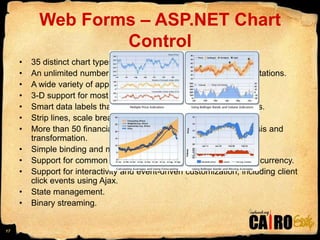
Web Forms – ASP.NET Chart Control35 distinct chart types.An unlimited number of chart areas, titles, legends, and annotations.A wide variety of appearance settings for all chart elements.3-D support for most chart types.Smart data labels that can automatically fit around data points.Strip lines, scale breaks, and logarithmic scaling.More than 50 financial and statistical formulas for data analysis and transformation.Simple binding and manipulation of chart data.Support for common data formats, such as dates, times, and currency.Support for interactivity and event-driven customization, including client click events using Ajax.State management.Binary streaming.17
Web Forms – Project Template ChangesEmpty Web SiteEmpty web application18
Web Forms – CSS ImprovementscontrolRenderingCompatibilityVersion "3.5". "4.0".Disabling ControlsHiding div Elements Around Hidden Fields19
Web Forms – Project Template ChangesEmpty Web SiteEmpty web application20
Web Application Deployment with Visual Studio 2010
IssuesDeploying to a shared hosting site.In an enterprise environment.Web deployment features in Visual Studio 2010 include the following major areas:Web packaging	Web.config TransformationDatabase deploymentOne-Click Publish for Web applications22
Web PackagingIIS Web Deployment Tool (MsDeploy.exe). Zip file + meta dataIIS settings, which includes application pool settings, error page settings, and so on.The actual Web content, which includes Web pages, user controls, static content (images and HTML files), and so on.SQL Server database schemas and data.Security certificates, components to install in the GAC, registry settings, and so on.23
Web.config TransformationTransform a Web.config file from development settings to production settings24
Database DeploymentA Visual Studio 2010 deployment package can include dependencies on SQL Server databases. 25
One-Click Publish for Web ApplicationsIIS remote management service to publish a Web application to a remote server 26
Thank YOU!

All About Asp Net 4 0 Hosam Kamel

  • 1.
    All About ASP.NET4.0HosamKamelSenior Software EngineerESRI Northeast Africa@HosamKamelhttp://Weblogs.asp.net/HosamKamel1
  • 2.
    AgendaOverviewCore ServicesNew Featuresin the Microsoft Ajax LibraryWeb FormsDynamic DataVisual Studio 2010 Web Designer ImprovementsWeb Application Deployment with Visual Studio 2010Q and A2
  • 3.
  • 4.
    Core Service –Web.Config File MinificationWeb.config (Past)Contains all the configuration for a Web application.Grown considerably over the past few releases of the .NET Framework as new features have been added, such as AJAX, routing, and integration with IIS 7This has made it harder to configure or start new Web applications without a tool like Visual StudioWeb.config ( .NET Framework 4)The major configuration elements have been moved to the machine.config file.The web applications now inherit these settings.4
  • 5.
    Core Service –Extensible Output CachingOld Caching mechanismIn memory Heavy trafficMemory consumed by output caching can compete with memory demands from other portions of a Web application.Custom output-cache providers.Output-cache providers can use any storage mechanism to persist HTML content5
  • 6.
    Core Service –Auto-Start Web ApplicationsApplication_LoadAuto-StartASP.NET 4 runs on IIS 7.5 on Windows Server 2008 R2Starting up an application pool, initializing an ASP.NET application, and then accepting HTTP request6
  • 7.
    Core Service –Permanently Redirecting a PageResponse.RedirectHTTP 302 Found (temporary redirect) response.An extra HTTP round trip when users attempt to access the old URLsRedirectPermanent Issue HTTP 301 Moved Permanently responses.Search engines and other user agents that recognize permanent redirects will store the new URL that is associated with the content, which eliminates the unnecessary round trip made by the browser for temporary redirects.7
  • 8.
    Core Service –The Incredible Shrinking Session StateDepending on how much information a developer saves in session state, the size of the serialized data can grow quite large.compressionEnabled="true“!8
  • 9.
    Core Service –Expanding the Range of Allowable URLsURL path lengths to 260 characters.(based on the NTFS file-path limit)To allow longer or shorter paths (the portion of the URL that does not include protocol, server name, and query string)maxRequestPathLength=“260”To allow longer or shorter query stringsmaxQueryStringLength="2048" 9
  • 10.
    Core Service –Multi-Targeting<compilation targetFramework="4.0"/> 10
  • 11.
  • 12.
    Web Forms– MetaTagsMetaKeywords MetaDescriptionYou can set these properties at run time.12
  • 13.
    Web Forms– EnablingView State for Individual ControlsViewStateMode property.Enabled, Disabled, and Inherit13
  • 14.
    Web Forms –Changes to Browser CapabilitiesHttpBrowserCapabilitiesASP.NET 4, these browser definition files have been updatedblackberry.browser - chrome.browserDefault.browser - firefox.browsergateway.browser - generic.browserie.browser - iemobile.browseriphone.browser - opera.browsersafari.browser14
  • 15.
    Web Forms –RoutingASP.NET 4 adds built-in support for using routing with Web Forms.Routing lets you configure an application to accept request URLs that do not map to physical files.http://website/products.aspx?categoryid=12 OR http://website/products/software15
  • 16.
    Web Forms –Client IDsThe id attribute in HTML that is rendered for Web server controls is generated based on the ClientID property of the controlctl00_MasterPageBody_ctl01_Textbox1ClientIDMode AutoIDStatic Predictable Inherit 16
  • 17.
    Web Forms –ASP.NET Chart Control35 distinct chart types.An unlimited number of chart areas, titles, legends, and annotations.A wide variety of appearance settings for all chart elements.3-D support for most chart types.Smart data labels that can automatically fit around data points.Strip lines, scale breaks, and logarithmic scaling.More than 50 financial and statistical formulas for data analysis and transformation.Simple binding and manipulation of chart data.Support for common data formats, such as dates, times, and currency.Support for interactivity and event-driven customization, including client click events using Ajax.State management.Binary streaming.17
  • 18.
    Web Forms –Project Template ChangesEmpty Web SiteEmpty web application18
  • 19.
    Web Forms –CSS ImprovementscontrolRenderingCompatibilityVersion "3.5". "4.0".Disabling ControlsHiding div Elements Around Hidden Fields19
  • 20.
    Web Forms –Project Template ChangesEmpty Web SiteEmpty web application20
  • 21.
    Web Application Deploymentwith Visual Studio 2010
  • 22.
    IssuesDeploying to ashared hosting site.In an enterprise environment.Web deployment features in Visual Studio 2010 include the following major areas:Web packaging Web.config TransformationDatabase deploymentOne-Click Publish for Web applications22
  • 23.
    Web PackagingIIS WebDeployment Tool (MsDeploy.exe). Zip file + meta dataIIS settings, which includes application pool settings, error page settings, and so on.The actual Web content, which includes Web pages, user controls, static content (images and HTML files), and so on.SQL Server database schemas and data.Security certificates, components to install in the GAC, registry settings, and so on.23
  • 24.
    Web.config TransformationTransform a Web.config filefrom development settings to production settings24
  • 25.
    Database DeploymentA VisualStudio 2010 deployment package can include dependencies on SQL Server databases. 25
  • 26.
    One-Click Publish forWeb ApplicationsIIS remote management service to publish a Web application to a remote server 26
  • 28.