ASP .NET Model View ControllerUniversity “Al.I.Cuza”, IasiFaculty of Computer ScienceEldorinaAlergusAndreeaJipa
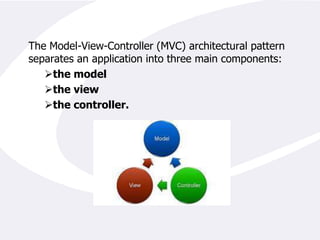
The Model-View-Controller (MVC) architectural pattern separates an application into three main components: the model
the view
the controller. Models. Model objects are the parts of the application that implement the logic for the application's data domain. Often, model objects retrieve and store model state in a database. For example, a Product object might retrieve information from a database, operate on it, and then write updated information back to a Products table in SQL ServerViews are the components that display the application's user interface (UI). Typically, this UI is created from the model data. An example would be an edit view of a Products table that displays text boxes, drop-down lists, and check boxes based on the current state of a Products object.In ASP.NET the view is the set of web pages presented by a web application.
Controllers The controller is the object that allows the manipulation of the view. Usually many applications implement Model-Controller tiers that contain the business logic along with the necessary code to manipulate a user interface. In an ASP.NET application the controller is implicitly represented by the code-behind or the server side code that generates the HTML presented to the user.A basic diagram that would help us understand the specific parts that implement the MVC architecture in an ASP.NET application is presented below:
How does ASP .NET MVC looks like?
ASP .NET MVC project specific directory architectureApp_Data is the physical store for data.
Content folder keeps files such as scripts, CSS, images and so on.
Controllers folder is the location for controllers. The MVC requires the names of all controller to end with Controller.
Models stores classes that handle application business logic.
Scripts is the folder for script files. By default, it contains AJAX script files and the JQuery library.
Views is the recommended location for views. It my contain .aspx, .ascx, .master and other files that are related to rendering views.Advantages of an MVC-Based Web ApplicationIt makes it easier to manage complexity by dividing an application into the model, the view, and the controller.
It does not use view state or server-based forms. This makes the MVC framework ideal for developers who want full control over the behavior of an application.

ASP .NET MVC

  • 1.
    ASP .NET ModelView ControllerUniversity “Al.I.Cuza”, IasiFaculty of Computer ScienceEldorinaAlergusAndreeaJipa
  • 2.
    The Model-View-Controller (MVC)architectural pattern separates an application into three main components: the model
  • 3.
  • 4.
    the controller. Models.Model objects are the parts of the application that implement the logic for the application's data domain. Often, model objects retrieve and store model state in a database. For example, a Product object might retrieve information from a database, operate on it, and then write updated information back to a Products table in SQL ServerViews are the components that display the application's user interface (UI). Typically, this UI is created from the model data. An example would be an edit view of a Products table that displays text boxes, drop-down lists, and check boxes based on the current state of a Products object.In ASP.NET the view is the set of web pages presented by a web application.
  • 5.
    Controllers The controlleris the object that allows the manipulation of the view. Usually many applications implement Model-Controller tiers that contain the business logic along with the necessary code to manipulate a user interface. In an ASP.NET application the controller is implicitly represented by the code-behind or the server side code that generates the HTML presented to the user.A basic diagram that would help us understand the specific parts that implement the MVC architecture in an ASP.NET application is presented below:
  • 6.
    How does ASP.NET MVC looks like?
  • 7.
    ASP .NET MVCproject specific directory architectureApp_Data is the physical store for data.
  • 8.
    Content folder keepsfiles such as scripts, CSS, images and so on.
  • 9.
    Controllers folder isthe location for controllers. The MVC requires the names of all controller to end with Controller.
  • 10.
    Models stores classesthat handle application business logic.
  • 11.
    Scripts is thefolder for script files. By default, it contains AJAX script files and the JQuery library.
  • 12.
    Views is therecommended location for views. It my contain .aspx, .ascx, .master and other files that are related to rendering views.Advantages of an MVC-Based Web ApplicationIt makes it easier to manage complexity by dividing an application into the model, the view, and the controller.
  • 13.
    It does notuse view state or server-based forms. This makes the MVC framework ideal for developers who want full control over the behavior of an application.