
Citrix BranchRepeater
Daniel Künzli, Systems Engineer ANG
Citrix Systems GmbH, Switzerland
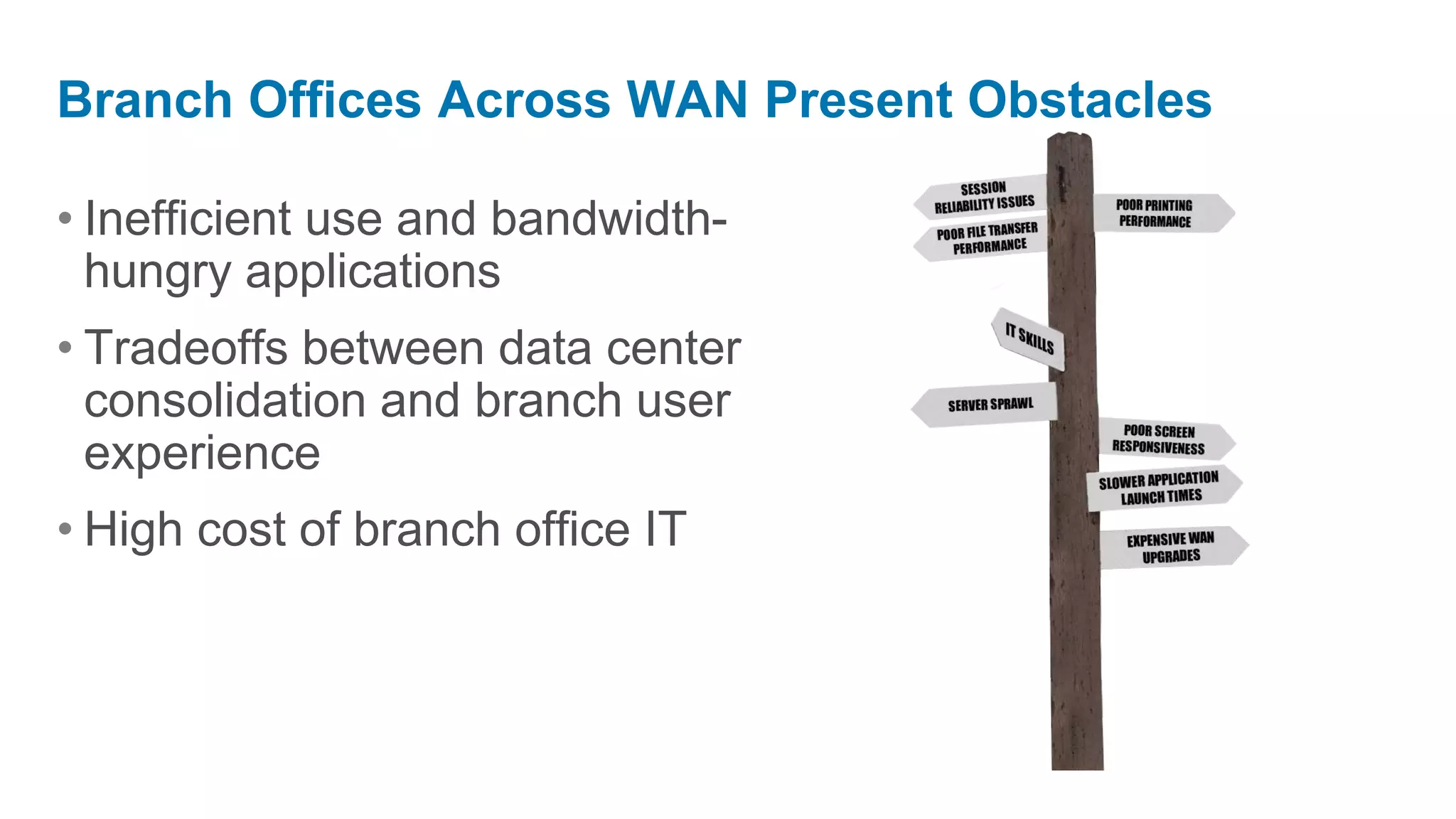
Branch Offices Across WAN Present Obstacles

• Inefficient use and bandwidth-
  hungry applications
• Tradeoffs between data center
  consolidation and branch user
  experience
• High cost of branch office IT
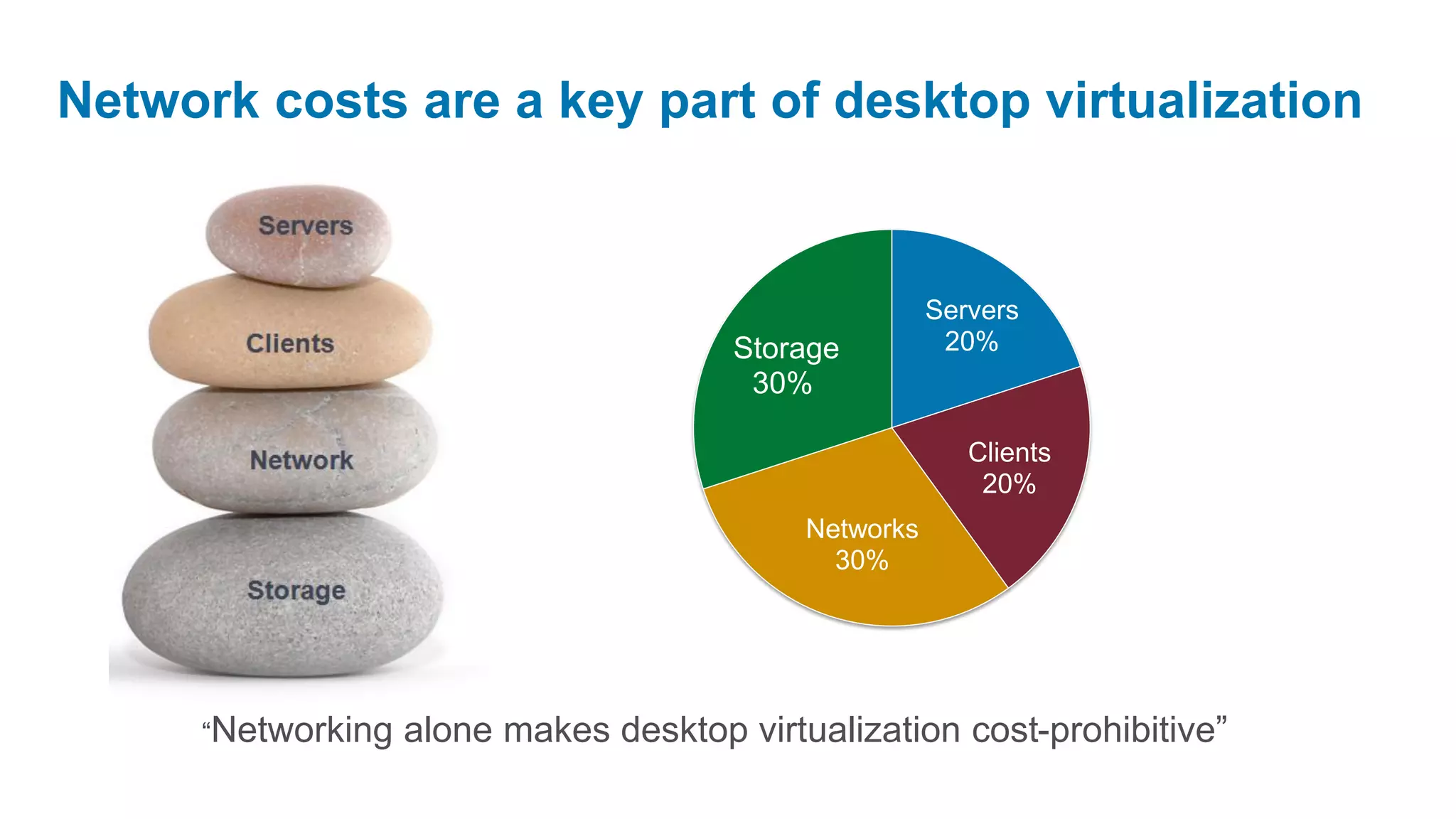
Network costs are a key part of desktop virtualization


                                                        Servers
                                        Storage          20%
                                         30%

                                                           Clients
                                                            20%
                                             Networks
                                               30%


      “Networking   alone makes desktop virtualization cost-prohibitive”
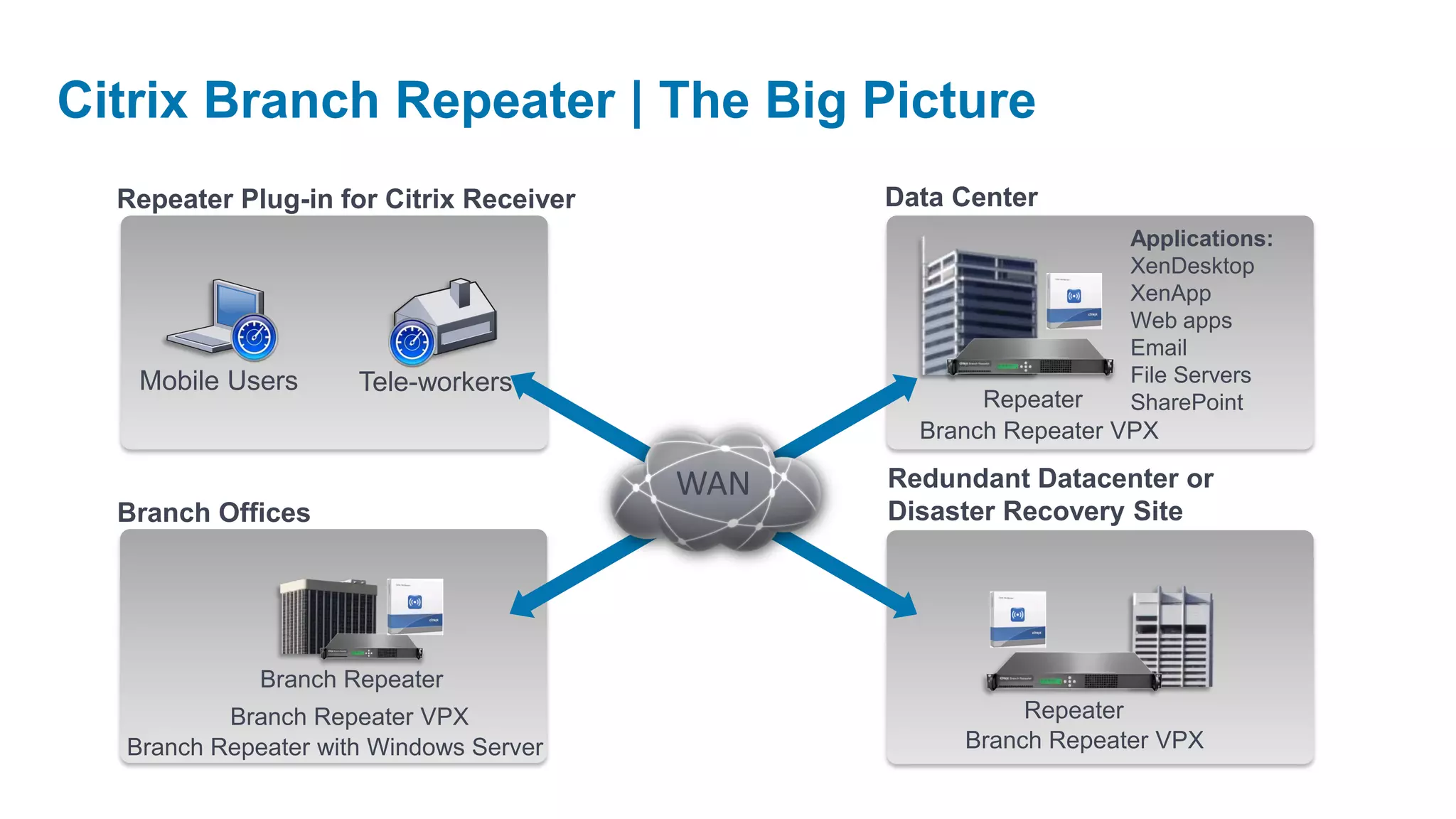
Citrix Branch Repeater | The Big Picture
  Repeater Plug-in for Citrix Receiver         Data Center
                                                                 Applications:
                                                                 XenDesktop
                                                                 XenApp
                                                                 Web apps
                                                                 Email
   Mobile Users      Tele-workers                                File Servers
                                                      Repeater   SharePoint
                                                 Branch Repeater VPX

                                         WAN   Redundant Datacenter or
  Branch Offices                               Disaster Recovery Site


             Branch Repeater
          Branch Repeater VPX                            Repeater
  Branch Repeater with Windows Server               Branch Repeater VPX
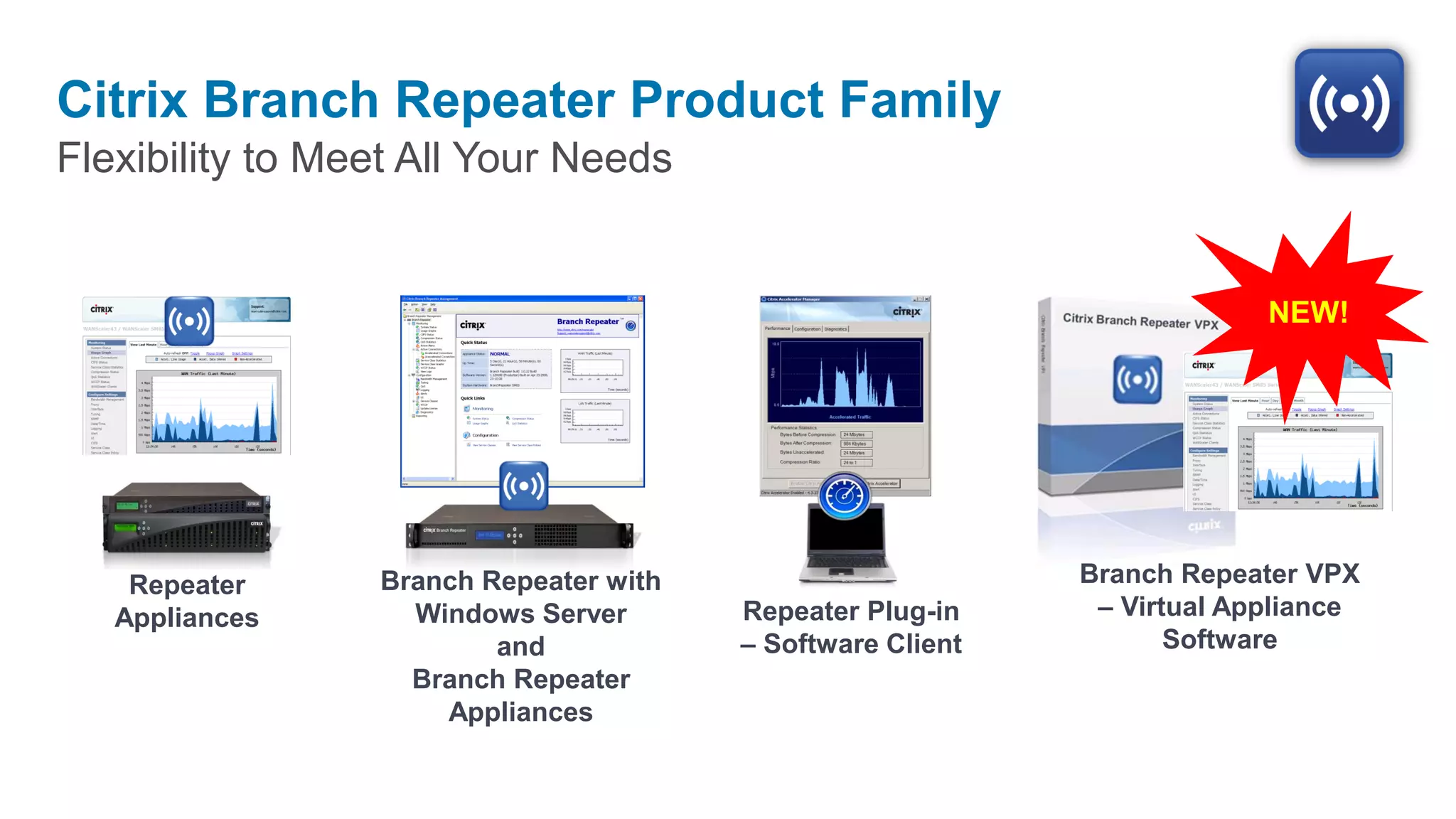
Citrix Branch Repeater Product Family
Flexibility to Meet All Your Needs


                                                                         NEW!


    Repeater     Branch Repeater with                       Branch Repeater VPX
   Appliances      Windows Server       Repeater Plug-in     – Virtual Appliance
                         and            – Software Client          Software
                   Branch Repeater
                     Appliances
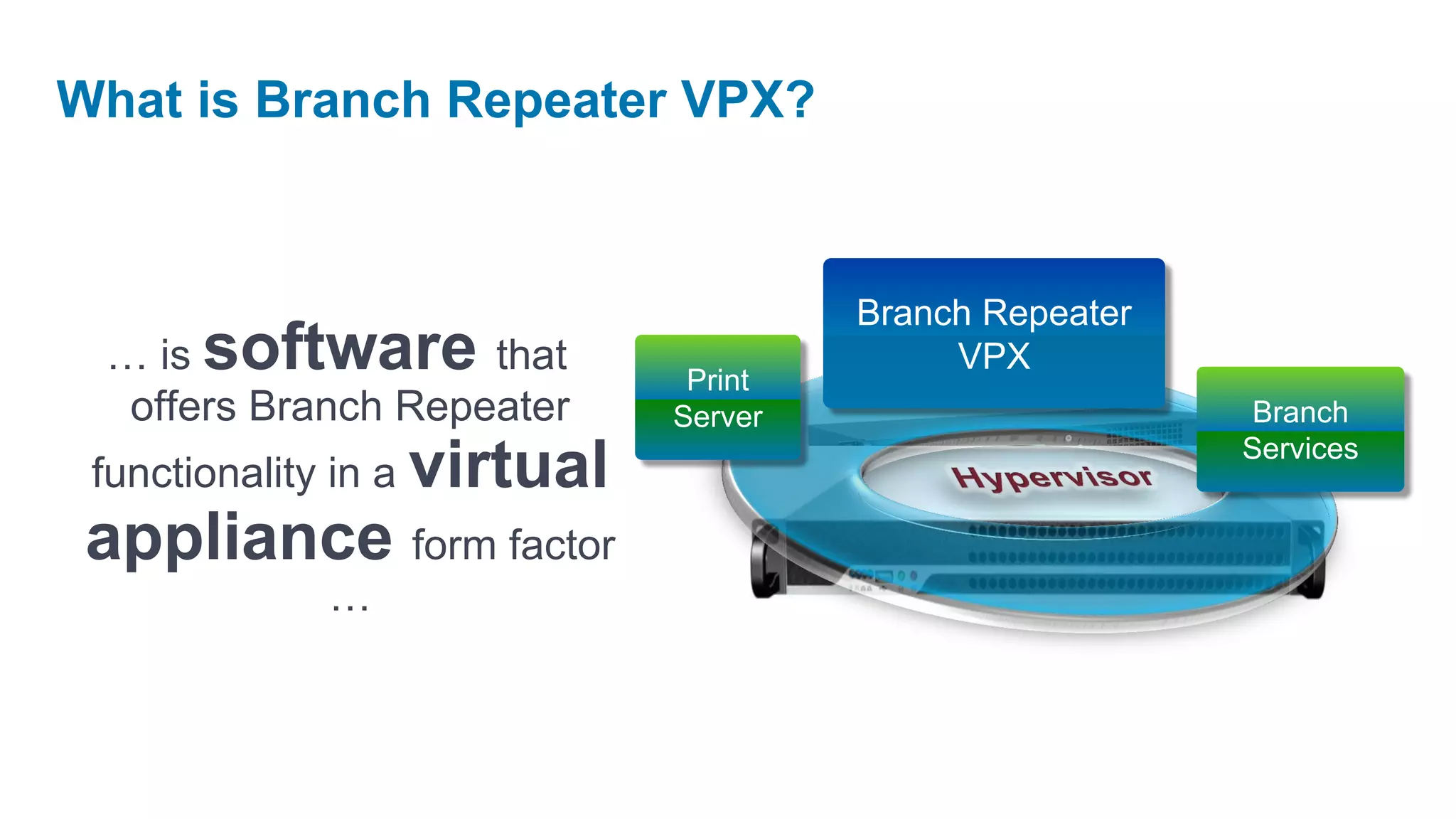
What is Branch Repeater VPX?


                                       Branch Repeater
 … is software that                         VPX
                               Print
  offers Branch Repeater      Server                      Branch
                                                         Services
 functionality in a virtual
 appliance form factor
            …
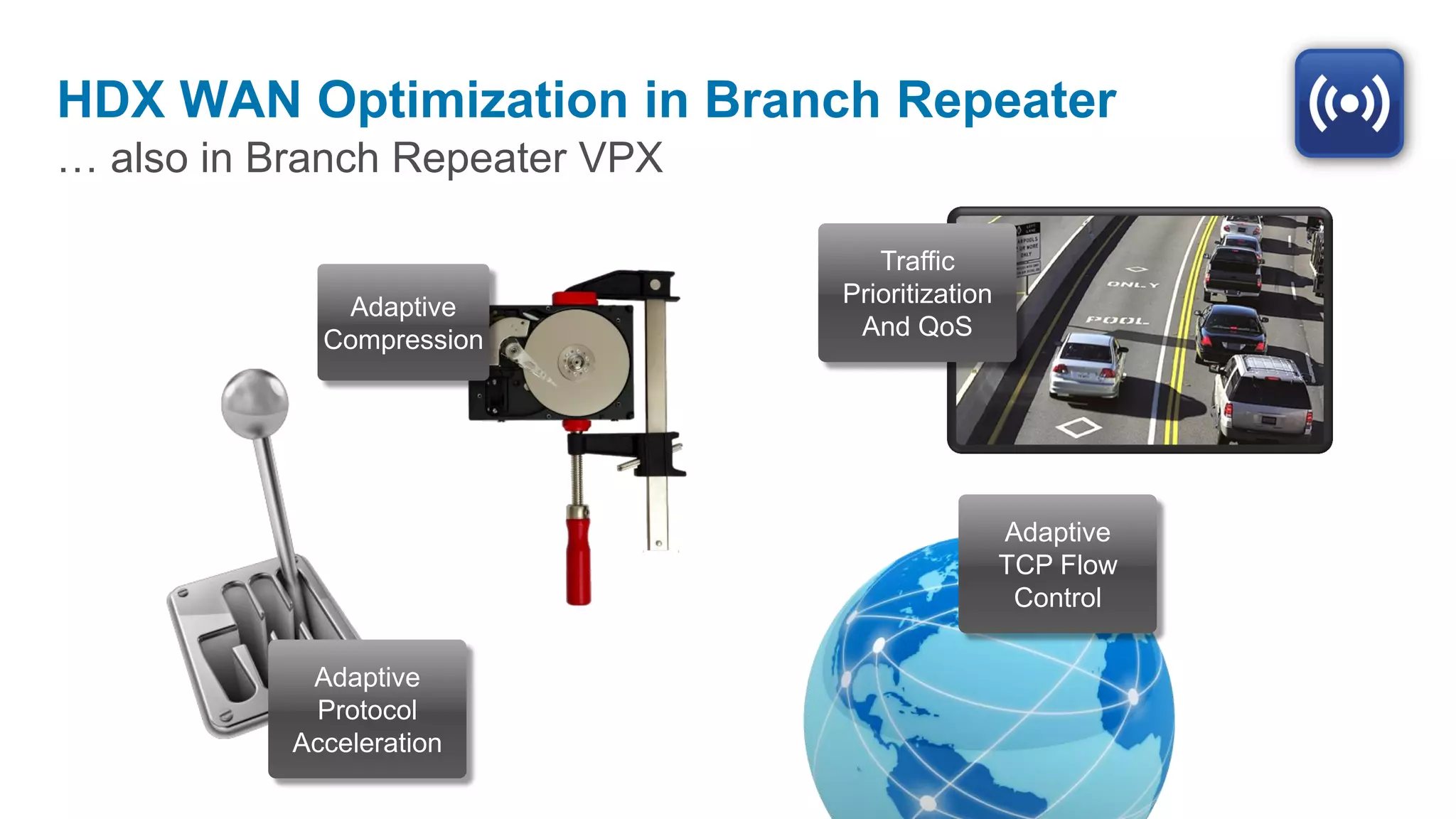
HDX WAN Optimization in Branch Repeater
… also in Branch Repeater VPX

                                   Traffic
              Adaptive          Prioritization
             Compression         And QoS


                                                 Adaptive
                                                 TCP Flow
                                                  Control

            Adaptive
            Protocol
           Acceleration
Deliver a high-definition user
   experience at the branch
      Accelerate print, video, launch
Reduce desktop delivery network
            costs
Cut bandwidth, energy, power & setup costs
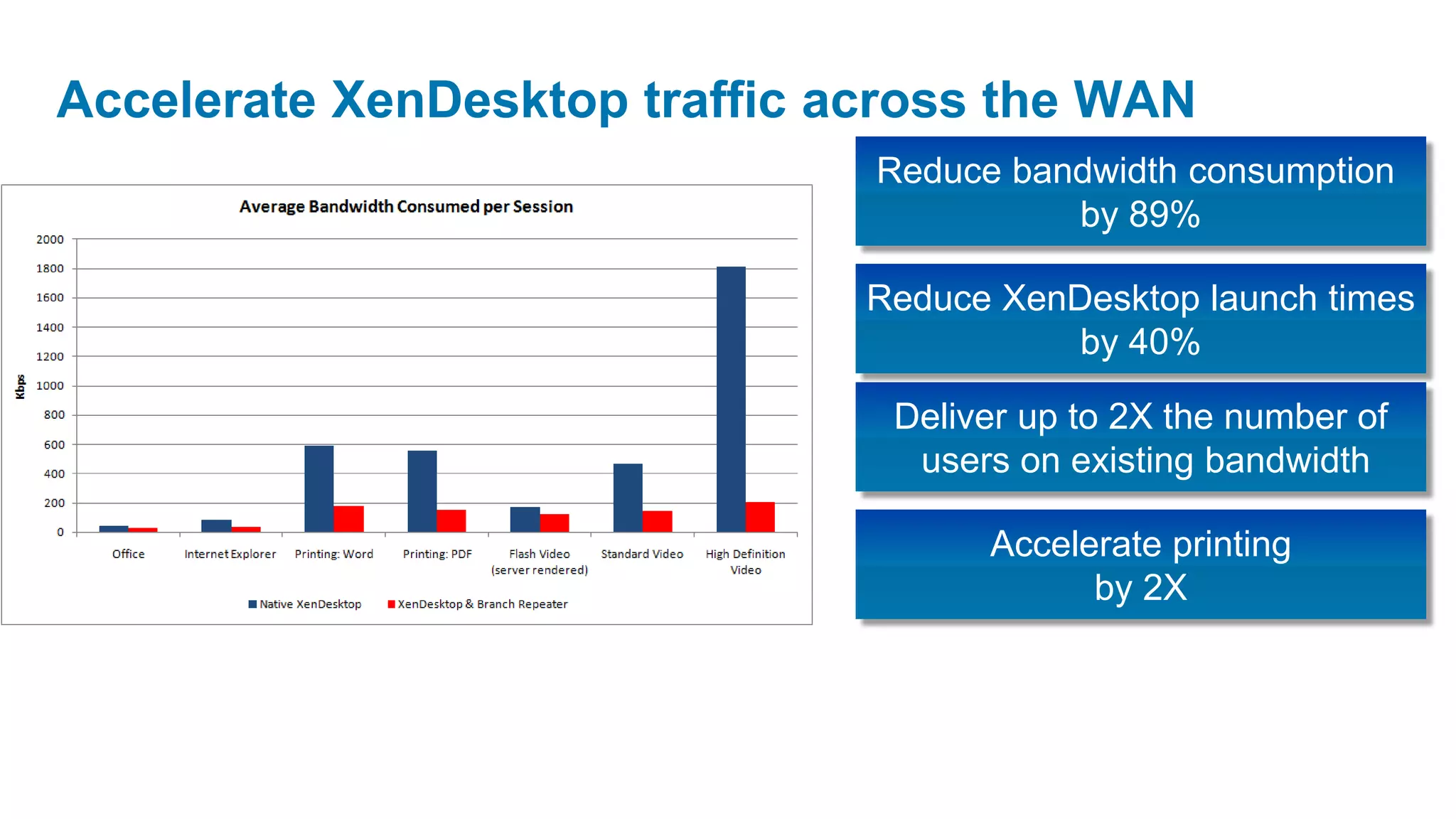
Accelerate XenDesktop traffic across the WAN
                               Reduce bandwidth consumption
                                         by 89%

                               Reduce XenDesktop launch times
                                          by 40%

                                Deliver up to 2X the number of
                                 users on existing bandwidth

                                     Accelerate printing
                                           by 2X
VPX requirements


Citrix Confidential - Do Not Distribute
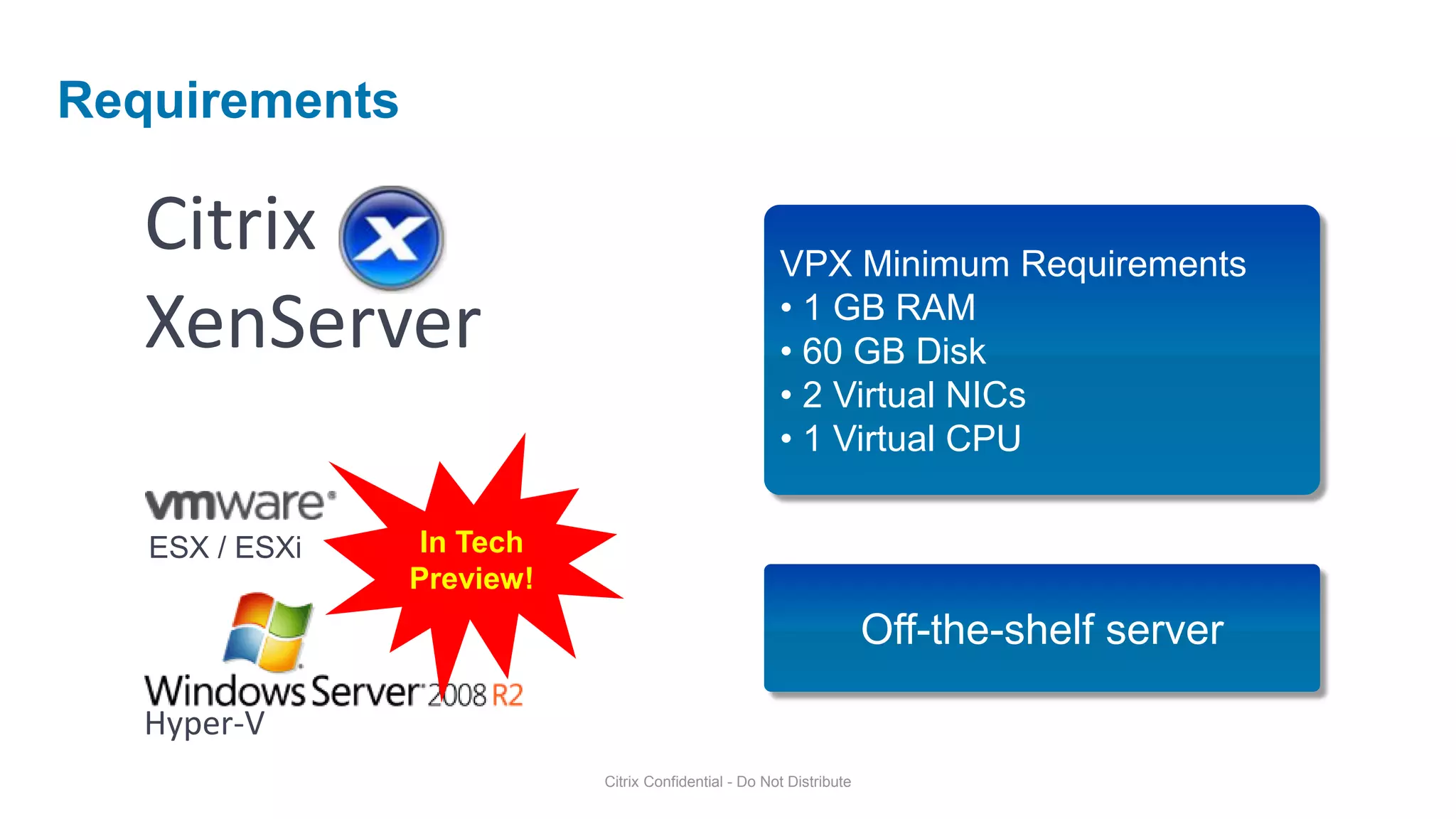
Requirements

   Citrix                                             VPX Minimum Requirements
   XenServer                                          • 1 GB RAM
                                                      • 60 GB Disk
                                                      • 2 Virtual NICs
                                                      • 1 Virtual CPU

   ESX / ESXi    In Tech
                Preview!
                                                                     Off-the-shelf server

   Hyper-V
                           Citrix Confidential - Do Not Distribute
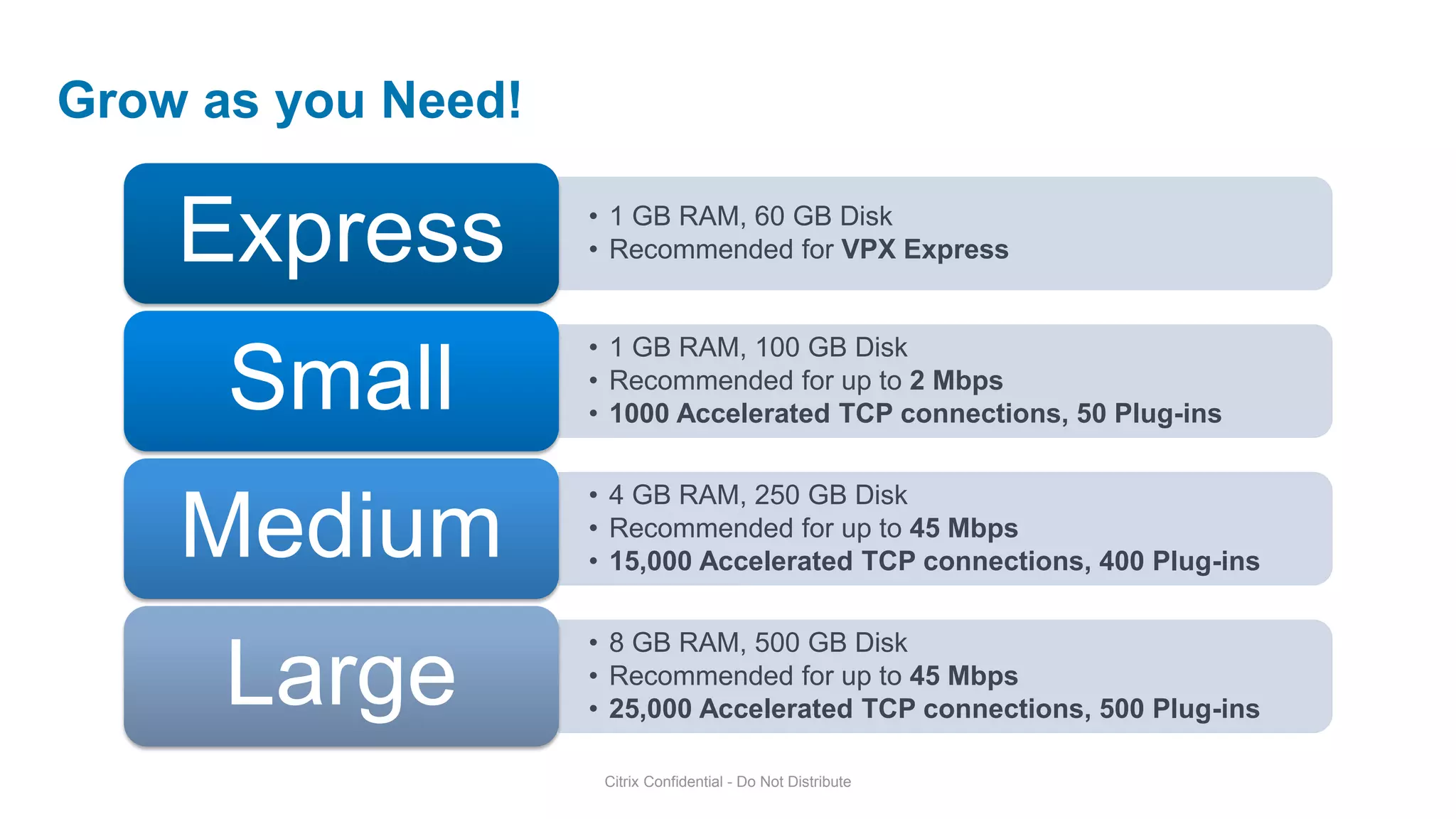
Grow as you Need!

    Express         • 1 GB RAM, 60 GB Disk
                    • Recommended for VPX Express


                    • 1 GB RAM, 100 GB Disk
      Small         • Recommended for up to 2 Mbps
                    • 1000 Accelerated TCP connections, 50 Plug-ins

                    • 4 GB RAM, 250 GB Disk
    Medium          • Recommended for up to 45 Mbps
                    • 15,000 Accelerated TCP connections, 400 Plug-ins

                    • 8 GB RAM, 500 GB Disk
      Large         • Recommended for up to 45 Mbps
                    • 25,000 Accelerated TCP connections, 500 Plug-ins

                     Citrix Confidential - Do Not Distribute
VPX Sizing and Scaling
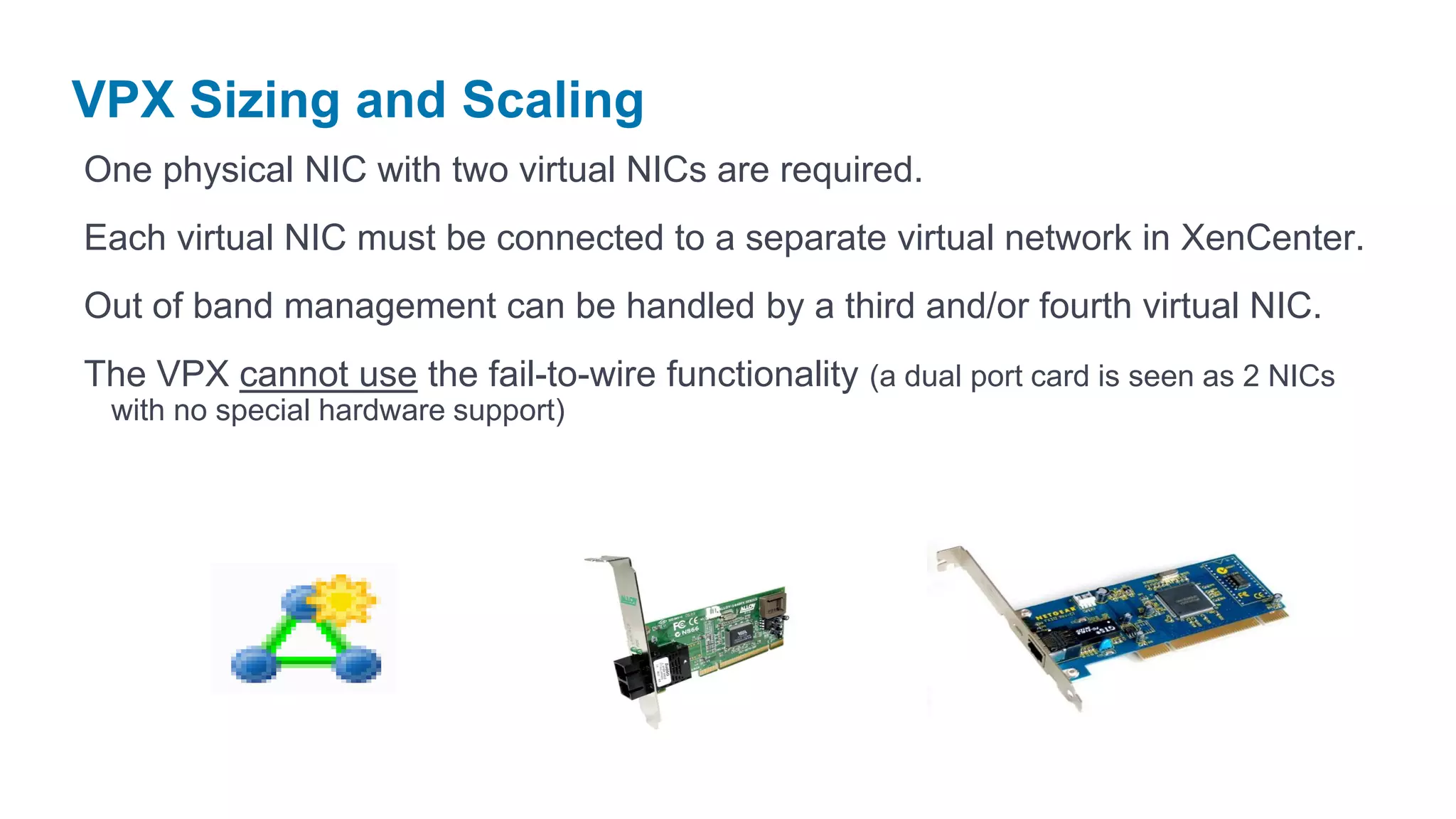
One physical NIC with two virtual NICs are required.
Each virtual NIC must be connected to a separate virtual network in XenCenter.
Out of band management can be handled by a third and/or fourth virtual NIC.
The VPX cannot use the fail-to-wire functionality (a dual port card is seen as 2 NICs
 with no special hardware support)
Branch Repeater
Deployment Simplicity
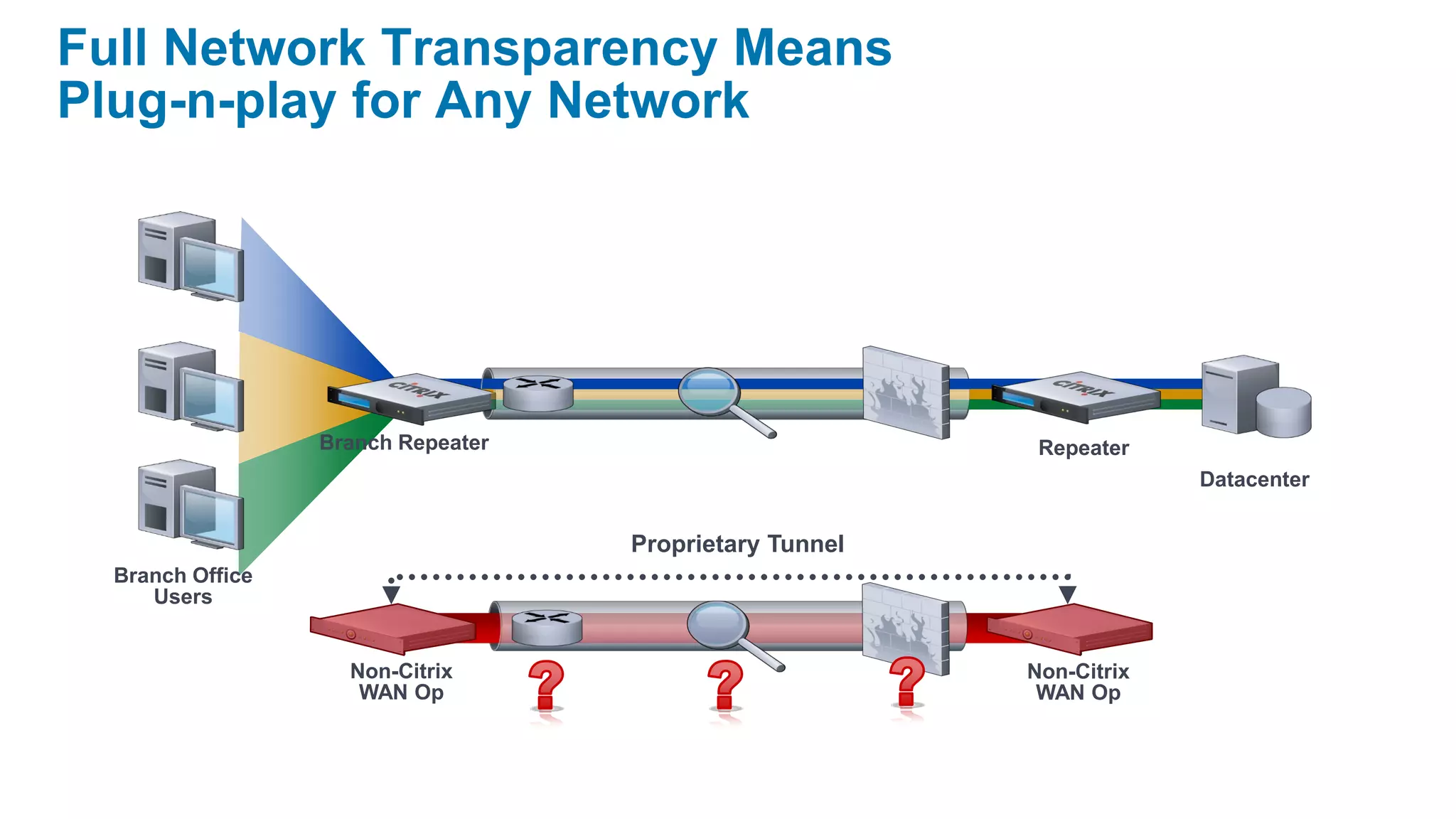
Full Network Transparency Means
Plug-n-play for Any Network


                  Branch Repeater                         Repeater
                                                                      Datacenter


                                    Proprietary Tunnel
  Branch Office
     Users


                    Non-Citrix                           Non-Citrix
                     WAN Op                               WAN Op
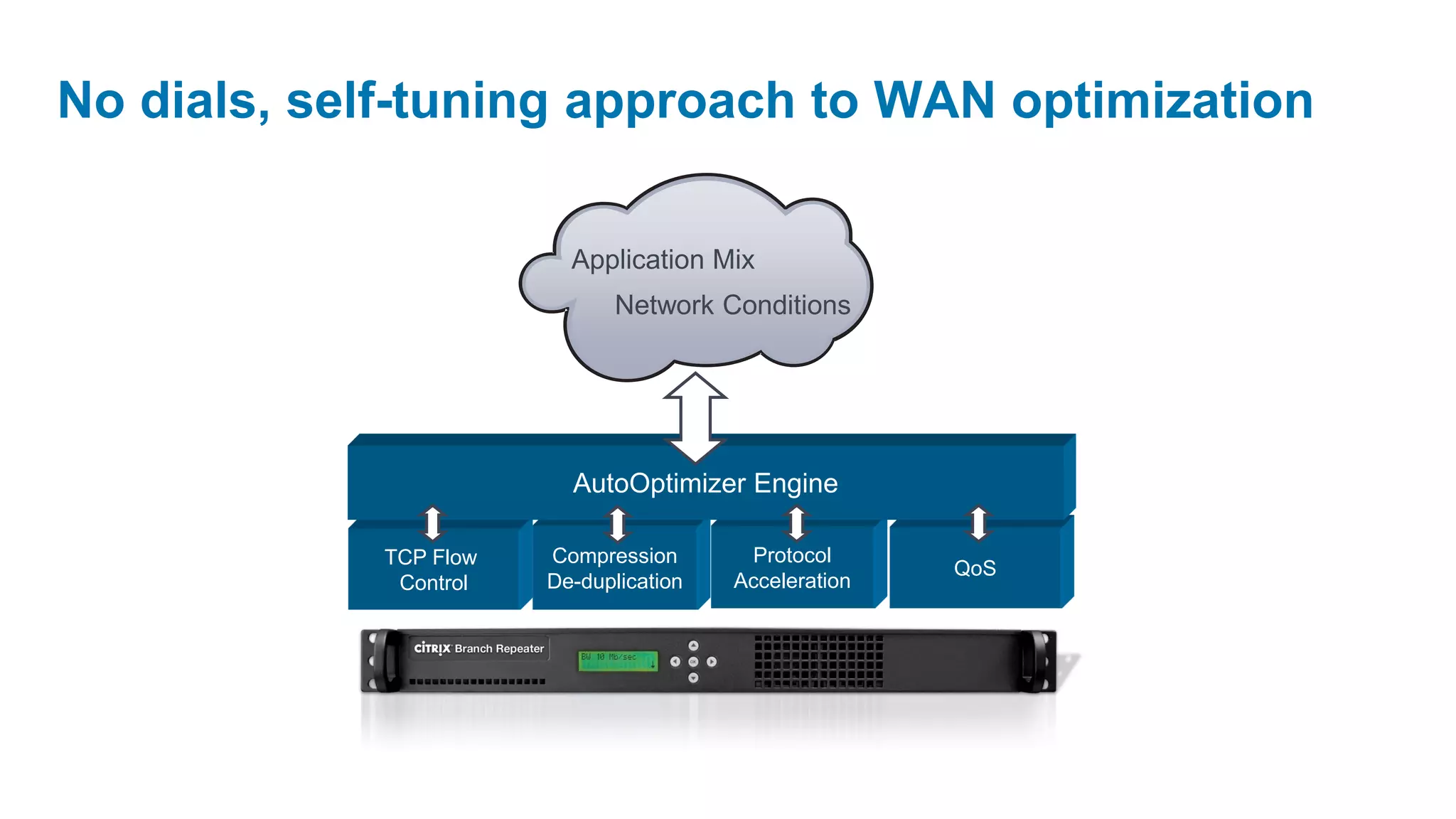
No dials, self-tuning approach to WAN optimization

                          Application Mix
                              Network Conditions


                          AutoOptimizer Engine

             TCP Flow   Compression       Protocol
                                                        QoS
              Control   De-duplication   Acceleration
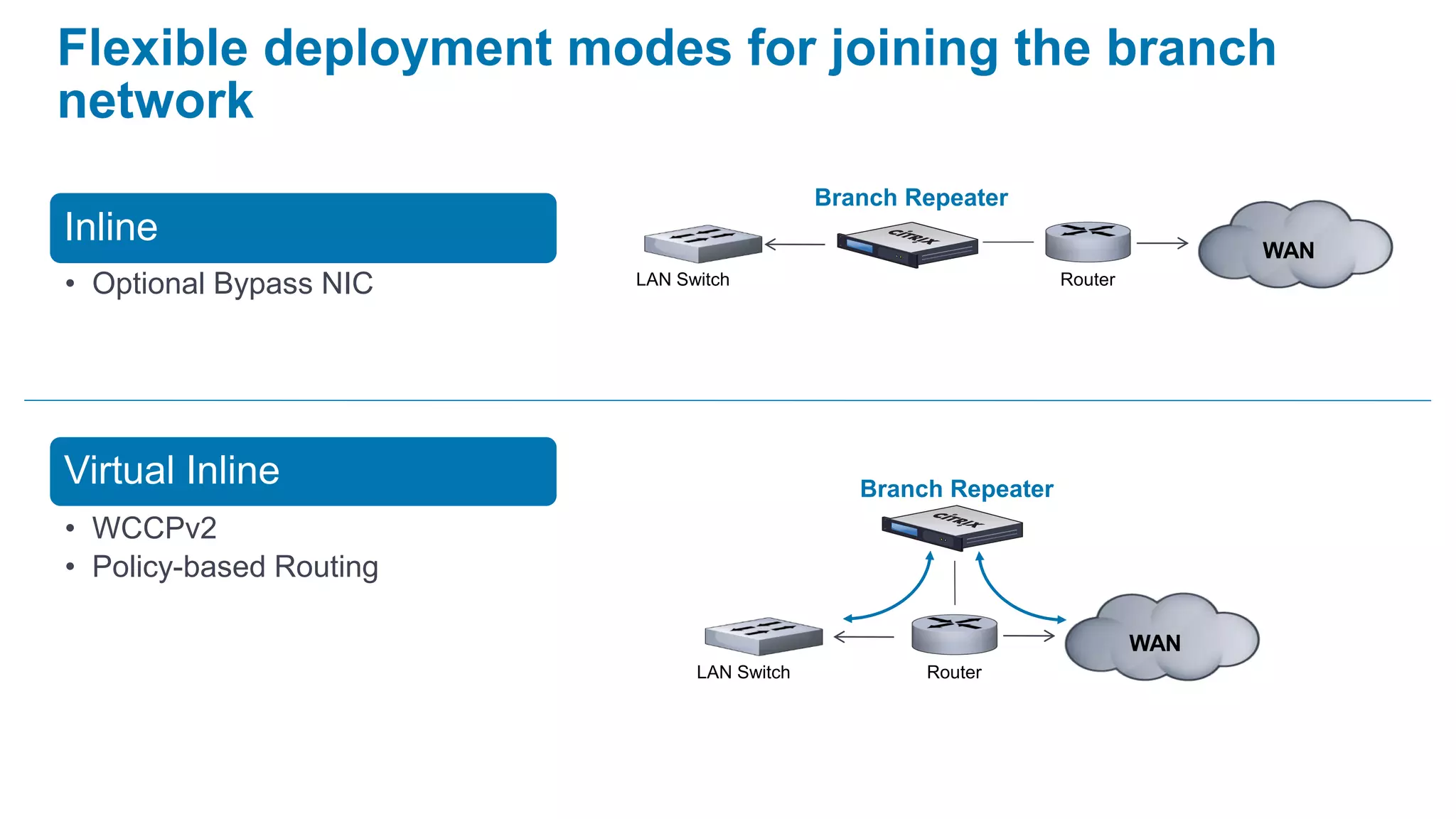
Flexible deployment modes for joining the branch
network
                                            Branch Repeater
Inline                                                                          WAN
• Optional Bypass NIC    LAN Switch                              Router


Virtual Inline                                 Branch Repeater
• WCCPv2
• Policy-based Routing

                                                                          WAN
                               LAN Switch           Router
Modes – Physical Deployments

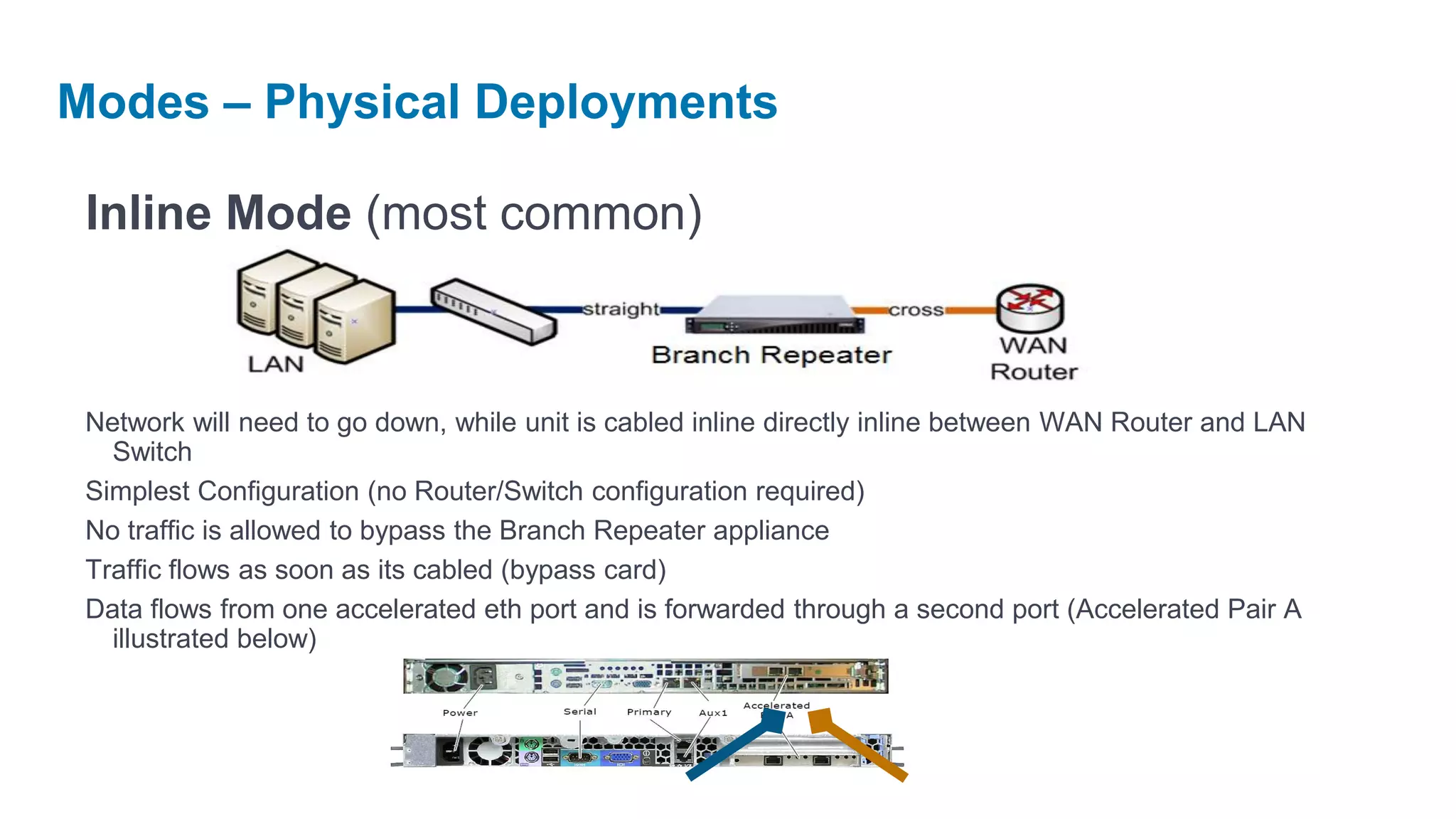
 Inline Mode (most common)


 Network will need to go down, while unit is cabled inline directly inline between WAN Router and LAN
   Switch
 Simplest Configuration (no Router/Switch configuration required)
 No traffic is allowed to bypass the Branch Repeater appliance
 Traffic flows as soon as its cabled (bypass card)
 Data flows from one accelerated eth port and is forwarded through a second port (Accelerated Pair A
   illustrated below)
Modes – Physical Deployments

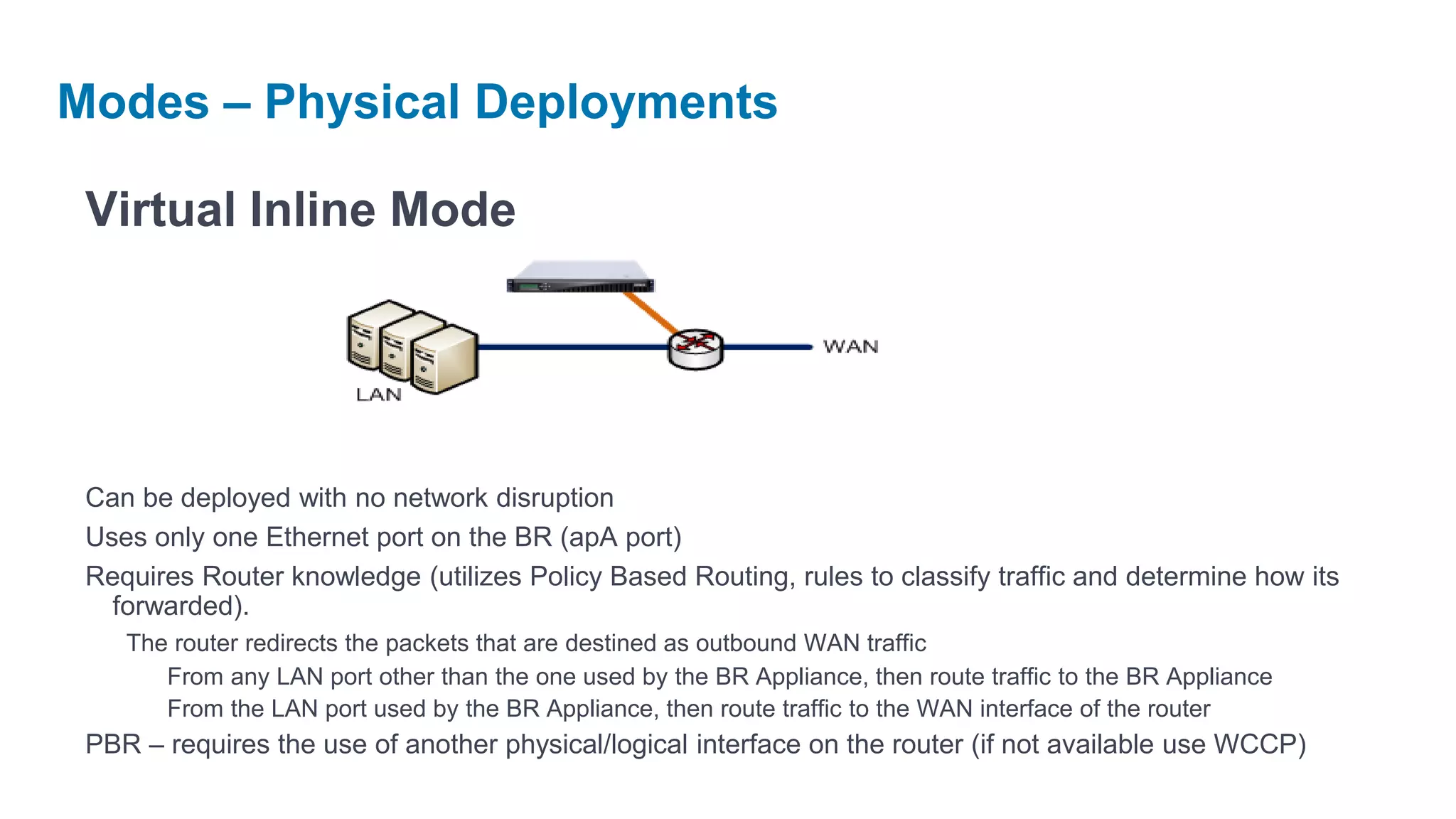
 Virtual Inline Mode


 Can be deployed with no network disruption
 Uses only one Ethernet port on the BR (apA port)
 Requires Router knowledge (utilizes Policy Based Routing, rules to classify traffic and determine how its
   forwarded).
    The router redirects the packets that are destined as outbound WAN traffic
       From any LAN port other than the one used by the BR Appliance, then route traffic to the BR Appliance
       From the LAN port used by the BR Appliance, then route traffic to the WAN interface of the router
 PBR – requires the use of another physical/logical interface on the router (if not available use WCCP)
Modes – Physical Deployments

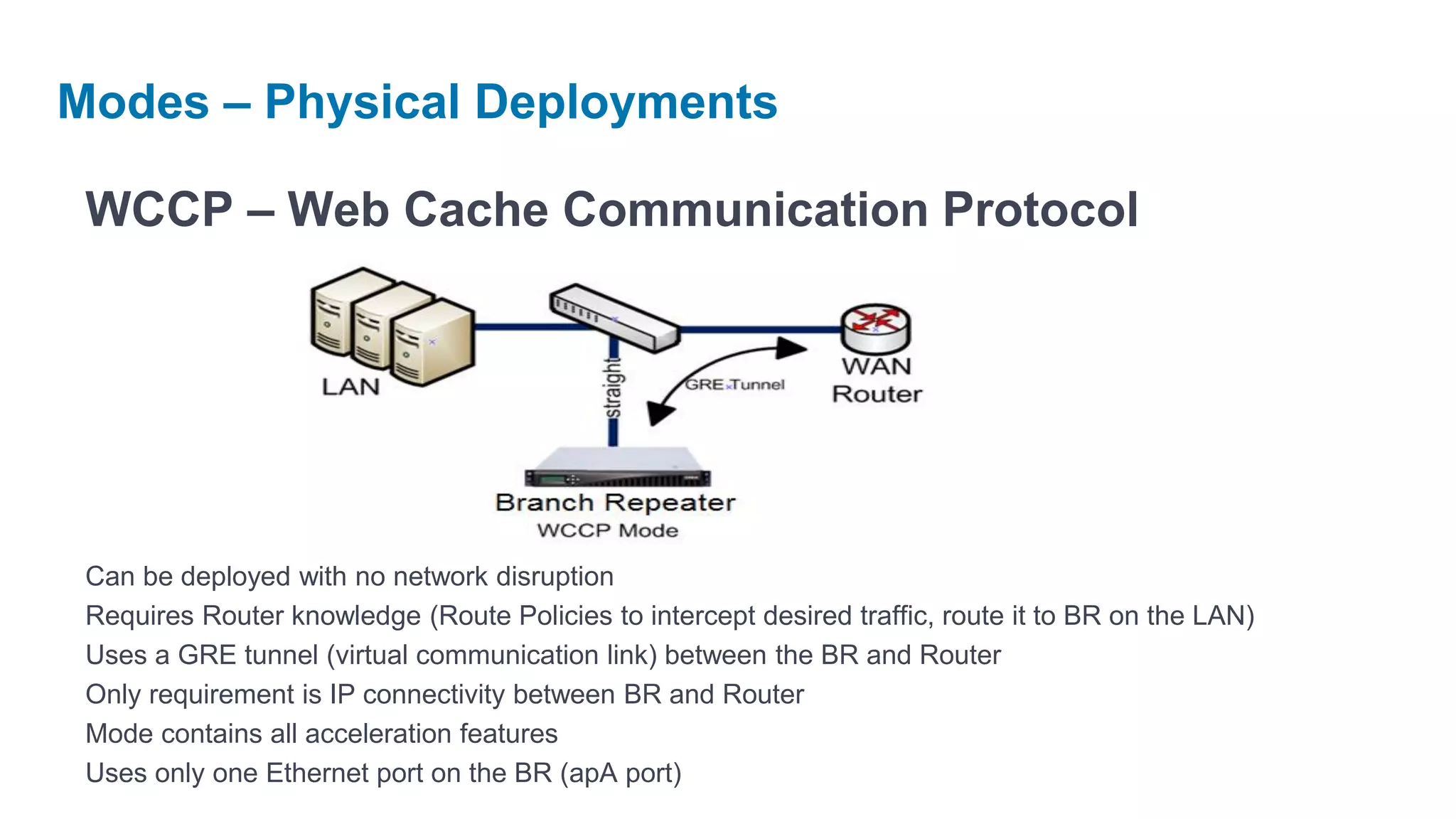
 WCCP – Web Cache Communication Protocol


 Can be deployed with no network disruption
 Requires Router knowledge (Route Policies to intercept desired traffic, route it to BR on the LAN)
 Uses a GRE tunnel (virtual communication link) between the BR and Router
 Only requirement is IP connectivity between BR and Router
 Mode contains all acceleration features
 Uses only one Ethernet port on the BR (apA port)
Modes – Physical Deployments

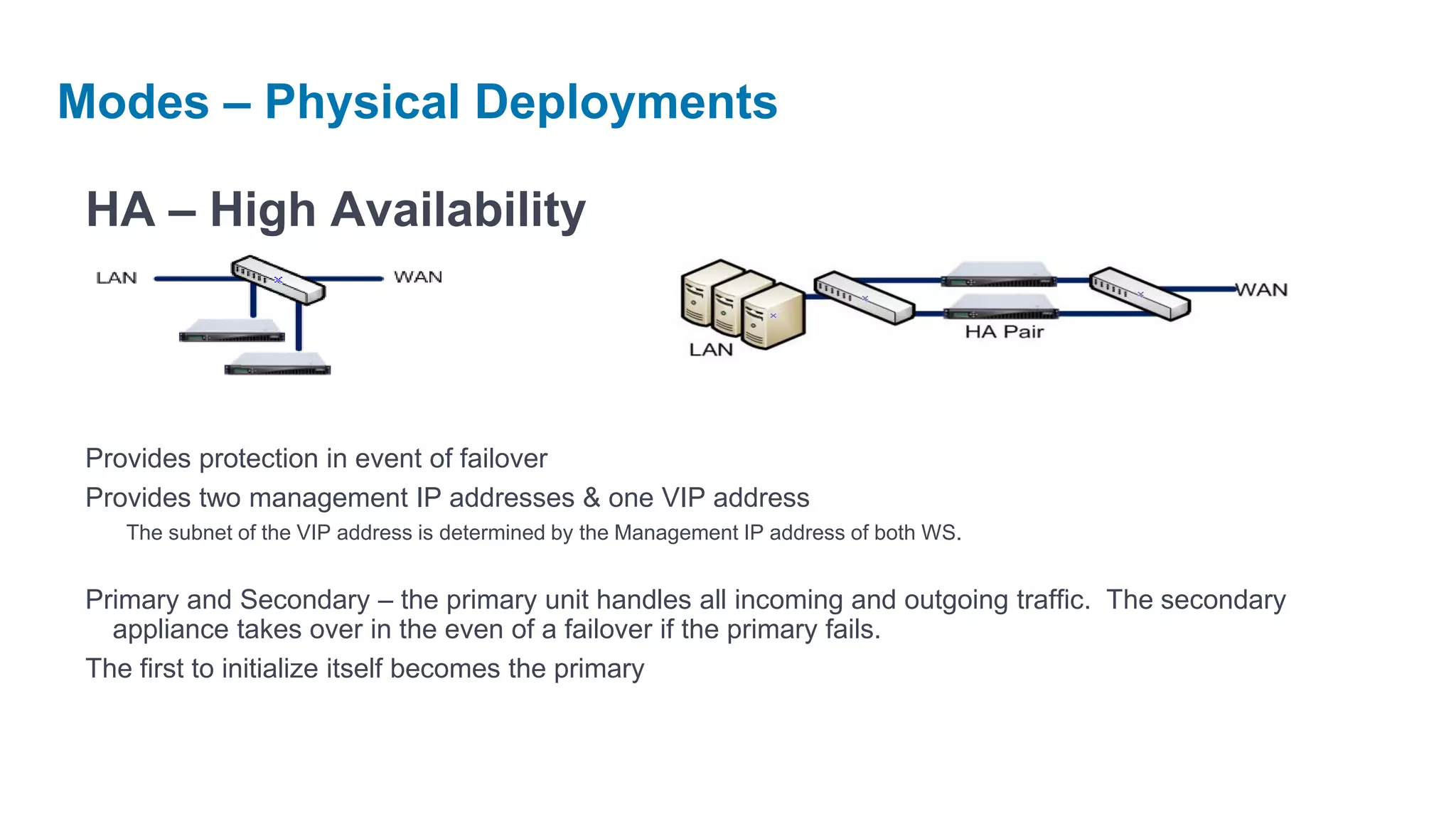
 HA – High Availability


 Provides protection in event of failover
 Provides two management IP addresses & one VIP address
    The subnet of the VIP address is determined by the Management IP address of both WS.


 Primary and Secondary – the primary unit handles all incoming and outgoing traffic. The secondary
   appliance takes over in the even of a failover if the primary fails.
 The first to initialize itself becomes the primary
Modes – Physical Deployments

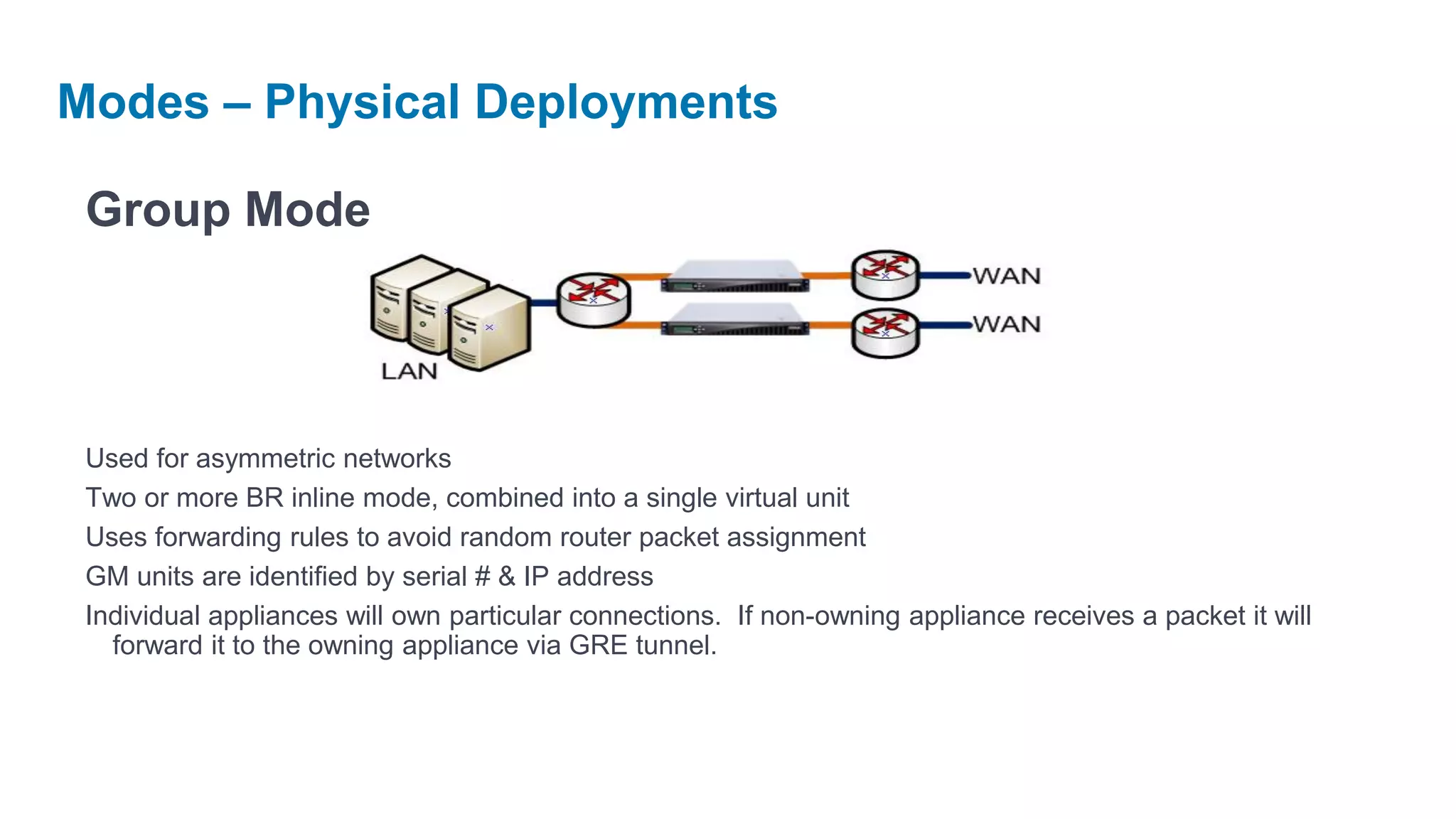
 Group Mode


 Used for asymmetric networks
 Two or more BR inline mode, combined into a single virtual unit
 Uses forwarding rules to avoid random router packet assignment
 GM units are identified by serial # & IP address
 Individual appliances will own particular connections. If non-owning appliance receives a packet it will
   forward it to the owning appliance via GRE tunnel.
Features
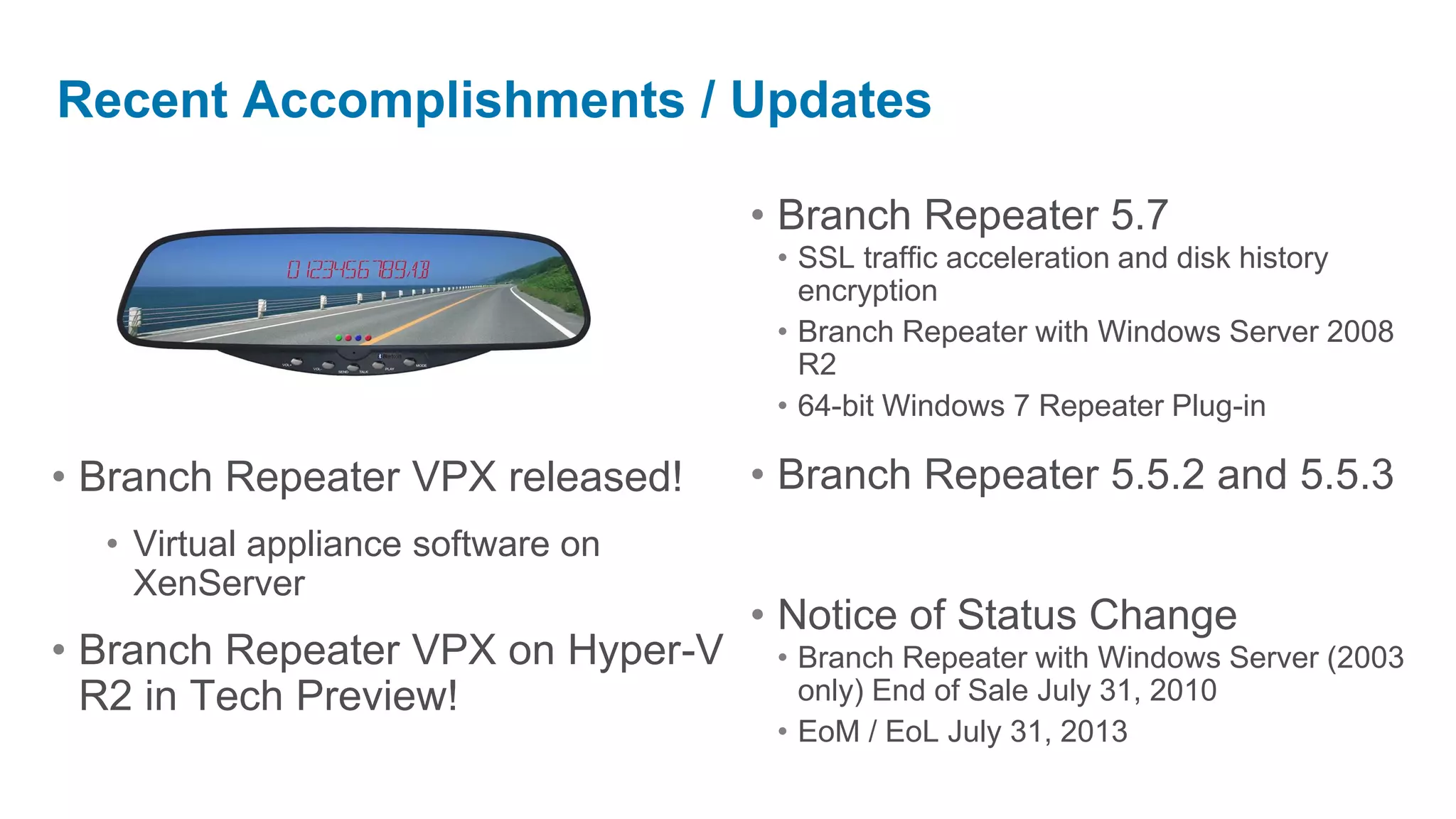
Recent Accomplishments / Updates

                                    • Branch Repeater 5.7
                                     • SSL traffic acceleration and disk history
                                       encryption
                                     • Branch Repeater with Windows Server 2008
                                       R2
                                     • 64-bit Windows 7 Repeater Plug-in

• Branch Repeater VPX released!     • Branch Repeater 5.5.2 and 5.5.3
  • Virtual appliance software on
    XenServer
                                    • Notice of Status Change
• Branch Repeater VPX on Hyper-V     • Branch Repeater with Windows Server (2003
  R2 in Tech Preview!                  only) End of Sale July 31, 2010
                                     • EoM / EoL July 31, 2013
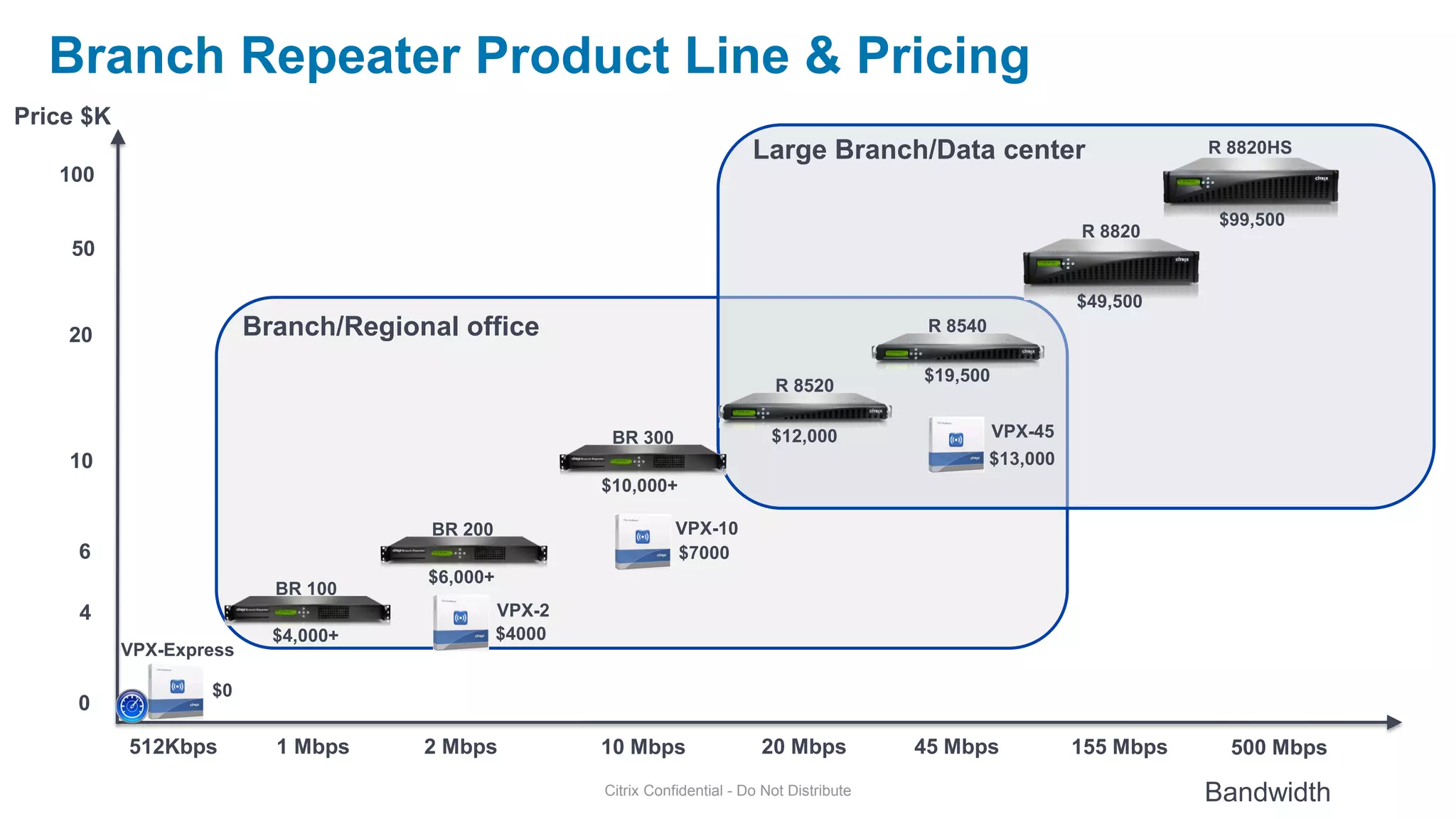
Branch Repeater Product Line & Pricing
Price $K
                                                                               Large Branch/Data center                          R 8820HS
   100

                                                                                                                                  $99,500
                                                                                                                      R 8820
    50

                                                                                                                      $49,500
    20                   Branch/Regional office                                                    R 8540

                                                                                                  $19,500
                                                                                  R 8520

                                                         BR 300                   $12,000                   VPX-45
    10                                                                                                      $13,000
                                                        $10,000+

                                       BR 200                      VPX-10
     6                                                             $7000
                                      $6,000+
                           BR 100
     4                                          VPX-2
                           $4,000+              $4000
           VPX-Express

                   $0
     0

           512Kbps         1 Mbps     2 Mbps            10 Mbps                 20 Mbps           45 Mbps             155 Mbps     500 Mbps
                                                        Citrix Confidential - Do Not Distribute                                  Bandwidth
SSL acceleration
Overview
What is the SSL Compression and Acceleration?
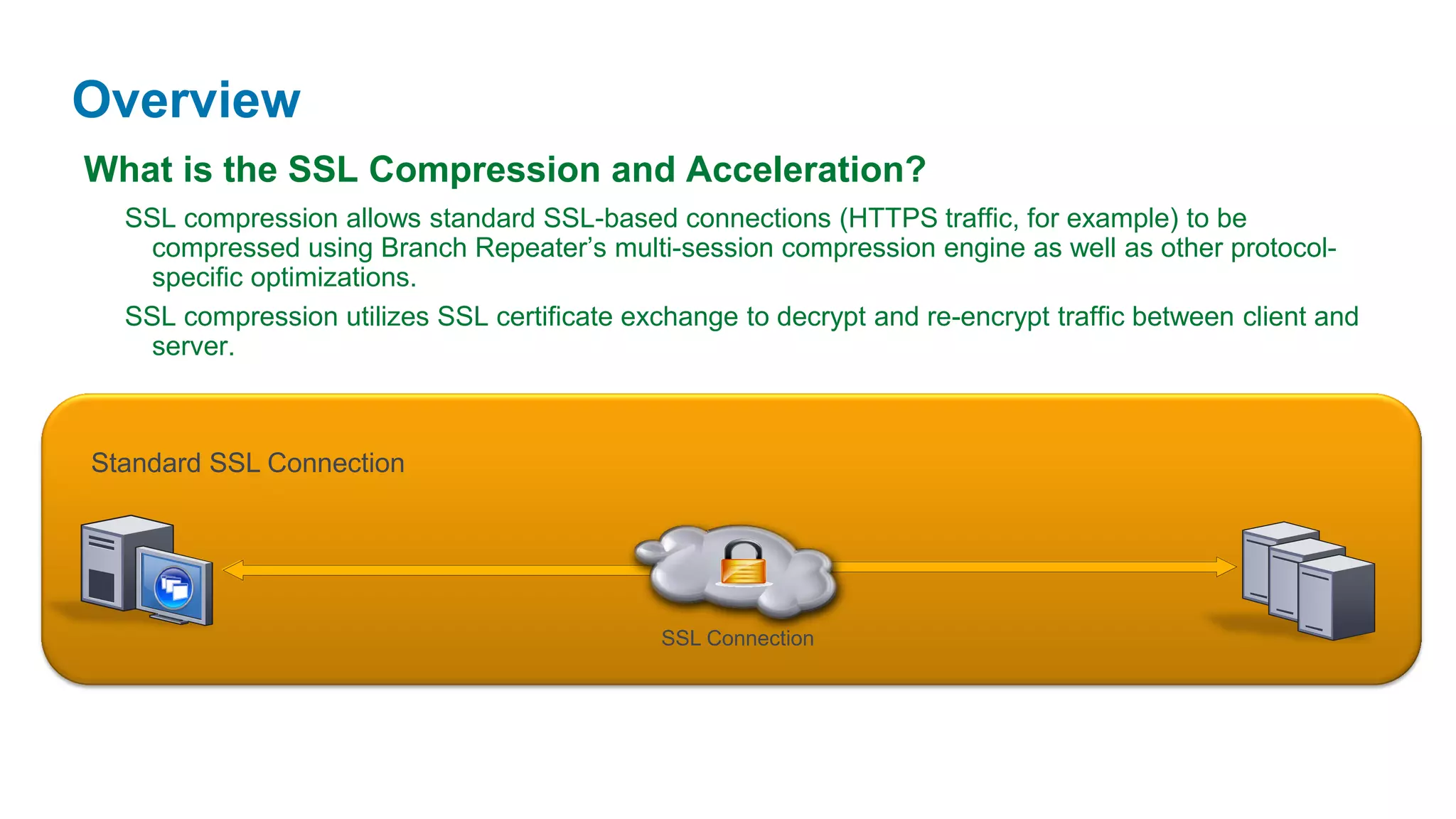
  SSL compression allows standard SSL-based connections (HTTPS traffic, for example) to be
   compressed using Branch Repeater’s multi-session compression engine as well as other protocol-
   specific optimizations.
  SSL compression utilizes SSL certificate exchange to decrypt and re-encrypt traffic between client and
   server.


Standard SSL Connection


                                              SSL Connection
What is SSL Compression
What is the SSL Compression and Acceleration?
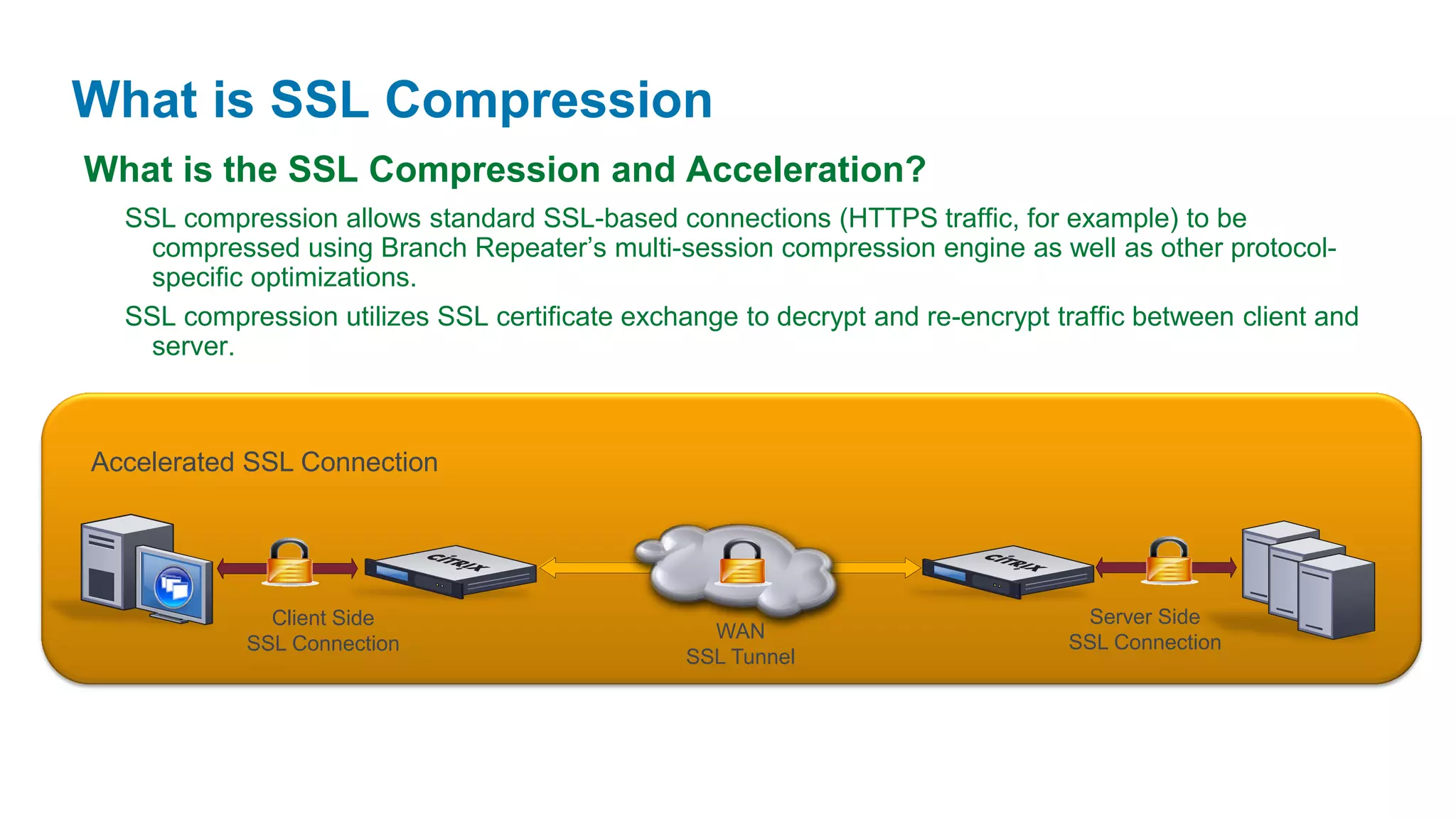
  SSL compression allows standard SSL-based connections (HTTPS traffic, for example) to be
   compressed using Branch Repeater’s multi-session compression engine as well as other protocol-
   specific optimizations.
  SSL compression utilizes SSL certificate exchange to decrypt and re-encrypt traffic between client and
   server.


Accelerated SSL Connection


              Client Side                                                       Server Side
                                                  WAN
            SSL Connection                                                     SSL Connection
                                                SSL Tunnel
What is SSL Compression

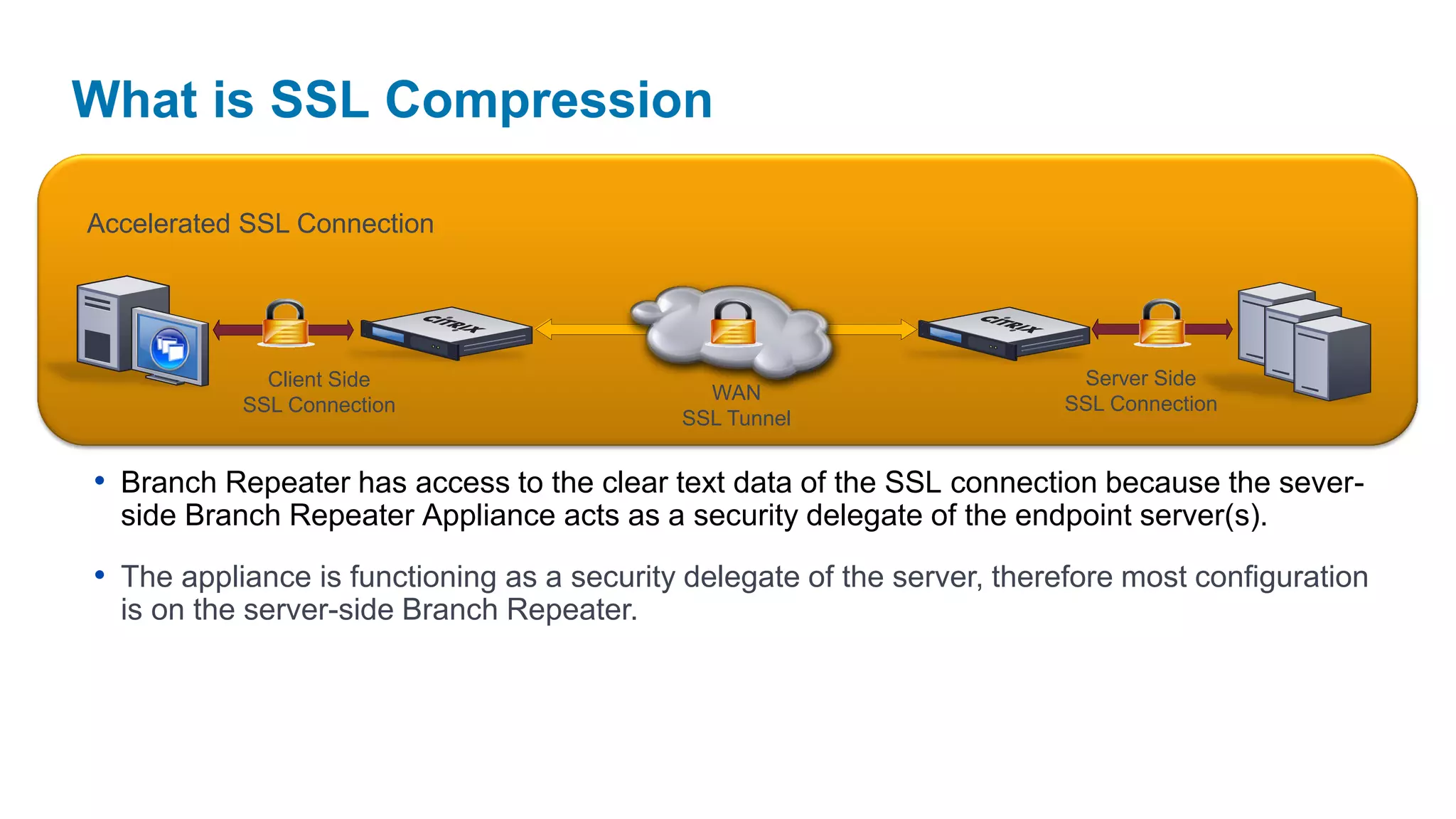
Accelerated SSL Connection


             Client Side                                                  Server Side
                                              WAN
           SSL Connection                                                SSL Connection
                                            SSL Tunnel


• Branch Repeater has access to the clear text data of the SSL connection because the sever-
  side Branch Repeater Appliance acts as a security delegate of the endpoint server(s).

• The appliance is functioning as a security delegate of the server, therefore most configuration
  is on the server-side Branch Repeater.
What is SSL Compression
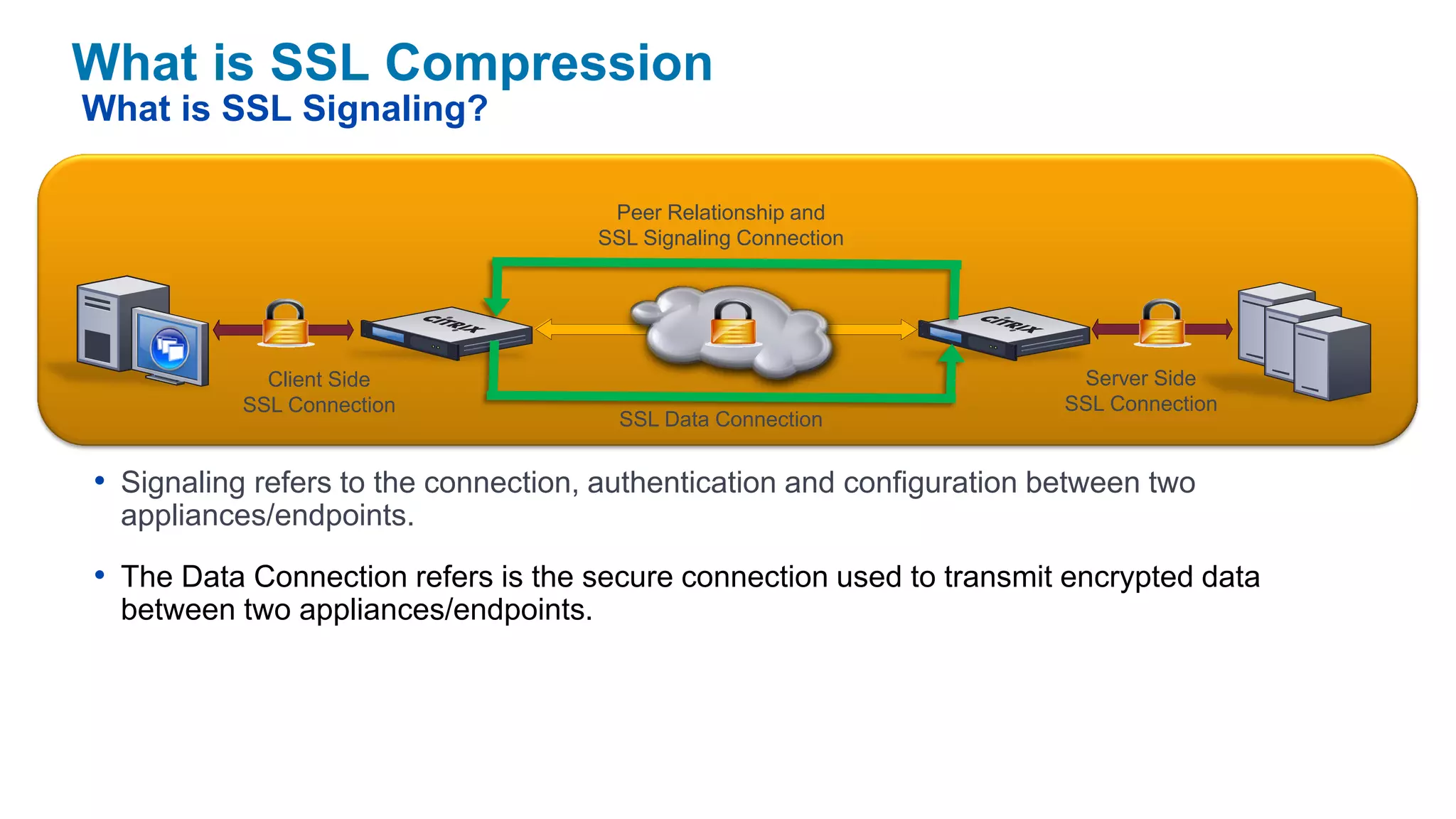
What is SSL Signaling?

                                       Peer Relationship and
                                      SSL Signaling Connection


             Client Side                                                 Server Side
           SSL Connection                                               SSL Connection
                                        SSL Data Connection


• Signaling refers to the connection, authentication and configuration between two
  appliances/endpoints.

• The Data Connection refers is the secure connection used to transmit encrypted data
  between two appliances/endpoints.
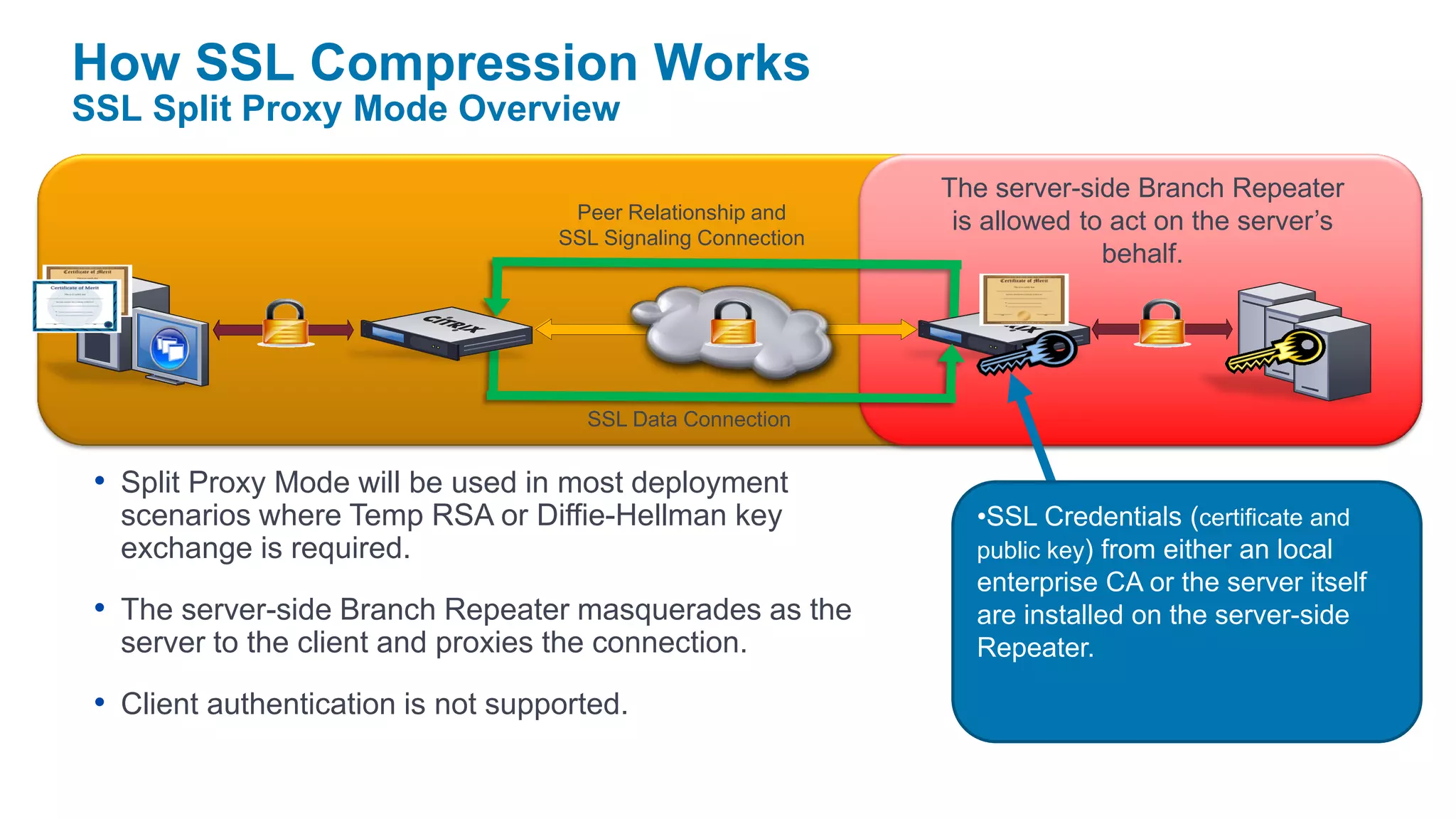
How SSL Compression Works
SSL Split Proxy Mode Overview

                                                               The server-side Branch Repeater
                                     Peer Relationship and      is allowed to act on the server’s
                                    SSL Signaling Connection
                                                                             behalf.


                                      SSL Data Connection


 • Split Proxy Mode will be used in most deployment
   scenarios where Temp RSA or Diffie-Hellman key                 •SSL Credentials (certificate and
   exchange is required.                                          public key) from either an local
                                                                  enterprise CA or the server itself
 • The server-side Branch Repeater masquerades as the             are installed on the server-side
   server to the client and proxies the connection.               Repeater.

 • Client authentication is not supported.
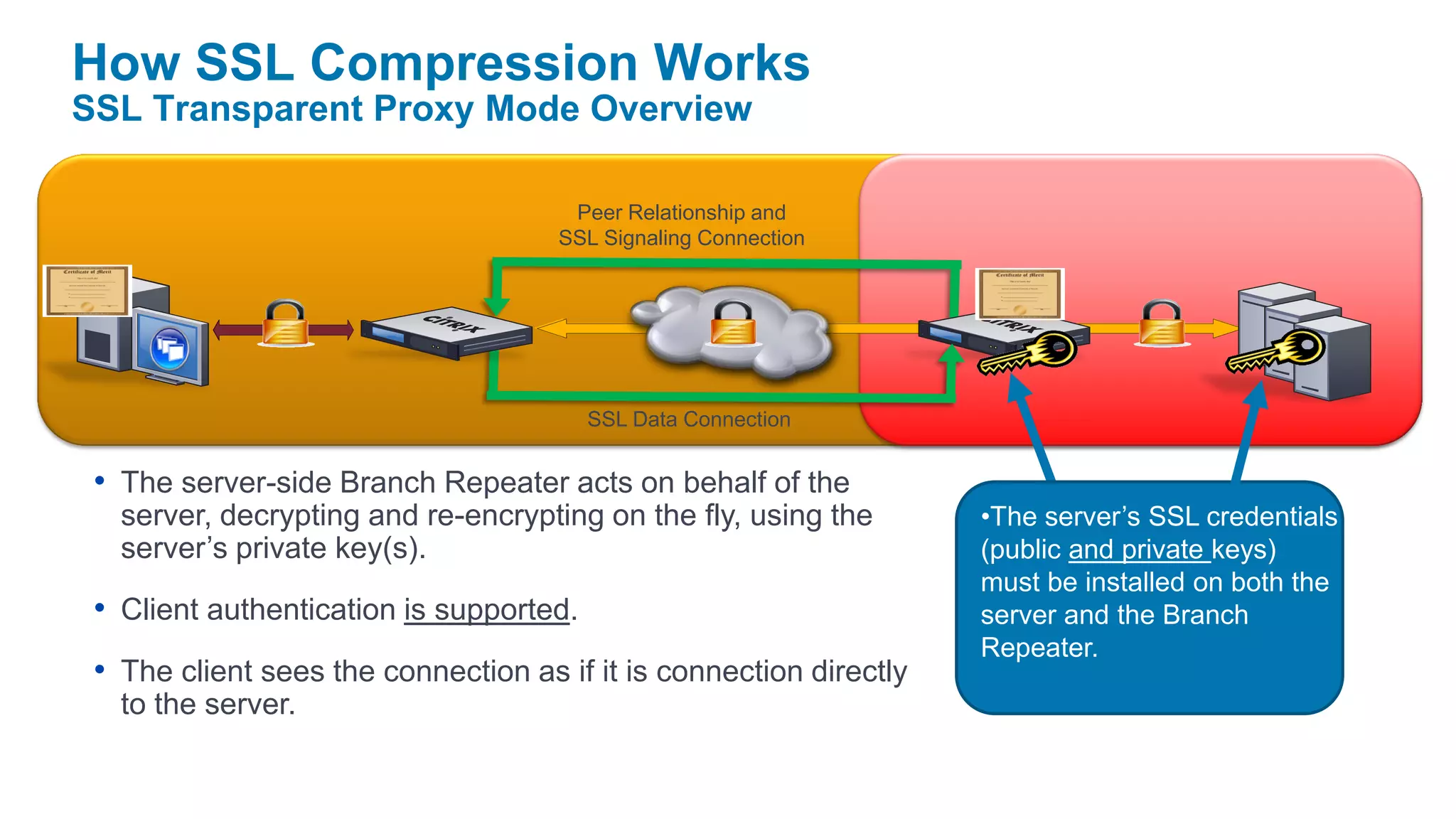
How SSL Compression Works
SSL Transparent Proxy Mode Overview

                                      Peer Relationship and
                                     SSL Signaling Connection


                                         SSL Data Connection


 • The server-side Branch Repeater acts on behalf of the
   server, decrypting and re-encrypting on the fly, using the       •The server’s SSL credentials
   server’s private key(s).                                         (public and private keys)
                                                                    must be installed on both the
 • Client authentication is supported.                              server and the Branch
                                                                    Repeater.
 • The client sees the connection as if it is connection directly
   to the server.
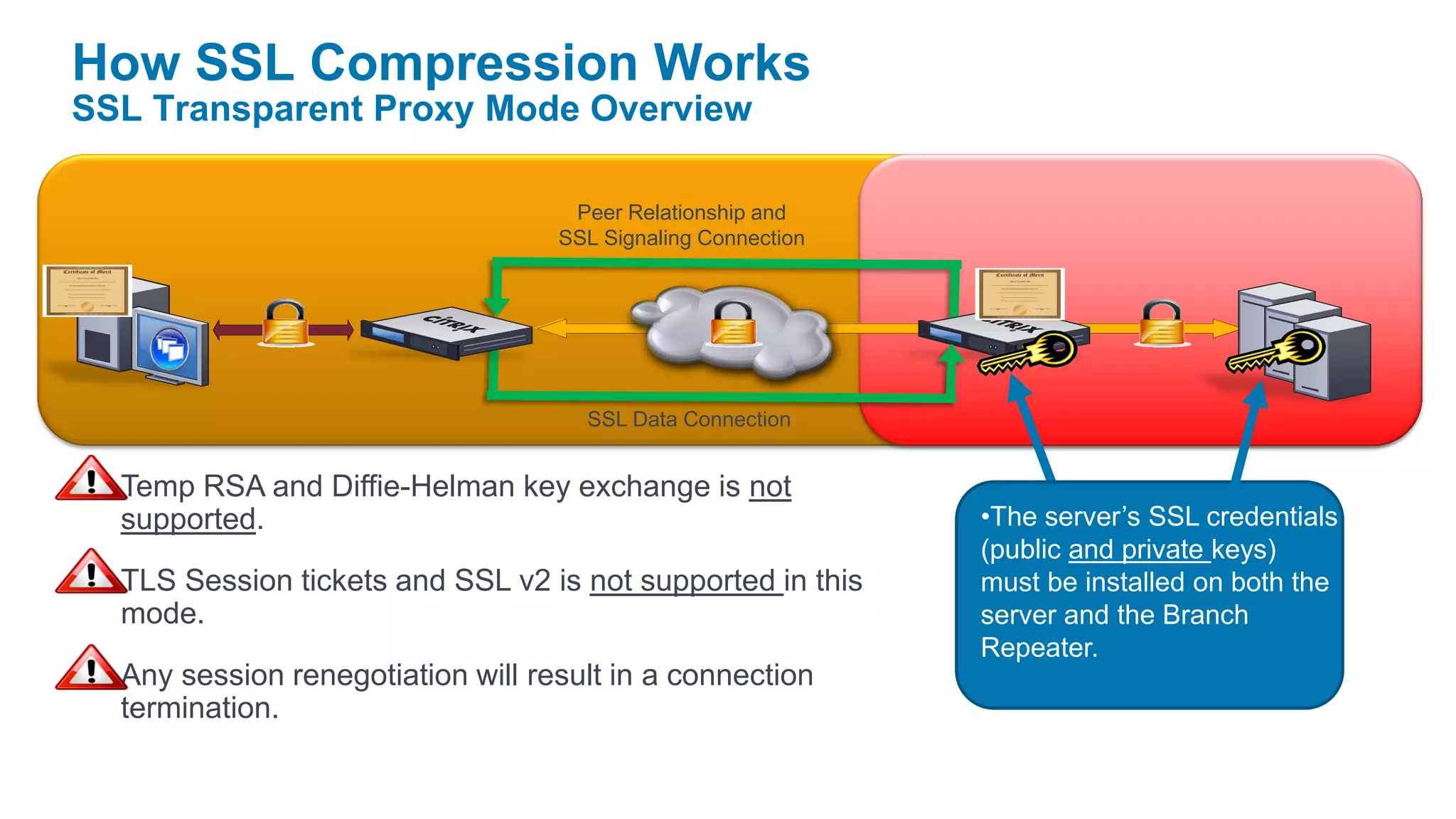
How SSL Compression Works
SSL Transparent Proxy Mode Overview

                                     Peer Relationship and
                                    SSL Signaling Connection


                                      SSL Data Connection


 • Temp RSA and Diffie-Helman key exchange is not
   supported.                                                  •The server’s SSL credentials
                                                               (public and private keys)
 • TLS Session tickets and SSL v2 is not supported in this     must be installed on both the
   mode.                                                       server and the Branch
                                                               Repeater.
 • Any session renegotiation will result in a connection
   termination.
WAN Optimierung mit Citrix Branch Repeater

WAN Optimierung mit Citrix Branch Repeater

  • 1.
    Citrix BranchRepeater Daniel Künzli,Systems Engineer ANG Citrix Systems GmbH, Switzerland
  • 2.
    Branch Offices AcrossWAN Present Obstacles • Inefficient use and bandwidth- hungry applications • Tradeoffs between data center consolidation and branch user experience • High cost of branch office IT
  • 3.
    Network costs area key part of desktop virtualization Servers Storage 20% 30% Clients 20% Networks 30% “Networking alone makes desktop virtualization cost-prohibitive”
  • 4.
    Citrix Branch Repeater| The Big Picture Repeater Plug-in for Citrix Receiver Data Center Applications: XenDesktop XenApp Web apps Email Mobile Users Tele-workers File Servers Repeater SharePoint Branch Repeater VPX WAN Redundant Datacenter or Branch Offices Disaster Recovery Site Branch Repeater Branch Repeater VPX Repeater Branch Repeater with Windows Server Branch Repeater VPX
  • 5.
    Citrix Branch RepeaterProduct Family Flexibility to Meet All Your Needs NEW! Repeater Branch Repeater with Branch Repeater VPX Appliances Windows Server Repeater Plug-in – Virtual Appliance and – Software Client Software Branch Repeater Appliances
  • 6.
    What is BranchRepeater VPX? Branch Repeater … is software that VPX Print offers Branch Repeater Server Branch Services functionality in a virtual appliance form factor …
  • 7.
    HDX WAN Optimizationin Branch Repeater … also in Branch Repeater VPX Traffic Adaptive Prioritization Compression And QoS Adaptive TCP Flow Control Adaptive Protocol Acceleration
  • 8.
    Deliver a high-definitionuser experience at the branch Accelerate print, video, launch Reduce desktop delivery network costs Cut bandwidth, energy, power & setup costs
  • 9.
    Accelerate XenDesktop trafficacross the WAN Reduce bandwidth consumption by 89% Reduce XenDesktop launch times by 40% Deliver up to 2X the number of users on existing bandwidth Accelerate printing by 2X
  • 10.
  • 11.
    Requirements Citrix VPX Minimum Requirements XenServer • 1 GB RAM • 60 GB Disk • 2 Virtual NICs • 1 Virtual CPU ESX / ESXi In Tech Preview! Off-the-shelf server Hyper-V Citrix Confidential - Do Not Distribute
  • 12.
    Grow as youNeed! Express • 1 GB RAM, 60 GB Disk • Recommended for VPX Express • 1 GB RAM, 100 GB Disk Small • Recommended for up to 2 Mbps • 1000 Accelerated TCP connections, 50 Plug-ins • 4 GB RAM, 250 GB Disk Medium • Recommended for up to 45 Mbps • 15,000 Accelerated TCP connections, 400 Plug-ins • 8 GB RAM, 500 GB Disk Large • Recommended for up to 45 Mbps • 25,000 Accelerated TCP connections, 500 Plug-ins Citrix Confidential - Do Not Distribute
  • 13.
    VPX Sizing andScaling One physical NIC with two virtual NICs are required. Each virtual NIC must be connected to a separate virtual network in XenCenter. Out of band management can be handled by a third and/or fourth virtual NIC. The VPX cannot use the fail-to-wire functionality (a dual port card is seen as 2 NICs with no special hardware support)
  • 14.
  • 15.
    Full Network TransparencyMeans Plug-n-play for Any Network Branch Repeater Repeater Datacenter Proprietary Tunnel Branch Office Users Non-Citrix Non-Citrix WAN Op WAN Op
  • 16.
    No dials, self-tuningapproach to WAN optimization Application Mix Network Conditions AutoOptimizer Engine TCP Flow Compression Protocol QoS Control De-duplication Acceleration
  • 17.
    Flexible deployment modesfor joining the branch network Branch Repeater Inline WAN • Optional Bypass NIC LAN Switch Router Virtual Inline Branch Repeater • WCCPv2 • Policy-based Routing WAN LAN Switch Router
  • 18.
    Modes – PhysicalDeployments Inline Mode (most common) Network will need to go down, while unit is cabled inline directly inline between WAN Router and LAN Switch Simplest Configuration (no Router/Switch configuration required) No traffic is allowed to bypass the Branch Repeater appliance Traffic flows as soon as its cabled (bypass card) Data flows from one accelerated eth port and is forwarded through a second port (Accelerated Pair A illustrated below)
  • 19.
    Modes – PhysicalDeployments Virtual Inline Mode Can be deployed with no network disruption Uses only one Ethernet port on the BR (apA port) Requires Router knowledge (utilizes Policy Based Routing, rules to classify traffic and determine how its forwarded). The router redirects the packets that are destined as outbound WAN traffic From any LAN port other than the one used by the BR Appliance, then route traffic to the BR Appliance From the LAN port used by the BR Appliance, then route traffic to the WAN interface of the router PBR – requires the use of another physical/logical interface on the router (if not available use WCCP)
  • 20.
    Modes – PhysicalDeployments WCCP – Web Cache Communication Protocol Can be deployed with no network disruption Requires Router knowledge (Route Policies to intercept desired traffic, route it to BR on the LAN) Uses a GRE tunnel (virtual communication link) between the BR and Router Only requirement is IP connectivity between BR and Router Mode contains all acceleration features Uses only one Ethernet port on the BR (apA port)
  • 21.
    Modes – PhysicalDeployments HA – High Availability Provides protection in event of failover Provides two management IP addresses & one VIP address The subnet of the VIP address is determined by the Management IP address of both WS. Primary and Secondary – the primary unit handles all incoming and outgoing traffic. The secondary appliance takes over in the even of a failover if the primary fails. The first to initialize itself becomes the primary
  • 22.
    Modes – PhysicalDeployments Group Mode Used for asymmetric networks Two or more BR inline mode, combined into a single virtual unit Uses forwarding rules to avoid random router packet assignment GM units are identified by serial # & IP address Individual appliances will own particular connections. If non-owning appliance receives a packet it will forward it to the owning appliance via GRE tunnel.
  • 23.
  • 24.
    Recent Accomplishments /Updates • Branch Repeater 5.7 • SSL traffic acceleration and disk history encryption • Branch Repeater with Windows Server 2008 R2 • 64-bit Windows 7 Repeater Plug-in • Branch Repeater VPX released! • Branch Repeater 5.5.2 and 5.5.3 • Virtual appliance software on XenServer • Notice of Status Change • Branch Repeater VPX on Hyper-V • Branch Repeater with Windows Server (2003 R2 in Tech Preview! only) End of Sale July 31, 2010 • EoM / EoL July 31, 2013
  • 25.
    Branch Repeater ProductLine & Pricing Price $K Large Branch/Data center R 8820HS 100 $99,500 R 8820 50 $49,500 20 Branch/Regional office R 8540 $19,500 R 8520 BR 300 $12,000 VPX-45 10 $13,000 $10,000+ BR 200 VPX-10 6 $7000 $6,000+ BR 100 4 VPX-2 $4,000+ $4000 VPX-Express $0 0 512Kbps 1 Mbps 2 Mbps 10 Mbps 20 Mbps 45 Mbps 155 Mbps 500 Mbps Citrix Confidential - Do Not Distribute Bandwidth
  • 26.
  • 27.
    Overview What is theSSL Compression and Acceleration? SSL compression allows standard SSL-based connections (HTTPS traffic, for example) to be compressed using Branch Repeater’s multi-session compression engine as well as other protocol- specific optimizations. SSL compression utilizes SSL certificate exchange to decrypt and re-encrypt traffic between client and server. Standard SSL Connection SSL Connection
  • 28.
    What is SSLCompression What is the SSL Compression and Acceleration? SSL compression allows standard SSL-based connections (HTTPS traffic, for example) to be compressed using Branch Repeater’s multi-session compression engine as well as other protocol- specific optimizations. SSL compression utilizes SSL certificate exchange to decrypt and re-encrypt traffic between client and server. Accelerated SSL Connection Client Side Server Side WAN SSL Connection SSL Connection SSL Tunnel
  • 29.
    What is SSLCompression Accelerated SSL Connection Client Side Server Side WAN SSL Connection SSL Connection SSL Tunnel • Branch Repeater has access to the clear text data of the SSL connection because the sever- side Branch Repeater Appliance acts as a security delegate of the endpoint server(s). • The appliance is functioning as a security delegate of the server, therefore most configuration is on the server-side Branch Repeater.
  • 30.
    What is SSLCompression What is SSL Signaling? Peer Relationship and SSL Signaling Connection Client Side Server Side SSL Connection SSL Connection SSL Data Connection • Signaling refers to the connection, authentication and configuration between two appliances/endpoints. • The Data Connection refers is the secure connection used to transmit encrypted data between two appliances/endpoints.
  • 31.
    How SSL CompressionWorks SSL Split Proxy Mode Overview The server-side Branch Repeater Peer Relationship and is allowed to act on the server’s SSL Signaling Connection behalf. SSL Data Connection • Split Proxy Mode will be used in most deployment scenarios where Temp RSA or Diffie-Hellman key •SSL Credentials (certificate and exchange is required. public key) from either an local enterprise CA or the server itself • The server-side Branch Repeater masquerades as the are installed on the server-side server to the client and proxies the connection. Repeater. • Client authentication is not supported.
  • 32.
    How SSL CompressionWorks SSL Transparent Proxy Mode Overview Peer Relationship and SSL Signaling Connection SSL Data Connection • The server-side Branch Repeater acts on behalf of the server, decrypting and re-encrypting on the fly, using the •The server’s SSL credentials server’s private key(s). (public and private keys) must be installed on both the • Client authentication is supported. server and the Branch Repeater. • The client sees the connection as if it is connection directly to the server.
  • 33.
    How SSL CompressionWorks SSL Transparent Proxy Mode Overview Peer Relationship and SSL Signaling Connection SSL Data Connection • Temp RSA and Diffie-Helman key exchange is not supported. •The server’s SSL credentials (public and private keys) • TLS Session tickets and SSL v2 is not supported in this must be installed on both the mode. server and the Branch Repeater. • Any session renegotiation will result in a connection termination.