Introduction to
Network Security
Guest Lecture
Debabrata Dash
Outline
• Security Vulnerabilities
• DoS and D-DoS
• Firewalls
• Intrusion Detection Systems
Security Vulnerabilities
• Security Problems in the TCP/IP Protocol
Suite – Steve Bellovin - 89
• Attacks on Different Layers
– IP Attacks
– ICMP Attacks
– Routing Attacks
– TCP Attacks
– Application Layer Attacks
Why?
• TCP/IP was designed for connectivity
– Assumed to have lots of trust
• Host implementation vulnerabilities
– Software “had/have/will have” bugs
– Some elements in the specification were left
to the implementers
Security Flaws in IP
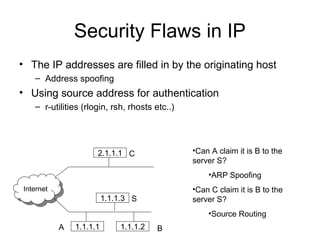
• The IP addresses are filled in by the originating host
– Address spoofing
• Using source address for authentication
– r-utilities (rlogin, rsh, rhosts etc..)
InternetInternet
2.1.1.1 C
1.1.1.1 1.1.1.2A B
1.1.1.3 S
•Can A claim it is B to the
server S?
•ARP Spoofing
•Can C claim it is B to the
server S?
•Source Routing
Security Flaws in IP
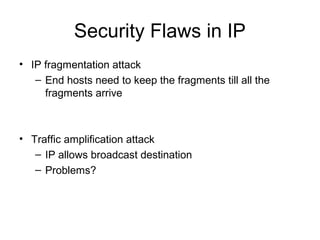
• IP fragmentation attack
– End hosts need to keep the fragments till all the
fragments arrive
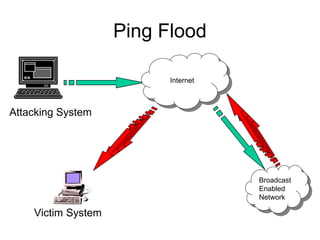
• Traffic amplification attack
– IP allows broadcast destination
– Problems?
Ping Flood
Attacking System
InternetInternet
Broadcast
Enabled
Network
Broadcast
Enabled
Network
Victim System
ICMP Attacks
• No authentication
• ICMP redirect message
– Can cause the host to switch gateways
– Benefit of doing this?
• Man in the middle attack, sniffing
• ICMP destination unreachable
– Can cause the host to drop connection
• ICMP echo request/reply
• Many more…
– http://www.sans.org/rr/whitepapers/threats/477.php
Routing Attacks
• Distance Vector Routing
– Announce 0 distance to all other nodes
• Blackhole traffic
• Eavesdrop
• Link State Routing
– Can drop links randomly
– Can claim direct link to any other routers
– A bit harder to attack than DV
• BGP
– ASes can announce arbitrary prefix
– ASes can alter path
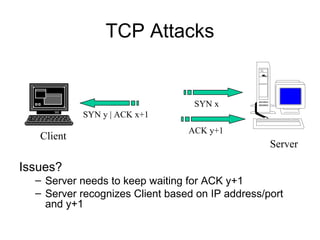
TCP Attacks
Issues?
– Server needs to keep waiting for ACK y+1
– Server recognizes Client based on IP address/port
and y+1
Client
Server
SYN x
SYN y | ACK x+1
ACK y+1
TCP Layer Attacks
• TCP SYN Flooding
– Exploit state allocated at server after initial
SYN packet
– Send a SYN and don’t reply with ACK
– Server will wait for 511 seconds for ACK
– Finite queue size for incomplete connections
(1024)
– Once the queue is full it doesn’t accept
requests
TCP Layer Attacks
• TCP Session Hijack
– When is a TCP packet valid?
• Address/Port/Sequence Number in window
– How to get sequence number?
• Sniff traffic
• Guess it
– Many earlier systems had predictable ISN
– Inject arbitrary data to the connection
TCP Layer Attacks
• TCP Session Poisoning
– Send RST packet
• Will tear down connection
– Do you have to guess the exact sequence
number?
• Anywhere in window is fine
• For 64k window it takes 64k packets to reset
• About 15 seconds for a T1
Application Layer Attacks
• Applications don’t authenticate properly
• Authentication information in clear
– FTP, Telnet, POP
• DNS insecurity
– DNS poisoning
– DNS zone transfer
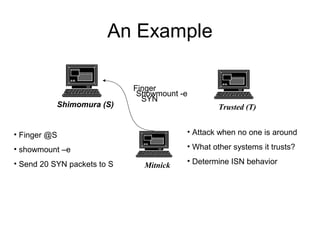
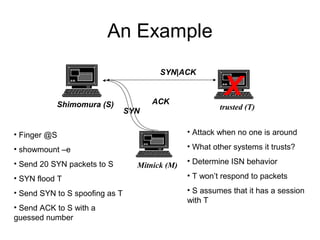
An Example
Shimomura (S) Trusted (T)
Mitnick
Finger
• Finger @S
• showmount –e
• Send 20 SYN packets to S
• Attack when no one is around
• What other systems it trusts?
• Determine ISN behavior
Showmount -e
SYN
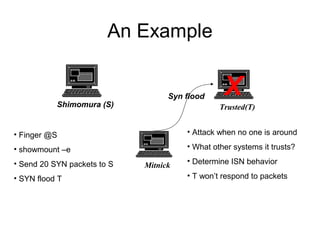
An Example
Shimomura (S) Trusted(T)
Mitnick
• Finger @S
• showmount –e
• Send 20 SYN packets to S
• SYN flood T
• Attack when no one is around
• What other systems it trusts?
• Determine ISN behavior
• T won’t respond to packets
Syn flood X
An Example
Shimomura (S) trusted (T)
Mitnick (M)
• Finger @S
• showmount –e
• Send 20 SYN packets to S
• SYN flood T
• Send SYN to S spoofing as T
• Send ACK to S with a
guessed number
• Attack when no one is around
• What other systems it trusts?
• Determine ISN behavior
• T won’t respond to packets
• S assumes that it has a session
with T
X
SYN
SYN|ACK
ACK
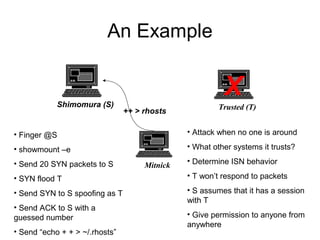
An Example
Shimomura (S) Trusted (T)
Mitnick
• Finger @S
• showmount –e
• Send 20 SYN packets to S
• SYN flood T
• Send SYN to S spoofing as T
• Send ACK to S with a
guessed number
• Send “echo + + > ~/.rhosts”
• Attack when no one is around
• What other systems it trusts?
• Determine ISN behavior
• T won’t respond to packets
• S assumes that it has a session
with T
• Give permission to anyone from
anywhere
X
++ > rhosts
Outline
• Security Vulnerabilities
• DoS and D-DoS
• Firewalls
• Intrusion Detection Systems
You are here
Denial of Service
• Objective  make a service unusable, usually
by overloading the server or network
• Consume host resources
– TCP SYN floods
– ICMP ECHO (ping) floods
• Consume bandwidth
– UDP floods
– ICMP floods
Denial of Service
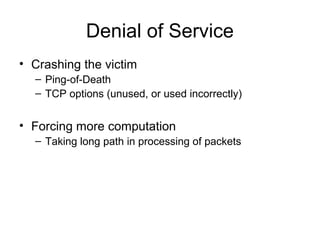
• Crashing the victim
– Ping-of-Death
– TCP options (unused, or used incorrectly)
• Forcing more computation
– Taking long path in processing of packets
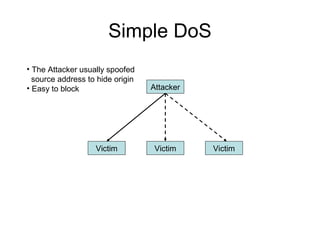
Simple DoS
Attacker
Victim Victim Victim
• The Attacker usually spoofed
source address to hide origin
• Easy to block
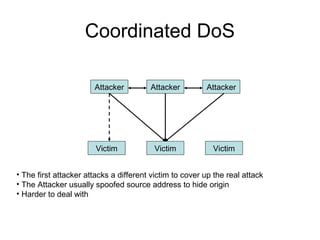
Coordinated DoS
Attacker
Victim Victim Victim
Attacker Attacker
• The first attacker attacks a different victim to cover up the real attack
• The Attacker usually spoofed source address to hide origin
• Harder to deal with
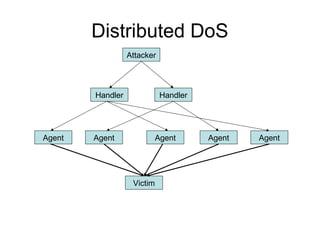
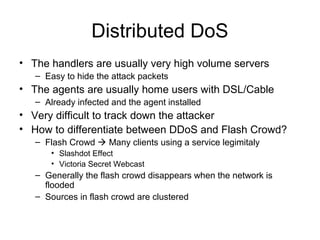
Distributed DoS
Attacker
Handler Handler
Agent Agent Agent Agent Agent
Victim
Distributed DoS
• The handlers are usually very high volume servers
– Easy to hide the attack packets
• The agents are usually home users with DSL/Cable
– Already infected and the agent installed
• Very difficult to track down the attacker
• How to differentiate between DDoS and Flash Crowd?
– Flash Crowd  Many clients using a service legimitaly
• Slashdot Effect
• Victoria Secret Webcast
– Generally the flash crowd disappears when the network is
flooded
– Sources in flash crowd are clustered
Outline
• Security Vulnerabilities
• DoS and D-DoS
• Firewalls
• Intrusion Detection Systems
You are here
Firewalls
• Lots of vulnerabilities on hosts in network
• Users don’t keep systems up to date
– Lots of patches
– Lots of exploits in wild (no patch for them)
• Solution?
– Limit access to the network
– Put firewalls across the perimeter of the
network
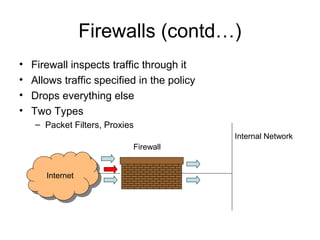
Firewalls (contd…)
• Firewall inspects traffic through it
• Allows traffic specified in the policy
• Drops everything else
• Two Types
– Packet Filters, Proxies
InternetInternet
Internal Network
Firewall
Packet Filters
• Packet filter selectively passes packets from one
network interface to another
• Usually done within a router between external
and internal networks
– screening router
• Can be done by a dedicated network element
– packet filtering bridge
– harder to detect and attack than screening routers
Packet Filters Contd.
• Data Available
– IP source and destination addresses
– Transport protocol (TCP, UDP, or ICMP)
– TCP/UDP source and destination ports
– ICMP message type
– Packet options (Fragment Size etc.)
• Actions Available
– Allow the packet to go through
– Drop the packet (Notify Sender/Drop Silently)
– Alter the packet (NAT?)
– Log information about the packet
Packet Filters Contd.
• Example filters
– Block all packets from outside except for
SMTP servers
– Block all traffic to a list of domains
– Block all connections from a specified domain
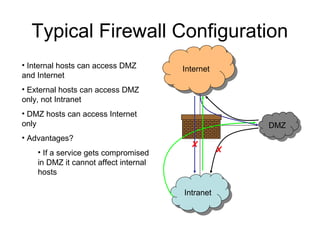
Typical Firewall Configuration
• Internal hosts can access DMZ
and Internet
• External hosts can access DMZ
only, not Intranet
• DMZ hosts can access Internet
only
• Advantages?
• If a service gets compromised
in DMZ it cannot affect internal
hosts
InternetInternet
IntranetIntranet
DMZDMZ
X
X
Example Firewall Rules
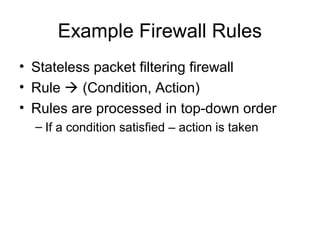
• Stateless packet filtering firewall
• Rule  (Condition, Action)
• Rules are processed in top-down order
– If a condition satisfied – action is taken
Sample Firewall Rule
Dst
Port
Alow
Allow
Yes
Any
> 1023
22
TCP22
TCP> 1023
ExtIntOutSSH-2
IntExtInSSH-1
Dst
Addr
Proto
Ack
Set?
ActionSrc Port
Src
Addr
DirRule
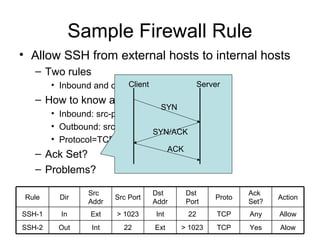
• Allow SSH from external hosts to internal hosts
– Two rules
• Inbound and outbound
– How to know a packet is for SSH?
• Inbound: src-port>1023, dst-port=22
• Outbound: src-port=22, dst-port>1023
• Protocol=TCP
– Ack Set?
– Problems?
SYN
SYN/ACK
ACK
Client Server
Default Firewall Rules
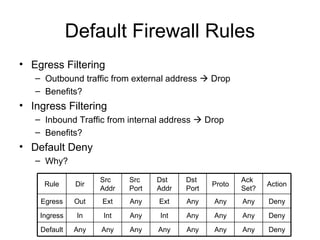
• Egress Filtering
– Outbound traffic from external address  Drop
– Benefits?
• Ingress Filtering
– Inbound Traffic from internal address  Drop
– Benefits?
• Default Deny
– Why?
Any
Dst
Port
Any DenyAnyAnyIntAnyIntInIngress
DenyAnyAnyExtAnyExtOutEgress
Any DenyAnyAnyAnyAnyAnyAnyDefault
Dst
Addr
Proto
Ack
Set?
Action
Src
Port
Src
Addr
DirRule
Packet Filters
• Advantages
– Transparent to application/user
– Simple packet filters can be efficient
• Disadvantages
– Usually fail open
– Very hard to configure the rules
– Doesn’t have enough information to take actions
• Does port 22 always mean SSH?
• Who is the user accessing the SSH?
Alternatives
• Stateful packet filters
– Keep the connection states
– Easier to specify rules
– More popular
– Problems?
• State explosion
• State for UDP/ICMP?
Alternatives
• Proxy Firewalls
– Two connections instead of one
– Either at transport level
• SOCKS proxy
– Or at application level
• HTTP proxy
• Requires applications (or dynamically
linked libraries) to be modified to use the
proxy
Proxy Firewall
• Data Available
– Application level information
– User information
• Advantages?
– Better policy enforcement
– Better logging
– Fail closed
• Disadvantages?
– Doesn’t perform as well
– One proxy for each application
– Client modification
Outline
• Security Vulnerabilities
• DoS and DDoS
• Firewalls
• Intrusion Detection Systems
You are here
Intrusion Detection Systems
• Firewalls allow traffic only to legitimate
hosts and services
• Traffic to the legitimate hosts/services can
have attacks
– CodeReds on IIS
• Solution?
– Intrusion Detection Systems
– Monitor data and behavior
– Report when identify attacks
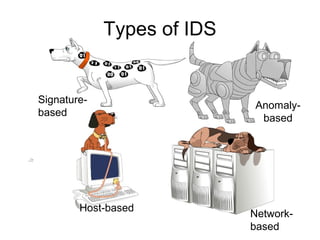
Types of IDS
Host-based
Network-
based
Signature-
based
Anomaly-
based
Signature-based IDS
• Characteristics
– Uses known pattern matching
to signify attack
• Advantages?
– Widely available
– Fairly fast
– Easy to implement
– Easy to update
• Disadvantages?
– Cannot detect attacks for which it has no signature
Anomaly-based IDS
• Characteristics
– Uses statistical model or machine learning engine to characterize
normal usage behaviors
– Recognizes departures from normal as potential intrusions
• Advantages?
– Can detect attempts to exploit new and unforeseen vulnerabilities
– Can recognize authorized usage that falls outside the normal pattern
• Disadvantages?
– Generally slower, more resource intensive compared to signature-
based IDS
– Greater complexity, difficult to configure
– Higher percentages of false alerts
Network-based IDS
• Characteristics
– NIDS examine raw packets in the network
passively and triggers alerts
• Advantages?
– Easy deployment
– Unobtrusive
– Difficult to evade if done at low level of
network operation
• Disadvantages?
– Fail Open
– Different hosts process packets differently
– NIDS needs to create traffic seen at the
end host
– Need to have the complete network
topology and complete host behavior
Host-based IDS
• Characteristics
– Runs on single host
– Can analyze audit-trails, logs, integrity of files and
directories, etc.
• Advantages
– More accurate than NIDS
– Less volume of traffic so less overhead
• Disadvantages
– Deployment is expensive
– What happens when host get compromised?
Summary
• TCP/IP security vulnerabilities
– Spoofing
– Flooding attacks
– TCP session poisoning
• DOS and D-DOS
• Firewalls
– Packet Filters
– Proxy
• IDS
– Signature and Anomaly IDS
– NIDS and HIDS

NETWORK SECURITY

  • 1.
  • 2.
    Outline • Security Vulnerabilities •DoS and D-DoS • Firewalls • Intrusion Detection Systems
  • 3.
    Security Vulnerabilities • SecurityProblems in the TCP/IP Protocol Suite – Steve Bellovin - 89 • Attacks on Different Layers – IP Attacks – ICMP Attacks – Routing Attacks – TCP Attacks – Application Layer Attacks
  • 4.
    Why? • TCP/IP wasdesigned for connectivity – Assumed to have lots of trust • Host implementation vulnerabilities – Software “had/have/will have” bugs – Some elements in the specification were left to the implementers
  • 5.
    Security Flaws inIP • The IP addresses are filled in by the originating host – Address spoofing • Using source address for authentication – r-utilities (rlogin, rsh, rhosts etc..) InternetInternet 2.1.1.1 C 1.1.1.1 1.1.1.2A B 1.1.1.3 S •Can A claim it is B to the server S? •ARP Spoofing •Can C claim it is B to the server S? •Source Routing
  • 6.
    Security Flaws inIP • IP fragmentation attack – End hosts need to keep the fragments till all the fragments arrive • Traffic amplification attack – IP allows broadcast destination – Problems?
  • 7.
  • 8.
    ICMP Attacks • Noauthentication • ICMP redirect message – Can cause the host to switch gateways – Benefit of doing this? • Man in the middle attack, sniffing • ICMP destination unreachable – Can cause the host to drop connection • ICMP echo request/reply • Many more… – http://www.sans.org/rr/whitepapers/threats/477.php
  • 9.
    Routing Attacks • DistanceVector Routing – Announce 0 distance to all other nodes • Blackhole traffic • Eavesdrop • Link State Routing – Can drop links randomly – Can claim direct link to any other routers – A bit harder to attack than DV • BGP – ASes can announce arbitrary prefix – ASes can alter path
  • 10.
    TCP Attacks Issues? – Serverneeds to keep waiting for ACK y+1 – Server recognizes Client based on IP address/port and y+1 Client Server SYN x SYN y | ACK x+1 ACK y+1
  • 11.
    TCP Layer Attacks •TCP SYN Flooding – Exploit state allocated at server after initial SYN packet – Send a SYN and don’t reply with ACK – Server will wait for 511 seconds for ACK – Finite queue size for incomplete connections (1024) – Once the queue is full it doesn’t accept requests
  • 12.
    TCP Layer Attacks •TCP Session Hijack – When is a TCP packet valid? • Address/Port/Sequence Number in window – How to get sequence number? • Sniff traffic • Guess it – Many earlier systems had predictable ISN – Inject arbitrary data to the connection
  • 13.
    TCP Layer Attacks •TCP Session Poisoning – Send RST packet • Will tear down connection – Do you have to guess the exact sequence number? • Anywhere in window is fine • For 64k window it takes 64k packets to reset • About 15 seconds for a T1
  • 14.
    Application Layer Attacks •Applications don’t authenticate properly • Authentication information in clear – FTP, Telnet, POP • DNS insecurity – DNS poisoning – DNS zone transfer
  • 15.
    An Example Shimomura (S)Trusted (T) Mitnick Finger • Finger @S • showmount –e • Send 20 SYN packets to S • Attack when no one is around • What other systems it trusts? • Determine ISN behavior Showmount -e SYN
  • 16.
    An Example Shimomura (S)Trusted(T) Mitnick • Finger @S • showmount –e • Send 20 SYN packets to S • SYN flood T • Attack when no one is around • What other systems it trusts? • Determine ISN behavior • T won’t respond to packets Syn flood X
  • 17.
    An Example Shimomura (S)trusted (T) Mitnick (M) • Finger @S • showmount –e • Send 20 SYN packets to S • SYN flood T • Send SYN to S spoofing as T • Send ACK to S with a guessed number • Attack when no one is around • What other systems it trusts? • Determine ISN behavior • T won’t respond to packets • S assumes that it has a session with T X SYN SYN|ACK ACK
  • 18.
    An Example Shimomura (S)Trusted (T) Mitnick • Finger @S • showmount –e • Send 20 SYN packets to S • SYN flood T • Send SYN to S spoofing as T • Send ACK to S with a guessed number • Send “echo + + > ~/.rhosts” • Attack when no one is around • What other systems it trusts? • Determine ISN behavior • T won’t respond to packets • S assumes that it has a session with T • Give permission to anyone from anywhere X ++ > rhosts
  • 19.
    Outline • Security Vulnerabilities •DoS and D-DoS • Firewalls • Intrusion Detection Systems You are here
  • 20.
    Denial of Service •Objective  make a service unusable, usually by overloading the server or network • Consume host resources – TCP SYN floods – ICMP ECHO (ping) floods • Consume bandwidth – UDP floods – ICMP floods
  • 21.
    Denial of Service •Crashing the victim – Ping-of-Death – TCP options (unused, or used incorrectly) • Forcing more computation – Taking long path in processing of packets
  • 22.
    Simple DoS Attacker Victim VictimVictim • The Attacker usually spoofed source address to hide origin • Easy to block
  • 23.
    Coordinated DoS Attacker Victim VictimVictim Attacker Attacker • The first attacker attacks a different victim to cover up the real attack • The Attacker usually spoofed source address to hide origin • Harder to deal with
  • 24.
    Distributed DoS Attacker Handler Handler AgentAgent Agent Agent Agent Victim
  • 25.
    Distributed DoS • Thehandlers are usually very high volume servers – Easy to hide the attack packets • The agents are usually home users with DSL/Cable – Already infected and the agent installed • Very difficult to track down the attacker • How to differentiate between DDoS and Flash Crowd? – Flash Crowd  Many clients using a service legimitaly • Slashdot Effect • Victoria Secret Webcast – Generally the flash crowd disappears when the network is flooded – Sources in flash crowd are clustered
  • 26.
    Outline • Security Vulnerabilities •DoS and D-DoS • Firewalls • Intrusion Detection Systems You are here
  • 27.
    Firewalls • Lots ofvulnerabilities on hosts in network • Users don’t keep systems up to date – Lots of patches – Lots of exploits in wild (no patch for them) • Solution? – Limit access to the network – Put firewalls across the perimeter of the network
  • 28.
    Firewalls (contd…) • Firewallinspects traffic through it • Allows traffic specified in the policy • Drops everything else • Two Types – Packet Filters, Proxies InternetInternet Internal Network Firewall
  • 29.
    Packet Filters • Packetfilter selectively passes packets from one network interface to another • Usually done within a router between external and internal networks – screening router • Can be done by a dedicated network element – packet filtering bridge – harder to detect and attack than screening routers
  • 30.
    Packet Filters Contd. •Data Available – IP source and destination addresses – Transport protocol (TCP, UDP, or ICMP) – TCP/UDP source and destination ports – ICMP message type – Packet options (Fragment Size etc.) • Actions Available – Allow the packet to go through – Drop the packet (Notify Sender/Drop Silently) – Alter the packet (NAT?) – Log information about the packet
  • 31.
    Packet Filters Contd. •Example filters – Block all packets from outside except for SMTP servers – Block all traffic to a list of domains – Block all connections from a specified domain
  • 32.
    Typical Firewall Configuration •Internal hosts can access DMZ and Internet • External hosts can access DMZ only, not Intranet • DMZ hosts can access Internet only • Advantages? • If a service gets compromised in DMZ it cannot affect internal hosts InternetInternet IntranetIntranet DMZDMZ X X
  • 33.
    Example Firewall Rules •Stateless packet filtering firewall • Rule  (Condition, Action) • Rules are processed in top-down order – If a condition satisfied – action is taken
  • 34.
    Sample Firewall Rule Dst Port Alow Allow Yes Any >1023 22 TCP22 TCP> 1023 ExtIntOutSSH-2 IntExtInSSH-1 Dst Addr Proto Ack Set? ActionSrc Port Src Addr DirRule • Allow SSH from external hosts to internal hosts – Two rules • Inbound and outbound – How to know a packet is for SSH? • Inbound: src-port>1023, dst-port=22 • Outbound: src-port=22, dst-port>1023 • Protocol=TCP – Ack Set? – Problems? SYN SYN/ACK ACK Client Server
  • 35.
    Default Firewall Rules •Egress Filtering – Outbound traffic from external address  Drop – Benefits? • Ingress Filtering – Inbound Traffic from internal address  Drop – Benefits? • Default Deny – Why? Any Dst Port Any DenyAnyAnyIntAnyIntInIngress DenyAnyAnyExtAnyExtOutEgress Any DenyAnyAnyAnyAnyAnyAnyDefault Dst Addr Proto Ack Set? Action Src Port Src Addr DirRule
  • 36.
    Packet Filters • Advantages –Transparent to application/user – Simple packet filters can be efficient • Disadvantages – Usually fail open – Very hard to configure the rules – Doesn’t have enough information to take actions • Does port 22 always mean SSH? • Who is the user accessing the SSH?
  • 37.
    Alternatives • Stateful packetfilters – Keep the connection states – Easier to specify rules – More popular – Problems? • State explosion • State for UDP/ICMP?
  • 38.
    Alternatives • Proxy Firewalls –Two connections instead of one – Either at transport level • SOCKS proxy – Or at application level • HTTP proxy • Requires applications (or dynamically linked libraries) to be modified to use the proxy
  • 39.
    Proxy Firewall • DataAvailable – Application level information – User information • Advantages? – Better policy enforcement – Better logging – Fail closed • Disadvantages? – Doesn’t perform as well – One proxy for each application – Client modification
  • 40.
    Outline • Security Vulnerabilities •DoS and DDoS • Firewalls • Intrusion Detection Systems You are here
  • 41.
    Intrusion Detection Systems •Firewalls allow traffic only to legitimate hosts and services • Traffic to the legitimate hosts/services can have attacks – CodeReds on IIS • Solution? – Intrusion Detection Systems – Monitor data and behavior – Report when identify attacks
  • 42.
  • 43.
    Signature-based IDS • Characteristics –Uses known pattern matching to signify attack • Advantages? – Widely available – Fairly fast – Easy to implement – Easy to update • Disadvantages? – Cannot detect attacks for which it has no signature
  • 44.
    Anomaly-based IDS • Characteristics –Uses statistical model or machine learning engine to characterize normal usage behaviors – Recognizes departures from normal as potential intrusions • Advantages? – Can detect attempts to exploit new and unforeseen vulnerabilities – Can recognize authorized usage that falls outside the normal pattern • Disadvantages? – Generally slower, more resource intensive compared to signature- based IDS – Greater complexity, difficult to configure – Higher percentages of false alerts
  • 45.
    Network-based IDS • Characteristics –NIDS examine raw packets in the network passively and triggers alerts • Advantages? – Easy deployment – Unobtrusive – Difficult to evade if done at low level of network operation • Disadvantages? – Fail Open – Different hosts process packets differently – NIDS needs to create traffic seen at the end host – Need to have the complete network topology and complete host behavior
  • 46.
    Host-based IDS • Characteristics –Runs on single host – Can analyze audit-trails, logs, integrity of files and directories, etc. • Advantages – More accurate than NIDS – Less volume of traffic so less overhead • Disadvantages – Deployment is expensive – What happens when host get compromised?
  • 47.
    Summary • TCP/IP securityvulnerabilities – Spoofing – Flooding attacks – TCP session poisoning • DOS and D-DOS • Firewalls – Packet Filters – Proxy • IDS – Signature and Anomaly IDS – NIDS and HIDS