SnapManager for Virtual Infrastructure 2.0A Guide for Deploying a 2,000 Seat Heterogeneous Environment on NetApp 3100 and 6000 Series Storage Controllers
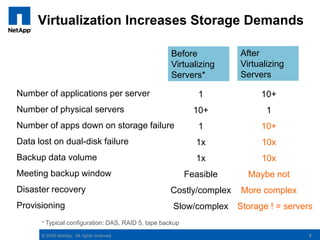
2Virtualization Increases Storage DemandsAfterVirtualizingServersBefore VirtualizingServers*Number of applications per serverNumber of physical serversNumber of apps down on storage failureData lost on dual-disk failureBackup data volumeMeeting backup windowDisaster recoveryProvisioning110+11x1xFeasibleCostly/complexSlow/complex10+110+10x10xMaybe notMore complex     Storage ! = servers* Typical configuration: DAS, RAID 5, tape backup2
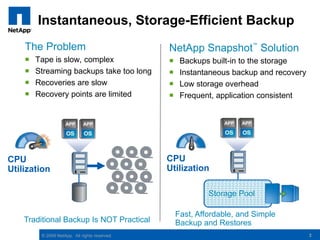
3Instantaneous, Storage-Efficient BackupThe ProblemTape is slow, complexStreaming backups take too longRecoveries are slowRecovery points are limitedNetApp Snapshot™ SolutionBackups built-in to the storageInstantaneous backup and recovery Low storage overheadFrequent, application consistentCPU UtilizationCPU UtilizationStorage PoolFast, Affordable, and Simple Backup and RestoresTraditional Backup Is NOT Practical3
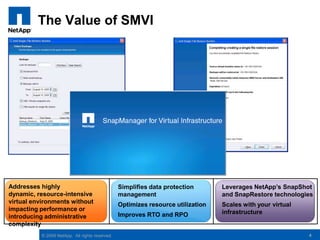
The Value of SMVI4Addresses highly dynamic, resource-intensive virtual environments without impacting performance or introducing administrative complexitySimplifies data protection managementOptimizes resource utilizationImproves RTO and RPOLeverages NetApp’sSnapShot and SnapRestore technologies Scales with your virtual infrastructure
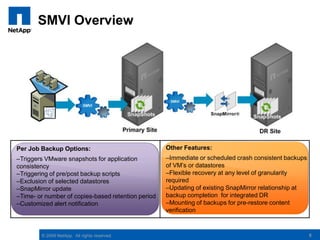
SMVI Overview5Other Features:Immediate or scheduled crash consistent backups of VM’s or datastores
Flexible recovery at any level of granularity required
Updating of existing SnapMirror relationship at backup completion  for integrated DR
Mounting of backups for pre-restore content verification Per Job Backup Options:Triggers VMware snapshots for application consistency
Triggering of pre/post backup scripts
Exclusion of selected datastores
SnapMirror update
Time- or number of copies-based retention period
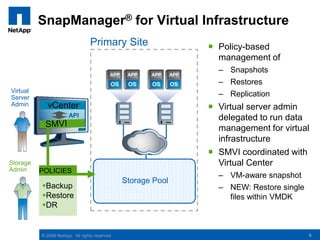
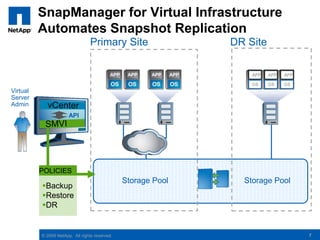
Customized alert notificationSnapManager® for Virtual InfrastructurePrimary SitePolicy-based management of

NetApp SMVI 2.0 - VMworld Mini Theatre

  • 1.
    SnapManager for VirtualInfrastructure 2.0A Guide for Deploying a 2,000 Seat Heterogeneous Environment on NetApp 3100 and 6000 Series Storage Controllers
  • 2.
    2Virtualization Increases StorageDemandsAfterVirtualizingServersBefore VirtualizingServers*Number of applications per serverNumber of physical serversNumber of apps down on storage failureData lost on dual-disk failureBackup data volumeMeeting backup windowDisaster recoveryProvisioning110+11x1xFeasibleCostly/complexSlow/complex10+110+10x10xMaybe notMore complex Storage ! = servers* Typical configuration: DAS, RAID 5, tape backup2
  • 3.
    3Instantaneous, Storage-Efficient BackupTheProblemTape is slow, complexStreaming backups take too longRecoveries are slowRecovery points are limitedNetApp Snapshot™ SolutionBackups built-in to the storageInstantaneous backup and recovery Low storage overheadFrequent, application consistentCPU UtilizationCPU UtilizationStorage PoolFast, Affordable, and Simple Backup and RestoresTraditional Backup Is NOT Practical3
  • 4.
    The Value ofSMVI4Addresses highly dynamic, resource-intensive virtual environments without impacting performance or introducing administrative complexitySimplifies data protection managementOptimizes resource utilizationImproves RTO and RPOLeverages NetApp’sSnapShot and SnapRestore technologies Scales with your virtual infrastructure
  • 5.
    SMVI Overview5Other Features:Immediateor scheduled crash consistent backups of VM’s or datastores
  • 6.
    Flexible recovery atany level of granularity required
  • 7.
    Updating of existingSnapMirror relationship at backup completion for integrated DR
  • 8.
    Mounting of backupsfor pre-restore content verification Per Job Backup Options:Triggers VMware snapshots for application consistency
  • 9.
  • 10.
  • 11.
  • 12.
    Time- or numberof copies-based retention period
  • 13.
    Customized alert notificationSnapManager®for Virtual InfrastructurePrimary SitePolicy-based management of

Editor's Notes

  • #3 Goal of this slide: Emphasize that storage deployed in virtualized environments needs to be robust.Points:Server virtualization indeed allows dramatic levels of server consolidation, often in the range of 10:1. This gets over the old “silo” of one app = one server.A storage failure in a server now takes down 10 applications, not just one. (need more reliable storage)A dual-disk failure (or more commonly, a failure with a media error on rebuild) means that data sets of 10 apps have to be reloaded, not just one. (need something better than RAID 5)With 10X more data on a server, may not be able to make the backup window. (need faster backup)In addition, with the ever-increasing criticality of IT operations, disaster recovery continues to increase in priority. DR is very difficult in a DAS environment, but becomes practical with virtualized servers and storage-based DR.While server virtualization enhances server provisioning greatly, the result is fast server and slow storage provisioning, unless other means of storage provisioning are brought into the picture.
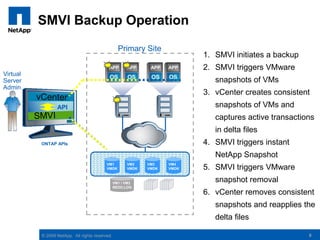
  • #9 Goal of this slide: Illustrate the sequence of backup operationsPoints:The virtual administrator requests a backup of VM1 and VM2 Virtual Center communicates with the appropriate ESX server which will place VM1 and VM2 in “Hot Backup” modeRedo-Logs get created by VMware for these VMs and the VMDKs are now frozen and all writes happen on the Redo-Logs for these Virtual Machines.SnapManager for VI can now initiate Data ONTAP Snapshots via the ONTAP APIs and the Snapshot of the entire datastore where these Virtual Machines reside is taken.Once the ONTAP Snapshot is completed, SnapManager for VI informs VC to take these VMs from the “Hot-Backup” mode and the Redo-Logs are applied to their corresponding VMDK(s) and normal operation resume
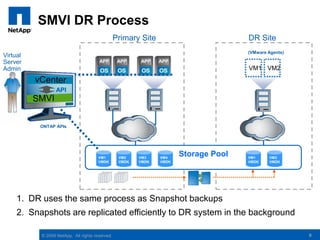
  • #10 Goal of this slide: Illustrate the SnapManager for VI DR Operations, which begin with a normal backup operation.Points:The virtual administrator requests a backup of VM1 and VM2Virtual Center communicates with the appropriate ESX server which will place VM1 and VM2 in “Hot Backup” modeRedo-Logs get created by VMware for these VMs and the VMDKs are now frozen and all writes happen on the Redo-Logs for these Virtual Machines.SnapManager for VI can now inititate ONTAP Snapshots via the ONTAP APIs and the Snapshot of the entire datastore where these Virtual Machines reside is taken, and a mention is made in the menu that SnapMirror will get invoked once the backup is completedOnce the ONTAP Snapshot is completed, SnapManager for VI informs VC to take these VMs from the “Hot-Backup” mode and the Redo-Logs are applied to their corresponding VMDK(s) and normal operation resumeSnapMirror is triggered and the newly created Snapshots are sent to their target
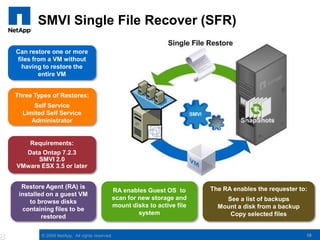
  • #11 Restore Agent (RA) on guest VM to browse disks containing files to be restored Enables guest OS to:Scan for new storage (attached disks)Mount disk(s) to active file systemEnables requester to:See list of all backups for the source VM¹Mount a disk (VMDK) from a backup to the guest VMCopy selected files to appropriate locations w/i active file systemInstalled once, but only active during restore sessionsSelf-service restoreRestored file(s) are from destination or alternate VM backupsRequester can browse all source VM backups, select files from any disks, and restore them to any location within active file systemLimited self-service restoreNo network connectivity between destination VM and SMVI serverAdmin mounts disks from selected source VM backups to destination VMRequester can browse all mounted disks, select files from any disks, and restore them to any location within active file systemAdministrator-assisted restoreCompany policy prohibits self-service restoreAdmin goes through the self-service restore process for the requester and places files to be restored in accessible locationRequester copies files to be restored from accessible location to any location within the active file system
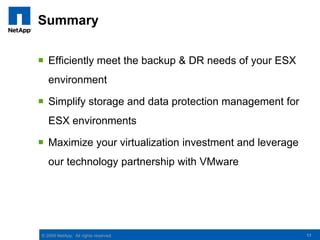
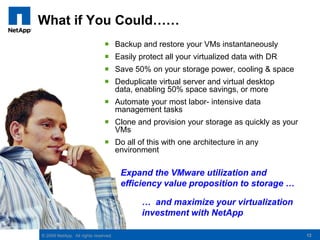
  • #13 Goal of this slide: Leave them with the possibilities that apply directly to an overall virtualization deployment and can be provided by NetApp storagePoints:Self-explanatory points, all of which are addressed earlier in the presentation.This slide should address both audiences: (1) the customer who is still using DAS storage and has not yet adopted network-based storage, as well as (2) the customer who has adopted (or will be purchasing) networked storage but does not yet understand the NetApp advantages.