Need for Cybersecurity
Introduction to Cybersecurity v2.1
2© 2016 Cisco and/or its affiliates. All rights reserved. Cisco Confidential
Need for Cybersecurity
Introduction to Cybersecurity v2.1
Planning Guide
3© 2016 Cisco and/or its affiliates. All rights reserved. Cisco Confidential
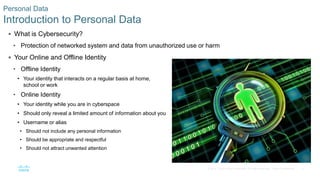
 What is Cybersecurity?
• Protection of networked system and data from unauthorized use or harm
 Your Online and Offline Identity
• Offline Identity
• Your identity that interacts on a regular basis at home,
school or work
• Online Identity
• Your identity while you are in cyberspace
• Should only reveal a limited amount of information about you
• Username or alias
• Should not include any personal information
• Should be appropriate and respectful
• Should not attract unwanted attention
Personal Data
Introduction to Personal Data
4© 2016 Cisco and/or its affiliates. All rights reserved. Cisco Confidential
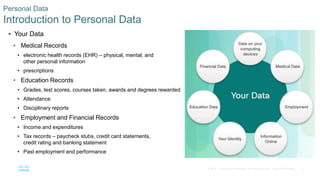
 Your Data
• Medical Records
• electronic health records (EHR) – physical, mental, and
other personal information
• prescriptions
• Education Records
• Grades, test scores, courses taken, awards and degrees rewarded
• Attendance
• Disciplinary reports
• Employment and Financial Records
• Income and expenditures
• Tax records – paycheck stubs, credit card statements,
credit rating and banking statement
• Past employment and performance
Personal Data
Introduction to Personal Data
5© 2016 Cisco and/or its affiliates. All rights reserved. Cisco Confidential
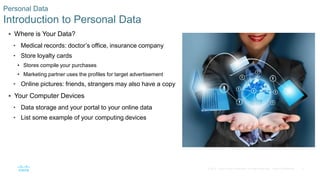
 Where is Your Data?
• Medical records: doctor’s office, insurance company
• Store loyalty cards
• Stores compile your purchases
• Marketing partner uses the profiles for target advertisement
• Online pictures: friends, strangers may also have a copy
 Your Computer Devices
• Data storage and your portal to your online data
• List some example of your computing devices
Personal Data
Introduction to Personal Data
6© 2016 Cisco and/or its affiliates. All rights reserved. Cisco Confidential
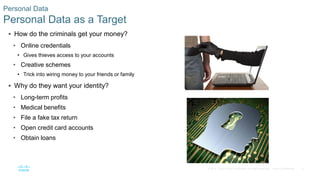
 How do the criminals get your money?
• Online credentials
• Gives thieves access to your accounts
• Creative schemes
• Trick into wiring money to your friends or family
 Why do they want your identity?
• Long-term profits
• Medical benefits
• File a fake tax return
• Open credit card accounts
• Obtain loans
Personal Data
Personal Data as a Target
7© 2016 Cisco and/or its affiliates. All rights reserved. Cisco Confidential
 Types of Organizational Data
• Traditional Data
• Personnel – application materials, payroll, offer letter, employee agreements
• Intellectual – patents, trademarks, product plans, trade secrets
• Financial – income statements, balance sheets, cash flow statements
• Internet of Things and Big Data
• IoT – large network of physical objects, such as sensors
• Big Data – data from the IoT
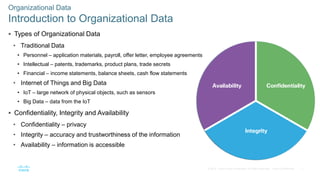
 Confidentiality, Integrity and Availability
• Confidentiality – privacy
• Integrity – accuracy and trustworthiness of the information
• Availability – information is accessible
Organizational Data
Introduction to Organizational Data
8© 2016 Cisco and/or its affiliates. All rights reserved. Cisco Confidential
 The Consequences of a Security Breach
• Not feasible to prevent every attack
• Attackers will always find new ways
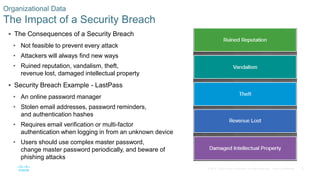
• Ruined reputation, vandalism, theft,
revenue lost, damaged intellectual property
 Security Breach Example - LastPass
• An online password manager
• Stolen email addresses, password reminders,
and authentication hashes
• Requires email verification or multi-factor
authentication when logging in from an unknown device
• Users should use complex master password,
change master password periodically, and beware of
phishing attacks
Organizational Data
The Impact of a Security Breach
9© 2016 Cisco and/or its affiliates. All rights reserved. Cisco Confidential
Attacks, Concepts and
Techniques
Introduction to Cybersecurity v2.1
Planning Guide
10© 2016 Cisco and/or its affiliates. All rights reserved. Cisco Confidential
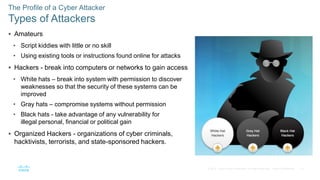
 Amateurs
• Script kiddies with little or no skill
• Using existing tools or instructions found online for attacks
 Hackers - break into computers or networks to gain access
• White hats – break into system with permission to discover
weaknesses so that the security of these systems can be
improved
• Gray hats – compromise systems without permission
• Black hats - take advantage of any vulnerability for
illegal personal, financial or political gain
 Organized Hackers - organizations of cyber criminals,
hacktivists, terrorists, and state-sponsored hackers.
The Profile of a Cyber Attacker
Types of Attackers
11© 2016 Cisco and/or its affiliates. All rights reserved. Cisco Confidential
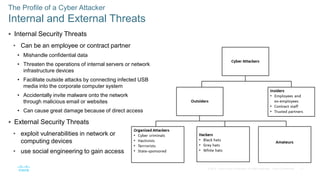
 Internal Security Threats
• Can be an employee or contract partner
• Mishandle confidential data
• Threaten the operations of internal servers or network
infrastructure devices
• Facilitate outside attacks by connecting infected USB
media into the corporate computer system
• Accidentally invite malware onto the network
through malicious email or websites
• Can cause great damage because of direct access
 External Security Threats
• exploit vulnerabilities in network or
computing devices
• use social engineering to gain access
The Profile of a Cyber Attacker
Internal and External Threats
12© 2016 Cisco and/or its affiliates. All rights reserved. Cisco Confidential
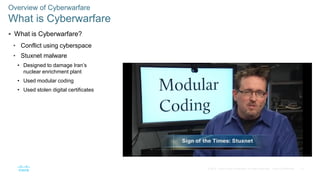
 What is Cyberwarfare?
• Conflict using cyberspace
• Stuxnet malware
• Designed to damage Iran’s
nuclear enrichment plant
• Used modular coding
• Used stolen digital certificates
Overview of Cyberwarfare
What is Cyberwarfare
13© 2016 Cisco and/or its affiliates. All rights reserved. Cisco Confidential
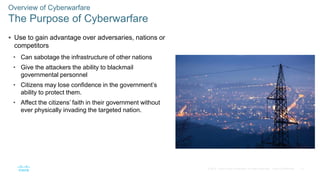
 Use to gain advantage over adversaries, nations or
competitors
• Can sabotage the infrastructure of other nations
• Give the attackers the ability to blackmail
governmental personnel
• Citizens may lose confidence in the government’s
ability to protect them.
• Affect the citizens’ faith in their government without
ever physically invading the targeted nation.
Overview of Cyberwarfare
The Purpose of Cyberwarfare
14© 2016 Cisco and/or its affiliates. All rights reserved. Cisco Confidential
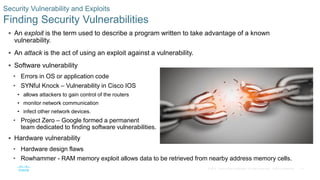
Security Vulnerability and Exploits
Finding Security Vulnerabilities
 An exploit is the term used to describe a program written to take advantage of a known
vulnerability.
 An attack is the act of using an exploit against a vulnerability.
 Software vulnerability
• Errors in OS or application code
• SYNful Knock – Vulnerability in Cisco IOS
• allows attackers to gain control of the routers
• monitor network communication
• infect other network devices.
• Project Zero – Google formed a permanent
team dedicated to finding software vulnerabilities.
 Hardware vulnerability
• Hardware design flaws
• Rowhammer - RAM memory exploit allows data to be retrieved from nearby address memory cells.
15© 2016 Cisco and/or its affiliates. All rights reserved. Cisco Confidential
Types of Security Vulnerabilities
Categorizing Security Vulnerabilities
 Buffer Overflow
• Data is written beyond the limits of a buffer
 Non-validated Input
• Force programs to behave in an unintended way
 Race Conditions
• Improperly ordered or timed events
 Weaknesses in Security Practices
• Protect sensitive data through authentication,
authorization, and encryption
 Access-control Problems
• Access control to physical equipment and resources
• Security practices
16© 2016 Cisco and/or its affiliates. All rights reserved. Cisco Confidential
Types of Malware and Symptoms
Types of Malware
 Malware is used to steal data, bypass access controls, cause harm to, or compromise a system.
 Types of Malware
• Spyware - track and spy on the user
• Adware - deliver advertisements, usually comes with spyware
• Bot - automatically perform action
• Ransomware - hold a computer system or the data captive
until a payment is made
• Scareware - persuade the user to take a specific action
based on fear.
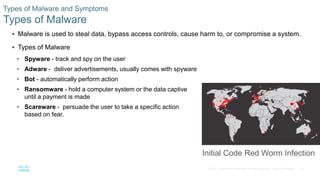
Initial Code Red Worm Infection
17© 2016 Cisco and/or its affiliates. All rights reserved. Cisco Confidential
Types of Malware and Symptoms
Types of Malware (Cont.)
 Types of Malware (Cont.)
• Rootkit - modify the operating system to create a backdoor
• Virus - malicious executable code that is attached to other executable files
• Trojan horse - carries out malicious operations under
the guise of a desired operation
• Worm - replicate themselves by independently
exploiting vulnerabilities in networks
• Man-in-The-Middle or Man-in-The-Mobile –
take control over a device without the
user’s knowledge
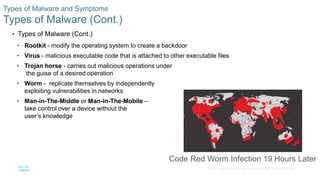
Code Red Worm Infection 19 Hours Later
18© 2016 Cisco and/or its affiliates. All rights reserved. Cisco Confidential
Types of Malware and Symptoms
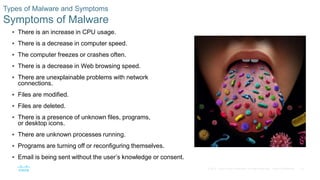
Symptoms of Malware
 There is an increase in CPU usage.
 There is a decrease in computer speed.
 The computer freezes or crashes often.
 There is a decrease in Web browsing speed.
 There are unexplainable problems with network
connections.
 Files are modified.
 Files are deleted.
 There is a presence of unknown files, programs,
or desktop icons.
 There are unknown processes running.
 Programs are turning off or reconfiguring themselves.
 Email is being sent without the user’s knowledge or consent.
19© 2016 Cisco and/or its affiliates. All rights reserved. Cisco Confidential
Methods of Infiltration
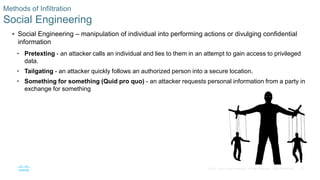
Social Engineering
 Social Engineering – manipulation of individual into performing actions or divulging confidential
information
• Pretexting - an attacker calls an individual and lies to them in an attempt to gain access to privileged
data.
• Tailgating - an attacker quickly follows an authorized person into a secure location.
• Something for something (Quid pro quo) - an attacker requests personal information from a party in
exchange for something
20© 2016 Cisco and/or its affiliates. All rights reserved. Cisco Confidential
Methods of Infiltration
Wi-Fi Password Cracking
 Wi-Fi Password Cracking – Password discovery
• Social engineering - The attacker manipulates a
person who knows the password into providing it.
• Brute-force attacks - The attacker tries several
possible passwords in an attempt to guess the
password.
• Network sniffing - The password maybe
discovered by listening and capturing packets send
on the network.
21© 2016 Cisco and/or its affiliates. All rights reserved. Cisco Confidential
Methods of Infiltration
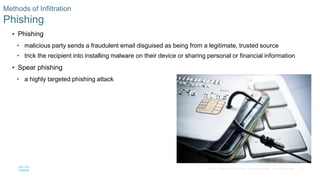
Phishing
 Phishing
• malicious party sends a fraudulent email disguised as being from a legitimate, trusted source
• trick the recipient into installing malware on their device or sharing personal or financial information
 Spear phishing
• a highly targeted phishing attack
22© 2016 Cisco and/or its affiliates. All rights reserved. Cisco Confidential
Methods of Infiltration
Vulnerability Exploitation
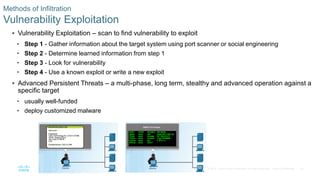
 Vulnerability Exploitation – scan to find vulnerability to exploit
• Step 1 - Gather information about the target system using port scanner or social engineering
• Step 2 - Determine learned information from step 1
• Step 3 - Look for vulnerability
• Step 4 - Use a known exploit or write a new exploit
 Advanced Persistent Threats – a multi-phase, long term, stealthy and advanced operation against a
specific target
• usually well-funded
• deploy customized malware
23© 2016 Cisco and/or its affiliates. All rights reserved. Cisco Confidential
Denial of Service
DoS
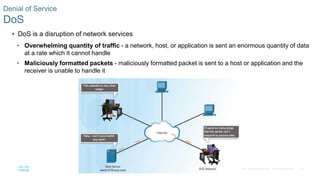
 DoS is a disruption of network services
• Overwhelming quantity of traffic - a network, host, or application is sent an enormous quantity of data
at a rate which it cannot handle
• Maliciously formatted packets - maliciously formatted packet is sent to a host or application and the
receiver is unable to handle it
24© 2016 Cisco and/or its affiliates. All rights reserved. Cisco Confidential
Denial of Service
DDoS
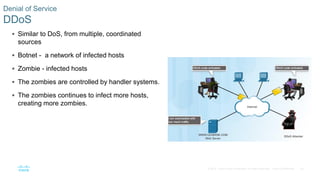
 Similar to DoS, from multiple, coordinated
sources
 Botnet - a network of infected hosts
 Zombie - infected hosts
 The zombies are controlled by handler systems.
 The zombies continues to infect more hosts,
creating more zombies.
25© 2016 Cisco and/or its affiliates. All rights reserved. Cisco Confidential
Denial of Service
SEO Poisoning
 SEO
• Search Engine Optimization
• Techniques to improve a website’s ranking by a search engine
 SEO Poisoning
• Increase traffic to malicious websites
• Force malicious sites to rank higher
26© 2016 Cisco and/or its affiliates. All rights reserved. Cisco Confidential
Blended Attack
What is a Blended Attack?
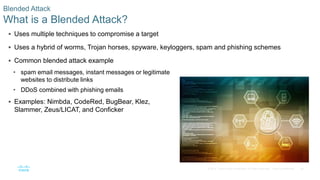
 Uses multiple techniques to compromise a target
 Uses a hybrid of worms, Trojan horses, spyware, keyloggers, spam and phishing schemes
 Common blended attack example
• spam email messages, instant messages or legitimate
websites to distribute links
• DDoS combined with phishing emails
 Examples: Nimbda, CodeRed, BugBear, Klez,
Slammer, Zeus/LICAT, and Conficker
27© 2016 Cisco and/or its affiliates. All rights reserved. Cisco Confidential
Impact Reduction
What is Impact Reduction?
 Communicate the issue
 Be sincere and accountable
 Provide details
 Understand the cause of the breach
 Take steps to avoid another similar breach in the future
 Ensure all systems are clean
 Educate employees, partners and customers
28© 2016 Cisco and/or its affiliates. All rights reserved. Cisco Confidential
Protecting Your Data
29© 2016 Cisco and/or its affiliates. All rights reserved. Cisco Confidential
Protecting Your Devices and Network
Protecting Your Computing Devices
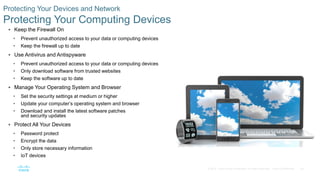
 Keep the Firewall On
• Prevent unauthorized access to your data or computing devices
• Keep the firewall up to date
 Use Antivirus and Antispyware
• Prevent unauthorized access to your data or computing devices
• Only download software from trusted websites
• Keep the software up to date
 Manage Your Operating System and Browser
• Set the security settings at medium or higher
• Update your computer’s operating system and browser
• Download and install the latest software patches
and security updates
 Protect All Your Devices
• Password protect
• Encrypt the data
• Only store necessary information
• IoT devices
30© 2016 Cisco and/or its affiliates. All rights reserved. Cisco Confidential
Protecting Your Devices and Network
Use Wireless Networks Safely
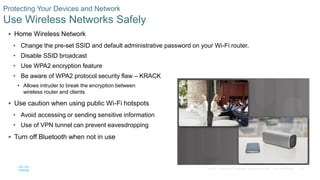
 Home Wireless Network
• Change the pre-set SSID and default administrative password on your Wi-Fi router.
• Disable SSID broadcast
• Use WPA2 encryption feature
• Be aware of WPA2 protocol security flaw – KRACK
• Allows intruder to break the encryption between
wireless router and clients
 Use caution when using public Wi-Fi hotspots
• Avoid accessing or sending sensitive information
• Use of VPN tunnel can prevent eavesdropping
 Turn off Bluetooth when not in use
31© 2016 Cisco and/or its affiliates. All rights reserved. Cisco Confidential
Protecting Your Devices and Network
Use Unique Passwords for Each Online Account
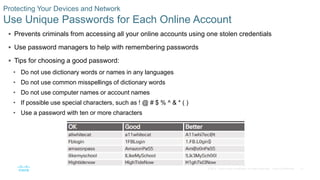
 Prevents criminals from accessing all your online accounts using one stolen credentials
 Use password managers to help with remembering passwords
 Tips for choosing a good password:
• Do not use dictionary words or names in any languages
• Do not use common misspellings of dictionary words
• Do not use computer names or account names
• If possible use special characters, such as ! @ # $ % ^ & * ( )
• Use a password with ten or more characters
32© 2016 Cisco and/or its affiliates. All rights reserved. Cisco Confidential
Protecting Your Devices and Network
Use Passphrase Rather Than a Password
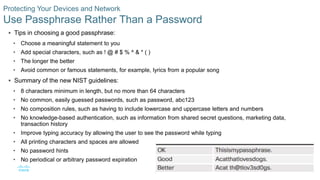
 Tips in choosing a good passphrase:
• Choose a meaningful statement to you
• Add special characters, such as ! @ # $ % ^ & * ( )
• The longer the better
• Avoid common or famous statements, for example, lyrics from a popular song
 Summary of the new NIST guidelines:
• 8 characters minimum in length, but no more than 64 characters
• No common, easily guessed passwords, such as password, abc123
• No composition rules, such as having to include lowercase and uppercase letters and numbers
• No knowledge-based authentication, such as information from shared secret questions, marketing data,
transaction history
• Improve typing accuracy by allowing the user to see the password while typing
• All printing characters and spaces are allowed
• No password hints
• No periodical or arbitrary password expiration
33© 2016 Cisco and/or its affiliates. All rights reserved. Cisco Confidential
Data Maintenance
Encrypt Your Data
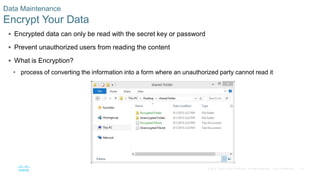
 Encrypted data can only be read with the secret key or password
 Prevent unauthorized users from reading the content
 What is Encryption?
• process of converting the information into a form where an unauthorized party cannot read it
34© 2016 Cisco and/or its affiliates. All rights reserved. Cisco Confidential
Data Maintenance
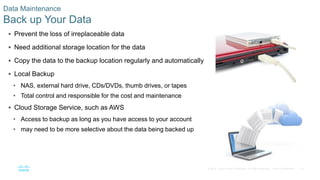
Back up Your Data
 Prevent the loss of irreplaceable data
 Need additional storage location for the data
 Copy the data to the backup location regularly and automatically
 Local Backup
• NAS, external hard drive, CDs/DVDs, thumb drives, or tapes
• Total control and responsible for the cost and maintenance
 Cloud Storage Service, such as AWS
• Access to backup as long as you have access to your account
• may need to be more selective about the data being backed up
35© 2016 Cisco and/or its affiliates. All rights reserved. Cisco Confidential
Data Maintenance
Deleting Your Data Permanently
 Use available tools to delete permanently: SDelete and Secure Empty Trash, for example
 Destroy the storage device to ensure that the data is unrecoverable
 Delete the online versions
36© 2016 Cisco and/or its affiliates. All rights reserved. Cisco Confidential
Safeguarding Your Online
Privacy
37© 2016 Cisco and/or its affiliates. All rights reserved. Cisco Confidential
Strong Authentication
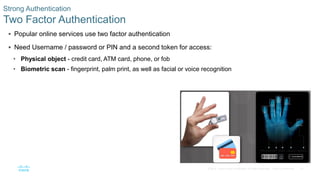
Two Factor Authentication
 Popular online services use two factor authentication
 Need Username / password or PIN and a second token for access:
• Physical object - credit card, ATM card, phone, or fob
• Biometric scan - fingerprint, palm print, as well as facial or voice recognition
38© 2016 Cisco and/or its affiliates. All rights reserved. Cisco Confidential
Strong Authentication
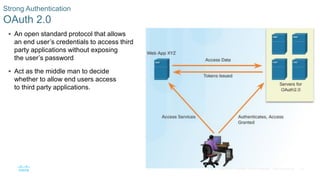
OAuth 2.0
 An open standard protocol that allows
an end user’s credentials to access third
party applications without exposing
the user’s password
 Act as the middle man to decide
whether to allow end users access
to third party applications.
39© 2016 Cisco and/or its affiliates. All rights reserved. Cisco Confidential
Sharing Too Much Information?
Do Not Share Too Much on Social Media
 Share as little information as possible on social media
 Do not share information such as:
• Birth date
• Email address
• Phone number
 Check your social media settings
40© 2016 Cisco and/or its affiliates. All rights reserved. Cisco Confidential
Sharing Too Much Information
Email and Web Browser Privacy
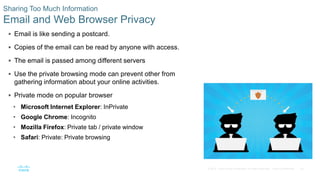
 Email is like sending a postcard.
 Copies of the email can be read by anyone with access.
 The email is passed among different servers
 Use the private browsing mode can prevent other from
gathering information about your online activities.
 Private mode on popular browser
• Microsoft Internet Explorer: InPrivate
• Google Chrome: Incognito
• Mozilla Firefox: Private tab / private window
• Safari: Private: Private browsing
41© 2016 Cisco and/or its affiliates. All rights reserved. Cisco Confidential
Protecting the Organization
Introduction to Cybersecurity v2.1
Planning Guide
42© 2016 Cisco and/or its affiliates. All rights reserved. Cisco Confidential
Firewalls
43© 2016 Cisco and/or its affiliates. All rights reserved. Cisco Confidential
Firewalls Types
Firewall Types
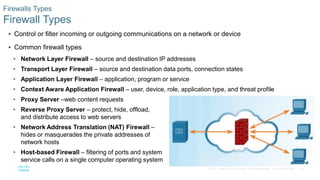
 Control or filter incoming or outgoing communications on a network or device
 Common firewall types
• Network Layer Firewall – source and destination IP addresses
• Transport Layer Firewall – source and destination data ports, connection states
• Application Layer Firewall – application, program or service
• Context Aware Application Firewall – user, device, role, application type, and threat profile
• Proxy Server –web content requests
• Reverse Proxy Server – protect, hide, offload,
and distribute access to web servers
• Network Address Translation (NAT) Firewall –
hides or masquerades the private addresses of
network hosts
• Host-based Firewall – filtering of ports and system
service calls on a single computer operating system
44© 2016 Cisco and/or its affiliates. All rights reserved. Cisco Confidential
Firewall Types
Port Scanning
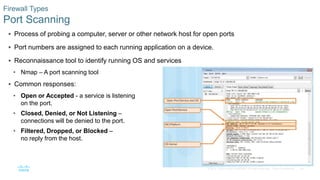
 Process of probing a computer, server or other network host for open ports
 Port numbers are assigned to each running application on a device.
 Reconnaissance tool to identify running OS and services
• Nmap – A port scanning tool
 Common responses:
• Open or Accepted - a service is listening
on the port.
• Closed, Denied, or Not Listening –
connections will be denied to the port.
• Filtered, Dropped, or Blocked –
no reply from the host.
45© 2016 Cisco and/or its affiliates. All rights reserved. Cisco Confidential
Security Appliances
Security Appliances
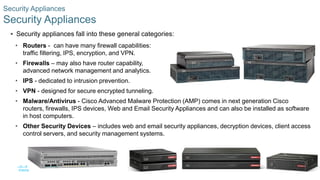
 Security appliances fall into these general categories:
• Routers - can have many firewall capabilities:
traffic filtering, IPS, encryption, and VPN.
• Firewalls – may also have router capability,
advanced network management and analytics.
• IPS - dedicated to intrusion prevention.
• VPN - designed for secure encrypted tunneling.
• Malware/Antivirus - Cisco Advanced Malware Protection (AMP) comes in next generation Cisco
routers, firewalls, IPS devices, Web and Email Security Appliances and can also be installed as software
in host computers.
• Other Security Devices – includes web and email security appliances, decryption devices, client access
control servers, and security management systems.
46© 2016 Cisco and/or its affiliates. All rights reserved. Cisco Confidential
Detecting Attacks in Real Time
 Zero-day attack
• A hacker exploits a flaw in a piece of software before the
creator can fix it.
 Real Time Scanning from Edge to Endpoint
• Actively scanning for attacks using firewall and IDS/IPS
network device
• detection with connections to online global threat centers
• detect network anomalies using context-based analysis
and behavior detection
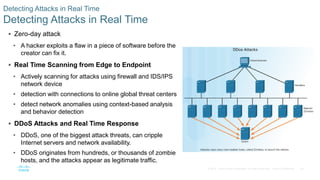
 DDoS Attacks and Real Time Response
• DDoS, one of the biggest attack threats, can cripple
Internet servers and network availability.
• DDoS originates from hundreds, or thousands of zombie
hosts, and the attacks appear as legitimate traffic.
47© 2016 Cisco and/or its affiliates. All rights reserved. Cisco Confidential
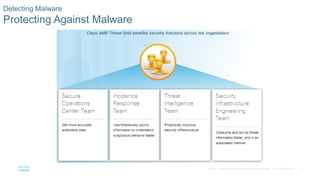
Detecting Malware
Protecting Against Malware
48© 2016 Cisco and/or its affiliates. All rights reserved. Cisco Confidential
Security Best Practices
 Some published Security Best Practices:
• Perform Risk Assessment – Knowing the value of what you are protecting will help in justifying security expenditures.
• Create a Security Policy – Create a policy that clearly outlines company rules, job duties, and expectations.
• Physical Security Measures – Restrict access to networking closets, server locations, as well as fire suppression.
• Human Resource Security Measures – Employees should be properly researched with background checks.
• Perform and Test Backups – Perform regular backups and test data recovery from backups.
• Maintain Security Patches and Updates – Regularly update server, client, and network device operating systems and
programs.
• Employ Access Controls – Configure user roles and privilege levels as well as strong user authentication.
• Regularly Test Incident Response – Employ an incident response team and test emergency response scenarios.
• Implement a Network Monitoring, Analytics and Management Tool - Choose a security monitoring solution that
integrates with other technologies.
• Implement Network Security Devices – Use next generation routers, firewalls, and other security appliances.
• Implement a Comprehensive Endpoint Security Solution – Use enterprise level antimalware and antivirus software.
• Educate Users – Educate users and employees in secure procedures.
• Encrypt data – Encrypt all sensitive company data including email.
49© 2016 Cisco and/or its affiliates. All rights reserved. Cisco Confidential
Behavior Approach to
Cybersecurity
50© 2016 Cisco and/or its affiliates. All rights reserved. Cisco Confidential
Botnet
Botnet
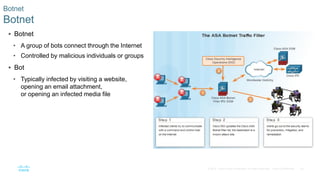
 Botnet
• A group of bots connect through the Internet
• Controlled by malicious individuals or groups
 Bot
• Typically infected by visiting a website,
opening an email attachment,
or opening an infected media file
51© 2016 Cisco and/or its affiliates. All rights reserved. Cisco Confidential
Kill Chain
The Kill Chain in Cyberdefense
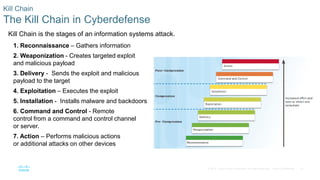
Kill Chain is the stages of an information systems attack.
1. Reconnaissance – Gathers information
2. Weaponization - Creates targeted exploit
and malicious payload
3. Delivery - Sends the exploit and malicious
payload to the target
4. Exploitation – Executes the exploit
5. Installation - Installs malware and backdoors
6. Command and Control - Remote
control from a command and control channel
or server.
7. Action – Performs malicious actions
or additional attacks on other devices
52© 2016 Cisco and/or its affiliates. All rights reserved. Cisco Confidential
Behavior-Based Security
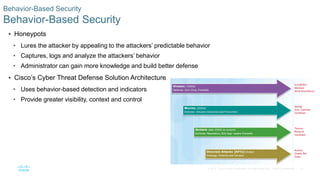
 Honeypots
• Lures the attacker by appealing to the attackers’ predictable behavior
• Captures, logs and analyze the attackers’ behavior
• Administrator can gain more knowledge and build better defense
 Cisco’s Cyber Threat Defense Solution Architecture
• Uses behavior-based detection and indicators
• Provide greater visibility, context and control
53© 2016 Cisco and/or its affiliates. All rights reserved. Cisco Confidential
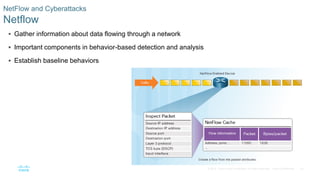
NetFlow and Cyberattacks
Netflow
 Gather information about data flowing through a network
 Important components in behavior-based detection and analysis
 Establish baseline behaviors
Need for cybersecurity

Need for cybersecurity

  • 1.
  • 2.
    2© 2016 Ciscoand/or its affiliates. All rights reserved. Cisco Confidential Need for Cybersecurity Introduction to Cybersecurity v2.1 Planning Guide
  • 3.
    3© 2016 Ciscoand/or its affiliates. All rights reserved. Cisco Confidential  What is Cybersecurity? • Protection of networked system and data from unauthorized use or harm  Your Online and Offline Identity • Offline Identity • Your identity that interacts on a regular basis at home, school or work • Online Identity • Your identity while you are in cyberspace • Should only reveal a limited amount of information about you • Username or alias • Should not include any personal information • Should be appropriate and respectful • Should not attract unwanted attention Personal Data Introduction to Personal Data
  • 4.
    4© 2016 Ciscoand/or its affiliates. All rights reserved. Cisco Confidential  Your Data • Medical Records • electronic health records (EHR) – physical, mental, and other personal information • prescriptions • Education Records • Grades, test scores, courses taken, awards and degrees rewarded • Attendance • Disciplinary reports • Employment and Financial Records • Income and expenditures • Tax records – paycheck stubs, credit card statements, credit rating and banking statement • Past employment and performance Personal Data Introduction to Personal Data
  • 5.
    5© 2016 Ciscoand/or its affiliates. All rights reserved. Cisco Confidential  Where is Your Data? • Medical records: doctor’s office, insurance company • Store loyalty cards • Stores compile your purchases • Marketing partner uses the profiles for target advertisement • Online pictures: friends, strangers may also have a copy  Your Computer Devices • Data storage and your portal to your online data • List some example of your computing devices Personal Data Introduction to Personal Data
  • 6.
    6© 2016 Ciscoand/or its affiliates. All rights reserved. Cisco Confidential  How do the criminals get your money? • Online credentials • Gives thieves access to your accounts • Creative schemes • Trick into wiring money to your friends or family  Why do they want your identity? • Long-term profits • Medical benefits • File a fake tax return • Open credit card accounts • Obtain loans Personal Data Personal Data as a Target
  • 7.
    7© 2016 Ciscoand/or its affiliates. All rights reserved. Cisco Confidential  Types of Organizational Data • Traditional Data • Personnel – application materials, payroll, offer letter, employee agreements • Intellectual – patents, trademarks, product plans, trade secrets • Financial – income statements, balance sheets, cash flow statements • Internet of Things and Big Data • IoT – large network of physical objects, such as sensors • Big Data – data from the IoT  Confidentiality, Integrity and Availability • Confidentiality – privacy • Integrity – accuracy and trustworthiness of the information • Availability – information is accessible Organizational Data Introduction to Organizational Data
  • 8.
    8© 2016 Ciscoand/or its affiliates. All rights reserved. Cisco Confidential  The Consequences of a Security Breach • Not feasible to prevent every attack • Attackers will always find new ways • Ruined reputation, vandalism, theft, revenue lost, damaged intellectual property  Security Breach Example - LastPass • An online password manager • Stolen email addresses, password reminders, and authentication hashes • Requires email verification or multi-factor authentication when logging in from an unknown device • Users should use complex master password, change master password periodically, and beware of phishing attacks Organizational Data The Impact of a Security Breach
  • 9.
    9© 2016 Ciscoand/or its affiliates. All rights reserved. Cisco Confidential Attacks, Concepts and Techniques Introduction to Cybersecurity v2.1 Planning Guide
  • 10.
    10© 2016 Ciscoand/or its affiliates. All rights reserved. Cisco Confidential  Amateurs • Script kiddies with little or no skill • Using existing tools or instructions found online for attacks  Hackers - break into computers or networks to gain access • White hats – break into system with permission to discover weaknesses so that the security of these systems can be improved • Gray hats – compromise systems without permission • Black hats - take advantage of any vulnerability for illegal personal, financial or political gain  Organized Hackers - organizations of cyber criminals, hacktivists, terrorists, and state-sponsored hackers. The Profile of a Cyber Attacker Types of Attackers
  • 11.
    11© 2016 Ciscoand/or its affiliates. All rights reserved. Cisco Confidential  Internal Security Threats • Can be an employee or contract partner • Mishandle confidential data • Threaten the operations of internal servers or network infrastructure devices • Facilitate outside attacks by connecting infected USB media into the corporate computer system • Accidentally invite malware onto the network through malicious email or websites • Can cause great damage because of direct access  External Security Threats • exploit vulnerabilities in network or computing devices • use social engineering to gain access The Profile of a Cyber Attacker Internal and External Threats
  • 12.
    12© 2016 Ciscoand/or its affiliates. All rights reserved. Cisco Confidential  What is Cyberwarfare? • Conflict using cyberspace • Stuxnet malware • Designed to damage Iran’s nuclear enrichment plant • Used modular coding • Used stolen digital certificates Overview of Cyberwarfare What is Cyberwarfare
  • 13.
    13© 2016 Ciscoand/or its affiliates. All rights reserved. Cisco Confidential  Use to gain advantage over adversaries, nations or competitors • Can sabotage the infrastructure of other nations • Give the attackers the ability to blackmail governmental personnel • Citizens may lose confidence in the government’s ability to protect them. • Affect the citizens’ faith in their government without ever physically invading the targeted nation. Overview of Cyberwarfare The Purpose of Cyberwarfare
  • 14.
    14© 2016 Ciscoand/or its affiliates. All rights reserved. Cisco Confidential Security Vulnerability and Exploits Finding Security Vulnerabilities  An exploit is the term used to describe a program written to take advantage of a known vulnerability.  An attack is the act of using an exploit against a vulnerability.  Software vulnerability • Errors in OS or application code • SYNful Knock – Vulnerability in Cisco IOS • allows attackers to gain control of the routers • monitor network communication • infect other network devices. • Project Zero – Google formed a permanent team dedicated to finding software vulnerabilities.  Hardware vulnerability • Hardware design flaws • Rowhammer - RAM memory exploit allows data to be retrieved from nearby address memory cells.
  • 15.
    15© 2016 Ciscoand/or its affiliates. All rights reserved. Cisco Confidential Types of Security Vulnerabilities Categorizing Security Vulnerabilities  Buffer Overflow • Data is written beyond the limits of a buffer  Non-validated Input • Force programs to behave in an unintended way  Race Conditions • Improperly ordered or timed events  Weaknesses in Security Practices • Protect sensitive data through authentication, authorization, and encryption  Access-control Problems • Access control to physical equipment and resources • Security practices
  • 16.
    16© 2016 Ciscoand/or its affiliates. All rights reserved. Cisco Confidential Types of Malware and Symptoms Types of Malware  Malware is used to steal data, bypass access controls, cause harm to, or compromise a system.  Types of Malware • Spyware - track and spy on the user • Adware - deliver advertisements, usually comes with spyware • Bot - automatically perform action • Ransomware - hold a computer system or the data captive until a payment is made • Scareware - persuade the user to take a specific action based on fear. Initial Code Red Worm Infection
  • 17.
    17© 2016 Ciscoand/or its affiliates. All rights reserved. Cisco Confidential Types of Malware and Symptoms Types of Malware (Cont.)  Types of Malware (Cont.) • Rootkit - modify the operating system to create a backdoor • Virus - malicious executable code that is attached to other executable files • Trojan horse - carries out malicious operations under the guise of a desired operation • Worm - replicate themselves by independently exploiting vulnerabilities in networks • Man-in-The-Middle or Man-in-The-Mobile – take control over a device without the user’s knowledge Code Red Worm Infection 19 Hours Later
  • 18.
    18© 2016 Ciscoand/or its affiliates. All rights reserved. Cisco Confidential Types of Malware and Symptoms Symptoms of Malware  There is an increase in CPU usage.  There is a decrease in computer speed.  The computer freezes or crashes often.  There is a decrease in Web browsing speed.  There are unexplainable problems with network connections.  Files are modified.  Files are deleted.  There is a presence of unknown files, programs, or desktop icons.  There are unknown processes running.  Programs are turning off or reconfiguring themselves.  Email is being sent without the user’s knowledge or consent.
  • 19.
    19© 2016 Ciscoand/or its affiliates. All rights reserved. Cisco Confidential Methods of Infiltration Social Engineering  Social Engineering – manipulation of individual into performing actions or divulging confidential information • Pretexting - an attacker calls an individual and lies to them in an attempt to gain access to privileged data. • Tailgating - an attacker quickly follows an authorized person into a secure location. • Something for something (Quid pro quo) - an attacker requests personal information from a party in exchange for something
  • 20.
    20© 2016 Ciscoand/or its affiliates. All rights reserved. Cisco Confidential Methods of Infiltration Wi-Fi Password Cracking  Wi-Fi Password Cracking – Password discovery • Social engineering - The attacker manipulates a person who knows the password into providing it. • Brute-force attacks - The attacker tries several possible passwords in an attempt to guess the password. • Network sniffing - The password maybe discovered by listening and capturing packets send on the network.
  • 21.
    21© 2016 Ciscoand/or its affiliates. All rights reserved. Cisco Confidential Methods of Infiltration Phishing  Phishing • malicious party sends a fraudulent email disguised as being from a legitimate, trusted source • trick the recipient into installing malware on their device or sharing personal or financial information  Spear phishing • a highly targeted phishing attack
  • 22.
    22© 2016 Ciscoand/or its affiliates. All rights reserved. Cisco Confidential Methods of Infiltration Vulnerability Exploitation  Vulnerability Exploitation – scan to find vulnerability to exploit • Step 1 - Gather information about the target system using port scanner or social engineering • Step 2 - Determine learned information from step 1 • Step 3 - Look for vulnerability • Step 4 - Use a known exploit or write a new exploit  Advanced Persistent Threats – a multi-phase, long term, stealthy and advanced operation against a specific target • usually well-funded • deploy customized malware
  • 23.
    23© 2016 Ciscoand/or its affiliates. All rights reserved. Cisco Confidential Denial of Service DoS  DoS is a disruption of network services • Overwhelming quantity of traffic - a network, host, or application is sent an enormous quantity of data at a rate which it cannot handle • Maliciously formatted packets - maliciously formatted packet is sent to a host or application and the receiver is unable to handle it
  • 24.
    24© 2016 Ciscoand/or its affiliates. All rights reserved. Cisco Confidential Denial of Service DDoS  Similar to DoS, from multiple, coordinated sources  Botnet - a network of infected hosts  Zombie - infected hosts  The zombies are controlled by handler systems.  The zombies continues to infect more hosts, creating more zombies.
  • 25.
    25© 2016 Ciscoand/or its affiliates. All rights reserved. Cisco Confidential Denial of Service SEO Poisoning  SEO • Search Engine Optimization • Techniques to improve a website’s ranking by a search engine  SEO Poisoning • Increase traffic to malicious websites • Force malicious sites to rank higher
  • 26.
    26© 2016 Ciscoand/or its affiliates. All rights reserved. Cisco Confidential Blended Attack What is a Blended Attack?  Uses multiple techniques to compromise a target  Uses a hybrid of worms, Trojan horses, spyware, keyloggers, spam and phishing schemes  Common blended attack example • spam email messages, instant messages or legitimate websites to distribute links • DDoS combined with phishing emails  Examples: Nimbda, CodeRed, BugBear, Klez, Slammer, Zeus/LICAT, and Conficker
  • 27.
    27© 2016 Ciscoand/or its affiliates. All rights reserved. Cisco Confidential Impact Reduction What is Impact Reduction?  Communicate the issue  Be sincere and accountable  Provide details  Understand the cause of the breach  Take steps to avoid another similar breach in the future  Ensure all systems are clean  Educate employees, partners and customers
  • 28.
    28© 2016 Ciscoand/or its affiliates. All rights reserved. Cisco Confidential Protecting Your Data
  • 29.
    29© 2016 Ciscoand/or its affiliates. All rights reserved. Cisco Confidential Protecting Your Devices and Network Protecting Your Computing Devices  Keep the Firewall On • Prevent unauthorized access to your data or computing devices • Keep the firewall up to date  Use Antivirus and Antispyware • Prevent unauthorized access to your data or computing devices • Only download software from trusted websites • Keep the software up to date  Manage Your Operating System and Browser • Set the security settings at medium or higher • Update your computer’s operating system and browser • Download and install the latest software patches and security updates  Protect All Your Devices • Password protect • Encrypt the data • Only store necessary information • IoT devices
  • 30.
    30© 2016 Ciscoand/or its affiliates. All rights reserved. Cisco Confidential Protecting Your Devices and Network Use Wireless Networks Safely  Home Wireless Network • Change the pre-set SSID and default administrative password on your Wi-Fi router. • Disable SSID broadcast • Use WPA2 encryption feature • Be aware of WPA2 protocol security flaw – KRACK • Allows intruder to break the encryption between wireless router and clients  Use caution when using public Wi-Fi hotspots • Avoid accessing or sending sensitive information • Use of VPN tunnel can prevent eavesdropping  Turn off Bluetooth when not in use
  • 31.
    31© 2016 Ciscoand/or its affiliates. All rights reserved. Cisco Confidential Protecting Your Devices and Network Use Unique Passwords for Each Online Account  Prevents criminals from accessing all your online accounts using one stolen credentials  Use password managers to help with remembering passwords  Tips for choosing a good password: • Do not use dictionary words or names in any languages • Do not use common misspellings of dictionary words • Do not use computer names or account names • If possible use special characters, such as ! @ # $ % ^ & * ( ) • Use a password with ten or more characters
  • 32.
    32© 2016 Ciscoand/or its affiliates. All rights reserved. Cisco Confidential Protecting Your Devices and Network Use Passphrase Rather Than a Password  Tips in choosing a good passphrase: • Choose a meaningful statement to you • Add special characters, such as ! @ # $ % ^ & * ( ) • The longer the better • Avoid common or famous statements, for example, lyrics from a popular song  Summary of the new NIST guidelines: • 8 characters minimum in length, but no more than 64 characters • No common, easily guessed passwords, such as password, abc123 • No composition rules, such as having to include lowercase and uppercase letters and numbers • No knowledge-based authentication, such as information from shared secret questions, marketing data, transaction history • Improve typing accuracy by allowing the user to see the password while typing • All printing characters and spaces are allowed • No password hints • No periodical or arbitrary password expiration
  • 33.
    33© 2016 Ciscoand/or its affiliates. All rights reserved. Cisco Confidential Data Maintenance Encrypt Your Data  Encrypted data can only be read with the secret key or password  Prevent unauthorized users from reading the content  What is Encryption? • process of converting the information into a form where an unauthorized party cannot read it
  • 34.
    34© 2016 Ciscoand/or its affiliates. All rights reserved. Cisco Confidential Data Maintenance Back up Your Data  Prevent the loss of irreplaceable data  Need additional storage location for the data  Copy the data to the backup location regularly and automatically  Local Backup • NAS, external hard drive, CDs/DVDs, thumb drives, or tapes • Total control and responsible for the cost and maintenance  Cloud Storage Service, such as AWS • Access to backup as long as you have access to your account • may need to be more selective about the data being backed up
  • 35.
    35© 2016 Ciscoand/or its affiliates. All rights reserved. Cisco Confidential Data Maintenance Deleting Your Data Permanently  Use available tools to delete permanently: SDelete and Secure Empty Trash, for example  Destroy the storage device to ensure that the data is unrecoverable  Delete the online versions
  • 36.
    36© 2016 Ciscoand/or its affiliates. All rights reserved. Cisco Confidential Safeguarding Your Online Privacy
  • 37.
    37© 2016 Ciscoand/or its affiliates. All rights reserved. Cisco Confidential Strong Authentication Two Factor Authentication  Popular online services use two factor authentication  Need Username / password or PIN and a second token for access: • Physical object - credit card, ATM card, phone, or fob • Biometric scan - fingerprint, palm print, as well as facial or voice recognition
  • 38.
    38© 2016 Ciscoand/or its affiliates. All rights reserved. Cisco Confidential Strong Authentication OAuth 2.0  An open standard protocol that allows an end user’s credentials to access third party applications without exposing the user’s password  Act as the middle man to decide whether to allow end users access to third party applications.
  • 39.
    39© 2016 Ciscoand/or its affiliates. All rights reserved. Cisco Confidential Sharing Too Much Information? Do Not Share Too Much on Social Media  Share as little information as possible on social media  Do not share information such as: • Birth date • Email address • Phone number  Check your social media settings
  • 40.
    40© 2016 Ciscoand/or its affiliates. All rights reserved. Cisco Confidential Sharing Too Much Information Email and Web Browser Privacy  Email is like sending a postcard.  Copies of the email can be read by anyone with access.  The email is passed among different servers  Use the private browsing mode can prevent other from gathering information about your online activities.  Private mode on popular browser • Microsoft Internet Explorer: InPrivate • Google Chrome: Incognito • Mozilla Firefox: Private tab / private window • Safari: Private: Private browsing
  • 41.
    41© 2016 Ciscoand/or its affiliates. All rights reserved. Cisco Confidential Protecting the Organization Introduction to Cybersecurity v2.1 Planning Guide
  • 42.
    42© 2016 Ciscoand/or its affiliates. All rights reserved. Cisco Confidential Firewalls
  • 43.
    43© 2016 Ciscoand/or its affiliates. All rights reserved. Cisco Confidential Firewalls Types Firewall Types  Control or filter incoming or outgoing communications on a network or device  Common firewall types • Network Layer Firewall – source and destination IP addresses • Transport Layer Firewall – source and destination data ports, connection states • Application Layer Firewall – application, program or service • Context Aware Application Firewall – user, device, role, application type, and threat profile • Proxy Server –web content requests • Reverse Proxy Server – protect, hide, offload, and distribute access to web servers • Network Address Translation (NAT) Firewall – hides or masquerades the private addresses of network hosts • Host-based Firewall – filtering of ports and system service calls on a single computer operating system
  • 44.
    44© 2016 Ciscoand/or its affiliates. All rights reserved. Cisco Confidential Firewall Types Port Scanning  Process of probing a computer, server or other network host for open ports  Port numbers are assigned to each running application on a device.  Reconnaissance tool to identify running OS and services • Nmap – A port scanning tool  Common responses: • Open or Accepted - a service is listening on the port. • Closed, Denied, or Not Listening – connections will be denied to the port. • Filtered, Dropped, or Blocked – no reply from the host.
  • 45.
    45© 2016 Ciscoand/or its affiliates. All rights reserved. Cisco Confidential Security Appliances Security Appliances  Security appliances fall into these general categories: • Routers - can have many firewall capabilities: traffic filtering, IPS, encryption, and VPN. • Firewalls – may also have router capability, advanced network management and analytics. • IPS - dedicated to intrusion prevention. • VPN - designed for secure encrypted tunneling. • Malware/Antivirus - Cisco Advanced Malware Protection (AMP) comes in next generation Cisco routers, firewalls, IPS devices, Web and Email Security Appliances and can also be installed as software in host computers. • Other Security Devices – includes web and email security appliances, decryption devices, client access control servers, and security management systems.
  • 46.
    46© 2016 Ciscoand/or its affiliates. All rights reserved. Cisco Confidential Detecting Attacks in Real Time Detecting Attacks in Real Time  Zero-day attack • A hacker exploits a flaw in a piece of software before the creator can fix it.  Real Time Scanning from Edge to Endpoint • Actively scanning for attacks using firewall and IDS/IPS network device • detection with connections to online global threat centers • detect network anomalies using context-based analysis and behavior detection  DDoS Attacks and Real Time Response • DDoS, one of the biggest attack threats, can cripple Internet servers and network availability. • DDoS originates from hundreds, or thousands of zombie hosts, and the attacks appear as legitimate traffic.
  • 47.
    47© 2016 Ciscoand/or its affiliates. All rights reserved. Cisco Confidential Detecting Malware Protecting Against Malware
  • 48.
    48© 2016 Ciscoand/or its affiliates. All rights reserved. Cisco Confidential Security Best Practices Security Best Practices  Some published Security Best Practices: • Perform Risk Assessment – Knowing the value of what you are protecting will help in justifying security expenditures. • Create a Security Policy – Create a policy that clearly outlines company rules, job duties, and expectations. • Physical Security Measures – Restrict access to networking closets, server locations, as well as fire suppression. • Human Resource Security Measures – Employees should be properly researched with background checks. • Perform and Test Backups – Perform regular backups and test data recovery from backups. • Maintain Security Patches and Updates – Regularly update server, client, and network device operating systems and programs. • Employ Access Controls – Configure user roles and privilege levels as well as strong user authentication. • Regularly Test Incident Response – Employ an incident response team and test emergency response scenarios. • Implement a Network Monitoring, Analytics and Management Tool - Choose a security monitoring solution that integrates with other technologies. • Implement Network Security Devices – Use next generation routers, firewalls, and other security appliances. • Implement a Comprehensive Endpoint Security Solution – Use enterprise level antimalware and antivirus software. • Educate Users – Educate users and employees in secure procedures. • Encrypt data – Encrypt all sensitive company data including email.
  • 49.
    49© 2016 Ciscoand/or its affiliates. All rights reserved. Cisco Confidential Behavior Approach to Cybersecurity
  • 50.
    50© 2016 Ciscoand/or its affiliates. All rights reserved. Cisco Confidential Botnet Botnet  Botnet • A group of bots connect through the Internet • Controlled by malicious individuals or groups  Bot • Typically infected by visiting a website, opening an email attachment, or opening an infected media file
  • 51.
    51© 2016 Ciscoand/or its affiliates. All rights reserved. Cisco Confidential Kill Chain The Kill Chain in Cyberdefense Kill Chain is the stages of an information systems attack. 1. Reconnaissance – Gathers information 2. Weaponization - Creates targeted exploit and malicious payload 3. Delivery - Sends the exploit and malicious payload to the target 4. Exploitation – Executes the exploit 5. Installation - Installs malware and backdoors 6. Command and Control - Remote control from a command and control channel or server. 7. Action – Performs malicious actions or additional attacks on other devices
  • 52.
    52© 2016 Ciscoand/or its affiliates. All rights reserved. Cisco Confidential Behavior-Based Security Behavior-Based Security  Honeypots • Lures the attacker by appealing to the attackers’ predictable behavior • Captures, logs and analyze the attackers’ behavior • Administrator can gain more knowledge and build better defense  Cisco’s Cyber Threat Defense Solution Architecture • Uses behavior-based detection and indicators • Provide greater visibility, context and control
  • 53.
    53© 2016 Ciscoand/or its affiliates. All rights reserved. Cisco Confidential NetFlow and Cyberattacks Netflow  Gather information about data flowing through a network  Important components in behavior-based detection and analysis  Establish baseline behaviors