NATFailoverwithDual ISP onCisco RouterconfigurationExplained withExample
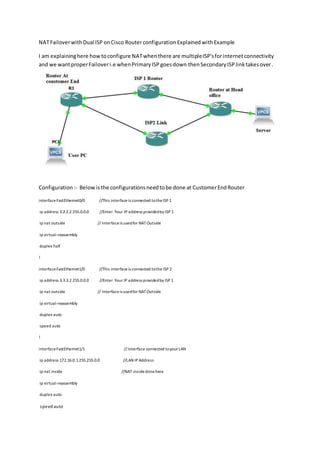
I am explaininghere howtoconfigure NATwhenthere are multipleISP'sforinternetconnectivity
and we wantproperFailoveri.e whenPrimaryISPgoesdown thenSecondary ISP linktakesover.
Configuration:- Belowisthe configurationsneedtobe done at CustomerEndRouter
interfaceFastEthernet0/0 //This interfaceis connected totheISP 1
ip address 2.2.2.2 255.0.0.0 //Enter Your IP address providedby ISP 1
ip nat outside // Interfaceis usedfor NATOutside
ip virtual-reassembly
duplex half
!
interfaceFastEthernet1/0 //This interfaceis connected tothe ISP 2
ip address 3.3.3.2 255.0.0.0 //Enter Your IP address providedby ISP 1
ip nat outside // Interfaceis usedfor NATOutside
ip virtual-reassembly
duplex auto
speed auto
!
interfaceFastEthernet1/1 // Interface connected toyourLAN
ip address 172.16.0.1255.255.0.0 //LAN IP Address
ip nat inside //NAT insidedonehere
ip virtual-reassembly
duplex auto
speedauto
ip sla 1 //IPSLA commandwhere 1 is the SLA number
icmp-echo 4.4.4.2 source-ip2.2.2.2 //4.4.4.2 is the destination/remote router interface to be pinged and 2.2.2.2 is the source IP address
interface from we ping the remote server or interface
frequency50
timeout 50
ip sla schedule 1 life forever start-time now //SLA start immediate andforever
access-list 101 permit ipanyany //Create Accesslist ownthis is a examplethat allowall host
route-mapisp1 permit 10 // Create Router Mapto ISp1
match ipaddress 101 //match The access list 101, which network/host,range ofnetwork is allowed
match interface FastEthernet0/0 // Match the interface
route-mapisp2 permit 10 // Create the router Mapto ISP2
match ip address 101 //match The accesslist 101, whichnetwork /host,range of networkis allowed
match interface FastEthernet1/0 //Match Interface connected to ISP2
Crate the NAT rule
ip nat inside source route-map isp1 interface FastEthernet0/0 overload
ip nat inside source route-map isp2 interface FastEthernet1/0 overload
track 1 rtr 1 reachability //Create track to Trackkthe IPSLA 1 we have created
Now you need to ceate the default router
ip route 0.0.0.0 0.0.0.0 2.2.2.1 track 1 //Default route Pointingtowards ISP1 withtrack1
ip route 0.0.0.0 0.0.0.0 3.3.3.1 10 // Default router withPointing towards ISP2 with Administrative distance AD 10

Nat failover with dual isp on cisco router configuration explained with example

  • 1.
    NATFailoverwithDual ISP onCiscoRouterconfigurationExplained withExample I am explaininghere howtoconfigure NATwhenthere are multipleISP'sforinternetconnectivity and we wantproperFailoveri.e whenPrimaryISPgoesdown thenSecondary ISP linktakesover. Configuration:- Belowisthe configurationsneedtobe done at CustomerEndRouter interfaceFastEthernet0/0 //This interfaceis connected totheISP 1 ip address 2.2.2.2 255.0.0.0 //Enter Your IP address providedby ISP 1 ip nat outside // Interfaceis usedfor NATOutside ip virtual-reassembly duplex half ! interfaceFastEthernet1/0 //This interfaceis connected tothe ISP 2 ip address 3.3.3.2 255.0.0.0 //Enter Your IP address providedby ISP 1 ip nat outside // Interfaceis usedfor NATOutside ip virtual-reassembly duplex auto speed auto ! interfaceFastEthernet1/1 // Interface connected toyourLAN ip address 172.16.0.1255.255.0.0 //LAN IP Address ip nat inside //NAT insidedonehere ip virtual-reassembly duplex auto speedauto
  • 2.
    ip sla 1//IPSLA commandwhere 1 is the SLA number icmp-echo 4.4.4.2 source-ip2.2.2.2 //4.4.4.2 is the destination/remote router interface to be pinged and 2.2.2.2 is the source IP address interface from we ping the remote server or interface frequency50 timeout 50 ip sla schedule 1 life forever start-time now //SLA start immediate andforever access-list 101 permit ipanyany //Create Accesslist ownthis is a examplethat allowall host route-mapisp1 permit 10 // Create Router Mapto ISp1 match ipaddress 101 //match The access list 101, which network/host,range ofnetwork is allowed match interface FastEthernet0/0 // Match the interface route-mapisp2 permit 10 // Create the router Mapto ISP2 match ip address 101 //match The accesslist 101, whichnetwork /host,range of networkis allowed match interface FastEthernet1/0 //Match Interface connected to ISP2 Crate the NAT rule ip nat inside source route-map isp1 interface FastEthernet0/0 overload ip nat inside source route-map isp2 interface FastEthernet1/0 overload track 1 rtr 1 reachability //Create track to Trackkthe IPSLA 1 we have created Now you need to ceate the default router ip route 0.0.0.0 0.0.0.0 2.2.2.1 track 1 //Default route Pointingtowards ISP1 withtrack1 ip route 0.0.0.0 0.0.0.0 3.3.3.1 10 // Default router withPointing towards ISP2 with Administrative distance AD 10