

PHP Failover site / MySQL Failover
CubeXS Weatherly (Pvt) Ltd.
• What is Failover / DR / Redundant Site
• What is Replication
• How database replication works
• Advantages of Replication
• Types of Database Replications
• How to setup replication
• How to Monitor Replication
• Failover Steps
• Reverse Failover Steps
Index
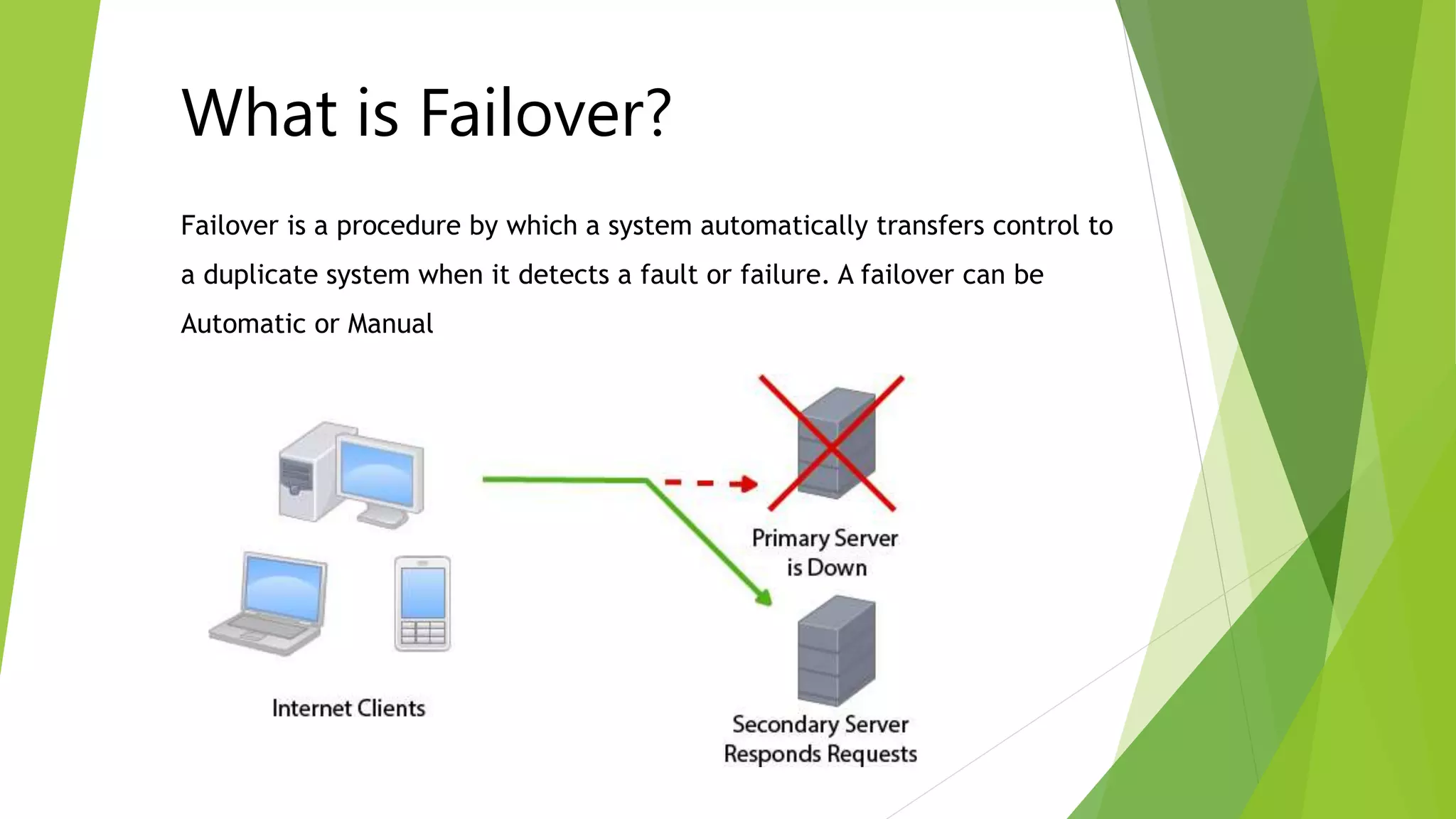
Failover is a procedure by which a system automatically transfers control to
a duplicate system when it detects a fault or failure. A failover can be
Automatic or Manual
What is Failover?
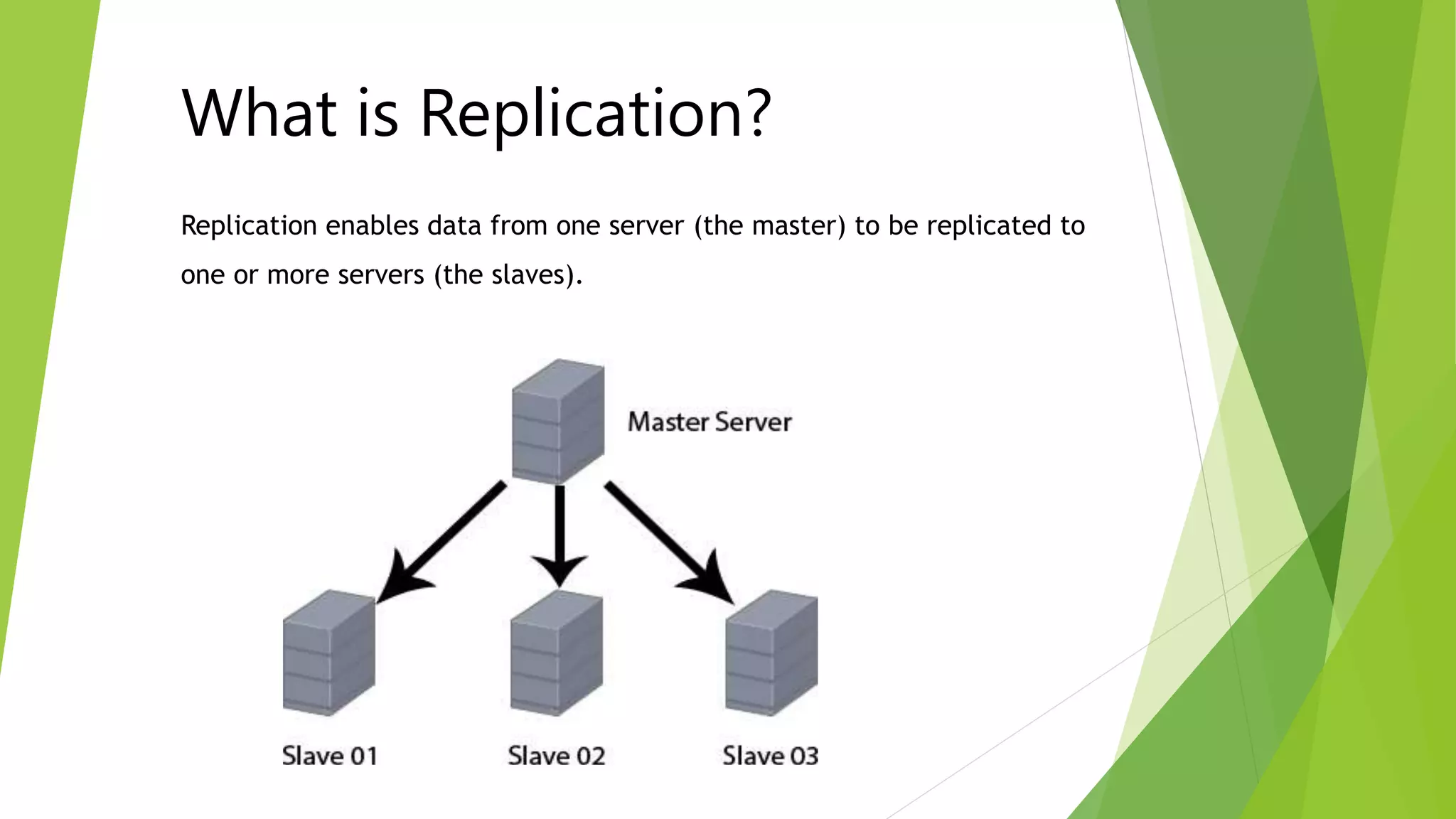
Replication enables data from one server (the master) to be replicated to
one or more servers (the slaves).
What is Replication?
MySQL Replication is asynchronous. slaves need not be connected
permanently to receive updates from the master. This means that updates
can occur over long-distance connections. Depending on the configuration,
you can replicate all databases, selected databases, or even selected tables
within a database
How MySQL Database
Replication works?
• Scale-out solutions
spreading the load among multiple slaves to improve performance. In this
environment, all writes and updates must take place on the master server.
Reads, however, may take place on one or more slaves. This model can improve
the performance of writes (since the master is dedicated to updates), while
dramatically increasing read speed across an increasing number of slaves.
• Data security
because data is replicated to the slave, and the slave can pause the replication
process, it is possible to run backup services on the slave without corrupting the
corresponding master data.
• Analytics
live data can be created on the master, while the analysis of the information
can take place on the slave without affecting the performance of the master.
• Long-distance data distribution
if a branch office would like to work with a copy of your main data, you can use
replication to create a local copy of the data for their use without requiring
permanent access to the master.
Advantages of MySQL
Database Replication
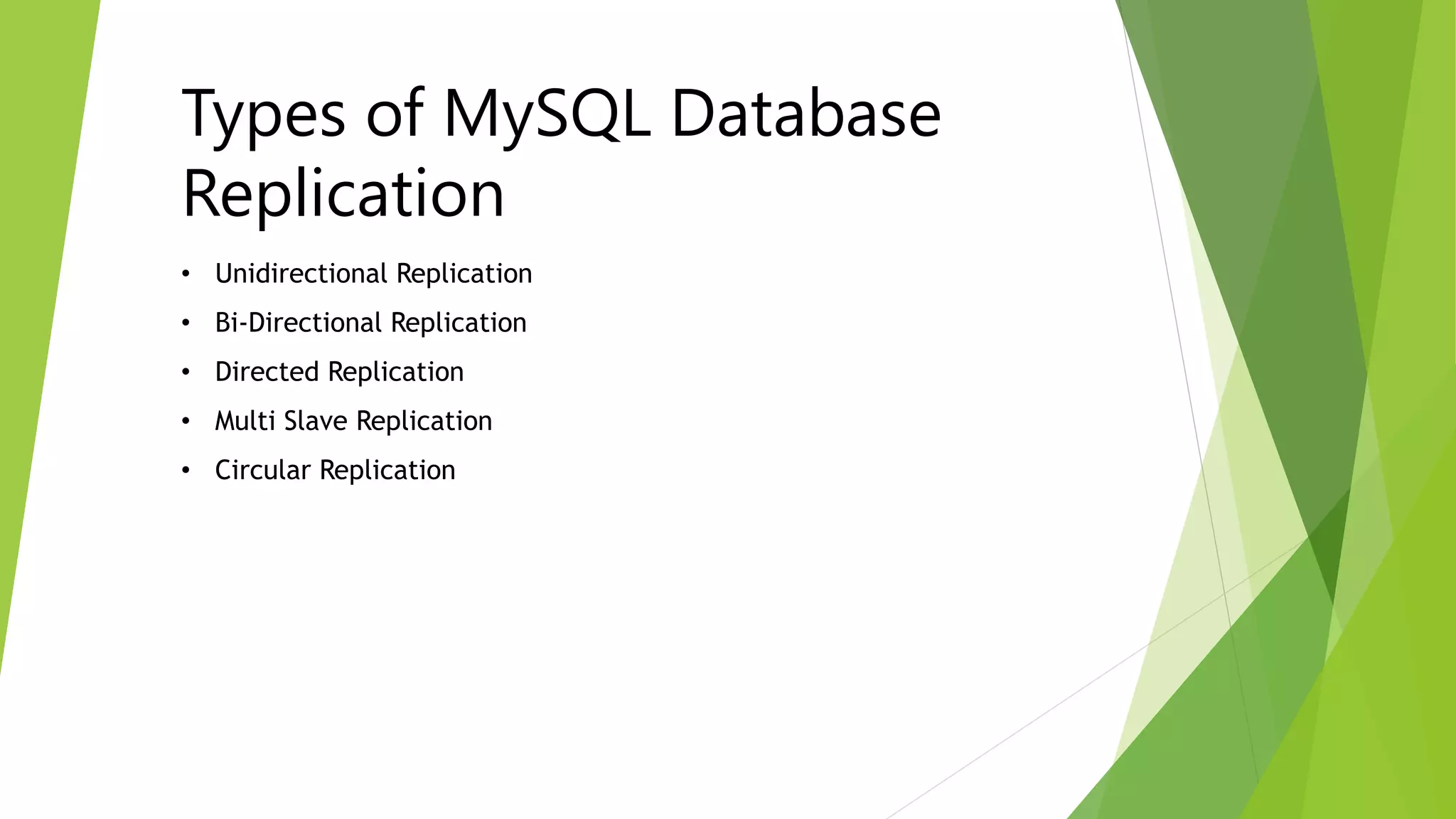
• Unidirectional Replication
• Bi-Directional Replication
• Directed Replication
• Multi Slave Replication
• Circular Replication
Types of MySQL Database
Replication
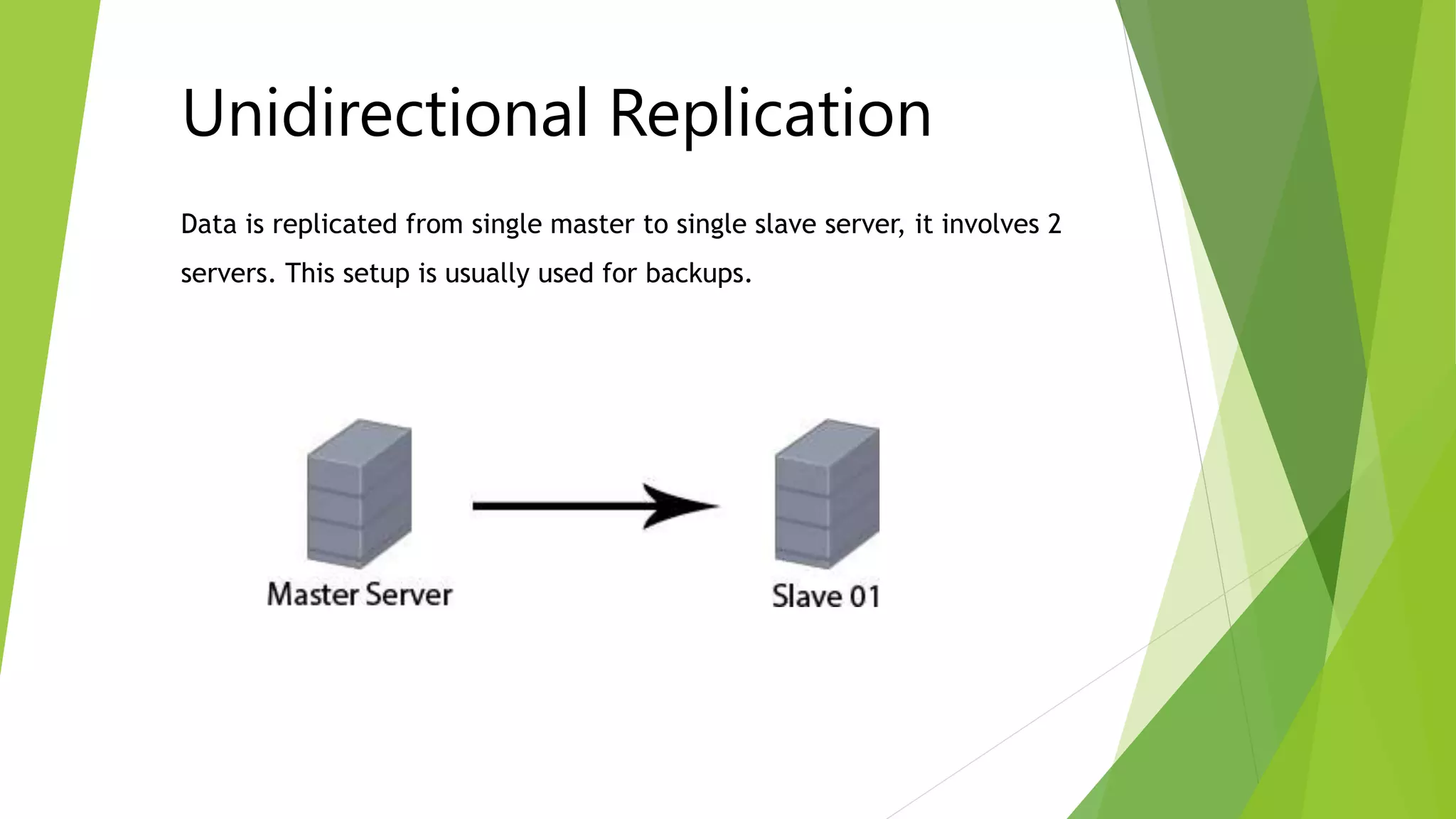
Data is replicated from single master to single slave server, it involves 2
servers. This setup is usually used for backups.
Unidirectional Replication
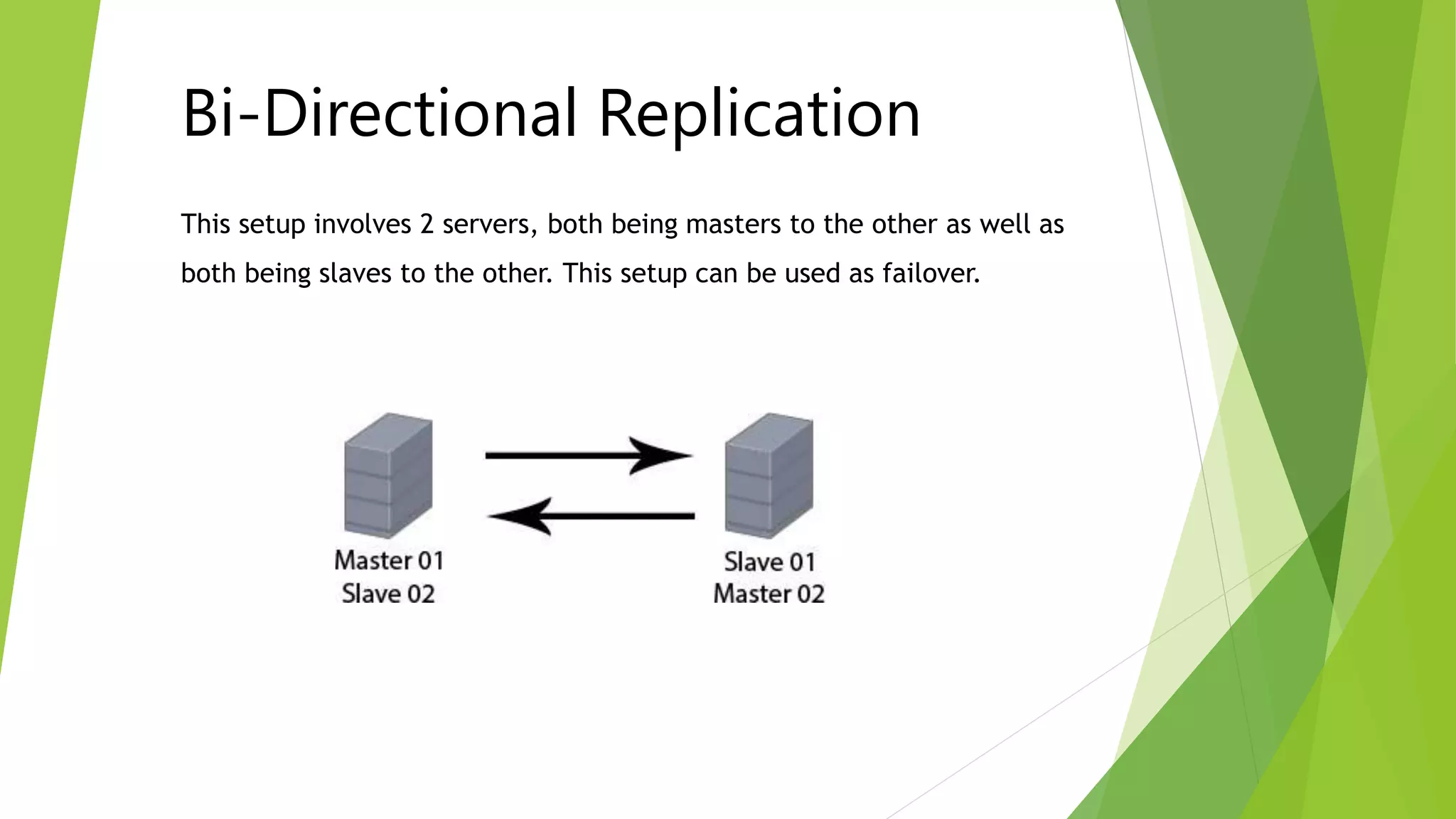
This setup involves 2 servers, both being masters to the other as well as
both being slaves to the other. This setup can be used as failover.
Bi-Directional Replication
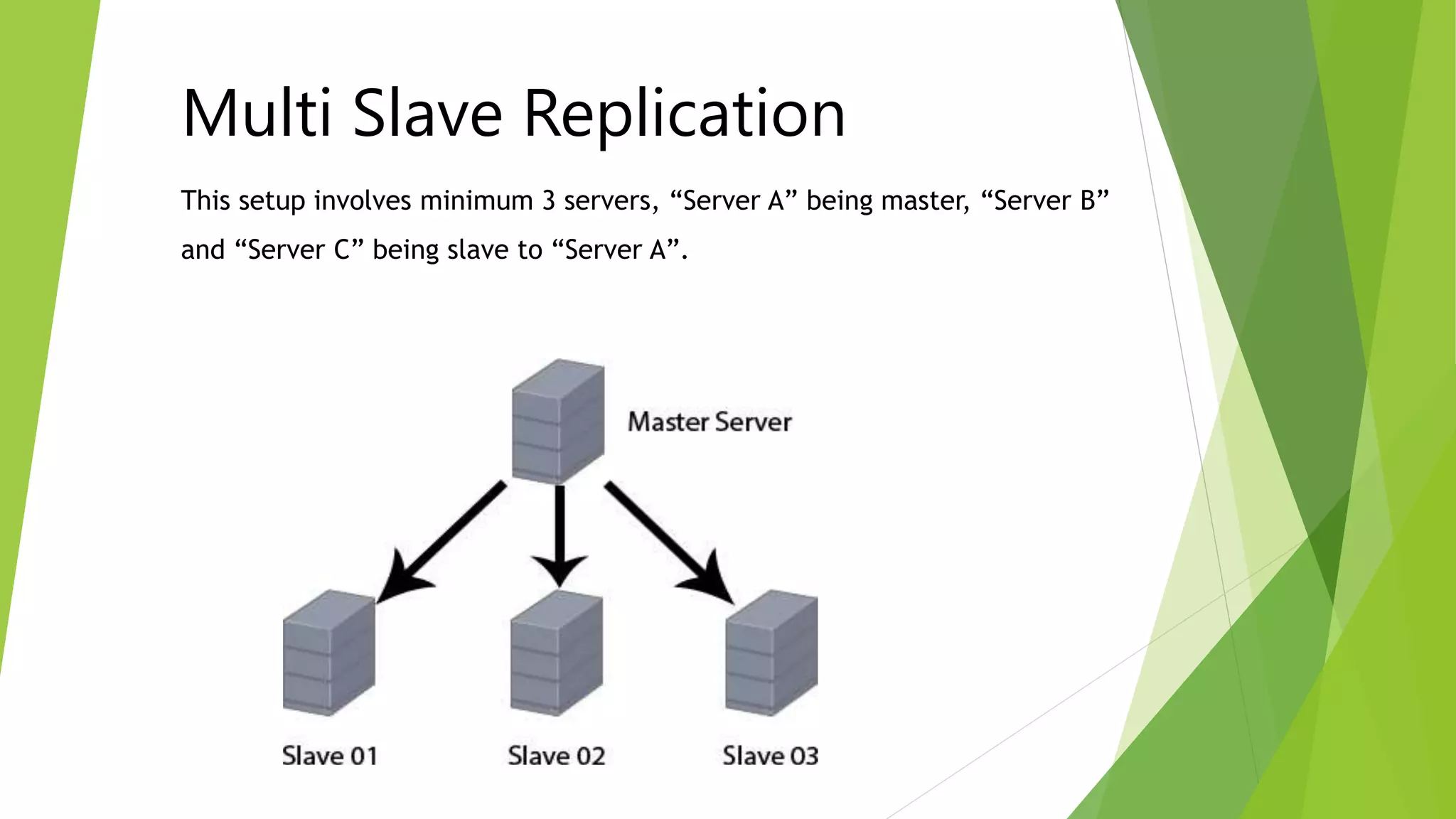
This setup involves minimum 3 servers, “Server A” being master, “Server B”
and “Server C” being slave to “Server A”.
Multi Slave Replication
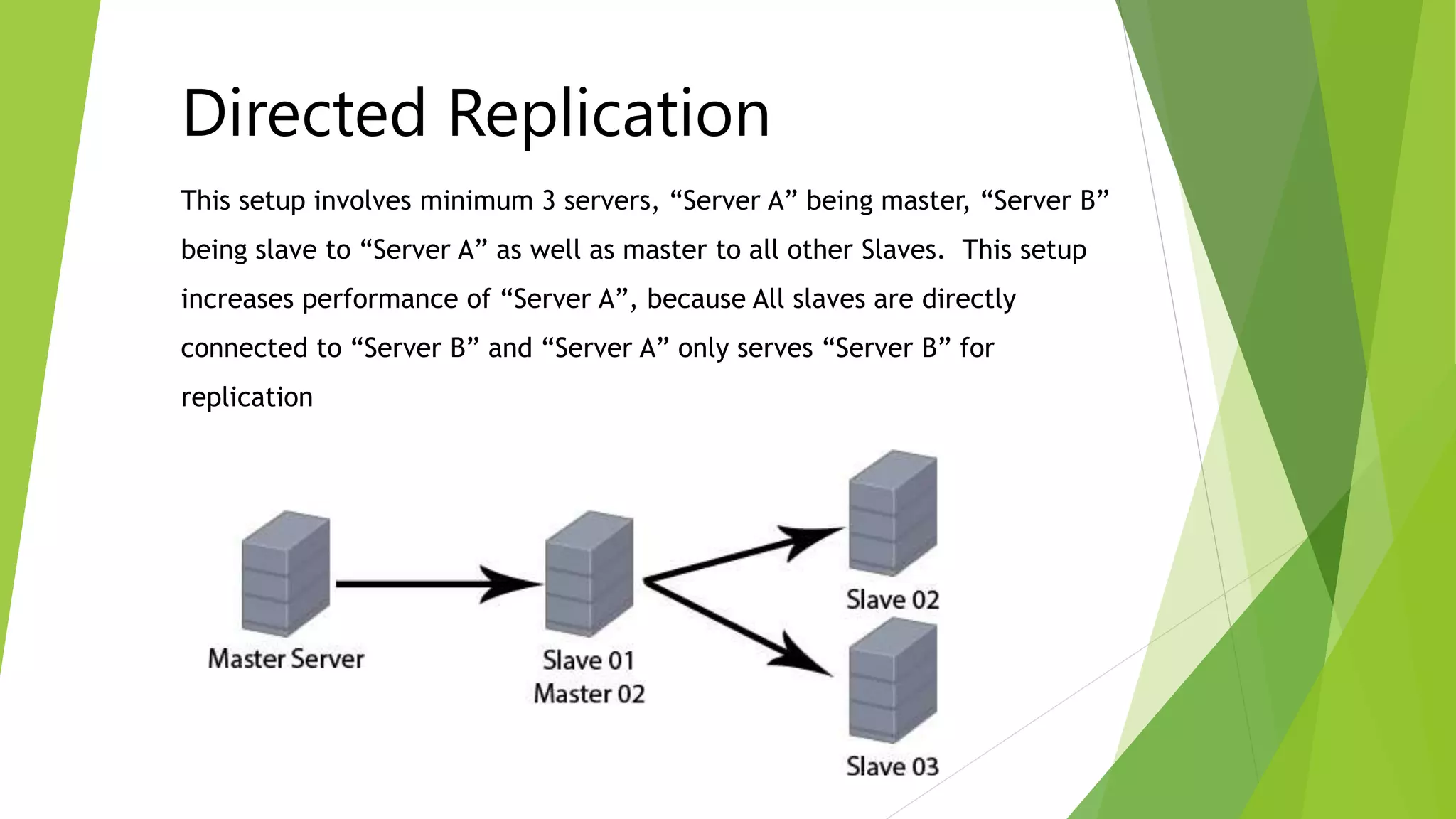
This setup involves minimum 3 servers, “Server A” being master, “Server B”
being slave to “Server A” as well as master to all other Slaves. This setup
increases performance of “Server A”, because All slaves are directly
connected to “Server B” and “Server A” only serves “Server B” for
replication
Directed Replication
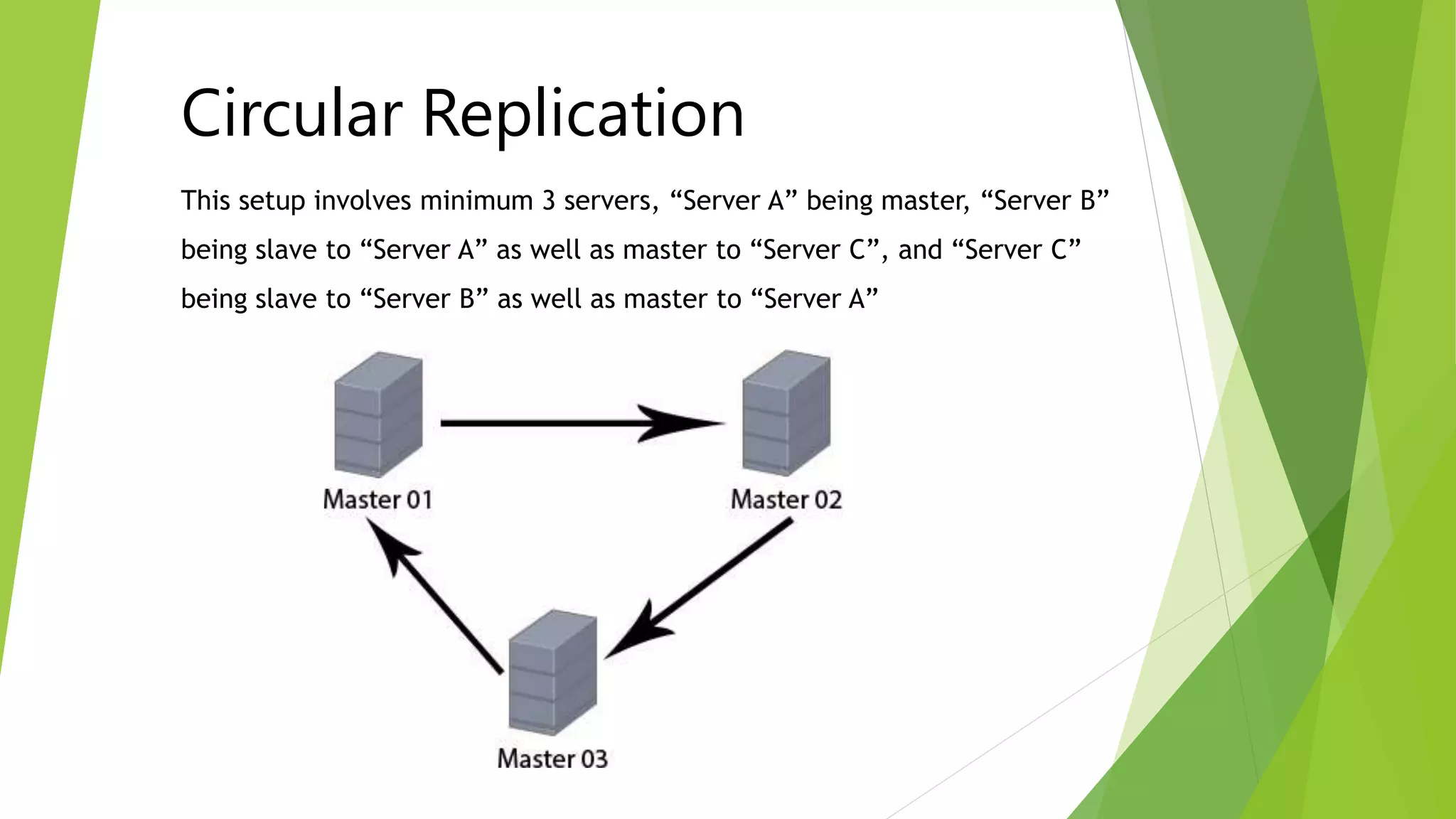
This setup involves minimum 3 servers, “Server A” being master, “Server B”
being slave to “Server A” as well as master to “Server C”, and “Server C”
being slave to “Server B” as well as master to “Server A”
Circular Replication
1. Add below directives in MySQL configuration file (my.cnf) and restart
MySQL services
server-id=1
log-bin=mysql-bin
log-error=mysql-bin.err
2. Connect Master Server and Add Replication User (Recommended)
3. Connect each Slave Server and execute below command
mysql> CHANGE MASTER TO MASTER_HOST=‘master_ip',
MASTER_USER='replication_username', MASTER_PASSWORD='replication_password‘;
mysql> Start Slave;
How to Setup Replication
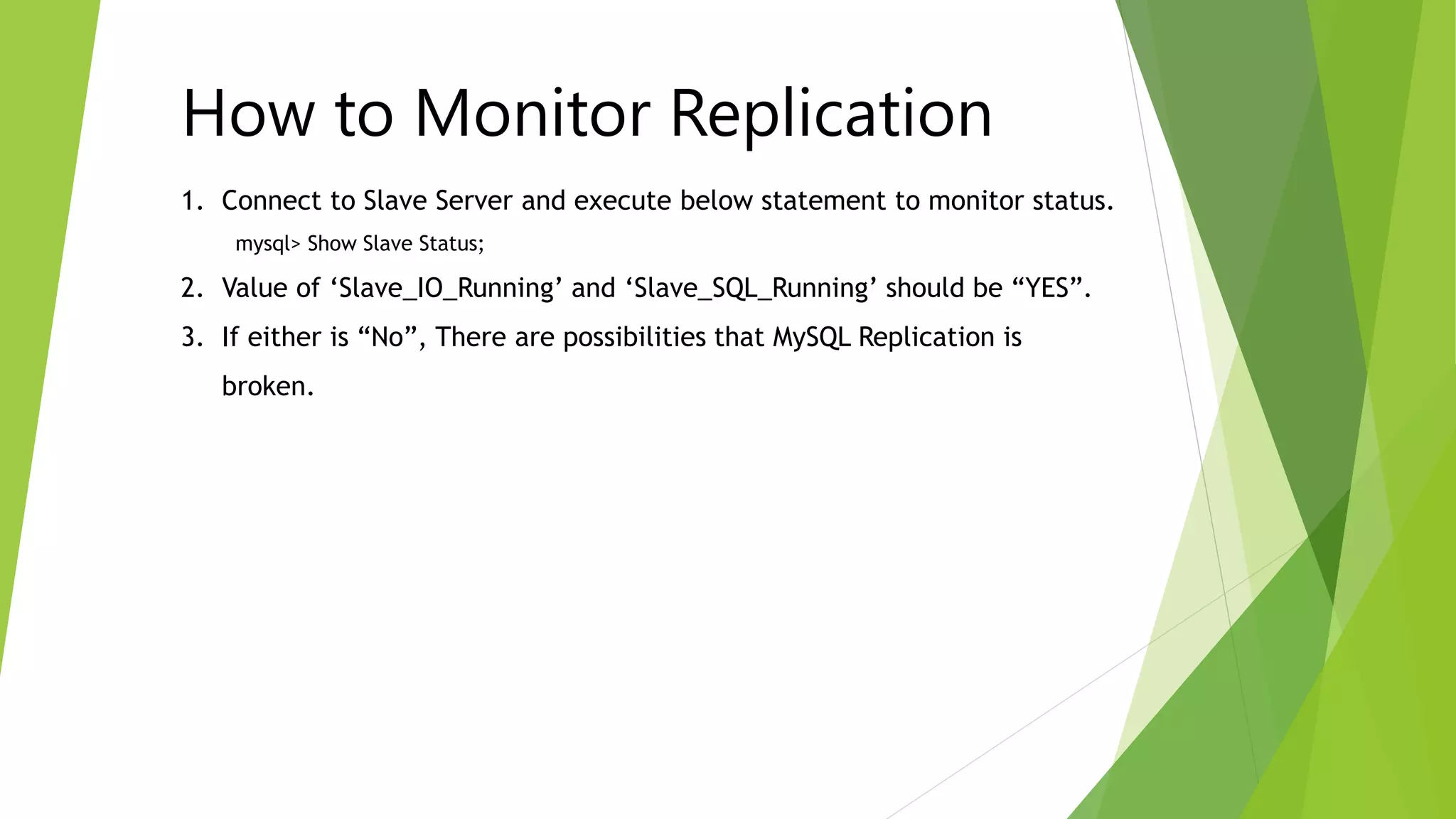
1. Connect to Slave Server and execute below statement to monitor status.
mysql> Show Slave Status;
2. Value of ‘Slave_IO_Running’ and ‘Slave_SQL_Running’ should be “YES”.
3. If either is “No”, There are possibilities that MySQL Replication is
broken.
How to Monitor Replication
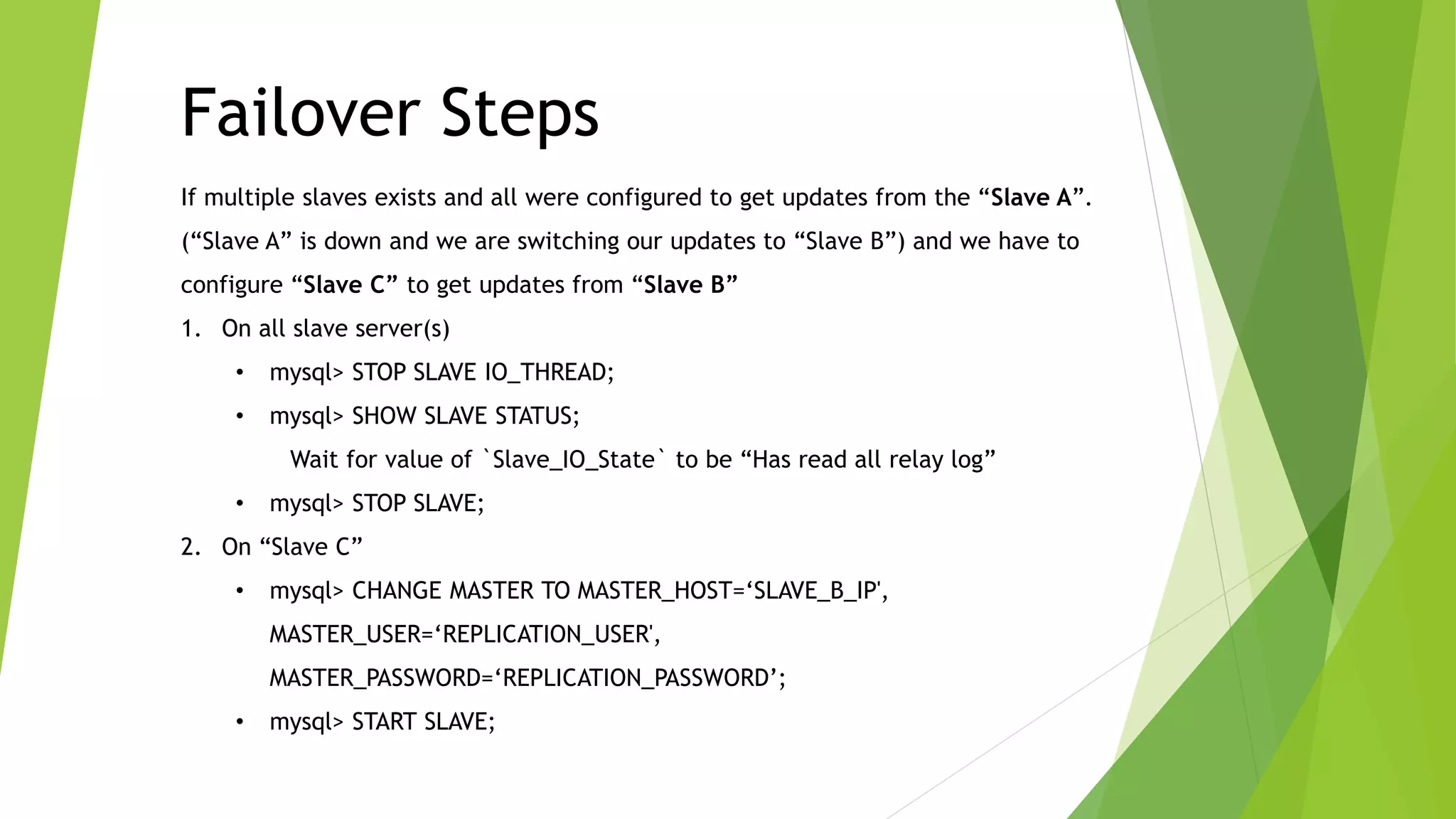
If multiple slaves exists and all were configured to get updates from the “Slave A”.
(“Slave A” is down and we are switching our updates to “Slave B”) and we have to
configure “Slave C” to get updates from “Slave B”
1. On all slave server(s)
• mysql> STOP SLAVE IO_THREAD;
• mysql> SHOW SLAVE STATUS;
Wait for value of `Slave_IO_State` to be “Has read all relay log”
• mysql> STOP SLAVE;
2. On “Slave C”
• mysql> CHANGE MASTER TO MASTER_HOST=‘SLAVE_B_IP',
MASTER_USER=‘REPLICATION_USER',
MASTER_PASSWORD=‘REPLICATION_PASSWORD’;
• mysql> START SLAVE;
Failover Steps
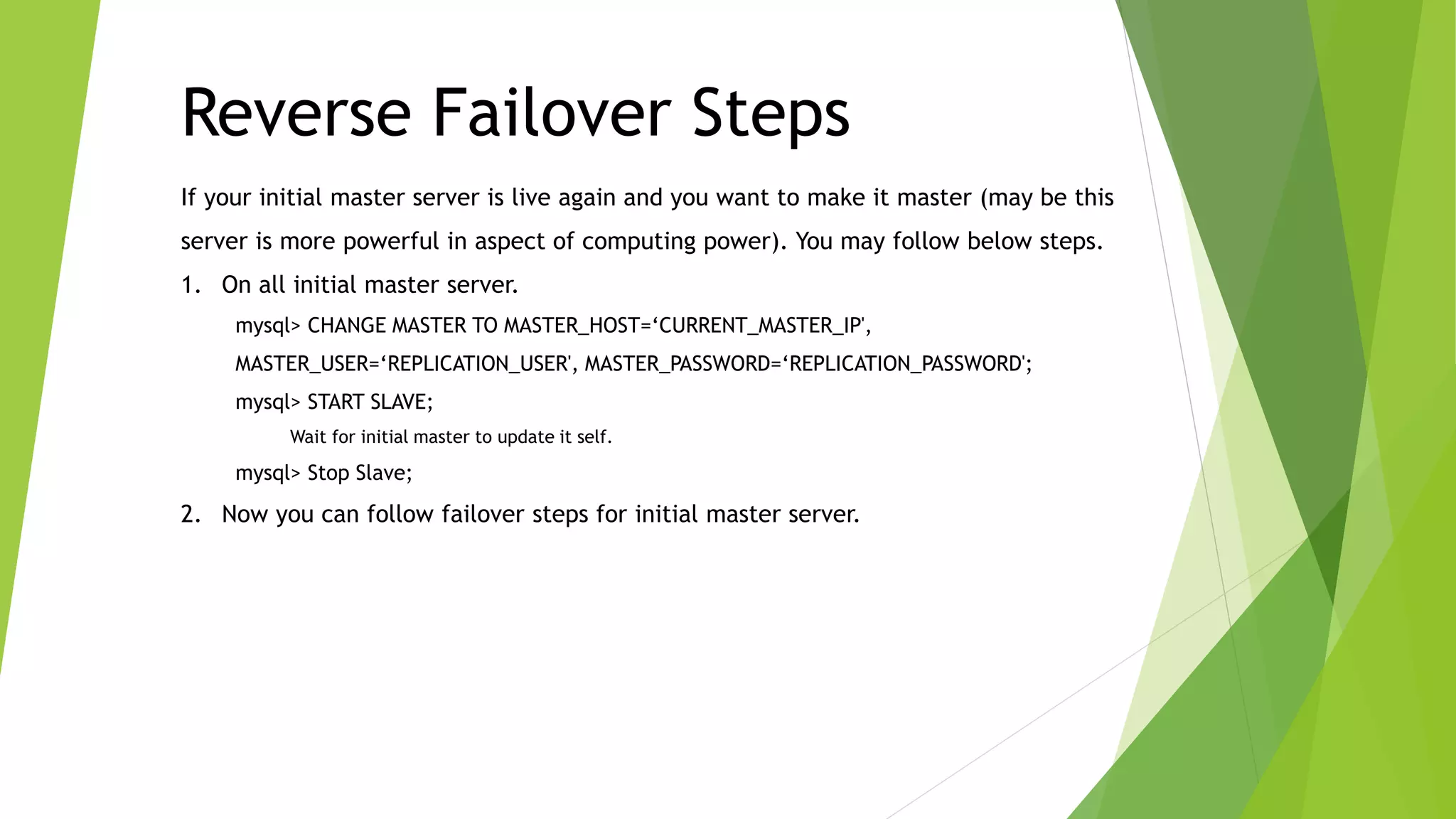
If your initial master server is live again and you want to make it master (may be this
server is more powerful in aspect of computing power). You may follow below steps.
1. On all initial master server.
mysql> CHANGE MASTER TO MASTER_HOST=‘CURRENT_MASTER_IP',
MASTER_USER=‘REPLICATION_USER', MASTER_PASSWORD=‘REPLICATION_PASSWORD';
mysql> START SLAVE;
Wait for initial master to update it self.
mysql> Stop Slave;
2. Now you can follow failover steps for initial master server.
Reverse Failover Steps
www.cubexsweatherly.com
sales@cubexsweatherly.com
+92 21 111-282-397

MySQL Failover - Cubexs Weatherly

  • 1.
    PHP Failover site/ MySQL Failover CubeXS Weatherly (Pvt) Ltd.
  • 2.
    • What isFailover / DR / Redundant Site • What is Replication • How database replication works • Advantages of Replication • Types of Database Replications • How to setup replication • How to Monitor Replication • Failover Steps • Reverse Failover Steps Index
  • 3.
    Failover is aprocedure by which a system automatically transfers control to a duplicate system when it detects a fault or failure. A failover can be Automatic or Manual What is Failover?
  • 4.
    Replication enables datafrom one server (the master) to be replicated to one or more servers (the slaves). What is Replication?
  • 5.
    MySQL Replication isasynchronous. slaves need not be connected permanently to receive updates from the master. This means that updates can occur over long-distance connections. Depending on the configuration, you can replicate all databases, selected databases, or even selected tables within a database How MySQL Database Replication works?
  • 6.
    • Scale-out solutions spreadingthe load among multiple slaves to improve performance. In this environment, all writes and updates must take place on the master server. Reads, however, may take place on one or more slaves. This model can improve the performance of writes (since the master is dedicated to updates), while dramatically increasing read speed across an increasing number of slaves. • Data security because data is replicated to the slave, and the slave can pause the replication process, it is possible to run backup services on the slave without corrupting the corresponding master data. • Analytics live data can be created on the master, while the analysis of the information can take place on the slave without affecting the performance of the master. • Long-distance data distribution if a branch office would like to work with a copy of your main data, you can use replication to create a local copy of the data for their use without requiring permanent access to the master. Advantages of MySQL Database Replication
  • 7.
    • Unidirectional Replication •Bi-Directional Replication • Directed Replication • Multi Slave Replication • Circular Replication Types of MySQL Database Replication
  • 8.
    Data is replicatedfrom single master to single slave server, it involves 2 servers. This setup is usually used for backups. Unidirectional Replication
  • 9.
    This setup involves2 servers, both being masters to the other as well as both being slaves to the other. This setup can be used as failover. Bi-Directional Replication
  • 10.
    This setup involvesminimum 3 servers, “Server A” being master, “Server B” and “Server C” being slave to “Server A”. Multi Slave Replication
  • 11.
    This setup involvesminimum 3 servers, “Server A” being master, “Server B” being slave to “Server A” as well as master to all other Slaves. This setup increases performance of “Server A”, because All slaves are directly connected to “Server B” and “Server A” only serves “Server B” for replication Directed Replication
  • 12.
    This setup involvesminimum 3 servers, “Server A” being master, “Server B” being slave to “Server A” as well as master to “Server C”, and “Server C” being slave to “Server B” as well as master to “Server A” Circular Replication
  • 13.
    1. Add belowdirectives in MySQL configuration file (my.cnf) and restart MySQL services server-id=1 log-bin=mysql-bin log-error=mysql-bin.err 2. Connect Master Server and Add Replication User (Recommended) 3. Connect each Slave Server and execute below command mysql> CHANGE MASTER TO MASTER_HOST=‘master_ip', MASTER_USER='replication_username', MASTER_PASSWORD='replication_password‘; mysql> Start Slave; How to Setup Replication
  • 14.
    1. Connect toSlave Server and execute below statement to monitor status. mysql> Show Slave Status; 2. Value of ‘Slave_IO_Running’ and ‘Slave_SQL_Running’ should be “YES”. 3. If either is “No”, There are possibilities that MySQL Replication is broken. How to Monitor Replication
  • 15.
    If multiple slavesexists and all were configured to get updates from the “Slave A”. (“Slave A” is down and we are switching our updates to “Slave B”) and we have to configure “Slave C” to get updates from “Slave B” 1. On all slave server(s) • mysql> STOP SLAVE IO_THREAD; • mysql> SHOW SLAVE STATUS; Wait for value of `Slave_IO_State` to be “Has read all relay log” • mysql> STOP SLAVE; 2. On “Slave C” • mysql> CHANGE MASTER TO MASTER_HOST=‘SLAVE_B_IP', MASTER_USER=‘REPLICATION_USER', MASTER_PASSWORD=‘REPLICATION_PASSWORD’; • mysql> START SLAVE; Failover Steps
  • 16.
    If your initialmaster server is live again and you want to make it master (may be this server is more powerful in aspect of computing power). You may follow below steps. 1. On all initial master server. mysql> CHANGE MASTER TO MASTER_HOST=‘CURRENT_MASTER_IP', MASTER_USER=‘REPLICATION_USER', MASTER_PASSWORD=‘REPLICATION_PASSWORD'; mysql> START SLAVE; Wait for initial master to update it self. mysql> Stop Slave; 2. Now you can follow failover steps for initial master server. Reverse Failover Steps
  • 17.