


Keith Hollman
MySQL Principal Solution Architect
keith.hollman@oracle.com
MySQL High Availability
InnoDB Cluster
Safe harbor statement
The following is intended to outline our general product direction. It is intended for information
purposes only, and may not be incorporated into any contract. It is not a commitment to deliver
any material, code, or functionality, and should not be relied upon in making purchasing
decisions.
The development, release, timing, and pricing of any features or functionality described for
Oracle’s products may change and remains at the sole discretion of Oracle Corporation.
High Availability: Terms and Concepts
 Availability
Outage and downtime
Mean Time Between Failures (MTBF)
Mean Time To Recover (MTTR)
Service Level Agreement (SLA)
The Nine’s Scale : 5 nines = 5 mins downtime per year
 Capacity / Performance
 Redundancy
 Fault Tolerance
 Disaster Tolerance/Recovery
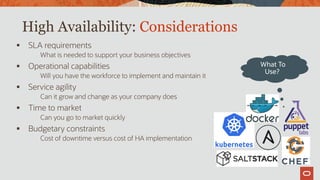
High Availability: Considerations
 SLA requirements
What is needed to support your business objectives
 Operational capabilities
Will you have the workforce to implement and maintain it
 Service agility
Can it grow and change as your company does
 Time to market
Can you go to market quickly
 Budgetary constraints
Cost of downtime versus cost of HA implementation
What To
Use?
High Availability: Factors
 Environment
Redundant servers in different datacenters and geographical areas will protect you against
regional issues—power grid failures, hurricanes, earthquakes, etc.
 Hardware
Each part of your hardware stack—networking, storage, servers—should be redundant
 Software
Every layer of the software stack needs to be duplicated and distributed across separate
hardware and environments
 Data
Data loss and inconsistency/corruption must be prevented by having multiple copies of each
piece of data, with consistency checks and guarantees for each change
High Availability: Design Factors
Reliability, Availability, and Serviceability (RAS)
Reliability
Quality hardware and software components that you can manage and trust
Availability
Multiple copies of each datum replicated to separate hardware
Multiple copies of each piece of the hardware and software stack
Multiple physical locations
Separate power grids
Enough physical distance to survive disasters such as floods, earthquakes, and power grid
outages
Resiliency
Automation to transparently deal with any potential failure in the infrastructure, hardware, software
Serviceability
Ensure that you can monitor, diagnose, maintain, and repair it all
High Availability: Database Needs
Management infrastructure
Monitoring of status, health, performance
Facilities for service changes, service transitions
Failure detection and handling
Identify and handle failures
Elasticity
Scale up to ensure acceptable performance is always maintained
Consistency guarantees
Conflict detection and handling ; data loss protection/prevention
Online maintenance
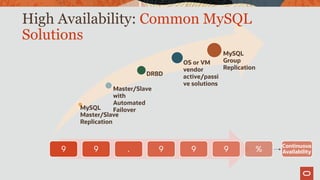
MySQL
Master/Slave
Replication
Master/Slave
with
Automated
Failover
DRBD
OS or VM
vendor
active/passi
ve solutions
MySQL
Group
Replication
High Availability: Common MySQL
Solutions
9 9 . 9 9 9 % Continuous
Availability
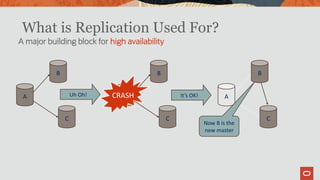
C
B
A
C
B
ACRASH
C
B
A
Now B is the
new master
Uh Oh! It’s OK!
A major building block for high availability
What is Replication Used For?
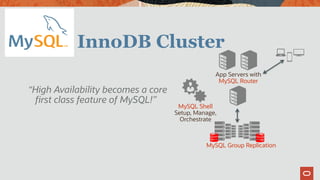
InnoDB Cluster
App Servers with
MySQL Router
MySQL Group Replication
MySQL Shell
Setup, Manage,
Orchestrate
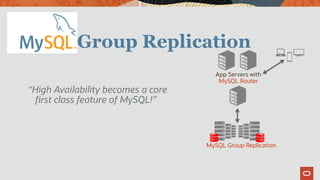
“High Availability becomes a core
first class feature of MySQL!”
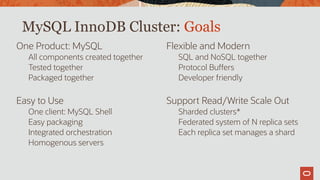
One Product: MySQL
All components created together
Tested together
Packaged together
Easy to Use
One client: MySQL Shell
Easy packaging
Integrated orchestration
Homogenous servers
Flexible and Modern
SQL and NoSQL together
Protocol Buffers
Developer friendly
Support Read/Write Scale Out
Sharded clusters*
Federated system of N replica sets
Each replica set manages a shard
MySQL InnoDB Cluster: Goals
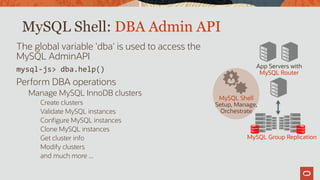
MySQL Shell: DBA Admin API
The global variable 'dba' is used to access the
MySQL AdminAPI
mysql-js> dba.help()
Perform DBA operations
Manage MySQL InnoDB clusters
Create clusters
Validate MySQL instances
Configure MySQL instances
Clone MySQL instances
Get cluster info
Modify clusters
and much more ...
App Servers with
MySQL Router
MySQL Group Replication
MySQL Shell
Setup, Manage,
Orchestrate
13
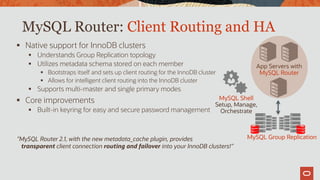
MySQL Router: Client Routing and HA
 Native support for InnoDB clusters
 Understands Group Replication topology
 Utilizes metadata schema stored on each member
 Bootstraps itself and sets up client routing for the InnoDB cluster
 Allows for intelligent client routing into the InnoDB cluster
 Supports multi-master and single primary modes
 Core improvements
 Built-in keyring for easy and secure password management
App Servers with
MySQL Router
MySQL Group Replication
MySQL Shell
Setup, Manage,
Orchestrate
”MySQL Router 2.1, with the new metadata_cache plugin, provides
transparent client connection routing and failover into your InnoDB clusters!”
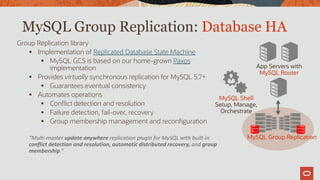
MySQL Group Replication: Database HA
Group Replication library
 Implementation of Replicated Database State Machine
 MySQL GCS is based on our home-grown Paxos
implementation
 Provides virtually synchronous replication for MySQL 5.7+
 Guarantees eventual consistency
 Automates operations
 Conflict detection and resolution
 Failure detection, fail-over, recovery
 Group membership management and reconfiguration
“Multi-master update anywhere replication plugin for MySQL with built-in
conflict detection and resolution, automatic distributed recovery, and group
membership.”
App Servers with
MySQL Router
MySQL Group Replication
MySQL Shell
Setup, Manage,
Orchestrate
Group Replication
App Servers with
MySQL Router
MySQL Group Replication
“High Availability becomes a core
first class feature of MySQL!”
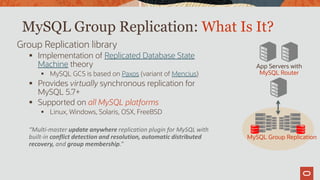
MySQL Group Replication: What Is It?
Group Replication library
 Implementation of Replicated Database State
Machine theory
 MySQL GCS is based on Paxos (variant of Mencius)
 Provides virtually synchronous replication for
MySQL 5.7+
 Supported on all MySQL platforms
 Linux, Windows, Solaris, OSX, FreeBSD
“Multi-master update anywhere replication plugin for MySQL with
built-in conflict detection and resolution, automatic distributed
recovery, and group membership.”
App Servers with
MySQL Router
MySQL Group Replication
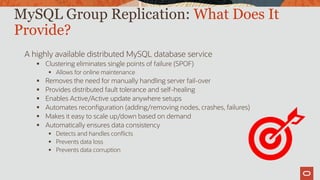
A highly available distributed MySQL database service
 Clustering eliminates single points of failure (SPOF)
 Allows for online maintenance
 Removes the need for manually handling server fail-over
 Provides distributed fault tolerance and self-healing
 Enables Active/Active update anywhere setups
 Automates reconfiguration (adding/removing nodes, crashes, failures)
 Makes it easy to scale up/down based on demand
 Automatically ensures data consistency
 Detects and handles conflicts
 Prevents data loss
 Prevents data corruption
MySQL Group Replication: What Does It
Provide?
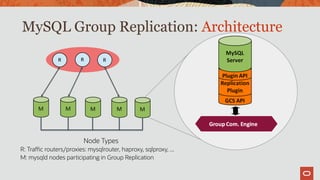
MySQL Group Replication: Architecture
Node Types
R: Traffic routers/proxies: mysqlrouter, haproxy, sqlproxy, ...
M: mysqld nodes participating in Group Replication
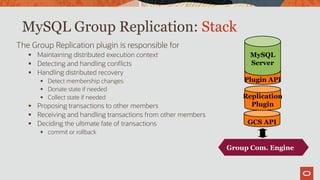
MySQL Group Replication: Stack
The Group Replication plugin is responsible for
 Maintaining distributed execution context
 Detecting and handling conflicts
 Handling distributed recovery
 Detect membership changes
 Donate state if needed
 Collect state if needed
 Proposing transactions to other members
 Receiving and handling transactions from other members
 Deciding the ultimate fate of transactions
 commit or rollback
GCS API
Replication
Plugin
Plugin API
MySQL
Server
Group Comm.
System (Corosync)
Group Com. Engine
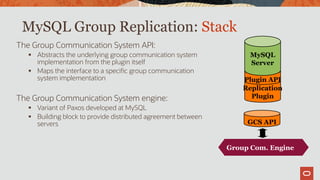
MySQL Group Replication: Stack
The Group Communication System API:
 Abstracts the underlying group communication system
implementation from the plugin itself
 Maps the interface to a specific group communication
system implementation
The Group Communication System engine:
 Variant of Paxos developed at MySQL
 Building block to provide distributed agreement between
servers GCS API
Replication
Plugin
Plugin API
MySQL
Server
Group Comm.
System (Corosync)
Group Com. Engine
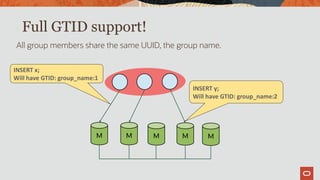
Full GTID support!
All group members share the same UUID, the group name.
M M M M M
INSERT y;
Will have GTID: group_name:2
INSERT x;
Will have GTID: group_name:1
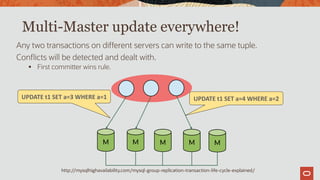
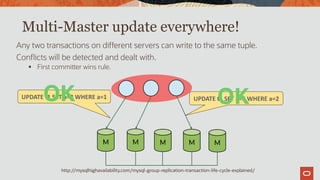
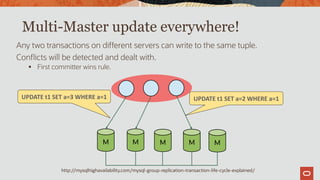
Multi-Master update everywhere!
Any two transactions on different servers can write to the same tuple.
Conflicts will be detected and dealt with.
 First committer wins rule.
M M M M M
UPDATE t1 SET a=4 WHERE a=2UPDATE t1 SET a=3 WHERE a=1
http://mysqlhighavailability.com/mysql-group-replication-transaction-life-cycle-explained/
Multi-Master update everywhere!
Any two transactions on different servers can write to the same tuple.
Conflicts will be detected and dealt with.
 First committer wins rule.
M M M M M
UPDATE t1 SET a=4 WHERE a=2UPDATE t1 SET a=3 WHERE a=1
OKOK
http://mysqlhighavailability.com/mysql-group-replication-transaction-life-cycle-explained/
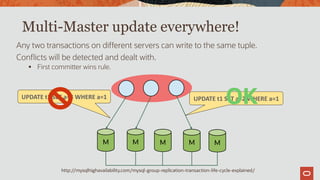
Multi-Master update everywhere!
Any two transactions on different servers can write to the same tuple.
Conflicts will be detected and dealt with.
 First committer wins rule.
M M M M M
UPDATE t1 SET a=2 WHERE a=1UPDATE t1 SET a=3 WHERE a=1
http://mysqlhighavailability.com/mysql-group-replication-transaction-life-cycle-explained/
Multi-Master update everywhere!
Any two transactions on different servers can write to the same tuple.
Conflicts will be detected and dealt with.
 First committer wins rule.
M M M M M
UPDATE t1 SET a=2 WHERE a=1UPDATE t1 SET a=3 WHERE a=1
OK
http://mysqlhighavailability.com/mysql-group-replication-transaction-life-cycle-explained/
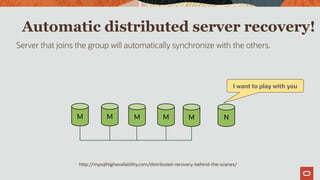
Automatic distributed server recovery!
Server that joins the group will automatically synchronize with the others.
M M M M M N
I want to play with you
http://mysqlhighavailability.com/distributed-recovery-behind-the-scenes/
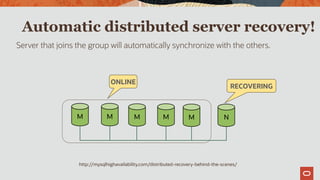
Automatic distributed server recovery!
Server that joins the group will automatically synchronize with the others.
M M M M M N
ONLINE
RECOVERING
http://mysqlhighavailability.com/distributed-recovery-behind-the-scenes/
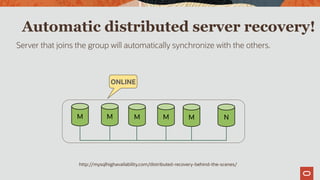
Automatic distributed server recovery!
Server that joins the group will automatically synchronize with the others.
M M M M M N
ONLINE
http://mysqlhighavailability.com/distributed-recovery-behind-the-scenes/
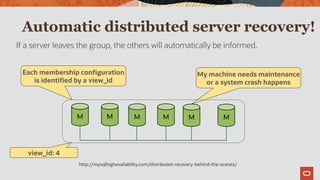
Automatic distributed server recovery!
If a server leaves the group, the others will automatically be informed.
M M M M M M
My machine needs maintenance
or a system crash happens
Each membership configuration
is identified by a view_id
view_id: 4
http://mysqlhighavailability.com/distributed-recovery-behind-the-scenes/
MySQL Group Replication: deploy modes
 Multi-Primary Mode
 every server in the group is allowed to execute transactions at any time, even transactions
that change state (RW transactions)
 Single-Primary Mode
 the group has a single primary server that is set to read-write mode. All the other members
in the group are set to read-only mode
http://mysqlhighavailability.com/mysql-group-replication-for-mysql-5-7-15/
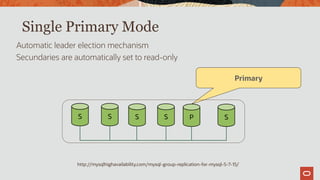
Single Primary Mode
Automatic leader election mechanism
Secundaries are automatically set to read-only
S S S S P S
Primary
http://mysqlhighavailability.com/mysql-group-replication-for-mysql-5-7-15/
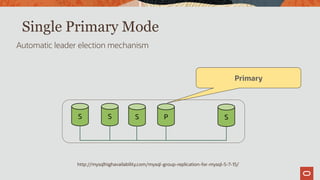
Single Primary Mode
Automatic leader election mechanism
S S S P S
Primary
http://mysqlhighavailability.com/mysql-group-replication-for-mysql-5-7-15/
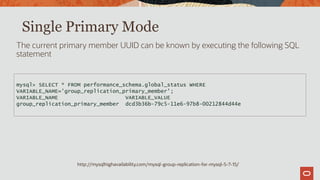
Single Primary Mode
The current primary member UUID can be known by executing the following SQL
statement
mysql> SELECT * FROM performance_schema.global_status WHERE
VARIABLE_NAME='group_replication_primary_member';
VARIABLE_NAME VARIABLE_VALUE
group_replication_primary_member dcd3b36b-79c5-11e6-97b8-00212844d44e
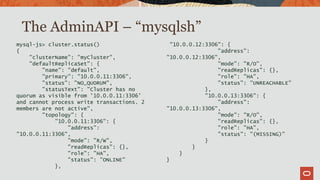
mysql-js> cluster.status()
{
"clusterName": "myCluster",
"defaultReplicaSet": {
"name": "default",
"primary": "10.0.0.11:3306",
"status": "NO_QUORUM",
"statusText": "Cluster has no
quorum as visible from '10.0.0.11:3306'
and cannot process write transactions. 2
members are not active",
"topology": {
"10.0.0.11:3306": {
"address":
"10.0.0.11:3306",
"mode": "R/W",
"readReplicas": {},
"role": "HA",
"status": "ONLINE"
},
"10.0.0.12:3306": {
"address":
"10.0.0.12:3306",
"mode": "R/O",
"readReplicas": {},
"role": "HA",
"status": "UNREACHABLE"
},
"10.0.0.13:3306": {
"address":
"10.0.0.13:3306",
"mode": "R/O",
"readReplicas": {},
"role": "HA",
"status": "(MISSING)"
}
}
}
}
The AdminAPI – “mysqlsh”
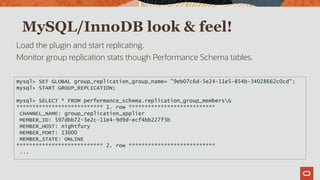
MySQL/InnoDB look & feel!
Load the plugin and start replicating.
Monitor group replication stats though Performance Schema tables.
mysql> SET GLOBAL group_replication_group_name= "9eb07c6d-5e24-11e5-854b-34028662c0cd";
mysql> START GROUP_REPLICATION;
mysql> SELECT * FROM performance_schema.replication_group_membersG
*************************** 1. row ***************************
CHANNEL_NAME: group_replication_applier
MEMBER_ID: 597dbb72-3e2c-11e4-9d9d-ecf4bb227f3b
MEMBER_HOST: nightfury
MEMBER_PORT: 13000
MEMBER_STATE: ONLINE
*************************** 2. row ***************************
...
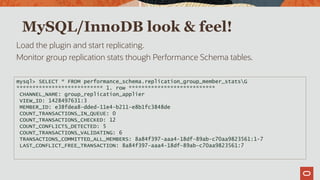
MySQL/InnoDB look & feel!
Load the plugin and start replicating.
Monitor group replication stats though Performance Schema tables.
mysql> SELECT * FROM performance_schema.replication_group_member_statsG
*************************** 1. row ***************************
CHANNEL_NAME: group_replication_applier
VIEW_ID: 1428497631:3
MEMBER_ID: e38fdea8-dded-11e4-b211-e8b1fc3848de
COUNT_TRANSACTIONS_IN_QUEUE: 0
COUNT_TRANSACTIONS_CHECKED: 12
COUNT_CONFLICTS_DETECTED: 5
COUNT_TRANSACTIONS_VALIDATING: 6
TRANSACTIONS_COMMITTED_ALL_MEMBERS: 8a84f397-aaa4-18df-89ab-c70aa9823561:1-7
LAST_CONFLICT_FREE_TRANSACTION: 8a84f397-aaa4-18df-89ab-c70aa9823561:7
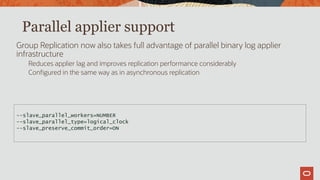
Parallel applier support
Group Replication now also takes full advantage of parallel binary log applier
infrastructure
Reduces applier lag and improves replication performance considerably
Configured in the same way as in asynchronous replication
--slave_parallel_workers=NUMBER
--slave_parallel_type=logical_clock
--slave_preserve_commit_order=ON
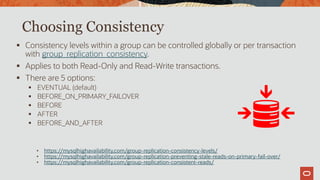
Choosing Consistency
 Consistency levels within a group can be controlled globally or per transaction
with group_replication_consistency.
 Applies to both Read-Only and Read-Write transactions.
 There are 5 options:
 EVENTUAL (default)
 BEFORE_ON_PRIMARY_FAILOVER
 BEFORE
 AFTER
 BEFORE_AND_AFTER
• https://mysqlhighavailability.com/group-replication-consistency-levels/
• https://mysqlhighavailability.com/group-replication-preventing-stale-reads-on-primary-fail-over/
• https://mysqlhighavailability.com/group-replication-consistent-reads/
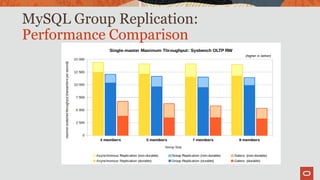
MySQL Group Replication:
Performance Comparison
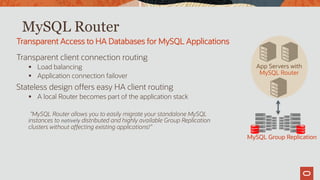
MySQL Router
Transparent client connection routing
 Load balancing
 Application connection failover
Stateless design offers easy HA client routing
 A local Router becomes part of the application stack
”MySQL Router allows you to easily migrate your standalone MySQL
instances to natively distributed and highly available Group Replication
clusters without affecting existing applications!”
Transparent Access to HA Databases for MySQL Applications
App Servers with
MySQL Router
MySQL Group Replication
MySQL Group Replication:
Built by the MySQL Engineering Team
 Natively integrated into Server: InnoDB, Replication, GTIDs, Performance Schema, SYS
 Built-in, no need for separate downloads
 Available on all platforms [Linux, Windows, Solaris, FreeBSD, etc]
Better performance than similar offerings
 MySQL GCS has optimized network protocol that reduces the impact on latency
Easier monitoring
 Simple Performance Schema tables for group and node status/stats
 Native support for Group Replication coming to MySQL Enterprise Monitor
Modern full stack MySQL HA being built around it
 Native end-to-end easy to use sharded InnoDB clusters
What Sets It Apart?
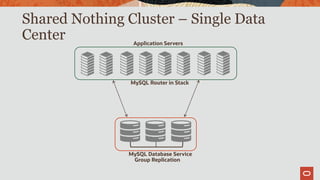
Shared Nothing Cluster – Single Data
Center Application Servers
MySQL Router in Stack
MySQL Database Service
Group Replication
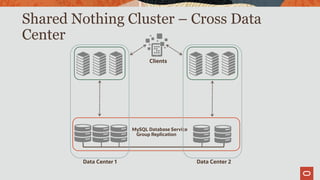
Shared Nothing Cluster – Cross Data
Center
MySQL Database Service
Group Replication
Data Center 1 Data Center 2
Clients
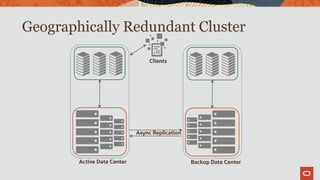
Geographically Redundant Cluster
Async Replication
Active Data Center Backup Data Center
Clients
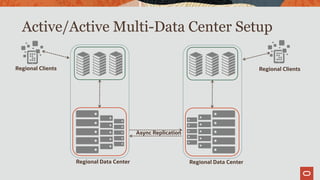
Active/Active Multi-Data Center Setup
Async Replication
Regional Data Center Regional Data Center
Regional ClientsRegional Clients
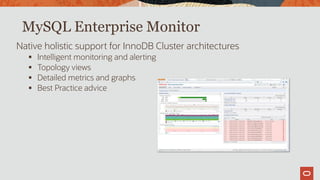
MySQL Enterprise Monitor
Native holistic support for InnoDB Cluster architectures
 Intelligent monitoring and alerting
 Topology views
 Detailed metrics and graphs
 Best Practice advice
MySQL InnoDB Cluster: Summary
 All components are MySQL built, maintained and supported.
 Built-in integration amongst components (Router+InnoDB Cluster+Shell)
 MySQL GCS Based on Paxos
 Consistency levels and, therefore , cluster-wide performance can be configured
globally or per-transaction / per-session.
 Compatible with 3PP.
 All the MySQL products are continuously being developed allowing for new
functionalities and improvements in every reléase (8.0.16, 8.0.17, etc.)
 Eg. 8.0.16 onwards, upgrades within major versions are automatic.
 Official MySQL Support for the whole stack, 365 x 7 x 24.
Demo Time!
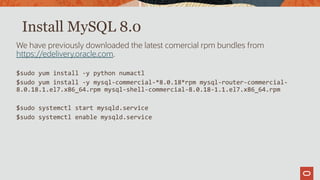
Install MySQL 8.0
We have previously downloaded the latest comercial rpm bundles from
https://edelivery.oracle.com.
$sudo yum install -y python numactl
$sudo yum install -y mysql-commercial-*8.0.18*rpm mysql-router-commercial-
8.0.18.1.el7.x86_64.rpm mysql-shell-commercial-8.0.18-1.1.el7.x86_64.rpm
$sudo systemctl start mysqld.service
$sudo systemctl enable mysqld.service
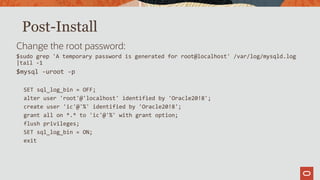
Post-Install
Change the root password:
$sudo grep 'A temporary password is generated for root@localhost' /var/log/mysqld.log
|tail -1
$mysql -uroot -p
SET sql_log_bin = OFF;
alter user 'root'@'localhost' identified by 'Oracle20!8';
create user 'ic'@'%' identified by 'Oracle20!8';
grant all on *.* to 'ic'@'%' with grant option;
flush privileges;
SET sql_log_bin = ON;
exit
MySQL Shell CLI
Just so that we understand what this means:
$mysqlsh --uri root@localhost:3306
Please provide the password for 'root@localhost:3306': **********
Save password for 'root@localhost:3306'? [Y]es/[N]o/Ne[v]er (default No): y
Making things simple, i.e. password is cached for our o.s. session.
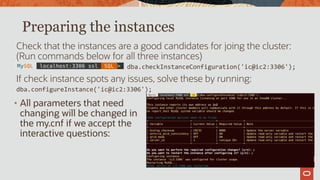
Preparing the instances
Check that the instances are a good candidates for joing the cluster:
(Run commands below for all three instances)
dba.checkInstanceConfiguration('ic@ic2:3306');
If check instance spots any issues, solve these by running:
dba.configureInstance('ic@ic2:3306');
• All parameters that need
changing will be changed in
the my.cnf if we accept the
interactive questions:
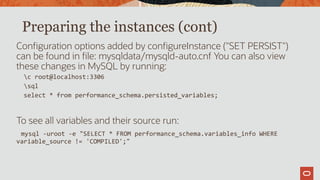
Preparing the instances (cont)
Configuration options added by configureInstance ("SET PERSIST")
can be found in file: mysqldata/mysqld-auto.cnf You can also view
these changes in MySQL by running:
c root@localhost:3306
sql
select * from performance_schema.persisted_variables;
To see all variables and their source run:
mysql -uroot -e "SELECT * FROM performance_schema.variables_info WHERE
variable_source != 'COMPILED';"
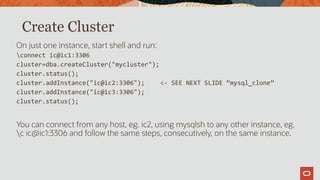
Create Cluster
On just one instance, start shell and run:
connect ic@ic1:3306
cluster=dba.createCluster("mycluster");
cluster.status();
cluster.addInstance("ic@ic2:3306"); <- SEE NEXT SLIDE “mysql_clone”
cluster.addInstance("ic@ic3:3306");
cluster.status();
You can connect from any host, eg. ic2, using mysqlsh to any other instance, eg.
c ic@ic1:3306 and follow the same steps, consecutively, on the same instance.
Create Cluster: “Clone”
In 8.0.17:
mysql> INSTALL PLUGIN clone SONAME 'mysql_clone.so';
MySQL localhost:3306 ssl JS > cluster.addInstance('ic@ic2:3306');
NOTE: A GTID set check of the MySQL instance at 'ic2:3306' determined
that it is
missing transactions that were purged from all cluster members.
Please select a recovery method [C]lone/[A]bort (default Abort): C
Validating instance at ic2:3306...
This instance reports its own address as ic2:3306
Instance configuration is suitable.
A new instance will be added to the InnoDB cluster. Depending on the
amount of
data on the cluster this might take from a few seconds to several hours.
Adding instance to the cluster...
Monitoring recovery process of the new cluster member. Press ^C to stop
monitoring and let it continue in background.
Clone based state recovery is now in progress.
NOTE: A server restart is expected to happen as part of the clone process.
If the
server does not support the RESTART command or does not come back
after a
while, you may need to manually start it back.
* Waiting for clone to finish...
NOTE: ic2:3306 is being cloned from ic1:3306
** Stage DROP DATA: Completed
** Clone Transfer
FILE COPY
############################################################
100% Completed
PAGE COPY
############################################################
100% Completed
REDO COPY
############################################################
100% Completed
** Stage RECOVERY: 
NOTE: ic2:3306 is shutting down...
* Waiting for server restart... ready
* ic2:3306 has restarted, waiting for clone to finish...
* Clone process has finished: 1.24 GB transferred in 9 sec (137.47 MB/s)
State recovery already finished for 'ic2:3306'
The instance 'ic2:3306' was successfully added to the cluster.
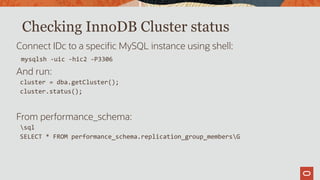
Checking InnoDB Cluster status
Connect IDc to a specific MySQL instance using shell:
mysqlsh -uic -hic2 -P3306
And run:
cluster = dba.getCluster();
cluster.status();
From performance_schema:
sql
SELECT * FROM performance_schema.replication_group_membersG
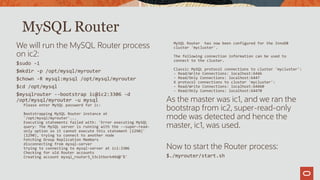
We will run the MySQL Router process
on ic2:
$sudo -i
$mkdir -p /opt/mysql/myrouter
$chown -R mysql:mysql /opt/mysql/myrouter
$cd /opt/mysql
$mysqlrouter --bootstrap ic@ic2:3306 -d
/opt/mysql/myrouter -u mysql
Please enter MySQL password for ic:
Bootstrapping MySQL Router instance at
'/opt/mysql/myrouter'...
Executing statements failed with: 'Error executing MySQL
query: The MySQL server is running with the --super-read-
only option so it cannot execute this statement (1290)'
(1290), trying to connect to another node
Fetching Group Replication Members
disconnecting from mysql-server
trying to connecting to mysql-server at ic1:3306
Checking for old Router accounts
Creating account mysql_router3_53c1tbork49d@'%'
MySQL Router has now been configured for the InnoDB
cluster 'mycluster'.
The following connection information can be used to
connect to the cluster.
Classic MySQL protocol connections to cluster 'mycluster':
- Read/Write Connections: localhost:6446
- Read/Only Connections: localhost:6447
X protocol connections to cluster 'mycluster':
- Read/Write Connections: localhost:64460
- Read/Only Connections: localhost:64470
As the master was ic1, and we ran the
bootstrap from ic2, super-read-only
mode was detected and hence the
master, ic1, was used.
Now to start the Router process:
$./myrouter/start.sh
MySQL Router
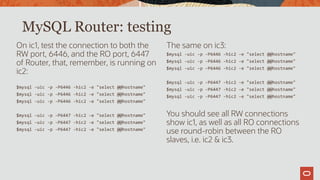
On ic1, test the connection to both the
RW port, 6446, and the RO port, 6447
of Router, that, remember, is running on
ic2:
$mysql -uic -p -P6446 -hic2 -e "select @@hostname"
$mysql -uic -p -P6447 -hic2 -e "select @@hostname"
The same on ic3:
$mysql -uic -p -P6446 -hic2 -e "select @@hostname"
$mysql -uic -p -P6447 -hic2 -e "select @@hostname"
You should see all RW connections
show ic1, as well as all RO connections
use round-robin between the RO
slaves, i.e. ic2 & ic3.
MySQL Router: testing
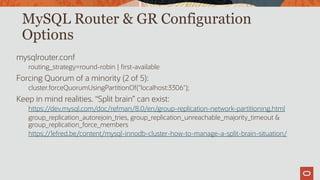
MySQL Router & GR Configuration
Options
mysqlrouter.conf
routing_strategy=round-robin | first-available
Forcing Quorum of a minority (2 of 5):
cluster.forceQuorumUsingPartitionOf("localhost:3306");
Keep in mind realities. “Split brain” can exist:
https://dev.mysql.com/doc/refman/8.0/en/group-replication-network-partitioning.html
group_replication_autorejoin_tries, group_replication_unreachable_majority_timeout &
group_replication_force_members
https://lefred.be/content/mysql-innodb-cluster-how-to-manage-a-split-brain-situation/
References
Blog on MySQL High Availability
http://mysqlhighavailability.com/
MySQL Server Engineering Team
https://mysqlserverteam.com/mysql-innodb-cluster-8-0-a-hands-on-tutorial/
Hands-on Github example (Thanks Ted!)
https://github.com/wwwted/MySQL-InnoDB-Cluster-3VM-Setup
An example of a production deployment & contemplating a disaster
https://mysqlmed.wordpress.com/2017/11/09/innodb-cluster-setting-up-production-for-
disaster-1-2/ (MySQL 5.7)
Questions?
keith.hollman@oracle.com
Thank you

MySQL InnoDB Cluster HA Overview & Demo

  • 2.
    Keith Hollman MySQL PrincipalSolution Architect keith.hollman@oracle.com MySQL High Availability InnoDB Cluster
  • 3.
    Safe harbor statement Thefollowing is intended to outline our general product direction. It is intended for information purposes only, and may not be incorporated into any contract. It is not a commitment to deliver any material, code, or functionality, and should not be relied upon in making purchasing decisions. The development, release, timing, and pricing of any features or functionality described for Oracle’s products may change and remains at the sole discretion of Oracle Corporation.
  • 4.
    High Availability: Termsand Concepts  Availability Outage and downtime Mean Time Between Failures (MTBF) Mean Time To Recover (MTTR) Service Level Agreement (SLA) The Nine’s Scale : 5 nines = 5 mins downtime per year  Capacity / Performance  Redundancy  Fault Tolerance  Disaster Tolerance/Recovery
  • 5.
    High Availability: Considerations SLA requirements What is needed to support your business objectives  Operational capabilities Will you have the workforce to implement and maintain it  Service agility Can it grow and change as your company does  Time to market Can you go to market quickly  Budgetary constraints Cost of downtime versus cost of HA implementation What To Use?
  • 6.
    High Availability: Factors Environment Redundant servers in different datacenters and geographical areas will protect you against regional issues—power grid failures, hurricanes, earthquakes, etc.  Hardware Each part of your hardware stack—networking, storage, servers—should be redundant  Software Every layer of the software stack needs to be duplicated and distributed across separate hardware and environments  Data Data loss and inconsistency/corruption must be prevented by having multiple copies of each piece of data, with consistency checks and guarantees for each change
  • 7.
    High Availability: DesignFactors Reliability, Availability, and Serviceability (RAS) Reliability Quality hardware and software components that you can manage and trust Availability Multiple copies of each datum replicated to separate hardware Multiple copies of each piece of the hardware and software stack Multiple physical locations Separate power grids Enough physical distance to survive disasters such as floods, earthquakes, and power grid outages Resiliency Automation to transparently deal with any potential failure in the infrastructure, hardware, software Serviceability Ensure that you can monitor, diagnose, maintain, and repair it all
  • 8.
    High Availability: DatabaseNeeds Management infrastructure Monitoring of status, health, performance Facilities for service changes, service transitions Failure detection and handling Identify and handle failures Elasticity Scale up to ensure acceptable performance is always maintained Consistency guarantees Conflict detection and handling ; data loss protection/prevention Online maintenance
  • 9.
    MySQL Master/Slave Replication Master/Slave with Automated Failover DRBD OS or VM vendor active/passi vesolutions MySQL Group Replication High Availability: Common MySQL Solutions 9 9 . 9 9 9 % Continuous Availability
  • 10.
    C B A C B ACRASH C B A Now B isthe new master Uh Oh! It’s OK! A major building block for high availability What is Replication Used For?
  • 11.
    InnoDB Cluster App Serverswith MySQL Router MySQL Group Replication MySQL Shell Setup, Manage, Orchestrate “High Availability becomes a core first class feature of MySQL!”
  • 12.
    One Product: MySQL Allcomponents created together Tested together Packaged together Easy to Use One client: MySQL Shell Easy packaging Integrated orchestration Homogenous servers Flexible and Modern SQL and NoSQL together Protocol Buffers Developer friendly Support Read/Write Scale Out Sharded clusters* Federated system of N replica sets Each replica set manages a shard MySQL InnoDB Cluster: Goals
  • 13.
    MySQL Shell: DBAAdmin API The global variable 'dba' is used to access the MySQL AdminAPI mysql-js> dba.help() Perform DBA operations Manage MySQL InnoDB clusters Create clusters Validate MySQL instances Configure MySQL instances Clone MySQL instances Get cluster info Modify clusters and much more ... App Servers with MySQL Router MySQL Group Replication MySQL Shell Setup, Manage, Orchestrate 13
  • 14.
    MySQL Router: ClientRouting and HA  Native support for InnoDB clusters  Understands Group Replication topology  Utilizes metadata schema stored on each member  Bootstraps itself and sets up client routing for the InnoDB cluster  Allows for intelligent client routing into the InnoDB cluster  Supports multi-master and single primary modes  Core improvements  Built-in keyring for easy and secure password management App Servers with MySQL Router MySQL Group Replication MySQL Shell Setup, Manage, Orchestrate ”MySQL Router 2.1, with the new metadata_cache plugin, provides transparent client connection routing and failover into your InnoDB clusters!”
  • 15.
    MySQL Group Replication:Database HA Group Replication library  Implementation of Replicated Database State Machine  MySQL GCS is based on our home-grown Paxos implementation  Provides virtually synchronous replication for MySQL 5.7+  Guarantees eventual consistency  Automates operations  Conflict detection and resolution  Failure detection, fail-over, recovery  Group membership management and reconfiguration “Multi-master update anywhere replication plugin for MySQL with built-in conflict detection and resolution, automatic distributed recovery, and group membership.” App Servers with MySQL Router MySQL Group Replication MySQL Shell Setup, Manage, Orchestrate
  • 16.
    Group Replication App Serverswith MySQL Router MySQL Group Replication “High Availability becomes a core first class feature of MySQL!”
  • 17.
    MySQL Group Replication:What Is It? Group Replication library  Implementation of Replicated Database State Machine theory  MySQL GCS is based on Paxos (variant of Mencius)  Provides virtually synchronous replication for MySQL 5.7+  Supported on all MySQL platforms  Linux, Windows, Solaris, OSX, FreeBSD “Multi-master update anywhere replication plugin for MySQL with built-in conflict detection and resolution, automatic distributed recovery, and group membership.” App Servers with MySQL Router MySQL Group Replication
  • 18.
    A highly availabledistributed MySQL database service  Clustering eliminates single points of failure (SPOF)  Allows for online maintenance  Removes the need for manually handling server fail-over  Provides distributed fault tolerance and self-healing  Enables Active/Active update anywhere setups  Automates reconfiguration (adding/removing nodes, crashes, failures)  Makes it easy to scale up/down based on demand  Automatically ensures data consistency  Detects and handles conflicts  Prevents data loss  Prevents data corruption MySQL Group Replication: What Does It Provide?
  • 19.
    MySQL Group Replication:Architecture Node Types R: Traffic routers/proxies: mysqlrouter, haproxy, sqlproxy, ... M: mysqld nodes participating in Group Replication
  • 20.
    MySQL Group Replication:Stack The Group Replication plugin is responsible for  Maintaining distributed execution context  Detecting and handling conflicts  Handling distributed recovery  Detect membership changes  Donate state if needed  Collect state if needed  Proposing transactions to other members  Receiving and handling transactions from other members  Deciding the ultimate fate of transactions  commit or rollback GCS API Replication Plugin Plugin API MySQL Server Group Comm. System (Corosync) Group Com. Engine
  • 21.
    MySQL Group Replication:Stack The Group Communication System API:  Abstracts the underlying group communication system implementation from the plugin itself  Maps the interface to a specific group communication system implementation The Group Communication System engine:  Variant of Paxos developed at MySQL  Building block to provide distributed agreement between servers GCS API Replication Plugin Plugin API MySQL Server Group Comm. System (Corosync) Group Com. Engine
  • 22.
    Full GTID support! Allgroup members share the same UUID, the group name. M M M M M INSERT y; Will have GTID: group_name:2 INSERT x; Will have GTID: group_name:1
  • 23.
    Multi-Master update everywhere! Anytwo transactions on different servers can write to the same tuple. Conflicts will be detected and dealt with.  First committer wins rule. M M M M M UPDATE t1 SET a=4 WHERE a=2UPDATE t1 SET a=3 WHERE a=1 http://mysqlhighavailability.com/mysql-group-replication-transaction-life-cycle-explained/
  • 24.
    Multi-Master update everywhere! Anytwo transactions on different servers can write to the same tuple. Conflicts will be detected and dealt with.  First committer wins rule. M M M M M UPDATE t1 SET a=4 WHERE a=2UPDATE t1 SET a=3 WHERE a=1 OKOK http://mysqlhighavailability.com/mysql-group-replication-transaction-life-cycle-explained/
  • 25.
    Multi-Master update everywhere! Anytwo transactions on different servers can write to the same tuple. Conflicts will be detected and dealt with.  First committer wins rule. M M M M M UPDATE t1 SET a=2 WHERE a=1UPDATE t1 SET a=3 WHERE a=1 http://mysqlhighavailability.com/mysql-group-replication-transaction-life-cycle-explained/
  • 26.
    Multi-Master update everywhere! Anytwo transactions on different servers can write to the same tuple. Conflicts will be detected and dealt with.  First committer wins rule. M M M M M UPDATE t1 SET a=2 WHERE a=1UPDATE t1 SET a=3 WHERE a=1 OK http://mysqlhighavailability.com/mysql-group-replication-transaction-life-cycle-explained/
  • 27.
    Automatic distributed serverrecovery! Server that joins the group will automatically synchronize with the others. M M M M M N I want to play with you http://mysqlhighavailability.com/distributed-recovery-behind-the-scenes/
  • 28.
    Automatic distributed serverrecovery! Server that joins the group will automatically synchronize with the others. M M M M M N ONLINE RECOVERING http://mysqlhighavailability.com/distributed-recovery-behind-the-scenes/
  • 29.
    Automatic distributed serverrecovery! Server that joins the group will automatically synchronize with the others. M M M M M N ONLINE http://mysqlhighavailability.com/distributed-recovery-behind-the-scenes/
  • 30.
    Automatic distributed serverrecovery! If a server leaves the group, the others will automatically be informed. M M M M M M My machine needs maintenance or a system crash happens Each membership configuration is identified by a view_id view_id: 4 http://mysqlhighavailability.com/distributed-recovery-behind-the-scenes/
  • 31.
    MySQL Group Replication:deploy modes  Multi-Primary Mode  every server in the group is allowed to execute transactions at any time, even transactions that change state (RW transactions)  Single-Primary Mode  the group has a single primary server that is set to read-write mode. All the other members in the group are set to read-only mode
  • 32.
    http://mysqlhighavailability.com/mysql-group-replication-for-mysql-5-7-15/ Single Primary Mode Automaticleader election mechanism Secundaries are automatically set to read-only S S S S P S Primary
  • 33.
  • 34.
    http://mysqlhighavailability.com/mysql-group-replication-for-mysql-5-7-15/ Single Primary Mode Thecurrent primary member UUID can be known by executing the following SQL statement mysql> SELECT * FROM performance_schema.global_status WHERE VARIABLE_NAME='group_replication_primary_member'; VARIABLE_NAME VARIABLE_VALUE group_replication_primary_member dcd3b36b-79c5-11e6-97b8-00212844d44e
  • 35.
    mysql-js> cluster.status() { "clusterName": "myCluster", "defaultReplicaSet":{ "name": "default", "primary": "10.0.0.11:3306", "status": "NO_QUORUM", "statusText": "Cluster has no quorum as visible from '10.0.0.11:3306' and cannot process write transactions. 2 members are not active", "topology": { "10.0.0.11:3306": { "address": "10.0.0.11:3306", "mode": "R/W", "readReplicas": {}, "role": "HA", "status": "ONLINE" }, "10.0.0.12:3306": { "address": "10.0.0.12:3306", "mode": "R/O", "readReplicas": {}, "role": "HA", "status": "UNREACHABLE" }, "10.0.0.13:3306": { "address": "10.0.0.13:3306", "mode": "R/O", "readReplicas": {}, "role": "HA", "status": "(MISSING)" } } } } The AdminAPI – “mysqlsh”
  • 36.
    MySQL/InnoDB look &feel! Load the plugin and start replicating. Monitor group replication stats though Performance Schema tables. mysql> SET GLOBAL group_replication_group_name= "9eb07c6d-5e24-11e5-854b-34028662c0cd"; mysql> START GROUP_REPLICATION; mysql> SELECT * FROM performance_schema.replication_group_membersG *************************** 1. row *************************** CHANNEL_NAME: group_replication_applier MEMBER_ID: 597dbb72-3e2c-11e4-9d9d-ecf4bb227f3b MEMBER_HOST: nightfury MEMBER_PORT: 13000 MEMBER_STATE: ONLINE *************************** 2. row *************************** ...
  • 37.
    MySQL/InnoDB look &feel! Load the plugin and start replicating. Monitor group replication stats though Performance Schema tables. mysql> SELECT * FROM performance_schema.replication_group_member_statsG *************************** 1. row *************************** CHANNEL_NAME: group_replication_applier VIEW_ID: 1428497631:3 MEMBER_ID: e38fdea8-dded-11e4-b211-e8b1fc3848de COUNT_TRANSACTIONS_IN_QUEUE: 0 COUNT_TRANSACTIONS_CHECKED: 12 COUNT_CONFLICTS_DETECTED: 5 COUNT_TRANSACTIONS_VALIDATING: 6 TRANSACTIONS_COMMITTED_ALL_MEMBERS: 8a84f397-aaa4-18df-89ab-c70aa9823561:1-7 LAST_CONFLICT_FREE_TRANSACTION: 8a84f397-aaa4-18df-89ab-c70aa9823561:7
  • 38.
    Parallel applier support GroupReplication now also takes full advantage of parallel binary log applier infrastructure Reduces applier lag and improves replication performance considerably Configured in the same way as in asynchronous replication --slave_parallel_workers=NUMBER --slave_parallel_type=logical_clock --slave_preserve_commit_order=ON
  • 39.
    Choosing Consistency  Consistencylevels within a group can be controlled globally or per transaction with group_replication_consistency.  Applies to both Read-Only and Read-Write transactions.  There are 5 options:  EVENTUAL (default)  BEFORE_ON_PRIMARY_FAILOVER  BEFORE  AFTER  BEFORE_AND_AFTER • https://mysqlhighavailability.com/group-replication-consistency-levels/ • https://mysqlhighavailability.com/group-replication-preventing-stale-reads-on-primary-fail-over/ • https://mysqlhighavailability.com/group-replication-consistent-reads/
  • 40.
  • 41.
    MySQL Router Transparent clientconnection routing  Load balancing  Application connection failover Stateless design offers easy HA client routing  A local Router becomes part of the application stack ”MySQL Router allows you to easily migrate your standalone MySQL instances to natively distributed and highly available Group Replication clusters without affecting existing applications!” Transparent Access to HA Databases for MySQL Applications App Servers with MySQL Router MySQL Group Replication
  • 42.
    MySQL Group Replication: Builtby the MySQL Engineering Team  Natively integrated into Server: InnoDB, Replication, GTIDs, Performance Schema, SYS  Built-in, no need for separate downloads  Available on all platforms [Linux, Windows, Solaris, FreeBSD, etc] Better performance than similar offerings  MySQL GCS has optimized network protocol that reduces the impact on latency Easier monitoring  Simple Performance Schema tables for group and node status/stats  Native support for Group Replication coming to MySQL Enterprise Monitor Modern full stack MySQL HA being built around it  Native end-to-end easy to use sharded InnoDB clusters What Sets It Apart?
  • 43.
    Shared Nothing Cluster– Single Data Center Application Servers MySQL Router in Stack MySQL Database Service Group Replication
  • 44.
    Shared Nothing Cluster– Cross Data Center MySQL Database Service Group Replication Data Center 1 Data Center 2 Clients
  • 45.
    Geographically Redundant Cluster AsyncReplication Active Data Center Backup Data Center Clients
  • 46.
    Active/Active Multi-Data CenterSetup Async Replication Regional Data Center Regional Data Center Regional ClientsRegional Clients
  • 47.
    MySQL Enterprise Monitor Nativeholistic support for InnoDB Cluster architectures  Intelligent monitoring and alerting  Topology views  Detailed metrics and graphs  Best Practice advice
  • 48.
    MySQL InnoDB Cluster:Summary  All components are MySQL built, maintained and supported.  Built-in integration amongst components (Router+InnoDB Cluster+Shell)  MySQL GCS Based on Paxos  Consistency levels and, therefore , cluster-wide performance can be configured globally or per-transaction / per-session.  Compatible with 3PP.  All the MySQL products are continuously being developed allowing for new functionalities and improvements in every reléase (8.0.16, 8.0.17, etc.)  Eg. 8.0.16 onwards, upgrades within major versions are automatic.  Official MySQL Support for the whole stack, 365 x 7 x 24.
  • 49.
  • 50.
    Install MySQL 8.0 Wehave previously downloaded the latest comercial rpm bundles from https://edelivery.oracle.com. $sudo yum install -y python numactl $sudo yum install -y mysql-commercial-*8.0.18*rpm mysql-router-commercial- 8.0.18.1.el7.x86_64.rpm mysql-shell-commercial-8.0.18-1.1.el7.x86_64.rpm $sudo systemctl start mysqld.service $sudo systemctl enable mysqld.service
  • 51.
    Post-Install Change the rootpassword: $sudo grep 'A temporary password is generated for root@localhost' /var/log/mysqld.log |tail -1 $mysql -uroot -p SET sql_log_bin = OFF; alter user 'root'@'localhost' identified by 'Oracle20!8'; create user 'ic'@'%' identified by 'Oracle20!8'; grant all on *.* to 'ic'@'%' with grant option; flush privileges; SET sql_log_bin = ON; exit
  • 52.
    MySQL Shell CLI Justso that we understand what this means: $mysqlsh --uri root@localhost:3306 Please provide the password for 'root@localhost:3306': ********** Save password for 'root@localhost:3306'? [Y]es/[N]o/Ne[v]er (default No): y Making things simple, i.e. password is cached for our o.s. session.
  • 53.
    Preparing the instances Checkthat the instances are a good candidates for joing the cluster: (Run commands below for all three instances) dba.checkInstanceConfiguration('ic@ic2:3306'); If check instance spots any issues, solve these by running: dba.configureInstance('ic@ic2:3306'); • All parameters that need changing will be changed in the my.cnf if we accept the interactive questions:
  • 54.
    Preparing the instances(cont) Configuration options added by configureInstance ("SET PERSIST") can be found in file: mysqldata/mysqld-auto.cnf You can also view these changes in MySQL by running: c root@localhost:3306 sql select * from performance_schema.persisted_variables; To see all variables and their source run: mysql -uroot -e "SELECT * FROM performance_schema.variables_info WHERE variable_source != 'COMPILED';"
  • 55.
    Create Cluster On justone instance, start shell and run: connect ic@ic1:3306 cluster=dba.createCluster("mycluster"); cluster.status(); cluster.addInstance("ic@ic2:3306"); <- SEE NEXT SLIDE “mysql_clone” cluster.addInstance("ic@ic3:3306"); cluster.status(); You can connect from any host, eg. ic2, using mysqlsh to any other instance, eg. c ic@ic1:3306 and follow the same steps, consecutively, on the same instance.
  • 56.
    Create Cluster: “Clone” In8.0.17: mysql> INSTALL PLUGIN clone SONAME 'mysql_clone.so'; MySQL localhost:3306 ssl JS > cluster.addInstance('ic@ic2:3306'); NOTE: A GTID set check of the MySQL instance at 'ic2:3306' determined that it is missing transactions that were purged from all cluster members. Please select a recovery method [C]lone/[A]bort (default Abort): C Validating instance at ic2:3306... This instance reports its own address as ic2:3306 Instance configuration is suitable. A new instance will be added to the InnoDB cluster. Depending on the amount of data on the cluster this might take from a few seconds to several hours. Adding instance to the cluster... Monitoring recovery process of the new cluster member. Press ^C to stop monitoring and let it continue in background. Clone based state recovery is now in progress. NOTE: A server restart is expected to happen as part of the clone process. If the server does not support the RESTART command or does not come back after a while, you may need to manually start it back. * Waiting for clone to finish... NOTE: ic2:3306 is being cloned from ic1:3306 ** Stage DROP DATA: Completed ** Clone Transfer FILE COPY ############################################################ 100% Completed PAGE COPY ############################################################ 100% Completed REDO COPY ############################################################ 100% Completed ** Stage RECOVERY: NOTE: ic2:3306 is shutting down... * Waiting for server restart... ready * ic2:3306 has restarted, waiting for clone to finish... * Clone process has finished: 1.24 GB transferred in 9 sec (137.47 MB/s) State recovery already finished for 'ic2:3306' The instance 'ic2:3306' was successfully added to the cluster.
  • 57.
    Checking InnoDB Clusterstatus Connect IDc to a specific MySQL instance using shell: mysqlsh -uic -hic2 -P3306 And run: cluster = dba.getCluster(); cluster.status(); From performance_schema: sql SELECT * FROM performance_schema.replication_group_membersG
  • 58.
    We will runthe MySQL Router process on ic2: $sudo -i $mkdir -p /opt/mysql/myrouter $chown -R mysql:mysql /opt/mysql/myrouter $cd /opt/mysql $mysqlrouter --bootstrap ic@ic2:3306 -d /opt/mysql/myrouter -u mysql Please enter MySQL password for ic: Bootstrapping MySQL Router instance at '/opt/mysql/myrouter'... Executing statements failed with: 'Error executing MySQL query: The MySQL server is running with the --super-read- only option so it cannot execute this statement (1290)' (1290), trying to connect to another node Fetching Group Replication Members disconnecting from mysql-server trying to connecting to mysql-server at ic1:3306 Checking for old Router accounts Creating account mysql_router3_53c1tbork49d@'%' MySQL Router has now been configured for the InnoDB cluster 'mycluster'. The following connection information can be used to connect to the cluster. Classic MySQL protocol connections to cluster 'mycluster': - Read/Write Connections: localhost:6446 - Read/Only Connections: localhost:6447 X protocol connections to cluster 'mycluster': - Read/Write Connections: localhost:64460 - Read/Only Connections: localhost:64470 As the master was ic1, and we ran the bootstrap from ic2, super-read-only mode was detected and hence the master, ic1, was used. Now to start the Router process: $./myrouter/start.sh MySQL Router
  • 59.
    On ic1, testthe connection to both the RW port, 6446, and the RO port, 6447 of Router, that, remember, is running on ic2: $mysql -uic -p -P6446 -hic2 -e "select @@hostname" $mysql -uic -p -P6446 -hic2 -e "select @@hostname" $mysql -uic -p -P6446 -hic2 -e "select @@hostname" $mysql -uic -p -P6447 -hic2 -e "select @@hostname" $mysql -uic -p -P6447 -hic2 -e "select @@hostname" $mysql -uic -p -P6447 -hic2 -e "select @@hostname" The same on ic3: $mysql -uic -p -P6446 -hic2 -e "select @@hostname" $mysql -uic -p -P6446 -hic2 -e "select @@hostname" $mysql -uic -p -P6446 -hic2 -e "select @@hostname" $mysql -uic -p -P6447 -hic2 -e "select @@hostname" $mysql -uic -p -P6447 -hic2 -e "select @@hostname" $mysql -uic -p -P6447 -hic2 -e "select @@hostname" You should see all RW connections show ic1, as well as all RO connections use round-robin between the RO slaves, i.e. ic2 & ic3. MySQL Router: testing
  • 60.
    MySQL Router &GR Configuration Options mysqlrouter.conf routing_strategy=round-robin | first-available Forcing Quorum of a minority (2 of 5): cluster.forceQuorumUsingPartitionOf("localhost:3306"); Keep in mind realities. “Split brain” can exist: https://dev.mysql.com/doc/refman/8.0/en/group-replication-network-partitioning.html group_replication_autorejoin_tries, group_replication_unreachable_majority_timeout & group_replication_force_members https://lefred.be/content/mysql-innodb-cluster-how-to-manage-a-split-brain-situation/
  • 61.
    References Blog on MySQLHigh Availability http://mysqlhighavailability.com/ MySQL Server Engineering Team https://mysqlserverteam.com/mysql-innodb-cluster-8-0-a-hands-on-tutorial/ Hands-on Github example (Thanks Ted!) https://github.com/wwwted/MySQL-InnoDB-Cluster-3VM-Setup An example of a production deployment & contemplating a disaster https://mysqlmed.wordpress.com/2017/11/09/innodb-cluster-setting-up-production-for- disaster-1-2/ (MySQL 5.7)
  • 62.
  • 63.