MySQL Replication
19 April 2014
Abdul Manaf
Agenda
• Basics of Replication
• Why Replication needed
• Types Of Replication
• Replication For MySQL
• Configuring MySQL Replication
• Test a Replicated MySQL System
Basics of Replication
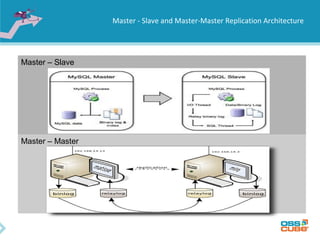
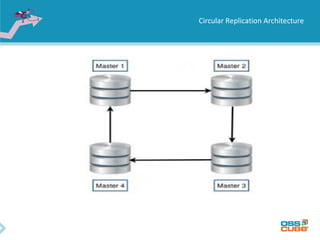
• Master / Slave, Master / Master and Circular replication
• Master writes all DDL and DML statements in the binary log
• Slaves read the binary log from the master and run the queries
locally
• A master can have many slaves
• A slave can have only one master
• A server can be both a master and a slave
• MySQL Replication is asynchronous
Master - Slave and Master-Master Replication Architecture
Master – Slave
Master – Master
Circular Replication Architecture
Why Replication needed
• Using Replication for Backups : Data is replicated to the slave, and
the slave can pause the replication process, it is possible to run backup
services on the slave without touching the corresponding master data.
• Using Replication with Different Master and Slave Storage Engines for
performance
• Using Replication for Scale-Out i.e Splitting load between servers
Distributing READ and WRITE.
• Creating reporting system on slave
Types Of Replication
• Synchronous Replication
• Asynchronous Replication
Synchronous Replication
• Master Server waits for the data to have been recorded on the duplicated
systems.
• Write either completes on both sides or not at all
• Uses the two-phase commit technology to protect data integrity
• Synchronous replication is essential for failover of transactional applications.
With synchronous replication, all committed data on the disk of the first server
are on the disk of the second server.
• Not in MySQL
Asynchronous Replication
• Write is considered complete as soon as local storage acknowledges.
• Performance is greatly increased. No need for two-phase commit protocol.
• In case of losing a local storage, the remote storage is not guaranteed to
have the current copy of data.
• Slaves need not be connected permanently to receive updates from the
master
Considerations before setting replication
• MySQL version of servers should be same.
• Master and slave should be able to commuincate with each other, create a test use
on master and try to connect from slave.
How to set MySQL replication
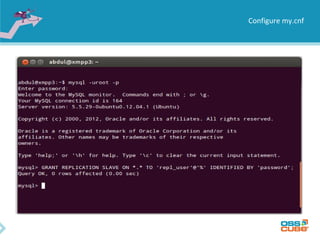
• Configure replication account on the master i.e create a mysql replication
user.
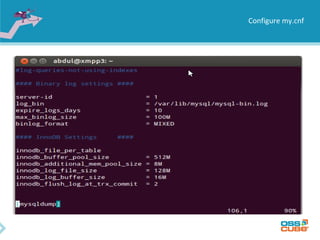
• Enable binary log and set server-id on the master my.cnf file
• Restart mysql master server
• Take backup from master server
• Configure slave for replication
• Restore backup on slave server
• Start replication using CHANGE MASTER and START SLAVE
Configure my.cnf
• Enable binary logging on the master
• Setup a server-id for the master
• Ensure that the skip-networking option has not been enabled, so that slave
can communicate with it
Configure my.cnf
Configure my.cnf
Configure slave server
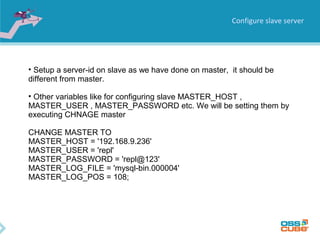
• Setup a server-id on slave as we have done on master, it should be
different from master.
• Other variables like for configuring slave MASTER_HOST ,
MASTER_USER , MASTER_PASSWORD etc. We will be setting them by
executing CHNAGE master
CHANGE MASTER TO
MASTER_HOST = '192.168.9.236'
MASTER_USER = 'repl'
MASTER_PASSWORD = 'repl@123'
MASTER_LOG_FILE = 'mysql-bin.000004'
MASTER_LOG_POS = 108;
Known issues and their resolutions
• MySQL replication can fail silently, that is data can drift out of sync with the
master without your knowing, You need to regularly monitor your replication
setups.
• Use checksum tools from Percona to verify & compare tables on master &
slave servers.
• Use rigorous monitoring to watch error logs, and checksum logs hourly if
necessary.
• Use Percona sync tools to resync tables if they get out of sync.
• Be especially vigilant if you’re taking backups off the slave server
THANK YOU ALL

MySQL Replication Basics

  • 1.
  • 2.
    Agenda • Basics ofReplication • Why Replication needed • Types Of Replication • Replication For MySQL • Configuring MySQL Replication • Test a Replicated MySQL System
  • 3.
    Basics of Replication •Master / Slave, Master / Master and Circular replication • Master writes all DDL and DML statements in the binary log • Slaves read the binary log from the master and run the queries locally • A master can have many slaves • A slave can have only one master • A server can be both a master and a slave • MySQL Replication is asynchronous
  • 4.
    Master - Slaveand Master-Master Replication Architecture Master – Slave Master – Master
  • 5.
  • 6.
    Why Replication needed •Using Replication for Backups : Data is replicated to the slave, and the slave can pause the replication process, it is possible to run backup services on the slave without touching the corresponding master data. • Using Replication with Different Master and Slave Storage Engines for performance • Using Replication for Scale-Out i.e Splitting load between servers Distributing READ and WRITE. • Creating reporting system on slave
  • 7.
    Types Of Replication •Synchronous Replication • Asynchronous Replication
  • 8.
    Synchronous Replication • MasterServer waits for the data to have been recorded on the duplicated systems. • Write either completes on both sides or not at all • Uses the two-phase commit technology to protect data integrity • Synchronous replication is essential for failover of transactional applications. With synchronous replication, all committed data on the disk of the first server are on the disk of the second server. • Not in MySQL
  • 9.
    Asynchronous Replication • Writeis considered complete as soon as local storage acknowledges. • Performance is greatly increased. No need for two-phase commit protocol. • In case of losing a local storage, the remote storage is not guaranteed to have the current copy of data. • Slaves need not be connected permanently to receive updates from the master
  • 10.
    Considerations before settingreplication • MySQL version of servers should be same. • Master and slave should be able to commuincate with each other, create a test use on master and try to connect from slave.
  • 11.
    How to setMySQL replication • Configure replication account on the master i.e create a mysql replication user. • Enable binary log and set server-id on the master my.cnf file • Restart mysql master server • Take backup from master server • Configure slave for replication • Restore backup on slave server • Start replication using CHANGE MASTER and START SLAVE
  • 12.
    Configure my.cnf • Enablebinary logging on the master • Setup a server-id for the master • Ensure that the skip-networking option has not been enabled, so that slave can communicate with it
  • 13.
  • 14.
  • 15.
    Configure slave server •Setup a server-id on slave as we have done on master, it should be different from master. • Other variables like for configuring slave MASTER_HOST , MASTER_USER , MASTER_PASSWORD etc. We will be setting them by executing CHNAGE master CHANGE MASTER TO MASTER_HOST = '192.168.9.236' MASTER_USER = 'repl' MASTER_PASSWORD = 'repl@123' MASTER_LOG_FILE = 'mysql-bin.000004' MASTER_LOG_POS = 108;
  • 16.
    Known issues andtheir resolutions • MySQL replication can fail silently, that is data can drift out of sync with the master without your knowing, You need to regularly monitor your replication setups. • Use checksum tools from Percona to verify & compare tables on master & slave servers. • Use rigorous monitoring to watch error logs, and checksum logs hourly if necessary. • Use Percona sync tools to resync tables if they get out of sync. • Be especially vigilant if you’re taking backups off the slave server
  • 17.