




Deploying
E.L.K.
with Puppets
Colin Brown
@colinreidbrown
cobrown@homeaway.com
The ELK Stack - What is it ?
ElasticSearch….for Storage, Indexing & Search
Logstash... For Logs & Filtering
Kibana…. for DataViz & this guy
What you’ll need….
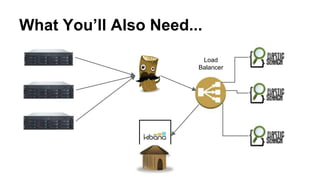
What You’ll Also Need...
Load
Balancer
These too….
elastic/puppet-elasticsearch
elastic/puppet-logstash
puppetlabs/puppetlabs-vcsrepo
puppetlabs/puppetlabs-git
puppetlabs/puppetlabs-concat
puppetlabs/puppetlabs-stdlib
1st Prep a Base Image
Save yourself some headache and just prep an
empty image that sets puppet master in
/etc/hosts
[ec2-user@ip-172-30-0-118 ~]$ cat /etc/hosts
127.0.0.1 localhost localhost.localdomain
172.30.0.41 puppet
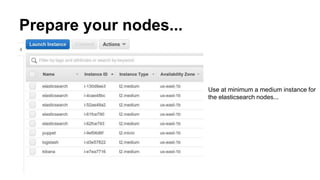
Prepare your nodes...
Use at minimum a medium instance for
the elasticsearch nodes...
Prep your Load Balancer
The ElasticSearch Config
node 'ip-172-30-0-189.ec2.internal', 'ip-172-30-0-190.ec2.internal','ip-172-30-0-160.ec2.internal','ip-172-30-0-159.ec2.internal','ip-172-30-0-4.ec2.internal' {
class { 'elasticsearch':
ensure => 'present',
package_url => 'https://download.elasticsearch.org/elasticsearch/elasticsearch/elasticsearch-1.4.3.noarch.rpm',
java_install => true,
config => {
'cluster.name' => 'cluster-name-goeshere-cluster',
'cloud.aws.access_key' => ‘SDFDSGGSDSDGFSRSGsgfse’,
'cloud.aws.secret_key' => ‘WhaTEVerUrKEYHaPp3n5t0B3ItWoodG0h3R3’,
'cloud.aws.region' => 'us-east',
'cloud.node.auto_attributes' => true,
'discovery.type' => 'ec2',
'discovery.ec2.tag.name' => 'elasticsearch',
'discovery.ec2.groups' => 'sg-0d6aaa69',
'http.port' => '9200',
'http.enabled' => true,
…….
package_url => 'https://download.elasticsearch.org/elasticsearch/elasticsearch/elasticsearch-1.4.3.noarch.rpm',
java_install => true,
config => {
'cluster.name' => 'Frederick-Von-Clusterberg',
'cloud.aws.access_key' => ‘SDFDSGGSDSDGFSRSGsgfse’,
'cloud.aws.secret_key' => ‘WhaTEVerUrKEYHaPp3n5t0B3ItWoodG0h3R3’,
'cloud.aws.region' => 'us-east',
'cloud.node.auto_attributes' => true,
'discovery.type' => 'ec2',
'discovery.ec2.tag.name' => 'elasticsearch',
'discovery.ec2.groups' => 'sg-0d6aaa69',
'http.port' => '9200',
'http.enabled' => true,
'http.cors.enabled' => true,
'http.cors.allow-origin' => 'http://54.152.82.147',
'path.data' => '/opt/elasticsearch/data',
'discovery.zen.ping.multicast.enabled' => false,
'discovery.zen.ping.unicast.hosts' => ["172.30.0.189", "172.30.0.190","172.30.0.159","172.30.0.160","172.30.0.4"],
}
}
exec{'export ES_HEAP_SIZ=2g':}
The ElasticSearch Package you
want to use
Give your cluster a name
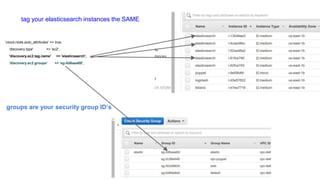
'cloud.node.auto_attributes' => true,
'discovery.type' => 'ec2',
'discovery.ec2.tag.name' => 'elasticsearch',
'discovery.ec2.groups' => 'sg-0d6aaa69',
tag your elasticsearch instances the SAME
groups are your security group ID’s
Node Discovery...
'discovery.type' => 'ec2',
Except it Doesn’t work.
'discovery.type' => 'ec2',
'http.port' => '9200',
'http.enabled' => true,
'http.cors.enabled' => true,
'http.cors.allow-origin' => 'http://54.152.82.147',
'path.data' => '/opt/elasticsearch/data',
'discovery.zen.ping.multicast.enabled' => false,
'discovery.zen.ping.unicast.hosts' => ["172.30.0.189", "172.30.0.190","172.30.0.159","172.30.0.160","172.30.0.4"],
}
}
CORS… you needs it
'http.cors.enabled' => true,
'http.cors.allow-origin' => 'http://my.kibanabox.whatevs',
Otherwise this happens...
Make your Heap Size Bigger
exec{'export ES_HEAP_SIZ=2g':}
The default is 1GB of
Memory, but apparently
ElasticSearch needs 2GB
You need to declare an instance!!!!
elasticsearch::instance { 'es1': }
Now add some Plugins!!
elasticsearch::plugin { 'elasticsearch/elasticsearch-cloud-aws/2.4.1':
module_dir => 'cloud-aws',
instances => ['es1'],
}
elasticsearch::plugin { 'mobz/elasticsearch-head':
module_dir => 'head',
instances => ['es1'],
}
elasticsearch::plugin { 'lmenezes/elasticsearch-kopf':
module_dir => 'kopf',
instances => ['es1'],
}
elasticsearch::plugin { 'lukas-vlcek/bigdesk':
module_dir => 'bigdesk',
instances => ['es1'],
}
}
And Make
Sure to add
your instance
Name
We’re almost done...
Not Really….
That was just the ElasticSearch Part.
Logstash
raw logs go in
pretty formatted logs
come out
Now for Logstash...
node 'ip-172-30-0-144.ec2.internal' {
class { 'logstash':
ensure => 'present',
package_url => 'https://download.elasticsearch.org/logstash/logstash/packages/centos/logstash-1.4.2-
1_2c0f5a1.noarch.rpm',
install_contrib => true,
contrib_package_url => 'https://download.elasticsearch.org/logstash/logstash/packages/centos/logstash-contrib-1.4.2-
1_efd53ef.noarch.rpm',
java_install => true,
exec{ ‘openssl req -x509 -batch -nodes -newkey rsa:2048 -keyout logstash-forwarder.key -out logstash-forwarder.crt -
days 365’}
}
logstash::configfile { ‘somename’:
content => template('files/logstash.conf')
}
}
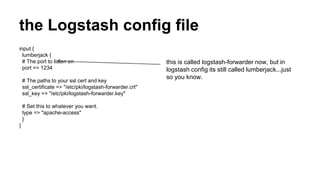
the Logstash config file
input {
lumberjack {
# The port to listen on
port => 1234
# The paths to your ssl cert and key
ssl_certificate => "/etc/pki/logstash-forwarder.crt"
ssl_key => "/etc/pki/logstash-forwarder.key"
# Set this to whatever you want.
type => "apache-access"
}
}
this is called logstash-forwarder now, but in
logstash config its still called lumberjack...just
so you know.
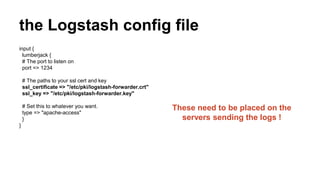
the Logstash config file
input {
lumberjack {
# The port to listen on
port => 1234
# The paths to your ssl cert and key
ssl_certificate => "/etc/pki/logstash-forwarder.crt"
ssl_key => "/etc/pki/logstash-forwarder.key"
# Set this to whatever you want.
type => "apache-access"
}
}
These need to be placed on the
servers sending the logs !
Filters….
filter {
grok {
type => "apache-access"
match => { message => "%{COMBINEDAPACHELOG}" }
}
date {
match => [ "timestamp" , "dd/MMM/yyyy:HH:mm:ss Z" ]
}
geoip {
source => clientip
}
}
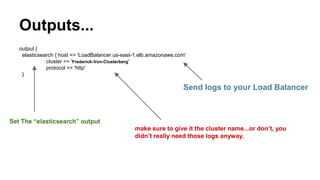
Outputs...
output {
elasticsearch { host => 'LoadBalancer.us-east-1.elb.amazonaws.com'
cluster => 'Frederick-Von-Clusterberg'
protocol => 'http'
}
Send logs to your Load Balancer
make sure to give it the cluster name...or don’t, you
didn’t really need those logs anyway.
Set The “elasticsearch” output
Are we there yet ?
And Now for Kibana….
elastic doesn’t provide a kibana module
so use this guy’s
echocat/puppet-kibana4
it does the job.
the only config value you need is….
class kibana4 (
$version = '4.0.0-linux-x64',
$download_path = 'http://download.elasticsearch.org/kibana/kibana',
$install_dir = '/opt',
$running = true,
$enabled = true,
$port = 5601,
$host = '0.0.0.0',
$elasticsearch_url = 'http://your.fancy.loadbalancerurl:9200',
$elasticsearch_preserve_host = true,
$kibana_index = '.kibana',
$kibana_elasticsearch_username = '',
$kibana_elasticsearch_password = '',
$default_app_id = 'discover',
$request_timeout = 300000,
$shard_timeout = 0,
$verify_ssl = true,
$ca = '',
$ssl_key_file = '',
$ssl_cert_file = '',
$pid_file = '/var/run/kibana.pid',
This one
right here
And Now You Have an ELK Stack!
You Still have to configure your Log Shipper
you need to prepare a few things
like go, the keys you made earlier, logstash
forwarder...
{
"network": {
"servers": [ "ip-172-30-0-144:1234" ],
"ssl key":"/root/.logstash/logstash-forwarder.key",
"ssl ca": "/root/.logstash/logstash-forwarder.crt",
"timeout": 120
},
"files": [
{
"paths": [
"/home/logdir/access*[^.][^g][^z]"
],
"start_position": "beginning",
"fields": { "type": "apache-access" }
}
]
}
Just Use This.
elastic/logstash-forwarder
Thanks !

Deploying E.L.K stack w Puppet

  • 1.
  • 2.
  • 3.
    The ELK Stack- What is it ? ElasticSearch….for Storage, Indexing & Search Logstash... For Logs & Filtering Kibana…. for DataViz & this guy
  • 4.
  • 5.
    What You’ll AlsoNeed... Load Balancer
  • 6.
  • 7.
    1st Prep aBase Image Save yourself some headache and just prep an empty image that sets puppet master in /etc/hosts [ec2-user@ip-172-30-0-118 ~]$ cat /etc/hosts 127.0.0.1 localhost localhost.localdomain 172.30.0.41 puppet
  • 8.
    Prepare your nodes... Useat minimum a medium instance for the elasticsearch nodes...
  • 9.
  • 11.
    The ElasticSearch Config node'ip-172-30-0-189.ec2.internal', 'ip-172-30-0-190.ec2.internal','ip-172-30-0-160.ec2.internal','ip-172-30-0-159.ec2.internal','ip-172-30-0-4.ec2.internal' { class { 'elasticsearch': ensure => 'present', package_url => 'https://download.elasticsearch.org/elasticsearch/elasticsearch/elasticsearch-1.4.3.noarch.rpm', java_install => true, config => { 'cluster.name' => 'cluster-name-goeshere-cluster', 'cloud.aws.access_key' => ‘SDFDSGGSDSDGFSRSGsgfse’, 'cloud.aws.secret_key' => ‘WhaTEVerUrKEYHaPp3n5t0B3ItWoodG0h3R3’, 'cloud.aws.region' => 'us-east', 'cloud.node.auto_attributes' => true, 'discovery.type' => 'ec2', 'discovery.ec2.tag.name' => 'elasticsearch', 'discovery.ec2.groups' => 'sg-0d6aaa69', 'http.port' => '9200', 'http.enabled' => true, …….
  • 12.
    package_url => 'https://download.elasticsearch.org/elasticsearch/elasticsearch/elasticsearch-1.4.3.noarch.rpm', java_install=> true, config => { 'cluster.name' => 'Frederick-Von-Clusterberg', 'cloud.aws.access_key' => ‘SDFDSGGSDSDGFSRSGsgfse’, 'cloud.aws.secret_key' => ‘WhaTEVerUrKEYHaPp3n5t0B3ItWoodG0h3R3’, 'cloud.aws.region' => 'us-east', 'cloud.node.auto_attributes' => true, 'discovery.type' => 'ec2', 'discovery.ec2.tag.name' => 'elasticsearch', 'discovery.ec2.groups' => 'sg-0d6aaa69', 'http.port' => '9200', 'http.enabled' => true, 'http.cors.enabled' => true, 'http.cors.allow-origin' => 'http://54.152.82.147', 'path.data' => '/opt/elasticsearch/data', 'discovery.zen.ping.multicast.enabled' => false, 'discovery.zen.ping.unicast.hosts' => ["172.30.0.189", "172.30.0.190","172.30.0.159","172.30.0.160","172.30.0.4"], } } exec{'export ES_HEAP_SIZ=2g':} The ElasticSearch Package you want to use Give your cluster a name
  • 13.
    'cloud.node.auto_attributes' => true, 'discovery.type'=> 'ec2', 'discovery.ec2.tag.name' => 'elasticsearch', 'discovery.ec2.groups' => 'sg-0d6aaa69', tag your elasticsearch instances the SAME groups are your security group ID’s
  • 14.
  • 15.
    Except it Doesn’twork. 'discovery.type' => 'ec2', 'http.port' => '9200', 'http.enabled' => true, 'http.cors.enabled' => true, 'http.cors.allow-origin' => 'http://54.152.82.147', 'path.data' => '/opt/elasticsearch/data', 'discovery.zen.ping.multicast.enabled' => false, 'discovery.zen.ping.unicast.hosts' => ["172.30.0.189", "172.30.0.190","172.30.0.159","172.30.0.160","172.30.0.4"], } }
  • 16.
    CORS… you needsit 'http.cors.enabled' => true, 'http.cors.allow-origin' => 'http://my.kibanabox.whatevs', Otherwise this happens...
  • 17.
    Make your HeapSize Bigger exec{'export ES_HEAP_SIZ=2g':} The default is 1GB of Memory, but apparently ElasticSearch needs 2GB
  • 18.
    You need todeclare an instance!!!! elasticsearch::instance { 'es1': }
  • 19.
    Now add somePlugins!! elasticsearch::plugin { 'elasticsearch/elasticsearch-cloud-aws/2.4.1': module_dir => 'cloud-aws', instances => ['es1'], } elasticsearch::plugin { 'mobz/elasticsearch-head': module_dir => 'head', instances => ['es1'], } elasticsearch::plugin { 'lmenezes/elasticsearch-kopf': module_dir => 'kopf', instances => ['es1'], } elasticsearch::plugin { 'lukas-vlcek/bigdesk': module_dir => 'bigdesk', instances => ['es1'], } } And Make Sure to add your instance Name
  • 20.
  • 21.
    Not Really…. That wasjust the ElasticSearch Part.
  • 22.
    Logstash raw logs goin pretty formatted logs come out
  • 23.
    Now for Logstash... node'ip-172-30-0-144.ec2.internal' { class { 'logstash': ensure => 'present', package_url => 'https://download.elasticsearch.org/logstash/logstash/packages/centos/logstash-1.4.2- 1_2c0f5a1.noarch.rpm', install_contrib => true, contrib_package_url => 'https://download.elasticsearch.org/logstash/logstash/packages/centos/logstash-contrib-1.4.2- 1_efd53ef.noarch.rpm', java_install => true, exec{ ‘openssl req -x509 -batch -nodes -newkey rsa:2048 -keyout logstash-forwarder.key -out logstash-forwarder.crt - days 365’} } logstash::configfile { ‘somename’: content => template('files/logstash.conf') } }
  • 24.
    the Logstash configfile input { lumberjack { # The port to listen on port => 1234 # The paths to your ssl cert and key ssl_certificate => "/etc/pki/logstash-forwarder.crt" ssl_key => "/etc/pki/logstash-forwarder.key" # Set this to whatever you want. type => "apache-access" } } this is called logstash-forwarder now, but in logstash config its still called lumberjack...just so you know.
  • 25.
    the Logstash configfile input { lumberjack { # The port to listen on port => 1234 # The paths to your ssl cert and key ssl_certificate => "/etc/pki/logstash-forwarder.crt" ssl_key => "/etc/pki/logstash-forwarder.key" # Set this to whatever you want. type => "apache-access" } } These need to be placed on the servers sending the logs !
  • 26.
    Filters…. filter { grok { type=> "apache-access" match => { message => "%{COMBINEDAPACHELOG}" } } date { match => [ "timestamp" , "dd/MMM/yyyy:HH:mm:ss Z" ] } geoip { source => clientip } }
  • 27.
    Outputs... output { elasticsearch {host => 'LoadBalancer.us-east-1.elb.amazonaws.com' cluster => 'Frederick-Von-Clusterberg' protocol => 'http' } Send logs to your Load Balancer make sure to give it the cluster name...or don’t, you didn’t really need those logs anyway. Set The “elasticsearch” output
  • 28.
  • 29.
    And Now forKibana…. elastic doesn’t provide a kibana module
  • 30.
    so use thisguy’s echocat/puppet-kibana4 it does the job.
  • 31.
    the only configvalue you need is…. class kibana4 ( $version = '4.0.0-linux-x64', $download_path = 'http://download.elasticsearch.org/kibana/kibana', $install_dir = '/opt', $running = true, $enabled = true, $port = 5601, $host = '0.0.0.0', $elasticsearch_url = 'http://your.fancy.loadbalancerurl:9200', $elasticsearch_preserve_host = true, $kibana_index = '.kibana', $kibana_elasticsearch_username = '', $kibana_elasticsearch_password = '', $default_app_id = 'discover', $request_timeout = 300000, $shard_timeout = 0, $verify_ssl = true, $ca = '', $ssl_key_file = '', $ssl_cert_file = '', $pid_file = '/var/run/kibana.pid', This one right here
  • 32.
    And Now YouHave an ELK Stack!
  • 33.
    You Still haveto configure your Log Shipper
  • 34.
    you need toprepare a few things
  • 35.
    like go, thekeys you made earlier, logstash forwarder... { "network": { "servers": [ "ip-172-30-0-144:1234" ], "ssl key":"/root/.logstash/logstash-forwarder.key", "ssl ca": "/root/.logstash/logstash-forwarder.crt", "timeout": 120 }, "files": [ { "paths": [ "/home/logdir/access*[^.][^g][^z]" ], "start_position": "beginning", "fields": { "type": "apache-access" } } ] }
  • 36.
  • 37.