






MVC and Razor
      By Naji El Kotob, MCT
              Version 1.2 - DRAFT
Razor Layout

   About MVC
   Razor
   Why Razor
   RenderBody
   RenderPage
   RenderSection
   Styles.Render/Scripts.Render
   _ViewStart file
   HTML Helpers
   Partial View
   Type of Returns
MVC
MVC

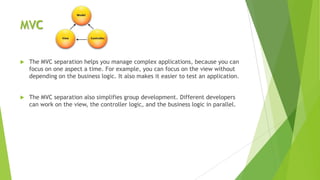
   The MVC separation helps you manage complex applications, because you can
    focus on one aspect a time. For example, you can focus on the view without
    depending on the business logic. It also makes it easier to test an application.


   The MVC separation also simplifies group development. Different developers
    can work on the view, the controller logic, and the business logic in parallel.
MVC - Model

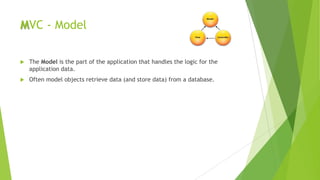
   The Model is the part of the application that handles the logic for the
    application data.
   Often model objects retrieve data (and store data) from a database.
MVC - View

   The View is the parts of the application that handles the display of the data.
   Most often the views are created from the model data.
MVC - Controller

   The Controller is the part of the application that handles user interaction.
   Typically controllers read data from a view, control user input, and send input
    data to the model.
   MVC requires the name of all controller files to end with “Controller“ e.g.
    HomeController
Razor
Razor

   “Razor” is a new view engine for ASP.NET
Why Razor

   Compact, Expressive, and Fluid
   Is not a new language
   Easy to Learn
   Works with any Text Editor
   Has great Intellisense (VS)
   Unit Testable
RenderBody

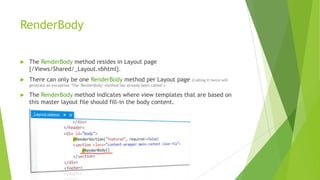
   The RenderBody method resides in Layout page
    {/Views/Shared/_Layout.vbhtml}.
   There can only be one RenderBody method per Layout page                     (Calling it twice will
    generate an exception „The "RenderBody" method has already been called‟).

   The RenderBody method indicates where view templates that are based on
    this master layout file should fill-in the body content.
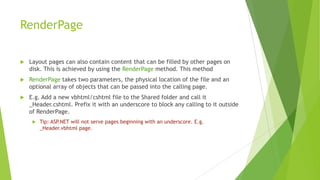
RenderPage

   Layout pages can also contain content that can be filled by other pages on
    disk. This is achieved by using the RenderPage method. This method
   RenderPage takes two parameters, the physical location of the file and an
    optional array of objects that can be passed into the calling page.
   E.g. Add a new vbhtml/cshtml file to the Shared folder and call it
    _Header.cshtml. Prefix it with an underscore to block any calling to it outside
    of RenderPage.
        Tip: ASP.NET will not serve pages beginning with an underscore. E.g.
         _Header.vbhtml page.
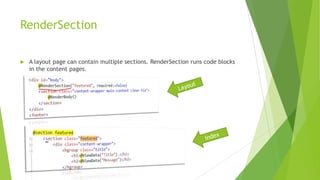
RenderSection

   A layout page can contain multiple sections. RenderSection runs code blocks
    in the content pages.
Styles.Render/Scripts.Render

   Styles.Render/Scripts.Render loads the css and js specified in
    BundleConfig.vb/.cs placed in App_Start folder.
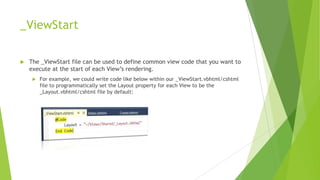
_ViewStart

   The _ViewStart file can be used to define common view code that you want to
    execute at the start of each View‟s rendering.
        For example, we could write code like below within our _ViewStart.vbhtml/cshtml
         file to programmatically set the Layout property for each View to be the
         _Layout.vbhtml/cshtml file by default:
HTML Helpers

   ASP.NET MVC providers a number of HtmlHelper methods for rendering
    markup based on the view model.
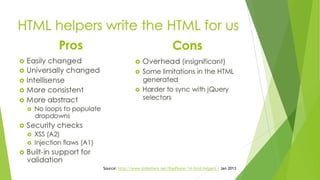
Source: http://www.slideshare.net/RapPayne/14-html-helpers / Jan 2013
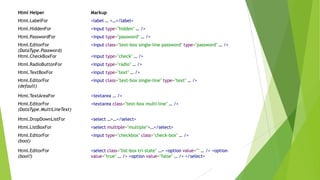
Html Helper                Markup
Html.LabelFor              <label … >…</label>
Html.HiddenFor             <input type="hidden" … />
Html.PasswordFor           <input type="password" … />
Html.EditorFor             <input class="text-box single-line password" type="password" … />
(DataType.Password)
Html.CheckBoxFor           <input type="check" … />
Html.RadioButtonFor        <input type="radio" … />
Html.TextBoxFor            <input type="text" … />
Html.EditorFor             <input class="text-box single-line" type="text" … />
(default)

Html.TextAreaFor           <textarea … />
Html.EditorFor             <textarea class="text-box multi-line" … />
(DataType.MultiLineText)

Html.DropDownListFor       <select …>…</select>
Html.ListBoxFor            <select multiple="multiple">…</select>
Html.EditorFor             <input type="checkbox" class="check-box" … />
(bool)

Html.EditorFor             <select class="list-box tri-state" …> <option value="" … /> <option
(bool?)                    value="true" … /> <option value="false" … /> </select>
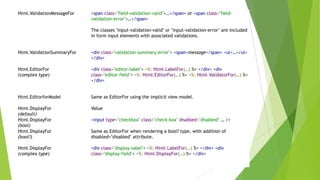
Html.ValidationMessageFor   <span class="field-validation-valid">…</span> or <span class="field-
                            validation-error">…</span>

                            The classes "input-validation-valid" or "input-validation-error" are included
                            in form input elements with associated validations.


Html.ValidationSummaryFor   <div class="validation-summary-error"> <span>message</span> <ul>…</ul>
                            </div>

Html.EditorFor              <div class="editor-label"> <%: Html.LabelFor(…) %> </div> <div
(complex type)              class="editor-field"> <%: Html.EditorFor(…) %> <%: Html.ValidatorFor(…) %>
                            </div>


Html.EditorforModel         Same as EditorFor using the implicit view model.

Html.DisplayFor             Value
(default)
Html.DisplayFor             <input type="checkbox" class="check-box" disabled="disabled" … />
(bool)
Html.DisplayFor             Same as EditorFor when rendering a bool? type, with addition of
(bool?)                     disabled="disabled" attribute.

Html.DisplayFor             <div class="display-label"> <%: Html.LabelFor(…) %> </div> <div
(complex type)              class="display-field"> <%: Html.DisplayFor(…) %> </div>
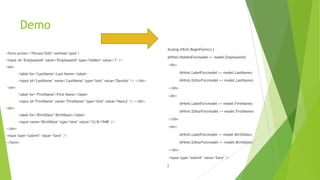
Demo
                                                                                      @using (Html.BeginForm()) {
<form action="/Person/Edit" method="post">
                                                                                      @Html.HiddenFor(model => model.EmployeeId)
<input id="EmployeeId" name="EmployeeId" type="hidden" value="1" />
                                                                                      <div>
<div>
         <label for="LastName">Last Name</label>                                               @Html.LabelFor(model => model.LastName)

         <input id="LastName" name="LastName" type="text" value="Davolio" /> </div>            @Html.EditorFor(model => model.LastName)
<div>                                                                                 </div>
         <label for="FirstName">First Name</label>                                    <div>
         <input id="FirstName" name="FirstName" type="text" value="Nancy" /> </div>
                                                                                               @Html.LabelFor(model => model.FirstName)
<div>
                                                                                               @Html.EditorFor(model => model.FirstName)
         <label for="BirthDate">BirthDate</label>
                                                                                      </div>
         <input name="BirthDate" type="text" value="12/8/1948" />
                                                                                      <div>
</div>
<input type="submit" value="Save" />                                                           @Html.LabelFor(model => model.BirthDate)

</form>                                                                                        @Html.EditorFor(model => model.BirthDate)

                                                                                      </div>

                                                                                      <input type="submit" value="Save" />

                                                                                      }
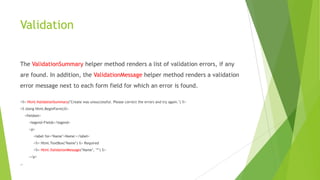
Validation


The ValidationSummary helper method renders a list of validation errors, if any
are found. In addition, the ValidationMessage helper method renders a validation
error message next to each form field for which an error is found.

<%= Html.ValidationSummary("Create was unsuccessful. Please correct the errors and try again.") %>
<% Using Html.BeginForm()%>
    <fieldset>
      <legend>Fields</legend>
      <p>
         <label for="Name">Name:</label>
         <%= Html.TextBox("Name") %> Required
         <%= Html.ValidationMessage("Name", "*") %>
      </p>
…
Partial View
Partial View

   A Partial View is a reusable fragment of content and code that can be
    embedded in another view and improves the usability of a site, while
    reducing duplicate code.
   Web User Control / Web Server Control (Web Forms) = Partial views (MVC)
   A simple use of the partial views is to use it to display social bookmarking
    icons across multiple pages.
Views vs. Partial View

   A View when rendered produces a full HTML document, whereas a partial
    view when rendered produces a fragment of HTML.
   A partial view does not specify the layout.
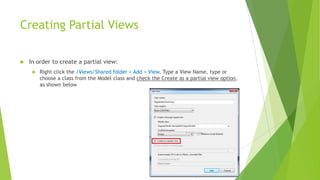
Creating Partial Views

   In order to create a partial view:
        Right click the /Views/Shared folder > Add > View. Type a View Name, type or
         choose a class from the Model class and check the Create as a partial view option,
         as shown below
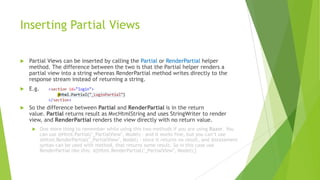
Inserting Partial Views

   Partial Views can be inserted by calling the Partial or RenderPartial helper
    method. The difference between the two is that the Partial helper renders a
    partial view into a string whereas RenderPartial method writes directly to the
    response stream instead of returning a string.
   E.g.


   So the difference between Partial and RenderPartial is in the return
    value. Partial returns result as MvcHtmlString and uses StringWriter to render
    view, and RenderPartial renders the view directly with no return value.
          One more thing to remember while using this two methods if you are using Razor. You
           can use @Html.Partial("_PartialView", Model) - and it works fine, but you can‟t use
           @Html.RenderPartial("_PartialView", Model) - since it returns no result, and @statement
           syntax can be used with method, that returns some result. So in this case use
           RenderPartial like this: @{Html.RenderPartial("_PartialView", Model);}
$('#div-sociallinks').html('This is the new content!');
  $('#div-sociallinks').html('This is the new content!');
     $('#div-sociallinks').html('This is the new content!');


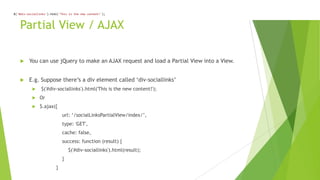
        Partial View / AJAX

             You can use jQuery to make an AJAX request and load a Partial View into a View.


             E.g. Suppose there‟s a div element called „div-sociallinks‟
                    $('#div-sociallinks').html('This is the new content!');
                   Or
                   $.ajax({
                                  url: „/socialLinksPartialView/index/‟,
                                  type: 'GET',
                                  cache: false,
                                  success: function (result) {
                                      $('#div-sociallinks').html(result);
                                  }
                              }
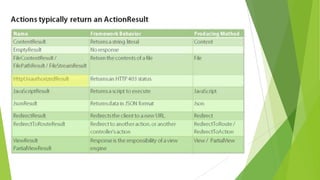
Type of Returns
Feedback

           Naji El Kotob, naji@dotnetheroes.com
                       Thank You 
References

   http://www.dotnetcurry.com/ShowArticle.aspx?ID=636
   http://www.dotnetspeaks.com/DisplayArticle.aspx?ID=241
   http://www.em64t.net/2010/12/razor-html-renderpartial-vs-html-partial-html-
    renderaction-vs-html-action-what-one-should-use/
   http://weblogs.asp.net/scottgu/archive/2010/12/30/asp-net-mvc-3-layouts-and-
    sections-with-razor.aspx
   http://www.w3schools.com/aspnet/mvc_htmlhelpers.asp
   http://rachelappel.com/razor/partial-views-in-asp-net-mvc-3-w-the-razor-view-
    engine/
   http://weblogs.asp.net/scottgu/archive/2010/10/22/asp-net-mvc-3-layouts.aspx
References (Cont.)

   http://www.gxclarke.org/2010/10/markup-rendered-by-aspnet-mvc-html.html
   http://www.devcurry.com/2012/04/partial-views-in-aspnet-mvc-3.html
   http://msdn.microsoft.com/en-us/library/dd381412(v=vs.108).aspx

MVC and Razor - Doc. v1.2

  • 1.
    MVC and Razor By Naji El Kotob, MCT Version 1.2 - DRAFT
  • 2.
    Razor Layout  About MVC  Razor  Why Razor  RenderBody  RenderPage  RenderSection  Styles.Render/Scripts.Render  _ViewStart file  HTML Helpers  Partial View  Type of Returns
  • 3.
  • 4.
    MVC  The MVC separation helps you manage complex applications, because you can focus on one aspect a time. For example, you can focus on the view without depending on the business logic. It also makes it easier to test an application.  The MVC separation also simplifies group development. Different developers can work on the view, the controller logic, and the business logic in parallel.
  • 5.
    MVC - Model  The Model is the part of the application that handles the logic for the application data.  Often model objects retrieve data (and store data) from a database.
  • 6.
    MVC - View  The View is the parts of the application that handles the display of the data.  Most often the views are created from the model data.
  • 7.
    MVC - Controller  The Controller is the part of the application that handles user interaction.  Typically controllers read data from a view, control user input, and send input data to the model.  MVC requires the name of all controller files to end with “Controller“ e.g. HomeController
  • 8.
  • 9.
    Razor  “Razor” is a new view engine for ASP.NET
  • 10.
    Why Razor  Compact, Expressive, and Fluid  Is not a new language  Easy to Learn  Works with any Text Editor  Has great Intellisense (VS)  Unit Testable
  • 11.
    RenderBody  The RenderBody method resides in Layout page {/Views/Shared/_Layout.vbhtml}.  There can only be one RenderBody method per Layout page (Calling it twice will generate an exception „The "RenderBody" method has already been called‟).  The RenderBody method indicates where view templates that are based on this master layout file should fill-in the body content.
  • 12.
    RenderPage  Layout pages can also contain content that can be filled by other pages on disk. This is achieved by using the RenderPage method. This method  RenderPage takes two parameters, the physical location of the file and an optional array of objects that can be passed into the calling page.  E.g. Add a new vbhtml/cshtml file to the Shared folder and call it _Header.cshtml. Prefix it with an underscore to block any calling to it outside of RenderPage.  Tip: ASP.NET will not serve pages beginning with an underscore. E.g. _Header.vbhtml page.
  • 13.
    RenderSection  A layout page can contain multiple sections. RenderSection runs code blocks in the content pages.
  • 14.
    Styles.Render/Scripts.Render  Styles.Render/Scripts.Render loads the css and js specified in BundleConfig.vb/.cs placed in App_Start folder.
  • 15.
    _ViewStart  The _ViewStart file can be used to define common view code that you want to execute at the start of each View‟s rendering.  For example, we could write code like below within our _ViewStart.vbhtml/cshtml file to programmatically set the Layout property for each View to be the _Layout.vbhtml/cshtml file by default:
  • 16.
    HTML Helpers  ASP.NET MVC providers a number of HtmlHelper methods for rendering markup based on the view model.
  • 17.
  • 18.
    Html Helper Markup Html.LabelFor <label … >…</label> Html.HiddenFor <input type="hidden" … /> Html.PasswordFor <input type="password" … /> Html.EditorFor <input class="text-box single-line password" type="password" … /> (DataType.Password) Html.CheckBoxFor <input type="check" … /> Html.RadioButtonFor <input type="radio" … /> Html.TextBoxFor <input type="text" … /> Html.EditorFor <input class="text-box single-line" type="text" … /> (default) Html.TextAreaFor <textarea … /> Html.EditorFor <textarea class="text-box multi-line" … /> (DataType.MultiLineText) Html.DropDownListFor <select …>…</select> Html.ListBoxFor <select multiple="multiple">…</select> Html.EditorFor <input type="checkbox" class="check-box" … /> (bool) Html.EditorFor <select class="list-box tri-state" …> <option value="" … /> <option (bool?) value="true" … /> <option value="false" … /> </select>
  • 19.
    Html.ValidationMessageFor <span class="field-validation-valid">…</span> or <span class="field- validation-error">…</span> The classes "input-validation-valid" or "input-validation-error" are included in form input elements with associated validations. Html.ValidationSummaryFor <div class="validation-summary-error"> <span>message</span> <ul>…</ul> </div> Html.EditorFor <div class="editor-label"> <%: Html.LabelFor(…) %> </div> <div (complex type) class="editor-field"> <%: Html.EditorFor(…) %> <%: Html.ValidatorFor(…) %> </div> Html.EditorforModel Same as EditorFor using the implicit view model. Html.DisplayFor Value (default) Html.DisplayFor <input type="checkbox" class="check-box" disabled="disabled" … /> (bool) Html.DisplayFor Same as EditorFor when rendering a bool? type, with addition of (bool?) disabled="disabled" attribute. Html.DisplayFor <div class="display-label"> <%: Html.LabelFor(…) %> </div> <div (complex type) class="display-field"> <%: Html.DisplayFor(…) %> </div>
  • 20.
    Demo @using (Html.BeginForm()) { <form action="/Person/Edit" method="post"> @Html.HiddenFor(model => model.EmployeeId) <input id="EmployeeId" name="EmployeeId" type="hidden" value="1" /> <div> <div> <label for="LastName">Last Name</label> @Html.LabelFor(model => model.LastName) <input id="LastName" name="LastName" type="text" value="Davolio" /> </div> @Html.EditorFor(model => model.LastName) <div> </div> <label for="FirstName">First Name</label> <div> <input id="FirstName" name="FirstName" type="text" value="Nancy" /> </div> @Html.LabelFor(model => model.FirstName) <div> @Html.EditorFor(model => model.FirstName) <label for="BirthDate">BirthDate</label> </div> <input name="BirthDate" type="text" value="12/8/1948" /> <div> </div> <input type="submit" value="Save" /> @Html.LabelFor(model => model.BirthDate) </form> @Html.EditorFor(model => model.BirthDate) </div> <input type="submit" value="Save" /> }
  • 21.
    Validation The ValidationSummary helpermethod renders a list of validation errors, if any are found. In addition, the ValidationMessage helper method renders a validation error message next to each form field for which an error is found. <%= Html.ValidationSummary("Create was unsuccessful. Please correct the errors and try again.") %> <% Using Html.BeginForm()%> <fieldset> <legend>Fields</legend> <p> <label for="Name">Name:</label> <%= Html.TextBox("Name") %> Required <%= Html.ValidationMessage("Name", "*") %> </p> …
  • 22.
  • 23.
    Partial View  A Partial View is a reusable fragment of content and code that can be embedded in another view and improves the usability of a site, while reducing duplicate code.  Web User Control / Web Server Control (Web Forms) = Partial views (MVC)  A simple use of the partial views is to use it to display social bookmarking icons across multiple pages.
  • 24.
    Views vs. PartialView  A View when rendered produces a full HTML document, whereas a partial view when rendered produces a fragment of HTML.  A partial view does not specify the layout.
  • 25.
    Creating Partial Views  In order to create a partial view:  Right click the /Views/Shared folder > Add > View. Type a View Name, type or choose a class from the Model class and check the Create as a partial view option, as shown below
  • 26.
    Inserting Partial Views  Partial Views can be inserted by calling the Partial or RenderPartial helper method. The difference between the two is that the Partial helper renders a partial view into a string whereas RenderPartial method writes directly to the response stream instead of returning a string.  E.g.  So the difference between Partial and RenderPartial is in the return value. Partial returns result as MvcHtmlString and uses StringWriter to render view, and RenderPartial renders the view directly with no return value.  One more thing to remember while using this two methods if you are using Razor. You can use @Html.Partial("_PartialView", Model) - and it works fine, but you can‟t use @Html.RenderPartial("_PartialView", Model) - since it returns no result, and @statement syntax can be used with method, that returns some result. So in this case use RenderPartial like this: @{Html.RenderPartial("_PartialView", Model);}
  • 27.
    $('#div-sociallinks').html('This is thenew content!'); $('#div-sociallinks').html('This is the new content!'); $('#div-sociallinks').html('This is the new content!'); Partial View / AJAX  You can use jQuery to make an AJAX request and load a Partial View into a View.  E.g. Suppose there‟s a div element called „div-sociallinks‟  $('#div-sociallinks').html('This is the new content!');  Or  $.ajax({ url: „/socialLinksPartialView/index/‟, type: 'GET', cache: false, success: function (result) { $('#div-sociallinks').html(result); } }
  • 28.
  • 31.
    Feedback Naji El Kotob, naji@dotnetheroes.com Thank You 
  • 32.
    References  http://www.dotnetcurry.com/ShowArticle.aspx?ID=636  http://www.dotnetspeaks.com/DisplayArticle.aspx?ID=241  http://www.em64t.net/2010/12/razor-html-renderpartial-vs-html-partial-html- renderaction-vs-html-action-what-one-should-use/  http://weblogs.asp.net/scottgu/archive/2010/12/30/asp-net-mvc-3-layouts-and- sections-with-razor.aspx  http://www.w3schools.com/aspnet/mvc_htmlhelpers.asp  http://rachelappel.com/razor/partial-views-in-asp-net-mvc-3-w-the-razor-view- engine/  http://weblogs.asp.net/scottgu/archive/2010/10/22/asp-net-mvc-3-layouts.aspx
  • 33.
    References (Cont.)  http://www.gxclarke.org/2010/10/markup-rendered-by-aspnet-mvc-html.html  http://www.devcurry.com/2012/04/partial-views-in-aspnet-mvc-3.html  http://msdn.microsoft.com/en-us/library/dd381412(v=vs.108).aspx

Editor's Notes

  • #11 Compact, Expressive, and Fluid: Razor minimizes the number of characters and keystrokes required in a file, and enables a fast, fluid coding workflow. Unlike most template syntaxes, you do not need to interrupt your coding to explicitly denote server blocks within your HTML. The parser is smart enough to infer this from your code. This enables a really compact and expressive syntax which is clean, fast and fun to type.Easy to Learn: Razor is easy to learn and enables you to quickly be productive with a minimum of concepts. You use all your existing language and HTML skills.Is not a new language: We consciously chose not to create a new imperative language with Razor. Instead we wanted to enable developers to use their existing C#/VB (or other) language skills with Razor, and deliver a template markup syntax that enables an awesome HTML construction workflow with your language of choice.Works with any Text Editor: Razor doesn’t require a specific tool and enables you to be productive in any plain old text editor (notepad works great).Has great Intellisense: While Razor has been designed to not require a specific tool or code editor, it will have awesome statement completion support within Visual Studio. We’ll be updating Visual Studio 2010 and Visual Web Developer 2010 to have full editor intellisense for it.Unit Testable: The new view engine implementation will support the ability to unit test views (without requiring a controller or web-server, and can be hosted in any unit test project – no special app-domain required)
  • #16 http://weblogs.asp.net/scottgu/archive/2010/10/22/asp-net-mvc-3-layouts.aspx
  • #18 http://www.slideshare.net/RapPayne/14-html-helpers
  • #20 http://www.gxclarke.org/2010/10/markup-rendered-by-aspnet-mvc-html.html
  • #22 http://msdn.microsoft.com/en-us/library/dd410404(v=vs.90).aspx
  • #24 http://rachelappel.com/razor/partial-views-in-asp-net-mvc-3-w-the-razor-view-engine/http://www.devcurry.com/2012/04/partial-views-in-aspnet-mvc-3.html