Android Data Binding in action
using MVVM pattern
Fabio Collini
2
Ego slide
@fabioCollini
linkedin.com/in/fabiocollini
github.com/fabioCollini
medium.com/@fabioCollini
codingjam.it
3
Agenda
1. Data Binding basics
2. Custom attributes
3. Components
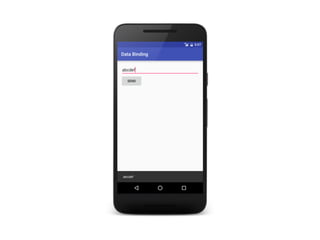
4. Two Way Data Binding
5. Model View ViewModel
4
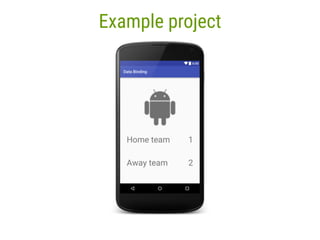
Example project
5
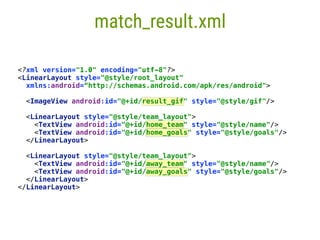
match_result.xml
<?xml version="1.0" encoding="utf-8"?>

<LinearLayout style="@style/root_layout"

xmlns:android=“http://schemas.android.com/apk/res/android">


<ImageView android:id="@+id/result_gif" style="@style/gif"/>


<LinearLayout style="@style/team_layout">

<TextView android:id="@+id/home_team" style="@style/name"/>

<TextView android:id="@+id/home_goals" style="@style/goals"/>

</LinearLayout>


<LinearLayout style="@style/team_layout">

<TextView android:id="@+id/away_team" style="@style/name"/>

<TextView android:id="@+id/away_goals" style="@style/goals"/>

</LinearLayout>

</LinearLayout>
6
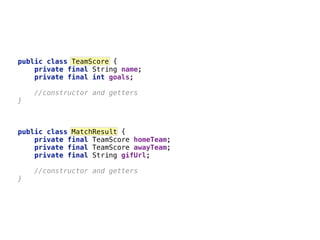
public class TeamScore {

private final String name;

private final int goals;
//constructor and getters

}
public class MatchResult {

private final TeamScore homeTeam;

private final TeamScore awayTeam;

private final String gifUrl;
//constructor and getters

}
7
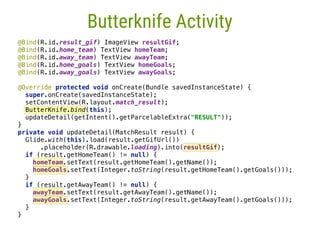
Butterknife Activity
@Bind(R.id.result_gif) ImageView resultGif;

@Bind(R.id.home_team) TextView homeTeam;

@Bind(R.id.away_team) TextView awayTeam;

@Bind(R.id.home_goals) TextView homeGoals;

@Bind(R.id.away_goals) TextView awayGoals;


@Override protected void onCreate(Bundle savedInstanceState) {

super.onCreate(savedInstanceState);

setContentView(R.layout.match_result);

ButterKnife.bind(this);

updateDetail(getIntent().getParcelableExtra("RESULT"));

}

private void updateDetail(MatchResult result) {

Glide.with(this).load(result.getGifUrl())

.placeholder(R.drawable.loading).into(resultGif);

if (result.getHomeTeam() != null) {

homeTeam.setText(result.getHomeTeam().getName());

homeGoals.setText(Integer.toString(result.getHomeTeam().getGoals()));

}

if (result.getAwayTeam() != null) {

awayTeam.setText(result.getAwayTeam().getName());

awayGoals.setText(Integer.toString(result.getAwayTeam().getGoals()));

}

}
DroidCon Italy - Torino - April 2016 - @fabioCollini 8
1Data Binding basics
9
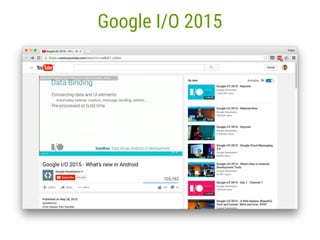
Google I/O 2015
10
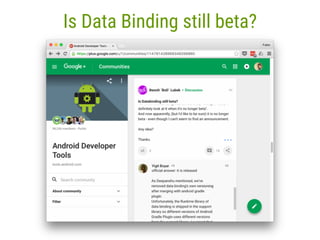
Is Data Binding still beta?
11
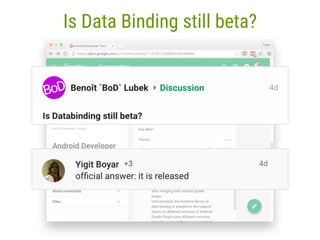
Is Data Binding still beta?
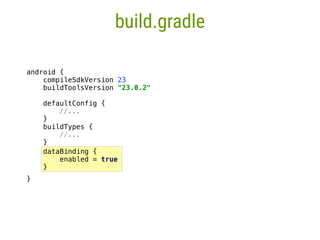
dataBinding {

enabled = true

}

12
build.gradle
android {

compileSdkVersion 23

buildToolsVersion "23.0.2"


defaultConfig {

//...

____}

buildTypes {

//...

____}
}
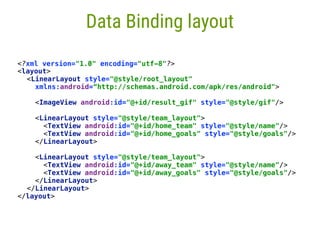
<?xml version="1.0" encoding="utf-8"?>

<layout>

<LinearLayout style=“@style/root_layout"
xmlns:android="http://schemas.android.com/apk/res/android">


<ImageView android:id="@+id/result_gif" style="@style/gif"/>


<LinearLayout style="@style/team_layout">

<TextView android:id="@+id/home_team" style="@style/name"/>

<TextView android:id="@+id/home_goals" style="@style/goals"/>

</LinearLayout>


<LinearLayout style="@style/team_layout">

<TextView android:id="@+id/away_team" style="@style/name"/>

<TextView android:id="@+id/away_goals" style="@style/goals"/>

</LinearLayout>

</LinearLayout>

</layout>
13
Data Binding layout
<LinearLayout style="@style/root_layout"

xmlns:android=“http://schemas.android.com/apk/res/android">


<ImageView android:id="@+id/result_gif" style="@style/gif"/>


<LinearLayout style="@style/team_layout">

<TextView android:id="@+id/home_team" style="@style/name"/>

<TextView android:id="@+id/home_goals" style="@style/goals"/>

</LinearLayout>


<LinearLayout style="@style/team_layout">

<TextView android:id="@+id/away_team" style="@style/name"/>

<TextView android:id="@+id/away_goals" style="@style/goals"/>

</LinearLayout>

</LinearLayout>
<?xml version="1.0" encoding="utf-8"?>
<layout>
</layout>
<LinearLayout style="@style/root_layout"

xmlns:android=“http://schemas.android.com/apk/res/android">


<ImageView android:id="@+id/result_gif" style="@style/gif"/>


<LinearLayout style="@style/team_layout">

<TextView android:id="@+id/home_team" style="@style/name"/>

<TextView android:id="@+id/home_goals" style="@style/goals"/>

</LinearLayout>


<LinearLayout style="@style/team_layout">

<TextView android:id="@+id/away_team" style="@style/name"/>

<TextView android:id="@+id/away_goals" style="@style/goals"/>

</LinearLayout>

</LinearLayout>
14
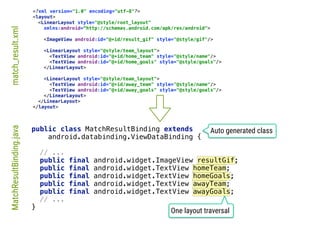
One layout traversal
match_result.xmlMatchResultBinding.java
Auto generated class
<?xml version="1.0" encoding="utf-8"?>
<layout>
</layout>
public class MatchResultBinding extends
android.databinding.ViewDataBinding {


// ...

public final android.widget.ImageView resultGif;

public final android.widget.TextView homeTeam;

public final android.widget.TextView homeGoals;

public final android.widget.TextView awayTeam;

public final android.widget.TextView awayGoals;

// ...

}
15
Activity


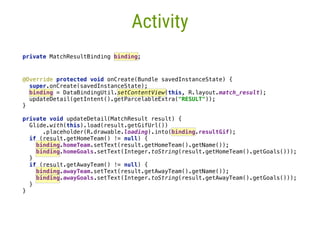
@Override protected void onCreate(Bundle savedInstanceState) {

super.onCreate(savedInstanceState);

binding = DataBindingUtil.setContentView(this, R.layout.match_result);
updateDetail(getIntent().getParcelableExtra("RESULT"));

}____


private void updateDetail(MatchResult result) {

Glide.with(this).load(result.getGifUrl())

.placeholder(R.drawable.loading).into(binding.resultGif);

if (result.getHomeTeam() != null) {

binding.homeTeam.setText(result.getHomeTeam().getName());

binding.homeGoals.setText(Integer.toString(result.getHomeTeam().getGoals()));

}___

if (result.getAwayTeam() != null) {

binding.awayTeam.setText(result.getAwayTeam().getName());

binding.awayGoals.setText(Integer.toString(result.getAwayTeam().getGoals()));

}__

}_
private MatchResultBinding binding;__
16
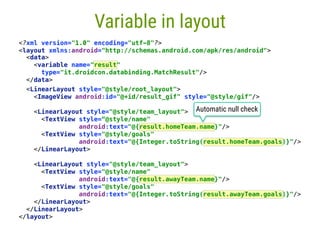
Variable in layout
<?xml version="1.0" encoding="utf-8"?>

<layout xmlns:android="http://schemas.android.com/apk/res/android">
Automatic null check
<data>

<variable name="result"
type="it.droidcon.databinding.MatchResult"/>

</data>
<LinearLayout style="@style/root_layout">

<ImageView android:id="@+id/result_gif" style="@style/gif"/>


<LinearLayout style="@style/team_layout">

<TextView style=“@style/name"

android:text="@{result.homeTeam.name}"/>

<TextView style="@style/goals"

android:text="@{Integer.toString(result.homeTeam.goals)}"/>

</LinearLayout>


<LinearLayout style="@style/team_layout">

<TextView style="@style/name"

android:text="@{result.awayTeam.name}"/>

<TextView style="@style/goals"

android:text="@{Integer.toString(result.awayTeam.goals)}"/>

</LinearLayout>

</LinearLayout>

</layout>
17
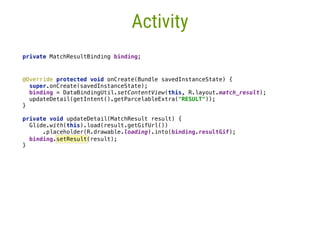
Activity
private MatchResultBinding binding;


@Override protected void onCreate(Bundle savedInstanceState) {

super.onCreate(savedInstanceState);

binding = DataBindingUtil.setContentView(this, R.layout.match_result);
updateDetail(getIntent().getParcelableExtra("RESULT"));

}____


private void updateDetail(MatchResult result) {

Glide.with(this).load(result.getGifUrl())

.placeholder(R.drawable.loading).into(binding.resultGif);

binding.setResult(result);
}_
18
Code in XML?
Are you serious?!?
19
Complex code in XML is
NOT
a best practice
DroidCon Italy - Torino - April 2016 - @fabioCollini 20
2Custom attributes
21
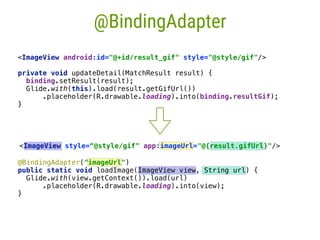
@BindingAdapter
<ImageView android:id="@+id/result_gif" style="@style/gif"/>
private void updateDetail(MatchResult result) {

binding.setResult(result);

Glide.with(this).load(result.getGifUrl())

.placeholder(R.drawable.loading).into(binding.resultGif);

}
<ImageView style=“@style/gif" app:imageUrl="@{result.gifUrl}"/>
@BindingAdapter("imageUrl")

public static void loadImage(ImageView view, String url) {

Glide.with(view.getContext()).load(url)

.placeholder(R.drawable.loading).into(view);

}
22
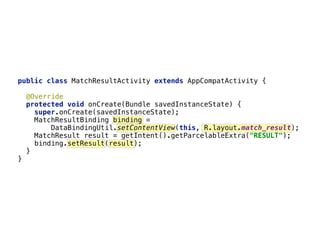
public class MatchResultActivity extends AppCompatActivity {


@Override

protected void onCreate(Bundle savedInstanceState) {

super.onCreate(savedInstanceState);

MatchResultBinding binding =

DataBindingUtil.setContentView(this, R.layout.match_result);

MatchResult result = getIntent().getParcelableExtra("RESULT");

binding.setResult(result);

}

}
23
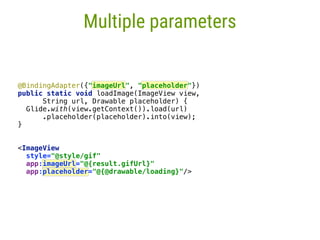
Multiple parameters
@BindingAdapter({"imageUrl", "placeholder"})

public static void loadImage(ImageView view,
String url, Drawable placeholder) {

Glide.with(view.getContext()).load(url)

.placeholder(placeholder).into(view);

}

<ImageView
style="@style/gif"

app:imageUrl="@{result.gifUrl}"
app:placeholder="@{@drawable/loading}"/>
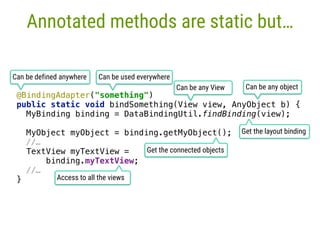
Annotated methods are static but…
@BindingAdapter("something")

public static void bindSomething(View view, AnyObject b) {

MyBinding binding = DataBindingUtil.findBinding(view);


MyObject myObject = binding.getMyObject();

//…
TextView myTextView = 

binding.myTextView;
//…
}
Can be any object
Get the layout binding
Get the connected objects
Access to all the views
Can be defined anywhere Can be used everywhere
Can be any View
25
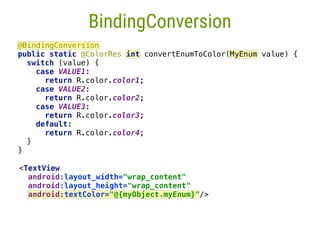
BindingConversion
@BindingConversion

public static @ColorRes int convertEnumToColor(MyEnum value) {

switch (value) {

case VALUE1:

return R.color.color1;

case VALUE2:

return R.color.color2;

case VALUE3:

return R.color.color3;

default:

return R.color.color4;

}

}
<TextView

android:layout_width="wrap_content"

android:layout_height="wrap_content"

android:textColor="@{myObject.myEnum}"/>
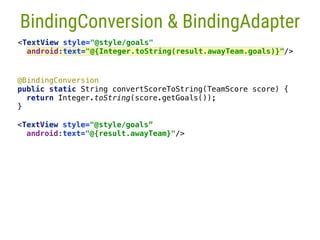
@BindingConversion

public static String convertScoreToString(TeamScore score) {

return Integer.toString(score.getGoals());

}___

<TextView style="@style/goals”
android:text="@{result.awayTeam}"/>

26
BindingConversion & BindingAdapter
<TextView style="@style/goals"

android:text="@{Integer.toString(result.awayTeam.goals)}"/>
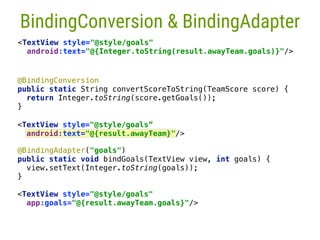
<TextView style="@style/goals"
app:goals="@{result.awayTeam.goals}"/>
@BindingAdapter("goals")

public static void bindGoals(TextView view, int goals) {

view.setText(Integer.toString(goals));

}__

@BindingConversion

public static String convertScoreToString(TeamScore score) {

return Integer.toString(score.getGoals());

}___

27
BindingConversion & BindingAdapter
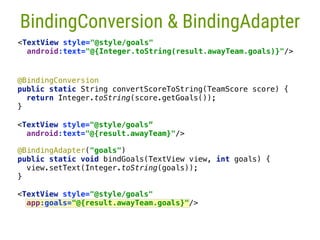
<TextView style="@style/goals"

android:text="@{Integer.toString(result.awayTeam.goals)}"/>
<TextView style="@style/goals”
android:text="@{result.awayTeam}"/>

<TextView style="@style/goals"
app:goals="@{result.awayTeam.goals}"/>
@BindingAdapter("goals")

public static void bindGoals(TextView view, int goals) {

view.setText(Integer.toString(goals));

}__

@BindingConversion

public static String convertScoreToString(TeamScore score) {

return Integer.toString(score.getGoals());

}___

<TextView style="@style/goals”
android:text="@{result.awayTeam}"/>

28
BindingConversion & BindingAdapter
<TextView style="@style/goals"

android:text="@{Integer.toString(result.awayTeam.goals)}"/>
29
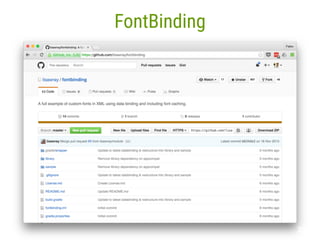
FontBinding
DroidCon Italy - Torino - April 2016 - @fabioCollini 30
3Components
31
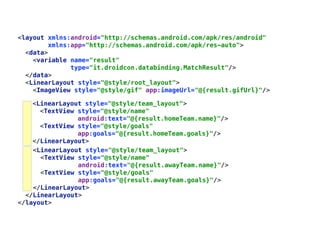
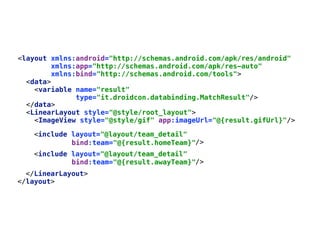
<layout xmlns:android="http://schemas.android.com/apk/res/android"

xmlns:app="http://schemas.android.com/apk/res-auto">

<data>

<variable name="result"

type="it.droidcon.databinding.MatchResult"/>

</data>

<LinearLayout style="@style/root_layout">

<ImageView style="@style/gif" app:imageUrl="@{result.gifUrl}"/>


<LinearLayout style="@style/team_layout">

<TextView style="@style/name"

android:text="@{result.awayTeam.name}"/>

<TextView style="@style/goals"

app:goals="@{result.awayTeam.goals}"/>

</LinearLayout>

</LinearLayout>

</layout>
<LinearLayout style="@style/team_layout">

<TextView style="@style/name"

android:text="@{result.homeTeam.name}"/>

<TextView style="@style/goals"

app:goals="@{result.homeTeam.goals}"/>

</LinearLayout>
32
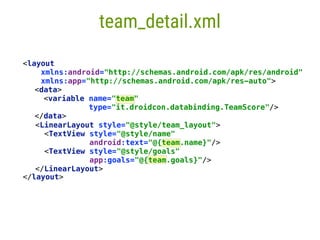
<layout
xmlns:android="http://schemas.android.com/apk/res/android"

xmlns:app="http://schemas.android.com/apk/res-auto">

</layout>
team_detail.xml
<data>

<variable name="team"

type="it.droidcon.databinding.TeamScore"/>

</data>

<LinearLayout style="@style/team_layout">

<TextView style="@style/name"

android:text="@{team.name}"/>

<TextView style="@style/goals"

app:goals="@{team.goals}"/>

</LinearLayout>
</data>

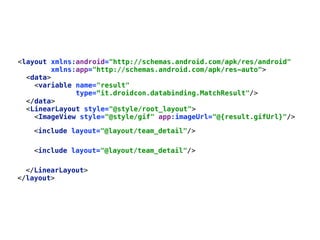
<LinearLayout style="@style/root_layout">

<ImageView style="@style/gif" app:imageUrl="@{result.gifUrl}"/>


<include layout="@layout/team_detail"/>
</LinearLayout>

</layout>
<layout xmlns:android="http://schemas.android.com/apk/res/android"

xmlns:app="http://schemas.android.com/apk/res-auto">

<data>

<variable name="result"

type=“it.droidcon.databinding.MatchResult"/>


</data>

<LinearLayout style="@style/root_layout">

<ImageView style="@style/gif" app:imageUrl="@{result.gifUrl}"/>


<layout xmlns:android="http://schemas.android.com/apk/res/android"

xmlns:app="http://schemas.android.com/apk/res-auto"
xmlns:bind="http://schemas.android.com/tools">

<data>

<variable name="result"

type="it.droidcon.databinding.MatchResult"/>

<include layout="@layout/team_detail"

/>
<include layout="@layout/team_detail"

/>
</LinearLayout>

</layout>
bind:team="@{result.homeTeam}"
bind:team="@{result.awayTeam}"
</data>

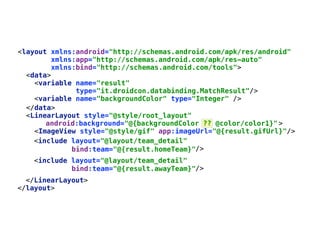
<LinearLayout style="@style/root_layout"
>

<ImageView style="@style/gif" app:imageUrl="@{result.gifUrl}"/>


android:background="@{backgroundColor ?? @color/color1}"
<layout xmlns:android="http://schemas.android.com/apk/res/android"

xmlns:app="http://schemas.android.com/apk/res-auto"
xmlns:bind="http://schemas.android.com/tools">

<data>

<variable name="result"

type="it.droidcon.databinding.MatchResult"/>

<include layout="@layout/team_detail"

/>
<include layout="@layout/team_detail"

/>
</LinearLayout>

</layout>
bind:team="@{result.homeTeam}"
bind:team="@{result.awayTeam}"
<variable name="backgroundColor" type="Integer" />
DroidCon Italy - Torino - April 2016 - @fabioCollini 36
4Two Way Data Binding
37
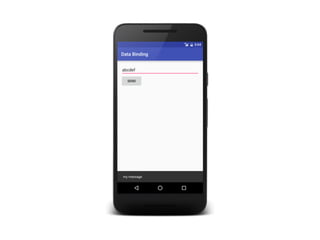
38
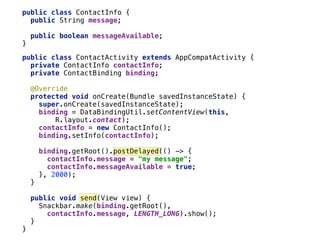
public class ContactInfo {

public String message;


public boolean messageAvailable;

}__
39
public class ContactInfo {

public String message;


public boolean messageAvailable;

}__
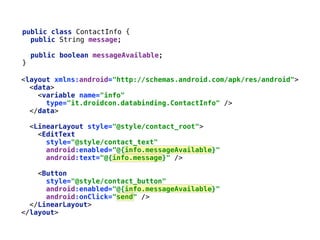
<layout xmlns:android="http://schemas.android.com/apk/res/android">

<data>

<variable name="info"

type="it.droidcon.databinding.ContactInfo" />

</data>


<LinearLayout style="@style/contact_root">

<EditText

style="@style/contact_text"

android:enabled="@{info.messageAvailable}"

android:text="@{info.message}" />


<Button

style="@style/contact_button"

android:enabled="@{info.messageAvailable}"

android:onClick="send" />

</LinearLayout>

</layout>
40
public class ContactInfo {

public String message;


public boolean messageAvailable;

}__
public class ContactActivity extends AppCompatActivity {

private ContactInfo contactInfo;

private ContactBinding binding;


@Override

protected void onCreate(Bundle savedInstanceState) {

super.onCreate(savedInstanceState);

binding = DataBindingUtil.setContentView(this,
R.layout.contact);

contactInfo = new ContactInfo();

binding.setInfo(contactInfo);


binding.getRoot().postDelayed(() -> {

contactInfo.message = "my message";

contactInfo.messageAvailable = true;

}, 2000);

}


public void send(View view) {

Snackbar.make(binding.getRoot(),
contactInfo.message, LENGTH_LONG).show();

}

}
41
42
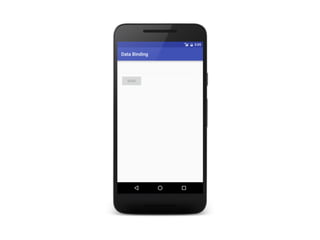
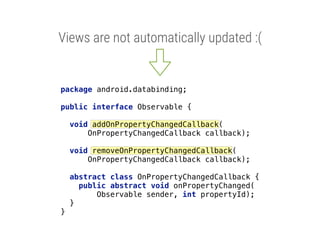
Views are not automatically updated :(
package android.databinding;


public interface Observable {


void addOnPropertyChangedCallback(
OnPropertyChangedCallback callback);


void removeOnPropertyChangedCallback(
OnPropertyChangedCallback callback);


abstract class OnPropertyChangedCallback {

public abstract void onPropertyChanged(
Observable sender, int propertyId);

}

}
43
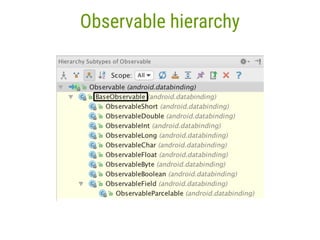
Observable hierarchy
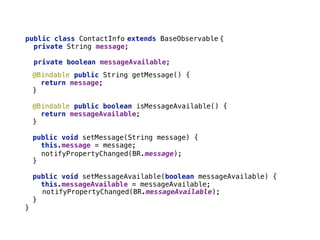
public String getMessage() {

return message;

}____


public boolean isMessageAvailable() {

return messageAvailable;

}___


public void setMessage(String message) {

this.message = message;


}__


public void setMessageAvailable(boolean messageAvailable) {

this.messageAvailable = messageAvailable;


}_

public class ContactInfo

private String message;


private boolean messageAvailable;

44
extends BaseObservable {
}
notifyPropertyChanged(BR.message);
notifyPropertyChanged(BR.messageAvailable);
@Bindable
@Bindable
45
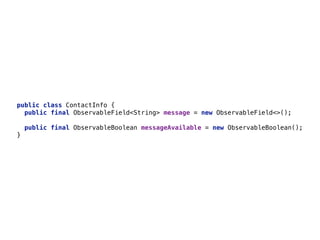
public class ContactInfo {

public final ObservableField<String> message = new ObservableField<>();_


public final ObservableBoolean messageAvailable = new ObservableBoolean();_

}__
46
public class ContactInfo {

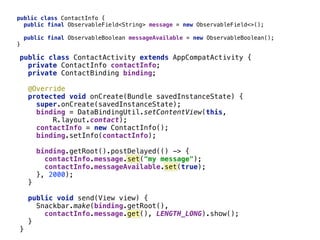
public final ObservableField<String> message = new ObservableField<>();_


public final ObservableBoolean messageAvailable = new ObservableBoolean();_

}__
public class ContactActivity extends AppCompatActivity {

private ContactInfo contactInfo;

private ContactBinding binding;


@Override

protected void onCreate(Bundle savedInstanceState) {

super.onCreate(savedInstanceState);

binding = DataBindingUtil.setContentView(this,
R.layout.contact);

contactInfo = new ContactInfo();

binding.setInfo(contactInfo);


binding.getRoot().postDelayed(() -> {

contactInfo.message.set("my message");

contactInfo.messageAvailable.set(true);

}, 2000);
}___


public void send(View view) {

Snackbar.make(binding.getRoot(),
contactInfo.message.get(), LENGTH_LONG).show();

}__

}_
<layout xmlns:android="http://schemas.android.com/apk/res/android">

<data>

<variable name="info"

type="it.droidcon.databinding.ContactInfo" />

</data>


<LinearLayout style="@style/contact_root">

<EditText

style="@style/contact_text"

android:enabled="@{info.messageAvailable}"

android:text="@{info.message}" />


<Button

style="@style/contact_button"

android:enabled="@{info.messageAvailable}"

android:onClick="send" />

</LinearLayout>

</layout>
47
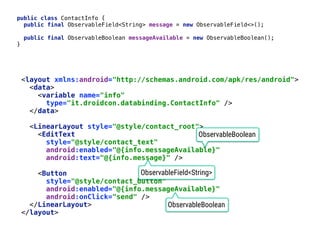
public class ContactInfo {

public final ObservableField<String> message = new ObservableField<>();_


public final ObservableBoolean messageAvailable = new ObservableBoolean();_

}__
ObservableField<String>
ObservableBoolean
ObservableBoolean
48
49
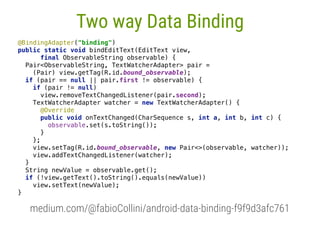
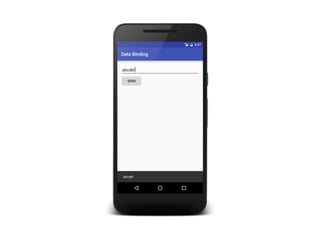
Two way Data Binding
@BindingAdapter("binding")

public static void bindEditText(EditText view,
final ObservableString observable) {

Pair<ObservableString, TextWatcherAdapter> pair =
(Pair) view.getTag(R.id.bound_observable);

if (pair == null || pair.first != observable) {

if (pair != null)

view.removeTextChangedListener(pair.second);

TextWatcherAdapter watcher = new TextWatcherAdapter() {

@Override
public void onTextChanged(CharSequence s, int a, int b, int c) {

observable.set(s.toString());

}

};

view.setTag(R.id.bound_observable, new Pair<>(observable, watcher));

view.addTextChangedListener(watcher);

}

String newValue = observable.get();

if (!view.getText().toString().equals(newValue))

view.setText(newValue);

}

medium.com/@fabioCollini/android-data-binding-f9f9d3afc761
50
51
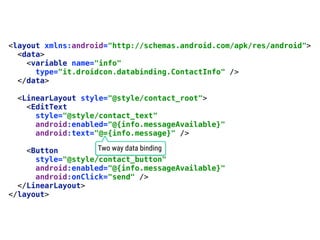
<layout xmlns:android="http://schemas.android.com/apk/res/android">

<data>

<variable name="info"

type="it.droidcon.databinding.ContactInfo" />

</data>


<LinearLayout style="@style/contact_root">

<EditText

style="@style/contact_text"

android:enabled="@{info.messageAvailable}"

android:text="@={info.message}" />


<Button

style="@style/contact_button"

android:enabled="@{info.messageAvailable}"

android:onClick="send" />

</LinearLayout>

</layout>
Two way data binding
52
53
54
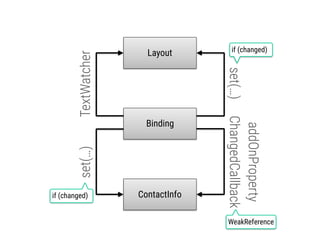
Layout
ContactInfo
Binding
TextWatcherset(…)
addOnProperty
ChangedCallbackset(…)
if (changed)
WeakReference
if (changed)
DroidCon Italy - Torino - April 2016 - @fabioCollini 55
5MVVM
56
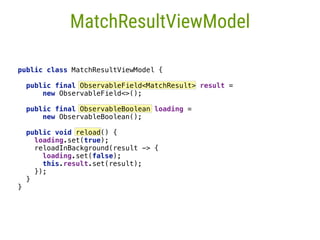
MatchResultViewModel
public class MatchResultViewModel {


public final ObservableField<MatchResult> result =
new ObservableField<>();


public final ObservableBoolean loading =
new ObservableBoolean();


public void reload() {
loading.set(true);

reloadInBackground(result -> {

loading.set(false);

this.result.set(result);

});

}

}
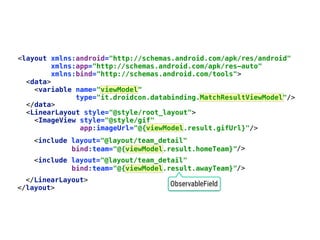
<layout xmlns:android="http://schemas.android.com/apk/res/android"

xmlns:app="http://schemas.android.com/apk/res-auto"
xmlns:bind="http://schemas.android.com/tools">

<data>

<variable name="viewModel"

type="it.droidcon.databinding.MatchResultViewModel"/>

</data>

<LinearLayout style="@style/root_layout">

<ImageView style="@style/gif"
app:imageUrl="@{viewModel.result.gifUrl}"/>


<include layout="@layout/team_detail"

/>
<include layout="@layout/team_detail"

/>
</LinearLayout>

</layout>
bind:team="@{viewModel.result.homeTeam}"
bind:team="@{viewModel.result.awayTeam}"
ObservableField
58
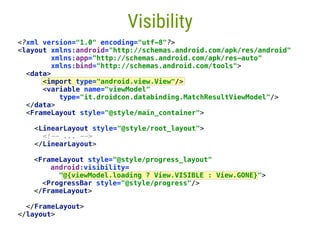
Visibility
<FrameLayout style="@style/progress_layout"

android:visibility=
"@{viewModel.loading ? View.VISIBLE : View.GONE}">

<ProgressBar style="@style/progress"/>

</FrameLayout>
<?xml version="1.0" encoding="utf-8"?>

<layout xmlns:android="http://schemas.android.com/apk/res/android"

xmlns:app="http://schemas.android.com/apk/res-auto"

xmlns:bind="http://schemas.android.com/tools">

<data>
<import type="android.view.View"/>

<variable name="viewModel"

type="it.droidcon.databinding.MatchResultViewModel"/>
</data>

<FrameLayout style="@style/main_container">


<LinearLayout style="@style/root_layout">

<!-- ... -->

</LinearLayout>


</FrameLayout>

</layout>
59
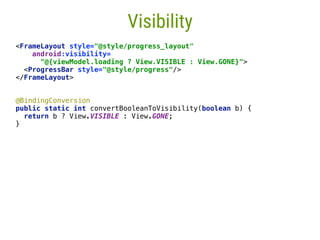
Visibility
<FrameLayout style="@style/progress_layout"

android:visibility=
"@{viewModel.loading ? View.VISIBLE : View.GONE}">

<ProgressBar style="@style/progress"/>

</FrameLayout>
@BindingConversion

public static int convertBooleanToVisibility(boolean b) {

return b ? View.VISIBLE : View.GONE;

}___

60
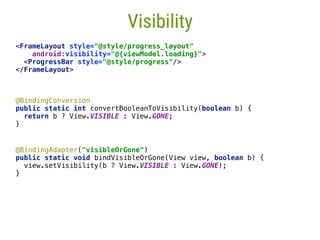
Visibility
<FrameLayout style="@style/progress_layout"

android:visibility="@{viewModel.loading}">

<ProgressBar style="@style/progress"/>

</FrameLayout>
@BindingConversion

public static int convertBooleanToVisibility(boolean b) {

return b ? View.VISIBLE : View.GONE;

}___

@BindingAdapter("visibleOrGone")

public static void bindVisibleOrGone(View view, boolean b) {

view.setVisibility(b ? View.VISIBLE : View.GONE);

}____
61
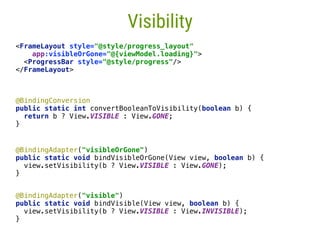
Visibility
<FrameLayout style="@style/progress_layout"

app:visibleOrGone="@{viewModel.loading}">

<ProgressBar style="@style/progress"/>

</FrameLayout>
@BindingConversion

public static int convertBooleanToVisibility(boolean b) {

return b ? View.VISIBLE : View.GONE;

}___

@BindingAdapter("visibleOrGone")

public static void bindVisibleOrGone(View view, boolean b) {

view.setVisibility(b ? View.VISIBLE : View.GONE);

}____
@BindingAdapter("visible")

public static void bindVisible(View view, boolean b) {

view.setVisibility(b ? View.VISIBLE : View.INVISIBLE);

}
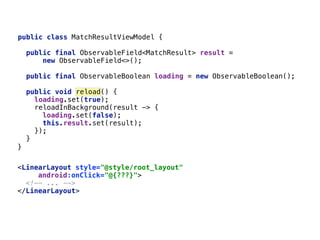
<LinearLayout style="@style/root_layout"

android:onClick="@{???}">

<!-- ... -->

</LinearLayout>

62
}___
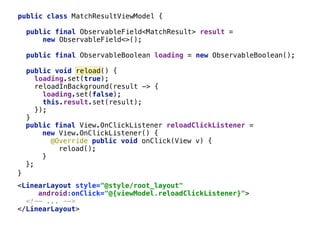
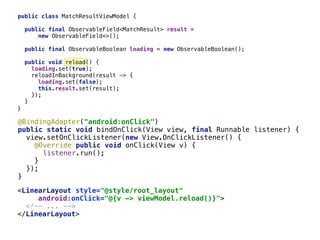
public class MatchResultViewModel {
public final ObservableField<MatchResult> result =
new ObservableField<>();

public final ObservableBoolean loading = new ObservableBoolean();

public void reload() {
loading.set(true);

reloadInBackground(result -> {

loading.set(false);

this.result.set(result);

});

}__
public final_View.OnClickListener reloadClickListener =
new View.OnClickListener() {

@Override public void onClick(View v) {

reload();

}_

};

<LinearLayout style="@style/root_layout"

android:onClick="@{viewModel.reloadClickListener}">

<!-- ... -->

</LinearLayout>

63
}___
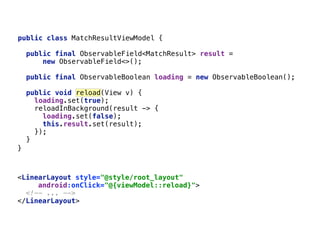
public class MatchResultViewModel {
public final ObservableField<MatchResult> result =
new ObservableField<>();

public final ObservableBoolean loading = new ObservableBoolean();

public void reload() {
loading.set(true);

reloadInBackground(result -> {

loading.set(false);

this.result.set(result);

});

}__
<LinearLayout style="@style/root_layout"

android:onClick="@{viewModel::reload}">

<!-- ... -->

</LinearLayout>

64
}___
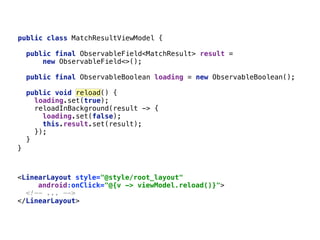
public class MatchResultViewModel {
public final ObservableField<MatchResult> result =
new ObservableField<>();

public final ObservableBoolean loading = new ObservableBoolean();

public void reload(View v) {
loading.set(true);

reloadInBackground(result -> {

loading.set(false);

this.result.set(result);

});

}__
<LinearLayout style="@style/root_layout"

android:onClick="@{v -> viewModel.reload()}">

<!-- ... -->

</LinearLayout>

65
}___
public class MatchResultViewModel {
public final ObservableField<MatchResult> result =
new ObservableField<>();

public final ObservableBoolean loading = new ObservableBoolean();

public void reload() {
loading.set(true);

reloadInBackground(result -> {

loading.set(false);

this.result.set(result);

});

}__
public class MatchResultViewModel {
public final ObservableField<MatchResult> result =
new ObservableField<>();

public final ObservableBoolean loading = new ObservableBoolean();

public void reload() {
loading.set(true);

reloadInBackground(result -> {

loading.set(false);

this.result.set(result);

});

}__
66
}___
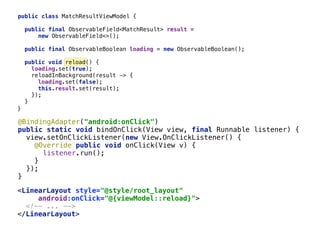
@BindingAdapter("android:onClick")

public static void bindOnClick(View view, final Runnable listener) {

view.setOnClickListener(new View.OnClickListener() {

@Override public void onClick(View v) {

listener.run();

}____

});

}___
<LinearLayout style="@style/root_layout"

android:onClick="@{v -> viewModel.reload()}">

<!-- ... -->

</LinearLayout>

public class MatchResultViewModel {
public final ObservableField<MatchResult> result =
new ObservableField<>();

public final ObservableBoolean loading = new ObservableBoolean();

public void reload() {
loading.set(true);

reloadInBackground(result -> {

loading.set(false);

this.result.set(result);

});

}__
<LinearLayout style="@style/root_layout"

android:onClick="@{viewModel::reload}">

<!-- ... -->

</LinearLayout>

67
}___
@BindingAdapter("android:onClick")

public static void bindOnClick(View view, final Runnable listener) {

view.setOnClickListener(new View.OnClickListener() {

@Override public void onClick(View v) {

listener.run();

}____

});

}___
68
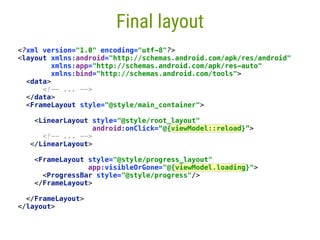
Final layout
<?xml version="1.0" encoding="utf-8"?>

<layout xmlns:android="http://schemas.android.com/apk/res/android"

xmlns:app="http://schemas.android.com/apk/res-auto"

xmlns:bind="http://schemas.android.com/tools">

<data>

<!-- ... -->

</data>

<FrameLayout style="@style/main_container">


<LinearLayout style="@style/root_layout"

android:onClick=“@{viewModel::reload}”>

<!-- ... -->

</LinearLayout>


<FrameLayout style="@style/progress_layout"

app:visibleOrGone="@{viewModel.loading}">

<ProgressBar style="@style/progress"/>

</FrameLayout>


</FrameLayout>

</layout>
69
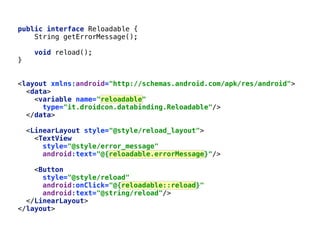
public interface Reloadable {

String getErrorMessage();


void reload();

}

<layout xmlns:android="http://schemas.android.com/apk/res/android">

<data>

<variable name="reloadable"

type="it.droidcon.databinding.Reloadable"/>

</data>


<LinearLayout style="@style/reload_layout">

<TextView

style="@style/error_message"

android:text="@{reloadable.errorMessage}"/>


<Button

style="@style/reload"

android:onClick="@{reloadable::reload}"

android:text="@string/reload"/>

</LinearLayout>

</layout>
70
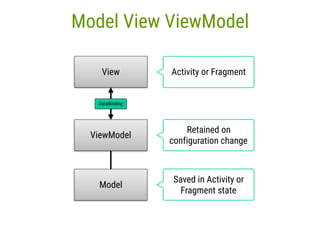
Model View ViewModel
View
ViewModel
Model
DataBinding
Retained on
configuration change
Saved in Activity or
Fragment state
Activity or Fragment
71
github.com/fabioCollini/mv2m
Android MVVM lightweight library based on
Android Data Binding
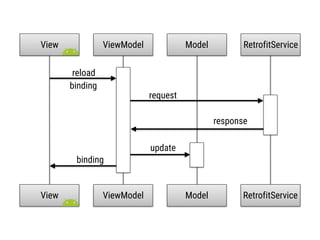
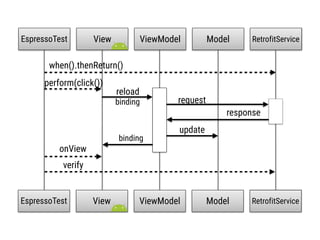
View ViewModel RetrofitService
reload
update
binding
Model
View ViewModel RetrofitServiceModel
request
response
binding
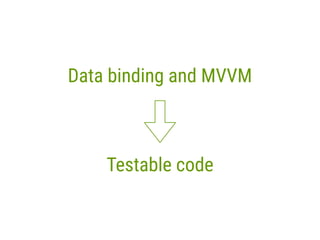
Testable code
Data binding and MVVM
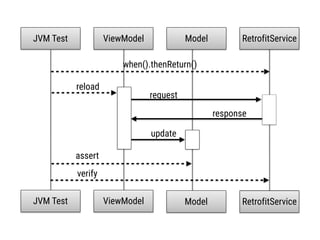
MockService
MockService
RetrofitService
RetrofitServiceViewModel
reload
update
Model
request
response
JVM Test
ViewModel ModelJVM Test
assert
when().thenReturn()
verify
MockServiceRetrofitService
View ViewModel
perform(click())
update
binding
Model
request
response
EspressoTest
View ViewModel ModelEspressoTest
onView
verify
when().thenReturn()
reload
binding
76
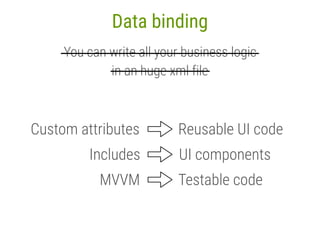
Data binding
You can write all your business logic
in an huge xml file
————————————————————————
————————————
Custom attributes Reusable UI code
77
Data binding
You can write all your business logic
in an huge xml file
————————————————————————
————————————
Includes UI components
MVVM Testable code
78
Thanks for your attention!
androidavanzato.it
Questions?
79
Links
developer.android.com/tools/data-binding/guide.html
Is Databinding still beta? - Google plus
medium.com/@fabioCollini/android-data-binding-f9f9d3afc761
github.com/fabioCollini/mv2m
github.com/commit-non-javisti/CoseNonJavisteAndroidApp
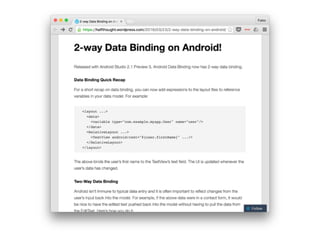
halfthought.wordpress.com/2016/03/23/2-way-data-binding-on-android

Data Binding in Action using MVVM pattern

  • 1.
    Android Data Bindingin action using MVVM pattern Fabio Collini
  • 2.
  • 3.
    3 Agenda 1. Data Bindingbasics 2. Custom attributes 3. Components 4. Two Way Data Binding 5. Model View ViewModel
  • 4.
  • 5.
    5 match_result.xml <?xml version="1.0" encoding="utf-8"?>
 <LinearLayoutstyle="@style/root_layout"
 xmlns:android=“http://schemas.android.com/apk/res/android"> 
 <ImageView android:id="@+id/result_gif" style="@style/gif"/>
 
 <LinearLayout style="@style/team_layout">
 <TextView android:id="@+id/home_team" style="@style/name"/>
 <TextView android:id="@+id/home_goals" style="@style/goals"/>
 </LinearLayout>
 
 <LinearLayout style="@style/team_layout">
 <TextView android:id="@+id/away_team" style="@style/name"/>
 <TextView android:id="@+id/away_goals" style="@style/goals"/>
 </LinearLayout>
 </LinearLayout>
  • 6.
    6 public class TeamScore{
 private final String name;
 private final int goals; //constructor and getters
 } public class MatchResult {
 private final TeamScore homeTeam;
 private final TeamScore awayTeam;
 private final String gifUrl; //constructor and getters
 }
  • 7.
    7 Butterknife Activity @Bind(R.id.result_gif) ImageViewresultGif;
 @Bind(R.id.home_team) TextView homeTeam;
 @Bind(R.id.away_team) TextView awayTeam;
 @Bind(R.id.home_goals) TextView homeGoals;
 @Bind(R.id.away_goals) TextView awayGoals;
 
 @Override protected void onCreate(Bundle savedInstanceState) {
 super.onCreate(savedInstanceState);
 setContentView(R.layout.match_result);
 ButterKnife.bind(this);
 updateDetail(getIntent().getParcelableExtra("RESULT"));
 }
 private void updateDetail(MatchResult result) {
 Glide.with(this).load(result.getGifUrl())
 .placeholder(R.drawable.loading).into(resultGif);
 if (result.getHomeTeam() != null) {
 homeTeam.setText(result.getHomeTeam().getName());
 homeGoals.setText(Integer.toString(result.getHomeTeam().getGoals()));
 }
 if (result.getAwayTeam() != null) {
 awayTeam.setText(result.getAwayTeam().getName());
 awayGoals.setText(Integer.toString(result.getAwayTeam().getGoals()));
 }
 }
  • 8.
    DroidCon Italy -Torino - April 2016 - @fabioCollini 8 1Data Binding basics
  • 9.
  • 10.
    10 Is Data Bindingstill beta?
  • 11.
    11 Is Data Bindingstill beta?
  • 12.
    dataBinding {
 enabled =true
 }
 12 build.gradle android {
 compileSdkVersion 23
 buildToolsVersion "23.0.2"
 
 defaultConfig {
 //...
 ____}
 buildTypes {
 //...
 ____} }
  • 13.
    <?xml version="1.0" encoding="utf-8"?>
 <layout>
 <LinearLayoutstyle=“@style/root_layout" xmlns:android="http://schemas.android.com/apk/res/android">
 
 <ImageView android:id="@+id/result_gif" style="@style/gif"/>
 
 <LinearLayout style="@style/team_layout">
 <TextView android:id="@+id/home_team" style="@style/name"/>
 <TextView android:id="@+id/home_goals" style="@style/goals"/>
 </LinearLayout>
 
 <LinearLayout style="@style/team_layout">
 <TextView android:id="@+id/away_team" style="@style/name"/>
 <TextView android:id="@+id/away_goals" style="@style/goals"/>
 </LinearLayout>
 </LinearLayout>
 </layout> 13 Data Binding layout <LinearLayout style="@style/root_layout"
 xmlns:android=“http://schemas.android.com/apk/res/android"> 
 <ImageView android:id="@+id/result_gif" style="@style/gif"/>
 
 <LinearLayout style="@style/team_layout">
 <TextView android:id="@+id/home_team" style="@style/name"/>
 <TextView android:id="@+id/home_goals" style="@style/goals"/>
 </LinearLayout>
 
 <LinearLayout style="@style/team_layout">
 <TextView android:id="@+id/away_team" style="@style/name"/>
 <TextView android:id="@+id/away_goals" style="@style/goals"/>
 </LinearLayout>
 </LinearLayout> <?xml version="1.0" encoding="utf-8"?> <layout> </layout>
  • 14.
    <LinearLayout style="@style/root_layout"
 xmlns:android=“http://schemas.android.com/apk/res/android"> 
 <ImageView android:id="@+id/result_gif"style="@style/gif"/>
 
 <LinearLayout style="@style/team_layout">
 <TextView android:id="@+id/home_team" style="@style/name"/>
 <TextView android:id="@+id/home_goals" style="@style/goals"/>
 </LinearLayout>
 
 <LinearLayout style="@style/team_layout">
 <TextView android:id="@+id/away_team" style="@style/name"/>
 <TextView android:id="@+id/away_goals" style="@style/goals"/>
 </LinearLayout>
 </LinearLayout> 14 One layout traversal match_result.xmlMatchResultBinding.java Auto generated class <?xml version="1.0" encoding="utf-8"?> <layout> </layout> public class MatchResultBinding extends android.databinding.ViewDataBinding {
 
 // ...
 public final android.widget.ImageView resultGif;
 public final android.widget.TextView homeTeam;
 public final android.widget.TextView homeGoals;
 public final android.widget.TextView awayTeam;
 public final android.widget.TextView awayGoals;
 // ...
 }
  • 15.
    15 Activity 
 @Override protected voidonCreate(Bundle savedInstanceState) {
 super.onCreate(savedInstanceState);
 binding = DataBindingUtil.setContentView(this, R.layout.match_result); updateDetail(getIntent().getParcelableExtra("RESULT"));
 }____ 
 private void updateDetail(MatchResult result) {
 Glide.with(this).load(result.getGifUrl())
 .placeholder(R.drawable.loading).into(binding.resultGif);
 if (result.getHomeTeam() != null) {
 binding.homeTeam.setText(result.getHomeTeam().getName());
 binding.homeGoals.setText(Integer.toString(result.getHomeTeam().getGoals()));
 }___
 if (result.getAwayTeam() != null) {
 binding.awayTeam.setText(result.getAwayTeam().getName());
 binding.awayGoals.setText(Integer.toString(result.getAwayTeam().getGoals()));
 }__
 }_ private MatchResultBinding binding;__
  • 16.
    16 Variable in layout <?xmlversion="1.0" encoding="utf-8"?>
 <layout xmlns:android="http://schemas.android.com/apk/res/android"> Automatic null check <data>
 <variable name="result" type="it.droidcon.databinding.MatchResult"/>
 </data> <LinearLayout style="@style/root_layout">
 <ImageView android:id="@+id/result_gif" style="@style/gif"/>
 
 <LinearLayout style="@style/team_layout">
 <TextView style=“@style/name"
 android:text="@{result.homeTeam.name}"/>
 <TextView style="@style/goals"
 android:text="@{Integer.toString(result.homeTeam.goals)}"/>
 </LinearLayout>
 
 <LinearLayout style="@style/team_layout">
 <TextView style="@style/name"
 android:text="@{result.awayTeam.name}"/>
 <TextView style="@style/goals"
 android:text="@{Integer.toString(result.awayTeam.goals)}"/>
 </LinearLayout>
 </LinearLayout>
 </layout>
  • 17.
    17 Activity private MatchResultBinding binding; 
 @Overrideprotected void onCreate(Bundle savedInstanceState) {
 super.onCreate(savedInstanceState);
 binding = DataBindingUtil.setContentView(this, R.layout.match_result); updateDetail(getIntent().getParcelableExtra("RESULT"));
 }____ 
 private void updateDetail(MatchResult result) {
 Glide.with(this).load(result.getGifUrl())
 .placeholder(R.drawable.loading).into(binding.resultGif);
 binding.setResult(result); }_
  • 18.
    18 Code in XML? Areyou serious?!?
  • 19.
    19 Complex code inXML is NOT a best practice
  • 20.
    DroidCon Italy -Torino - April 2016 - @fabioCollini 20 2Custom attributes
  • 21.
    21 @BindingAdapter <ImageView android:id="@+id/result_gif" style="@style/gif"/> privatevoid updateDetail(MatchResult result) {
 binding.setResult(result);
 Glide.with(this).load(result.getGifUrl())
 .placeholder(R.drawable.loading).into(binding.resultGif);
 } <ImageView style=“@style/gif" app:imageUrl="@{result.gifUrl}"/> @BindingAdapter("imageUrl")
 public static void loadImage(ImageView view, String url) {
 Glide.with(view.getContext()).load(url)
 .placeholder(R.drawable.loading).into(view);
 }
  • 22.
    22 public class MatchResultActivityextends AppCompatActivity {
 
 @Override
 protected void onCreate(Bundle savedInstanceState) {
 super.onCreate(savedInstanceState);
 MatchResultBinding binding =
 DataBindingUtil.setContentView(this, R.layout.match_result);
 MatchResult result = getIntent().getParcelableExtra("RESULT");
 binding.setResult(result);
 }
 }
  • 23.
    23 Multiple parameters @BindingAdapter({"imageUrl", "placeholder"})
 publicstatic void loadImage(ImageView view, String url, Drawable placeholder) {
 Glide.with(view.getContext()).load(url)
 .placeholder(placeholder).into(view);
 }
 <ImageView style="@style/gif"
 app:imageUrl="@{result.gifUrl}" app:placeholder="@{@drawable/loading}"/>
  • 24.
    Annotated methods arestatic but… @BindingAdapter("something")
 public static void bindSomething(View view, AnyObject b) {
 MyBinding binding = DataBindingUtil.findBinding(view); 
 MyObject myObject = binding.getMyObject();
 //… TextView myTextView = 
 binding.myTextView; //… } Can be any object Get the layout binding Get the connected objects Access to all the views Can be defined anywhere Can be used everywhere Can be any View
  • 25.
    25 BindingConversion @BindingConversion
 public static @ColorResint convertEnumToColor(MyEnum value) {
 switch (value) {
 case VALUE1:
 return R.color.color1;
 case VALUE2:
 return R.color.color2;
 case VALUE3:
 return R.color.color3;
 default:
 return R.color.color4;
 }
 } <TextView
 android:layout_width="wrap_content"
 android:layout_height="wrap_content"
 android:textColor="@{myObject.myEnum}"/>
  • 26.
    @BindingConversion
 public static StringconvertScoreToString(TeamScore score) {
 return Integer.toString(score.getGoals());
 }___
 <TextView style="@style/goals” android:text="@{result.awayTeam}"/>
 26 BindingConversion & BindingAdapter <TextView style="@style/goals"
 android:text="@{Integer.toString(result.awayTeam.goals)}"/>
  • 27.
    <TextView style="@style/goals" app:goals="@{result.awayTeam.goals}"/> @BindingAdapter("goals")
 public staticvoid bindGoals(TextView view, int goals) {
 view.setText(Integer.toString(goals));
 }__
 @BindingConversion
 public static String convertScoreToString(TeamScore score) {
 return Integer.toString(score.getGoals());
 }___
 27 BindingConversion & BindingAdapter <TextView style="@style/goals"
 android:text="@{Integer.toString(result.awayTeam.goals)}"/> <TextView style="@style/goals” android:text="@{result.awayTeam}"/>

  • 28.
    <TextView style="@style/goals" app:goals="@{result.awayTeam.goals}"/> @BindingAdapter("goals")
 public staticvoid bindGoals(TextView view, int goals) {
 view.setText(Integer.toString(goals));
 }__
 @BindingConversion
 public static String convertScoreToString(TeamScore score) {
 return Integer.toString(score.getGoals());
 }___
 <TextView style="@style/goals” android:text="@{result.awayTeam}"/>
 28 BindingConversion & BindingAdapter <TextView style="@style/goals"
 android:text="@{Integer.toString(result.awayTeam.goals)}"/>
  • 29.
  • 30.
    DroidCon Italy -Torino - April 2016 - @fabioCollini 30 3Components
  • 31.
    31 <layout xmlns:android="http://schemas.android.com/apk/res/android"
 xmlns:app="http://schemas.android.com/apk/res-auto">
 <data>
 <variable name="result"
 type="it.droidcon.databinding.MatchResult"/>
 </data>
 <LinearLayoutstyle="@style/root_layout">
 <ImageView style="@style/gif" app:imageUrl="@{result.gifUrl}"/>
 
 
 <LinearLayout style="@style/team_layout">
 <TextView style="@style/name"
 android:text="@{result.awayTeam.name}"/>
 <TextView style="@style/goals"
 app:goals="@{result.awayTeam.goals}"/>
 </LinearLayout>
 </LinearLayout>
 </layout> <LinearLayout style="@style/team_layout">
 <TextView style="@style/name"
 android:text="@{result.homeTeam.name}"/>
 <TextView style="@style/goals"
 app:goals="@{result.homeTeam.goals}"/>
 </LinearLayout>
  • 32.
  • 33.
    </data>
 <LinearLayout style="@style/root_layout">
 <ImageView style="@style/gif"app:imageUrl="@{result.gifUrl}"/>
 
 
 <include layout="@layout/team_detail"/> <include layout="@layout/team_detail"/> </LinearLayout>
 </layout> <layout xmlns:android="http://schemas.android.com/apk/res/android"
 xmlns:app="http://schemas.android.com/apk/res-auto">
 <data>
 <variable name="result"
 type=“it.droidcon.databinding.MatchResult"/> 

  • 34.
    </data>
 <LinearLayout style="@style/root_layout">
 <ImageView style="@style/gif"app:imageUrl="@{result.gifUrl}"/>
 
 
 <layout xmlns:android="http://schemas.android.com/apk/res/android"
 xmlns:app="http://schemas.android.com/apk/res-auto" xmlns:bind="http://schemas.android.com/tools">
 <data>
 <variable name="result"
 type="it.droidcon.databinding.MatchResult"/>
 <include layout="@layout/team_detail"
 /> <include layout="@layout/team_detail"
 /> </LinearLayout>
 </layout> bind:team="@{result.homeTeam}" bind:team="@{result.awayTeam}"
  • 35.
    </data>
 <LinearLayout style="@style/root_layout" >
 <ImageView style="@style/gif"app:imageUrl="@{result.gifUrl}"/>
 
 
 android:background="@{backgroundColor ?? @color/color1}" <layout xmlns:android="http://schemas.android.com/apk/res/android"
 xmlns:app="http://schemas.android.com/apk/res-auto" xmlns:bind="http://schemas.android.com/tools">
 <data>
 <variable name="result"
 type="it.droidcon.databinding.MatchResult"/>
 <include layout="@layout/team_detail"
 /> <include layout="@layout/team_detail"
 /> </LinearLayout>
 </layout> bind:team="@{result.homeTeam}" bind:team="@{result.awayTeam}" <variable name="backgroundColor" type="Integer" />
  • 36.
    DroidCon Italy -Torino - April 2016 - @fabioCollini 36 4Two Way Data Binding
  • 37.
  • 38.
    38 public class ContactInfo{
 public String message;
 
 public boolean messageAvailable;
 }__
  • 39.
    39 public class ContactInfo{
 public String message;
 
 public boolean messageAvailable;
 }__ <layout xmlns:android="http://schemas.android.com/apk/res/android">
 <data>
 <variable name="info"
 type="it.droidcon.databinding.ContactInfo" />
 </data>
 
 <LinearLayout style="@style/contact_root">
 <EditText
 style="@style/contact_text"
 android:enabled="@{info.messageAvailable}"
 android:text="@{info.message}" />
 
 <Button
 style="@style/contact_button"
 android:enabled="@{info.messageAvailable}"
 android:onClick="send" />
 </LinearLayout>
 </layout>
  • 40.
    40 public class ContactInfo{
 public String message;
 
 public boolean messageAvailable;
 }__ public class ContactActivity extends AppCompatActivity {
 private ContactInfo contactInfo;
 private ContactBinding binding;
 
 @Override
 protected void onCreate(Bundle savedInstanceState) {
 super.onCreate(savedInstanceState);
 binding = DataBindingUtil.setContentView(this, R.layout.contact);
 contactInfo = new ContactInfo();
 binding.setInfo(contactInfo);
 
 binding.getRoot().postDelayed(() -> {
 contactInfo.message = "my message";
 contactInfo.messageAvailable = true;
 }, 2000);
 }
 
 public void send(View view) {
 Snackbar.make(binding.getRoot(), contactInfo.message, LENGTH_LONG).show();
 }
 }
  • 41.
  • 42.
    42 Views are notautomatically updated :( package android.databinding;
 
 public interface Observable {
 
 void addOnPropertyChangedCallback( OnPropertyChangedCallback callback);
 
 void removeOnPropertyChangedCallback( OnPropertyChangedCallback callback);
 
 abstract class OnPropertyChangedCallback {
 public abstract void onPropertyChanged( Observable sender, int propertyId);
 }
 }
  • 43.
  • 44.
    public String getMessage(){
 return message;
 }____
 
 public boolean isMessageAvailable() {
 return messageAvailable;
 }___
 
 public void setMessage(String message) {
 this.message = message;
 
 }__
 
 public void setMessageAvailable(boolean messageAvailable) {
 this.messageAvailable = messageAvailable;
 
 }_
 public class ContactInfo
 private String message;
 
 private boolean messageAvailable;
 44 extends BaseObservable { } notifyPropertyChanged(BR.message); notifyPropertyChanged(BR.messageAvailable); @Bindable @Bindable
  • 45.
    45 public class ContactInfo{
 public final ObservableField<String> message = new ObservableField<>();_
 
 public final ObservableBoolean messageAvailable = new ObservableBoolean();_
 }__
  • 46.
    46 public class ContactInfo{
 public final ObservableField<String> message = new ObservableField<>();_
 
 public final ObservableBoolean messageAvailable = new ObservableBoolean();_
 }__ public class ContactActivity extends AppCompatActivity {
 private ContactInfo contactInfo;
 private ContactBinding binding;
 
 @Override
 protected void onCreate(Bundle savedInstanceState) {
 super.onCreate(savedInstanceState);
 binding = DataBindingUtil.setContentView(this, R.layout.contact);
 contactInfo = new ContactInfo();
 binding.setInfo(contactInfo);
 
 binding.getRoot().postDelayed(() -> {
 contactInfo.message.set("my message");
 contactInfo.messageAvailable.set(true);
 }, 2000); }___
 
 public void send(View view) {
 Snackbar.make(binding.getRoot(), contactInfo.message.get(), LENGTH_LONG).show();
 }__
 }_
  • 47.
    <layout xmlns:android="http://schemas.android.com/apk/res/android">
 <data>
 <variable name="info"
 type="it.droidcon.databinding.ContactInfo"/>
 </data>
 
 <LinearLayout style="@style/contact_root">
 <EditText
 style="@style/contact_text"
 android:enabled="@{info.messageAvailable}"
 android:text="@{info.message}" />
 
 <Button
 style="@style/contact_button"
 android:enabled="@{info.messageAvailable}"
 android:onClick="send" />
 </LinearLayout>
 </layout> 47 public class ContactInfo {
 public final ObservableField<String> message = new ObservableField<>();_
 
 public final ObservableBoolean messageAvailable = new ObservableBoolean();_
 }__ ObservableField<String> ObservableBoolean ObservableBoolean
  • 48.
  • 49.
    49 Two way DataBinding @BindingAdapter("binding")
 public static void bindEditText(EditText view, final ObservableString observable) {
 Pair<ObservableString, TextWatcherAdapter> pair = (Pair) view.getTag(R.id.bound_observable);
 if (pair == null || pair.first != observable) {
 if (pair != null)
 view.removeTextChangedListener(pair.second);
 TextWatcherAdapter watcher = new TextWatcherAdapter() {
 @Override public void onTextChanged(CharSequence s, int a, int b, int c) {
 observable.set(s.toString());
 }
 };
 view.setTag(R.id.bound_observable, new Pair<>(observable, watcher));
 view.addTextChangedListener(watcher);
 }
 String newValue = observable.get();
 if (!view.getText().toString().equals(newValue))
 view.setText(newValue);
 }
 medium.com/@fabioCollini/android-data-binding-f9f9d3afc761
  • 50.
  • 51.
    51 <layout xmlns:android="http://schemas.android.com/apk/res/android">
 <data>
 <variable name="info"
 type="it.droidcon.databinding.ContactInfo"/>
 </data>
 
 <LinearLayout style="@style/contact_root">
 <EditText
 style="@style/contact_text"
 android:enabled="@{info.messageAvailable}"
 android:text="@={info.message}" />
 
 <Button
 style="@style/contact_button"
 android:enabled="@{info.messageAvailable}"
 android:onClick="send" />
 </LinearLayout>
 </layout> Two way data binding
  • 52.
  • 53.
  • 54.
  • 55.
    DroidCon Italy -Torino - April 2016 - @fabioCollini 55 5MVVM
  • 56.
    56 MatchResultViewModel public class MatchResultViewModel{ 
 public final ObservableField<MatchResult> result = new ObservableField<>();
 
 public final ObservableBoolean loading = new ObservableBoolean();
 
 public void reload() { loading.set(true);
 reloadInBackground(result -> {
 loading.set(false);
 this.result.set(result);
 });
 }
 }
  • 57.
    <layout xmlns:android="http://schemas.android.com/apk/res/android"
 xmlns:app="http://schemas.android.com/apk/res-auto" xmlns:bind="http://schemas.android.com/tools">
 <data>
 <variable name="viewModel"
 type="it.droidcon.databinding.MatchResultViewModel"/>
 </data>
 <LinearLayoutstyle="@style/root_layout">
 <ImageView style="@style/gif" app:imageUrl="@{viewModel.result.gifUrl}"/>
 
 
 <include layout="@layout/team_detail"
 /> <include layout="@layout/team_detail"
 /> </LinearLayout>
 </layout> bind:team="@{viewModel.result.homeTeam}" bind:team="@{viewModel.result.awayTeam}" ObservableField
  • 58.
    58 Visibility <FrameLayout style="@style/progress_layout"
 android:visibility= "@{viewModel.loading ?View.VISIBLE : View.GONE}">
 <ProgressBar style="@style/progress"/>
 </FrameLayout> <?xml version="1.0" encoding="utf-8"?>
 <layout xmlns:android="http://schemas.android.com/apk/res/android"
 xmlns:app="http://schemas.android.com/apk/res-auto"
 xmlns:bind="http://schemas.android.com/tools">
 <data> <import type="android.view.View"/>
 <variable name="viewModel"
 type="it.droidcon.databinding.MatchResultViewModel"/> </data>
 <FrameLayout style="@style/main_container"> 
 <LinearLayout style="@style/root_layout">
 <!-- ... -->
 </LinearLayout>
 
 
 </FrameLayout>
 </layout>
  • 59.
    59 Visibility <FrameLayout style="@style/progress_layout"
 android:visibility= "@{viewModel.loading ?View.VISIBLE : View.GONE}">
 <ProgressBar style="@style/progress"/>
 </FrameLayout> @BindingConversion
 public static int convertBooleanToVisibility(boolean b) {
 return b ? View.VISIBLE : View.GONE;
 }___

  • 60.
    60 Visibility <FrameLayout style="@style/progress_layout"
 android:visibility="@{viewModel.loading}">
 <ProgressBar style="@style/progress"/>
 </FrameLayout> @BindingConversion
 publicstatic int convertBooleanToVisibility(boolean b) {
 return b ? View.VISIBLE : View.GONE;
 }___
 @BindingAdapter("visibleOrGone")
 public static void bindVisibleOrGone(View view, boolean b) {
 view.setVisibility(b ? View.VISIBLE : View.GONE);
 }____
  • 61.
    61 Visibility <FrameLayout style="@style/progress_layout"
 app:visibleOrGone="@{viewModel.loading}">
 <ProgressBar style="@style/progress"/>
 </FrameLayout> @BindingConversion
 publicstatic int convertBooleanToVisibility(boolean b) {
 return b ? View.VISIBLE : View.GONE;
 }___
 @BindingAdapter("visibleOrGone")
 public static void bindVisibleOrGone(View view, boolean b) {
 view.setVisibility(b ? View.VISIBLE : View.GONE);
 }____ @BindingAdapter("visible")
 public static void bindVisible(View view, boolean b) {
 view.setVisibility(b ? View.VISIBLE : View.INVISIBLE);
 }
  • 62.
    <LinearLayout style="@style/root_layout"
 android:onClick="@{???}">
 <!-- ...-->
 </LinearLayout>
 62 }___ public class MatchResultViewModel { public final ObservableField<MatchResult> result = new ObservableField<>();
 public final ObservableBoolean loading = new ObservableBoolean();
 public void reload() { loading.set(true);
 reloadInBackground(result -> {
 loading.set(false);
 this.result.set(result);
 });
 }__
  • 63.
    public final_View.OnClickListener reloadClickListener= new View.OnClickListener() {
 @Override public void onClick(View v) {
 reload();
 }_
 };
 <LinearLayout style="@style/root_layout"
 android:onClick="@{viewModel.reloadClickListener}">
 <!-- ... -->
 </LinearLayout>
 63 }___ public class MatchResultViewModel { public final ObservableField<MatchResult> result = new ObservableField<>();
 public final ObservableBoolean loading = new ObservableBoolean();
 public void reload() { loading.set(true);
 reloadInBackground(result -> {
 loading.set(false);
 this.result.set(result);
 });
 }__
  • 64.
    <LinearLayout style="@style/root_layout"
 android:onClick="@{viewModel::reload}">
 <!-- ...-->
 </LinearLayout>
 64 }___ public class MatchResultViewModel { public final ObservableField<MatchResult> result = new ObservableField<>();
 public final ObservableBoolean loading = new ObservableBoolean();
 public void reload(View v) { loading.set(true);
 reloadInBackground(result -> {
 loading.set(false);
 this.result.set(result);
 });
 }__
  • 65.
    <LinearLayout style="@style/root_layout"
 android:onClick="@{v ->viewModel.reload()}">
 <!-- ... -->
 </LinearLayout>
 65 }___ public class MatchResultViewModel { public final ObservableField<MatchResult> result = new ObservableField<>();
 public final ObservableBoolean loading = new ObservableBoolean();
 public void reload() { loading.set(true);
 reloadInBackground(result -> {
 loading.set(false);
 this.result.set(result);
 });
 }__
  • 66.
    public class MatchResultViewModel{ public final ObservableField<MatchResult> result = new ObservableField<>();
 public final ObservableBoolean loading = new ObservableBoolean();
 public void reload() { loading.set(true);
 reloadInBackground(result -> {
 loading.set(false);
 this.result.set(result);
 });
 }__ 66 }___ @BindingAdapter("android:onClick")
 public static void bindOnClick(View view, final Runnable listener) {
 view.setOnClickListener(new View.OnClickListener() {
 @Override public void onClick(View v) {
 listener.run();
 }____
 });
 }___ <LinearLayout style="@style/root_layout"
 android:onClick="@{v -> viewModel.reload()}">
 <!-- ... -->
 </LinearLayout>

  • 67.
    public class MatchResultViewModel{ public final ObservableField<MatchResult> result = new ObservableField<>();
 public final ObservableBoolean loading = new ObservableBoolean();
 public void reload() { loading.set(true);
 reloadInBackground(result -> {
 loading.set(false);
 this.result.set(result);
 });
 }__ <LinearLayout style="@style/root_layout"
 android:onClick="@{viewModel::reload}">
 <!-- ... -->
 </LinearLayout>
 67 }___ @BindingAdapter("android:onClick")
 public static void bindOnClick(View view, final Runnable listener) {
 view.setOnClickListener(new View.OnClickListener() {
 @Override public void onClick(View v) {
 listener.run();
 }____
 });
 }___
  • 68.
    68 Final layout <?xml version="1.0"encoding="utf-8"?>
 <layout xmlns:android="http://schemas.android.com/apk/res/android"
 xmlns:app="http://schemas.android.com/apk/res-auto"
 xmlns:bind="http://schemas.android.com/tools">
 <data>
 <!-- ... -->
 </data>
 <FrameLayout style="@style/main_container"> 
 <LinearLayout style="@style/root_layout"
 android:onClick=“@{viewModel::reload}”>
 <!-- ... -->
 </LinearLayout>
 
 <FrameLayout style="@style/progress_layout"
 app:visibleOrGone="@{viewModel.loading}">
 <ProgressBar style="@style/progress"/>
 </FrameLayout>
 
 </FrameLayout>
 </layout>
  • 69.
    69 public interface Reloadable{
 String getErrorMessage();
 
 void reload();
 }
 <layout xmlns:android="http://schemas.android.com/apk/res/android">
 <data>
 <variable name="reloadable"
 type="it.droidcon.databinding.Reloadable"/>
 </data>
 
 <LinearLayout style="@style/reload_layout">
 <TextView
 style="@style/error_message"
 android:text="@{reloadable.errorMessage}"/>
 
 <Button
 style="@style/reload"
 android:onClick="@{reloadable::reload}"
 android:text="@string/reload"/>
 </LinearLayout>
 </layout>
  • 70.
    70 Model View ViewModel View ViewModel Model DataBinding Retainedon configuration change Saved in Activity or Fragment state Activity or Fragment
  • 71.
    71 github.com/fabioCollini/mv2m Android MVVM lightweightlibrary based on Android Data Binding
  • 72.
    View ViewModel RetrofitService reload update binding Model ViewViewModel RetrofitServiceModel request response binding
  • 73.
  • 74.
  • 75.
  • 76.
    76 Data binding You canwrite all your business logic in an huge xml file ———————————————————————— ————————————
  • 77.
    Custom attributes ReusableUI code 77 Data binding You can write all your business logic in an huge xml file ———————————————————————— ———————————— Includes UI components MVVM Testable code
  • 78.
    78 Thanks for yourattention! androidavanzato.it Questions?
  • 79.
    79 Links developer.android.com/tools/data-binding/guide.html Is Databinding stillbeta? - Google plus medium.com/@fabioCollini/android-data-binding-f9f9d3afc761 github.com/fabioCollini/mv2m github.com/commit-non-javisti/CoseNonJavisteAndroidApp halfthought.wordpress.com/2016/03/23/2-way-data-binding-on-android