









Design Patterns for
JavaScript Web Apps
     Stefan Scheidt
OPITZ CONSULTING GmbH
About me ...


stefan.scheidt@opitz-consulting.com
          (@stefanscheidt)
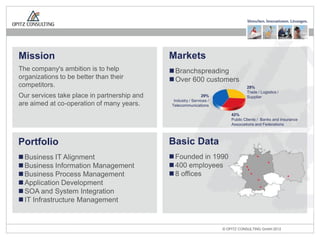
Mission                                      Markets
The company's ambition is to help             Branchspreading
organizations to be better than their         Over 600 customers
competitors.                                                                      29%
                                                                                  Trade / Logistics /
Our services take place in partnership and                    29%                 Supplier
                                              Industry / Services /
are aimed at co-operation of many years.     Telecommunications

                                                                          42%
                                                                          Public Clients / Banks and Insurance
                                                                          Associations and Federations


Portfolio                                    Basic Data
 Business IT Alignment                       Founded in 1990
 Business Information Management             400 employees
 Business Process Management                 8 offices
 Application Development
 SOA and System Integration
 IT Infrastructure Management


                                                                      © OPITZ CONSULTING GmbH 2012           Seite 3
And … who are you?
This talk is about ...

  ... the development of
testable and maintainable
   JavaScript Web Apps
This talk is about ...

  ... the development of
testable and maintainable
   JavaScript Web Apps
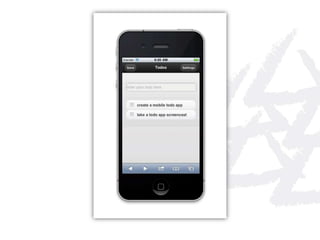
Our Sample App ...

http://tigbro.github.com/todo-mobile
https://github.com/tigbro/todo-mobile
Software Design
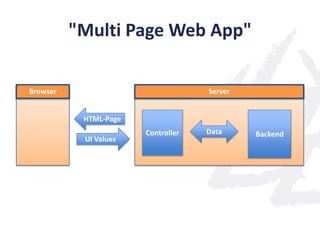
"Multi Page Web App"

Browser                             Server


           HTML-Page
                       Controller   Data     Backend
           UI Values
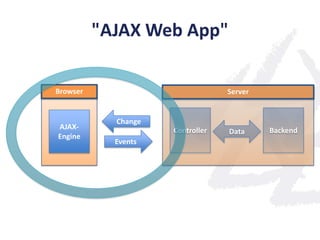
"AJAX Web App"

Browser                           Server


            Change
AJAX-                Controller            Backend
                                  Data
Engine
            Events
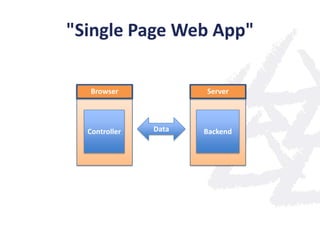
"Single Page Web App"

  Browser             Server


  Controller   Data   Backend
UI Component Libraries
jQuery Mobile


 http://jquerymobile.com/
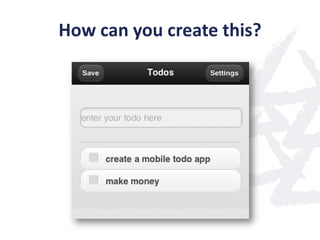
How can you create this?
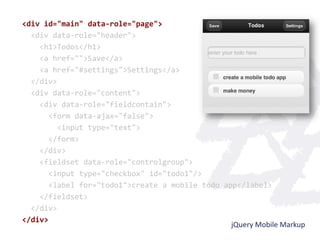
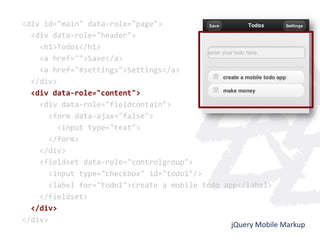
<div id="main" data-role="page">
  <div data-role="header">
    <h1>Todos</h1>
    <a href="">Save</a>
    <a href="#settings">Settings</a>
  </div>
  <div data-role="content">
    <div data-role="fieldcontain">
       <form data-ajax="false">
         <input type="text">
       </form>
    </div>
    <fieldset data-role="controlgroup">
       <input type="checkbox" id="todo1"/>
       <label for="todo1">create a mobile todo app</label>
    </fieldset>
  </div>
</div>
                                                 jQuery Mobile Markup
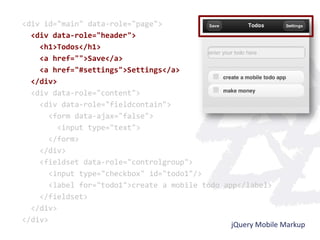
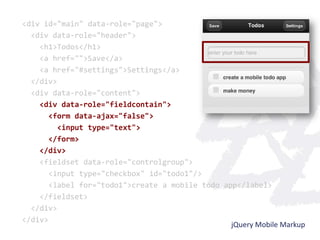
<div id="main" data-role="page">
  <div data-role="header">
    <h1>Todos</h1>
    <a href="">Save</a>
    <a href="#settings">Settings</a>
  </div>
  <div data-role="content">
    <div data-role="fieldcontain">
       <form data-ajax="false">
         <input type="text">
       </form>
    </div>
    <fieldset data-role="controlgroup">
       <input type="checkbox" id="todo1"/>
       <label for="todo1">create a mobile todo app</label>
    </fieldset>
  </div>
</div>
                                                 jQuery Mobile Markup
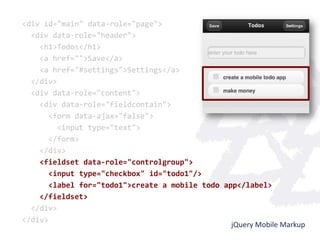
<div id="main" data-role="page">
  <div data-role="header">
    <h1>Todos</h1>
    <a href="">Save</a>
    <a href="#settings">Settings</a>
  </div>
  <div data-role="content">
    <div data-role="fieldcontain">
       <form data-ajax="false">
         <input type="text">
       </form>
    </div>
    <fieldset data-role="controlgroup">
       <input type="checkbox" id="todo1"/>
       <label for="todo1">create a mobile todo app</label>
    </fieldset>
  </div>
</div>
                                                 jQuery Mobile Markup
<div id="main" data-role="page">
  <div data-role="header">
    <h1>Todos</h1>
    <a href="">Save</a>
    <a href="#settings">Settings</a>
  </div>
  <div data-role="content">
    <div data-role="fieldcontain">
       <form data-ajax="false">
         <input type="text">
       </form>
    </div>
    <fieldset data-role="controlgroup">
       <input type="checkbox" id="todo1"/>
       <label for="todo1">create a mobile todo app</label>
    </fieldset>
  </div>
</div>
                                                 jQuery Mobile Markup
<div id="main" data-role="page">
  <div data-role="header">
    <h1>Todos</h1>
    <a href="">Save</a>
    <a href="#settings">Settings</a>
  </div>
  <div data-role="content">
    <div data-role="fieldcontain">
       <form data-ajax="false">
         <input type="text">
       </form>
    </div>
    <fieldset data-role="controlgroup">
       <input type="checkbox" id="todo1"/>
       <label for="todo1">create a mobile todo app</label>
    </fieldset>
  </div>
</div>
                                                 jQuery Mobile Markup
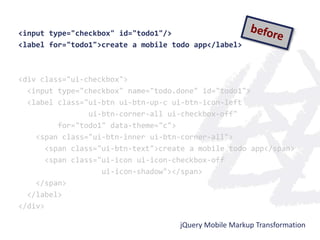
DOM Transformations
<input type="checkbox" id="todo1"/>
<label for="todo1">create a mobile todo app</label>


<div class="ui-checkbox">
  <input type="checkbox" name="todo.done" id="todo1">
  <label class="ui-btn ui-btn-up-c ui-btn-icon-left
                 ui-btn-corner-all ui-checkbox-off"
          for="todo1" data-theme="c">
    <span class="ui-btn-inner ui-btn-corner-all">
       <span class="ui-btn-text">create a mobile todo app</span>
       <span class="ui-icon ui-icon-checkbox-off
                    ui-icon-shadow"></span>
    </span>
  </label>
</div>

                                     jQuery Mobile Markup Transformation
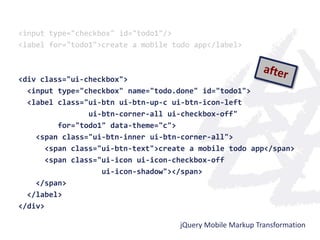
<input type="checkbox" id="todo1"/>
<label for="todo1">create a mobile todo app</label>


<div class="ui-checkbox">
  <input type="checkbox" name="todo.done" id="todo1">
  <label class="ui-btn ui-btn-up-c ui-btn-icon-left
                 ui-btn-corner-all ui-checkbox-off"
          for="todo1" data-theme="c">
    <span class="ui-btn-inner ui-btn-corner-all">
       <span class="ui-btn-text">create a mobile todo app</span>
       <span class="ui-icon ui-icon-checkbox-off
                    ui-icon-shadow"></span>
    </span>
  </label>
</div>

                                     jQuery Mobile Markup Transformation
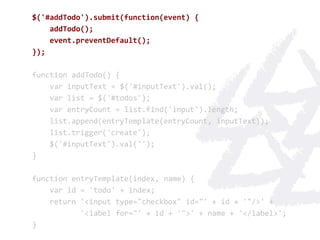
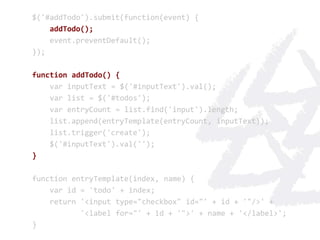
Two Way Data Binding
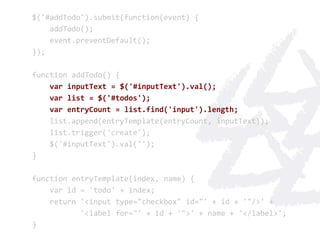
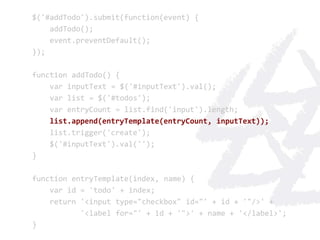
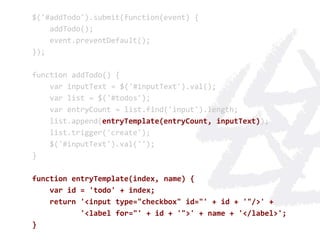
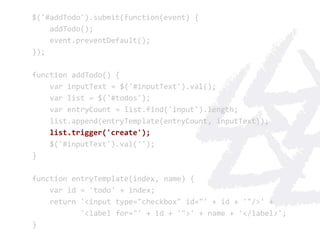
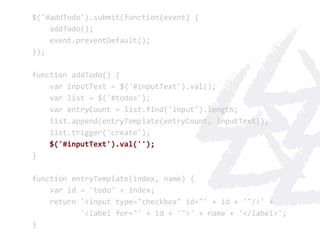
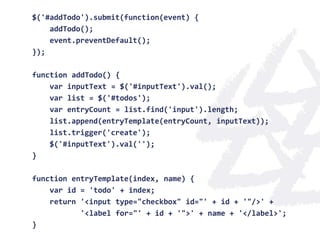
Do it yourself "binding" ...
$('#addTodo').submit(function(event) {
    addTodo();
    event.preventDefault();
});

function addTodo() {
    var inputText = $('#inputText').val();
    var list = $('#todos');
    var entryCount = list.find('input').length;
    list.append(entryTemplate(entryCount, inputText));
    list.trigger('create');
    $('#inputText').val('');
}

function entryTemplate(index, name) {
    var id = 'todo' + index;
    return '<input type="checkbox" id="' + id + '"/>' +
           '<label for="' + id + '">' + name + '</label>';
}
$('#addTodo').submit(function(event) {
    addTodo();
    event.preventDefault();
});

function addTodo() {
    var inputText = $('#inputText').val();
    var list = $('#todos');
    var entryCount = list.find('input').length;
    list.append(entryTemplate(entryCount, inputText));
    list.trigger('create');
    $('#inputText').val('');
}

function entryTemplate(index, name) {
    var id = 'todo' + index;
    return '<input type="checkbox" id="' + id + '"/>' +
           '<label for="' + id + '">' + name + '</label>';
}
$('#addTodo').submit(function(event) {
    addTodo();
    event.preventDefault();
});

function addTodo() {
    var inputText = $('#inputText').val();
    var list = $('#todos');
    var entryCount = list.find('input').length;
    list.append(entryTemplate(entryCount, inputText));
    list.trigger('create');
    $('#inputText').val('');
}

function entryTemplate(index, name) {
    var id = 'todo' + index;
    return '<input type="checkbox" id="' + id + '"/>' +
           '<label for="' + id + '">' + name + '</label>';
}
$('#addTodo').submit(function(event) {
    addTodo();
    event.preventDefault();
});

function addTodo() {
    var inputText = $('#inputText').val();
    var list = $('#todos');
    var entryCount = list.find('input').length;
    list.append(entryTemplate(entryCount, inputText));
    list.trigger('create');
    $('#inputText').val('');
}

function entryTemplate(index, name) {
    var id = 'todo' + index;
    return '<input type="checkbox" id="' + id + '"/>' +
           '<label for="' + id + '">' + name + '</label>';
}
$('#addTodo').submit(function(event) {
    addTodo();
    event.preventDefault();
});

function addTodo() {
    var inputText = $('#inputText').val();
    var list = $('#todos');
    var entryCount = list.find('input').length;
    list.append(entryTemplate(entryCount, inputText));
    list.trigger('create');
    $('#inputText').val('');
}

function entryTemplate(index, name) {
    var id = 'todo' + index;
    return '<input type="checkbox" id="' + id + '"/>' +
           '<label for="' + id + '">' + name + '</label>';
}
$('#addTodo').submit(function(event) {
    addTodo();
    event.preventDefault();
});

function addTodo() {
    var inputText = $('#inputText').val();
    var list = $('#todos');
    var entryCount = list.find('input').length;
    list.append(entryTemplate(entryCount, inputText));
    list.trigger('create');
    $('#inputText').val('');
}

function entryTemplate(index, name) {
    var id = 'todo' + index;
    return '<input type="checkbox" id="' + id + '"/>' +
           '<label for="' + id + '">' + name + '</label>';
}
$('#addTodo').submit(function(event) {
    addTodo();
    event.preventDefault();
});

function addTodo() {
    var inputText = $('#inputText').val();
    var list = $('#todos');
    var entryCount = list.find('input').length;
    list.append(entryTemplate(entryCount, inputText));
    list.trigger('create');
    $('#inputText').val('');
}

function entryTemplate(index, name) {
    var id = 'todo' + index;
    return '<input type="checkbox" id="' + id + '"/>' +
           '<label for="' + id + '">' + name + '</label>';
}
$('#addTodo').submit(function(event) {
    addTodo();
    event.preventDefault();
});

function addTodo() {
    var inputText = $('#inputText').val();
    var list = $('#todos');
    var entryCount = list.find('input').length;
    list.append(entryTemplate(entryCount, inputText));
    list.trigger('create');
    $('#inputText').val('');
}

function entryTemplate(index, name) {
    var id = 'todo' + index;
    return '<input type="checkbox" id="' + id + '"/>' +
           '<label for="' + id + '">' + name + '</label>';
}
Wouldn't this be better ... ?

function TodoController() {
    this.todos = [];
    this.inputText = '';
}

TodoController.prototype.addTodo = function() {
    this.todos.push({
            name: this.inputText,
            done: false
        });
    this.inputText = '';
}
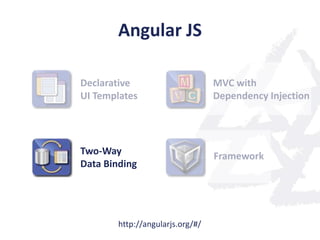
Angular JS

Declarative                       MVC with
UI Templates                      Dependency Injection


Two-Way                           Framework
Data Binding


        http://angularjs.org/#/
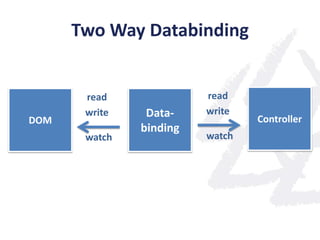
Two Way Databinding


       read              read
       write    Data-    write
DOM                              Controller
               binding
       watch             watch
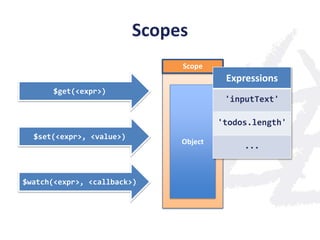
Scopes
                               Scope
                                         Expressions
       $get(<expr>)
                                         'inputText'

                                        'todos.length'
  $set(<expr>, <value>)
                               Object
                                             ...


$watch(<expr>, <callback>)
Demo
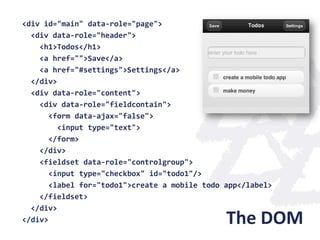
<div id="main" data-role="page">
  <div data-role="header">
    <h1>Todos</h1>
    <a href="">Save</a>
    <a href="#settings">Settings</a>
  </div>
  <div data-role="content">
    <div data-role="fieldcontain">
       <form data-ajax="false">
         <input type="text">
       </form>
    </div>
    <fieldset data-role="controlgroup">
       <input type="checkbox" id="todo1"/>
       <label for="todo1">create a mobile todo app</label>
    </fieldset>
  </div>
</div>                                         The DOM
function TodoController() {
    this.todos = [];
    this.inputText = '';
}

TodoController.prototype.addTodo = function() {
    this.todos.push({
            name: this.inputText,
            done: false
        });
    this.inputText = '';
}


                               The Controller
<div data-role="page"                         TodoController Scope
     ng:controller="TodoController">
                                              inputText: 'new todo'
                             create
  <input type="text"                          todos: [...]
         name="inputText"
                                bind
                                       bind
  <div ng:repeat="todo in todos">

                    create                               Repeater Scope
                                                        Repeater Scope
                                                       Repeater Scope
                                               todo: {
                                                todo:
                                              todo: { {
      <input type="checkbox"
             name="todo.done"/>                          done: false
                                                        done: false
                                                       done: false
                                  bind
                                                         name: 'makemoney'
                                                        name: 'makemoney'
                                                       name: 'makemoney'
      <label>
        {{todo.name}}                              }
      </label>
                                bind          }}
We are almost there, but ...
jQuery Mobile & AngularJS

        The problem:

       DOM transformations
done by jQuery Mobile and AngularJS
      need to be coordinated!
jQuery Mobile & AngularJS

       Our Solution:

 jQuery Mobile Angular Adapter
jQuery Mobile Angular Adapter

 Integration of jQuery Mobile & AngularJS

  Extentions for mobile web development

            Open source on GitHub

https://github.com/tigbro/jquery-mobile-angular-adapter
Dependency Injection
Dependency Injection is a design pattern
whose purpose is to reduce the dependencies
          between components.


It delegates the responsibility for creation and
 wiring of objects to an externaly configurable
                  framework.


                    http://de.wikipedia.org/wiki/Dependency_Injection
Dependency Injection is a design pattern
whose purpose is to reduce the dependencies
          between components.


It delegates the responsibility for creation and
 wiring of objects to an externaly configurable
                  framework.


                    http://de.wikipedia.org/wiki/Dependency_Injection
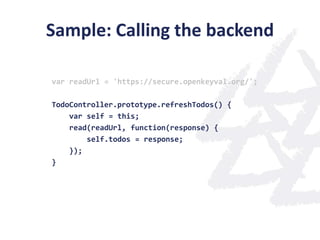
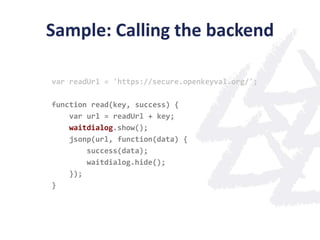
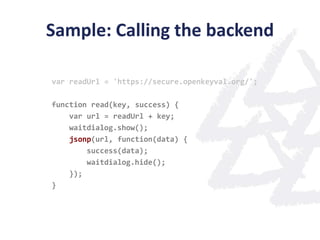
Sample: Calling the backend

var readUrl = 'https://secure.openkeyval.org/';

TodoController.prototype.refreshTodos() {
    var self = this;
    read(readUrl, function(response) {
        self.todos = response;
    });
}
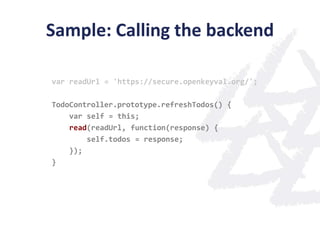
Sample: Calling the backend

var readUrl = 'https://secure.openkeyval.org/';

TodoController.prototype.refreshTodos() {
    var self = this;
    read(readUrl, function(response) {
        self.todos = response;
    });
}
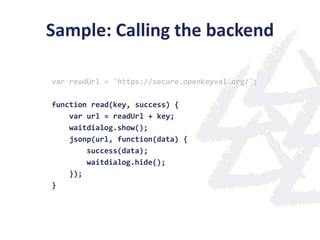
Sample: Calling the backend

var readUrl = 'https://secure.openkeyval.org/';

function read(key, success) {
    var url = readUrl + key;
    waitdialog.show();
    jsonp(url, function(data) {
        success(data);
        waitdialog.hide();
    });
}
Sample: Calling the backend

var readUrl = 'https://secure.openkeyval.org/';

function read(key, success) {
    var url = readUrl + key;
    waitdialog.show();
    jsonp(url, function(data) {
        success(data);
        waitdialog.hide();
    });
}
Sample: Calling the backend

var readUrl = 'https://secure.openkeyval.org/';

function read(key, success) {
    var url = readUrl + key;
    waitdialog.show();
    jsonp(url, function(data) {
        success(data);
        waitdialog.hide();
    });
}
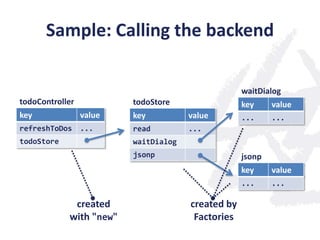
Sample: Calling the backend

                                                   waitDialog
todoController           todoStore                 key     value
key              value   key          value        ...     ...
refreshToDos ...         read         ...
todoStore                waitDialog
                         jsonp                     jsonp
                                                   key     value
                                                   ...     ...

             created                  created by
            with "new"                 Factories
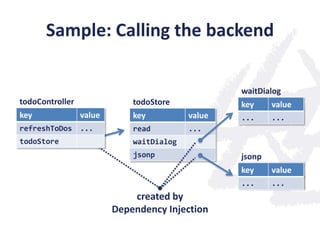
Sample: Calling the backend

                                                  waitDialog
todoController               todoStore            key     value
key              value       key          value   ...     ...
refreshToDos ...             read         ...
todoStore                    waitDialog
                             jsonp                jsonp
                                                  key     value
                                                  ...     ...
                             created by
                         Dependency Injection
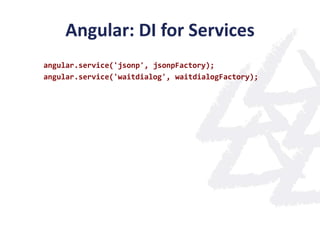
Angular: DI for Services
angular.service('jsonp', jsonpFactory);
angular.service('waitdialog', waitdialogFactory);
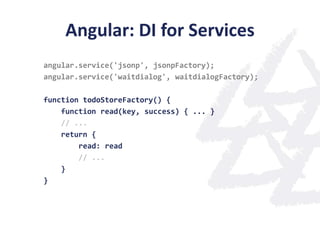
Angular: DI for Services
angular.service('jsonp', jsonpFactory);
angular.service('waitdialog', waitdialogFactory);

function todoStoreFactory() {
    function read(key, success) { ... }
    // ...
    return {
        read: read
        // ...
    }
}
Angular: DI for Services
angular.service('jsonp', jsonpFactory);
angular.service('waitdialog', waitdialogFactory);

function todoStoreFactory(jsonp, waitdialog) {
    function read(key, success) { ... }
    // ...
    return {
        read: read,
        // ...
    }
}
todoStoreFactory.$inject = ['jsonp', 'waitdialog'];
Angular: DI for Services
angular.service('jsonp', jsonpFactory);
angular.service('waitdialog', waitdialogFactory);

function todoStoreFactory(jsonp, waitdialog) {
    function read(key, success) { ... }
    // ...
    return {
        read: read
        // ...
    }
}
todoStoreFactory.$inject = ['jsonp', 'waitdialog'];
angular.service('todoStore', todoStoreFactory);
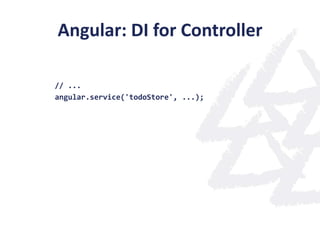
Angular: DI for Controller

// ...
angular.service('todoStore', ...);
Angular: DI for Controller

// ...
angular.service('todoStore', ...);

function TodoController(todoStore) {
  // do something with todoStore ...
}
TodoController.$inject = ['todoStore'];
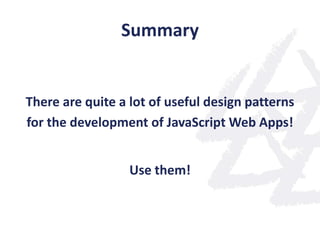
Summary


There are quite a lot of useful design patterns
for the development of JavaScript Web Apps!


                  Use them!
Summary


     Libraries and Frameworks
can help you to get your stuff done!
In the hive 11: nectar and pollen
      by Max xx, http://www.flickr.com/photos/max_westby/4567762490

                                     Books
By Rodrigo Galindez, http://www.flickr.com/photos/rodrigogalindez/4637637337/

                              IMG_1300-Edit
  by Susan E Adams, http://www.flickr.com/photos/susanad813/3912914836/

                                  Doble Via
     by amslerPIX, http://www.flickr.com/photos/amslerpix/6242266697/

                            MacBook Pro Keyboard
by superstrikertwo, http://www.flickr.com/photos/superstrikertwo/4989727256/

                            Stubborn Last Drop
  by RogueSun Media, http://www.flickr.com/photos/shuttercat7/627798443/
The End ...
@stefanscheidt
   @tigbro

Design Patterns for JavaScript Web Apps - JavaScript Conference 2012 - OPITZ CONSULTING - Stefan Scheidt

  • 1.
    Design Patterns for JavaScriptWeb Apps Stefan Scheidt OPITZ CONSULTING GmbH
  • 2.
  • 3.
    Mission Markets The company's ambition is to help  Branchspreading organizations to be better than their  Over 600 customers competitors. 29% Trade / Logistics / Our services take place in partnership and 29% Supplier Industry / Services / are aimed at co-operation of many years. Telecommunications 42% Public Clients / Banks and Insurance Associations and Federations Portfolio Basic Data  Business IT Alignment  Founded in 1990  Business Information Management  400 employees  Business Process Management  8 offices  Application Development  SOA and System Integration  IT Infrastructure Management © OPITZ CONSULTING GmbH 2012 Seite 3
  • 4.
    And … whoare you?
  • 5.
    This talk isabout ... ... the development of testable and maintainable JavaScript Web Apps
  • 6.
    This talk isabout ... ... the development of testable and maintainable JavaScript Web Apps
  • 7.
    Our Sample App... http://tigbro.github.com/todo-mobile https://github.com/tigbro/todo-mobile
  • 9.
  • 10.
    "Multi Page WebApp" Browser Server HTML-Page Controller Data Backend UI Values
  • 11.
    "AJAX Web App" Browser Server Change AJAX- Controller Backend Data Engine Events
  • 12.
    "Single Page WebApp" Browser Server Controller Data Backend
  • 13.
  • 14.
  • 15.
    How can youcreate this?
  • 16.
    <div id="main" data-role="page"> <div data-role="header"> <h1>Todos</h1> <a href="">Save</a> <a href="#settings">Settings</a> </div> <div data-role="content"> <div data-role="fieldcontain"> <form data-ajax="false"> <input type="text"> </form> </div> <fieldset data-role="controlgroup"> <input type="checkbox" id="todo1"/> <label for="todo1">create a mobile todo app</label> </fieldset> </div> </div> jQuery Mobile Markup
  • 17.
    <div id="main" data-role="page"> <div data-role="header"> <h1>Todos</h1> <a href="">Save</a> <a href="#settings">Settings</a> </div> <div data-role="content"> <div data-role="fieldcontain"> <form data-ajax="false"> <input type="text"> </form> </div> <fieldset data-role="controlgroup"> <input type="checkbox" id="todo1"/> <label for="todo1">create a mobile todo app</label> </fieldset> </div> </div> jQuery Mobile Markup
  • 18.
    <div id="main" data-role="page"> <div data-role="header"> <h1>Todos</h1> <a href="">Save</a> <a href="#settings">Settings</a> </div> <div data-role="content"> <div data-role="fieldcontain"> <form data-ajax="false"> <input type="text"> </form> </div> <fieldset data-role="controlgroup"> <input type="checkbox" id="todo1"/> <label for="todo1">create a mobile todo app</label> </fieldset> </div> </div> jQuery Mobile Markup
  • 19.
    <div id="main" data-role="page"> <div data-role="header"> <h1>Todos</h1> <a href="">Save</a> <a href="#settings">Settings</a> </div> <div data-role="content"> <div data-role="fieldcontain"> <form data-ajax="false"> <input type="text"> </form> </div> <fieldset data-role="controlgroup"> <input type="checkbox" id="todo1"/> <label for="todo1">create a mobile todo app</label> </fieldset> </div> </div> jQuery Mobile Markup
  • 20.
    <div id="main" data-role="page"> <div data-role="header"> <h1>Todos</h1> <a href="">Save</a> <a href="#settings">Settings</a> </div> <div data-role="content"> <div data-role="fieldcontain"> <form data-ajax="false"> <input type="text"> </form> </div> <fieldset data-role="controlgroup"> <input type="checkbox" id="todo1"/> <label for="todo1">create a mobile todo app</label> </fieldset> </div> </div> jQuery Mobile Markup
  • 21.
  • 22.
    <input type="checkbox" id="todo1"/> <labelfor="todo1">create a mobile todo app</label> <div class="ui-checkbox"> <input type="checkbox" name="todo.done" id="todo1"> <label class="ui-btn ui-btn-up-c ui-btn-icon-left ui-btn-corner-all ui-checkbox-off" for="todo1" data-theme="c"> <span class="ui-btn-inner ui-btn-corner-all"> <span class="ui-btn-text">create a mobile todo app</span> <span class="ui-icon ui-icon-checkbox-off ui-icon-shadow"></span> </span> </label> </div> jQuery Mobile Markup Transformation
  • 23.
    <input type="checkbox" id="todo1"/> <labelfor="todo1">create a mobile todo app</label> <div class="ui-checkbox"> <input type="checkbox" name="todo.done" id="todo1"> <label class="ui-btn ui-btn-up-c ui-btn-icon-left ui-btn-corner-all ui-checkbox-off" for="todo1" data-theme="c"> <span class="ui-btn-inner ui-btn-corner-all"> <span class="ui-btn-text">create a mobile todo app</span> <span class="ui-icon ui-icon-checkbox-off ui-icon-shadow"></span> </span> </label> </div> jQuery Mobile Markup Transformation
  • 24.
    Two Way DataBinding
  • 25.
    Do it yourself"binding" ...
  • 26.
    $('#addTodo').submit(function(event) { addTodo(); event.preventDefault(); }); function addTodo() { var inputText = $('#inputText').val(); var list = $('#todos'); var entryCount = list.find('input').length; list.append(entryTemplate(entryCount, inputText)); list.trigger('create'); $('#inputText').val(''); } function entryTemplate(index, name) { var id = 'todo' + index; return '<input type="checkbox" id="' + id + '"/>' + '<label for="' + id + '">' + name + '</label>'; }
  • 27.
    $('#addTodo').submit(function(event) { addTodo(); event.preventDefault(); }); function addTodo() { var inputText = $('#inputText').val(); var list = $('#todos'); var entryCount = list.find('input').length; list.append(entryTemplate(entryCount, inputText)); list.trigger('create'); $('#inputText').val(''); } function entryTemplate(index, name) { var id = 'todo' + index; return '<input type="checkbox" id="' + id + '"/>' + '<label for="' + id + '">' + name + '</label>'; }
  • 28.
    $('#addTodo').submit(function(event) { addTodo(); event.preventDefault(); }); function addTodo() { var inputText = $('#inputText').val(); var list = $('#todos'); var entryCount = list.find('input').length; list.append(entryTemplate(entryCount, inputText)); list.trigger('create'); $('#inputText').val(''); } function entryTemplate(index, name) { var id = 'todo' + index; return '<input type="checkbox" id="' + id + '"/>' + '<label for="' + id + '">' + name + '</label>'; }
  • 29.
    $('#addTodo').submit(function(event) { addTodo(); event.preventDefault(); }); function addTodo() { var inputText = $('#inputText').val(); var list = $('#todos'); var entryCount = list.find('input').length; list.append(entryTemplate(entryCount, inputText)); list.trigger('create'); $('#inputText').val(''); } function entryTemplate(index, name) { var id = 'todo' + index; return '<input type="checkbox" id="' + id + '"/>' + '<label for="' + id + '">' + name + '</label>'; }
  • 30.
    $('#addTodo').submit(function(event) { addTodo(); event.preventDefault(); }); function addTodo() { var inputText = $('#inputText').val(); var list = $('#todos'); var entryCount = list.find('input').length; list.append(entryTemplate(entryCount, inputText)); list.trigger('create'); $('#inputText').val(''); } function entryTemplate(index, name) { var id = 'todo' + index; return '<input type="checkbox" id="' + id + '"/>' + '<label for="' + id + '">' + name + '</label>'; }
  • 31.
    $('#addTodo').submit(function(event) { addTodo(); event.preventDefault(); }); function addTodo() { var inputText = $('#inputText').val(); var list = $('#todos'); var entryCount = list.find('input').length; list.append(entryTemplate(entryCount, inputText)); list.trigger('create'); $('#inputText').val(''); } function entryTemplate(index, name) { var id = 'todo' + index; return '<input type="checkbox" id="' + id + '"/>' + '<label for="' + id + '">' + name + '</label>'; }
  • 32.
    $('#addTodo').submit(function(event) { addTodo(); event.preventDefault(); }); function addTodo() { var inputText = $('#inputText').val(); var list = $('#todos'); var entryCount = list.find('input').length; list.append(entryTemplate(entryCount, inputText)); list.trigger('create'); $('#inputText').val(''); } function entryTemplate(index, name) { var id = 'todo' + index; return '<input type="checkbox" id="' + id + '"/>' + '<label for="' + id + '">' + name + '</label>'; }
  • 33.
    $('#addTodo').submit(function(event) { addTodo(); event.preventDefault(); }); function addTodo() { var inputText = $('#inputText').val(); var list = $('#todos'); var entryCount = list.find('input').length; list.append(entryTemplate(entryCount, inputText)); list.trigger('create'); $('#inputText').val(''); } function entryTemplate(index, name) { var id = 'todo' + index; return '<input type="checkbox" id="' + id + '"/>' + '<label for="' + id + '">' + name + '</label>'; }
  • 34.
    Wouldn't this bebetter ... ? function TodoController() { this.todos = []; this.inputText = ''; } TodoController.prototype.addTodo = function() { this.todos.push({ name: this.inputText, done: false }); this.inputText = ''; }
  • 35.
    Angular JS Declarative MVC with UI Templates Dependency Injection Two-Way Framework Data Binding http://angularjs.org/#/
  • 36.
    Two Way Databinding read read write Data- write DOM Controller binding watch watch
  • 37.
    Scopes Scope Expressions $get(<expr>) 'inputText' 'todos.length' $set(<expr>, <value>) Object ... $watch(<expr>, <callback>)
  • 38.
  • 39.
    <div id="main" data-role="page"> <div data-role="header"> <h1>Todos</h1> <a href="">Save</a> <a href="#settings">Settings</a> </div> <div data-role="content"> <div data-role="fieldcontain"> <form data-ajax="false"> <input type="text"> </form> </div> <fieldset data-role="controlgroup"> <input type="checkbox" id="todo1"/> <label for="todo1">create a mobile todo app</label> </fieldset> </div> </div> The DOM
  • 40.
    function TodoController() { this.todos = []; this.inputText = ''; } TodoController.prototype.addTodo = function() { this.todos.push({ name: this.inputText, done: false }); this.inputText = ''; } The Controller
  • 41.
    <div data-role="page" TodoController Scope ng:controller="TodoController"> inputText: 'new todo' create <input type="text" todos: [...] name="inputText" bind bind <div ng:repeat="todo in todos"> create Repeater Scope Repeater Scope Repeater Scope todo: { todo: todo: { { <input type="checkbox" name="todo.done"/> done: false done: false done: false bind name: 'makemoney' name: 'makemoney' name: 'makemoney' <label> {{todo.name}} } </label> bind }}
  • 42.
    We are almostthere, but ...
  • 43.
    jQuery Mobile &AngularJS The problem: DOM transformations done by jQuery Mobile and AngularJS need to be coordinated!
  • 44.
    jQuery Mobile &AngularJS Our Solution: jQuery Mobile Angular Adapter
  • 45.
    jQuery Mobile AngularAdapter Integration of jQuery Mobile & AngularJS Extentions for mobile web development Open source on GitHub https://github.com/tigbro/jquery-mobile-angular-adapter
  • 46.
  • 47.
    Dependency Injection isa design pattern whose purpose is to reduce the dependencies between components. It delegates the responsibility for creation and wiring of objects to an externaly configurable framework. http://de.wikipedia.org/wiki/Dependency_Injection
  • 48.
    Dependency Injection isa design pattern whose purpose is to reduce the dependencies between components. It delegates the responsibility for creation and wiring of objects to an externaly configurable framework. http://de.wikipedia.org/wiki/Dependency_Injection
  • 49.
    Sample: Calling thebackend var readUrl = 'https://secure.openkeyval.org/'; TodoController.prototype.refreshTodos() { var self = this; read(readUrl, function(response) { self.todos = response; }); }
  • 50.
    Sample: Calling thebackend var readUrl = 'https://secure.openkeyval.org/'; TodoController.prototype.refreshTodos() { var self = this; read(readUrl, function(response) { self.todos = response; }); }
  • 51.
    Sample: Calling thebackend var readUrl = 'https://secure.openkeyval.org/'; function read(key, success) { var url = readUrl + key; waitdialog.show(); jsonp(url, function(data) { success(data); waitdialog.hide(); }); }
  • 52.
    Sample: Calling thebackend var readUrl = 'https://secure.openkeyval.org/'; function read(key, success) { var url = readUrl + key; waitdialog.show(); jsonp(url, function(data) { success(data); waitdialog.hide(); }); }
  • 53.
    Sample: Calling thebackend var readUrl = 'https://secure.openkeyval.org/'; function read(key, success) { var url = readUrl + key; waitdialog.show(); jsonp(url, function(data) { success(data); waitdialog.hide(); }); }
  • 54.
    Sample: Calling thebackend waitDialog todoController todoStore key value key value key value ... ... refreshToDos ... read ... todoStore waitDialog jsonp jsonp key value ... ... created created by with "new" Factories
  • 55.
    Sample: Calling thebackend waitDialog todoController todoStore key value key value key value ... ... refreshToDos ... read ... todoStore waitDialog jsonp jsonp key value ... ... created by Dependency Injection
  • 56.
    Angular: DI forServices angular.service('jsonp', jsonpFactory); angular.service('waitdialog', waitdialogFactory);
  • 57.
    Angular: DI forServices angular.service('jsonp', jsonpFactory); angular.service('waitdialog', waitdialogFactory); function todoStoreFactory() { function read(key, success) { ... } // ... return { read: read // ... } }
  • 58.
    Angular: DI forServices angular.service('jsonp', jsonpFactory); angular.service('waitdialog', waitdialogFactory); function todoStoreFactory(jsonp, waitdialog) { function read(key, success) { ... } // ... return { read: read, // ... } } todoStoreFactory.$inject = ['jsonp', 'waitdialog'];
  • 59.
    Angular: DI forServices angular.service('jsonp', jsonpFactory); angular.service('waitdialog', waitdialogFactory); function todoStoreFactory(jsonp, waitdialog) { function read(key, success) { ... } // ... return { read: read // ... } } todoStoreFactory.$inject = ['jsonp', 'waitdialog']; angular.service('todoStore', todoStoreFactory);
  • 60.
    Angular: DI forController // ... angular.service('todoStore', ...);
  • 61.
    Angular: DI forController // ... angular.service('todoStore', ...); function TodoController(todoStore) { // do something with todoStore ... } TodoController.$inject = ['todoStore'];
  • 62.
    Summary There are quitea lot of useful design patterns for the development of JavaScript Web Apps! Use them!
  • 63.
    Summary Libraries and Frameworks can help you to get your stuff done!
  • 64.
    In the hive11: nectar and pollen by Max xx, http://www.flickr.com/photos/max_westby/4567762490 Books By Rodrigo Galindez, http://www.flickr.com/photos/rodrigogalindez/4637637337/ IMG_1300-Edit by Susan E Adams, http://www.flickr.com/photos/susanad813/3912914836/ Doble Via by amslerPIX, http://www.flickr.com/photos/amslerpix/6242266697/ MacBook Pro Keyboard by superstrikertwo, http://www.flickr.com/photos/superstrikertwo/4989727256/ Stubborn Last Drop by RogueSun Media, http://www.flickr.com/photos/shuttercat7/627798443/
  • 65.