ASP.NET MVC
Training – Part 2
AN ASP.NET MVC INTRODUCTION
Lee Englestone (@LeeEnglestone)
Tech Lead @ Kitbag.com
www.ManchesterDeveloper.com
Areas
 Areas group related Models, Views and
Controllers
 By default no Areas exists
 They appear in the route like so
 http://www.website.com/{Area}/{Controller}/{Action}/{Id}
 You can try adding an Area to your application and you’ll see
it creates a new folder and sub-folders for Models, Views and
Controllers and the code to register the Area itself
 We don’t use Areas
HtmlHelpers
 HtmlHelpers are methods that can be executed
within Razor views to generate HTML
 They are actually just extension methods and
therefore you can write your own HtmlHelper
methods
 The @Html.Action Helper method can be used to
generate links given controller, actions names
and id values
 We’ve already encountered @Html.LabelFor()
and @Html.TextBoxFor() in Part 1
Partial Views
 A view that can be rendered in another view
 Conceptually similar to WebForms UserControls
 By convention located in the Views/Shared folder
 By convention prefixed with an underscore
 Can be returned from Controller Actions with a
Model
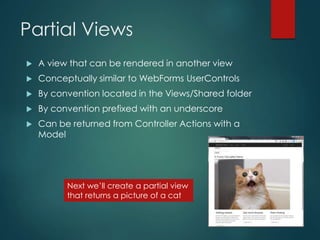
Next we’ll create a partial view
that returns a picture of a cat
Exercise : Create and use
a simple Partial View
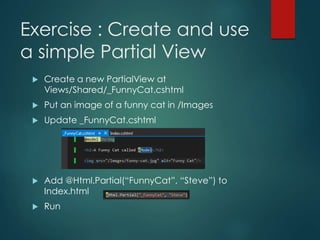
 Create a new PartialView at
Views/Shared/_FunnyCat.cshtml
 Put an image of a funny cat in /Images
 Update _FunnyCat.cshtml
 Add @Html.Partial(“FunnyCat”, “Steve”) to
Index.html
 Run
Custom Mobile Views
using DisplayModes
 Rules can be put into place to serve different
views with different extensions in different
circumstances
 A popular method is that if a user has requested a
page on a mobile device and there are 2 versions
of a View in the View folder
 Index.cshtml
 Index.mobile.cshtml
 Then the relevant view will be returned
 There is a built in DisplayMode for *.mobile.cshtml
views
Exercise : Create Mobile View
 Create a new View called
ViewsIndex.mobile.cshtml
 Make it obvious it is the Mobile View
 Run the application and emulate a Mobile
device
CSS Boostrap Framework
 Bootstrap is a popular CSS and JavaScript
framework that now is included in / used by new
ASP.NET MVC Application projects
 http://getbootstrap.com/
 It warrants a training course in itself (so check it
out) but some of main things it gives are
 Browser reset
 Grid system
 Glyphicons
 Popovers, tooltips, tabs, modals, pagination
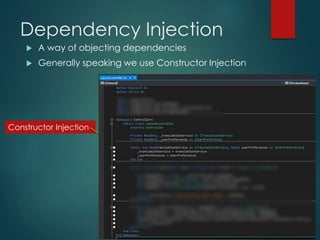
Dependency Injection
 A way of objecting dependencies
 Generally speaking we use Constructor Injection
Constructor Injection
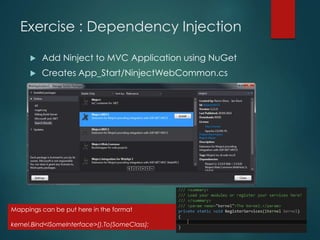
Exercise : Dependency Injection
 Add Ninject to MVC Application using NuGet
 Creates App_Start/NinjectWebCommon.cs
Mappings can be put here in the format
kernel.Bind<ISomeInterface>().To(SomeClass);
TDD/Unit Testing
 Controllers can be easily Unit Tested
 Can mock dependencies
 A few things you could Unit Test
 The View (or result) returned from an Action is of the
correct type
 The Model returned from an Action is correct
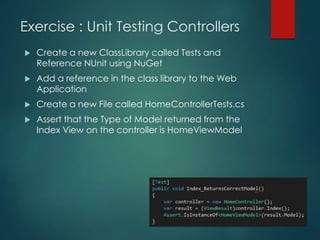
Exercise : Unit Testing Controllers
 Create a new ClassLibrary called Tests and
Reference NUnit using NuGet
 Add a reference in the class library to the Web
Application
 Create a new File called HomeControllerTests.cs
 Assert that the Type of Model returned from the
Index View on the controller is HomeViewModel
Bundling
 The merging together and serving of multiple files
 Instead of a request for each javascript/css file,
files are ‘merged together’ to reduce number of
requests
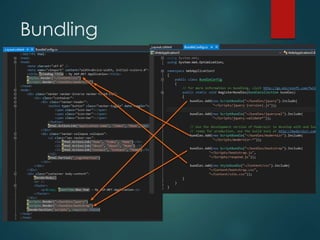
 Bundles defined in App_Start/BundleConfig.cs
 Can be turned off whilst debugging / working
locally
Bundling
Minification
 The removing of whitespace in served javascript
and css files
 Is done automatically to styles and scripts in a
Bundle
 Can be turned off whilst debugging / working
locally
Scaffolding Views
 It is possible to auto-generate the input fields for a
Views Model properties
 @Html.EditorForModel()
 May have to ignore unwanted Model properties
with [ScaffoldColumn(false)]
Exercise : Scaffolding View
using Model  Change the save form on
the Index View to use
@Html.EditorForModel() and
run
 You should see most of the
properties are provided
with relevant inputs
 To tell the ‘auto-scaffolder’
to ignore certain properties,
give the properties the
[ScaffoldColumn(false)]
attribute
Model Attributes
 Model properties can be given attributes to provide
additional information about them
 This is especially useful in validation
 Attributes include
 [Required]
 Marks the property as non-optional
 [DisplayName]
 Overrides the default label of a property in the view
 [StringLength(50), MinimumLength=3]
 Sets a max length for a string property
 [Range(0,5]
 Provided value must be within a range
ModelState
 Once a Model has been posted back to an
action we can check it’s ‘State’ and whether it is
in a valid state
 Discussed in next slide
Exercise : Model Attributes
for Validation
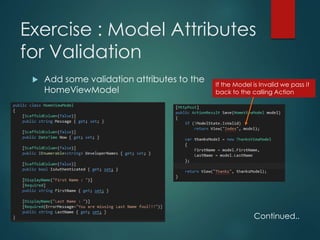
 Add some validation attributes to the
HomeViewModel
If the Model is Invalid we pass it
back to the calling Action
Continued..
Exercise : Model Attributes
for Validation continued..
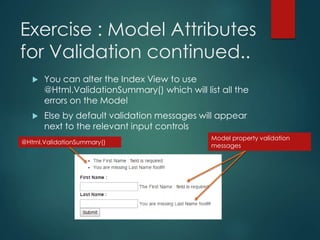
 You can alter the Index View to use
@Html.ValidationSummary() which will list all the
errors on the Model
 Else by default validation messages will appear
next to the relevant input controls
@Html.ValidationSummary()
Model property validation
messages
Async Actions in Controllers
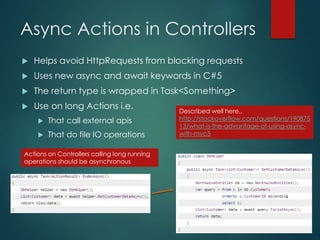
 Helps avoid HttpRequests from blocking requests
 Uses new async and await keywords in C#5
 The return type is wrapped in Task<Something>
 Use on long Actions i.e.
 That call external apis
 That do file IO operations
Actions on Controllers calling long running
operations should be asynchronous
Described well here..
http://stackoverflow.com/questions/190875
13/what-is-the-advantage-of-using-async-
with-mvc5

MVC Training Part 2

  • 1.
    ASP.NET MVC Training –Part 2 AN ASP.NET MVC INTRODUCTION Lee Englestone (@LeeEnglestone) Tech Lead @ Kitbag.com www.ManchesterDeveloper.com
  • 2.
    Areas  Areas grouprelated Models, Views and Controllers  By default no Areas exists  They appear in the route like so  http://www.website.com/{Area}/{Controller}/{Action}/{Id}  You can try adding an Area to your application and you’ll see it creates a new folder and sub-folders for Models, Views and Controllers and the code to register the Area itself  We don’t use Areas
  • 3.
    HtmlHelpers  HtmlHelpers aremethods that can be executed within Razor views to generate HTML  They are actually just extension methods and therefore you can write your own HtmlHelper methods  The @Html.Action Helper method can be used to generate links given controller, actions names and id values  We’ve already encountered @Html.LabelFor() and @Html.TextBoxFor() in Part 1
  • 4.
    Partial Views  Aview that can be rendered in another view  Conceptually similar to WebForms UserControls  By convention located in the Views/Shared folder  By convention prefixed with an underscore  Can be returned from Controller Actions with a Model Next we’ll create a partial view that returns a picture of a cat
  • 5.
    Exercise : Createand use a simple Partial View  Create a new PartialView at Views/Shared/_FunnyCat.cshtml  Put an image of a funny cat in /Images  Update _FunnyCat.cshtml  Add @Html.Partial(“FunnyCat”, “Steve”) to Index.html  Run
  • 6.
    Custom Mobile Views usingDisplayModes  Rules can be put into place to serve different views with different extensions in different circumstances  A popular method is that if a user has requested a page on a mobile device and there are 2 versions of a View in the View folder  Index.cshtml  Index.mobile.cshtml  Then the relevant view will be returned  There is a built in DisplayMode for *.mobile.cshtml views
  • 7.
    Exercise : CreateMobile View  Create a new View called ViewsIndex.mobile.cshtml  Make it obvious it is the Mobile View  Run the application and emulate a Mobile device
  • 8.
    CSS Boostrap Framework Bootstrap is a popular CSS and JavaScript framework that now is included in / used by new ASP.NET MVC Application projects  http://getbootstrap.com/  It warrants a training course in itself (so check it out) but some of main things it gives are  Browser reset  Grid system  Glyphicons  Popovers, tooltips, tabs, modals, pagination
  • 9.
    Dependency Injection  Away of objecting dependencies  Generally speaking we use Constructor Injection Constructor Injection
  • 10.
    Exercise : DependencyInjection  Add Ninject to MVC Application using NuGet  Creates App_Start/NinjectWebCommon.cs Mappings can be put here in the format kernel.Bind<ISomeInterface>().To(SomeClass);
  • 11.
    TDD/Unit Testing  Controllerscan be easily Unit Tested  Can mock dependencies  A few things you could Unit Test  The View (or result) returned from an Action is of the correct type  The Model returned from an Action is correct
  • 12.
    Exercise : UnitTesting Controllers  Create a new ClassLibrary called Tests and Reference NUnit using NuGet  Add a reference in the class library to the Web Application  Create a new File called HomeControllerTests.cs  Assert that the Type of Model returned from the Index View on the controller is HomeViewModel
  • 13.
    Bundling  The mergingtogether and serving of multiple files  Instead of a request for each javascript/css file, files are ‘merged together’ to reduce number of requests  Bundles defined in App_Start/BundleConfig.cs  Can be turned off whilst debugging / working locally
  • 14.
  • 15.
    Minification  The removingof whitespace in served javascript and css files  Is done automatically to styles and scripts in a Bundle  Can be turned off whilst debugging / working locally
  • 16.
    Scaffolding Views  Itis possible to auto-generate the input fields for a Views Model properties  @Html.EditorForModel()  May have to ignore unwanted Model properties with [ScaffoldColumn(false)]
  • 17.
    Exercise : ScaffoldingView using Model  Change the save form on the Index View to use @Html.EditorForModel() and run  You should see most of the properties are provided with relevant inputs  To tell the ‘auto-scaffolder’ to ignore certain properties, give the properties the [ScaffoldColumn(false)] attribute
  • 18.
    Model Attributes  Modelproperties can be given attributes to provide additional information about them  This is especially useful in validation  Attributes include  [Required]  Marks the property as non-optional  [DisplayName]  Overrides the default label of a property in the view  [StringLength(50), MinimumLength=3]  Sets a max length for a string property  [Range(0,5]  Provided value must be within a range
  • 19.
    ModelState  Once aModel has been posted back to an action we can check it’s ‘State’ and whether it is in a valid state  Discussed in next slide
  • 20.
    Exercise : ModelAttributes for Validation  Add some validation attributes to the HomeViewModel If the Model is Invalid we pass it back to the calling Action Continued..
  • 21.
    Exercise : ModelAttributes for Validation continued..  You can alter the Index View to use @Html.ValidationSummary() which will list all the errors on the Model  Else by default validation messages will appear next to the relevant input controls @Html.ValidationSummary() Model property validation messages
  • 22.
    Async Actions inControllers  Helps avoid HttpRequests from blocking requests  Uses new async and await keywords in C#5  The return type is wrapped in Task<Something>  Use on long Actions i.e.  That call external apis  That do file IO operations Actions on Controllers calling long running operations should be asynchronous Described well here.. http://stackoverflow.com/questions/190875 13/what-is-the-advantage-of-using-async- with-mvc5