Actively Engage Your Students and Keep Parents InformedBy Lynne Butkiewicz
OverviewWikis are used for a variety of purposes:Collaboration and communication
Reduce email overload
Have an archive of the work that has been done
Create an electronic portfolio for your studentsMake Lessons InterestingActive Lessons
Sharing ideas
Games
Replace worksheets
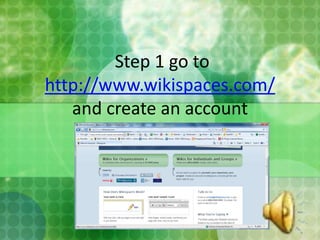
Working with friends Step 1 go to http://www.wikispaces.com/and create an account
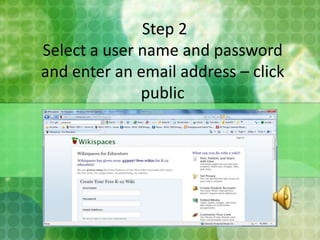
 Step 2 Select a user name and password and enter an email address – click public
 Step 3 – you will see Welcome to Your New Wiki –Table of Contents of pages and information that will help you create a wiki site
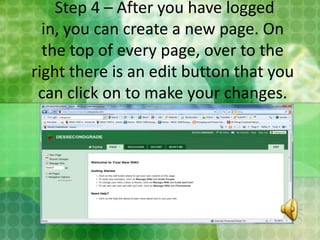
 Step 4 – After you have logged in, you can create a new page. On the top of every page, over to the right there is an edit button that you can click on to make your changes.
 Step 5 –Editing Tab Page: The next screen is a welcome to your wiki where you can add or delete information on that page

Multimedia butkiewiczl

  • 1.
    Actively Engage YourStudents and Keep Parents InformedBy Lynne Butkiewicz
  • 2.
    OverviewWikis are usedfor a variety of purposes:Collaboration and communication
  • 3.
  • 4.
    Have an archiveof the work that has been done
  • 5.
    Create an electronicportfolio for your studentsMake Lessons InterestingActive Lessons
  • 6.
  • 7.
  • 8.
  • 9.
    Working with friendsStep 1 go to http://www.wikispaces.com/and create an account
  • 10.
    Step 2Select a user name and password and enter an email address – click public
  • 11.
    Step 3– you will see Welcome to Your New Wiki –Table of Contents of pages and information that will help you create a wiki site
  • 12.
    Step 4– After you have logged in, you can create a new page. On the top of every page, over to the right there is an edit button that you can click on to make your changes.
  • 13.
    Step 5–Editing Tab Page: The next screen is a welcome to your wiki where you can add or delete information on that page