Wikispaces for Teachers A Guide to Using Them in Your Classroom This work is licensed under a Creative Commons 3.0 Attribution License
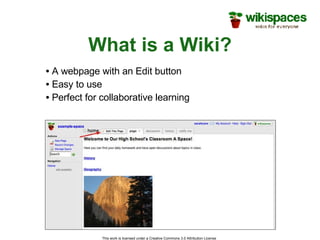
What is a Wiki? This work is licensed under a Creative Commons 3.0 Attribution License  A webpage with an Edit button Easy to use Perfect for collaborative learning
Why Wikispaces? The world’s easiest to use wiki No experience necessary. You are up and running in minutes. Constantly bring you new and improved features Develop the product based on what you, our community, wants. Highly-praised customer service This work is licensed under a Creative Commons 3.0 Attribution License
What Our Users Are Saying This work is licensed under a Creative Commons 3.0 Attribution License  “ WOW!…I honestly thought my email to you guys was going to be a shout into the night like it is for most places - but then you responded right away… [Wikispaces] has become indispensable to what I do.”   -Matt Dilley "Let me say how impressed I am with your service. It always amazes me that such an organization still has that personal touch.” -Westley Field "Since I set up a Wikispace for my classes I have received nothing but positive feedback from parents, students and other faculty members. I have found a new resource that is easily accessible by students and parents. It allows parents to find out what their son or daughter is doing in my courses. Thank you.” - Blair Simms
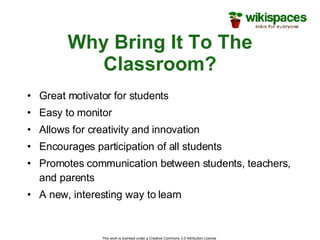
Why Bring It To The Classroom? Great motivator for students Easy to monitor Allows for creativity and innovation Encourages participation of all students Promotes communication between students, teachers, and parents A new, interesting way to learn This work is licensed under a Creative Commons 3.0 Attribution License
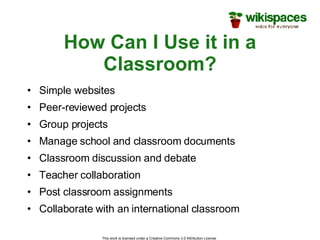
How Can I Use it in a Classroom? Simple websites Peer-reviewed projects Group projects Manage school and classroom documents  Classroom discussion and debate Teacher collaboration Post classroom assignments Collaborate with an international classroom This work is licensed under a Creative Commons 3.0 Attribution License
Getting Started… This work is licensed under a Creative Commons 3.0 Attribution License
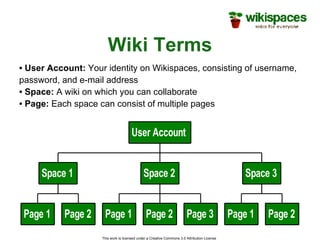
Wiki Terms This work is licensed under a Creative Commons 3.0 Attribution License  User Account:  Your identity on Wikispaces, consisting of username, password, and e-mail address Space:  A wiki on which you can collaborate Page:  Each space can consist of multiple pages
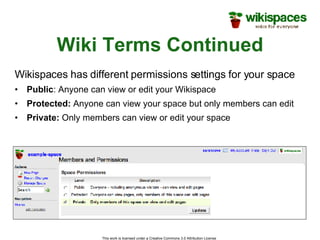
Wiki Terms Continued Wikispaces has different permissions settings for your space Public : Anyone can view or edit your Wikispace Protected:  Anyone can view your space but only members can edit Private:  Only members can view or edit your space This work is licensed under a Creative Commons 3.0 Attribution License
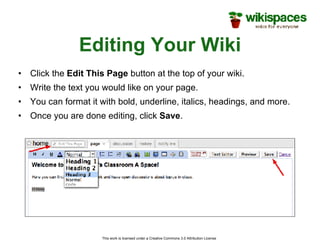
Editing Your Wiki Click the  Edit This Page  button at the top of your wiki. Write the text you would like on your page. You can format it with bold, underline, italics, headings, and more. Once you are done editing, click  Save . This work is licensed under a Creative Commons 3.0 Attribution License
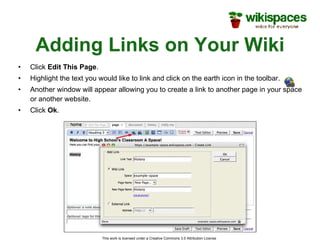
Adding Links on Your Wiki Click  Edit This Page . Highlight the text you would like to link and click on the earth icon in the toolbar. Another window will appear allowing you to create a link to another page in your space or another website. Click  Ok . This work is licensed under a Creative Commons 3.0 Attribution License
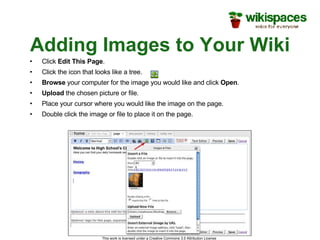
Adding Images to Your Wiki Click  Edit This Page . Click the icon that looks like a tree. Browse  your computer for the image you would like and click  Open . Upload  the chosen picture or file. Place your cursor where you would like the image on the page. Double click the image or file to place it on the page. This work is licensed under a Creative Commons 3.0 Attribution License
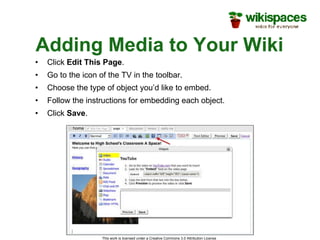
Adding Media to Your Wiki Click  Edit This Page . Go to the icon of the TV in the toolbar. Choose the type of object you’d like to embed. Follow the instructions for embedding each object. Click  Save . This work is licensed under a Creative Commons 3.0 Attribution License
Time for an Activity This work is licensed under a Creative Commons 3.0 Attribution License
Activity Let’s teach each other about various countries Take the next 15 minutes to edit your wiki’s text, add links, and add an image or a video clip. This work is licensed under a Creative Commons 3.0 Attribution License
Additional Resources for Teachers Wikispaces will create your student accounts for you! http://www.wikispaces.com/help+teachers Check out our K-12 Educational Community at: http://educationalwikis.wikispaces.com This work is licensed under a Creative Commons 3.0 Attribution License
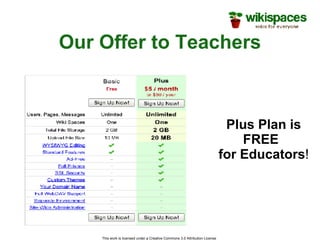
Our Offer to Teachers This work is licensed under a Creative Commons 3.0 Attribution License  Plus Plan is FREE   for Educators !
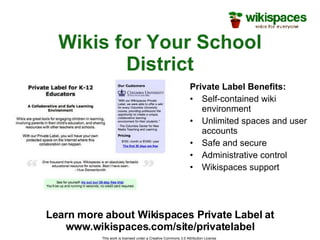
Wikis for Your School District Private Label Benefits: Self-contained wiki environment Unlimited spaces and user accounts Safe and secure Administrative control Wikispaces support This work is licensed under a Creative Commons 3.0 Attribution License  Learn more about Wikispaces Private Label at www.wikispaces.com/site/privatelabel
Questions? Visit us: http://www.wikispaces.com Email us: [email_address] This work is licensed under a Creative Commons 3.0 Attribution License
Thank You This work is licensed under a Creative Commons 3.0 Attribution License  Thanks for listening and watching along.  We hope to hear from you soon.  Until then, - The Wikispaces Team: Adam, Bisma, Dom, James, and Sarah

Wikispaces

  • 1.
    Wikispaces for TeachersA Guide to Using Them in Your Classroom This work is licensed under a Creative Commons 3.0 Attribution License
  • 2.
    What is aWiki? This work is licensed under a Creative Commons 3.0 Attribution License A webpage with an Edit button Easy to use Perfect for collaborative learning
  • 3.
    Why Wikispaces? Theworld’s easiest to use wiki No experience necessary. You are up and running in minutes. Constantly bring you new and improved features Develop the product based on what you, our community, wants. Highly-praised customer service This work is licensed under a Creative Commons 3.0 Attribution License
  • 4.
    What Our UsersAre Saying This work is licensed under a Creative Commons 3.0 Attribution License “ WOW!…I honestly thought my email to you guys was going to be a shout into the night like it is for most places - but then you responded right away… [Wikispaces] has become indispensable to what I do.” -Matt Dilley "Let me say how impressed I am with your service. It always amazes me that such an organization still has that personal touch.” -Westley Field "Since I set up a Wikispace for my classes I have received nothing but positive feedback from parents, students and other faculty members. I have found a new resource that is easily accessible by students and parents. It allows parents to find out what their son or daughter is doing in my courses. Thank you.” - Blair Simms
  • 5.
    Why Bring ItTo The Classroom? Great motivator for students Easy to monitor Allows for creativity and innovation Encourages participation of all students Promotes communication between students, teachers, and parents A new, interesting way to learn This work is licensed under a Creative Commons 3.0 Attribution License
  • 6.
    How Can IUse it in a Classroom? Simple websites Peer-reviewed projects Group projects Manage school and classroom documents Classroom discussion and debate Teacher collaboration Post classroom assignments Collaborate with an international classroom This work is licensed under a Creative Commons 3.0 Attribution License
  • 7.
    Getting Started… Thiswork is licensed under a Creative Commons 3.0 Attribution License
  • 8.
    Wiki Terms Thiswork is licensed under a Creative Commons 3.0 Attribution License User Account: Your identity on Wikispaces, consisting of username, password, and e-mail address Space: A wiki on which you can collaborate Page: Each space can consist of multiple pages
  • 9.
    Wiki Terms ContinuedWikispaces has different permissions settings for your space Public : Anyone can view or edit your Wikispace Protected: Anyone can view your space but only members can edit Private: Only members can view or edit your space This work is licensed under a Creative Commons 3.0 Attribution License
  • 10.
    Editing Your WikiClick the Edit This Page button at the top of your wiki. Write the text you would like on your page. You can format it with bold, underline, italics, headings, and more. Once you are done editing, click Save . This work is licensed under a Creative Commons 3.0 Attribution License
  • 11.
    Adding Links onYour Wiki Click Edit This Page . Highlight the text you would like to link and click on the earth icon in the toolbar. Another window will appear allowing you to create a link to another page in your space or another website. Click Ok . This work is licensed under a Creative Commons 3.0 Attribution License
  • 12.
    Adding Images toYour Wiki Click Edit This Page . Click the icon that looks like a tree. Browse your computer for the image you would like and click Open . Upload the chosen picture or file. Place your cursor where you would like the image on the page. Double click the image or file to place it on the page. This work is licensed under a Creative Commons 3.0 Attribution License
  • 13.
    Adding Media toYour Wiki Click Edit This Page . Go to the icon of the TV in the toolbar. Choose the type of object you’d like to embed. Follow the instructions for embedding each object. Click Save . This work is licensed under a Creative Commons 3.0 Attribution License
  • 14.
    Time for anActivity This work is licensed under a Creative Commons 3.0 Attribution License
  • 15.
    Activity Let’s teacheach other about various countries Take the next 15 minutes to edit your wiki’s text, add links, and add an image or a video clip. This work is licensed under a Creative Commons 3.0 Attribution License
  • 16.
    Additional Resources forTeachers Wikispaces will create your student accounts for you! http://www.wikispaces.com/help+teachers Check out our K-12 Educational Community at: http://educationalwikis.wikispaces.com This work is licensed under a Creative Commons 3.0 Attribution License
  • 17.
    Our Offer toTeachers This work is licensed under a Creative Commons 3.0 Attribution License Plus Plan is FREE for Educators !
  • 18.
    Wikis for YourSchool District Private Label Benefits: Self-contained wiki environment Unlimited spaces and user accounts Safe and secure Administrative control Wikispaces support This work is licensed under a Creative Commons 3.0 Attribution License Learn more about Wikispaces Private Label at www.wikispaces.com/site/privatelabel
  • 19.
    Questions? Visit us:http://www.wikispaces.com Email us: [email_address] This work is licensed under a Creative Commons 3.0 Attribution License
  • 20.
    Thank You Thiswork is licensed under a Creative Commons 3.0 Attribution License Thanks for listening and watching along. We hope to hear from you soon. Until then, - The Wikispaces Team: Adam, Bisma, Dom, James, and Sarah

Editor's Notes

  • #2 Overview: This presentation is a template we have prepared for you to use in your own presentations about using wikis in education. We encourage you to use the parts you like, change it around to suit your purposes, and send us the final presentations you use so that we can improve our materials. We hope this guide is helpful in making your presentation a success. This presentation covers what Wikispaces is, why it’s beneficial for teachers, how to begin using it, how to manage Wikispaces to suit the specific needs of teachers and their classrooms, and the features we have that they might find useful. Key points for this slide: Wikispaces is a tool that can help teachers teach, organize their classrooms, and in general foster classroom participation. Remember to introduce yourself and explain when and why you started using Wikispaces, how it has changed your teaching experience, and why you think they can benefit from it like you have. Your experiences will be the best example for your audience.