ALL ABOUT WIKISPACES
By: Marin Halperin
What are Wikispaces?
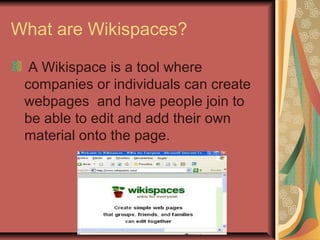
A Wikispace is a tool where
companies or individuals can create
webpages and have people join to
be able to edit and add their own
material onto the page.
Who Can Use WikiSpaces?
Anyone!
Often utilized by
Organizations
Companies
Individuals
Educators
Who can use it?
Wikispaces is seen used by more
adults and professionals but is
making a mark on the education
world.
Teachers are using the wikispaces for
their classes to get and respond to
assignments, for parent blogs etc.
Pro’s
Fast and Easy to use!
Everything is in one place
It’s FREE for basic package
Unlimited members
2GB+ of memory
Unlimited pages
Built in Chat Forums
Con’s
Format takes some getting used to.
Additional Privacy settings and no
ads for $5/month
Custom Permission/Domains for
$20/month
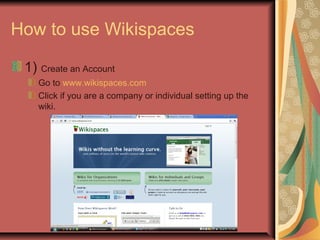
How to use Wikispaces
1) Create an Account
Go to www.wikispaces.com
Click if you are a company or individual setting up the
wiki.
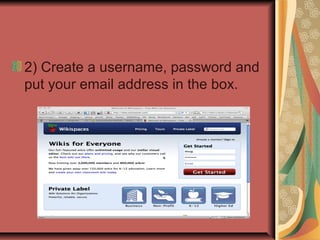
2) Create a username, password and
put your email address in the box.
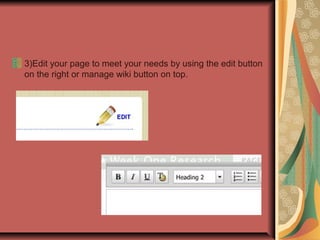
3)Edit your page to meet your needs by using the edit button
on the right or manage wiki button on top.
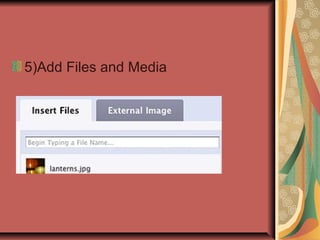
5)Add Files and Media
6) Invite people to join your wiki by
clicking the manage wiki button and
then clicking on members
Type in someone’s email or
username to send them an invitation.
Results
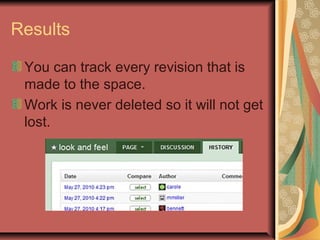
You can track every revision that is
made to the space.
Work is never deleted so it will not get
lost.
Ideas for the Classroom
Teachers are using Wiki’s more and more to integrate
technology into the class.
Wikispaces has a special wiki package for k-12 teachers. Go
to wikispaces.com and scroll down to the bottom left where it
says “create a free classroom wiki”
They can be used as
discussion boards
Literature circles
Group projects
Parent corners
and much, much, more!!
Once a member always a member!
Once you have a wiki account the work will never
be deleted unless done so by the creator of the
work or if the account is deleted.
Great to keep files and store public information!
Go to http://ucf5americanrevolutionsp10t.wikispaces.com/
to see a sample wiki page on a unit plan project I created.

All about wikispaces

  • 1.
  • 2.
    What are Wikispaces? AWikispace is a tool where companies or individuals can create webpages and have people join to be able to edit and add their own material onto the page.
  • 3.
    Who Can UseWikiSpaces? Anyone! Often utilized by Organizations Companies Individuals Educators
  • 4.
    Who can useit? Wikispaces is seen used by more adults and professionals but is making a mark on the education world. Teachers are using the wikispaces for their classes to get and respond to assignments, for parent blogs etc.
  • 5.
    Pro’s Fast and Easyto use! Everything is in one place It’s FREE for basic package Unlimited members 2GB+ of memory Unlimited pages Built in Chat Forums
  • 6.
    Con’s Format takes somegetting used to. Additional Privacy settings and no ads for $5/month Custom Permission/Domains for $20/month
  • 7.
    How to useWikispaces 1) Create an Account Go to www.wikispaces.com Click if you are a company or individual setting up the wiki.
  • 8.
    2) Create ausername, password and put your email address in the box.
  • 9.
    3)Edit your pageto meet your needs by using the edit button on the right or manage wiki button on top.
  • 10.
  • 11.
    6) Invite peopleto join your wiki by clicking the manage wiki button and then clicking on members Type in someone’s email or username to send them an invitation.
  • 12.
    Results You can trackevery revision that is made to the space. Work is never deleted so it will not get lost.
  • 13.
    Ideas for theClassroom Teachers are using Wiki’s more and more to integrate technology into the class. Wikispaces has a special wiki package for k-12 teachers. Go to wikispaces.com and scroll down to the bottom left where it says “create a free classroom wiki” They can be used as discussion boards Literature circles Group projects Parent corners and much, much, more!!
  • 14.
    Once a memberalways a member! Once you have a wiki account the work will never be deleted unless done so by the creator of the work or if the account is deleted. Great to keep files and store public information! Go to http://ucf5americanrevolutionsp10t.wikispaces.com/ to see a sample wiki page on a unit plan project I created.