www.sanjeetpandey.com
Prepared by – Sanjeet Pandey
Salesforce Push Topic Notification in Mule
www.sanjeetpandey.com
Define Push Topic in SFDC
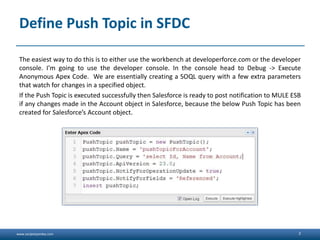
The easiest way to do this is to either use the workbench at developerforce.com or the developer
console. I'm going to use the developer console. In the console head to Debug -> Execute
Anonymous Apex Code. We are essentially creating a SOQL query with a few extra parameters
that watch for changes in a specified object.
If the Push Topic is executed successfully then Salesforce is ready to post notification to MULE ESB
if any changes made in the Account object in Salesforce, because the below Push Topic has been
created for Salesforce’s Account object.
2
www.sanjeetpandey.com
Mule SFDC Cloud Connector
Select the MULE SFDC Cloud Connector and setup the following details by defining the Global
element –
• User Name
• Password
• Security Token
• URL
3
<sfdc:config name="Salesforce"
username="test@test.com"
password="test"
securityToken="DbdkalteklajdcvNJ2vx0
LBHDpYw" url="https://test--
test.cs8.my.salesforce.com/services/
Soap/u/23.0" doc:name="Salesforce"/>
www.sanjeetpandey.com
Mule SFDC Inbound Endpoint
To receive the Push Topic notifications from Salesforce, Salesforce connector has to define as a
inbound endpoint with the ‘Subscribe topic’ operation by including the Push Topic Name –
4
<sfdc:config name="Salesforce"
username="test@test.com" pass-
word="test" securityTo-
ken="dsggasgLtcvNJ2adsfDpYw"
url="https://test--
test.cs8.my.salesforce.com/services/So
ap/u/23.0" doc:name="Salesforce"/>
<flow name="SFDC_TopicFlow1"
doc:name="SFDC_TopicFlow1">
<sfdc:subscribe-topic config-
ref="Salesforce" top-
ic="/pushTopicForAccount"
doc:name="Salesforce (Streaming)"/>
<logger message="****** SFDC :
#[payload]" level="INFO"
doc:name="Logger"/>
</flow>
www.sanjeetpandey.com
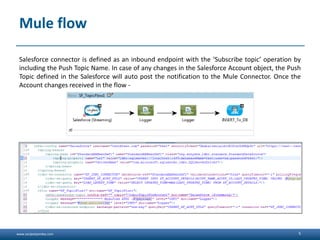
Mule flow
Salesforce connector is defined as an inbound endpoint with the ‘Subscribe topic’ operation by
including the Push Topic Name. In case of any changes in the Salesforce Account object, the Push
Topic defined in the Salesforce will auto post the notification to the Mule Connector. Once the
Account changes received in the flow -
5
www.sanjeetpandey.com
Outcomes
After deployment of the Mule project, if any changes made against the Account object then it will
be notified to Mule using Streaming API.
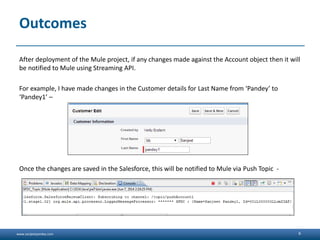
For example, I have made changes in the Customer details for Last Name from ‘Pandey’ to
‘Pandey1’ –
Once the changes are saved in the Salesforce, this will be notified to Mule via Push Topic -
6
www.sanjeetpandey.com 7

Mule with salesforce push topic notification copy

  • 1.
    www.sanjeetpandey.com www.sanjeetpandey.com Prepared by –Sanjeet Pandey Salesforce Push Topic Notification in Mule
  • 2.
    www.sanjeetpandey.com Define Push Topicin SFDC The easiest way to do this is to either use the workbench at developerforce.com or the developer console. I'm going to use the developer console. In the console head to Debug -> Execute Anonymous Apex Code. We are essentially creating a SOQL query with a few extra parameters that watch for changes in a specified object. If the Push Topic is executed successfully then Salesforce is ready to post notification to MULE ESB if any changes made in the Account object in Salesforce, because the below Push Topic has been created for Salesforce’s Account object. 2
  • 3.
    www.sanjeetpandey.com Mule SFDC CloudConnector Select the MULE SFDC Cloud Connector and setup the following details by defining the Global element – • User Name • Password • Security Token • URL 3 <sfdc:config name="Salesforce" username="test@test.com" password="test" securityToken="DbdkalteklajdcvNJ2vx0 LBHDpYw" url="https://test-- test.cs8.my.salesforce.com/services/ Soap/u/23.0" doc:name="Salesforce"/>
  • 4.
    www.sanjeetpandey.com Mule SFDC InboundEndpoint To receive the Push Topic notifications from Salesforce, Salesforce connector has to define as a inbound endpoint with the ‘Subscribe topic’ operation by including the Push Topic Name – 4 <sfdc:config name="Salesforce" username="test@test.com" pass- word="test" securityTo- ken="dsggasgLtcvNJ2adsfDpYw" url="https://test-- test.cs8.my.salesforce.com/services/So ap/u/23.0" doc:name="Salesforce"/> <flow name="SFDC_TopicFlow1" doc:name="SFDC_TopicFlow1"> <sfdc:subscribe-topic config- ref="Salesforce" top- ic="/pushTopicForAccount" doc:name="Salesforce (Streaming)"/> <logger message="****** SFDC : #[payload]" level="INFO" doc:name="Logger"/> </flow>
  • 5.
    www.sanjeetpandey.com Mule flow Salesforce connectoris defined as an inbound endpoint with the ‘Subscribe topic’ operation by including the Push Topic Name. In case of any changes in the Salesforce Account object, the Push Topic defined in the Salesforce will auto post the notification to the Mule Connector. Once the Account changes received in the flow - 5
  • 6.
    www.sanjeetpandey.com Outcomes After deployment ofthe Mule project, if any changes made against the Account object then it will be notified to Mule using Streaming API. For example, I have made changes in the Customer details for Last Name from ‘Pandey’ to ‘Pandey1’ – Once the changes are saved in the Salesforce, this will be notified to Mule via Push Topic - 6
  • 7.

Editor's Notes

  • #4 Follow Do's and Do Not'sCommon Profile PicFollow Company and Geography:HydAdd followers from peers and WW, MuleSoftHave a Note about yourselfAsk Questions in live BrightTalk Webinars using #tweetsTweet/Retweet Articles on Mule. WW blog, G+ and Forum Links Follow WW and Mulesoft....