August 15th 2020
Event Driven Integration with Salesforce
AND
CICD with GitHub, Maven & Jenkins
[CHANDIGARH –INDIA]
Virtual Meetup #2
All contents © MuleSoft Inc.
Guidelines for our Virtual Meetup
2
1.Please keep yourself on mute unless you have any query/question
2.We encourage you to keep your video on for interactive session.
3.You can write down your questions in the chat during the session.
4.Once we are done with the day, don’t forget to provide your
valuable feedback.
All contents © MuleSoft Inc.
Agenda
• Introductions
• Event-Driven Integration with Salesforce
• CICD with Github, Maven & Jenkins
• Plan for next meetup
• Networking time
All contents © MuleSoft Inc.
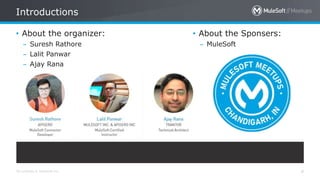
Introductions
4
• About the organizer:
– Suresh Rathore
– Lalit Panwar
– Ajay Rana
• About the Sponsers:
– MuleSoft
All contents © MuleSoft Inc.
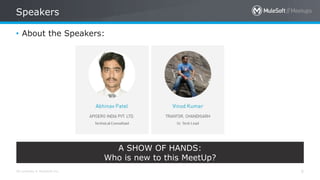
Speakers
5
• About the Speakers:
A SHOW OF HANDS:
Who is new to this MeetUp?
Event-Driven Integration
with
Salesforce
All contents © MuleSoft Inc.
Agenda
7
• Introduction
• Event-Driven Integration
• Why use Mulesoft for event-driven applications
• Salesforce Events
• Salesforce Streaming API
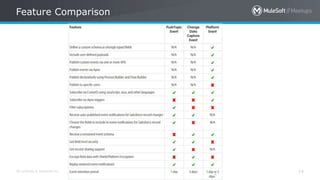
• Feature Comparison
• Salesforce Connectors
• Demo
• QA & Trivia Questions
All contents © MuleSoft Inc.
Event-Driven Integration
8
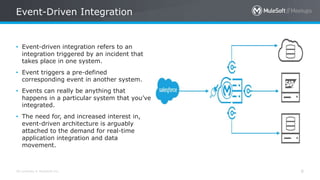
• Event-driven integration refers to an
integration triggered by an incident that
takes place in one system.
• Event triggers a pre-defined
corresponding event in another system.
• Events can really be anything that
happens in a particular system that you’ve
integrated.
• The need for, and increased interest in,
event-driven architecture is arguably
attached to the demand for real-time
application integration and data
movement.
All contents © MuleSoft Inc.
Why use Mulesoft for event-driven applications
9
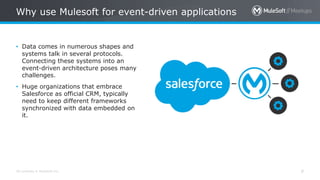
• Data comes in numerous shapes and
systems talk in several protocols.
Connecting these systems into an
event-driven architecture poses many
challenges.
• Huge organizations that embrace
Salesforce as official CRM, typically
need to keep different frameworks
synchronized with data embedded on
it.
All contents © MuleSoft Inc.
Why use Mulesoft for event-driven applications
10
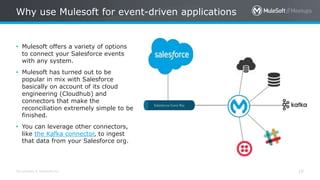
• Mulesoft offers a variety of options
to connect your Salesforce events
with any system.
• Mulesoft has turned out to be
popular in mix with Salesforce
basically on account of its cloud
engineering (Cloudhub) and
connectors that make the
reconciliation extremely simple to be
finished.
• You can leverage other connectors,
like the Kafka connector, to ingest
that data from your Salesforce org.
All contents © MuleSoft Inc.
Salesforce Events
11
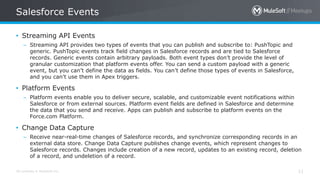
• Streaming API Events
– Streaming API provides two types of events that you can publish and subscribe to: PushTopic and
generic. PushTopic events track field changes in Salesforce records and are tied to Salesforce
records. Generic events contain arbitrary payloads. Both event types don’t provide the level of
granular customization that platform events offer. You can send a custom payload with a generic
event, but you can’t define the data as fields. You can’t define those types of events in Salesforce,
and you can’t use them in Apex triggers.
• Platform Events
– Platform events enable you to deliver secure, scalable, and customizable event notifications within
Salesforce or from external sources. Platform event fields are defined in Salesforce and determine
the data that you send and receive. Apps can publish and subscribe to platform events on the
Force.com Platform.
• Change Data Capture
– Receive near-real-time changes of Salesforce records, and synchronize corresponding records in an
external data store. Change Data Capture publishes change events, which represent changes to
Salesforce records. Changes include creation of a new record, updates to an existing record, deletion
of a record, and undeletion of a record.
All contents © MuleSoft Inc.
Salesforce Streaming API
12
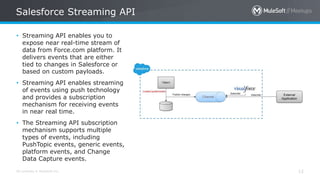
• Streaming API enables you to
expose near real-time stream of
data from Force.com platform. It
delivers events that are either
tied to changes in Salesforce or
based on custom payloads.
• Streaming API enables streaming
of events using push technology
and provides a subscription
mechanism for receiving events
in near real time.
• The Streaming API subscription
mechanism supports multiple
types of events, including
PushTopic events, generic events,
platform events, and Change
Data Capture events.
All contents © MuleSoft Inc.
Salesforce Streaming API
13
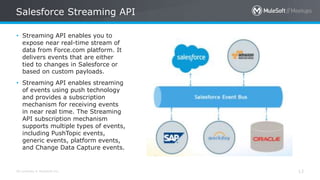
• Streaming API enables you to
expose near real-time stream of
data from Force.com platform. It
delivers events that are either
tied to changes in Salesforce or
based on custom payloads.
• Streaming API enables streaming
of events using push technology
and provides a subscription
mechanism for receiving events
in near real time. The Streaming
API subscription mechanism
supports multiple types of events,
including PushTopic events,
generic events, platform events,
and Change Data Capture events.
All contents © MuleSoft Inc.
Feature Comparison
14
All contents © MuleSoft Inc.
Salesforce Connectors
15
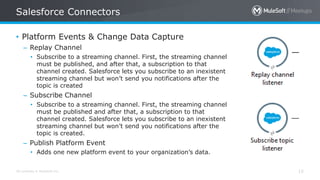
• Platform Events & Change Data Capture
– Replay Channel
• Subscribe to a streaming channel. First, the streaming channel
must be published, and after that, a subscription to that
channel created. Salesforce lets you subscribe to an inexistent
streaming channel but won’t send you notifications after the
topic is created
– Subscribe Channel
• Subscribe to a streaming channel. First, the streaming channel
must be published and after that, a subscription to that
channel created. Salesforce lets you subscribe to an inexistent
streaming channel but won’t send you notifications after the
topic is created.
– Publish Platform Event
• Adds one new platform event to your organization’s data.
All contents © MuleSoft Inc.
Salesforce Connectors
16
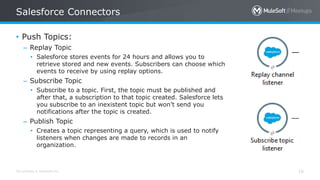
• Push Topics:
– Replay Topic
• Salesforce stores events for 24 hours and allows you to
retrieve stored and new events. Subscribers can choose which
events to receive by using replay options.
– Subscribe Topic
• Subscribe to a topic. First, the topic must be published and
after that, a subscription to that topic created. Salesforce lets
you subscribe to an inexistent topic but won’t send you
notifications after the topic is created.
– Publish Topic
• Creates a topic representing a query, which is used to notify
listeners when changes are made to records in an
organization.
All contents © MuleSoft Inc.
Demo
17
CICD
With Github, Maven &
Jenkins
All contents © MuleSoft Inc.
Agenda
19
•The completion of this demo will consist of a few steps:
Creating Jenkins file
Initializing a Git repo
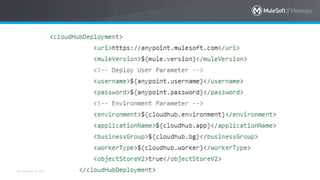
Adding the Mule Maven Plugin configuration to the Mule pom.xml file.
Creating a Pipeline Jenkins job
Modifying POM file
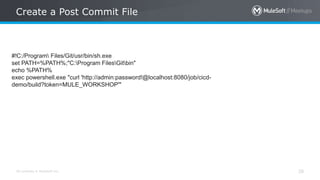
**Creating a post-commit file to automate a Jenkins job process after each git
commit
Jenkinsfile
How to create one?
All contents © MuleSoft Inc.
Sample Jenkinfile
21
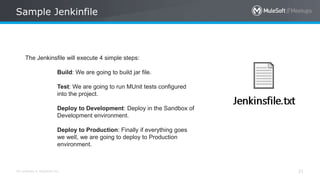
The Jenkinsfile will execute 4 simple steps:
Build: We are going to build jar file.
Test: We are going to run MUnit tests configured
into the project.
Deploy to Development: Deploy in the Sandbox of
Development environment.
Deploy to Production: Finally if everything goes
we well, we are going to deploy to Production
environment.
All contents © MuleSoft Inc.
Let's build our own sample Jenkinsfile:-
22
What's next?
Setting the Git !!
All contents © MuleSoft Inc.
Changes in Core Components
24
1. Team sharing option in Studio.
2. Git perpective.
** initial commit always need to be in project folder.
POM File
How to modify
one?
All contents © MuleSoft Inc.
What's next?
Setting the Web
hook!!
All contents © MuleSoft Inc.
Create a Post Commit File
28
#!C:/Program Files/Git/usr/bin/sh.exe
set PATH=%PATH%;"C:Program FilesGitbin"
echo %PATH%
exec powershell.exe "curl 'http://admin:password!@localhost:8080/job/cicd-
demo/build?token=MULE_WORKSHOP'"
Q. & A.
Trivia Quiz
All contents © MuleSoft Inc.
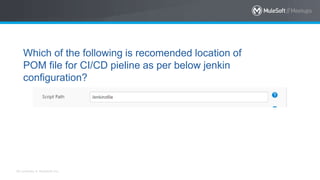
Which of the following is recomended location of
POM file for CI/CD pieline as per below jenkin
configuration?
All contents © MuleSoft Inc.
1. POM and Jenkin File need to at same level in
project structure.
2. POM could be nested down wrt the Jenkinfile
in project structure.
3. POM could be nested up wrt the Jenkinfile in
project structure.
4. POM and Jenkinfile don't have any
dependency on each other wrt the project
Structure
All contents © MuleSoft Inc.
Trivia Questions
33
- What are the three replay options available in Salesforce connector
replay channel source?
All contents © MuleSoft Inc.
Trivia Questions
34
- What package name we need to use to enable debug logs for
Salesforce connector in Mule 4?
All contents © MuleSoft Inc.
While making use of Trigger builds remotely (e.g., from
scripts), we make use of?
1. Authorisation Token
2. Authentication Token
3. Client_ID
4. OAuth Token
Thank You

All contents © MuleSoft Inc.
What’s next
37
Share:
– Tweet your pictures with the hashtag #MuleMeetup
– Invite your network to join: https://meetups.mulesoft.com/chandigarh/
Feedback:
– Contact any of your organizer to suggest topics
– Contact MuleSoft at meetup@mulesoft.com for ways to improve the program
See you next time
Please send topic suggestions to the organizer

Chandigarh MuleSoft Meetup #3

  • 1.
    August 15th 2020 EventDriven Integration with Salesforce AND CICD with GitHub, Maven & Jenkins [CHANDIGARH –INDIA] Virtual Meetup #2
  • 2.
    All contents ©MuleSoft Inc. Guidelines for our Virtual Meetup 2 1.Please keep yourself on mute unless you have any query/question 2.We encourage you to keep your video on for interactive session. 3.You can write down your questions in the chat during the session. 4.Once we are done with the day, don’t forget to provide your valuable feedback.
  • 3.
    All contents ©MuleSoft Inc. Agenda • Introductions • Event-Driven Integration with Salesforce • CICD with Github, Maven & Jenkins • Plan for next meetup • Networking time
  • 4.
    All contents ©MuleSoft Inc. Introductions 4 • About the organizer: – Suresh Rathore – Lalit Panwar – Ajay Rana • About the Sponsers: – MuleSoft
  • 5.
    All contents ©MuleSoft Inc. Speakers 5 • About the Speakers: A SHOW OF HANDS: Who is new to this MeetUp?
  • 6.
  • 7.
    All contents ©MuleSoft Inc. Agenda 7 • Introduction • Event-Driven Integration • Why use Mulesoft for event-driven applications • Salesforce Events • Salesforce Streaming API • Feature Comparison • Salesforce Connectors • Demo • QA & Trivia Questions
  • 8.
    All contents ©MuleSoft Inc. Event-Driven Integration 8 • Event-driven integration refers to an integration triggered by an incident that takes place in one system. • Event triggers a pre-defined corresponding event in another system. • Events can really be anything that happens in a particular system that you’ve integrated. • The need for, and increased interest in, event-driven architecture is arguably attached to the demand for real-time application integration and data movement.
  • 9.
    All contents ©MuleSoft Inc. Why use Mulesoft for event-driven applications 9 • Data comes in numerous shapes and systems talk in several protocols. Connecting these systems into an event-driven architecture poses many challenges. • Huge organizations that embrace Salesforce as official CRM, typically need to keep different frameworks synchronized with data embedded on it.
  • 10.
    All contents ©MuleSoft Inc. Why use Mulesoft for event-driven applications 10 • Mulesoft offers a variety of options to connect your Salesforce events with any system. • Mulesoft has turned out to be popular in mix with Salesforce basically on account of its cloud engineering (Cloudhub) and connectors that make the reconciliation extremely simple to be finished. • You can leverage other connectors, like the Kafka connector, to ingest that data from your Salesforce org.
  • 11.
    All contents ©MuleSoft Inc. Salesforce Events 11 • Streaming API Events – Streaming API provides two types of events that you can publish and subscribe to: PushTopic and generic. PushTopic events track field changes in Salesforce records and are tied to Salesforce records. Generic events contain arbitrary payloads. Both event types don’t provide the level of granular customization that platform events offer. You can send a custom payload with a generic event, but you can’t define the data as fields. You can’t define those types of events in Salesforce, and you can’t use them in Apex triggers. • Platform Events – Platform events enable you to deliver secure, scalable, and customizable event notifications within Salesforce or from external sources. Platform event fields are defined in Salesforce and determine the data that you send and receive. Apps can publish and subscribe to platform events on the Force.com Platform. • Change Data Capture – Receive near-real-time changes of Salesforce records, and synchronize corresponding records in an external data store. Change Data Capture publishes change events, which represent changes to Salesforce records. Changes include creation of a new record, updates to an existing record, deletion of a record, and undeletion of a record.
  • 12.
    All contents ©MuleSoft Inc. Salesforce Streaming API 12 • Streaming API enables you to expose near real-time stream of data from Force.com platform. It delivers events that are either tied to changes in Salesforce or based on custom payloads. • Streaming API enables streaming of events using push technology and provides a subscription mechanism for receiving events in near real time. • The Streaming API subscription mechanism supports multiple types of events, including PushTopic events, generic events, platform events, and Change Data Capture events.
  • 13.
    All contents ©MuleSoft Inc. Salesforce Streaming API 13 • Streaming API enables you to expose near real-time stream of data from Force.com platform. It delivers events that are either tied to changes in Salesforce or based on custom payloads. • Streaming API enables streaming of events using push technology and provides a subscription mechanism for receiving events in near real time. The Streaming API subscription mechanism supports multiple types of events, including PushTopic events, generic events, platform events, and Change Data Capture events.
  • 14.
    All contents ©MuleSoft Inc. Feature Comparison 14
  • 15.
    All contents ©MuleSoft Inc. Salesforce Connectors 15 • Platform Events & Change Data Capture – Replay Channel • Subscribe to a streaming channel. First, the streaming channel must be published, and after that, a subscription to that channel created. Salesforce lets you subscribe to an inexistent streaming channel but won’t send you notifications after the topic is created – Subscribe Channel • Subscribe to a streaming channel. First, the streaming channel must be published and after that, a subscription to that channel created. Salesforce lets you subscribe to an inexistent streaming channel but won’t send you notifications after the topic is created. – Publish Platform Event • Adds one new platform event to your organization’s data.
  • 16.
    All contents ©MuleSoft Inc. Salesforce Connectors 16 • Push Topics: – Replay Topic • Salesforce stores events for 24 hours and allows you to retrieve stored and new events. Subscribers can choose which events to receive by using replay options. – Subscribe Topic • Subscribe to a topic. First, the topic must be published and after that, a subscription to that topic created. Salesforce lets you subscribe to an inexistent topic but won’t send you notifications after the topic is created. – Publish Topic • Creates a topic representing a query, which is used to notify listeners when changes are made to records in an organization.
  • 17.
    All contents ©MuleSoft Inc. Demo 17
  • 18.
  • 19.
    All contents ©MuleSoft Inc. Agenda 19 •The completion of this demo will consist of a few steps: Creating Jenkins file Initializing a Git repo Adding the Mule Maven Plugin configuration to the Mule pom.xml file. Creating a Pipeline Jenkins job Modifying POM file **Creating a post-commit file to automate a Jenkins job process after each git commit
  • 20.
  • 21.
    All contents ©MuleSoft Inc. Sample Jenkinfile 21 The Jenkinsfile will execute 4 simple steps: Build: We are going to build jar file. Test: We are going to run MUnit tests configured into the project. Deploy to Development: Deploy in the Sandbox of Development environment. Deploy to Production: Finally if everything goes we well, we are going to deploy to Production environment.
  • 22.
    All contents ©MuleSoft Inc. Let's build our own sample Jenkinsfile:- 22
  • 23.
  • 24.
    All contents ©MuleSoft Inc. Changes in Core Components 24 1. Team sharing option in Studio. 2. Git perpective. ** initial commit always need to be in project folder.
  • 25.
    POM File How tomodify one?
  • 26.
    All contents ©MuleSoft Inc.
  • 27.
  • 28.
    All contents ©MuleSoft Inc. Create a Post Commit File 28 #!C:/Program Files/Git/usr/bin/sh.exe set PATH=%PATH%;"C:Program FilesGitbin" echo %PATH% exec powershell.exe "curl 'http://admin:password!@localhost:8080/job/cicd- demo/build?token=MULE_WORKSHOP'"
  • 29.
  • 30.
  • 31.
    All contents ©MuleSoft Inc. Which of the following is recomended location of POM file for CI/CD pieline as per below jenkin configuration?
  • 32.
    All contents ©MuleSoft Inc. 1. POM and Jenkin File need to at same level in project structure. 2. POM could be nested down wrt the Jenkinfile in project structure. 3. POM could be nested up wrt the Jenkinfile in project structure. 4. POM and Jenkinfile don't have any dependency on each other wrt the project Structure
  • 33.
    All contents ©MuleSoft Inc. Trivia Questions 33 - What are the three replay options available in Salesforce connector replay channel source?
  • 34.
    All contents ©MuleSoft Inc. Trivia Questions 34 - What package name we need to use to enable debug logs for Salesforce connector in Mule 4?
  • 35.
    All contents ©MuleSoft Inc. While making use of Trigger builds remotely (e.g., from scripts), we make use of? 1. Authorisation Token 2. Authentication Token 3. Client_ID 4. OAuth Token
  • 36.
  • 37.
    All contents ©MuleSoft Inc. What’s next 37 Share: – Tweet your pictures with the hashtag #MuleMeetup – Invite your network to join: https://meetups.mulesoft.com/chandigarh/ Feedback: – Contact any of your organizer to suggest topics – Contact MuleSoft at meetup@mulesoft.com for ways to improve the program
  • 38.
    See you nexttime Please send topic suggestions to the organizer