The Integrations
Behind Connecting
With Salesforce
February 2021
1. Integration Obstacles With Salesforce
2. Ways to Integrate with Salesforce
3. Solving the Challenge of Unlocking Salesforce Data
4. Use Cases: Extracting Data out of Salesforce
Agenda
● MuleSoft, AWS, Confluent, Salesforce,
and Boomi partners
● Consulting - specializing in
integrations and related technologies
● We build connections between
systems, applications, people, and
ideas
Big Compass
Salesforce Integrations
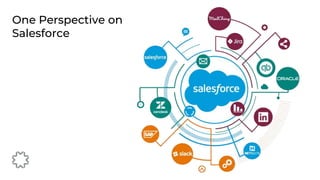
One Perspective on
Salesforce
● Subscription tier limits
● API/Event limits
● Countless customizations
● Custom code/triggers to push data
out of Salesforce
● Unexpected API Security
Integration Obstacles
With Salesforce
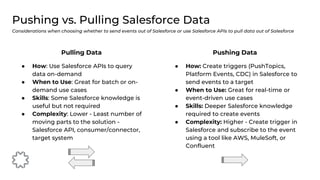
● How: Create triggers (PushTopics,
Platform Events, CDC) in Salesforce to
send events to a target
● When to Use: Great for real-time or
event-driven use cases
● Skills: Deeper Salesforce knowledge
required to create events
● Complexity: Higher - Create trigger in
Salesforce and subscribe to the event
using a tool like AWS, MuleSoft, or
Confluent
Pushing vs. Pulling Salesforce Data
Considerations when choosing whether to send events out of Salesforce or use Salesforce APIs to pull data out of Salesforce
Pushing Data
● How: Use Salesforce APIs to query
data on-demand
● When to Use: Great for batch or on-
demand use cases
● Skills: Some Salesforce knowledge is
useful but not required
● Complexity: Lower - Least number of
moving parts to the solution -
Salesforce API, consumer/connector,
target system
Pulling Data
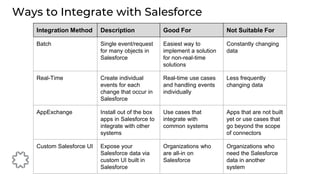
Ways to Integrate with Salesforce
Integration Method Description Good For Not Suitable For
Batch Single event/request
for many objects in
Salesforce
Easiest way to
implement a solution
for non-real-time
solutions
Constantly changing
data
Real-Time Create individual
events for each
change that occur in
Salesforce
Real-time use cases
and handling events
individually
Less frequently
changing data
AppExchange Install out of the box
apps in Salesforce to
integrate with other
systems
Use cases that
integrate with
common systems
Apps that are not built
yet or use cases that
go beyond the scope
of connectors
Custom Salesforce UI Expose your
Salesforce data via
custom UI built in
Salesforce
Organizations who
are all-in on
Salesforce
Organizations who
need the Salesforce
data in another
system
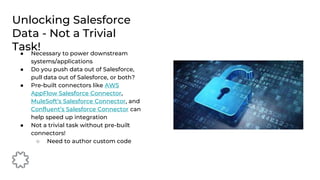
● Necessary to power downstream
systems/applications
● Do you push data out of Salesforce,
pull data out of Salesforce, or both?
● Pre-built connectors like AWS
AppFlow Salesforce Connector,
MuleSoft’s Salesforce Connector, and
Confluent’s Salesforce Connector can
help speed up integration
● Not a trivial task without pre-built
connectors!
○ Need to author custom code
Unlocking Salesforce
Data - Not a Trivial
Task!
Real-Time Salesforce
Events
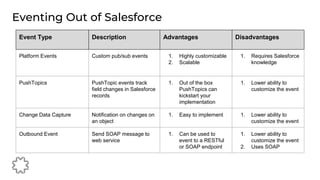
Eventing Out of Salesforce
Event Type Description Advantages Disadvantages
Platform Events Custom pub/sub events 1. Highly customizable
2. Scalable
1. Requires Salesforce
knowledge
PushTopics PushTopic events track
field changes in Salesforce
records
1. Out of the box
PushTopics can
kickstart your
implementation
1. Lower ability to
customize the event
Change Data Capture Notification on changes on
an object
1. Easy to implement 1. Lower ability to
customize the event
Outbound Event Send SOAP message to
web service
1. Can be used to
event to a RESTful
or SOAP endpoint
1. Lower ability to
customize the event
2. Uses SOAP
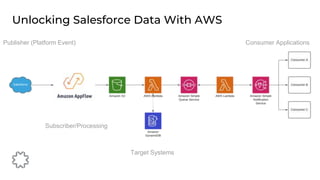
Unlocking Salesforce Data With AWS
Publisher (Platform Event)
Subscriber/Processing
Target Systems
Consumer Applications
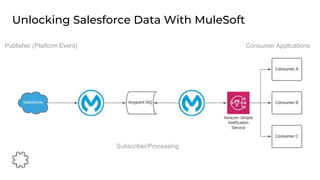
Unlocking Salesforce Data With MuleSoft
Publisher (Platform Event)
Subscriber/Processing
Consumer Applications
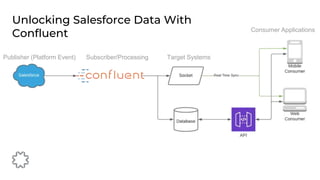
Unlocking Salesforce Data With
Confluent
Publisher (Platform Event) Subscriber/Processing Target Systems
Consumer Applications
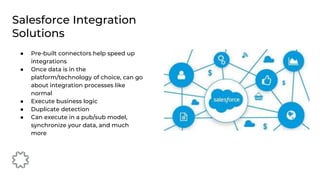
● Pre-built connectors help speed up
integrations
● Once data is in the
platform/technology of choice, can go
about integration processes like
normal
● Execute business logic
● Duplicate detection
● Can execute in a pub/sub model,
synchronize your data, and much
more
Salesforce Integration
Solutions
Use Cases
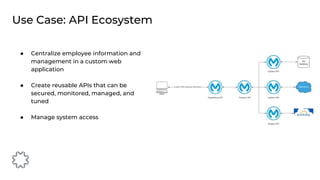
● Centralize employee information and
management in a custom web
application
● Create reusable APIs that can be
secured, monitored, managed, and
tuned
● Manage system access
Use Case: API Ecosystem
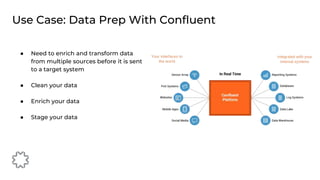
● Need to enrich and transform data
from multiple sources before it is sent
to a target system
● Clean your data
● Enrich your data
● Stage your data
Use Case: Data Prep With Confluent
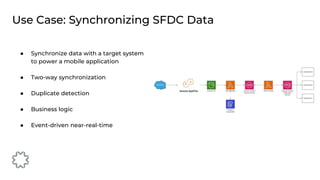
● Synchronize data with a target system
to power a mobile application
● Two-way synchronization
● Duplicate detection
● Business logic
● Event-driven near-real-time
Use Case: Synchronizing SFDC Data
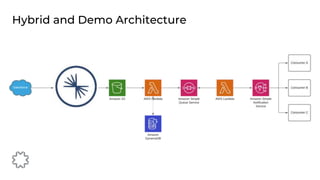
Hybrid and Demo Architecture
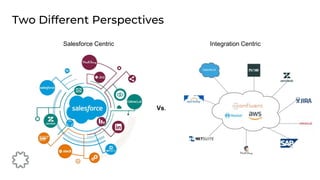
Two Different Perspectives
Vs.
Integration Centric
Salesforce Centric
Demo
Questions?
Appendix
References
● Salesforce API Documentation
● Comparing PushTopics, Platform Events, and Change Data
Capture
● External Objects
● Confluent KSQL
● Kafka Transformations
● MuleSoft Salesforce Connector
● AWS AppFlow
● Confluent Salesforce Connector

The Integrations Behind Connecting With Salesforce

  • 1.
  • 2.
    1. Integration ObstaclesWith Salesforce 2. Ways to Integrate with Salesforce 3. Solving the Challenge of Unlocking Salesforce Data 4. Use Cases: Extracting Data out of Salesforce Agenda
  • 3.
    ● MuleSoft, AWS,Confluent, Salesforce, and Boomi partners ● Consulting - specializing in integrations and related technologies ● We build connections between systems, applications, people, and ideas Big Compass
  • 4.
  • 5.
  • 6.
    ● Subscription tierlimits ● API/Event limits ● Countless customizations ● Custom code/triggers to push data out of Salesforce ● Unexpected API Security Integration Obstacles With Salesforce
  • 7.
    ● How: Createtriggers (PushTopics, Platform Events, CDC) in Salesforce to send events to a target ● When to Use: Great for real-time or event-driven use cases ● Skills: Deeper Salesforce knowledge required to create events ● Complexity: Higher - Create trigger in Salesforce and subscribe to the event using a tool like AWS, MuleSoft, or Confluent Pushing vs. Pulling Salesforce Data Considerations when choosing whether to send events out of Salesforce or use Salesforce APIs to pull data out of Salesforce Pushing Data ● How: Use Salesforce APIs to query data on-demand ● When to Use: Great for batch or on- demand use cases ● Skills: Some Salesforce knowledge is useful but not required ● Complexity: Lower - Least number of moving parts to the solution - Salesforce API, consumer/connector, target system Pulling Data
  • 8.
    Ways to Integratewith Salesforce Integration Method Description Good For Not Suitable For Batch Single event/request for many objects in Salesforce Easiest way to implement a solution for non-real-time solutions Constantly changing data Real-Time Create individual events for each change that occur in Salesforce Real-time use cases and handling events individually Less frequently changing data AppExchange Install out of the box apps in Salesforce to integrate with other systems Use cases that integrate with common systems Apps that are not built yet or use cases that go beyond the scope of connectors Custom Salesforce UI Expose your Salesforce data via custom UI built in Salesforce Organizations who are all-in on Salesforce Organizations who need the Salesforce data in another system
  • 9.
    ● Necessary topower downstream systems/applications ● Do you push data out of Salesforce, pull data out of Salesforce, or both? ● Pre-built connectors like AWS AppFlow Salesforce Connector, MuleSoft’s Salesforce Connector, and Confluent’s Salesforce Connector can help speed up integration ● Not a trivial task without pre-built connectors! ○ Need to author custom code Unlocking Salesforce Data - Not a Trivial Task!
  • 10.
  • 11.
    Eventing Out ofSalesforce Event Type Description Advantages Disadvantages Platform Events Custom pub/sub events 1. Highly customizable 2. Scalable 1. Requires Salesforce knowledge PushTopics PushTopic events track field changes in Salesforce records 1. Out of the box PushTopics can kickstart your implementation 1. Lower ability to customize the event Change Data Capture Notification on changes on an object 1. Easy to implement 1. Lower ability to customize the event Outbound Event Send SOAP message to web service 1. Can be used to event to a RESTful or SOAP endpoint 1. Lower ability to customize the event 2. Uses SOAP
  • 12.
    Unlocking Salesforce DataWith AWS Publisher (Platform Event) Subscriber/Processing Target Systems Consumer Applications
  • 13.
    Unlocking Salesforce DataWith MuleSoft Publisher (Platform Event) Subscriber/Processing Consumer Applications
  • 14.
    Unlocking Salesforce DataWith Confluent Publisher (Platform Event) Subscriber/Processing Target Systems Consumer Applications
  • 15.
    ● Pre-built connectorshelp speed up integrations ● Once data is in the platform/technology of choice, can go about integration processes like normal ● Execute business logic ● Duplicate detection ● Can execute in a pub/sub model, synchronize your data, and much more Salesforce Integration Solutions
  • 16.
  • 17.
    ● Centralize employeeinformation and management in a custom web application ● Create reusable APIs that can be secured, monitored, managed, and tuned ● Manage system access Use Case: API Ecosystem
  • 18.
    ● Need toenrich and transform data from multiple sources before it is sent to a target system ● Clean your data ● Enrich your data ● Stage your data Use Case: Data Prep With Confluent
  • 19.
    ● Synchronize datawith a target system to power a mobile application ● Two-way synchronization ● Duplicate detection ● Business logic ● Event-driven near-real-time Use Case: Synchronizing SFDC Data
  • 20.
    Hybrid and DemoArchitecture
  • 21.
  • 22.
  • 23.
  • 24.
  • 25.
    References ● Salesforce APIDocumentation ● Comparing PushTopics, Platform Events, and Change Data Capture ● External Objects ● Confluent KSQL ● Kafka Transformations ● MuleSoft Salesforce Connector ● AWS AppFlow ● Confluent Salesforce Connector

Editor's Notes

  • #6 Salesforce can be the center of the universe
  • #7 No one talks about pain points of integrating with Salesforce! A Google search of “Salesforce integration pain points” returned nothing useful. The top hit was 3 pain points of user engagement with Salesforce, and then how Salesforce solves various pain points for an organization. So if we look at Salesforce from the perspective of integrations, we see some integration hurdles to overcome Subscription tier limits Lack of features at lower subscription tiers Security - not industry-standard (unexpected) security model with Salesforce tokens For API requests This all leads to Data locked up in Salesforce and makes it more difficult to synchronize target systems with Salesforce or send the valuable data in Salesforce to downstream systems
  • #9 External Objects are also a way to integrate external data with Salesforce https://developer.salesforce.com/docs/atlas.en-us.object_reference.meta/object_reference/sforce_api_objects_external_objects.htm
  • #10 Getting the data out of SFDC is not a trivial task! We have talked about ways to integrate with Salesforce, but you can already see that there are quite a few considerations for integrating with Salesforce It’s necessary so often to power downstream systems/applications Salesforce is acting as the enterprise’s data hub more often these days So first, you need to figure out if you pull data out of Salesforce, push data out of Salesforce, or do both in a hybrid model Connectors from technologies like AWS, MuleSoft, and Confluent can greatly help speed up Salesforce integrations It takes custom code otherwise to integrate with Salesforce So now we’ll talk more about real-time use cases because that is what so many organizations are moving towards
  • #11 Real-time events are the next trend. Gone are the days of batch processing. Real-time events play well with an event driven architecture and microservices based approach, both of which are great architectures for the modern enterprise And the more we can deliver real-time data, the better insights we can get, the quicker we can take action, and the more we can unlock the potential of the data running through our systems
  • #12 When you want to event out of Salesforce, you have some considerations to take. Under the hood, these events use the Salesforce event bus for the most part Platform events Highly scalable and my recommended way to event out of SFDC Create using Apex code PushTopics Define using a SOQL query Events the results of the SOQL query and triggered based on changes to an object CDC Publishes new or changed records on an object Outbound event SOAP style eventing Been around for a long time
  • #13 How does that work in practice with a cloud provider like AWS? AWS is the most customizable option we’ll talk about today
  • #14 MuleSoft has a few less moving parts than AWS and for good reason
  • #15 It’s close to all in one with Confluent, where Confluent is the messaging and processing layer
  • #16 Pre-built connectors help speed up integrations Speeds up your integration and makes it easy to get the data into a tool that unlocks processing potential Once data is in the technology of choice, easy to use pub/sub model to process and route the data Easily add new subscribers Want to scalably event out to a database, cold storage, Hadoop, and a consumer application? Hook into your technology of choice or a topic using Confluent for example Joining from multiple sources Use SQL-like queries to join data from multiple sources for data enrichment Streaming data Your latency is only as good as your processing power With Confluent, reliably scale to handle the largest workloads How you will accomplish truly real-time use cases Execute business logic Such as detect when a Salesforce lead needs to be converted to an opportunity based on JSON messages Duplicate detection Can execute in a pub/sub model, synchronize your data, and much more So let’s talk about some use cases now with the various technologies that you can use to integrate with Salesforce
  • #17 Real-time events are the next trend. Gone are the days of batch processing. Real-time events play well with an event driven architecture and microservices based approach, both of which are great architectures for the modern enterprise And the more we can deliver real-time data, the better insights we can get, the quicker we can take action, and the more we can unlock the potential of the data running through our systems
  • #21 A few things to notice here First, the center of the universe changes when we look at Salesforce from the eyes of integrations Second, you can take a hybrid approach, and a hybrid of technologies is very common in the integration world You can combine these technologies! Use each technology to its strength is always our recommendation
  • #22 Salesforce can be the center of the universe, but when we integrate with Salesforce we can also take an integration centric approach