
Using PGP in Mule
2
PGP Security
This extension adds PGP security on connector communication. With PGP
you can achieve end-to-end security communication with signed and
encrypted messages between parties.
3
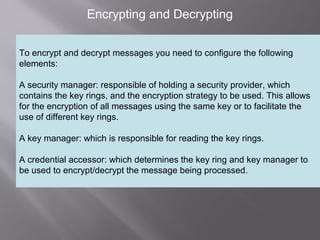
Encrypting and Decrypting
To encrypt and decrypt messages you need to configure the following
elements:
A security manager: responsible of holding a security provider, which
contains the key rings, and the encryption strategy to be used. This allows
for the encryption of all messages using the same key or to facilitate the
use of different key rings.
A key manager: which is responsible for reading the key rings.
A credential accessor: which determines the key ring and key manager to
be used to encrypt/decrypt the message being processed.
4
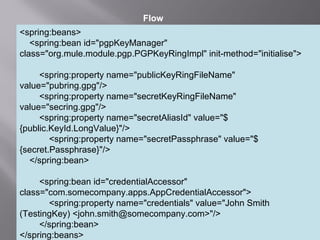
<spring:beans>
<spring:bean id="pgpKeyManager"
class="org.mule.module.pgp.PGPKeyRingImpl" init-method="initialise">
<spring:property name="publicKeyRingFileName"
value="pubring.gpg"/>
<spring:property name="secretKeyRingFileName"
value="secring.gpg"/>
<spring:property name="secretAliasId" value="$
{public.KeyId.LongValue}"/>
<spring:property name="secretPassphrase" value="$
{secret.Passphrase}"/>
</spring:bean>
<spring:bean id="credentialAccessor"
class="com.somecompany.apps.AppCredentialAccessor">
<spring:property name="credentials" value="John Smith
(TestingKey) <john.smith@somecompany.com>"/>
</spring:bean>
</spring:beans>
Flow
5
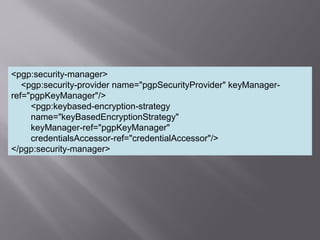
<pgp:security-manager>
<pgp:security-provider name="pgpSecurityProvider" keyManager-
ref="pgpKeyManager"/>
<pgp:keybased-encryption-strategy
name="keyBasedEncryptionStrategy"
keyManager-ref="pgpKeyManager"
credentialsAccessor-ref="credentialAccessor"/>
</pgp:security-manager>
6
Flow for Encryption
<flow name="processEncryptFiles">
<file:inbound-endpoint connector-ref="inputEncrypt"
path="file:///temp/fileInput"
moveToDirectory="file:///temp/fileInputBackup"
moveToPattern="#[header:originalFilename].backup" transformer-
refs="file2Bytes" />
<encrypt-transformer name="pgpEncrypt"
strategy-ref="keyBasedEncryptionStrategy" />
<file:outbound-endpoint connector-ref="output"
path="file:///temp/fileOutput" outputPattern="#[function:datestamp]-
#[header:originalFilename]" />
</flow>
7
Flow for Decryption
<flow name="processDecryptFiles">
<file:inbound-endpoint connector-ref="inputDecrypt"
path="file:///temp/fileOutput"
moveToDirectory="file:///temp/fileOutputEncrypted"
moveToPattern="#[header:originalFilename].backup" transformer-
refs="file2Bytes" />
<decrypt-transformer name="pgpDecrypt"
strategy-ref="keyBasedEncryptionStrategy" />
<file:outbound-endpoint connector-ref="output"
path="file:///temp/fileOutputDecrypted"
outputPattern="#[function:datestamp]-#[header:originalFilename]" />
</flow>
8
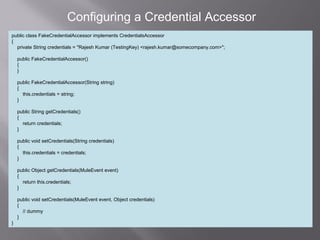
Configuring a Credential Accessor
public class FakeCredentialAccessor implements CredentialsAccessor
{
private String credentials = "Rajesh Kumar (TestingKey) <rajesh.kumar@somecompany.com>";
public FakeCredentialAccessor()
{
}
public FakeCredentialAccessor(String string)
{
this.credentials = string;
}
public String getCredentials()
{
return credentials;
}
public void setCredentials(String credentials)
{
this.credentials = credentials;
}
public Object getCredentials(MuleEvent event)
{
return this.credentials;
}
public void setCredentials(MuleEvent event, Object credentials)
{
// dummy
}
}
Mule security pgp with Example

Mule security pgp with Example

  • 1.
  • 2.
    2 PGP Security This extensionadds PGP security on connector communication. With PGP you can achieve end-to-end security communication with signed and encrypted messages between parties.
  • 3.
    3 Encrypting and Decrypting Toencrypt and decrypt messages you need to configure the following elements: A security manager: responsible of holding a security provider, which contains the key rings, and the encryption strategy to be used. This allows for the encryption of all messages using the same key or to facilitate the use of different key rings. A key manager: which is responsible for reading the key rings. A credential accessor: which determines the key ring and key manager to be used to encrypt/decrypt the message being processed.
  • 4.
    4 <spring:beans> <spring:bean id="pgpKeyManager" class="org.mule.module.pgp.PGPKeyRingImpl" init-method="initialise"> <spring:propertyname="publicKeyRingFileName" value="pubring.gpg"/> <spring:property name="secretKeyRingFileName" value="secring.gpg"/> <spring:property name="secretAliasId" value="$ {public.KeyId.LongValue}"/> <spring:property name="secretPassphrase" value="$ {secret.Passphrase}"/> </spring:bean> <spring:bean id="credentialAccessor" class="com.somecompany.apps.AppCredentialAccessor"> <spring:property name="credentials" value="John Smith (TestingKey) <john.smith@somecompany.com>"/> </spring:bean> </spring:beans> Flow
  • 5.
  • 6.
    6 Flow for Encryption <flowname="processEncryptFiles"> <file:inbound-endpoint connector-ref="inputEncrypt" path="file:///temp/fileInput" moveToDirectory="file:///temp/fileInputBackup" moveToPattern="#[header:originalFilename].backup" transformer- refs="file2Bytes" /> <encrypt-transformer name="pgpEncrypt" strategy-ref="keyBasedEncryptionStrategy" /> <file:outbound-endpoint connector-ref="output" path="file:///temp/fileOutput" outputPattern="#[function:datestamp]- #[header:originalFilename]" /> </flow>
  • 7.
    7 Flow for Decryption <flowname="processDecryptFiles"> <file:inbound-endpoint connector-ref="inputDecrypt" path="file:///temp/fileOutput" moveToDirectory="file:///temp/fileOutputEncrypted" moveToPattern="#[header:originalFilename].backup" transformer- refs="file2Bytes" /> <decrypt-transformer name="pgpDecrypt" strategy-ref="keyBasedEncryptionStrategy" /> <file:outbound-endpoint connector-ref="output" path="file:///temp/fileOutputDecrypted" outputPattern="#[function:datestamp]-#[header:originalFilename]" /> </flow>
  • 8.
    8 Configuring a CredentialAccessor public class FakeCredentialAccessor implements CredentialsAccessor { private String credentials = "Rajesh Kumar (TestingKey) <rajesh.kumar@somecompany.com>"; public FakeCredentialAccessor() { } public FakeCredentialAccessor(String string) { this.credentials = string; } public String getCredentials() { return credentials; } public void setCredentials(String credentials) { this.credentials = credentials; } public Object getCredentials(MuleEvent event) { return this.credentials; } public void setCredentials(MuleEvent event, Object credentials) { // dummy } }