P R E S E N T E D B Y
S I N D H U V L
Encryption (PGP) in Mule
 Pretty Good Privacy (PGP) is a data encryption
and decryption computer program that provides
cryptographic privacy and authentication for data
communication.
 This extension adds PGP security on connector
communication. With PGP you can achieve end-to-
end security communication with signed and
encrypted messages between parties.
Encrypting and Decrypting :
 To encrypt and decrypt messages you need to configure
the following elements:
 A security manager: responsible of holding a security
provider, which contains the key rings, and the
encryption strategy to be used. This allows for the
encryption of all messages using the same key or to
facilitate the use of different key rings.
 A key manager: which is responsible for reading the key
rings.
 A credential accessor: which determines the key ring and
key manager to be used to encrypt/decrypt the message
being processed.
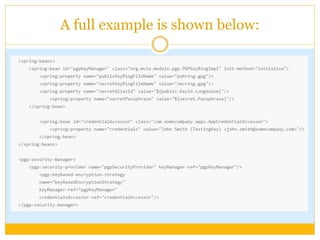
A full example is shown below:
 The pgpKeyManager (in the spring:beans tag) is the one
responsible for reading the rings. You have to set all the
parameters: public and secret rings, the alias id (the long
value in the ring) and the secret passphrase. In the same
section, you can see the credentials accessor which needs
to implement the CredentialsAccessor interface basically
returning the key id based on the message (MuleEvent).
Finally thepgp:security-managerglues both beans.
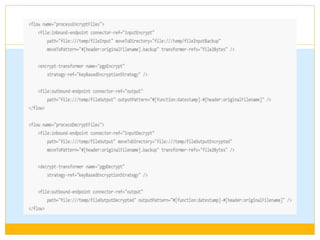
 You are ready to encrypt and decrypt messages in your
flows. The following two flows show how to use the
encrypt-transformer and decrypt-transformer to encrypt
and decrypt files.
Configuring the Security
Manager :
Configuring the Key
Manager :
 To configure the
Security Manager you
need to reference your
key manager and your
encryption strategy.
The Key manager is
simple a reference to
your key manager ring.
 To configure your key manager
you have to create a spring bean
as shown before. You will need to
set the public and secret ring
files, the alias id and the secret
passphrase. As Mule uses the
bouncy castle library to
encrypt/decrypt messages we
recommend to obtain the alias id
(as a long value) using this
library. If Mule does not find
your id in the ring it will throw
an exception and it will list all the
available ids in your ring.
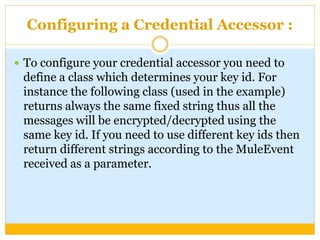
Configuring a Credential Accessor :
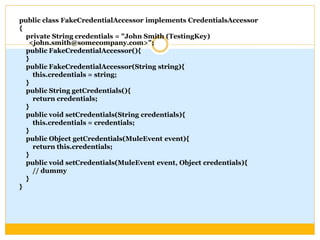
 To configure your credential accessor you need to
define a class which determines your key id. For
instance the following class (used in the example)
returns always the same fixed string thus all the
messages will be encrypted/decrypted using the
same key id. If you need to use different key ids then
return different strings according to the MuleEvent
received as a parameter.
public class FakeCredentialAccessor implements CredentialsAccessor
{
private String credentials = "John Smith (TestingKey)
<john.smith@somecompany.com>";
public FakeCredentialAccessor(){
}
public FakeCredentialAccessor(String string){
this.credentials = string;
}
public String getCredentials(){
return credentials;
}
public void setCredentials(String credentials){
this.credentials = credentials;
}
public Object getCredentials(MuleEvent event){
return this.credentials;
}
public void setCredentials(MuleEvent event, Object credentials){
// dummy
}
}
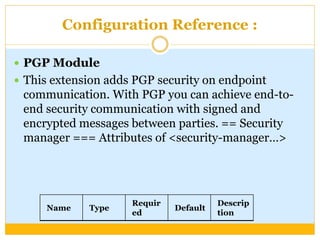
Configuration Reference :
 PGP Module
 This extension adds PGP security on endpoint
communication. With PGP you can achieve end-to-
end security communication with signed and
encrypted messages between parties. == Security
manager === Attributes of <security-manager…>
Name Type
Requir
ed
Default
Descrip
tion
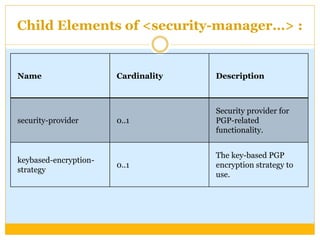
Child Elements of <security-manager…> :
Name Cardinality Description
security-provider 0..1
Security provider for
PGP-related
functionality.
keybased-encryption-
strategy
0..1
The key-based PGP
encryption strategy to
use.
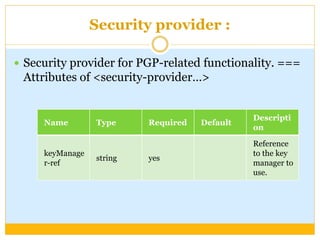
Security provider :
 Security provider for PGP-related functionality. ===
Attributes of <security-provider…>
Name Type Required Default
Descripti
on
keyManage
r-ref
string yes
Reference
to the key
manager to
use.
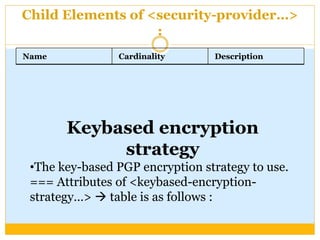
Child Elements of <security-provider…>
:
Name Cardinality Description
Keybased encryption
strategy
•The key-based PGP encryption strategy to use.
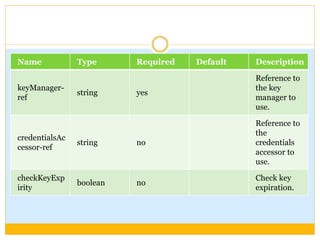
=== Attributes of <keybased-encryption-
strategy…>  table is as follows :
Name Type Required Default Description
keyManager-
ref
string yes
Reference to
the key
manager to
use.
credentialsAc
cessor-ref
string no
Reference to
the
credentials
accessor to
use.
checkKeyExp
irity
boolean no
Check key
expiration.
Thank You!!!!!!!!!

Encrption in mule

  • 1.
    P R ES E N T E D B Y S I N D H U V L Encryption (PGP) in Mule
  • 2.
     Pretty GoodPrivacy (PGP) is a data encryption and decryption computer program that provides cryptographic privacy and authentication for data communication.  This extension adds PGP security on connector communication. With PGP you can achieve end-to- end security communication with signed and encrypted messages between parties.
  • 3.
    Encrypting and Decrypting:  To encrypt and decrypt messages you need to configure the following elements:  A security manager: responsible of holding a security provider, which contains the key rings, and the encryption strategy to be used. This allows for the encryption of all messages using the same key or to facilitate the use of different key rings.  A key manager: which is responsible for reading the key rings.  A credential accessor: which determines the key ring and key manager to be used to encrypt/decrypt the message being processed.
  • 4.
    A full exampleis shown below:
  • 5.
     The pgpKeyManager(in the spring:beans tag) is the one responsible for reading the rings. You have to set all the parameters: public and secret rings, the alias id (the long value in the ring) and the secret passphrase. In the same section, you can see the credentials accessor which needs to implement the CredentialsAccessor interface basically returning the key id based on the message (MuleEvent). Finally thepgp:security-managerglues both beans.  You are ready to encrypt and decrypt messages in your flows. The following two flows show how to use the encrypt-transformer and decrypt-transformer to encrypt and decrypt files.
  • 7.
    Configuring the Security Manager: Configuring the Key Manager :  To configure the Security Manager you need to reference your key manager and your encryption strategy. The Key manager is simple a reference to your key manager ring.  To configure your key manager you have to create a spring bean as shown before. You will need to set the public and secret ring files, the alias id and the secret passphrase. As Mule uses the bouncy castle library to encrypt/decrypt messages we recommend to obtain the alias id (as a long value) using this library. If Mule does not find your id in the ring it will throw an exception and it will list all the available ids in your ring.
  • 8.
    Configuring a CredentialAccessor :  To configure your credential accessor you need to define a class which determines your key id. For instance the following class (used in the example) returns always the same fixed string thus all the messages will be encrypted/decrypted using the same key id. If you need to use different key ids then return different strings according to the MuleEvent received as a parameter.
  • 9.
    public class FakeCredentialAccessorimplements CredentialsAccessor { private String credentials = "John Smith (TestingKey) <john.smith@somecompany.com>"; public FakeCredentialAccessor(){ } public FakeCredentialAccessor(String string){ this.credentials = string; } public String getCredentials(){ return credentials; } public void setCredentials(String credentials){ this.credentials = credentials; } public Object getCredentials(MuleEvent event){ return this.credentials; } public void setCredentials(MuleEvent event, Object credentials){ // dummy } }
  • 10.
    Configuration Reference : PGP Module  This extension adds PGP security on endpoint communication. With PGP you can achieve end-to- end security communication with signed and encrypted messages between parties. == Security manager === Attributes of <security-manager…> Name Type Requir ed Default Descrip tion
  • 11.
    Child Elements of<security-manager…> : Name Cardinality Description security-provider 0..1 Security provider for PGP-related functionality. keybased-encryption- strategy 0..1 The key-based PGP encryption strategy to use.
  • 12.
    Security provider : Security provider for PGP-related functionality. === Attributes of <security-provider…> Name Type Required Default Descripti on keyManage r-ref string yes Reference to the key manager to use.
  • 13.
    Child Elements of<security-provider…> : Name Cardinality Description Keybased encryption strategy •The key-based PGP encryption strategy to use. === Attributes of <keybased-encryption- strategy…>  table is as follows :
  • 14.
    Name Type RequiredDefault Description keyManager- ref string yes Reference to the key manager to use. credentialsAc cessor-ref string no Reference to the credentials accessor to use. checkKeyExp irity boolean no Check key expiration.
  • 15.