WSDL CONNECTOR
INTRODUCTION
SOURCE: MULESOFT
 A WSDL endpoint enables you to easily invoke web
services without generating a client. At startup, it
reads the WSDL to determine how to invoke the
remote web service during runtime. When a message
is sent through the WSDL endpoint, it is able to
construct a SOAP message using the message
payload and its knowledge of the expected payload
format from the WSDL.
CXF
 Axis and CXF transports provide WSDL connectors
that can be used to call remote Web services by
obtaining the WSDL service. Mule creates a
dynamic proxy for the service and then invokes it.
The easiest tool to do this, however, is the Web
service consumer.
 YOU MUST SUPPLY THE FULL URL TO THE
SERVICE'S WSDL TO INVOKE, AND YOU MUST
SUPPLY A PARAMETER UMMETHOD THAT TELLS
MULE WHICH OPERATION TO INVOKE ON THE
SERVICE:
The WSDL URL is appended with the wsdl: prefix. Mule checks its class
path to see if there is a WSDL provider that it can use to create a client
proxy from the WSDL. Mule supports both Axis and CXF as WSDL
providers. If you want to use a specific one, you can specify it in the
URL as follows:
eur-lex.europa.eu eur-lex.europa.eu
 In general, you should use the CXF WSDL endpoint.
The only limitation of the CXF WSDL provider is that
it does not allow you to use non-Java primitives
(objects that are not a String, int, double, and so on).
Sometimes the Axis WSDL generation does not work
(incorrect namespaces are used), so you can
experiment with each to see which works best.
 Note: There are no specific transformers to define in
WSDL endpoints.
WSDL
 By default, the WSDL provider looks at your WSDL,
taking the endpoint address and attaching it? Wsdla
it. With CXF transport, you have the option of
specifying a location for the WSDL that is different
than the one specified with the? Wsdl parameter. This
can be useful in cases where the WSDL is not available
a normal way either because the SOAP engine does
not provide it or the provider does not want to publicly
expose the WSDL.
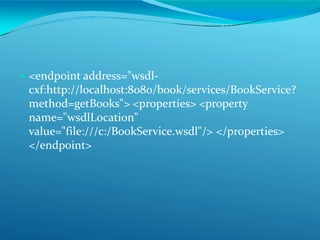
 <endpoint address="wsdl-
cxf:http://localhost:8080/book/services/BookService?
method=getBooks"> <properties> <property
name="wsdlLocation"
value="file:///c:/BookService.wsdl"/> </properties>
</endpoint>
EXEMPLO DO CXF WSDL ENDPOINT
 This example demonstrates how to draw multiple
arguments from the console, invoke a web service, and
print the output to the screen. It uses the Currency
Converter web service at www.webservicex.net.
 This service requires two arguments: the "from" currency
code and the "to" currency code. When the dispatcher CXF
prepares arguments for the invocation of the service, it
expects to find the message load of Object [] - that is, an
array of objects. In the case of the currency converter, this
should be an array of two objects - the "of" currency and
"the" currency.
XML
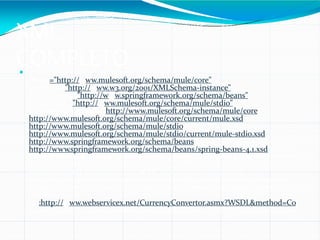
COMPLETO <?xml version="1.0" encoding="UTF-8"?> <mule
xmlns="http://www.mulesoft.org/schema/mule/core"
xmlns:xsi="http://www.w3.org/2001/XMLSchema-instance"
xmlns:spring="http://www.springframework.org/schema/beans"
xmlns:stdio="http://www.mulesoft.org/schema/mule/stdio"
xsi:schemaLocation=" http://www.mulesoft.org/schema/mule/core
http://www.mulesoft.org/schema/mule/core/current/mule.xsd
http://www.mulesoft.org/schema/mule/stdio
http://www.mulesoft.org/schema/mule/stdio/current/mule-stdio.xsd
http://www.springframework.org/schema/beans
http://www.springframework.org/schema/beans/spring-beans-4.1.xsd">
<stdio:connector name="stdioConnector" promptMessage="Enter from and to
currency symbols, separated by a comma:"/> <flowname="inputService">
<stdio:inbound-endpoint system="IN"/> <custom-transformer
class="org.mule.transformer.simple.StringToObjectArray"> <spring:property
name="delimiter" value=","/> </custom-transformer> <outbound-endpoint
address="wsdl-
cxf:http://www.webservicex.net/CurrencyConvertor.asmx?WSDL&method=Co
nversionRate"/> <stdio:outbound-endpoint system="OUT"/> </flow> </mule>

Wsdl connector introduction

  • 1.
  • 2.
    SOURCE: MULESOFT  AWSDL endpoint enables you to easily invoke web services without generating a client. At startup, it reads the WSDL to determine how to invoke the remote web service during runtime. When a message is sent through the WSDL endpoint, it is able to construct a SOAP message using the message payload and its knowledge of the expected payload format from the WSDL.
  • 3.
    CXF  Axis andCXF transports provide WSDL connectors that can be used to call remote Web services by obtaining the WSDL service. Mule creates a dynamic proxy for the service and then invokes it. The easiest tool to do this, however, is the Web service consumer.
  • 4.
     YOU MUSTSUPPLY THE FULL URL TO THE SERVICE'S WSDL TO INVOKE, AND YOU MUST SUPPLY A PARAMETER UMMETHOD THAT TELLS MULE WHICH OPERATION TO INVOKE ON THE SERVICE:
  • 5.
    The WSDL URLis appended with the wsdl: prefix. Mule checks its class path to see if there is a WSDL provider that it can use to create a client proxy from the WSDL. Mule supports both Axis and CXF as WSDL providers. If you want to use a specific one, you can specify it in the URL as follows: eur-lex.europa.eu eur-lex.europa.eu
  • 6.
     In general,you should use the CXF WSDL endpoint. The only limitation of the CXF WSDL provider is that it does not allow you to use non-Java primitives (objects that are not a String, int, double, and so on). Sometimes the Axis WSDL generation does not work (incorrect namespaces are used), so you can experiment with each to see which works best.  Note: There are no specific transformers to define in WSDL endpoints.
  • 7.
    WSDL  By default,the WSDL provider looks at your WSDL, taking the endpoint address and attaching it? Wsdla it. With CXF transport, you have the option of specifying a location for the WSDL that is different than the one specified with the? Wsdl parameter. This can be useful in cases where the WSDL is not available a normal way either because the SOAP engine does not provide it or the provider does not want to publicly expose the WSDL.
  • 8.
     <endpoint address="wsdl- cxf:http://localhost:8080/book/services/BookService? method=getBooks"><properties> <property name="wsdlLocation" value="file:///c:/BookService.wsdl"/> </properties> </endpoint>
  • 9.
    EXEMPLO DO CXFWSDL ENDPOINT  This example demonstrates how to draw multiple arguments from the console, invoke a web service, and print the output to the screen. It uses the Currency Converter web service at www.webservicex.net.  This service requires two arguments: the "from" currency code and the "to" currency code. When the dispatcher CXF prepares arguments for the invocation of the service, it expects to find the message load of Object [] - that is, an array of objects. In the case of the currency converter, this should be an array of two objects - the "of" currency and "the" currency.
  • 10.
    XML COMPLETO <?xml version="1.0"encoding="UTF-8"?> <mule xmlns="http://www.mulesoft.org/schema/mule/core" xmlns:xsi="http://www.w3.org/2001/XMLSchema-instance" xmlns:spring="http://www.springframework.org/schema/beans" xmlns:stdio="http://www.mulesoft.org/schema/mule/stdio" xsi:schemaLocation=" http://www.mulesoft.org/schema/mule/core http://www.mulesoft.org/schema/mule/core/current/mule.xsd http://www.mulesoft.org/schema/mule/stdio http://www.mulesoft.org/schema/mule/stdio/current/mule-stdio.xsd http://www.springframework.org/schema/beans http://www.springframework.org/schema/beans/spring-beans-4.1.xsd"> <stdio:connector name="stdioConnector" promptMessage="Enter from and to currency symbols, separated by a comma:"/> <flowname="inputService"> <stdio:inbound-endpoint system="IN"/> <custom-transformer class="org.mule.transformer.simple.StringToObjectArray"> <spring:property name="delimiter" value=","/> </custom-transformer> <outbound-endpoint address="wsdl- cxf:http://www.webservicex.net/CurrencyConvertor.asmx?WSDL&method=Co nversionRate"/> <stdio:outbound-endpoint system="OUT"/> </flow> </mule>