Batch Job Processing
• THE APPLICATION ILLUSTRATES A USE CASE OF A BATCH
JOB THAT QUERIES A DATABASE TO GET ALL USERS WITH
A STATUS "APPROVED" AND IF ANY EXIST GETS EACH
USER ACCOUNT RECORD AND GENERATES A CSV FILE
USING THE ACCOUNT ATTRIBUTES. THE RESULTING CSV
FILE WILL BE SAVED FOR LATER USE OR IT MAY BE SENT
VIA EMAIL OR SENT TO AN FTP SERVER.
2
3
Batch Processing in Mule
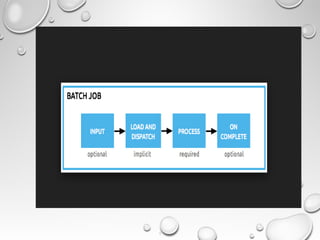
Batch is a Mule construct that provides the ability to process messages in batches.
Within an application, you can initiate a batch job which is a block of code that splits
messages into individual records, performs actions upon each record, then reports
on the results and potentially pushes the processed output to other systems or
queues.
4
Batch processing is particularly useful when working with the following scenarios:
Integrating data sets, small or large, streaming or not, to parallel process records
Synchronising data sets between business applications, such as syncing contacts
between Netsuite and Salesforce, effecting “near real-time”data integration
Extracting, transforming and loading (ETL) information into a target system, such as
uploading data from a flat file (CSV) to Hadoop
Handling large quantities of incoming data from an API into a legacy system
5
6
Learn Batch Fundamentals
Mule’s December 2013 release shipped with a major leap forward feature that will
massively change and simplify Mule’s user experience for both SaaS and On-
Premise users. Yes, we are talking about the new Batch jobs. If you need to handle
massive amounts of data, or you’re longing for record based reporting and error
handling, or even if you are all about resilience and reliability with parallel
processing, then this post is for you!
7
What's new in Batch
We received great feedback about it and we even have some CloudHub users
happily using it in production! However, we know that the journey of Batch has just
begun and for the Early Access release of Mule 3.5 we added a bunch of
improvements.
Let’s have a look!
https://www.mulesoft.com/exchange#!/batch-process-mule?filters=Business
%20Process%20Administration
8
Error handling in Batch
Fact: Batch Jobs are tricky to handle when exceptions raise. The problem is the
huge amounts of data that these jobs are designed to take. If you’re processing 1
million records you simply can’t log everything. Logs would become huge and
unreadable. Not to mention the performance toll it would take. On the other hand, if
you log too little then it’s impossible to know what went wrong, and if 30 thousand
records failed, not knowing what’s wrong with them can be a royal pain. This is a
trade-off not simple to overcome.
9
Near real time sync with Batch
Learn how to do Real time sync with Mule ESB. We’ll use several of the newest
features that Mule has to offer – like the improved Poll component with
watermarking and the Batch Module. Finally we’ll use one of our Anypoint
Templates as an example application to illustrate the concepts.
9
Near real time sync with Batch
Learn how to do Real time sync with Mule ESB. We’ll use several of the newest
features that Mule has to offer – like the improved Poll component with
watermarking and the Batch Module. Finally we’ll use one of our Anypoint
Templates as an example application to illustrate the concepts.

Batch job processing

  • 1.
  • 2.
    • THE APPLICATIONILLUSTRATES A USE CASE OF A BATCH JOB THAT QUERIES A DATABASE TO GET ALL USERS WITH A STATUS "APPROVED" AND IF ANY EXIST GETS EACH USER ACCOUNT RECORD AND GENERATES A CSV FILE USING THE ACCOUNT ATTRIBUTES. THE RESULTING CSV FILE WILL BE SAVED FOR LATER USE OR IT MAY BE SENT VIA EMAIL OR SENT TO AN FTP SERVER. 2
  • 3.
    3 Batch Processing inMule Batch is a Mule construct that provides the ability to process messages in batches. Within an application, you can initiate a batch job which is a block of code that splits messages into individual records, performs actions upon each record, then reports on the results and potentially pushes the processed output to other systems or queues.
  • 4.
    4 Batch processing isparticularly useful when working with the following scenarios: Integrating data sets, small or large, streaming or not, to parallel process records Synchronising data sets between business applications, such as syncing contacts between Netsuite and Salesforce, effecting “near real-time”data integration Extracting, transforming and loading (ETL) information into a target system, such as uploading data from a flat file (CSV) to Hadoop Handling large quantities of incoming data from an API into a legacy system
  • 5.
  • 6.
    6 Learn Batch Fundamentals Mule’sDecember 2013 release shipped with a major leap forward feature that will massively change and simplify Mule’s user experience for both SaaS and On- Premise users. Yes, we are talking about the new Batch jobs. If you need to handle massive amounts of data, or you’re longing for record based reporting and error handling, or even if you are all about resilience and reliability with parallel processing, then this post is for you!
  • 7.
    7 What's new inBatch We received great feedback about it and we even have some CloudHub users happily using it in production! However, we know that the journey of Batch has just begun and for the Early Access release of Mule 3.5 we added a bunch of improvements. Let’s have a look! https://www.mulesoft.com/exchange#!/batch-process-mule?filters=Business %20Process%20Administration
  • 8.
    8 Error handling inBatch Fact: Batch Jobs are tricky to handle when exceptions raise. The problem is the huge amounts of data that these jobs are designed to take. If you’re processing 1 million records you simply can’t log everything. Logs would become huge and unreadable. Not to mention the performance toll it would take. On the other hand, if you log too little then it’s impossible to know what went wrong, and if 30 thousand records failed, not knowing what’s wrong with them can be a royal pain. This is a trade-off not simple to overcome.
  • 9.
    9 Near real timesync with Batch Learn how to do Real time sync with Mule ESB. We’ll use several of the newest features that Mule has to offer – like the improved Poll component with watermarking and the Batch Module. Finally we’ll use one of our Anypoint Templates as an example application to illustrate the concepts.
  • 10.
    9 Near real timesync with Batch Learn how to do Real time sync with Mule ESB. We’ll use several of the newest features that Mule has to offer – like the improved Poll component with watermarking and the Batch Module. Finally we’ll use one of our Anypoint Templates as an example application to illustrate the concepts.