UiPath Community Event
SAP Tips’n’Tricks for
Automation Developers from
ABAP Developer
2
• RPA Developers, who would like to understand more about SAP and learn more about SAP BAPI
and its benefits and challenges
• Automation Developers who are heavily involved with SAP related automation projects, not only
using RPA solutions.
• Everyone wants to know how data can be retrieved from SAP and pushed into SAP, in most
efficient way.
More, knowledge about SAP Automation can be found here:
https://community.uipath.com/events/details/uipath-emeaapac-virtual-events-presents-aut[…]-sap-
s4hana-business-processes-across-all-user-interfaces/
https://community.uipath.com/events/details/uipath-global-virtual-events-presents-sap-api-automation-
with-the-help-of-uipath/
Who is this event best suited for?
3
• Basics:
How to navigate SAP GUI and find some technical information we need. How to get data from SAP
in a variety of ways.
• BAPI:
More advanced introduction to BAPI. BAPI is every developer’s dream, but it’s also a nightmare
• Forbidden fruit:
Rather advanced features.
You want to know those features exist, but you never want to use them ;)
Agenda
4
“T-code” is a short name for “Transaction Code”. SAP Transactions have unique names. In SAP,
every activity is completed by using Transaction.
• SU01, SU01D – User management (check what authorization your user has)
• SE12 – ABAP dictionary
• SE37, SE38 – Function Module/Program Repository (part of ABAP Editor)
• SE80 – ABAP Developer Workbench (don’t go there if you are not ABAP Developer)
• SE16, SE16N – DB Data browser
• SU53 – Authorization access audit
• ST22 – “Short Dump” analysis
• ST01 – Trace (including RFC trace)
Useful “t-codes”
5
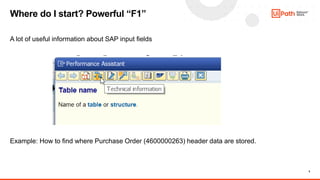
A lot of useful information about SAP input fields
Example: How to find where Purchase Order (4600000263) header data are stored.
Where do I start? Powerful “F1”
6
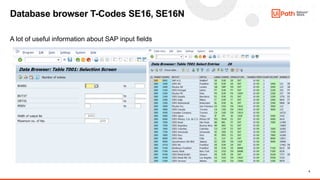
A lot of useful information about SAP input fields
Database browser T-Codes SE16, SE16N
7
• Via User Interface (SAP GUI, Web GUI, Fiori, etc.)
• Via RFC calls (BAPI, but not only)
• Via Web Services (not easy as it sounds)
• Via direct DB reads (show me an SAP Admin who will let you do this in production 
How can we exchange data with SAP?
8
SAP BAPI (Business Application Programming Interface) is a standard interface to the business
object models in SAP products.
BAPIs are the primary method through which customer code and third-party applications interact with
SAP products. BAPIs wrap the internal layers of SAP's business object model to ensure that all
business logic, validations and authorization checks are executed properly when accessing or
changing business objects.
In short: BAPI is a program which can be called by external systems to do something “inside” SAP.
https://searchsap.techtarget.com/definition/BAPI
What is “BAPI”?
9
What is “BAPI”?
External system
(initiator)
SAP
BAPI
Function
Module
Other FMs
SAP DB
External system
RFC
10
What is RFC?
“Remote Function Call is the proprietary SAP SE interface. Remote Function Call (RFC) is the
standard SAP interface for communication between SAP systems. The RFC calls a function to be
executed in a remote system”
https://en.wikipedia.org/wiki/Remote_Function_Call
• RFC is a protocol. BAPI is a set of SAP Function Modules
• RFC can be used to trigger non-BAPI Function Modules as well
• RFC connection must be established before BAPI FM can be executed
• Once RFC connection is established, all SAP BAPIs become available.
BAPI vs. RFC
11
“BADI stands for Business Add Ins Just like Customer Exits , BADI help hook custom enhancements
to SAP functionality.“
• BADI is a way SAP programs, functions and screens are customized to match customer-specific
requirements
• BAPI are programs (Function Modules).
• BAPI Function modules can be customized using variety of BADIs
• Note: BADIs will, most likely, not come up during sales stage but if Professional Services are
included in the deal PS team should enquire about BADIs (as they may significantly affect SAP
functionality and implementation effort).
• A lot of BAPIs used by customer = 
A lot of BADIs used by customer = *
* More information is necessary to determine impact to implementation (if any).
BAPI vs. BADI
12
• RFC Connectivity must be enabled by
Customer’s network and SAP teams.
• RFC connection requires User credentials
(Dialog user account can be used for POC
but this is not recommended for production
(e.g. dialog user passwords expire)
• RFC connectivity can be established with
selected SAP Application server directly or
via Message server.
• Establishing RFC connection does not guarantee ability to execute BAPI – authorizations are
required and SNC (secure communication) may need to be configured.
• Useful information can be found here: https://docs.uipath.com/activities/docs/about-the-sap-bapi-
activities-pack
Establishing RFC connection
13
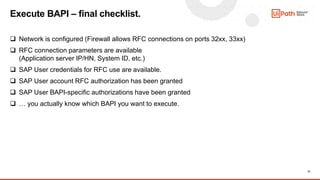
 Network is configured (Firewall allows RFC connections on ports 32xx, 33xx)
 RFC connection parameters are available
(Application server IP/HN, System ID, etc.)
 SAP User credentials for RFC use are available.
 SAP User account RFC authorization has been granted
 SAP User BAPI-specific authorizations have been granted
 … you actually know which BAPI you want to execute.
Execute BAPI – final checklist.
14
• RFC protocol can be used to execute
any RFC-enabled SAP Function Module.
• There are thousands of standard and
custom RFC-enabled modules in SAP
but not all qualify as BAPI.
• In order to qualify as BAPI Function Module
SAP program must satisfy certain development
requirements.
• UiPath RFC connector can be used to any
RFC-enabled module (BAPI and non-BAPI)
• Some companies scrutinize use of RFC-enabled modules and allow use of only BAPI FMs.
Note: check company/organization internal policies before implementation !
BAPI or not BAPI?
15
There’s a very simple rule:
Standard SAP code:
• Function module name
starts with any character
except “Z” or “Y”
• Author is denoted as “SAP”
Custom ABAP code:
• Function module name
starts with Z* or Y* (always)
• Author is not “SAP”.
SAP BAPI FM, Custom BAPI FMs, how to tell?
16
• Companies, who are not using RFC may feel insecure about use of BAPI and may not have
resources to enable/configure it.
• Companies who use dedicated RFC SAP User account may face internal compliance or audit
issues (SAP logging is very limited).
• Implementation requires more SAP knowledge than using GUI
• It usually takes longer time to start with BAPI than with SAP UI due to the fact necessary
authorizations need to be granted by SAP team.
• SAP BAPI is poorly documented (even in standard SAP documentation)
• Troubleshooting is challenging. Requires SAP knowledge.
• Debugging is challenging. Do you want to learn ABAP?
Major challenges: using/implementing SAP BAPI
17
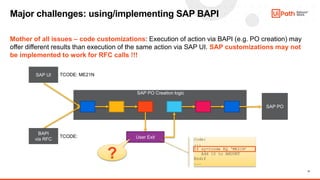
Mother of all issues – code customizations: Execution of action via BAPI (e.g. PO creation) may
offer different results than execution of the same action via SAP UI. SAP customizations may not
be implemented to work for RFC calls !!!
Major challenges: using/implementing SAP BAPI
SAP UI
BAPI
via RFC
SAP PO Creation logic
SAP PO
User Exit
TCODE: ME21N
TCODE:
?
Code:
...
If sy-tcode EQ ‘ME21N’
Add 10 to AMOUNT
Endif
...
18
• Yes, if customer is tech savvy and sees BAPI-enabled implementation as a value.
• Yes, if you want to create fast and reliable SAP automation
• Yes, if customer SAP connectivity is unreliable or very slow.
• No, if SAP part of the process is simple and short and connection is OK
• No, if customer want to see what is actually robot doing on his PC (BAPI kills some “wow factor”
as robot actions are executed in background and user can’t see it.
• No, if customer’s SAP system is not configured for RFC or customer is not using BAPI/RFC in any
other scenario and is not comfortable with BAPI use.
• No, if you want to minimize IT involvement (getting IT support usually requires time so plan your
POC accordingly)
• No, if you are not familiar with SAP BAPI. Preparing data for BAPI call (BAPI interface) is
simplified by UiPath connector but can still take some additional time.
Should I use BAPI in my project?
19
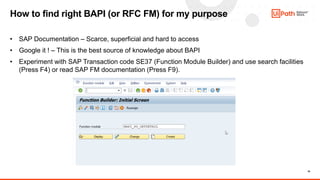
• SAP Documentation – Scarce, superficial and hard to access
• Google it ! – This is the best source of knowledge about BAPI
• Experiment with SAP Transaction code SE37 (Function Module Builder) and use search facilities
(Press F4) or read SAP FM documentation (Press F9).
How to find right BAPI (or RFC FM) for my purpose
20
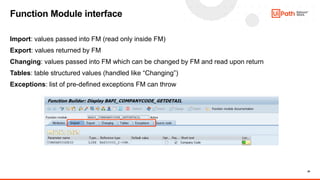
Import: values passed into FM (read only inside FM)
Export: values returned by FM
Changing: values passed into FM which can be changed by FM and read upon return
Tables: table structured values (handled like “Changing”)
Exceptions: list of pre-defined exceptions FM can throw
Function Module interface
21
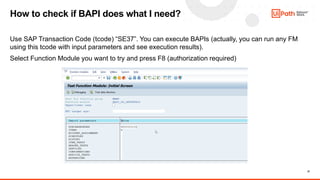
Use SAP Transaction Code (tcode) “SE37”. You can execute BAPIs (actually, you can run any FM
using this tcode with input parameters and see execution results).
Select Function Module you want to try and press F8 (authorization required)
How to check if BAPI does what I need?
22
Some BAPI Function modules execute its code but do not trigger explicit commit. If commit is not
triggered manually, actions completed by BAPI will be discarded when RFC connection is terminated.
Commit (or Rollback) is required only if BAPI changed DB contents (e.g. created new PO) and it’s not
applicable for data reading BAPIs.
Proper sequence of actions:
1. Establish RFC connection
2. Execute desired BAPI
3. Execute BAPI_TRANSACTION_COMMIT to commit changes or
BAPI_TRANSACTION_ROLLBACK to roll-back the changes.
4. Terminate RFC connection if done.
Tricky case of BAPI commit
23
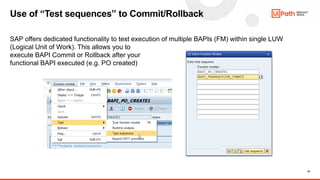
SAP offers dedicated functionality to test execution of multiple BAPIs (FM) within single LUW
(Logical Unit of Work). This allows you to
execute BAPI Commit or Rollback after your
functional BAPI executed (e.g. PO created)
Use of “Test sequences” to Commit/Rollback
24
• OK-Codes
What are they? What do the do? How to use them if, for some strange reason, you hate “Click”
activity.
• FM RFC_READ_TABLE
What does this Function Module do? How to use it? Why is it every auditor’s nightmare?
• No external debugger – No problem
What is the problem here? Why would I need it? What is “SM50”? And why I shouldn’t do it?
Dark zone ;)
Thank you
Tomasz Gaczynski
tomasz.gaczynski@uipath.com
Think
Automation
First

SAP Tips and Tricks for Automation Developers from ABAP Developer

  • 1.
    UiPath Community Event SAPTips’n’Tricks for Automation Developers from ABAP Developer
  • 2.
    2 • RPA Developers,who would like to understand more about SAP and learn more about SAP BAPI and its benefits and challenges • Automation Developers who are heavily involved with SAP related automation projects, not only using RPA solutions. • Everyone wants to know how data can be retrieved from SAP and pushed into SAP, in most efficient way. More, knowledge about SAP Automation can be found here: https://community.uipath.com/events/details/uipath-emeaapac-virtual-events-presents-aut[…]-sap- s4hana-business-processes-across-all-user-interfaces/ https://community.uipath.com/events/details/uipath-global-virtual-events-presents-sap-api-automation- with-the-help-of-uipath/ Who is this event best suited for?
  • 3.
    3 • Basics: How tonavigate SAP GUI and find some technical information we need. How to get data from SAP in a variety of ways. • BAPI: More advanced introduction to BAPI. BAPI is every developer’s dream, but it’s also a nightmare • Forbidden fruit: Rather advanced features. You want to know those features exist, but you never want to use them ;) Agenda
  • 4.
    4 “T-code” is ashort name for “Transaction Code”. SAP Transactions have unique names. In SAP, every activity is completed by using Transaction. • SU01, SU01D – User management (check what authorization your user has) • SE12 – ABAP dictionary • SE37, SE38 – Function Module/Program Repository (part of ABAP Editor) • SE80 – ABAP Developer Workbench (don’t go there if you are not ABAP Developer) • SE16, SE16N – DB Data browser • SU53 – Authorization access audit • ST22 – “Short Dump” analysis • ST01 – Trace (including RFC trace) Useful “t-codes”
  • 5.
    5 A lot ofuseful information about SAP input fields Example: How to find where Purchase Order (4600000263) header data are stored. Where do I start? Powerful “F1”
  • 6.
    6 A lot ofuseful information about SAP input fields Database browser T-Codes SE16, SE16N
  • 7.
    7 • Via UserInterface (SAP GUI, Web GUI, Fiori, etc.) • Via RFC calls (BAPI, but not only) • Via Web Services (not easy as it sounds) • Via direct DB reads (show me an SAP Admin who will let you do this in production  How can we exchange data with SAP?
  • 8.
    8 SAP BAPI (BusinessApplication Programming Interface) is a standard interface to the business object models in SAP products. BAPIs are the primary method through which customer code and third-party applications interact with SAP products. BAPIs wrap the internal layers of SAP's business object model to ensure that all business logic, validations and authorization checks are executed properly when accessing or changing business objects. In short: BAPI is a program which can be called by external systems to do something “inside” SAP. https://searchsap.techtarget.com/definition/BAPI What is “BAPI”?
  • 9.
    9 What is “BAPI”? Externalsystem (initiator) SAP BAPI Function Module Other FMs SAP DB External system RFC
  • 10.
    10 What is RFC? “RemoteFunction Call is the proprietary SAP SE interface. Remote Function Call (RFC) is the standard SAP interface for communication between SAP systems. The RFC calls a function to be executed in a remote system” https://en.wikipedia.org/wiki/Remote_Function_Call • RFC is a protocol. BAPI is a set of SAP Function Modules • RFC can be used to trigger non-BAPI Function Modules as well • RFC connection must be established before BAPI FM can be executed • Once RFC connection is established, all SAP BAPIs become available. BAPI vs. RFC
  • 11.
    11 “BADI stands forBusiness Add Ins Just like Customer Exits , BADI help hook custom enhancements to SAP functionality.“ • BADI is a way SAP programs, functions and screens are customized to match customer-specific requirements • BAPI are programs (Function Modules). • BAPI Function modules can be customized using variety of BADIs • Note: BADIs will, most likely, not come up during sales stage but if Professional Services are included in the deal PS team should enquire about BADIs (as they may significantly affect SAP functionality and implementation effort). • A lot of BAPIs used by customer =  A lot of BADIs used by customer = * * More information is necessary to determine impact to implementation (if any). BAPI vs. BADI
  • 12.
    12 • RFC Connectivitymust be enabled by Customer’s network and SAP teams. • RFC connection requires User credentials (Dialog user account can be used for POC but this is not recommended for production (e.g. dialog user passwords expire) • RFC connectivity can be established with selected SAP Application server directly or via Message server. • Establishing RFC connection does not guarantee ability to execute BAPI – authorizations are required and SNC (secure communication) may need to be configured. • Useful information can be found here: https://docs.uipath.com/activities/docs/about-the-sap-bapi- activities-pack Establishing RFC connection
  • 13.
    13  Network isconfigured (Firewall allows RFC connections on ports 32xx, 33xx)  RFC connection parameters are available (Application server IP/HN, System ID, etc.)  SAP User credentials for RFC use are available.  SAP User account RFC authorization has been granted  SAP User BAPI-specific authorizations have been granted  … you actually know which BAPI you want to execute. Execute BAPI – final checklist.
  • 14.
    14 • RFC protocolcan be used to execute any RFC-enabled SAP Function Module. • There are thousands of standard and custom RFC-enabled modules in SAP but not all qualify as BAPI. • In order to qualify as BAPI Function Module SAP program must satisfy certain development requirements. • UiPath RFC connector can be used to any RFC-enabled module (BAPI and non-BAPI) • Some companies scrutinize use of RFC-enabled modules and allow use of only BAPI FMs. Note: check company/organization internal policies before implementation ! BAPI or not BAPI?
  • 15.
    15 There’s a verysimple rule: Standard SAP code: • Function module name starts with any character except “Z” or “Y” • Author is denoted as “SAP” Custom ABAP code: • Function module name starts with Z* or Y* (always) • Author is not “SAP”. SAP BAPI FM, Custom BAPI FMs, how to tell?
  • 16.
    16 • Companies, whoare not using RFC may feel insecure about use of BAPI and may not have resources to enable/configure it. • Companies who use dedicated RFC SAP User account may face internal compliance or audit issues (SAP logging is very limited). • Implementation requires more SAP knowledge than using GUI • It usually takes longer time to start with BAPI than with SAP UI due to the fact necessary authorizations need to be granted by SAP team. • SAP BAPI is poorly documented (even in standard SAP documentation) • Troubleshooting is challenging. Requires SAP knowledge. • Debugging is challenging. Do you want to learn ABAP? Major challenges: using/implementing SAP BAPI
  • 17.
    17 Mother of allissues – code customizations: Execution of action via BAPI (e.g. PO creation) may offer different results than execution of the same action via SAP UI. SAP customizations may not be implemented to work for RFC calls !!! Major challenges: using/implementing SAP BAPI SAP UI BAPI via RFC SAP PO Creation logic SAP PO User Exit TCODE: ME21N TCODE: ? Code: ... If sy-tcode EQ ‘ME21N’ Add 10 to AMOUNT Endif ...
  • 18.
    18 • Yes, ifcustomer is tech savvy and sees BAPI-enabled implementation as a value. • Yes, if you want to create fast and reliable SAP automation • Yes, if customer SAP connectivity is unreliable or very slow. • No, if SAP part of the process is simple and short and connection is OK • No, if customer want to see what is actually robot doing on his PC (BAPI kills some “wow factor” as robot actions are executed in background and user can’t see it. • No, if customer’s SAP system is not configured for RFC or customer is not using BAPI/RFC in any other scenario and is not comfortable with BAPI use. • No, if you want to minimize IT involvement (getting IT support usually requires time so plan your POC accordingly) • No, if you are not familiar with SAP BAPI. Preparing data for BAPI call (BAPI interface) is simplified by UiPath connector but can still take some additional time. Should I use BAPI in my project?
  • 19.
    19 • SAP Documentation– Scarce, superficial and hard to access • Google it ! – This is the best source of knowledge about BAPI • Experiment with SAP Transaction code SE37 (Function Module Builder) and use search facilities (Press F4) or read SAP FM documentation (Press F9). How to find right BAPI (or RFC FM) for my purpose
  • 20.
    20 Import: values passedinto FM (read only inside FM) Export: values returned by FM Changing: values passed into FM which can be changed by FM and read upon return Tables: table structured values (handled like “Changing”) Exceptions: list of pre-defined exceptions FM can throw Function Module interface
  • 21.
    21 Use SAP TransactionCode (tcode) “SE37”. You can execute BAPIs (actually, you can run any FM using this tcode with input parameters and see execution results). Select Function Module you want to try and press F8 (authorization required) How to check if BAPI does what I need?
  • 22.
    22 Some BAPI Functionmodules execute its code but do not trigger explicit commit. If commit is not triggered manually, actions completed by BAPI will be discarded when RFC connection is terminated. Commit (or Rollback) is required only if BAPI changed DB contents (e.g. created new PO) and it’s not applicable for data reading BAPIs. Proper sequence of actions: 1. Establish RFC connection 2. Execute desired BAPI 3. Execute BAPI_TRANSACTION_COMMIT to commit changes or BAPI_TRANSACTION_ROLLBACK to roll-back the changes. 4. Terminate RFC connection if done. Tricky case of BAPI commit
  • 23.
    23 SAP offers dedicatedfunctionality to test execution of multiple BAPIs (FM) within single LUW (Logical Unit of Work). This allows you to execute BAPI Commit or Rollback after your functional BAPI executed (e.g. PO created) Use of “Test sequences” to Commit/Rollback
  • 24.
    24 • OK-Codes What arethey? What do the do? How to use them if, for some strange reason, you hate “Click” activity. • FM RFC_READ_TABLE What does this Function Module do? How to use it? Why is it every auditor’s nightmare? • No external debugger – No problem What is the problem here? Why would I need it? What is “SM50”? And why I shouldn’t do it? Dark zone ;)
  • 25.