SCATTER-GATHER COMPONENT - MULE
Presented By
Sindhu VL
 The routing message processor Scatter-
Gather sends a request message to multiple
targets concurrently. It collects the responses
from all routes, and aggregates them into a
single message.
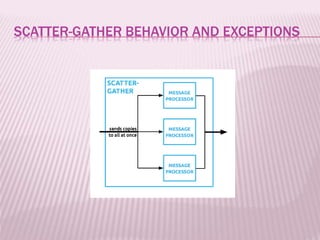
SCATTER-GATHER BEHAVIOR AND EXCEPTIONS
 The Scatter-Gather router sends a message for
concurrent processing to all configured routes.
The thread executing the flow that owns the
router waits until all routes complete or time out.
 If there are no failures, Mule aggregates the
results from each of the routes into a message
collection (MessageCollection class). Failure in
one route does not stop the Scatter-Gather from
sending messages to its other configured
routes, so it is possible that many, or all routes
may fail concurrently.
 The Scatter-Gather router sends a message for
concurrent processing to all configured routes.
The thread executing the flow that owns the
router waits until all routes complete or time out.
 If there are no failures, Mule aggregates the
results from each of the routes into a message
collection (MessageCollection class). Failure in
one route does not stop the Scatter-Gather from
sending messages to its other configured
routes, so it is possible that many, or all routes
may fail concurrently.
COMPOSITEROUTINGEXCEPTION :
 The CompositeRoutingException is new to
the 3.5.0 Runtime. It extends the Mule
MessagingException to aggregate
exceptions from different routes in the
context of a single message router.
Exceptions are correlated to each route
through a sequential ID.
 This exception exposes two methods which
allow you to obtain the IDs of failed routes and
the exceptions returned by each route.
 The getExceptions method returns a map where
the key is an integer that identifies the index of
the failed route, and the value is the exception
itself.
 The getExceptionForRouteIndex(int) method
returns the exception of the requested route ID.
CUSTOMIZING AGGREGATION STRATEGIES :
 Scatter-Gather allows you to define a custom
aggregation strategy which overrides its default
aggregation strategy. Among other things,
custom gathering strategies allow you to:
 Discard message responses
 Merge message properties that originated in
different routes
 Discard failed messages without throwing an
exception
 Select only one from multiple responses
MODELING SCATTER-GATHER IN A FLOW :
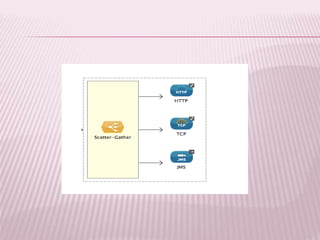
 Add a scatter-gather element to your flow,
then, inside the dashed-line scope area of
the scatter-gather element, drag and drop
two or more message processors or
connectors, placing them parallel to one
another, as shown.
SCATTER-GATHER THREADING PROFILES :
 Scatter-Gather’s default threading profile is designed to
work in most scenarios, where the Scatter-Gather
component is typically configured with between three to
six routes. If the default threading profile is not best suited
for your needs, Scatter-Gather allows you to define a
custom threading profile for the component. Ultimately,
the optimum threading profile depends on each
application. For most scenarios, MuleSoft recommends
that the number of threads in Scatter-Gather should be
the result of the number of routes times the value
of maxThreadsActive for the flow where Scatter-Gather
resides.
 maxThreadsActive for Scatter-Gather = number of
routes in Scatter-GathermaxThreadsActive for flow
MIGRATING TO SCATTER-GATHER FROM THE ALL
MESSAGE ROUTER :
 If you are currently using All routers in your
application, you may wish to replace them
with Scatter-Gather routers. This section
details the differences you need to be aware
of when considering migration.
WHY MIGRATE?
 Scatter-Gather is a better option for most
cases
 migrating to Scatter-Gather now will facilitate
the transition to Mule 4
ThankYou!!!!!!!!!!

Scatter gather component - mule

  • 1.
    SCATTER-GATHER COMPONENT -MULE Presented By Sindhu VL
  • 2.
     The routingmessage processor Scatter- Gather sends a request message to multiple targets concurrently. It collects the responses from all routes, and aggregates them into a single message.
  • 3.
  • 4.
     The Scatter-Gatherrouter sends a message for concurrent processing to all configured routes. The thread executing the flow that owns the router waits until all routes complete or time out.  If there are no failures, Mule aggregates the results from each of the routes into a message collection (MessageCollection class). Failure in one route does not stop the Scatter-Gather from sending messages to its other configured routes, so it is possible that many, or all routes may fail concurrently.
  • 5.
     The Scatter-Gatherrouter sends a message for concurrent processing to all configured routes. The thread executing the flow that owns the router waits until all routes complete or time out.  If there are no failures, Mule aggregates the results from each of the routes into a message collection (MessageCollection class). Failure in one route does not stop the Scatter-Gather from sending messages to its other configured routes, so it is possible that many, or all routes may fail concurrently.
  • 6.
    COMPOSITEROUTINGEXCEPTION :  TheCompositeRoutingException is new to the 3.5.0 Runtime. It extends the Mule MessagingException to aggregate exceptions from different routes in the context of a single message router. Exceptions are correlated to each route through a sequential ID.
  • 7.
     This exceptionexposes two methods which allow you to obtain the IDs of failed routes and the exceptions returned by each route.  The getExceptions method returns a map where the key is an integer that identifies the index of the failed route, and the value is the exception itself.  The getExceptionForRouteIndex(int) method returns the exception of the requested route ID.
  • 8.
    CUSTOMIZING AGGREGATION STRATEGIES:  Scatter-Gather allows you to define a custom aggregation strategy which overrides its default aggregation strategy. Among other things, custom gathering strategies allow you to:  Discard message responses  Merge message properties that originated in different routes  Discard failed messages without throwing an exception  Select only one from multiple responses
  • 9.
    MODELING SCATTER-GATHER INA FLOW :  Add a scatter-gather element to your flow, then, inside the dashed-line scope area of the scatter-gather element, drag and drop two or more message processors or connectors, placing them parallel to one another, as shown.
  • 11.
    SCATTER-GATHER THREADING PROFILES:  Scatter-Gather’s default threading profile is designed to work in most scenarios, where the Scatter-Gather component is typically configured with between three to six routes. If the default threading profile is not best suited for your needs, Scatter-Gather allows you to define a custom threading profile for the component. Ultimately, the optimum threading profile depends on each application. For most scenarios, MuleSoft recommends that the number of threads in Scatter-Gather should be the result of the number of routes times the value of maxThreadsActive for the flow where Scatter-Gather resides.  maxThreadsActive for Scatter-Gather = number of routes in Scatter-GathermaxThreadsActive for flow
  • 12.
    MIGRATING TO SCATTER-GATHERFROM THE ALL MESSAGE ROUTER :  If you are currently using All routers in your application, you may wish to replace them with Scatter-Gather routers. This section details the differences you need to be aware of when considering migration.
  • 13.
    WHY MIGRATE?  Scatter-Gatheris a better option for most cases  migrating to Scatter-Gather now will facilitate the transition to Mule 4
  • 14.