
Mule ESB
General Mule description and some Checkout specific
examples
What is ESB?
ESB:
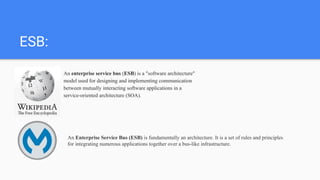
An enterprise service bus (ESB) is a "software architecture"
model used for designing and implementing communication
between mutually interacting software applications in a
service-oriented architecture (SOA).
An Enterprise Service Bus (ESB) is fundamentally an architecture. It is a set of rules and principles
for integrating numerous applications together over a bus-like infrastructure.
Mule Message Anatomy
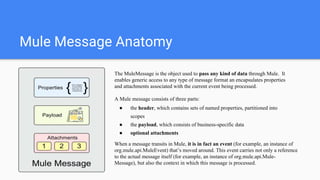
The MuleMessage is the object used to pass any kind of data through Mule. It
enables generic access to any type of message format an encapsulates properties
and attachments associated with the current event being processed.
A Mule message consists of three parts:
● the header, which contains sets of named properties, partitioned into
scopes
● the payload, which consists of business-specific data
● optional attachments
When a message transits in Mule, it is in fact an event (for example, an instance of
org.mule.api.MuleEvent) that’s moved around. This event carries not only a reference
to the actual message itself (for example, an instance of org.mule.api.Mule-
Message), but also the context in which this message is processed.
MuleStudio
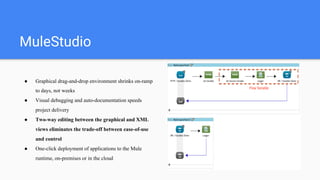
● Graphical drag-and-drop environment shrinks on-ramp
to days, not weeks
● Visual debugging and auto-documentation speeds
project delivery
● Two-way editing between the graphical and XML
views eliminates the trade-off between ease-of-use
and control
● One-click deployment of applications to the Mule
runtime, on-premises or in the cloud
What is mule flow?
A flow is the construct within which you link together
several individual elements to handle the receipt,
processing, and eventual routing of a message. You can
connect many flows together to build a complete application
which you can then deploy on premise, on Mule or another
application server, or in the cloud.
At the simplest level, flows are sequences of message-
processing events. A message that enters a flow may pass
through a wide variety of processors.
Subflow vs Private Flow?
The primary reason for using a private flow instead of a
subflow is to define in it a different exception strategy
from the calling flow (something that is impossible with a
subflow).
Another reason is that subflows aren’t materialized at runtime
and, as such, don’t have specific statistics or debug properties
attached to them and can’t be controlled or monitored
independently. Private flows offer all this.
Composite message source
<vm:inbound-endpoint path="payment-processor" />
<composite-source>
<jms:inbound-endpoint queue="payment-processor" />
<http:inbound-endpoint host="localhost"
port="8080"
path="payment-processor" />
</composite-source>
While not common, generic endpoints that aren’t
prefixed with a transport’s namespace can be used.
This might be useful if you want to use a different
transport depending on the environment (for example,
using the VM transport instead of the JMS transport
depending on where the app is deployed).
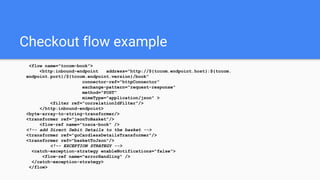
Checkout flow example
<flow name="tccom-book">
<http:inbound-endpoint address="http://${tccom.endpoint.host}:${tccom.
endpoint.port}/${tccom.endpoint.version}/book"
connector-ref="httpConnector"
exchange-pattern="request-response"
method="POST"
mimeType="application/json" >
<filter ref="correlationIdFilter"/>
</http:inbound-endpoint>
<byte-array-to-string-transformer/>
<transformer ref="jsonToBasket"/>
<flow-ref name="tosca-book" />
<!-- add Direct Debit Details to the basket -->
<transformer ref="goCardlessDetailsTransformer"/>
<transformer ref="basketToJson"/>
<!-- EXCEPTION STRATEGY -->
<catch-exception-strategy enableNotifications="false">
<flow-ref name="errorHandling" />
</catch-exception-strategy>
</flow>
MEL
It’s valid to place several statements in the same expression, as long
as they’re separated by semicolons. The value of the last statement is
used as the value of the whole
expression. For example, evaluating the following expression:
targetDir = new java.io.File(server.tmpDir, 'target');
targetDir.mkdir();
targetDir
returns targetDir as a java.io.File (and also ensures that it exists).
With MEL, you can do the following:
● Use any Java class available on the classpath;
● Easily navigate lists, maps, arrays, and bean properties;
● Express complex logic, including ternary expressions;
● Define local variables and use them in statements;
#[message.inboundProperties.'locale' == 'en_us']
Inheritance in Components
<pattern:validator name="abstract-parent-validator" abstract="true" ackExpression="#['Message
accepted.']" nackExpression="#['Message rejected.']" />
<pattern:validator name="integer-service-validator" parent="abstract-parent-validator"
inboundAddress="vm://integer-service.in" outboundAddress="vm://real-integer-service.in"> <payload-type-
filter expectedType="java.lang.Integer" />
</pattern:validator>
Mule message scopes
Mule has the following scopes:
1. Inbound - properties/headers coming from the client's request
2. Invocation - used mostly internally by Mule for the duration of this service's call, not typically utilized
nor meant for end-user. They are strictly bound to a flow.
3. Outbound - values deemed to be sent out from this service. They become either request properties for
the next service, or response properties in case of a synchronous invocation
4. Session - values which are passed from invocation to invocation. This scope is bound to the in-flight
message and can therefore span multiple flows, as it follows the message through them (think of Java’s
ThreadLocal mechanism but with a MessageLocal twist).
A bit more on Message Scopes
When using http endpoints Mule session
is stored as a custom http header so
there are some limitations in header
size. HTTP specification does not limit
length of headers at all. However web-
servers do limit header size they accept,
throwing “413 Entity Too Large” if it
exceeds or you can also get a java.io.
SocketException: Broken Pipe in the
client side
What is Session in Mule?
The mule session has nothing to do with the Java EE session that is shared across
threads.
Mule Session Properties
● Session Properties can be set by you.
● Session properties are preserved when crossing a “transport barrier”.
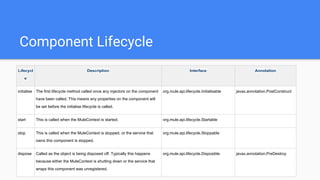
Component Lifecycle
Components have a lifecycle like any other object in the Mule registry. Lifecycle can be configured by
adding one or more lifecycle interfaces to your component. Since Mule 3.0 JSR-250 annotations can
be used to configure initialise and destroy methods.
ONE INTERFACE TO RULE THEM ALL If your custom object needs to implement the four
standard lifecycle interfaces, you can save yourself a lot of typing by implementing org.mule.api.
lifecycle.Lifecycle, which extends the four standard ones.
Component Lifecycle
Components have a lifecycle like any other object in the Mule registry. Lifecycle can be configured by adding
one or more lifecycle interfaces to your component. Since Mule 3.0 JSR-250 annotations can be used to
configure initialise and destroy methods.
Lifecycl
e
Description Interface Annotation
initialise The first lifecycle method called once any injectors on the component
have been called. This means any properties on the component will
be set before the initialise lifecycle is called.
org.mule.api.lifecycle.Initialisable javax.annotation.PostConstruct
start This is called when the MuleContext is started. org.mule.api.lifecycle.Startable
stop This is called when the MuleContext is stopped, or the service that
owns this component is stopped.
org.mule.api.lifecycle.Stoppable
dispose Called as the object is being disposed off. Typically this happens
because either the MuleContext is shutting down or the service that
wraps this component was unregistered.
org.mule.api.lifecycle.Disposible javax.annotation.PreDestroy
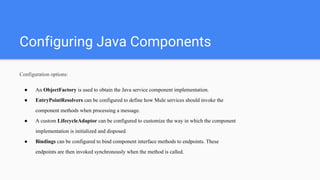
Configuring Java Components
Configuration options:
● An ObjectFactory is used to obtain the Java service component implementation.
● EntryPointResolvers can be configured to define how Mule services should invoke the
component methods when processing a message.
● A custom LifecycleAdaptor can be configured to customize the way in which the component
implementation is initialized and disposed.
● Bindings can be configured to bind component interface methods to endpoints. These
endpoints are then invoked synchronously when the method is called.
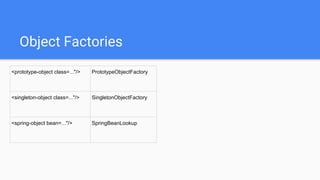
Object Factories
<prototype-object class=..."/> PrototypeObjectFactory
<singleton-object class=..."/> SingletonObjectFactory
<spring-object bean=..."/> SpringBeanLookup
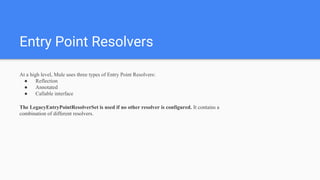
Entry Point Resolvers
At a high level, Mule uses three types of Entry Point Resolvers:
● Reflection
● Annotated
● Callable interface
The LegacyEntryPointResolverSet is used if no other resolver is configured. It contains a
combination of different resolvers.
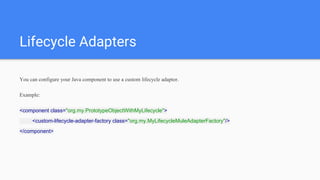
Lifecycle Adapters
You can configure your Java component to use a custom lifecycle adaptor.
Example:
<component class="org.my.PrototypeObjectWithMyLifecycle">
<custom-lifecycle-adapter-factory class="org.my.MyLifecycleMuleAdapterFactory"/>
</component>
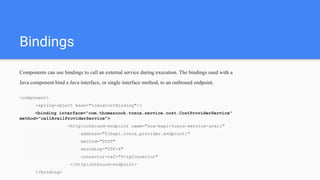
Bindings
Components can use bindings to call an external service during execution. The bindings used with a
Java component bind a Java interface, or single interface method, to an outbound endpoint.
<component>
<spring-object bean="toscaCostBinding"/>
<binding interface="com.thomascook.tosca.service.cost.CostProviderService"
method="callAvailProviderService">
<http:outbound-endpoint name="soa-bapi-tosca-service-avail"
address="${bapi.tosca.provider.endpoint}"
method="POST"
encoding="UTF-8"
connector-ref="httpConnector"
</http:outbound-endpoint>
</binding>
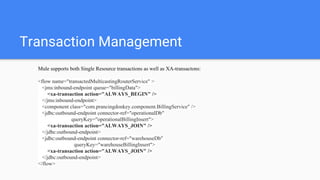
Transaction Management
Mule supports both Single Resource transactions as well as XA-transactons:
<flow name="transactedMulticastingRouterService" >
<jms:inbound-endpoint queue="billingData">
<xa-transaction action="ALWAYS_BEGIN" />
</jms:inbound-endpoint>
<component class="com.prancingdonkey.component.BillingService" />
<jdbc:outbound-endpoint connector-ref="operationalDb"
queryKey="operationalBillingInsert">
<xa-transaction action="ALWAYS_JOIN" />
</jdbc:outbound-endpoint>
<jdbc:outbound-endpoint connector-ref="warehouseDb"
queryKey="warehouseBillingInsert">
<xa-transaction action="ALWAYS_JOIN" />
</jdbc:outbound-endpoint>
</flow>
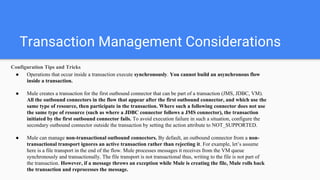
Transaction Management Considerations
Configuration Tips and Tricks
● Operations that occur inside a transaction execute synchronously. You cannot build an asynchronous flow
inside a transaction.
● Mule creates a transaction for the first outbound connector that can be part of a transaction (JMS, JDBC, VM).
All the outbound connectors in the flow that appear after the first outbound connector, and which use the
same type of resource, then participate in the transaction. Where such a following connector does not use
the same type of resource (such as where a JDBC connector follows a JMS connector), the transaction
initiated by the first outbound connector fails. To avoid execution failure in such a situation, configure the
secondary outbound connector outside the transaction by setting the action attribute to NOT_SUPPORTED.
● Mule can manage non-transactional outbound connectors. By default, an outbound connector from a non-
transactional transport ignores an active transaction rather than rejecting it. For example, let’s assume
here is a file transport in the end of the flow. Mule processes messages it receives from the VM queue
synchronously and transactionally. The file transport is not transactional thus, writing to the file is not part of
the transaction. However, if a message throws an exception while Mule is creating the file, Mule rolls back
the transaction and reprocesses the message.
JTA
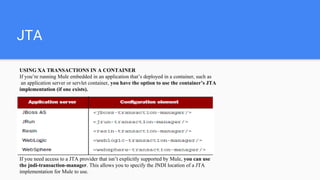
USING XA TRANSACTIONS IN A CONTAINER
If you’re running Mule embedded in an application that’s deployed in a container, such as
an application server or servlet container, you have the option to use the container’s JTA
implementation (if one exists).
If you need access to a JTA provider that isn’t explicitly supported by Mule, you can use
the jndi-transaction-manager. This allows you to specify the JNDI location of a JTA
implementation for Mule to use.
Rolling back
Finally, transactional demarcators also support the use of exception
handlers. For instance, let’s say that you want to log a message when the transaction goes wrong. You
can do that by adding a rollback-exception-strategy to the transactional element
and including a logger in it:
<subflow name="transactionalFlowWithLogger">
<transactional action="BEGIN_OR_JOIN">
<jms:outbound-endpoint queue="billingOrders"/>
<jms:outbound-endpoint queue="productionOrders"/>
<rollback-exception-strategy>
<logger message="Problem in the transaction!" />
</rollback-exception-strategy>
</transactional>
</subflow>
Pool or not to Pool components
Pooled components decrease throughput. Pools of components are almost always less
performant than singletons. Under load there will be contention of threads for
objects in the pool. There’s also overhead in growing the pool. Use singleton
components unless you have a good reason not to.
<pooled-component class="org.my.PrototypeObject">
<pooling-profile exhaustedAction="WHEN_EXHAUSTED_FAIL"
initialisationPolicy="INITIALISE_ALL" maxActive="1" maxIdle="2" maxWait="3" />
</pooled-component>
Pooling ensures that each component instance will handle only one request at a time. It’s
important to understand that this pooling profile, if used, influences the number of
requests that can be served simultaneously by the service.
Makes sense when::
The component is expensive to create—
It’s important that the total number of
component
object instances remains under control.
The component is thread-unsafe—It’s
essential to ensure that only one thread at
a time will ever enter a particular instance
of the component.
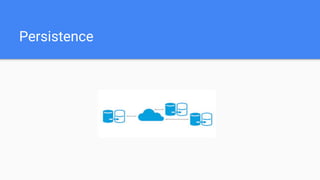
Persistence
What if we need to store some data across
multiple calls and across multiple
messages?
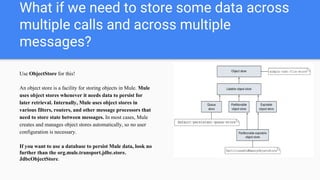
Use ObjectStore for this!
An object store is a facility for storing objects in Mule. Mule
uses object stores whenever it needs data to persist for
later retrieval. Internally, Mule uses object stores in
various filters, routers, and other message processors that
need to store state between messages. In most cases, Mule
creates and manages object stores automatically, so no user
configuration is necessary.
If you want to use a database to persist Mule data, look no
further than the org.mule.transport.jdbc.store.
JdbcObjectStore.
Examples of where persistence can be very
desirable in Mule
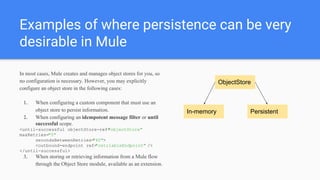
In most cases, Mule creates and manages object stores for you, so
no configuration is necessary. However, you may explicitly
configure an object store in the following cases:
1. When configuring a custom component that must use an
object store to persist information.
2. When configuring an idempotent message filter or until
successful scope.
<until-successful objectStore-ref="objectStore"
maxRetries="5"
secondsBetweenRetries="60">
<outbound-endpoint ref="retriableEndpoint" />
</until-successful>
3. When storing or retrieving information from a Mule flow
through the Object Store module, available as an extension.
ObjectStore
In-memory Persistent
Storing objects in the Registry
If you need to store runtime data that is available across the application, you can store the data as objects in the
Registry . You can get a handle to the Registry from anywhere that you have access to the MuleContext , as in most
Mule ESB entities. For example, you could store the object as follows:
muleContext.getRegistry().registerObject("foo", new MyFoo());
When using a Spring XML configuration, the registry is created and populated for you. In that case, it’s composed of
a Mule-specific transient registry that delegates to a read-only Spring bean factory:
private MessageService lookupMessageService(MuleContext muleContext) {
return muleContext.getRegistry().lookupObject("MessageServiceNurvis");
}
@Service("MessageServiceNurvis")
public class MessageServiceNurvis extends AbstractMessageService {
…
}
In terms of software
design, dependency
injection should be
preferred to registry
lookups.
Working with different persistence providers
Mule has an extensive support for JDBC components(relational DBs) as well as many other non-relationals components.
Since mongo is a subject of a lot of watercooler talking in Checkout lately, let’s see how Mule can interact with mongo:
<mongo:config name="mongoDB"
database="prancingdonkey"
username="${mongo.user}"
password="${mongo.password}"
host="${mongo.host}"/>
<jms:activemq-connector name="jmsConnector"
specification="1.1"
brokerURL="${jms.url}"/>
<flow name="saveCoolingAlerts">
<jms:inbound-endpoint topic="cooling.alerts" connector-ref="jmsConnector"/>
<mongo:json-to-dbobject/>
<mongo:insert-object collection="cooling_alerts" config-ref="mongoDB"/>
</flow>
Threads and Pools
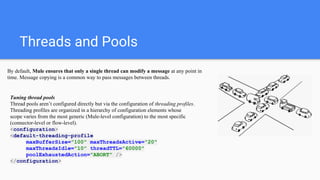
By default, Mule ensures that only a single thread can modify a message at any point in
time. Message copying is a common way to pass messages between threads.
Tuning thread pools
Thread pools aren’t configured directly but via the configuration of threading profiles.
Threading profiles are organized in a hierarchy of configuration elements whose
scope varies from the most generic (Mule-level configuration) to the most specific
(connector-level or flow-level).
<configuration>
<default-threading-profile
maxBufferSize="100" maxThreadsActive="20"
maxThreadsIdle="10" threadTTL="60000"
poolExhaustedAction="ABORT" />
</configuration>
Possible Threading Scenarios
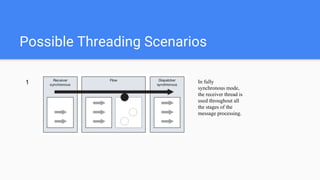
In fully
synchronous mode,
the receiver thread is
used throughout all
the stages of the
message processing.
1
Possible Threading Scenarios
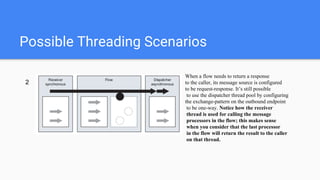
When a flow needs to return a response
to the caller, its message source is configured
to be request-response. It’s still possible
to use the dispatcher thread pool by configuring
the exchange-pattern on the outbound endpoint
to be one-way. Notice how the receiver
thread is used for calling the message
processors in the flow; this makes sense
when you consider that the last processor
in the flow will return the result to the caller
on that thread.
2
Possible Threading Scenarios
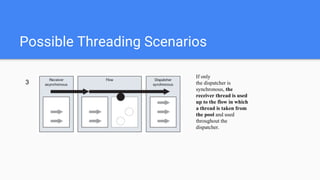
If only
the dispatcher is
synchronous, the
receiver thread is used
up to the flow in which
a thread is taken from
the pool and used
throughout the
dispatcher.
3
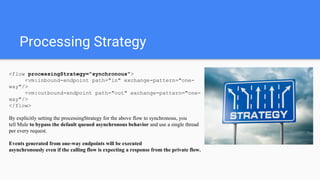
Processing Strategy
<flow processingStrategy="synchronous">
<vm:inbound-endpoint path="in" exchange-pattern="one-
way"/>
<vm:outbound-endpoint path="out" exchange-pattern="one-
way"/>
</flow>
By explicitly setting the processingStrategy for the above flow to synchronous, you
tell Mule to bypass the default queued asynchronous behavior and use a single thread
per every request.
Events generated from one-way endpoints will be executed
asynchronously even if the calling flow is expecting a response from the private flow.
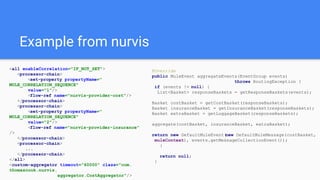
Example from nurvis
<all enableCorrelation="IF_NOT_SET">
<processor-chain>
<set-property propertyName="
MULE_CORRELATION_SEQUENCE"
value="1"/>
<flow-ref name="nurvis-provider-cost"/>
</processor-chain>
<processor-chain>
<set-property propertyName="
MULE_CORRELATION_SEQUENCE"
value="2"/>
<flow-ref name="nurvis-provider-insurance"
/>
</processor-chain>
<processor-chain>
...
</processor-chain>
</all>
<custom-aggregator timeout="60000" class="com.
thomascook.nurvis.
aggregator.CostAggregator"/>
@Override
public MuleEvent aggregateEvents(EventGroup events)
throws RoutingException {
if (events != null) {
List<Basket> responseBaskets = getResponseBaskets(events);
Basket costBasket = getCostBasket(responseBaskets);
Basket insuranceBasket = getInsuranceBasket(responseBaskets);
Basket extraBasket = getLuggageBasket(responseBaskets);
aggregate(costBasket, insuranceBasket, extraBasket);
return new DefaultMuleEvent(new DefaultMuleMessage(costBasket,
muleContext), events.getMessageCollectionEvent());
}
return null;
}
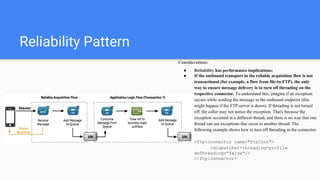
Reliability Pattern
-Do we use it?
-No
-Why?
-Because bapi internal modules designed in a way to support independent use.
So that the external component(like web-api) can call, for instance,
nurvis module directly overpassing the central entry-point(service module)
-Ok, what is it anyway?
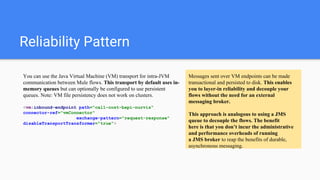
Reliability Pattern
Messages sent over VM endpoints can be made
transactional and persisted to disk. This enables
you to layer-in reliability and decouple your
flows without the need for an external
messaging broker.
This approach is analogous to using a JMS
queue to decouple the flows. The benefit
here is that you don’t incur the administrative
and performance overheads of running
a JMS broker to reap the benefits of durable,
asynchronous messaging.
You can use the Java Virtual Machine (VM) transport for intra-JVM
communication between Mule flows. This transport by default uses in-
memory queues but can optionally be configured to use persistent
queues. Note: VM file persistency does not work on clusters.
<vm:inbound-endpoint path="call-cost-bapi-nurvis"
connector-ref="vmConnector"
exchange-pattern="request-response"
disableTransportTransformer="true">
Reliability Pattern
Considerations:
● Reliability has performance implications;
● If the outbound transport in the reliable acquisition flow is not
transactional (for example, a flow from file-to-FTP), the only
way to ensure message delivery is to turn off threading on the
respective connector. To understand this, imagine if an exception
occurs while sending the message to the outbound endpoint (this
might happen if the FTP server is down). If threading is not turned
off, the caller may not notice the exception. That's because the
exception occurred in a different thread, and there is no way that one
thread can see exceptions that occur in another thread. The
following example shows how to turn off threading in the connector:
<ftp:connector name="ftpConn">
<dispatcher-threading-profile
doThreading="false"/>
</ftp:connector>
Scripting
Mule lets you use any JSR 223–compliant script engine such as Groovy, JavaScript,
Jython, or JRuby to implement custom transformations.
<flow name="rhino-message-enritchment-service">
<inbound-endpoint
address="vm://rhino-message-enritchment-service.in"
exchange-pattern="request-response" />
<scripting:component>
<scripting:script engine="javascript">
<scripting:text>
if (payload.search("STATUS: CRITICAL") != -1) {
message.setProperty("PRIORITY", 'HIGH');
}
result = message
</scripting:text>
</scripting:script>
</scripting:component>
</flow>
Variables made available to a scripting
context:
message
payload
originalPayload
muleContext
eventContext
id
result
*Alternatively a reference to a script can be provided.
Cloud Connectors
Git:
<git:clone uri="git@github.com:mulesoft/s3-connector.git"/>
<git:create-branch name="myexperiment">
<git:push remote="origin"/>
Twitter:
<twitter:update-status config-ref="Amjad" status="#[header:
INBOUND:mymessage]" doc:name="Twitter"/>
SalesForce:
<sfdc:publish-topic name="AccountUpdates" query="SELECT Id FROM
Account"/>
Mule deployment options
1. Embedded(run on a AS of choise, usually JBoss)
Because the context listener took care of starting Mule, you have no reference to the context, unlike the case in which you
bootstrap Mule yourself. This is why the Mule client is instantiated with a context retrieved from the servletContext:
muleContext = (MuleContext) getServletContext()
.getAttribute(MulePropertis.MULE_CONTEXT_PROPERTY);
Also be sure to use Servlet inbound endpoints instead of HTTP inbound endpoints otherwise Mule will open another
HTTP server inside the web container. You want Mule to use the servlet container for its inbound HTTP requests.
2. Standalone(the way we use it in Checkout)
Mule relies on the Java Service Wrapper from Tanuki Software to control its execution.
The Java Service Wrapper enables a Java Application to be run as a Windows Service or UNIX Daemon.
Because of the wrapping nature of the wrapper, the system properties you’ll try to set with the classic -Dkey=value construct will be
applied on the wrapper itself. They won’t be set on the Mule instance that’s wrapped. The solution is to use a specific construct such
as this one: -M-Dkey=value.
Deployment considerations
VM endpoints don’t communicate between
applications
The “VM” part of VM transport mistakenly suggests
virtual machine. Given that many Mule applications can run in the
same Mule standalone server, and therefore in the same Java
Virtual Machine, you may think that you can use VM endpoints to
communicate with applications in the same server. But you would
be wrong.
The VM transport is an in-memory transport, and
therefore each application has a different set of VM endpoints
that are completely local to that application.
Thanks, mates!
Contacts:
yura.nosenko@thomascookonline.com

Mule ESB

  • 1.
    Mule ESB General Muledescription and some Checkout specific examples
  • 2.
  • 3.
    ESB: An enterprise servicebus (ESB) is a "software architecture" model used for designing and implementing communication between mutually interacting software applications in a service-oriented architecture (SOA). An Enterprise Service Bus (ESB) is fundamentally an architecture. It is a set of rules and principles for integrating numerous applications together over a bus-like infrastructure.
  • 4.
    Mule Message Anatomy TheMuleMessage is the object used to pass any kind of data through Mule. It enables generic access to any type of message format an encapsulates properties and attachments associated with the current event being processed. A Mule message consists of three parts: ● the header, which contains sets of named properties, partitioned into scopes ● the payload, which consists of business-specific data ● optional attachments When a message transits in Mule, it is in fact an event (for example, an instance of org.mule.api.MuleEvent) that’s moved around. This event carries not only a reference to the actual message itself (for example, an instance of org.mule.api.Mule- Message), but also the context in which this message is processed.
  • 5.
    MuleStudio ● Graphical drag-and-dropenvironment shrinks on-ramp to days, not weeks ● Visual debugging and auto-documentation speeds project delivery ● Two-way editing between the graphical and XML views eliminates the trade-off between ease-of-use and control ● One-click deployment of applications to the Mule runtime, on-premises or in the cloud
  • 6.
    What is muleflow? A flow is the construct within which you link together several individual elements to handle the receipt, processing, and eventual routing of a message. You can connect many flows together to build a complete application which you can then deploy on premise, on Mule or another application server, or in the cloud. At the simplest level, flows are sequences of message- processing events. A message that enters a flow may pass through a wide variety of processors.
  • 7.
    Subflow vs PrivateFlow? The primary reason for using a private flow instead of a subflow is to define in it a different exception strategy from the calling flow (something that is impossible with a subflow). Another reason is that subflows aren’t materialized at runtime and, as such, don’t have specific statistics or debug properties attached to them and can’t be controlled or monitored independently. Private flows offer all this.
  • 8.
    Composite message source <vm:inbound-endpointpath="payment-processor" /> <composite-source> <jms:inbound-endpoint queue="payment-processor" /> <http:inbound-endpoint host="localhost" port="8080" path="payment-processor" /> </composite-source> While not common, generic endpoints that aren’t prefixed with a transport’s namespace can be used. This might be useful if you want to use a different transport depending on the environment (for example, using the VM transport instead of the JMS transport depending on where the app is deployed).
  • 9.
    Checkout flow example <flowname="tccom-book"> <http:inbound-endpoint address="http://${tccom.endpoint.host}:${tccom. endpoint.port}/${tccom.endpoint.version}/book" connector-ref="httpConnector" exchange-pattern="request-response" method="POST" mimeType="application/json" > <filter ref="correlationIdFilter"/> </http:inbound-endpoint> <byte-array-to-string-transformer/> <transformer ref="jsonToBasket"/> <flow-ref name="tosca-book" /> <!-- add Direct Debit Details to the basket --> <transformer ref="goCardlessDetailsTransformer"/> <transformer ref="basketToJson"/> <!-- EXCEPTION STRATEGY --> <catch-exception-strategy enableNotifications="false"> <flow-ref name="errorHandling" /> </catch-exception-strategy> </flow>
  • 10.
    MEL It’s valid toplace several statements in the same expression, as long as they’re separated by semicolons. The value of the last statement is used as the value of the whole expression. For example, evaluating the following expression: targetDir = new java.io.File(server.tmpDir, 'target'); targetDir.mkdir(); targetDir returns targetDir as a java.io.File (and also ensures that it exists). With MEL, you can do the following: ● Use any Java class available on the classpath; ● Easily navigate lists, maps, arrays, and bean properties; ● Express complex logic, including ternary expressions; ● Define local variables and use them in statements; #[message.inboundProperties.'locale' == 'en_us']
  • 11.
    Inheritance in Components <pattern:validatorname="abstract-parent-validator" abstract="true" ackExpression="#['Message accepted.']" nackExpression="#['Message rejected.']" /> <pattern:validator name="integer-service-validator" parent="abstract-parent-validator" inboundAddress="vm://integer-service.in" outboundAddress="vm://real-integer-service.in"> <payload-type- filter expectedType="java.lang.Integer" /> </pattern:validator>
  • 12.
    Mule message scopes Mulehas the following scopes: 1. Inbound - properties/headers coming from the client's request 2. Invocation - used mostly internally by Mule for the duration of this service's call, not typically utilized nor meant for end-user. They are strictly bound to a flow. 3. Outbound - values deemed to be sent out from this service. They become either request properties for the next service, or response properties in case of a synchronous invocation 4. Session - values which are passed from invocation to invocation. This scope is bound to the in-flight message and can therefore span multiple flows, as it follows the message through them (think of Java’s ThreadLocal mechanism but with a MessageLocal twist).
  • 13.
    A bit moreon Message Scopes When using http endpoints Mule session is stored as a custom http header so there are some limitations in header size. HTTP specification does not limit length of headers at all. However web- servers do limit header size they accept, throwing “413 Entity Too Large” if it exceeds or you can also get a java.io. SocketException: Broken Pipe in the client side
  • 14.
    What is Sessionin Mule? The mule session has nothing to do with the Java EE session that is shared across threads. Mule Session Properties ● Session Properties can be set by you. ● Session properties are preserved when crossing a “transport barrier”.
  • 15.
    Component Lifecycle Components havea lifecycle like any other object in the Mule registry. Lifecycle can be configured by adding one or more lifecycle interfaces to your component. Since Mule 3.0 JSR-250 annotations can be used to configure initialise and destroy methods. ONE INTERFACE TO RULE THEM ALL If your custom object needs to implement the four standard lifecycle interfaces, you can save yourself a lot of typing by implementing org.mule.api. lifecycle.Lifecycle, which extends the four standard ones.
  • 16.
    Component Lifecycle Components havea lifecycle like any other object in the Mule registry. Lifecycle can be configured by adding one or more lifecycle interfaces to your component. Since Mule 3.0 JSR-250 annotations can be used to configure initialise and destroy methods. Lifecycl e Description Interface Annotation initialise The first lifecycle method called once any injectors on the component have been called. This means any properties on the component will be set before the initialise lifecycle is called. org.mule.api.lifecycle.Initialisable javax.annotation.PostConstruct start This is called when the MuleContext is started. org.mule.api.lifecycle.Startable stop This is called when the MuleContext is stopped, or the service that owns this component is stopped. org.mule.api.lifecycle.Stoppable dispose Called as the object is being disposed off. Typically this happens because either the MuleContext is shutting down or the service that wraps this component was unregistered. org.mule.api.lifecycle.Disposible javax.annotation.PreDestroy
  • 17.
    Configuring Java Components Configurationoptions: ● An ObjectFactory is used to obtain the Java service component implementation. ● EntryPointResolvers can be configured to define how Mule services should invoke the component methods when processing a message. ● A custom LifecycleAdaptor can be configured to customize the way in which the component implementation is initialized and disposed. ● Bindings can be configured to bind component interface methods to endpoints. These endpoints are then invoked synchronously when the method is called.
  • 18.
    Object Factories <prototype-object class=..."/>PrototypeObjectFactory <singleton-object class=..."/> SingletonObjectFactory <spring-object bean=..."/> SpringBeanLookup
  • 19.
    Entry Point Resolvers Ata high level, Mule uses three types of Entry Point Resolvers: ● Reflection ● Annotated ● Callable interface The LegacyEntryPointResolverSet is used if no other resolver is configured. It contains a combination of different resolvers.
  • 20.
    Lifecycle Adapters You canconfigure your Java component to use a custom lifecycle adaptor. Example: <component class="org.my.PrototypeObjectWithMyLifecycle"> <custom-lifecycle-adapter-factory class="org.my.MyLifecycleMuleAdapterFactory"/> </component>
  • 21.
    Bindings Components can usebindings to call an external service during execution. The bindings used with a Java component bind a Java interface, or single interface method, to an outbound endpoint. <component> <spring-object bean="toscaCostBinding"/> <binding interface="com.thomascook.tosca.service.cost.CostProviderService" method="callAvailProviderService"> <http:outbound-endpoint name="soa-bapi-tosca-service-avail" address="${bapi.tosca.provider.endpoint}" method="POST" encoding="UTF-8" connector-ref="httpConnector" </http:outbound-endpoint> </binding>
  • 22.
    Transaction Management Mule supportsboth Single Resource transactions as well as XA-transactons: <flow name="transactedMulticastingRouterService" > <jms:inbound-endpoint queue="billingData"> <xa-transaction action="ALWAYS_BEGIN" /> </jms:inbound-endpoint> <component class="com.prancingdonkey.component.BillingService" /> <jdbc:outbound-endpoint connector-ref="operationalDb" queryKey="operationalBillingInsert"> <xa-transaction action="ALWAYS_JOIN" /> </jdbc:outbound-endpoint> <jdbc:outbound-endpoint connector-ref="warehouseDb" queryKey="warehouseBillingInsert"> <xa-transaction action="ALWAYS_JOIN" /> </jdbc:outbound-endpoint> </flow>
  • 23.
    Transaction Management Considerations ConfigurationTips and Tricks ● Operations that occur inside a transaction execute synchronously. You cannot build an asynchronous flow inside a transaction. ● Mule creates a transaction for the first outbound connector that can be part of a transaction (JMS, JDBC, VM). All the outbound connectors in the flow that appear after the first outbound connector, and which use the same type of resource, then participate in the transaction. Where such a following connector does not use the same type of resource (such as where a JDBC connector follows a JMS connector), the transaction initiated by the first outbound connector fails. To avoid execution failure in such a situation, configure the secondary outbound connector outside the transaction by setting the action attribute to NOT_SUPPORTED. ● Mule can manage non-transactional outbound connectors. By default, an outbound connector from a non- transactional transport ignores an active transaction rather than rejecting it. For example, let’s assume here is a file transport in the end of the flow. Mule processes messages it receives from the VM queue synchronously and transactionally. The file transport is not transactional thus, writing to the file is not part of the transaction. However, if a message throws an exception while Mule is creating the file, Mule rolls back the transaction and reprocesses the message.
  • 24.
    JTA USING XA TRANSACTIONSIN A CONTAINER If you’re running Mule embedded in an application that’s deployed in a container, such as an application server or servlet container, you have the option to use the container’s JTA implementation (if one exists). If you need access to a JTA provider that isn’t explicitly supported by Mule, you can use the jndi-transaction-manager. This allows you to specify the JNDI location of a JTA implementation for Mule to use.
  • 25.
    Rolling back Finally, transactionaldemarcators also support the use of exception handlers. For instance, let’s say that you want to log a message when the transaction goes wrong. You can do that by adding a rollback-exception-strategy to the transactional element and including a logger in it: <subflow name="transactionalFlowWithLogger"> <transactional action="BEGIN_OR_JOIN"> <jms:outbound-endpoint queue="billingOrders"/> <jms:outbound-endpoint queue="productionOrders"/> <rollback-exception-strategy> <logger message="Problem in the transaction!" /> </rollback-exception-strategy> </transactional> </subflow>
  • 26.
    Pool or notto Pool components Pooled components decrease throughput. Pools of components are almost always less performant than singletons. Under load there will be contention of threads for objects in the pool. There’s also overhead in growing the pool. Use singleton components unless you have a good reason not to. <pooled-component class="org.my.PrototypeObject"> <pooling-profile exhaustedAction="WHEN_EXHAUSTED_FAIL" initialisationPolicy="INITIALISE_ALL" maxActive="1" maxIdle="2" maxWait="3" /> </pooled-component> Pooling ensures that each component instance will handle only one request at a time. It’s important to understand that this pooling profile, if used, influences the number of requests that can be served simultaneously by the service. Makes sense when:: The component is expensive to create— It’s important that the total number of component object instances remains under control. The component is thread-unsafe—It’s essential to ensure that only one thread at a time will ever enter a particular instance of the component.
  • 27.
  • 28.
    What if weneed to store some data across multiple calls and across multiple messages? Use ObjectStore for this! An object store is a facility for storing objects in Mule. Mule uses object stores whenever it needs data to persist for later retrieval. Internally, Mule uses object stores in various filters, routers, and other message processors that need to store state between messages. In most cases, Mule creates and manages object stores automatically, so no user configuration is necessary. If you want to use a database to persist Mule data, look no further than the org.mule.transport.jdbc.store. JdbcObjectStore.
  • 29.
    Examples of wherepersistence can be very desirable in Mule In most cases, Mule creates and manages object stores for you, so no configuration is necessary. However, you may explicitly configure an object store in the following cases: 1. When configuring a custom component that must use an object store to persist information. 2. When configuring an idempotent message filter or until successful scope. <until-successful objectStore-ref="objectStore" maxRetries="5" secondsBetweenRetries="60"> <outbound-endpoint ref="retriableEndpoint" /> </until-successful> 3. When storing or retrieving information from a Mule flow through the Object Store module, available as an extension. ObjectStore In-memory Persistent
  • 30.
    Storing objects inthe Registry If you need to store runtime data that is available across the application, you can store the data as objects in the Registry . You can get a handle to the Registry from anywhere that you have access to the MuleContext , as in most Mule ESB entities. For example, you could store the object as follows: muleContext.getRegistry().registerObject("foo", new MyFoo()); When using a Spring XML configuration, the registry is created and populated for you. In that case, it’s composed of a Mule-specific transient registry that delegates to a read-only Spring bean factory: private MessageService lookupMessageService(MuleContext muleContext) { return muleContext.getRegistry().lookupObject("MessageServiceNurvis"); } @Service("MessageServiceNurvis") public class MessageServiceNurvis extends AbstractMessageService { … } In terms of software design, dependency injection should be preferred to registry lookups.
  • 31.
    Working with differentpersistence providers Mule has an extensive support for JDBC components(relational DBs) as well as many other non-relationals components. Since mongo is a subject of a lot of watercooler talking in Checkout lately, let’s see how Mule can interact with mongo: <mongo:config name="mongoDB" database="prancingdonkey" username="${mongo.user}" password="${mongo.password}" host="${mongo.host}"/> <jms:activemq-connector name="jmsConnector" specification="1.1" brokerURL="${jms.url}"/> <flow name="saveCoolingAlerts"> <jms:inbound-endpoint topic="cooling.alerts" connector-ref="jmsConnector"/> <mongo:json-to-dbobject/> <mongo:insert-object collection="cooling_alerts" config-ref="mongoDB"/> </flow>
  • 32.
    Threads and Pools Bydefault, Mule ensures that only a single thread can modify a message at any point in time. Message copying is a common way to pass messages between threads. Tuning thread pools Thread pools aren’t configured directly but via the configuration of threading profiles. Threading profiles are organized in a hierarchy of configuration elements whose scope varies from the most generic (Mule-level configuration) to the most specific (connector-level or flow-level). <configuration> <default-threading-profile maxBufferSize="100" maxThreadsActive="20" maxThreadsIdle="10" threadTTL="60000" poolExhaustedAction="ABORT" /> </configuration>
  • 33.
    Possible Threading Scenarios Infully synchronous mode, the receiver thread is used throughout all the stages of the message processing. 1
  • 34.
    Possible Threading Scenarios Whena flow needs to return a response to the caller, its message source is configured to be request-response. It’s still possible to use the dispatcher thread pool by configuring the exchange-pattern on the outbound endpoint to be one-way. Notice how the receiver thread is used for calling the message processors in the flow; this makes sense when you consider that the last processor in the flow will return the result to the caller on that thread. 2
  • 35.
    Possible Threading Scenarios Ifonly the dispatcher is synchronous, the receiver thread is used up to the flow in which a thread is taken from the pool and used throughout the dispatcher. 3
  • 36.
    Processing Strategy <flow processingStrategy="synchronous"> <vm:inbound-endpointpath="in" exchange-pattern="one- way"/> <vm:outbound-endpoint path="out" exchange-pattern="one- way"/> </flow> By explicitly setting the processingStrategy for the above flow to synchronous, you tell Mule to bypass the default queued asynchronous behavior and use a single thread per every request. Events generated from one-way endpoints will be executed asynchronously even if the calling flow is expecting a response from the private flow.
  • 37.
    Example from nurvis <allenableCorrelation="IF_NOT_SET"> <processor-chain> <set-property propertyName=" MULE_CORRELATION_SEQUENCE" value="1"/> <flow-ref name="nurvis-provider-cost"/> </processor-chain> <processor-chain> <set-property propertyName=" MULE_CORRELATION_SEQUENCE" value="2"/> <flow-ref name="nurvis-provider-insurance" /> </processor-chain> <processor-chain> ... </processor-chain> </all> <custom-aggregator timeout="60000" class="com. thomascook.nurvis. aggregator.CostAggregator"/> @Override public MuleEvent aggregateEvents(EventGroup events) throws RoutingException { if (events != null) { List<Basket> responseBaskets = getResponseBaskets(events); Basket costBasket = getCostBasket(responseBaskets); Basket insuranceBasket = getInsuranceBasket(responseBaskets); Basket extraBasket = getLuggageBasket(responseBaskets); aggregate(costBasket, insuranceBasket, extraBasket); return new DefaultMuleEvent(new DefaultMuleMessage(costBasket, muleContext), events.getMessageCollectionEvent()); } return null; }
  • 38.
    Reliability Pattern -Do weuse it? -No -Why? -Because bapi internal modules designed in a way to support independent use. So that the external component(like web-api) can call, for instance, nurvis module directly overpassing the central entry-point(service module) -Ok, what is it anyway?
  • 39.
    Reliability Pattern Messages sentover VM endpoints can be made transactional and persisted to disk. This enables you to layer-in reliability and decouple your flows without the need for an external messaging broker. This approach is analogous to using a JMS queue to decouple the flows. The benefit here is that you don’t incur the administrative and performance overheads of running a JMS broker to reap the benefits of durable, asynchronous messaging. You can use the Java Virtual Machine (VM) transport for intra-JVM communication between Mule flows. This transport by default uses in- memory queues but can optionally be configured to use persistent queues. Note: VM file persistency does not work on clusters. <vm:inbound-endpoint path="call-cost-bapi-nurvis" connector-ref="vmConnector" exchange-pattern="request-response" disableTransportTransformer="true">
  • 40.
    Reliability Pattern Considerations: ● Reliabilityhas performance implications; ● If the outbound transport in the reliable acquisition flow is not transactional (for example, a flow from file-to-FTP), the only way to ensure message delivery is to turn off threading on the respective connector. To understand this, imagine if an exception occurs while sending the message to the outbound endpoint (this might happen if the FTP server is down). If threading is not turned off, the caller may not notice the exception. That's because the exception occurred in a different thread, and there is no way that one thread can see exceptions that occur in another thread. The following example shows how to turn off threading in the connector: <ftp:connector name="ftpConn"> <dispatcher-threading-profile doThreading="false"/> </ftp:connector>
  • 41.
    Scripting Mule lets youuse any JSR 223–compliant script engine such as Groovy, JavaScript, Jython, or JRuby to implement custom transformations. <flow name="rhino-message-enritchment-service"> <inbound-endpoint address="vm://rhino-message-enritchment-service.in" exchange-pattern="request-response" /> <scripting:component> <scripting:script engine="javascript"> <scripting:text> if (payload.search("STATUS: CRITICAL") != -1) { message.setProperty("PRIORITY", 'HIGH'); } result = message </scripting:text> </scripting:script> </scripting:component> </flow> Variables made available to a scripting context: message payload originalPayload muleContext eventContext id result *Alternatively a reference to a script can be provided.
  • 42.
    Cloud Connectors Git: <git:clone uri="git@github.com:mulesoft/s3-connector.git"/> <git:create-branchname="myexperiment"> <git:push remote="origin"/> Twitter: <twitter:update-status config-ref="Amjad" status="#[header: INBOUND:mymessage]" doc:name="Twitter"/> SalesForce: <sfdc:publish-topic name="AccountUpdates" query="SELECT Id FROM Account"/>
  • 43.
    Mule deployment options 1.Embedded(run on a AS of choise, usually JBoss) Because the context listener took care of starting Mule, you have no reference to the context, unlike the case in which you bootstrap Mule yourself. This is why the Mule client is instantiated with a context retrieved from the servletContext: muleContext = (MuleContext) getServletContext() .getAttribute(MulePropertis.MULE_CONTEXT_PROPERTY); Also be sure to use Servlet inbound endpoints instead of HTTP inbound endpoints otherwise Mule will open another HTTP server inside the web container. You want Mule to use the servlet container for its inbound HTTP requests. 2. Standalone(the way we use it in Checkout) Mule relies on the Java Service Wrapper from Tanuki Software to control its execution. The Java Service Wrapper enables a Java Application to be run as a Windows Service or UNIX Daemon. Because of the wrapping nature of the wrapper, the system properties you’ll try to set with the classic -Dkey=value construct will be applied on the wrapper itself. They won’t be set on the Mule instance that’s wrapped. The solution is to use a specific construct such as this one: -M-Dkey=value.
  • 44.
    Deployment considerations VM endpointsdon’t communicate between applications The “VM” part of VM transport mistakenly suggests virtual machine. Given that many Mule applications can run in the same Mule standalone server, and therefore in the same Java Virtual Machine, you may think that you can use VM endpoints to communicate with applications in the same server. But you would be wrong. The VM transport is an in-memory transport, and therefore each application has a different set of VM endpoints that are completely local to that application.
  • 45.