Presented by:
Thamishetti harika
Jan 20 2017
MULE ESB
Agenda
What is Integration?
What is ESB?and Why?
ESB in SOA
When to use ESB and When Not to use?
Why Mule ESB?
Mule Flow
Mule Message
Mule Studio Building Blocks
Mule Management
Console(MMC)
© Copyright 2013. Apps 2
Integration
© Copyright 2013. Apps 3
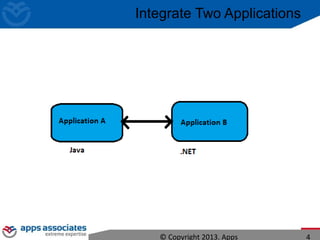
Integrate Two Applications
© Copyright 2013. Apps 4
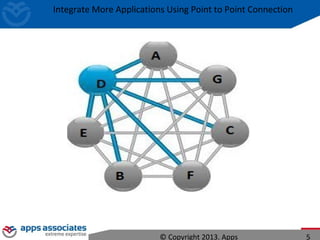
Integrate More Applications Using Point to Point Connection
© Copyright 2013. Apps 5
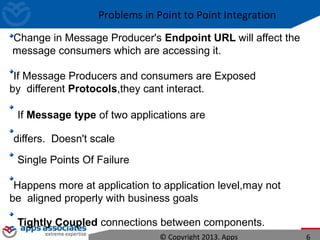
Problems in Point to Point Integration
Change in Message Producer's Endpoint URL will affect the
message consumers which are accessing it.
If Message Producers and consumers are Exposed
by different Protocols,they cant interact.
If Message type of two applications are
differs. Doesn't scale
Single Points Of Failure
Happens more at application to application level,may not
be aligned properly with business goals
Tightly Coupled connections between components.
© Copyright 2013. Apps 6
Enterprise Service Bus
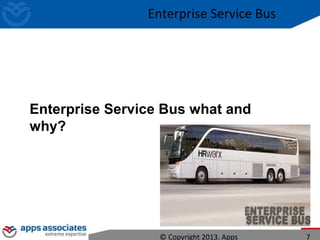
Enterprise Service Bus what and
why?
© Copyright 2013. Apps 7
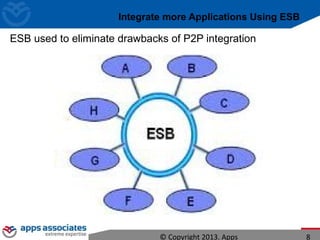
Integrate more Applications Using ESB
ESB used to eliminate drawbacks of P2P integration
© Copyright 2013. Apps 8
Common Integration Requirements
Adapters
Transformation
Routing
Filtering
© Copyright 2013. Apps 9
Enterprise Service Bus
An enterprise service bus (ESB) is a software architecture for middleware that
provides fundamental services for more complex architectures.
Large IT organizations increasingly face the challenge of integrating various
web services, applications, and other technologies into a single network.
The ESB pattern enables the connection of software running in parallel on
different platforms, written in different programming languages and using
different programming models.
Mediator VS ESB
One advantage of connecting clients and services via an enterprise
service bus is that clients need only look for services in a single location.
Lot of Design patterns in ESB.
© Copyright 2013. Apps 10
ESB in SOA Architecture
© Copyright 2013. Apps 11
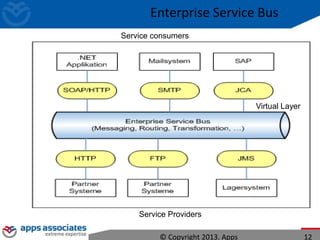
Enterprise Service Bus
Service Providers
© Copyright 2013. Apps 12
Service consumers
Virtual Layer
Enterprise Service Bus
When to Use ESB and
When Not to Use?
© Copyright 2013. Apps 13
Enterprise Service Bus
NOT TO ESB
I'm Only Using Web services.
I just Need FTP and a file transfer only.
We need access to a message queue.
We need only Two Integration Points.
Web services frameworks are very good at handling
HTTP and SOAP
© Copyright 2013. Apps 14
Enterprise Service Bus
What are the
different ESBs in
Market?
© Copyright 2013. Apps 15
Enterprise Service Bus
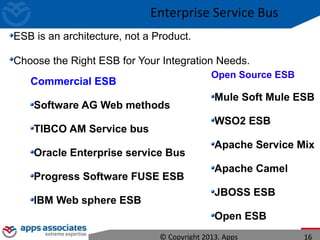
Commercial ESB
Software AG Web methods
TIBCO AM Service bus
Oracle Enterprise service Bus
Progress Software FUSE ESB
IBM Web sphere ESB
Open Source ESB
Mule Soft Mule ESB
WSO2 ESB
Apache Service Mix
Apache Camel
JBOSS ESB
Open ESB
ESB is an architecture, not a Product.
Choose the Right ESB for Your Integration Needs.
© Copyright 2013. Apps 16
Enterprise Service Bus
Why MULE ESB?
Founder
Ross Mason,2006
© Copyright 2013. Apps 17
MULE ESB
The world’s most used enterprise service bus. With over 3,200
production deployments in mission-critical environments and an
active road map for future development and support.
Mule ESB takes the complexity out of integration, enabling
developers to easily build high-performance, secure, multi-protocol
interactions between heterogeneous systems and services.
It´s Open
It´s Light and it´s Fast:
It´s Developer
friendly: It´s Cloud
ready:
© Copyright 2013. Apps 18
MULE ESB
Mule has been designed to provide a simple, powerful model of wiring POJO (Plain
Old Java Object) services together using endpoints
Mule is a messaging platform.
Ease of use – services can be configured easily in one configuration file
. The heart of the system, the messaging bus, is what routes messages
between endpoints.
Extensive data transformations out of the box
Small footprint: memory and disk, no application server
required
These endpoints provide a simple and consistent interface to vastly disparate
technologies such as JMS, SMTP, JDBC, TCP, HTTP,IMAP,JMS, FILE,FTP,JMS etc.
Mule allows us to quickly develop components and then change the way they behave
through configuration instead of coding.
Through Mule ESB we can integrate third party application like LinkedIn,
Twitter, Facebook and we can expose and consume web services also.(SOAP
& REST) © Copyright 2013. Apps 19
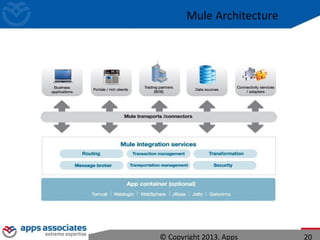
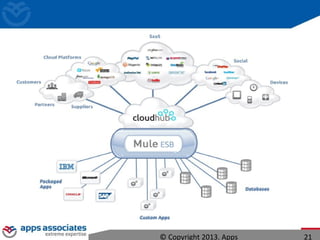
Mule Architecture
© Copyright 2013. Apps 20
© Copyright 2013. Apps 21
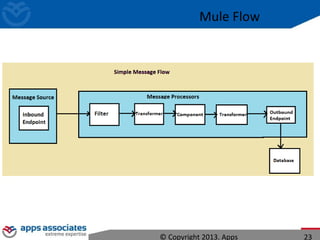
Mule Flow
© Copyright 2013. Apps 22
Mule Flow
© Copyright 2013. Apps 23
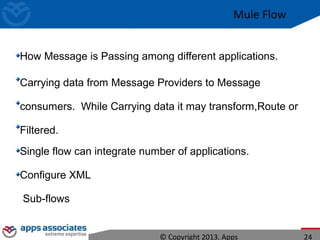
How Message is Passing among different applications.
Carrying data from Message Providers to Message
consumers. While Carrying data it may transform,Route or
Filtered.
Single flow can integrate number of applications.
Configure XML
Sub-flows
© Copyright 2013. Apps 24
Mule Flow
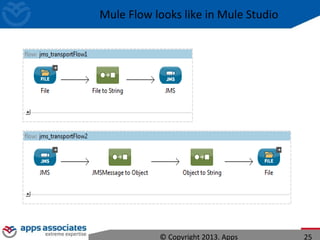
Mule Flow looks like in Mule Studio
© Copyright 2013. Apps 25
Mule Message
© Copyright 2013. Apps 26
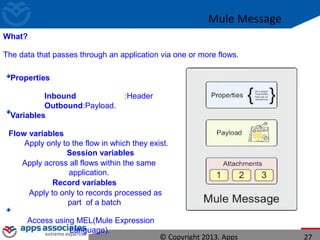
Mule Message
What?
The data that passes through an application via one or more flows.
Properties
Inbound :Header
Outbound:Payload.
Variables
Flow variables
Apply only to the flow in which they exist.
Session variables
Apply across all flows within the same
application.
Record variables
Apply to only to records processed as
part of a batch
Access using MEL(Mule Expression
Language).
© Copyright 2013. Apps 27
How To Work with MULE ESB
© Copyright 2013. Apps 28
To Editions In MuleSoft to Work With Mule Studio IDE.
Community Edition : 80 % of features available for Free.
Enterprise Edition : 20 % of features are Licensed.
Download
Mule Studio IDE
Mule Management Console(MMC)
The java and mule environment variables must be setup correctly for mule to start.
MULE_HOME - should be the location of the mule install
JAVA_HOME - should be the location of the JDK
PATH - should have both JAVA_HOMEbin and MULE_HOMEbin in the path.
© Copyright 2013. Apps 29
MULE Environment
Mule Studio
© Copyright 2013. Apps 30
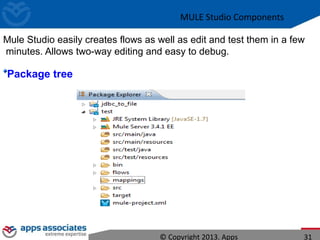
Mule Studio easily creates flows as well as edit and test them in a few
minutes. Allows two-way editing and easy to debug.
Package tree
MULE Studio Components
© Copyright 2013. Apps 31
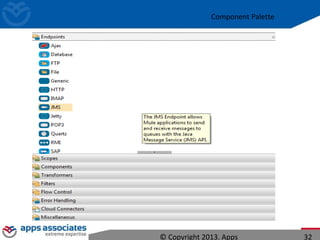
Component Palette
© Copyright 2013. Apps 32
Mule
Components
© Copyright 2013. Apps 33
Palette
Endpoints
It is an object on which services will receive (inbound)
and send (outbound) message.
Messaging Styles
Asynchronous : Fire and forget a message to a
service Synchronous: Request-Response
Components
Message Processors Execute Logic on
messages. Scripting/Web-service/HTTP/Other
components.
Scopes
Encapsulate other message processors so that
they function as a single unit.
Mule Component Palette
© Copyright 2013. Apps 34
Transformers
Convert data from one format to another.
Filters
Filters decide which Mule messages are processed
Flow Control
To direct or otherwise control messages within a flow.
Act as splitters or aggregators, splitting messages
Error Handling
Errors, or faults, that occur within Mule are referred to as
exceptions.
Mule Enterprise Security
Restrict access based on client IP addresses Leverage proven
security standards such as SAML, Oauth,and
WSSecurity,LDAP authentication.
Global Elements
Configure once, then reference many times from
elements within multiple flows.
We can refer this global component using Connector-ref
attribute.
© Copyright 2013. Apps 35
Mule Component Palette
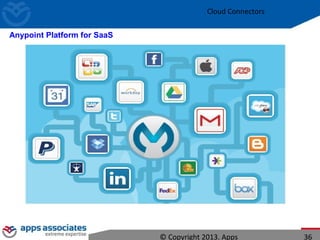
Cloud Connectors
© Copyright 2013. Apps 36
Anypoint Platform for SaaS
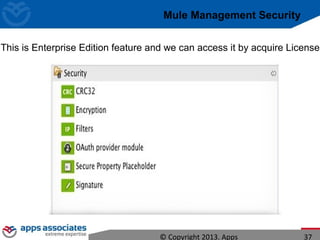
Mule Management Security
This is Enterprise Edition feature and we can access it by acquire License
© Copyright 2013. Apps 37
Mule Management Console
© Copyright 2013. Apps 38
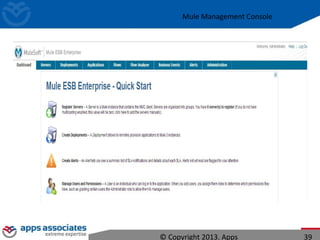
Mule Management Console
© Copyright 2013. Apps 39
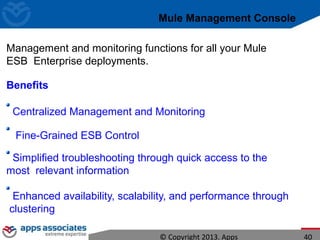
Mule Management Console
Management and monitoring functions for all your Mule
ESB Enterprise deployments.
Benefits
Centralized Management and Monitoring
Fine-Grained ESB Control
Simplified troubleshooting through quick access to the
most relevant information
Enhanced availability, scalability, and performance through
clustering
© Copyright 2013. Apps 40
References
http://www.mulesoft.org/
Forum:
http://forum.mulesoft.org/mulesoft
https://www.facebook.com/MuleSoft
© Copyright 2013. Apps 41
Thank you

Muleesb

  • 1.
  • 2.
    Agenda What is Integration? Whatis ESB?and Why? ESB in SOA When to use ESB and When Not to use? Why Mule ESB? Mule Flow Mule Message Mule Studio Building Blocks Mule Management Console(MMC) © Copyright 2013. Apps 2
  • 3.
  • 4.
    Integrate Two Applications ©Copyright 2013. Apps 4
  • 5.
    Integrate More ApplicationsUsing Point to Point Connection © Copyright 2013. Apps 5
  • 6.
    Problems in Pointto Point Integration Change in Message Producer's Endpoint URL will affect the message consumers which are accessing it. If Message Producers and consumers are Exposed by different Protocols,they cant interact. If Message type of two applications are differs. Doesn't scale Single Points Of Failure Happens more at application to application level,may not be aligned properly with business goals Tightly Coupled connections between components. © Copyright 2013. Apps 6
  • 7.
    Enterprise Service Bus EnterpriseService Bus what and why? © Copyright 2013. Apps 7
  • 8.
    Integrate more ApplicationsUsing ESB ESB used to eliminate drawbacks of P2P integration © Copyright 2013. Apps 8
  • 9.
  • 10.
    Enterprise Service Bus Anenterprise service bus (ESB) is a software architecture for middleware that provides fundamental services for more complex architectures. Large IT organizations increasingly face the challenge of integrating various web services, applications, and other technologies into a single network. The ESB pattern enables the connection of software running in parallel on different platforms, written in different programming languages and using different programming models. Mediator VS ESB One advantage of connecting clients and services via an enterprise service bus is that clients need only look for services in a single location. Lot of Design patterns in ESB. © Copyright 2013. Apps 10
  • 11.
    ESB in SOAArchitecture © Copyright 2013. Apps 11 Enterprise Service Bus
  • 12.
    Service Providers © Copyright2013. Apps 12 Service consumers Virtual Layer Enterprise Service Bus
  • 13.
    When to UseESB and When Not to Use? © Copyright 2013. Apps 13 Enterprise Service Bus
  • 14.
    NOT TO ESB I'mOnly Using Web services. I just Need FTP and a file transfer only. We need access to a message queue. We need only Two Integration Points. Web services frameworks are very good at handling HTTP and SOAP © Copyright 2013. Apps 14 Enterprise Service Bus
  • 15.
    What are the differentESBs in Market? © Copyright 2013. Apps 15 Enterprise Service Bus
  • 16.
    Commercial ESB Software AGWeb methods TIBCO AM Service bus Oracle Enterprise service Bus Progress Software FUSE ESB IBM Web sphere ESB Open Source ESB Mule Soft Mule ESB WSO2 ESB Apache Service Mix Apache Camel JBOSS ESB Open ESB ESB is an architecture, not a Product. Choose the Right ESB for Your Integration Needs. © Copyright 2013. Apps 16 Enterprise Service Bus
  • 17.
    Why MULE ESB? Founder RossMason,2006 © Copyright 2013. Apps 17
  • 18.
    MULE ESB The world’smost used enterprise service bus. With over 3,200 production deployments in mission-critical environments and an active road map for future development and support. Mule ESB takes the complexity out of integration, enabling developers to easily build high-performance, secure, multi-protocol interactions between heterogeneous systems and services. It´s Open It´s Light and it´s Fast: It´s Developer friendly: It´s Cloud ready: © Copyright 2013. Apps 18
  • 19.
    MULE ESB Mule hasbeen designed to provide a simple, powerful model of wiring POJO (Plain Old Java Object) services together using endpoints Mule is a messaging platform. Ease of use – services can be configured easily in one configuration file . The heart of the system, the messaging bus, is what routes messages between endpoints. Extensive data transformations out of the box Small footprint: memory and disk, no application server required These endpoints provide a simple and consistent interface to vastly disparate technologies such as JMS, SMTP, JDBC, TCP, HTTP,IMAP,JMS, FILE,FTP,JMS etc. Mule allows us to quickly develop components and then change the way they behave through configuration instead of coding. Through Mule ESB we can integrate third party application like LinkedIn, Twitter, Facebook and we can expose and consume web services also.(SOAP & REST) © Copyright 2013. Apps 19
  • 20.
  • 21.
  • 22.
  • 23.
  • 24.
    How Message isPassing among different applications. Carrying data from Message Providers to Message consumers. While Carrying data it may transform,Route or Filtered. Single flow can integrate number of applications. Configure XML Sub-flows © Copyright 2013. Apps 24 Mule Flow
  • 25.
    Mule Flow lookslike in Mule Studio © Copyright 2013. Apps 25
  • 26.
  • 27.
    Mule Message What? The datathat passes through an application via one or more flows. Properties Inbound :Header Outbound:Payload. Variables Flow variables Apply only to the flow in which they exist. Session variables Apply across all flows within the same application. Record variables Apply to only to records processed as part of a batch Access using MEL(Mule Expression Language). © Copyright 2013. Apps 27
  • 28.
    How To Workwith MULE ESB © Copyright 2013. Apps 28
  • 29.
    To Editions InMuleSoft to Work With Mule Studio IDE. Community Edition : 80 % of features available for Free. Enterprise Edition : 20 % of features are Licensed. Download Mule Studio IDE Mule Management Console(MMC) The java and mule environment variables must be setup correctly for mule to start. MULE_HOME - should be the location of the mule install JAVA_HOME - should be the location of the JDK PATH - should have both JAVA_HOMEbin and MULE_HOMEbin in the path. © Copyright 2013. Apps 29 MULE Environment
  • 30.
  • 31.
    Mule Studio easilycreates flows as well as edit and test them in a few minutes. Allows two-way editing and easy to debug. Package tree MULE Studio Components © Copyright 2013. Apps 31
  • 32.
  • 33.
    Mule Components © Copyright 2013.Apps 33 Palette Endpoints It is an object on which services will receive (inbound) and send (outbound) message. Messaging Styles Asynchronous : Fire and forget a message to a service Synchronous: Request-Response Components Message Processors Execute Logic on messages. Scripting/Web-service/HTTP/Other components. Scopes Encapsulate other message processors so that they function as a single unit.
  • 34.
    Mule Component Palette ©Copyright 2013. Apps 34 Transformers Convert data from one format to another. Filters Filters decide which Mule messages are processed Flow Control To direct or otherwise control messages within a flow. Act as splitters or aggregators, splitting messages Error Handling Errors, or faults, that occur within Mule are referred to as exceptions.
  • 35.
    Mule Enterprise Security Restrictaccess based on client IP addresses Leverage proven security standards such as SAML, Oauth,and WSSecurity,LDAP authentication. Global Elements Configure once, then reference many times from elements within multiple flows. We can refer this global component using Connector-ref attribute. © Copyright 2013. Apps 35 Mule Component Palette
  • 36.
    Cloud Connectors © Copyright2013. Apps 36 Anypoint Platform for SaaS
  • 37.
    Mule Management Security Thisis Enterprise Edition feature and we can access it by acquire License © Copyright 2013. Apps 37
  • 38.
    Mule Management Console ©Copyright 2013. Apps 38
  • 39.
    Mule Management Console ©Copyright 2013. Apps 39
  • 40.
    Mule Management Console Managementand monitoring functions for all your Mule ESB Enterprise deployments. Benefits Centralized Management and Monitoring Fine-Grained ESB Control Simplified troubleshooting through quick access to the most relevant information Enhanced availability, scalability, and performance through clustering © Copyright 2013. Apps 40
  • 41.
  • 42.