MSc BIMM Oct 2014 
Finding research evidence 
http:// unihub.mdx.ac.uk / study / library
In this workshop we will look at... 
• How to find information 
• Developing an effective search strategy 
• Resources available and how to use them 
• Evaluating information for quality and relevance 
• Managing references
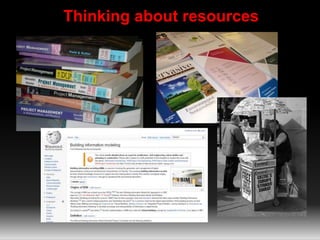
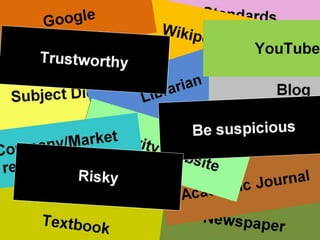
Thinking about resources
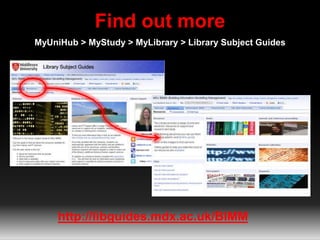
Find out more 
MyUniHub > MyStudy > MyLibrary > Library Subject Guides 
http://libguides.mdx.ac.uk/BIMM
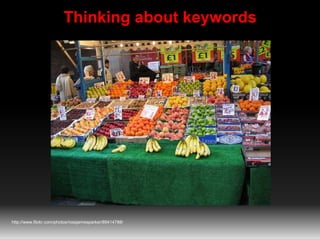
Thinking about keywords 
http://www.flickr.com/photos/rossjamesparker/89414788/
The real thing 
Management of Building Information Modelling 
•Keywords 
•Alternative keywords 
•More specific keywords 
•Related subjects
So far so good 
So far we’ve looked at: 
• The range of resources available 
• Choosing the right resource 
• Coming up with useful keywords 
Next: 
• Searching and evaluating information
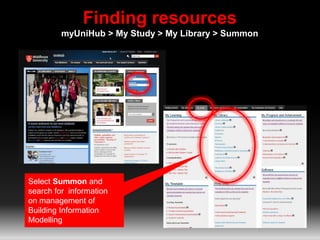
Finding resources 
myUniHub > My Study > My Library > Summon 
Select Summon and 
search for information 
on management of 
Building Information 
Modelling
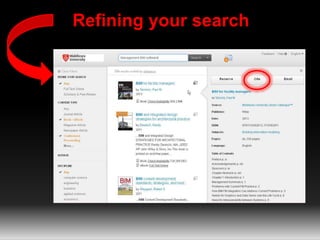
Refining your search
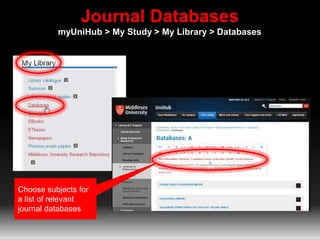
Journal Databases 
myUniHub > My Study > My Library > Databases 
Choose subjects for 
a list of relevant 
journal databases
Summon and journal databases provide: 
• Access to quality information 
• Information not available elsewhere 
• Up-to-date 
• Focussed/specific 
• Full-text access 
• Access on/off campus 
• Personalize 
• Citation and journal impact info
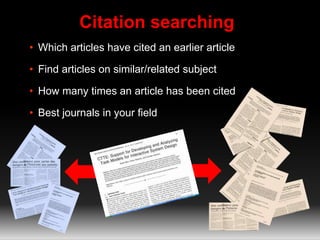
Citation searching 
• Which articles have cited an earlier article 
• Find articles on similar/related subject 
• How many times an article has been cited 
• Best journals in your field
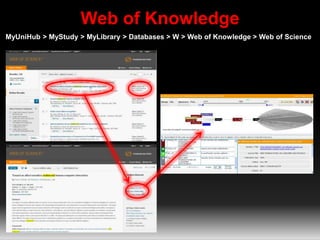
Web of Knowledge 
MyUniHub > MyStudy > MyLibrary > Databases > W > Web of Knowledge > Web of Science
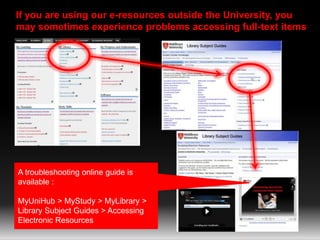
If you are using our e-resources outside the University, you 
may sometimes experience problems accessing full-text items 
A troubleshooting online guide is 
available : 
MyUniHub > MyStudy > MyLibrary > 
Library Subject Guides > Accessing 
Electronic Resources
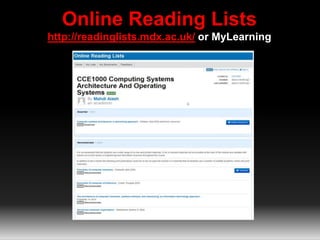
Online Reading Lists 
http://readinglists.mdx.ac.uk/ or MyLearning
Keeping up-to-date with your subject 
• Zetoc Alert 
• TicTOC 
• Google Alerts 
More information on Library Subject Guide: 
http://bit.ly/KeepingCurrentBIMM
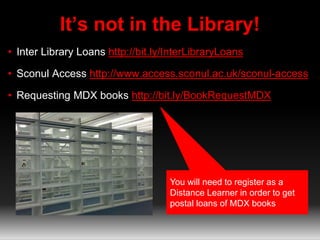
It’s not in the Library! 
• Inter Library Loans http://bit.ly/InterLibraryLoans 
• Sconul Access http://www.access.sconul.ac.uk/sconul-access 
• Requesting MDX books http://bit.ly/BookRequestMDX 
You will need to register as a 
Distance Learner in order to get 
postal loans of MDX books
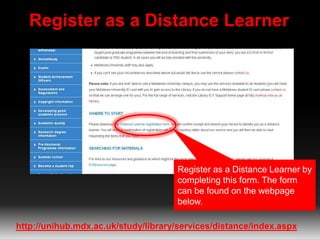
Register as a Distance Learner 
Register as a Distance Learner by 
completing this form. The form 
can be found on the webpage 
below. 
http://unihub.mdx.ac.uk/study/library/services/distance/index.aspx
But is it any good?
Evaluating information 
Imagine you are writing an essay on project management 
Have a look at the 4 items that you have been given and consider 
the following: 
• Which items are the most relevant? 
• Which items would be no use? 
• Which item has the most academic authority? 
• Which items might have bias? 
• Which item is the most current?
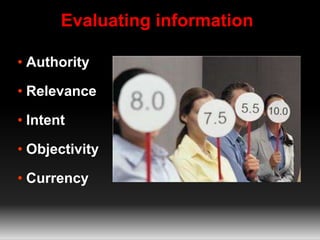
Evaluating information 
• Authority 
• Relevance 
• Intent 
• Objectivity 
• Currency
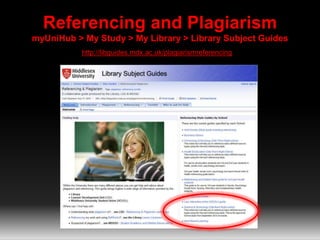
Referencing and Plagiarism 
myUniHub > My Study > My Library > Library Subject Guides 
http://libguides.mdx.ac.uk/plagiarismreferencing
Managing your references 
• Use bibliographic management software 
• RefWorks and Flow 
• http://bit.ly/BibManSoftwareMDX
Keeping in touch 
• Librarian Blog http://satlibrarian.blogspot.com 
• Librarian Twitter http://twitter.com/SATlibrarian 
• Library Facebook Middlesex University Library 
• Library Twitter http://twitter.com/MDXLibrary
Need more help? 
Vanessa Hill v.hill@mdx.ac.uk 
UniHelp http://unihub.mdx.ac.uk/support/unihelp/ 
Distance Support http://unihub.mdx.ac.uk/study/library/services/distance/

MSc BIMM Oct2014

  • 1.
    MSc BIMM Oct2014 Finding research evidence http:// unihub.mdx.ac.uk / study / library
  • 2.
    In this workshopwe will look at... • How to find information • Developing an effective search strategy • Resources available and how to use them • Evaluating information for quality and relevance • Managing references
  • 3.
  • 5.
    Find out more MyUniHub > MyStudy > MyLibrary > Library Subject Guides http://libguides.mdx.ac.uk/BIMM
  • 6.
    Thinking about keywords http://www.flickr.com/photos/rossjamesparker/89414788/
  • 7.
    The real thing Management of Building Information Modelling •Keywords •Alternative keywords •More specific keywords •Related subjects
  • 8.
    So far sogood So far we’ve looked at: • The range of resources available • Choosing the right resource • Coming up with useful keywords Next: • Searching and evaluating information
  • 9.
    Finding resources myUniHub> My Study > My Library > Summon Select Summon and search for information on management of Building Information Modelling
  • 10.
  • 11.
    Journal Databases myUniHub> My Study > My Library > Databases Choose subjects for a list of relevant journal databases
  • 12.
    Summon and journaldatabases provide: • Access to quality information • Information not available elsewhere • Up-to-date • Focussed/specific • Full-text access • Access on/off campus • Personalize • Citation and journal impact info
  • 13.
    Citation searching •Which articles have cited an earlier article • Find articles on similar/related subject • How many times an article has been cited • Best journals in your field
  • 14.
    Web of Knowledge MyUniHub > MyStudy > MyLibrary > Databases > W > Web of Knowledge > Web of Science
  • 15.
    If you areusing our e-resources outside the University, you may sometimes experience problems accessing full-text items A troubleshooting online guide is available : MyUniHub > MyStudy > MyLibrary > Library Subject Guides > Accessing Electronic Resources
  • 16.
    Online Reading Lists http://readinglists.mdx.ac.uk/ or MyLearning
  • 17.
    Keeping up-to-date withyour subject • Zetoc Alert • TicTOC • Google Alerts More information on Library Subject Guide: http://bit.ly/KeepingCurrentBIMM
  • 18.
    It’s not inthe Library! • Inter Library Loans http://bit.ly/InterLibraryLoans • Sconul Access http://www.access.sconul.ac.uk/sconul-access • Requesting MDX books http://bit.ly/BookRequestMDX You will need to register as a Distance Learner in order to get postal loans of MDX books
  • 19.
    Register as aDistance Learner Register as a Distance Learner by completing this form. The form can be found on the webpage below. http://unihub.mdx.ac.uk/study/library/services/distance/index.aspx
  • 20.
    But is itany good?
  • 21.
    Evaluating information Imagineyou are writing an essay on project management Have a look at the 4 items that you have been given and consider the following: • Which items are the most relevant? • Which items would be no use? • Which item has the most academic authority? • Which items might have bias? • Which item is the most current?
  • 22.
    Evaluating information •Authority • Relevance • Intent • Objectivity • Currency
  • 23.
    Referencing and Plagiarism myUniHub > My Study > My Library > Library Subject Guides http://libguides.mdx.ac.uk/plagiarismreferencing
  • 24.
    Managing your references • Use bibliographic management software • RefWorks and Flow • http://bit.ly/BibManSoftwareMDX
  • 25.
    Keeping in touch • Librarian Blog http://satlibrarian.blogspot.com • Librarian Twitter http://twitter.com/SATlibrarian • Library Facebook Middlesex University Library • Library Twitter http://twitter.com/MDXLibrary
  • 26.
    Need more help? Vanessa Hill v.hill@mdx.ac.uk UniHelp http://unihub.mdx.ac.uk/support/unihelp/ Distance Support http://unihub.mdx.ac.uk/study/library/services/distance/

Editor's Notes

  • #2 Thurs 3rd Oct Tutor Noha Saleeb S106 1-3, 3-5pm Collect from Boardroom Welcome and intros.
  • #3 How to find information for your projects How to develop an effective search strategy when you need to find information for an essay or project The range of resources available and how to use them to find good quality and relevant information Evaluating information for quality and relevance Managing references Research from Uni of Huddersfield shows that correlation between library usage and good grades.
  • #4 Hands on exercise: Sources game.
  • #5 Magazine (A regular publication aimed at a profession, business or interest....trade/popular) Good: Latest news: events, jobs, products etc, concise info, easy to obtain Bad: lacks detail, can be bias, old issues hard to come by Standards (An agreed, often legally binding level of quality or way of doing something....regional, Nat, Internat, profession/sector) Good: Created by experts, confidence Company/market research report (Well researched overview of a company or product market. Could contain future trends, financial data, competitors and SWOT analysis) Good: Up-to-date: latest research/data, Insider information: information not freely available elsewhere, objective, accurate Bad: Hard to locate Webpage Good: All subjects covered, easy to use, mobile Bad: accuracy, no editorial control, anyone can add information, provenance Newspapers Good: Daily information ie. up-to-date, edited, current issues accessible Bad: Sensationalist, biased (unbalanced), harder to get back issues Conference proceedings (Collof aca papers distributed after a conference, cont the contributions made by researchers, academics etc) Good: Up-to-date: latest research, ideas, thinking on a subject, focussed/specialist, stringent quality control Bad: Too specific Journals Good: Up-to-date, Focussed: specialist subject areas, quality Bad: Too specific Books Good: overview, background knowledge, edited/quality Bad: Currency, detailed/specific information
  • #6 More information about the range of resources available on the BIMM Library Subject Guide.
  • #7 Group discussion: What can you see in the picture…fruit If type ‘fruit’ into database will get millions of hits, how can you break it down ie. search for something more specific to get more manageable results Can you be more specific ie. Type of fruit: apples, oranges, bananas etc Location: Stall, market, outdoor market, fruit market, Britain Detail: boxes, signs, astroturf, prices, colour of fruit, lights, pound £ signs, special offer etc People in background: old, young, male, female > stall holder, customers, browsers etc Think of related subjects eg. retail, commercial, financial, point-of-sale Shopping, shops, fish/meat/clothes market, shopping centres, high street Town, city, centre, British town Nutrition: vits and mins Also: Orange or Blackberry: fruit NOT telephone Apple: fruit NOT computer Thinking beyond the obvious, looking for the detail that might make a difference.
  • #8 The National Building Information Model Standard Project Committee has the following definition: Building Information Modeling (BIM) is a digital representation of physical and functional characteristics of a facility. A BIM is a shared knowledge resource for information about a facility forming a reliable basis for decisions during its life-cycle; defined as existing from earliest conception to demolition. Keywords: management, building, information, modelling Alternative: BIM, Virtual Building Environment and Virtual Design and Construction (US) Management: coordination, control, decisions Building: facility Information: knowledge, documentation Modelling: modeling, models, virtual building, building process, integrated project models. Specific: Software > Autodesk Revit, Autoscheme etc Stakeholders (design team > Contractors > owners/operators) Building lifecycle: cost m’ment, construction m’ment, project m’ment, facility operation (conception-demolition) Related: Project management, shared knowledge
  • #9 Next……….. Searching and evaluating information
  • #10 Need to carry out a literature review: Finding the information available on a subject Finding information to inform, underpin and shape your research Finding what has already been written on a subject Analyzing, evaluating and making judgements about the info found Identifying the main trends Finding appropriate information: the information needs to be suitable for your need ie. right level, current if important, sufficient breadth or detail etc Explain to students what Summon is. Go to UniHub > Login in to MyUniHub > My Study > My Library > Summon Ask students to search for information for their project. Remember to use some of the keywords that we have discussed.
  • #18 Inter Library Loan service: request copies of books and journals not held by MDX. £3 charge. Register as DL first. More info on our website. SCONUL Access http://www.access.sconul.ac.uk/ The SCONUL Access Scheme provides reciprocal access and borrowing rights for staff and students to approximately 170 member institutions in the UK. Apply online. Requesting MDX books: online guide at this link
  • #19 This will enable you to request books for postal loan
  • #20 How do you decide if the information is any good? Especially important with the Internet. What do you think about this quote?
  • #21  Which items are most relevant: Wikipedia, academic journal, magazine (Newspaper about decorating project) Which items would be no use: Newspaper, Wikipedia, magazine (?) Which item has the most academic authority: Academic journal (refs, citations, language, source, peer reviewed....although doesn’t say on print-out, know who authors are etc. Magazine uses non-aca language, newspaper not from academic source, Wikipedia...... Are any of the items bias: newspaper could be (probably not in this case), Wikipedia could be (sum info, edited favourably etc), magazine has advertising etc Which item is the most current: Magazine Jan 2010,Newspaper Dec 2010,Wikipedia 15th Oct 2012, Academic Journal 2006 Would need to continue search.
  • #22 Take feedback and discuss. Authority : Who is the author? What is their knowledge base/qualifications? How have they carried out their research? Relevance : Is this what I need? Will it answer my question? Is it at the right level? Intent : What is the purpose of information e.g. financial gain, propaganda, academic etc? Objectivity : Balanced view? Opposing views represented? Links to supporting information? Currency: How old is this information? When was it last updated and by whom?
  • #23 Referencing and Plagiarism libguide includes information on how to reference material correctly. Also information about Plato, LDU support and links to helpsheets. Referencing tutorials available on request. EIS LibGuide bring together all the resources for your subject area.
  • #24 RefWorks is online software that helps you collect, store and organise the references you use in your work. It makes producing a reference list or bibliography quick and easy. It is web-based, so you can access your references from anywhere, and you will never loose them if your computer fails.