Azure Migrate
Agenda Azure Migrate overview
Discover, assess, & migrate servers to Azure
Discover servers
Discover applications and dependencies
Assess servers for migration
Assess SQL servers
Migrate servers to Azure
Agentless VMware migrations
Agentless Hyper-V migrations
Agent-based migrations
Migration concepts
Private Link support
App Containerization
01
02
03
04
05
06
07
08
09
10
11
12
13
Multiple scenarios
Coverage for servers
(Windows/Linux), databases,
VDI, web apps, and large
volumes of data
Migration targets include
Azure VMs, AVS, App Service
and Azure SQL
A central hub of tools for your datacenter cloud migration
Azure Migrate
End-to-end visibility
Centralized migration
repository delivering end-to-
end tracking and insights
A central hub of tools for your datacenter cloud migration
Azure Migrate
Diverse capabilities
Comprehensive discovery,
assessment and migration
capabilities powered by Azure
and partner tools
A central hub of tools for your datacenter cloud migration
Azure Migrate
Choice of tools for every stage and every requirement
Servers Databases Web apps VDI Data
Partner tools
Discover, asses & migrate
servers to Azure
For every step of your migration journey
Industry-leading capabilities
Discover Assess
Azure Migrate: Server assessment Azure Migrate: Server migration
Migrate
Unified appliance Dedicated machine No impact to source
Deployment options
Azure Migrate appliance
Web application
interface used to
configure the
appliance
Collects
configuration
data of servers
Collects
performance and
resource utilization
data of servers
Checks and
updates appliance
components (every
24 hrs.)
Orchestrates
server replication
to Azure
Sends replication
data to Azure
Collector
Software components
Azure Migrate appliance
Discover servers
Discover: Capabilities
Any platform Agentless discovery
Inventory applications Visualize dependencies
Deploy
Appliance discovers servers and
server configurations, and collects
performance data (resource
utilizations)
View
For all scenarios
Discovery: Process
VMware Hyper-V Physical/other cloud
Host requirements
• ESXi hosts version (5.5 or later)
vCenter requirements
• vCenter Server version
(5.5, 6, 6.5, 6.7, 7)
• Read-only account
Host requirements
• Windows Server 2012 R2 or later
• PowerShell remoting
• Administrator permissions
For Windows servers
• Local or domain joined account
For Linux servers
• An account with root
permissions
Discovery: Supported versions & pre-requisites
For VMware VMs
Discovery: Architecture
ESXi hosts
Discovered
servers
Azure Migrate
appliance for VMware
vSphere API used Purpose
Login Initializes connection to vCenter/ESXi
RetrieveServiceContent Initializes vSphere management client
RetrievePropertiesEx Retrieve a list of properties specified by the property filter spec.
ContinueRetrievePropertiesEx Retrieve a list of properties specified by the property filter spec.
QueryDvsConfigTarget Gets Distributed Virtual PortGroupInfo on vSphere /ESX host.
CreateContainerView Get the entities from the vCenter
QueryPerfCounterByLevel Get counter information for given levels for vCenter server
QueryPerf Get Performance data points.
vSphere APIs, TCP 443
Azure Migrate
Performance data (20 secs)
Configuration data (30 mins)
HTTPS 443
Performance data (20 secs)
Configuration data (30 mins)
vCenter Server
For Hyper-V VMs
Discovery: Architecture
Discovered
servers
Azure Migrate
appliance for Hyper-V
WinRM 5985
Azure Migrate
Performance data (20 secs)
Configuration data (30 mins)
HTTPS 443
Performance data (20 secs)
Configuration data (30 mins)
Hyper-V hosts
VMs Storage
For physical servers & servers from other clouds (AWS, GCP)
Discovery: Architecture
Physical servers/ AWS VM/GCP
VMs/VMs in other clouds
Discovered
servers
Azure Migrate appliance
for physical servers
Use a non-root account for Linux server discovery
Ensure the required capabilities are set using the following commands:
setcap CAP_DAC_READ_SEARCH+eip /usr/sbin/fdisk
setcap CAP_DAC_READ_SEARCH+eip /sbin/fdisk (if /usr/sbin/fdisk is not present)
setcap "cap_dac_override, cap_dac_read_search, cap_fowner,cap_fsetid, cap_setuid, cap_setpcap,
cap_net_bind_service, cap_net_admin, cap_sys_chroot, cap_sys_admin, cap_sys_resource, cap_audit_control,
cap_setfcap=+eip" /sbin/lvm
setcap CAP_DAC_READ_SEARCH+eip /usr/sbin/dmidecode
chmod a+r /sys/class/dmi/id/product_uuid
Windows (WinRM 5985) Linux ( SSH 22)
Azure Migrate Portal
Performance data (20 secs)
Configuration data (30 mins)
HTTPS 443
Performance data (20 secs)
Configuration data (30 mins)
Physical servers
Configuration data Performance data
Polling interval
Secure Hashing Algorithm SHA 256 (in transit and at rest) SHA 256 (in transit and at rest)
Datastore Azure Cosmos DB in Microsoft subscription Azure Data Explorer in Microsoft subscription
Retention
3 days post VM removal from discovery
Migrate project deletion
Auto-deletion after 30 days;
sooner if Azure Migrate project is deleted
Storage region Any region within Migrate project geography Any region within Migrate project geography
Appliance component used Discovery agent Collector agent
For all scenarios
Discovery: Data management
Deploy configure
Appliance discovers servers and
server configurations, and collects
performance data (resource
utilizations) for Windows, Linux,
Perform assessments to determine
 Readiness for Azure SQL
 Recommended Azure SQL target
 Migration blockers and warnings
 Azure SQL configuration (SKU)
 Estimated monthly cost
SQL discovery: Process
VMware SQL Server
Host requirements
• ESXi hosts version (5.5 or later)
vCenter requirements
• vCenter Server version
(5.5, 6, 6.5, 6.7, 7)
• Read-only account
Configuration
• Standalone SQL Server instances with databases
• Sysadmin server role for accessing SQL servers
• Failover Clusters and Always On availability groups
are not supported
Services
• SQL Server Database Engine
• SQL Server Reporting Services, Integration Services,
Analysis Services are not supported
• Enterprise, Standard, Developer, Web and Express
editions
SQL discovery: Supported versions & pre-requisites
ESXi hosts
SQL instances and
databases
(configuration and
performance data)
Azure Migrate
appliance for VMware
Server discovery
Azure Migrate Portal
Installed apps (24 hrs.)
HTTPS 443
vCenter Server
vCenter account with Virtual
Machines -> Guest
Operations privilege
SQL instances and databases (24 hrs.)
*Data collection for SQL instances:
• Configuration data is collected every 24 hours
• Performance data is collected every 30 seconds
Application
inventory
SQL discovery: Architecture
Configuration data Performance data
Polling interval
Secure Hashing Algorithm SHA 256 (in transit and at rest) SHA 256 (in transit and at rest)
Datastore Azure Cosmos DB in Microsoft subscription Azure Data Explorer in Microsoft subscription
Retention
3 days post SQL instance/ database/ server
removal
Migrate project deletion
Auto-deletion after 30 days
Storage region Any region within Migrate project geography Any region within Migrate project geography
Appliance component used SQL discovery and assessment agent SQL discovery and assessment agent
SQL discovery: Data management
Azure Migrate project
Discovery: Resource Limits
VMware
*Discovery scoping supported
Hyper-V Physical/other cloud
Same project can be used for multiple scenarios
For VMware VMs
Discovery: How to scope
For vCenter >10000
servers
Overlapping VM
discovery leads to
Discover applications and
dependencies
Dependency analysis: Supported versions & pre-requisites
On VMs
On vCenter
Supported VMs
VMware
(agentless) On VMs
On Azure
Supported VMs
Hyper-V/ physical
servers/
other cloud servers
*These are in addition to the pre-requisites called out for server discovery
Deploy and configure
Appliance discovers servers and
server configurations, applications
and roles, and collects performance
data
Enable dependency analysis
View
Agentless for VMware VMs
Dependency analysis: Process
For VMware VMs
Dependency analysis: Architecture
ESXi hosts
Dependencies
Azure Migrate
appliance for VMware
Server discovery
Azure Migrate Portal
Installed apps (24 hrs.)
App dependencies (6 hrs.)
HTTPS 443
vCenter Server
Use a non-root account for Linux server dependency analysis
Ensure the required capabilities are set using the following commands:
sudo setcap CAP_DAC_READ_SEARCH,CAP_SYS_PTRACE=ep /bin/ls
sudo setcap CAP_DAC_READ_SEARCH,CAP_SYS_PTRACE=ep /bin/netstat
vCenter account with Virtual
Machines -> Guest
Operations privilege
Application
inventory
* Dependency analysis can only be enabled on successfully validated servers
* Required for software inventory and agentless dependency analysis
Configure
Deploy
Agents send dependency
information
View
Agent-based for Hyper-V VMs/physical
servers/AWS, GCP, other cloud services
Dependency analysis:
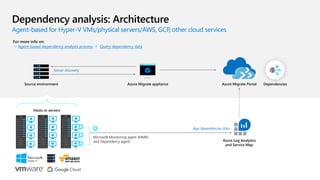
Agent-based for Hyper-V VMs/physical servers/AWS, GCP, other cloud services
Dependency analysis: Architecture
Hosts or servers
Dependencies
Azure Migrate appliance
Server discovery
Azure Migrate Portal
Source environment
Microsoft Monitoring agent (MMA)
and Dependency agent Azure Log Analytics
and Service Map
For more info on:
 Agent-based dependency analysis process  Query dependency data
App dependencies data
For agentless and agent-based
Dependency Analysis: Process
Agentless Agent-based
Supported scenario
Data Collection Process
Data gathered
Visualization support
Data Export
Pricing
Assess servers for migration
Assessment: Capabilities
Any platform Multiple types
Analyze & optimize Instant & customized
Deploy the Azure Migrate appliance
Appliance starts collecting
configuration data and analyzing
performance of your Windows and
Linux servers (as part of discovery)
Perform assessments to determine
 Azure suitability
 Right-sizing information
 Cost planning
For all scenarios and targets (Azure VMs, AVS)
Assessment: Process
Import-based for Azure VM and AVS assessment
Assessment: Architecture
Hosts or servers
CMDB Azure Migrate Portal
Source environment
Import through CSV
Stages and computation criteria
Assessment for Azure VMs: Process
Sizing
Parameters
• Storage
• Network
• Compute
Allocated or used depends on assessment
type
Confidence ratings are computed based on
available data points
Azure Readiness
Parameters
• Boot type
• Cores
• RAM
• Storage disk
• Networking
• Operating system
Monthly costs
Parameters
• Azure VM size output from stage 2
• Software Assurance
• Reserved instances
• VM uptime
• Location
• Azure Hybird Benefit (Windows OS)
Stages and computation criteria
Assessment for AVS: Process
Sizing
Parameters
• Compute
• Storage
• Node type
Allocated or used depends on assessment
type
Confidence ratings are computed based on
available data points
Azure Readiness
Parameters
• Internet Protocol
Monthly costs
Parameters
• AVS node output from stage 2
• Location
• AVS node type
Per VM cost is calculated by dividing
aggregated cost by number of VMs
in assessment
Appliance collects
performance
data points
Frequency – 20 secs. for
VMware, 30 secs. for Hyper-
V, 5 mins. for physical servers
Appliance identifies
1 peak data point for
every 10 mins.
(max value)
Appliance transmits
the peak data points
to Datastore
Discovery is
initiated
Data points are sorted
in ascending order and
selects the 95th or
99th percentile data
point for right sizing
For performance-based
Assessment: Right-sizing computation
Computation formula: Output is categorized as:
For performance-based
Assessment: Confidence rating computation
10 mins
Low confidence ratings
x
100
pts
Can be customized to account for:
Can compute multiple assessments
for the same server to compare
Azure VM assessment: Customizations
Compute for 1 day, 7
days, or 30 days
Account for load
seasonality and growth
Account for offers and
discounts
Sizing criteria
Percentile utilization
Offer
Discount
EA subscription
Azure Hybrid Benefit
Can be customized to account for:
Can compute multiple assessments
for the same server to compare
Azure VMware Solution assessment: Customizations
Compute for 1 day, 7
days, or 30 days
Account for load
seasonality and growth
Account for offers and
discounts
Sizing criteria
Percentile utilization
Offer
Discount
Assess SQL Server instances
and databases
Azure Migrate
Azure VM assessment
Azure Migrate
Azure SQL assessment
Azure Migrate
Azure SQL assessment
AzureVirtualMachine
AzureSQLDatabase
AzureSQLManagedInstance
vCenter Server
ESXi hosts and
servers running SQL
Server
SQL assessments: Options
Computation formula: Output is categorized as:
SQL assessment: Confidence rating computation
10 mins
Low confidence ratings
x
100
pts
Can be customized to account for:
Can compute multiple assessments
for the same server to compare
Compute for 1 day, 1
week, or 1 month
Account for offers
and discounts
Target deployment type
Performance duration
Service tier
Offer
Discount
Azure Hybrid Benefit
Microsoft recommended
or targeted to Azure SQL
Database or Azure SQL
Managed Instance
Business critical or
General Purpose
SQL assessments: Customizations
Appliance collects
performance
data points
Frequency –30 secs. for SQL
instances
Appliance aggregates
the sample data points
collected every 30
seconds over 10
minutes and sends
max, mean, variance,
occurrence for each
counter
Service calculates
normalized values of
counters sent by the
appliance
Discovery is
initiated
Percentile logic
selected by the user is
applied on the
normalized data points
SQL assessments: Right-sizing computation
Migrate servers to Azure
Migration: Capabilities
Multiple options Migrate at scale
Test before migrating Zero data loss
Both tools share certain components. Recovery Services vault is used by Azure Migrate: Server Migration, Disaster Recovery, and Azure Backup.
Common components are used for replication in the Hyper-V and agent-based replication scenarios.
Azure Migrate: Server migration vs Azure Site Recovery
Migration: Overview
Azure Migrate: Server migration Azure Site Recovery
Scenario
Options
Pricing
Feature support
Recommended use
Pricing
Agentless VMware Agentless Hyper-V Physical/other cloud
Requirements
• Uses the Azure Migrate appliance
• No software on VMs
Requirements
• Uses Hyper-V Replication Provider
installed on hosts
• No software on VMs
Requirements
• Uses replication appliance
(configuration & process server)
installed on dedicated machine
• Uses mobility service installed on
servers
*This method can also be used to migrate VMware or
Hyper-V servers by treating them as physical servers
Migration: Scenarios
For all scenarios
Migration: Stages
Enable
replication
Initial
replication
Delta
replication
Migrate
Start test
migration
Cleanup test
migration
Stop
replication
VMware Hyper-V Physical/other cloud
Host requirements
• ESXi hosts version (5.5 or later)
vCenter requirements
• vCenter Server version
(5.5, 6, 6.5, 6.7, 7)
• vCenter Server permissions
Host requirements
• Windows Server 2012 R2 or later
• .NET 4.7 or later
• Administrator permissions
In source environment
• Install replication appliance on
dedicated machine
• Install Mobility service on servers
to be migrated
Migration: Supported versions & pre-requisites
Agentless VMware
migrations
Deploy and configure the Azure
Migrate appliance for VMware and
complete server discovery
Start replicating
The Azure Migrate appliance
orchestrates the replication of your
VM data to your Azure subscription
Perform test migrations (optional,
but highly recommended)
Migrate to Azure
Agentless VMware: Process
ESXi hosts
Azure Migrate
appliance for VMware
Azure Migrate
Replication orchestration and data upload
(HTTPS 443)
vCenter Server
Technologies used:
VMware Change Block Tracking (CBT)
VMware Snapshots
VMware VDDK
Datastore
Snapshot and CBT requests (TCP 443)
TCP 902
Storage Account
Service Bus
Key Vault
Data transfer to
managed disks
Recovery
Services Vault
Replication
orchestration
Replication
orchestration
Agentless VMware: Architecture
Agentless VMware: Azure artifacts created
Operation
Azure Migrate: Server
migration
Azure Site Recovery
Register appliance
with Azure Migrate
AAD App –
Key Vault –
Recovery Services Vault -
Start first
replication
Key Vault –
Service Bus –
Storage Account 1 –
Storage Account 2 –
Scheduling per VM
Agentless VMware: Replication cycle scheduling
Prioritization across concurrent replications
Use agent-
based option
Have access to
vCenter server?
VMs support
snapshots
(no independent
disks etc.)
Datastore has
capacity to
hold VM
snapshots
Use agentless
option
Yes Yes Yes
No No No No
Recommended
VMware VMs: Agentless or agent-based
Deploy and configure the Azure Migrate
appliance for VMware and complete server
discovery
Deploy the scale-out appliance
Start replicating
The Azure Migrate appliance orchestrates the
replication of your VM data to your Azure
subscription
Configure the scale-out appliance after starting
the replication of at least one VM
Start replicating
Perform test migrations (optional, but highly
recommended)
Migrate to Azure
Migrate 500 VMs concurrently
Agentless VMware: Scale-out process
ESXi hosts
Azure Migrate
Replication orchestration and data upload
(HTTPS 443)
vCenter Server
Technologies used:
VMware Change Block Tracking (CBT)
VMware Snapshots
VMware VDDK
Datastore
Snapshot and CBT requests (TCP 443)
TCP 902
Storage Account
Service Bus
Key Vault
Data transfer to
managed disks
Recovery
Services Vault
Replication
orchestration
Replication
orchestration
Agentless VMware: Scale-out architecture
Replication data upload
(HTTPS 443)
Azure Migrate
appliance for VMware
Azure Migrate scale-out
appliance for VMware
Agentless Hyper-V
migrations
Deploy Hyper-V Replication Provider on Hyper-V host
Start replicating
The Hyper-V Replication Provider orchestrates the replication of
your VM data to your Azure subscription
Perform test migrations
Migrate to Azure
Deploy Hyper-V Replication Provider
on Hyper-V host
Start replicating
The Hyper-V Replication Provider
orchestrates the replication of your
VM data to your Azure subscription
Perform test migrations
Migrate to Azure
Agentless Hyper-V: Process
Agentless Hyper-V: Architecture
Azure Migrate
Technologies used:
Hyper-V snapshots (for initial replication)
Hyper-V replica (for delta replication)
Hyper-V Replication Provider
Replication orchestration and data upload
(HTTPS 443)
Storage Account
Data transfer to
managed disks
Recovery
Services Vault
Replication
orchestration
Replication
orchestration
Hyper-V hosts
VMs Storage
Operation
Azure Migrate: Server
migration
Azure Site Recovery
Register Azure Migrate
appliance (discovery and
assessment) with Azure
Migrate
AAD app
Key Vault
Register Hyper-V Replication
Provider
Recovery Services Vault
Start first replication Storage Account
Agentless Hyper-V: Azure artifacts created
Agent-based migrations
Deploy Hyper-V Replication Provider on Hyper-V host
Start replicating
The Hyper-V Replication Provider orchestrates the replication of
your VM data to your Azure subscription
Perform test migrations
Migrate to Azure
Deploy Replication appliance (also known as
configuration server) in your source
environment
Install Mobility Service on the servers to be
migrated
Start replicating
Replication appliance orchestrates
Perform test migrations
Migrate
For physical servers/AWS, GCP, other cloud servers
Agent-based: Process
Configuration Server Process server
Mobility Service
Deployed on each source
server to be migrated
Deployment options
Replication appliance and Mobility service
Agent-based: Components used
Replication appliance
Deployed on a dedicated
Windows Server 2016 server
Configuration
Server
Process
Server
Captures data writes from memory and sends replication data from
source server to Process server
Agent-based: Architecture
Azure Migrate
Storage Account
Data transfer to
managed disks
Recovery
Services Vault
Replication
orchestration
Replication
orchestration
Physical servers/ AWS
VM/ GCP VMs/ VMs in
other clouds
Orchestration data (HTTPS 443)
Replication data (HTTPS 9443)
Mobility
Service
Replication appliance
(configuration server
and process server)
Replication orchestration and
data upload (HTTPS 443)
Operation
Azure Migrate: Server
migration
Azure Site Recovery
Register Azure Migrate
appliance (discovery and
assessment) with Azure
Migrate
Register replication
appliance
(Configuration Server)
Start first replication
Agent-based: Azure artifacts created
Agent-based: Scaling
CPU Memory
Free space – data
caching
Churn rate Replication limits
8 vCPUs
(2 sockets * 4 cores @ 2.5 GHz)
12 vCPUs
(2 sockets * 6 cores @ 2.5 GHz)
16 vCPUs
(2 sockets * 8 cores @ 2.5 GHz)
Identify need for additional process server based on following limits
Process server limits
CPU Memory
Free space – data
caching
Churn rate Replication limits
4 vCPUs
(2 sockets * 2 cores @ 2.5 GHz)
8-GB memory
8 vCPUs
(2 sockets * 4 cores @ 2.5 GHz)
12-GB memory
12 vCPUs
(2 sockets * 6 cores @ 2.5 GHz)
24-GB memory
Scale concurrent replications by deploying additional process server based on following parameters
Agent-based: Scaling
Scale-out process server sizing
Migration concepts
For agentless VMware migrations For agentless Hyper-V and agent-based migrations
Migration: Bandwidth Consumption
Migration: Replication Bandwidth Throttling
For agentless VMware
migrations
For agentless Hyper-V
migrations
For agent-based
migrations
Migration: Test Migration
What is it?
How do I demarcate
a sandbox
environment?
By specifying a Virtual Network
while starting test migration
Subnet is automatically selected
in following priority -
• Subnet with same name as the
target subnet specified while
enabling replication
• First subnet available
alphabetically that is not a
gateway/application
gateway/firewall/bastion
subnet
Orchestration data (over Internet and ExpressRoute with Microsoft peering)
Replication data (over ExpressRoute with Microsoft peering)
Connectivity to Azure VM post failover (over Internet or ExpressRoute Private)
Azure Migrate Azure Storage Azure Compute
On-premises environment
Replication
appliance
(agent-based)
Hyper-V
Replication
Provider
Azure Migrate
appliance -
VMware
Migration: Using ExpressRoute Microsoft peering
Data plane (replication data) can be routed through ExpressRoute
with Microsoft Peering for better bandwidth or latency requirements.
Control plane (replication
For replication data transfer over Microsoft peering, configure
route filters to advertise routes for the Azure Storage endpoints. This
would be the regional BGP communities for the target Azure region
(region for migration).
To route control plane traffic over Microsoft peering, configure
route filters to advertise routes for other public endpoints as
required.
• .*.vault.azure.net
• .*.servicebus.windows.net
• .*.discoverysrv.windowsazure.com
• .*.migration.windowsazure.com
• .*.hypervrecoverymanager.windowsazure.com
• .*.backup.windowsazure.com
For agentless and agent-based migrations
Internet connectivity:
• You still need internet connectivity from the on-premises site for
other URLs that aren't reachable over ExpressRoute Microsoft
peering.
• Following URLs require Internet connectivity: *.portal.azure.com,
*.windows.net, *.msftauth.net, *.msauth.net, *.microsoft.com, *.live.com, *.office.com,
*.microsoftonline.com, *.microsoftonline-p.com, *.microsoftazuread-sso.com,
management.azure.com, *.services.visualstudio.com (optional), aka.ms/* (optional),
download.microsoft.com/download
Azure Migrate project configuration:
Orchestration data (over Internet and ExpressRoute with Microsoft peering)
Replication data (over ExpressRoute with Microsoft Peering)
Connectivity to Azure VM post failover (over Internet or ExpressRoute Private)
Azure Migrate Azure Storage Azure Compute
On-premises environment
Replication
appliance
(agent-based)
Hyper-V
Replication
Provider
Azure Migrate
appliance -
VMware
Migration: Using ExpressRoute Microsoft peering
For agentless and agent-based migrations
Orchestration data (over Internet)
Replication data (over ExpressRoute with private peering)
Connectivity to Azure VM post failover (over ExpressRoute with private peering)
Azure Migrate
appliance -
VMware
Azure Migrate Azure Storage Azure Compute
On-premises environment
Migration: Using ExpressRoute private peering
For agentless VMware migrations
Data plane (replication data)
Control plane
To replicate over a private network,
.
Azure Migrate project configuration:
Replication data (over ExpressRoute with private peering)
Connectivity to Azure VM post failover (over ExpressRoute with private peering)
Azure Migrate Azure Storage Azure Compute
Migration: Using ExpressRoute private peering
Data plane (replication data) and control plane
will need access to the following URLs over and above private
link access:
• *.blob.core.windows.com
• https://management.azure.com
• https://login.microsoftonline.com
• https://login.windows.net
• https://www.live.com and
• https://www.microsoft.com
Azure Migrate project configuration:
Replication
appliance
(agent-based)
Hyper-V
Replication
Provider
On-premises environment
For agentless Hyper-V and agent-based migrations
Azure Migrate Private Link
Support
Private Link: Capabilities
Execute faster Be compliant
Be secure Onboard easily
Discovery and assessment Migration
End to end support for
• Discovery and assessment of VMware VMs, Hyper-
V VMs, physical servers, VMs running on GCP/AWS,
or VMs running on a different virtualization
provider
• Discovery of applications and roles on VMware
VMs
• Agentless dependency analysis of VMware VMs
Private Link: Supported scenarios
End to end support for
• Agentless Hyper-V migrations
• Agent-based migrations of VMware VMs, Hyper-V
VMs, physical servers, VMs running on GCP/AWS, or
VMs running on a different virtualization provider
Azure Migrate
appliance
Azure Migrate
ESXi host/ Hyper-V
host/ physical server
ExpressRoute private peering
/ S2S VPN
Private
endpoints
Discovered
servers
Assessments
Agentless
Dependency
Application
inventory
*Additional DNS settings may be required to establish private endpoint connectivity.
For all scenarios
Private Link: Discovery and assessment architecture
Hyper-V replication provider/
Replication appliance
Azure Migrate
Hyper-V host/ Physical
Server
ExpressRoute private peering
/ S2S VPN Cache/Replication
Storage Account
Data transfer to
managed disks
Recovery Services
Vault
Replication
orchestration
Replication
orchestration
Private endpoint
Private endpoint
For agentless Hyper-V and agent-based migrations
Private Link: Migration architecture
*Additional DNS settings may be required to establish private endpoint connectivity.
Private Link: Additional permissions required
Operation Permissions
Create and manage private endpoints Microsoft.Network/privateEndpoint/write/action
Microsoft.Network/privateEndpoint/read/action
Attach a private endpoint to a virtual network or subnet Microsoft.Network/virtualNetworks/subnet/join/action
Microsoft.Network/virtualNetworks/join/action
Link the private endpoint to an ARM resource (vault,
storage, key-vault etc.)
Microsoft.[RP]/[resouceName]/privateEndpointConnectionApproval/ac
tion Microsoft.[RP]/[resouceName]/privateEndpointConnections/read
Create a network interface and join to a network
security group
Microsoft.Network/networkInterfaces/read
Microsoft.Network/networkInterfaces/subnets/write
Microsoft.Network/networkInterfaces/subnets/read
Microsoft.Network/networkSecurityGroups/join/action (optional)
To assign RBAC to another user or Managed Identity on
an ARM resource
Microsoft.Authorization/roleAssignments/write
Containerize ASP.NET and Java
web apps and migrate to Azure
Kubernetes Service (AKS)
LOB application web and app tier
(ASP.NET/Java web apps)
Azure laaS
App Service
AKS
Azure Migrate
Server migration
Azure Migrate
Web app migration
Azure Migrate
App containerization
App migration: Options
Point and
Containerize
Parameterize
configurations
Reusable
artifacts
Customization
App Containerization: Capabilities
Containerize and migrate your apps to AKS
Download
Tool remotely connects to app
servers to discover apps and their
configurations. Provides option to
parameterize connection strings and
use persistent volumes
Build container image and publish
the image to Azure Container
Registry
Deploy containerized app to AKS
App Containerization: Process
ASP.NET Java web apps
App requirements
• Microsoft .NET framework
version 3.5 or later
• Internet Information Services (IIS)
version 7.5 or later
App server requirements
• Microsoft Web deploy tool installed
• PowerShell remoting enabled
• Local/domain administrator account
App requirements
• Apache Tomcat
version 8.0 or later
• Java Development Kit
version 7.0 or later
App server requirements
• SSH remoting enabled
• Root account
• Ubuntu Linux 16.04/18.04/20.04
• Debian 7/8
• CentOS 6/7
• Red Hat Enterprise Linux 5/6/7.
App Containerization: Supported versions & pre-requisites
• Dockerfile
• Create
ACR/AKS
cluster
• Container
image
• Kubernetes
yaml specs
• Use Persistent
Volumes
DB
DB
LOB App
Web layer
Data layer
App
containerization
helper
Azure Container Registry
DB migration or test copy
Publish
image
Deploy to AKS
PV through
Azure File Share
AKS Cluster
Pod Pod
App Containerization: Architecture
Learn More
For more info about Azure Migrate:
 Documentation
 MS Learn
© Copyright Microsoft Corporation. All rights reserved.
Thank you.

MS_Azure_Migrate_L300_Refreshed_-_To_be_published.pptx

  • 1.
  • 2.
    Agenda Azure Migrateoverview Discover, assess, & migrate servers to Azure Discover servers Discover applications and dependencies Assess servers for migration Assess SQL servers Migrate servers to Azure Agentless VMware migrations Agentless Hyper-V migrations Agent-based migrations Migration concepts Private Link support App Containerization 01 02 03 04 05 06 07 08 09 10 11 12 13
  • 3.
    Multiple scenarios Coverage forservers (Windows/Linux), databases, VDI, web apps, and large volumes of data Migration targets include Azure VMs, AVS, App Service and Azure SQL A central hub of tools for your datacenter cloud migration Azure Migrate
  • 4.
    End-to-end visibility Centralized migration repositorydelivering end-to- end tracking and insights A central hub of tools for your datacenter cloud migration Azure Migrate
  • 5.
    Diverse capabilities Comprehensive discovery, assessmentand migration capabilities powered by Azure and partner tools A central hub of tools for your datacenter cloud migration Azure Migrate
  • 6.
    Choice of toolsfor every stage and every requirement Servers Databases Web apps VDI Data Partner tools
  • 7.
    Discover, asses &migrate servers to Azure
  • 8.
    For every stepof your migration journey Industry-leading capabilities Discover Assess Azure Migrate: Server assessment Azure Migrate: Server migration Migrate
  • 9.
    Unified appliance Dedicatedmachine No impact to source Deployment options Azure Migrate appliance
  • 10.
    Web application interface usedto configure the appliance Collects configuration data of servers Collects performance and resource utilization data of servers Checks and updates appliance components (every 24 hrs.) Orchestrates server replication to Azure Sends replication data to Azure Collector Software components Azure Migrate appliance
  • 11.
  • 12.
    Discover: Capabilities Any platformAgentless discovery Inventory applications Visualize dependencies
  • 13.
    Deploy Appliance discovers serversand server configurations, and collects performance data (resource utilizations) View For all scenarios Discovery: Process
  • 14.
    VMware Hyper-V Physical/othercloud Host requirements • ESXi hosts version (5.5 or later) vCenter requirements • vCenter Server version (5.5, 6, 6.5, 6.7, 7) • Read-only account Host requirements • Windows Server 2012 R2 or later • PowerShell remoting • Administrator permissions For Windows servers • Local or domain joined account For Linux servers • An account with root permissions Discovery: Supported versions & pre-requisites
  • 15.
    For VMware VMs Discovery:Architecture ESXi hosts Discovered servers Azure Migrate appliance for VMware vSphere API used Purpose Login Initializes connection to vCenter/ESXi RetrieveServiceContent Initializes vSphere management client RetrievePropertiesEx Retrieve a list of properties specified by the property filter spec. ContinueRetrievePropertiesEx Retrieve a list of properties specified by the property filter spec. QueryDvsConfigTarget Gets Distributed Virtual PortGroupInfo on vSphere /ESX host. CreateContainerView Get the entities from the vCenter QueryPerfCounterByLevel Get counter information for given levels for vCenter server QueryPerf Get Performance data points. vSphere APIs, TCP 443 Azure Migrate Performance data (20 secs) Configuration data (30 mins) HTTPS 443 Performance data (20 secs) Configuration data (30 mins) vCenter Server
  • 16.
    For Hyper-V VMs Discovery:Architecture Discovered servers Azure Migrate appliance for Hyper-V WinRM 5985 Azure Migrate Performance data (20 secs) Configuration data (30 mins) HTTPS 443 Performance data (20 secs) Configuration data (30 mins) Hyper-V hosts VMs Storage
  • 17.
    For physical servers& servers from other clouds (AWS, GCP) Discovery: Architecture Physical servers/ AWS VM/GCP VMs/VMs in other clouds Discovered servers Azure Migrate appliance for physical servers Use a non-root account for Linux server discovery Ensure the required capabilities are set using the following commands: setcap CAP_DAC_READ_SEARCH+eip /usr/sbin/fdisk setcap CAP_DAC_READ_SEARCH+eip /sbin/fdisk (if /usr/sbin/fdisk is not present) setcap "cap_dac_override, cap_dac_read_search, cap_fowner,cap_fsetid, cap_setuid, cap_setpcap, cap_net_bind_service, cap_net_admin, cap_sys_chroot, cap_sys_admin, cap_sys_resource, cap_audit_control, cap_setfcap=+eip" /sbin/lvm setcap CAP_DAC_READ_SEARCH+eip /usr/sbin/dmidecode chmod a+r /sys/class/dmi/id/product_uuid Windows (WinRM 5985) Linux ( SSH 22) Azure Migrate Portal Performance data (20 secs) Configuration data (30 mins) HTTPS 443 Performance data (20 secs) Configuration data (30 mins) Physical servers
  • 18.
    Configuration data Performancedata Polling interval Secure Hashing Algorithm SHA 256 (in transit and at rest) SHA 256 (in transit and at rest) Datastore Azure Cosmos DB in Microsoft subscription Azure Data Explorer in Microsoft subscription Retention 3 days post VM removal from discovery Migrate project deletion Auto-deletion after 30 days; sooner if Azure Migrate project is deleted Storage region Any region within Migrate project geography Any region within Migrate project geography Appliance component used Discovery agent Collector agent For all scenarios Discovery: Data management
  • 19.
    Deploy configure Appliance discoversservers and server configurations, and collects performance data (resource utilizations) for Windows, Linux, Perform assessments to determine  Readiness for Azure SQL  Recommended Azure SQL target  Migration blockers and warnings  Azure SQL configuration (SKU)  Estimated monthly cost SQL discovery: Process
  • 20.
    VMware SQL Server Hostrequirements • ESXi hosts version (5.5 or later) vCenter requirements • vCenter Server version (5.5, 6, 6.5, 6.7, 7) • Read-only account Configuration • Standalone SQL Server instances with databases • Sysadmin server role for accessing SQL servers • Failover Clusters and Always On availability groups are not supported Services • SQL Server Database Engine • SQL Server Reporting Services, Integration Services, Analysis Services are not supported • Enterprise, Standard, Developer, Web and Express editions SQL discovery: Supported versions & pre-requisites
  • 21.
    ESXi hosts SQL instancesand databases (configuration and performance data) Azure Migrate appliance for VMware Server discovery Azure Migrate Portal Installed apps (24 hrs.) HTTPS 443 vCenter Server vCenter account with Virtual Machines -> Guest Operations privilege SQL instances and databases (24 hrs.) *Data collection for SQL instances: • Configuration data is collected every 24 hours • Performance data is collected every 30 seconds Application inventory SQL discovery: Architecture
  • 22.
    Configuration data Performancedata Polling interval Secure Hashing Algorithm SHA 256 (in transit and at rest) SHA 256 (in transit and at rest) Datastore Azure Cosmos DB in Microsoft subscription Azure Data Explorer in Microsoft subscription Retention 3 days post SQL instance/ database/ server removal Migrate project deletion Auto-deletion after 30 days Storage region Any region within Migrate project geography Any region within Migrate project geography Appliance component used SQL discovery and assessment agent SQL discovery and assessment agent SQL discovery: Data management
  • 23.
    Azure Migrate project Discovery:Resource Limits VMware *Discovery scoping supported Hyper-V Physical/other cloud Same project can be used for multiple scenarios
  • 24.
    For VMware VMs Discovery:How to scope For vCenter >10000 servers Overlapping VM discovery leads to
  • 25.
  • 26.
    Dependency analysis: Supportedversions & pre-requisites On VMs On vCenter Supported VMs VMware (agentless) On VMs On Azure Supported VMs Hyper-V/ physical servers/ other cloud servers *These are in addition to the pre-requisites called out for server discovery
  • 27.
    Deploy and configure Appliancediscovers servers and server configurations, applications and roles, and collects performance data Enable dependency analysis View Agentless for VMware VMs Dependency analysis: Process
  • 28.
    For VMware VMs Dependencyanalysis: Architecture ESXi hosts Dependencies Azure Migrate appliance for VMware Server discovery Azure Migrate Portal Installed apps (24 hrs.) App dependencies (6 hrs.) HTTPS 443 vCenter Server Use a non-root account for Linux server dependency analysis Ensure the required capabilities are set using the following commands: sudo setcap CAP_DAC_READ_SEARCH,CAP_SYS_PTRACE=ep /bin/ls sudo setcap CAP_DAC_READ_SEARCH,CAP_SYS_PTRACE=ep /bin/netstat vCenter account with Virtual Machines -> Guest Operations privilege Application inventory * Dependency analysis can only be enabled on successfully validated servers * Required for software inventory and agentless dependency analysis
  • 29.
    Configure Deploy Agents send dependency information View Agent-basedfor Hyper-V VMs/physical servers/AWS, GCP, other cloud services Dependency analysis:
  • 30.
    Agent-based for Hyper-VVMs/physical servers/AWS, GCP, other cloud services Dependency analysis: Architecture Hosts or servers Dependencies Azure Migrate appliance Server discovery Azure Migrate Portal Source environment Microsoft Monitoring agent (MMA) and Dependency agent Azure Log Analytics and Service Map For more info on:  Agent-based dependency analysis process  Query dependency data App dependencies data
  • 31.
    For agentless andagent-based Dependency Analysis: Process Agentless Agent-based Supported scenario Data Collection Process Data gathered Visualization support Data Export Pricing
  • 32.
  • 33.
    Assessment: Capabilities Any platformMultiple types Analyze & optimize Instant & customized
  • 34.
    Deploy the AzureMigrate appliance Appliance starts collecting configuration data and analyzing performance of your Windows and Linux servers (as part of discovery) Perform assessments to determine  Azure suitability  Right-sizing information  Cost planning For all scenarios and targets (Azure VMs, AVS) Assessment: Process
  • 35.
    Import-based for AzureVM and AVS assessment Assessment: Architecture Hosts or servers CMDB Azure Migrate Portal Source environment Import through CSV
  • 36.
    Stages and computationcriteria Assessment for Azure VMs: Process Sizing Parameters • Storage • Network • Compute Allocated or used depends on assessment type Confidence ratings are computed based on available data points Azure Readiness Parameters • Boot type • Cores • RAM • Storage disk • Networking • Operating system Monthly costs Parameters • Azure VM size output from stage 2 • Software Assurance • Reserved instances • VM uptime • Location • Azure Hybird Benefit (Windows OS)
  • 37.
    Stages and computationcriteria Assessment for AVS: Process Sizing Parameters • Compute • Storage • Node type Allocated or used depends on assessment type Confidence ratings are computed based on available data points Azure Readiness Parameters • Internet Protocol Monthly costs Parameters • AVS node output from stage 2 • Location • AVS node type Per VM cost is calculated by dividing aggregated cost by number of VMs in assessment
  • 38.
    Appliance collects performance data points Frequency– 20 secs. for VMware, 30 secs. for Hyper- V, 5 mins. for physical servers Appliance identifies 1 peak data point for every 10 mins. (max value) Appliance transmits the peak data points to Datastore Discovery is initiated Data points are sorted in ascending order and selects the 95th or 99th percentile data point for right sizing For performance-based Assessment: Right-sizing computation
  • 39.
    Computation formula: Outputis categorized as: For performance-based Assessment: Confidence rating computation 10 mins Low confidence ratings x 100 pts
  • 40.
    Can be customizedto account for: Can compute multiple assessments for the same server to compare Azure VM assessment: Customizations Compute for 1 day, 7 days, or 30 days Account for load seasonality and growth Account for offers and discounts Sizing criteria Percentile utilization Offer Discount EA subscription Azure Hybrid Benefit
  • 41.
    Can be customizedto account for: Can compute multiple assessments for the same server to compare Azure VMware Solution assessment: Customizations Compute for 1 day, 7 days, or 30 days Account for load seasonality and growth Account for offers and discounts Sizing criteria Percentile utilization Offer Discount
  • 42.
    Assess SQL Serverinstances and databases
  • 43.
    Azure Migrate Azure VMassessment Azure Migrate Azure SQL assessment Azure Migrate Azure SQL assessment AzureVirtualMachine AzureSQLDatabase AzureSQLManagedInstance vCenter Server ESXi hosts and servers running SQL Server SQL assessments: Options
  • 44.
    Computation formula: Outputis categorized as: SQL assessment: Confidence rating computation 10 mins Low confidence ratings x 100 pts
  • 45.
    Can be customizedto account for: Can compute multiple assessments for the same server to compare Compute for 1 day, 1 week, or 1 month Account for offers and discounts Target deployment type Performance duration Service tier Offer Discount Azure Hybrid Benefit Microsoft recommended or targeted to Azure SQL Database or Azure SQL Managed Instance Business critical or General Purpose SQL assessments: Customizations
  • 46.
    Appliance collects performance data points Frequency–30 secs. for SQL instances Appliance aggregates the sample data points collected every 30 seconds over 10 minutes and sends max, mean, variance, occurrence for each counter Service calculates normalized values of counters sent by the appliance Discovery is initiated Percentile logic selected by the user is applied on the normalized data points SQL assessments: Right-sizing computation
  • 47.
  • 48.
    Migration: Capabilities Multiple optionsMigrate at scale Test before migrating Zero data loss
  • 49.
    Both tools sharecertain components. Recovery Services vault is used by Azure Migrate: Server Migration, Disaster Recovery, and Azure Backup. Common components are used for replication in the Hyper-V and agent-based replication scenarios. Azure Migrate: Server migration vs Azure Site Recovery Migration: Overview Azure Migrate: Server migration Azure Site Recovery Scenario Options Pricing Feature support Recommended use Pricing
  • 50.
    Agentless VMware AgentlessHyper-V Physical/other cloud Requirements • Uses the Azure Migrate appliance • No software on VMs Requirements • Uses Hyper-V Replication Provider installed on hosts • No software on VMs Requirements • Uses replication appliance (configuration & process server) installed on dedicated machine • Uses mobility service installed on servers *This method can also be used to migrate VMware or Hyper-V servers by treating them as physical servers Migration: Scenarios
  • 51.
    For all scenarios Migration:Stages Enable replication Initial replication Delta replication Migrate Start test migration Cleanup test migration Stop replication
  • 52.
    VMware Hyper-V Physical/othercloud Host requirements • ESXi hosts version (5.5 or later) vCenter requirements • vCenter Server version (5.5, 6, 6.5, 6.7, 7) • vCenter Server permissions Host requirements • Windows Server 2012 R2 or later • .NET 4.7 or later • Administrator permissions In source environment • Install replication appliance on dedicated machine • Install Mobility service on servers to be migrated Migration: Supported versions & pre-requisites
  • 53.
  • 54.
    Deploy and configurethe Azure Migrate appliance for VMware and complete server discovery Start replicating The Azure Migrate appliance orchestrates the replication of your VM data to your Azure subscription Perform test migrations (optional, but highly recommended) Migrate to Azure Agentless VMware: Process
  • 55.
    ESXi hosts Azure Migrate appliancefor VMware Azure Migrate Replication orchestration and data upload (HTTPS 443) vCenter Server Technologies used: VMware Change Block Tracking (CBT) VMware Snapshots VMware VDDK Datastore Snapshot and CBT requests (TCP 443) TCP 902 Storage Account Service Bus Key Vault Data transfer to managed disks Recovery Services Vault Replication orchestration Replication orchestration Agentless VMware: Architecture
  • 56.
    Agentless VMware: Azureartifacts created Operation Azure Migrate: Server migration Azure Site Recovery Register appliance with Azure Migrate AAD App – Key Vault – Recovery Services Vault - Start first replication Key Vault – Service Bus – Storage Account 1 – Storage Account 2 –
  • 57.
    Scheduling per VM AgentlessVMware: Replication cycle scheduling Prioritization across concurrent replications
  • 58.
    Use agent- based option Haveaccess to vCenter server? VMs support snapshots (no independent disks etc.) Datastore has capacity to hold VM snapshots Use agentless option Yes Yes Yes No No No No Recommended VMware VMs: Agentless or agent-based
  • 59.
    Deploy and configurethe Azure Migrate appliance for VMware and complete server discovery Deploy the scale-out appliance Start replicating The Azure Migrate appliance orchestrates the replication of your VM data to your Azure subscription Configure the scale-out appliance after starting the replication of at least one VM Start replicating Perform test migrations (optional, but highly recommended) Migrate to Azure Migrate 500 VMs concurrently Agentless VMware: Scale-out process
  • 60.
    ESXi hosts Azure Migrate Replicationorchestration and data upload (HTTPS 443) vCenter Server Technologies used: VMware Change Block Tracking (CBT) VMware Snapshots VMware VDDK Datastore Snapshot and CBT requests (TCP 443) TCP 902 Storage Account Service Bus Key Vault Data transfer to managed disks Recovery Services Vault Replication orchestration Replication orchestration Agentless VMware: Scale-out architecture Replication data upload (HTTPS 443) Azure Migrate appliance for VMware Azure Migrate scale-out appliance for VMware
  • 61.
  • 62.
    Deploy Hyper-V ReplicationProvider on Hyper-V host Start replicating The Hyper-V Replication Provider orchestrates the replication of your VM data to your Azure subscription Perform test migrations Migrate to Azure Deploy Hyper-V Replication Provider on Hyper-V host Start replicating The Hyper-V Replication Provider orchestrates the replication of your VM data to your Azure subscription Perform test migrations Migrate to Azure Agentless Hyper-V: Process
  • 63.
    Agentless Hyper-V: Architecture AzureMigrate Technologies used: Hyper-V snapshots (for initial replication) Hyper-V replica (for delta replication) Hyper-V Replication Provider Replication orchestration and data upload (HTTPS 443) Storage Account Data transfer to managed disks Recovery Services Vault Replication orchestration Replication orchestration Hyper-V hosts VMs Storage
  • 64.
    Operation Azure Migrate: Server migration AzureSite Recovery Register Azure Migrate appliance (discovery and assessment) with Azure Migrate AAD app Key Vault Register Hyper-V Replication Provider Recovery Services Vault Start first replication Storage Account Agentless Hyper-V: Azure artifacts created
  • 65.
  • 66.
    Deploy Hyper-V ReplicationProvider on Hyper-V host Start replicating The Hyper-V Replication Provider orchestrates the replication of your VM data to your Azure subscription Perform test migrations Migrate to Azure Deploy Replication appliance (also known as configuration server) in your source environment Install Mobility Service on the servers to be migrated Start replicating Replication appliance orchestrates Perform test migrations Migrate For physical servers/AWS, GCP, other cloud servers Agent-based: Process
  • 67.
    Configuration Server Processserver Mobility Service Deployed on each source server to be migrated Deployment options Replication appliance and Mobility service Agent-based: Components used Replication appliance Deployed on a dedicated Windows Server 2016 server Configuration Server Process Server Captures data writes from memory and sends replication data from source server to Process server
  • 68.
    Agent-based: Architecture Azure Migrate StorageAccount Data transfer to managed disks Recovery Services Vault Replication orchestration Replication orchestration Physical servers/ AWS VM/ GCP VMs/ VMs in other clouds Orchestration data (HTTPS 443) Replication data (HTTPS 9443) Mobility Service Replication appliance (configuration server and process server) Replication orchestration and data upload (HTTPS 443)
  • 69.
    Operation Azure Migrate: Server migration AzureSite Recovery Register Azure Migrate appliance (discovery and assessment) with Azure Migrate Register replication appliance (Configuration Server) Start first replication Agent-based: Azure artifacts created
  • 70.
    Agent-based: Scaling CPU Memory Freespace – data caching Churn rate Replication limits 8 vCPUs (2 sockets * 4 cores @ 2.5 GHz) 12 vCPUs (2 sockets * 6 cores @ 2.5 GHz) 16 vCPUs (2 sockets * 8 cores @ 2.5 GHz) Identify need for additional process server based on following limits Process server limits
  • 71.
    CPU Memory Free space– data caching Churn rate Replication limits 4 vCPUs (2 sockets * 2 cores @ 2.5 GHz) 8-GB memory 8 vCPUs (2 sockets * 4 cores @ 2.5 GHz) 12-GB memory 12 vCPUs (2 sockets * 6 cores @ 2.5 GHz) 24-GB memory Scale concurrent replications by deploying additional process server based on following parameters Agent-based: Scaling Scale-out process server sizing
  • 72.
  • 73.
    For agentless VMwaremigrations For agentless Hyper-V and agent-based migrations Migration: Bandwidth Consumption
  • 74.
    Migration: Replication BandwidthThrottling For agentless VMware migrations For agentless Hyper-V migrations For agent-based migrations
  • 75.
    Migration: Test Migration Whatis it? How do I demarcate a sandbox environment? By specifying a Virtual Network while starting test migration Subnet is automatically selected in following priority - • Subnet with same name as the target subnet specified while enabling replication • First subnet available alphabetically that is not a gateway/application gateway/firewall/bastion subnet
  • 76.
    Orchestration data (overInternet and ExpressRoute with Microsoft peering) Replication data (over ExpressRoute with Microsoft peering) Connectivity to Azure VM post failover (over Internet or ExpressRoute Private) Azure Migrate Azure Storage Azure Compute On-premises environment Replication appliance (agent-based) Hyper-V Replication Provider Azure Migrate appliance - VMware Migration: Using ExpressRoute Microsoft peering Data plane (replication data) can be routed through ExpressRoute with Microsoft Peering for better bandwidth or latency requirements. Control plane (replication For replication data transfer over Microsoft peering, configure route filters to advertise routes for the Azure Storage endpoints. This would be the regional BGP communities for the target Azure region (region for migration). To route control plane traffic over Microsoft peering, configure route filters to advertise routes for other public endpoints as required. • .*.vault.azure.net • .*.servicebus.windows.net • .*.discoverysrv.windowsazure.com • .*.migration.windowsazure.com • .*.hypervrecoverymanager.windowsazure.com • .*.backup.windowsazure.com For agentless and agent-based migrations
  • 77.
    Internet connectivity: • Youstill need internet connectivity from the on-premises site for other URLs that aren't reachable over ExpressRoute Microsoft peering. • Following URLs require Internet connectivity: *.portal.azure.com, *.windows.net, *.msftauth.net, *.msauth.net, *.microsoft.com, *.live.com, *.office.com, *.microsoftonline.com, *.microsoftonline-p.com, *.microsoftazuread-sso.com, management.azure.com, *.services.visualstudio.com (optional), aka.ms/* (optional), download.microsoft.com/download Azure Migrate project configuration: Orchestration data (over Internet and ExpressRoute with Microsoft peering) Replication data (over ExpressRoute with Microsoft Peering) Connectivity to Azure VM post failover (over Internet or ExpressRoute Private) Azure Migrate Azure Storage Azure Compute On-premises environment Replication appliance (agent-based) Hyper-V Replication Provider Azure Migrate appliance - VMware Migration: Using ExpressRoute Microsoft peering For agentless and agent-based migrations
  • 78.
    Orchestration data (overInternet) Replication data (over ExpressRoute with private peering) Connectivity to Azure VM post failover (over ExpressRoute with private peering) Azure Migrate appliance - VMware Azure Migrate Azure Storage Azure Compute On-premises environment Migration: Using ExpressRoute private peering For agentless VMware migrations Data plane (replication data) Control plane To replicate over a private network, . Azure Migrate project configuration:
  • 79.
    Replication data (overExpressRoute with private peering) Connectivity to Azure VM post failover (over ExpressRoute with private peering) Azure Migrate Azure Storage Azure Compute Migration: Using ExpressRoute private peering Data plane (replication data) and control plane will need access to the following URLs over and above private link access: • *.blob.core.windows.com • https://management.azure.com • https://login.microsoftonline.com • https://login.windows.net • https://www.live.com and • https://www.microsoft.com Azure Migrate project configuration: Replication appliance (agent-based) Hyper-V Replication Provider On-premises environment For agentless Hyper-V and agent-based migrations
  • 80.
  • 81.
    Private Link: Capabilities Executefaster Be compliant Be secure Onboard easily
  • 82.
    Discovery and assessmentMigration End to end support for • Discovery and assessment of VMware VMs, Hyper- V VMs, physical servers, VMs running on GCP/AWS, or VMs running on a different virtualization provider • Discovery of applications and roles on VMware VMs • Agentless dependency analysis of VMware VMs Private Link: Supported scenarios End to end support for • Agentless Hyper-V migrations • Agent-based migrations of VMware VMs, Hyper-V VMs, physical servers, VMs running on GCP/AWS, or VMs running on a different virtualization provider
  • 83.
    Azure Migrate appliance Azure Migrate ESXihost/ Hyper-V host/ physical server ExpressRoute private peering / S2S VPN Private endpoints Discovered servers Assessments Agentless Dependency Application inventory *Additional DNS settings may be required to establish private endpoint connectivity. For all scenarios Private Link: Discovery and assessment architecture
  • 84.
    Hyper-V replication provider/ Replicationappliance Azure Migrate Hyper-V host/ Physical Server ExpressRoute private peering / S2S VPN Cache/Replication Storage Account Data transfer to managed disks Recovery Services Vault Replication orchestration Replication orchestration Private endpoint Private endpoint For agentless Hyper-V and agent-based migrations Private Link: Migration architecture *Additional DNS settings may be required to establish private endpoint connectivity.
  • 85.
    Private Link: Additionalpermissions required Operation Permissions Create and manage private endpoints Microsoft.Network/privateEndpoint/write/action Microsoft.Network/privateEndpoint/read/action Attach a private endpoint to a virtual network or subnet Microsoft.Network/virtualNetworks/subnet/join/action Microsoft.Network/virtualNetworks/join/action Link the private endpoint to an ARM resource (vault, storage, key-vault etc.) Microsoft.[RP]/[resouceName]/privateEndpointConnectionApproval/ac tion Microsoft.[RP]/[resouceName]/privateEndpointConnections/read Create a network interface and join to a network security group Microsoft.Network/networkInterfaces/read Microsoft.Network/networkInterfaces/subnets/write Microsoft.Network/networkInterfaces/subnets/read Microsoft.Network/networkSecurityGroups/join/action (optional) To assign RBAC to another user or Managed Identity on an ARM resource Microsoft.Authorization/roleAssignments/write
  • 86.
    Containerize ASP.NET andJava web apps and migrate to Azure Kubernetes Service (AKS)
  • 87.
    LOB application weband app tier (ASP.NET/Java web apps) Azure laaS App Service AKS Azure Migrate Server migration Azure Migrate Web app migration Azure Migrate App containerization App migration: Options
  • 88.
  • 89.
    Download Tool remotely connectsto app servers to discover apps and their configurations. Provides option to parameterize connection strings and use persistent volumes Build container image and publish the image to Azure Container Registry Deploy containerized app to AKS App Containerization: Process
  • 90.
    ASP.NET Java webapps App requirements • Microsoft .NET framework version 3.5 or later • Internet Information Services (IIS) version 7.5 or later App server requirements • Microsoft Web deploy tool installed • PowerShell remoting enabled • Local/domain administrator account App requirements • Apache Tomcat version 8.0 or later • Java Development Kit version 7.0 or later App server requirements • SSH remoting enabled • Root account • Ubuntu Linux 16.04/18.04/20.04 • Debian 7/8 • CentOS 6/7 • Red Hat Enterprise Linux 5/6/7. App Containerization: Supported versions & pre-requisites
  • 91.
    • Dockerfile • Create ACR/AKS cluster •Container image • Kubernetes yaml specs • Use Persistent Volumes DB DB LOB App Web layer Data layer App containerization helper Azure Container Registry DB migration or test copy Publish image Deploy to AKS PV through Azure File Share AKS Cluster Pod Pod App Containerization: Architecture
  • 92.
    Learn More For moreinfo about Azure Migrate:  Documentation  MS Learn
  • 93.
    © Copyright MicrosoftCorporation. All rights reserved. Thank you.

Editor's Notes

  • #4 In the past, cloud migration was overwhelming with disconnected tools in different places. That's why Microsoft introduced Azure Migrate to bring everything together and simplify cloud migration. With one centralized migration service, you can discover and assess your datacenter, and then migrate workloads to Azure. 
  • #5 In the past, cloud migration was overwhelming with disconnected tools in different places. That's why Microsoft introduced Azure Migrate to bring everything together and simplify cloud migration. With one centralized migration service, you can discover and assess your datacenter, and then migrate workloads to Azure. 
  • #6 In the past, cloud migration was overwhelming with disconnected tools in different places. That's why Microsoft introduced Azure Migrate to bring everything together and simplify cloud migration. With one centralized migration service, you can discover and assess your datacenter, and then migrate workloads to Azure. 
  • #7 Our goal is to enable successful Azure migration, regardless of what tool was used. We have a great set of first party Azure tools that are built into the Azure portal and free to get started. But we also have a great set of third-party tools to meet all your requirements. If you already have a license with any of the Azure Migrate ISVs, you can easily connect the partner tools to Azure Migrate so data from the assessment and migration appears in your Azure Migrate dashboard. Migration is a large project, so Azure Migrate provides one location to track your entire journey.
  • #8 Add the original and hide
  • #9 Discover: for agentless discovery, you can either use the lightweight Azure Migrate appliance, or use the new Import feature and upload a CSV file to the tool You can view dependencies between machines in your environment and create groupings from this for your assessment Once you run an assessment, you’ll get a detailed report of each discovered machine’s readiness for Azure in terms of operating system or disk size, an estimated cost of running on Azure, and also sizing recommendations. The Azure Migrate tool collects information over time about your environment and comes up with an accurate recommendation based on past performance. You can run this for as little as a few days, or for longer for even more precision. Choose to either keep machines running during the migration or shut them down to ensure no downtime.
  • #10 For more info on – Azure Migrate appliance overview Appliance deployment options
  • #11 For more info on - Azure Migrate appliance overview Appliance Requirements
  • #12 Add the original and hide
  • #13 For more info on – Azure Migrate appliance overview Appliance deployment options
  • #14 For more info on - VMware discovery tutorial Hyper-V discovery tutorial Physical server discovery tutorial
  • #15 For more info on - VMware discovery support Hyper-V discovery support Physical server discovery support
  • #16 For more info on - Prepare VMware for discovery Deploy appliance for VMware Data collected for VMware VMs
  • #17 For more info on - Preparing Hyper-V hosts for discovery Discovering Hyper-V VMs on remote SMB shares Data collected for Hyper-V VMs
  • #18 For more info on - Prepare physical servers for discovery Deploy appliance for physical servers Data collected for Physical servers
  • #19 For more info on - Data collected for VMware VMs Data collected for Hyper-V VMs Data collected for Physical servers
  • #21 For more info on - VMware discovery support Hyper-V discovery support Physical server discovery support
  • #24 For more info on - Discovering VMware at scale Discovering Hyper-V at scale Discovering physical servers at scale
  • #25 For more info on - Scoping VMware discovery
  • #27 For more info on - Dependency analysis
  • #28 For more info on - Agentless dependency analysis VMware application inventory
  • #29 For more info on - Agentless dependency analysis process Data collected for installed apps Data collected for dependencies
  • #30 For more info on - Agent-based dependency analysis
  • #32 For more info on - Dependency analysis
  • #34 For more info on – Azure Migrate appliance overview Appliance deployment options
  • #35 For more info on - VMware assessment tutorial Hyper-V assessment tutorial Physical server assessment tutoria
  • #36 For more info on - Imported server assessmen
  • #37 For more info on - VMware discovery support Hyper-V discovery support Physical server discovery support
  • #38 For more info on - VMware discovery support Hyper-V discovery support Physical server discovery support
  • #39 For more info on - Data collected for VMware assessment Data collected for Hyper-V assessment Data collected for Physical server assessment
  • #40 For more info on - Confidence ratings
  • #41 For more info on - Customizing assessments
  • #42 For more info on - Customizing assessments
  • #45 For more info on - Confidence ratings
  • #50 For more info on - Azure Migrate overview
  • #51 For more info on - VMware discovery support Hyper-V discovery support Physical server discovery support
  • #53 For more info on - VMware migration support Hyper-V migration support Physical server migration support
  • #55 For more info on - Agentless VMware migration tutorial
  • #56 For more info on - Agentless VMware migration architecture
  • #57 For more info on - Azure artifacts created
  • #59 For more info on - VMware migration options
  • #60 For more info on - Agentless VMware migration tutorial
  • #61 For more info on - Agentless VMware migration architecture
  • #63 For more info on - Agentless Hyper-V migration tutorial
  • #64 For more info on - Customizing assessments
  • #65 For more info on - Azure artifacts created
  • #67 For more info on - Agent-based migration tutorial for physical Agent-based migration tutorial for AWS
  • #68 For more info on - Agent-based migration components
  • #69 For more info on - Customizing assessments
  • #70 For more info on - Azure artifacts created
  • #71 For more info on - Replication appliance capacity
  • #72 For more info on - Process server sizing
  • #74 For more info on - Bandwidth consumption and estimation
  • #75 For more info on - Throttling for agentless VMware Throttling for agentless Hyper-V Throttling for agent-based migrations
  • #76 For more info on - Test Migrations
  • #79 Learn more - Replicate data over ExpressRoute with Azure Migrate Server Migration - Azure Migrate | Microsoft Docs
  • #80 Using Azure Migrate with private endpoints - Azure Migrate | Microsoft Docs
  • #82 For more info on – Azure Migrate appliance overview Appliance deployment options
  • #83 Get started: Discover, assess, and migrate servers over a private network using Azure Private Link. - Using Azure Migrate with private endpoints - Azure Migrate | Microsoft Docs. Replicate data over ExpressRoute with Azure Migrate: Server Migration - Replicate data over ExpressRoute with Azure Migrate Server Migration - Azure Migrate | Microsoft Docs Troubleshoot network connectivity issues using Azure Migrate with private endpoints – Troubleshoot network connectivity issues - Azure Migrate | Microsoft Docs Additional DNS settings may be required to establish private endpoint connectivity. Learn more - Azure Private Endpoint DNS configuration | Microsoft Docs
  • #84 For more info on - Agentless VMware migration architecture
  • #85 For more info on DNS configuration Azure Private Endpoint DNS configuration | Microsoft Docs
  • #90 For more info on - VMware discovery tutorial Hyper-V discovery tutorial Physical server discovery tutorial
  • #91 For more info on - VMware discovery support Hyper-V discovery support Physical server discovery support