MOBILE DEVICE
SECURITY
Assoc. Prof. Ts. Dr. Madihah Mohd Saudi
Faculty of Science & Technology, USIM
CONTENTS
• Overview
• Definition
• Mobile Device Security Objectives
• Mobile Security Threats
• Rethinking Mobile Security
• Mobile Security Best Practices
• Mobile Security Strategy
• Smartphone Surveillance Features
• Antivirus in Gadget
• Mobile Device Security: A buyer’s guide
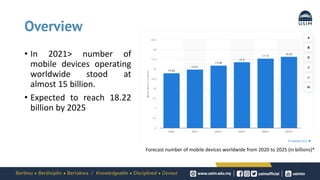
Overview
Forecast number of mobile devices worldwide from 2020 to 2025 (in billions)*
• In 2021> number of
mobile devices operating
worldwide stood at
almost 15 billion.
• Expected to reach 18.22
billion by 2025
Why is mobile security important?
• The future of computers and communication lies
with mobile devices, such as laptops, tablets and
smartphones with desktop-computer capabilities.
• Their size, operating systems, applications and
processing power make them ideal to use from
any place with an internet connection.
• Because mobile devices have become more
affordable and portable, organizations and users
have preferred to buy and use them over desktop
computers.
• And with ubiquitous wireless internet access, all
varieties of mobile devices are becoming more
vulnerable to attacks and data breaches.
Definition
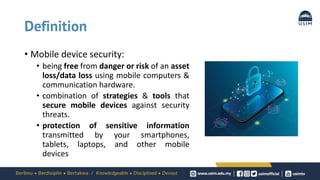
• Mobile device security:
• being free from danger or risk of an asset
loss/data loss using mobile computers &
communication hardware.
• combination of strategies & tools that
secure mobile devices against security
threats.
• protection of sensitive information
transmitted by your smartphones,
tablets, laptops, and other mobile
devices
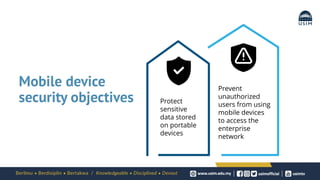
Mobile device
security objectives Protect
sensitive
data stored
on portable
devices
Prevent
unauthorized
users from using
mobile devices
to access the
enterprise
network
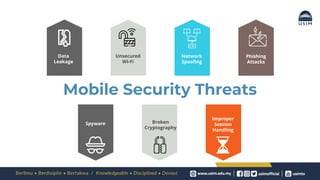
Mobile Security Threats
Data
Leakage
Unsecured
Wi-Fi
Network
Spoofing
Phishing
Attacks
Spyware Broken
Cryptography
Improper
Session
Handling
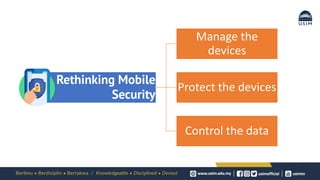
Rethinking Mobile
Security
Manage the
devices
Protect the devices
Control the data
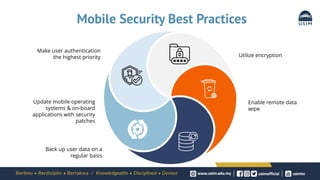
Mobile Security Best Practices
Utilize encryption
Enable remote data
wipe
Make user authentication
the highest priority
Update mobile operating
systems & on-board
applications with security
patches
Back up user data on a
regular basis
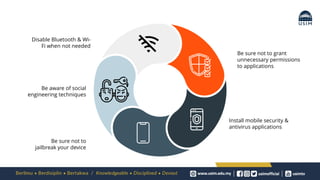
Be sure not to grant
unnecessary permissions
to applications
Install mobile security &
antivirus applications
Disable Bluetooth & Wi-
Fi when not needed
Be aware of social
engineering techniques
Be sure not to
jailbreak your device
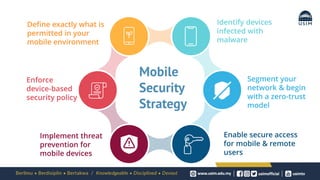
Enable secure access
for mobile & remote
users
Segment your
network & begin
with a zero-trust
model
Identify devices
infected with
malware
Implement threat
prevention for
mobile devices
Enforce
device-based
security policy
Define exactly what is
permitted in your
mobile environment
Mobile
Security
Strategy
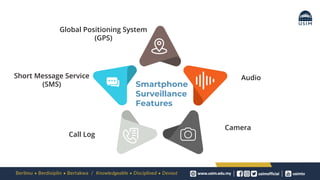
Global Positioning System
(GPS)
Short Message Service
(SMS)
Audio
Camera
Call Log
Smartphone
Surveillance
Features
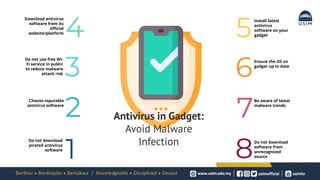
Download antivirus
software from its
official
website/platform
Do not use free Wi-
Fi service in public
to reduce malware
attack risk
Choose reputable
antivirus software
Do not download
pirated antivirus
software
Install latest
antivirus
software on your
gadget
Ensure the OS on
gadget up to date
Be aware of latest
malware trends
Do not download
software from
unrecognized
source
1 8
7
2
6
3
5
4
Antivirus in Gadget:
Avoid Malware
Infection
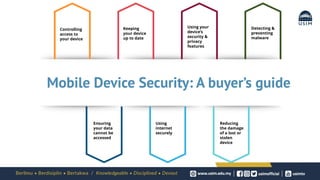
Controlling
access to
your device
Keeping
your device
up to date
Using your
device’s
security &
privacy
features
Ensuring
your data
cannot be
accessed
Using
internet
securely
Reducing
the damage
of a lost or
stolen
device
Detecting &
preventing
malware
Mobile Device Security: A buyer’s guide
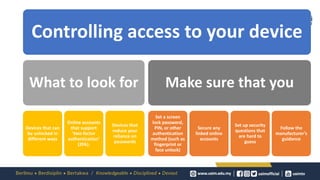
Controlling access to your device
What to look for
Devices that can
be unlocked in
different ways
Online accounts
that support
‘two-factor
authentication’
(2FA).
Devices that
reduce your
reliance on
passwords
Make sure that you
Set a screen
lock password,
PIN, or other
authentication
method (such as
fingerprint or
face unlock)
Secure any
linked online
accounts
Set up security
questions that
are hard to
guess
Follow the
manufacturer’s
guidance
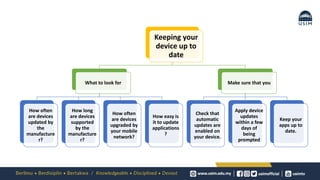
Keeping your
device up to
date
What to look for
How often
are devices
updated by
the
manufacture
r?
How long
are devices
supported
by the
manufacture
r?
How often
are devices
upgraded by
your mobile
network?
How easy is
it to update
applications
?
Make sure that you
Check that
automatic
updates are
enabled on
your device.
Apply device
updates
within a few
days of
being
prompted
Keep your
apps up to
date.
Using your
device’s security
& privacy
features
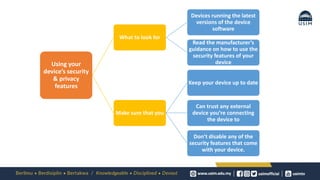
What to look for
Devices running the latest
versions of the device
software
Read the manufacturer’s
guidance on how to use the
security features of your
device
Make sure that you
Keep your device up to date
Can trust any external
device you’re connecting
the device to
Don’t disable any of the
security features that come
with your device.
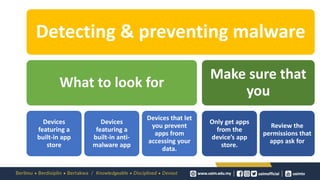
Detecting & preventing malware
What to look for
Devices
featuring a
built-in app
store
Devices
featuring a
built-in anti-
malware app
Devices that let
you prevent
apps from
accessing your
data.
Make sure that
you
Only get apps
from the
device’s app
store.
Review the
permissions that
apps ask for
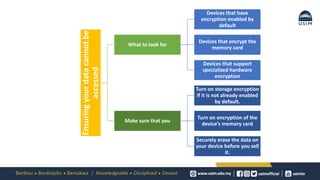
Ensuring
your
data
cannot
be
accessed
What to look for
Devices that have
encryption enabled by
default
Devices that encrypt the
memory card
Devices that support
specialized hardware
encryption
Make sure that you
Turn on storage encryption
if it is not already enabled
by default.
Turn on encryption of the
device’s memory card
Securely erase the data on
your device before you sell
it.
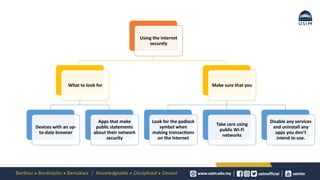
Using the internet
securely
What to look for
Devices with an up-
to-date browser
Apps that make
public statements
about their network
security
Make sure that you
Look for the padlock
symbol when
making transactions
on the Internet
Take care using
public Wi-Fi
networks
Disable any services
and uninstall any
apps you don’t
intend to use.
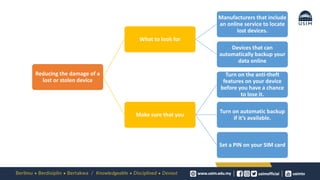
Reducing the damage of a
lost or stolen device
What to look for
Manufacturers that include
an online service to locate
lost devices.
Devices that can
automatically backup your
data online
Make sure that you
Turn on the anti-theft
features on your device
before you have a chance
to lose it.
Turn on automatic backup
if it’s available.
Set a PIN on your SIM card
CASE STUDY
Securing Mobile Applications Against Mobile Malware Attacks:
A Case Study
SCOReD 2021 |19th IEEE Student Conference on Research and Development, 23-25 November 2021, Kota Kinabalu Malaysia
Introduction
• The increasing demand for online meetings and online learning
• led to different security challenges by the cyber attackers, such as
exploiting the unpatched or defaults setting for online applications.1,2
• In 2020 >
• in the Dark Web, there were more than 500,000 exploited Zoom accounts
credentials were discovered3
• the Valve game was among the victim of security exploitation7
• This paper presents a new model called Mobotder to detect possible
security exploitation for online meeting applications and online games
based on geolocation (GPS), permissions, Application Programming
Interface (API) calls, and system calls.
Securing Mobile Applications Against Mobile Malware Attacks: A Case Study (1570767839)
SCOReD 2021 |19th IEEE Student Conference on Research and Development, 23-25 November 2021, Kota Kinabalu Malaysia
Methods
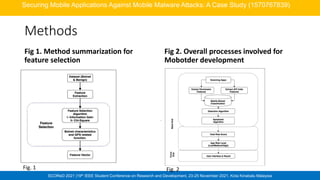
Fig 1. Method summarization for
feature selection
Fig 2. Overall processes involved for
Mobotder development
Securing Mobile Applications Against Mobile Malware Attacks: A Case Study (1570767839)
Fig. 1 Fig. 2
SCOReD 2021 |19th IEEE Student Conference on Research and Development, 23-25 November 2021, Kota Kinabalu Malaysia
Methods
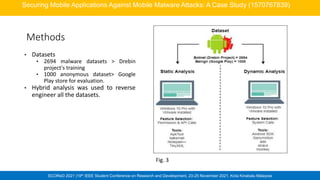
• Datasets
• 2694 malware datasets > Drebin
project's training
• 1000 anonymous dataset> Google
Play store for evaluation.
• Hybrid analysis was used to reverse
engineer all the datasets.
Securing Mobile Applications Against Mobile Malware Attacks: A Case Study (1570767839)
Fig. 3
SCOReD 2021 |19th IEEE Student Conference on Research and Development, 23-25 November 2021, Kota Kinabalu Malaysia
Findings
Securing Mobile Applications Against Mobile Malware Attacks: A Case Study (1570767839)
Fig.4: Example of Mobotder
Mobile App Simulation for Online
Gaming Mobile Apps Evaluation
Fig.5: Example of Mobotder
Mobile App Simulation for Online
Meeting Mobile Apps Evaluation
Feature Work by
[19]
Work by [20] Work by [21] Work by [22] Mobotder
Number of
Samples
(Malware/
Benign)
1929/
150
250/
250
5560/ 5560 1931/1150 2694/1000
Number of
Features
(Permission/AP
I calls)
63/
1414
12
/8
Not stated the
number of
Permission, API
calls, hardware
components,
intents
Not stated the
number of
Permission, API
calls, intents,
metadata, system
calls, network
30/38
ML Classifier
Accuracy
Rate(%)
Random
Forest
93.9
PSO-ANFIS
89
Random Forest
97.24
Random Forest
97.48
Random
Forest
99.1
Comparison with previous studies
SCOReD 2021 |19th IEEE Student Conference on Research and Development, 23-25 November 2021, Kota Kinabalu Malaysia
Findings
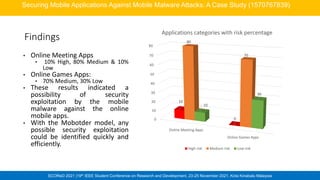
• Online Meeting Apps
• 10% High, 80% Medium & 10%
Low
• Online Games Apps:
• 70% Medium, 30% Low
• These results indicated a
possibility of security
exploitation by the mobile
malware against the online
mobile apps.
• With the Mobotder model, any
possible security exploitation
could be identified quickly and
efficiently.
Securing Mobile Applications Against Mobile Malware Attacks: A Case Study (1570767839)
0
10
20
30
40
50
60
70
80
Online Meeting Apps
Online Games Apps
10
0
80
70
10
30
Applications categories with risk percentage
High risk Medium risk Low risk
SCOReD 2021 |19th IEEE Student Conference on Research and Development, 23-25 November 2021, Kota Kinabalu Malaysia
Conclusion
• Every online app has its own risk related to security
exploitation.
• The developed model used the permissions and API calls as
the underlying concept and input for the Mobotder model
development.
• It is proven that security exploitation can be detected with a
suitable and right feature selection.
Securing Mobile Applications Against Mobile Malware Attacks: A Case Study (1570767839)
SCOReD 2021 |19th IEEE Student Conference on Research and Development, 23-25 November 2021, Kota Kinabalu Malaysia
References
[1] P. Laplante, “Contactless u: Higher education in the postcoronavirus world,” Computer (Long. Beach. Calif)., vol. 53, no. 7, pp. 76–79, Jul. 2020, doi:
10.1109/MC.2020.2990360.
[2] M. Humayun, M. Niazi, · Nz Jhanjhi, · Mohammad Alshayeb, and · Sajjad Mahmood, “Cyber Security Threats and Vulnerabilities: A Systematic Mapping
Study,” Arab. J. Sci. Eng., vol. 45, no. 3, pp. 3171–3189, 2020, doi: 10.1007/s13369-019-04319-2.
[3] Paul Wagenseil, “Zoom security issues: Everything that’s gone wrong (so far) ,” Tom’s Guide, 2020. https://www.tomsguide.com/news/zoom-security-
privacy-woes (accessed Mar. 23, 2021).
[7] Sue Poremba, “Online Gaming Adds More Risk to WFH - Security Boulevard,” Security Boulevard, Jan. 04, 2020.
https://securityboulevard.com/2021/01/online-gaming-adds-more-risk-to-wfh/ (accessed Mar. 24, 2021).
[19] L. Onwuzurike, E. Mariconti, P. Andriotis, E. De Cristofaro, G. Ross, and G. Stringhini, “Mamadroid: Detecting android malware by building Markov chains of
behavioral models (extended version),” ACM Trans. Priv. Secur., vol. 22, no. 2, 2019, doi: 10.1145/3313391.
[20] A. Feizollah, N. B. Anuar, R. Salleh, G. Suarez-Tangil, and S. Furnell, “AndroDialysis: Analysis of Android Intent Effectiveness in Malware Detection,” Comput.
Secur., vol. 65, pp. 121–134, Mar. 2017, doi: 10.1016/J.COSE.2016.11.007.
[21] E. M. B. Karbab, M. Debbabi, A. Derhab, and D. Mouheb, “MalDozer: Automatic framework for android malware detection using deep learning,” in
Proceedings of the 5fth Annual DFRWS Europe, Mar. 2018, vol. 24, pp. S48–S59, doi: 10.1016/J.DIIN.2018.01.007.
[22] C. Tansettanakorn, S. Thongprasit, S. Thamkongka, and V. Visoottiviseth, “ABIS: A prototype of Android Botnet Identification System,” Proc. 2016 5th ICT
Int. Student Proj. Conf. ICT-ISPC 2016, pp. 1–5, Jul. 2016, doi: 10.1109/ICT-ISPC.2016.7519221.
Securing Mobile Applications Against Mobile Malware Attacks: A Case Study (1570767839)
WEEK5 Mobile Device Security 31032022.pdf

WEEK5 Mobile Device Security 31032022.pdf

  • 1.
    MOBILE DEVICE SECURITY Assoc. Prof.Ts. Dr. Madihah Mohd Saudi Faculty of Science & Technology, USIM
  • 2.
    CONTENTS • Overview • Definition •Mobile Device Security Objectives • Mobile Security Threats • Rethinking Mobile Security • Mobile Security Best Practices • Mobile Security Strategy • Smartphone Surveillance Features • Antivirus in Gadget • Mobile Device Security: A buyer’s guide
  • 3.
    Overview Forecast number ofmobile devices worldwide from 2020 to 2025 (in billions)* • In 2021> number of mobile devices operating worldwide stood at almost 15 billion. • Expected to reach 18.22 billion by 2025
  • 4.
    Why is mobilesecurity important? • The future of computers and communication lies with mobile devices, such as laptops, tablets and smartphones with desktop-computer capabilities. • Their size, operating systems, applications and processing power make them ideal to use from any place with an internet connection. • Because mobile devices have become more affordable and portable, organizations and users have preferred to buy and use them over desktop computers. • And with ubiquitous wireless internet access, all varieties of mobile devices are becoming more vulnerable to attacks and data breaches.
  • 5.
    Definition • Mobile devicesecurity: • being free from danger or risk of an asset loss/data loss using mobile computers & communication hardware. • combination of strategies & tools that secure mobile devices against security threats. • protection of sensitive information transmitted by your smartphones, tablets, laptops, and other mobile devices
  • 6.
    Mobile device security objectivesProtect sensitive data stored on portable devices Prevent unauthorized users from using mobile devices to access the enterprise network
  • 7.
  • 8.
  • 9.
    Mobile Security BestPractices Utilize encryption Enable remote data wipe Make user authentication the highest priority Update mobile operating systems & on-board applications with security patches Back up user data on a regular basis
  • 10.
    Be sure notto grant unnecessary permissions to applications Install mobile security & antivirus applications Disable Bluetooth & Wi- Fi when not needed Be aware of social engineering techniques Be sure not to jailbreak your device
  • 11.
    Enable secure access formobile & remote users Segment your network & begin with a zero-trust model Identify devices infected with malware Implement threat prevention for mobile devices Enforce device-based security policy Define exactly what is permitted in your mobile environment Mobile Security Strategy
  • 12.
    Global Positioning System (GPS) ShortMessage Service (SMS) Audio Camera Call Log Smartphone Surveillance Features
  • 13.
    Download antivirus software fromits official website/platform Do not use free Wi- Fi service in public to reduce malware attack risk Choose reputable antivirus software Do not download pirated antivirus software Install latest antivirus software on your gadget Ensure the OS on gadget up to date Be aware of latest malware trends Do not download software from unrecognized source 1 8 7 2 6 3 5 4 Antivirus in Gadget: Avoid Malware Infection
  • 14.
    Controlling access to your device Keeping yourdevice up to date Using your device’s security & privacy features Ensuring your data cannot be accessed Using internet securely Reducing the damage of a lost or stolen device Detecting & preventing malware Mobile Device Security: A buyer’s guide
  • 15.
    Controlling access toyour device What to look for Devices that can be unlocked in different ways Online accounts that support ‘two-factor authentication’ (2FA). Devices that reduce your reliance on passwords Make sure that you Set a screen lock password, PIN, or other authentication method (such as fingerprint or face unlock) Secure any linked online accounts Set up security questions that are hard to guess Follow the manufacturer’s guidance
  • 16.
    Keeping your device upto date What to look for How often are devices updated by the manufacture r? How long are devices supported by the manufacture r? How often are devices upgraded by your mobile network? How easy is it to update applications ? Make sure that you Check that automatic updates are enabled on your device. Apply device updates within a few days of being prompted Keep your apps up to date.
  • 17.
    Using your device’s security &privacy features What to look for Devices running the latest versions of the device software Read the manufacturer’s guidance on how to use the security features of your device Make sure that you Keep your device up to date Can trust any external device you’re connecting the device to Don’t disable any of the security features that come with your device.
  • 18.
    Detecting & preventingmalware What to look for Devices featuring a built-in app store Devices featuring a built-in anti- malware app Devices that let you prevent apps from accessing your data. Make sure that you Only get apps from the device’s app store. Review the permissions that apps ask for
  • 19.
    Ensuring your data cannot be accessed What to lookfor Devices that have encryption enabled by default Devices that encrypt the memory card Devices that support specialized hardware encryption Make sure that you Turn on storage encryption if it is not already enabled by default. Turn on encryption of the device’s memory card Securely erase the data on your device before you sell it.
  • 20.
    Using the internet securely Whatto look for Devices with an up- to-date browser Apps that make public statements about their network security Make sure that you Look for the padlock symbol when making transactions on the Internet Take care using public Wi-Fi networks Disable any services and uninstall any apps you don’t intend to use.
  • 21.
    Reducing the damageof a lost or stolen device What to look for Manufacturers that include an online service to locate lost devices. Devices that can automatically backup your data online Make sure that you Turn on the anti-theft features on your device before you have a chance to lose it. Turn on automatic backup if it’s available. Set a PIN on your SIM card
  • 22.
    CASE STUDY Securing MobileApplications Against Mobile Malware Attacks: A Case Study
  • 23.
    SCOReD 2021 |19thIEEE Student Conference on Research and Development, 23-25 November 2021, Kota Kinabalu Malaysia Introduction • The increasing demand for online meetings and online learning • led to different security challenges by the cyber attackers, such as exploiting the unpatched or defaults setting for online applications.1,2 • In 2020 > • in the Dark Web, there were more than 500,000 exploited Zoom accounts credentials were discovered3 • the Valve game was among the victim of security exploitation7 • This paper presents a new model called Mobotder to detect possible security exploitation for online meeting applications and online games based on geolocation (GPS), permissions, Application Programming Interface (API) calls, and system calls. Securing Mobile Applications Against Mobile Malware Attacks: A Case Study (1570767839)
  • 24.
    SCOReD 2021 |19thIEEE Student Conference on Research and Development, 23-25 November 2021, Kota Kinabalu Malaysia Methods Fig 1. Method summarization for feature selection Fig 2. Overall processes involved for Mobotder development Securing Mobile Applications Against Mobile Malware Attacks: A Case Study (1570767839) Fig. 1 Fig. 2
  • 25.
    SCOReD 2021 |19thIEEE Student Conference on Research and Development, 23-25 November 2021, Kota Kinabalu Malaysia Methods • Datasets • 2694 malware datasets > Drebin project's training • 1000 anonymous dataset> Google Play store for evaluation. • Hybrid analysis was used to reverse engineer all the datasets. Securing Mobile Applications Against Mobile Malware Attacks: A Case Study (1570767839) Fig. 3
  • 26.
    SCOReD 2021 |19thIEEE Student Conference on Research and Development, 23-25 November 2021, Kota Kinabalu Malaysia Findings Securing Mobile Applications Against Mobile Malware Attacks: A Case Study (1570767839) Fig.4: Example of Mobotder Mobile App Simulation for Online Gaming Mobile Apps Evaluation Fig.5: Example of Mobotder Mobile App Simulation for Online Meeting Mobile Apps Evaluation Feature Work by [19] Work by [20] Work by [21] Work by [22] Mobotder Number of Samples (Malware/ Benign) 1929/ 150 250/ 250 5560/ 5560 1931/1150 2694/1000 Number of Features (Permission/AP I calls) 63/ 1414 12 /8 Not stated the number of Permission, API calls, hardware components, intents Not stated the number of Permission, API calls, intents, metadata, system calls, network 30/38 ML Classifier Accuracy Rate(%) Random Forest 93.9 PSO-ANFIS 89 Random Forest 97.24 Random Forest 97.48 Random Forest 99.1 Comparison with previous studies
  • 27.
    SCOReD 2021 |19thIEEE Student Conference on Research and Development, 23-25 November 2021, Kota Kinabalu Malaysia Findings • Online Meeting Apps • 10% High, 80% Medium & 10% Low • Online Games Apps: • 70% Medium, 30% Low • These results indicated a possibility of security exploitation by the mobile malware against the online mobile apps. • With the Mobotder model, any possible security exploitation could be identified quickly and efficiently. Securing Mobile Applications Against Mobile Malware Attacks: A Case Study (1570767839) 0 10 20 30 40 50 60 70 80 Online Meeting Apps Online Games Apps 10 0 80 70 10 30 Applications categories with risk percentage High risk Medium risk Low risk
  • 28.
    SCOReD 2021 |19thIEEE Student Conference on Research and Development, 23-25 November 2021, Kota Kinabalu Malaysia Conclusion • Every online app has its own risk related to security exploitation. • The developed model used the permissions and API calls as the underlying concept and input for the Mobotder model development. • It is proven that security exploitation can be detected with a suitable and right feature selection. Securing Mobile Applications Against Mobile Malware Attacks: A Case Study (1570767839)
  • 29.
    SCOReD 2021 |19thIEEE Student Conference on Research and Development, 23-25 November 2021, Kota Kinabalu Malaysia References [1] P. Laplante, “Contactless u: Higher education in the postcoronavirus world,” Computer (Long. Beach. Calif)., vol. 53, no. 7, pp. 76–79, Jul. 2020, doi: 10.1109/MC.2020.2990360. [2] M. Humayun, M. Niazi, · Nz Jhanjhi, · Mohammad Alshayeb, and · Sajjad Mahmood, “Cyber Security Threats and Vulnerabilities: A Systematic Mapping Study,” Arab. J. Sci. Eng., vol. 45, no. 3, pp. 3171–3189, 2020, doi: 10.1007/s13369-019-04319-2. [3] Paul Wagenseil, “Zoom security issues: Everything that’s gone wrong (so far) ,” Tom’s Guide, 2020. https://www.tomsguide.com/news/zoom-security- privacy-woes (accessed Mar. 23, 2021). [7] Sue Poremba, “Online Gaming Adds More Risk to WFH - Security Boulevard,” Security Boulevard, Jan. 04, 2020. https://securityboulevard.com/2021/01/online-gaming-adds-more-risk-to-wfh/ (accessed Mar. 24, 2021). [19] L. Onwuzurike, E. Mariconti, P. Andriotis, E. De Cristofaro, G. Ross, and G. Stringhini, “Mamadroid: Detecting android malware by building Markov chains of behavioral models (extended version),” ACM Trans. Priv. Secur., vol. 22, no. 2, 2019, doi: 10.1145/3313391. [20] A. Feizollah, N. B. Anuar, R. Salleh, G. Suarez-Tangil, and S. Furnell, “AndroDialysis: Analysis of Android Intent Effectiveness in Malware Detection,” Comput. Secur., vol. 65, pp. 121–134, Mar. 2017, doi: 10.1016/J.COSE.2016.11.007. [21] E. M. B. Karbab, M. Debbabi, A. Derhab, and D. Mouheb, “MalDozer: Automatic framework for android malware detection using deep learning,” in Proceedings of the 5fth Annual DFRWS Europe, Mar. 2018, vol. 24, pp. S48–S59, doi: 10.1016/J.DIIN.2018.01.007. [22] C. Tansettanakorn, S. Thongprasit, S. Thamkongka, and V. Visoottiviseth, “ABIS: A prototype of Android Botnet Identification System,” Proc. 2016 5th ICT Int. Student Proj. Conf. ICT-ISPC 2016, pp. 1–5, Jul. 2016, doi: 10.1109/ICT-ISPC.2016.7519221. Securing Mobile Applications Against Mobile Malware Attacks: A Case Study (1570767839)