SSIS
1
SQL Server Integration Services
B.Bhuvaneswaran, Assistant Professor (SG),
Department of Computer Science and Engineering,
Rajalakshmi Engineering College,
Chennai
bhuvaneswaran@rajalakshmi.edu.in
28 September 2022
SSIS
2
Overview
 Overview of SQL Server Integration Services
 Using Integration Services Tools
Overview of SQL Server Integration Services
SSIS
4
Overview of SQL Server Integration Services
 What is SQL Server Integration Services
 Common uses of Integration Services
 Fundamental Integration Services concepts
 Integration Services Architecture
SSIS
5
What is SQL Server Integration Services?
 ETL (Extract, Transform, Load)
–The process of collecting and cleaning data from various
sources.

 SSIS is a platform for ETL operations.
 SSIS consists of a control flow engine and a data flow engine.
SSIS
6
Common Uses of Integration Services
 Import and export data
 Integrate heterogeneous data
 Clean and standardize data
 Support BI solutions
SSIS
7
Fundamental Integration Services Concepts
 Package
 Control flow
 Data flow
 Variable
 Event handler
SSIS
8
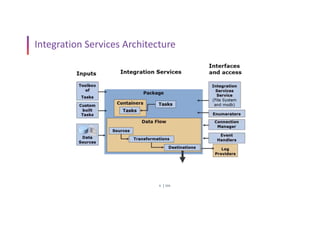
Integration Services Architecture
SSIS
9
SSIS in SQL Server Data Tools (SSDT)
 Five tabs in SSIS designer
–Control flow
–Data flow
–Event handlers
–Package explorer
–Progress / Execution results
SSIS
10
Using Packages
 Import and export Integration Services packages
 Manage Integration Services packages
 Run Integration Services packages
 Monitor running Integration Services packages
SSIS
11
SSIS Wizards
 SQL Server Import and Export Wizard
 Package Configuration Wizard
 Package Installation Wizard
SSIS
12
Section 1: SSIS – The Big Picture
 Course Introduction
 Installing SQL Server 2019
 Installing SSDT
 Setting Up Sample Database
 Overview of SQL Server Integration Services (SSIS)
 Exercise Files
SSIS
13
Section 2: Data Migration Techniques
 Working with Import Export Wizard
 Invoking Wizard from SSMS
 Invoking Wizard from SSDT
SSIS
14
Section 3: Working with Data Flow Tasks-1
 Exporting Data from SQL Server to CSV File
 Working with Character Map Transformation
 Working with CopyColumn Transformation
 Working with DerivedColumn Transformation
 Working with PercentageSampling Transformation
 Working with RowSampling Transformation
SSIS
15
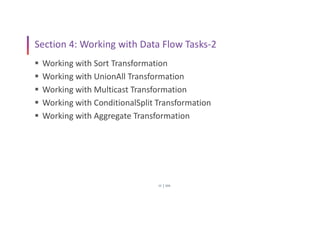
Section 4: Working with Data Flow Tasks-2
 Working with Sort Transformation
 Working with UnionAll Transformation
 Working with Multicast Transformation
 Working with ConditionalSplit Transformation
 Working with Aggregate Transformation
SSIS
16
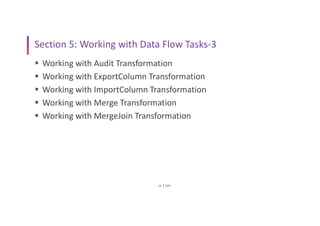
Section 5: Working with Data Flow Tasks-3
 Working with Audit Transformation
 Working with ExportColumn Transformation
 Working with ImportColumn Transformation
 Working with Merge Transformation
 Working with MergeJoin Transformation
SSIS
17
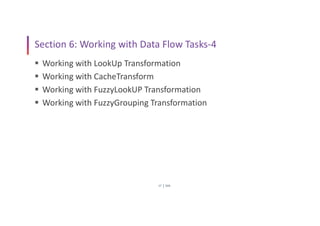
Section 6: Working with Data Flow Tasks-4
 Working with LookUp Transformation
 Working with CacheTransform
 Working with FuzzyLookUP Transformation
 Working with FuzzyGrouping Transformation
SSIS
18
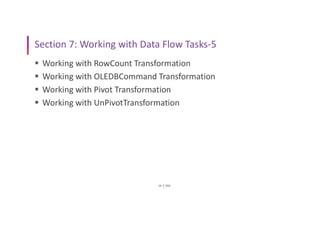
Section 7: Working with Data Flow Tasks-5
 Working with RowCount Transformation
 Working with OLEDBCommand Transformation
 Working with Pivot Transformation
 Working with UnPivotTransformation
SSIS
19
Section 8: Working with Data Flow Tasks-6
 Working with TermExtract Transformation
 Working with TermLookUp Transformation
SSIS
20
Section 9: Working with Control Flow Tasks-1
 Working with BulkInsert Task
 Working with SequenceContainer Task
 Working with ExecuteProcess Task
 Working with ExecutePackage Task
 Passing Parameters between Packages
SSIS
21
Section 10: Working with Control Flow Tasks-2
 Working with FileSystem Task
 Working with WebService Task
 Working with XML Task
 Working with DataProfiling Task
SSIS
22
Section 11: Working with Control Flow Tasks-3
 Working with TransferDatabase Task
 Working with TransferSQLServerObjects Task
 Working with TransferMasterStoredProcedures Task
 Working with TransferJobs Task
 Working with TransferLogins Task
 Working with TransferErrorMessages Task
SSIS
23
Section 12: Working with Control Flow Tasks-4
 Working with For Loop Container in a Fixed Manner
 Working with For Loop Container in a Variant Manner
 Working with For Each File Enumerator
 Working with For Each Item Enumerator
 Working with For Each From Variable Enumerator
 Working with For Each Node List Enumerator
 Working with For Each SMO Enumerator
 Working with For Each ADO Enumerator
SSIS
24
Section 13: Working with Configuration Types
 Using Configuration Files
 Using Configuration Tables
SSIS
25
Section 14: Creating Dynamic Packages
 Creating Dynamic Connection Managers
 Creating Dynamic Tasks
SSIS
26
Section 15: Event Handling Techniques
 Using Precedence Constraints
 Handling Events
SSIS
27
Section 16: Working with Log Providers
 Working with Log Provider for Text Files
 Working with Log Provider for XML Files
 Working with Log Provider for Windows Event Log
SSIS
28
Section 17: Working with WMI Tasks
 Working with WMIDataReader Task-1
 Working with WMIDataReader Task-2
 Working with WMIEventWatcher Task
SSIS
29
Section 18: Using Message Queuing Techniques
 Sending and Receiving Messages with Message Queuing Task
SSIS
30
Section 19: Working with Maintenance Planning Tasks
 Working with BackupDatabase Task
 Working with SQLServer Agent Job Task
 Working with Execute T-SQL Task
 Working with Update Statistics Task
 Working with History CleanUp Task
 Working with ShrinkDatabase Task
 Working with RebuildIndexes Task
 Working with ReorganizeIndex Task
 Working with CheckDatabaseIntegrity Task
SSIS
31
Section 20: Implementing CheckPoints
 Working with CheckPoints
SSIS
32
Section 21: Working with Various Sources and
Destinations of SSIS
 Working with XML Source and RAWFile Destination
 Working with RAWFile Source and SQLServer Destination
 Working with ADO.NET Source and ADO.NET Destination
 Working with RecordSetDestination
 Working with DataReader Destination
SSIS
33
Section 22: Incremental Data Loading Techniques
 Implementing Incremental Inserts
 Updating Modified Records
 Deleting Records
SSIS
34
Section 23: Working with CDC Components
 Configuring CDC
 Implementing Initial Load
 Implementing Incremental Inserts
 Updating Modified Records
 Deleting Records
SSIS
35
Section 24: Deployment
 Deploying SSIS Packages
 Executing Packages Manually
 Executing Packages through a Scheduler
 Executing Packages through T-SQL
Queries…?
Thank You…!

SQL Server Integration Services.pdf

  • 1.
    SSIS 1 SQL Server IntegrationServices B.Bhuvaneswaran, Assistant Professor (SG), Department of Computer Science and Engineering, Rajalakshmi Engineering College, Chennai bhuvaneswaran@rajalakshmi.edu.in 28 September 2022
  • 2.
    SSIS 2 Overview  Overview ofSQL Server Integration Services  Using Integration Services Tools
  • 3.
    Overview of SQLServer Integration Services
  • 4.
    SSIS 4 Overview of SQLServer Integration Services  What is SQL Server Integration Services  Common uses of Integration Services  Fundamental Integration Services concepts  Integration Services Architecture
  • 5.
    SSIS 5 What is SQLServer Integration Services?  ETL (Extract, Transform, Load) –The process of collecting and cleaning data from various sources.  SSIS is a platform for ETL operations.  SSIS consists of a control flow engine and a data flow engine.
  • 6.
    SSIS 6 Common Uses ofIntegration Services  Import and export data  Integrate heterogeneous data  Clean and standardize data  Support BI solutions
  • 7.
    SSIS 7 Fundamental Integration ServicesConcepts  Package  Control flow  Data flow  Variable  Event handler
  • 8.
  • 9.
    SSIS 9 SSIS in SQLServer Data Tools (SSDT)  Five tabs in SSIS designer –Control flow –Data flow –Event handlers –Package explorer –Progress / Execution results
  • 10.
    SSIS 10 Using Packages  Importand export Integration Services packages  Manage Integration Services packages  Run Integration Services packages  Monitor running Integration Services packages
  • 11.
    SSIS 11 SSIS Wizards  SQLServer Import and Export Wizard  Package Configuration Wizard  Package Installation Wizard
  • 12.
    SSIS 12 Section 1: SSIS– The Big Picture  Course Introduction  Installing SQL Server 2019  Installing SSDT  Setting Up Sample Database  Overview of SQL Server Integration Services (SSIS)  Exercise Files
  • 13.
    SSIS 13 Section 2: DataMigration Techniques  Working with Import Export Wizard  Invoking Wizard from SSMS  Invoking Wizard from SSDT
  • 14.
    SSIS 14 Section 3: Workingwith Data Flow Tasks-1  Exporting Data from SQL Server to CSV File  Working with Character Map Transformation  Working with CopyColumn Transformation  Working with DerivedColumn Transformation  Working with PercentageSampling Transformation  Working with RowSampling Transformation
  • 15.
    SSIS 15 Section 4: Workingwith Data Flow Tasks-2  Working with Sort Transformation  Working with UnionAll Transformation  Working with Multicast Transformation  Working with ConditionalSplit Transformation  Working with Aggregate Transformation
  • 16.
    SSIS 16 Section 5: Workingwith Data Flow Tasks-3  Working with Audit Transformation  Working with ExportColumn Transformation  Working with ImportColumn Transformation  Working with Merge Transformation  Working with MergeJoin Transformation
  • 17.
    SSIS 17 Section 6: Workingwith Data Flow Tasks-4  Working with LookUp Transformation  Working with CacheTransform  Working with FuzzyLookUP Transformation  Working with FuzzyGrouping Transformation
  • 18.
    SSIS 18 Section 7: Workingwith Data Flow Tasks-5  Working with RowCount Transformation  Working with OLEDBCommand Transformation  Working with Pivot Transformation  Working with UnPivotTransformation
  • 19.
    SSIS 19 Section 8: Workingwith Data Flow Tasks-6  Working with TermExtract Transformation  Working with TermLookUp Transformation
  • 20.
    SSIS 20 Section 9: Workingwith Control Flow Tasks-1  Working with BulkInsert Task  Working with SequenceContainer Task  Working with ExecuteProcess Task  Working with ExecutePackage Task  Passing Parameters between Packages
  • 21.
    SSIS 21 Section 10: Workingwith Control Flow Tasks-2  Working with FileSystem Task  Working with WebService Task  Working with XML Task  Working with DataProfiling Task
  • 22.
    SSIS 22 Section 11: Workingwith Control Flow Tasks-3  Working with TransferDatabase Task  Working with TransferSQLServerObjects Task  Working with TransferMasterStoredProcedures Task  Working with TransferJobs Task  Working with TransferLogins Task  Working with TransferErrorMessages Task
  • 23.
    SSIS 23 Section 12: Workingwith Control Flow Tasks-4  Working with For Loop Container in a Fixed Manner  Working with For Loop Container in a Variant Manner  Working with For Each File Enumerator  Working with For Each Item Enumerator  Working with For Each From Variable Enumerator  Working with For Each Node List Enumerator  Working with For Each SMO Enumerator  Working with For Each ADO Enumerator
  • 24.
    SSIS 24 Section 13: Workingwith Configuration Types  Using Configuration Files  Using Configuration Tables
  • 25.
    SSIS 25 Section 14: CreatingDynamic Packages  Creating Dynamic Connection Managers  Creating Dynamic Tasks
  • 26.
    SSIS 26 Section 15: EventHandling Techniques  Using Precedence Constraints  Handling Events
  • 27.
    SSIS 27 Section 16: Workingwith Log Providers  Working with Log Provider for Text Files  Working with Log Provider for XML Files  Working with Log Provider for Windows Event Log
  • 28.
    SSIS 28 Section 17: Workingwith WMI Tasks  Working with WMIDataReader Task-1  Working with WMIDataReader Task-2  Working with WMIEventWatcher Task
  • 29.
    SSIS 29 Section 18: UsingMessage Queuing Techniques  Sending and Receiving Messages with Message Queuing Task
  • 30.
    SSIS 30 Section 19: Workingwith Maintenance Planning Tasks  Working with BackupDatabase Task  Working with SQLServer Agent Job Task  Working with Execute T-SQL Task  Working with Update Statistics Task  Working with History CleanUp Task  Working with ShrinkDatabase Task  Working with RebuildIndexes Task  Working with ReorganizeIndex Task  Working with CheckDatabaseIntegrity Task
  • 31.
    SSIS 31 Section 20: ImplementingCheckPoints  Working with CheckPoints
  • 32.
    SSIS 32 Section 21: Workingwith Various Sources and Destinations of SSIS  Working with XML Source and RAWFile Destination  Working with RAWFile Source and SQLServer Destination  Working with ADO.NET Source and ADO.NET Destination  Working with RecordSetDestination  Working with DataReader Destination
  • 33.
    SSIS 33 Section 22: IncrementalData Loading Techniques  Implementing Incremental Inserts  Updating Modified Records  Deleting Records
  • 34.
    SSIS 34 Section 23: Workingwith CDC Components  Configuring CDC  Implementing Initial Load  Implementing Incremental Inserts  Updating Modified Records  Deleting Records
  • 35.
    SSIS 35 Section 24: Deployment Deploying SSIS Packages  Executing Packages Manually  Executing Packages through a Scheduler  Executing Packages through T-SQL
  • 36.
  • 37.