Excel 2010 Keyboard Shortcuts
Click to edit headline title  Ctrl combination shortcut keys


style
 Key
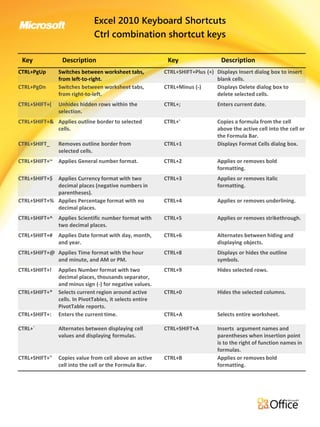
CTRL+PgUp
                Description
               Switches between worksheet tabs,
               from left-to-right.
                                                           Key                   Description
                                                          CTRL+SHIFT+Plus (+) Displays Insert dialog box to insert
                                                                              blank cells.
CTRL+PgDn      Switches between worksheet tabs,           CTRL+Minus (-)      Displays Delete dialog box to
               from right-to-left.                                            delete selected cells.
CTRL+SHIFT+(   Unhides hidden rows within the             CTRL+;               Enters current date.
Click to edit body copy.
               selection.
CTRL+SHIFT+& Applies outline border to selected           CTRL+'               Copies a formula from the cell
             cells.                                                            above the active cell into the cell or
                                                                               the Formula Bar.
CTRL+SHIFT_    Removes outline border from                CTRL+1               Displays Format Cells dialog box.
               selected cells.
CTRL+SHIFT+~   Applies General number format.             CTRL+2               Applies or removes bold
                                                                               formatting.
CTRL+SHIFT+$ Applies Currency format with two             CTRL+3               Applies or removes italic
             decimal places (negative numbers in                               formatting.
             parentheses).
CTRL+SHIFT+% Applies Percentage format with no            CTRL+4               Applies or removes underlining.
             decimal places.
CTRL+SHIFT+^   Applies Scientific number format with      CTRL+5               Applies or removes strikethrough.
               two decimal places.
CTRL+SHIFT+#   Applies Date format with day, month,       CTRL+6               Alternates between hiding and
               and year.                                                       displaying objects.
CTRL+SHIFT+@ Applies Time format with the hour            CTRL+8               Displays or hides the outline
             and minute, and AM or PM.                                         symbols.
CTRL+SHIFT+!   Applies Number format with two             CTRL+9               Hides selected rows.
               decimal places, thousands separator,
               and minus sign (-) for negative values.
CTRL+SHIFT+*   Selects current region around active       CTRL+0               Hides the selected columns.
               cells. In PivotTables, it selects entire
               PivotTable reports.
CTRL+SHIFT+:   Enters the current time.                   CTRL+A               Selects entire worksheet.

CTRL+`         Alternates between displaying cell         CTRL+SHIFT+A         Inserts argument names and
               values and displaying formulas.                                 parentheses when insertion point
                                                                               is to the right of function names in
                                                                               formulas.
CTRL+SHIFT+"   Copies value from cell above an active     CTRL+B               Applies or removes bold
               cell into the cell or the Formula Bar.                          formatting.
Excel 2010 Keyboard Shortcuts - Ctrl combination shortcut keys
  Click to edit headline title
 Key             Description                                 Key            Description

  style
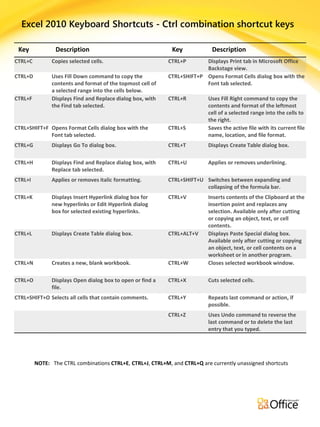
CTRL+C

CTRL+D
               Copies selected cells.

               Uses Fill Down command to copy the
                                                            CTRL+P       Displays Print tab in Microsoft Office
                                                                         Backstage view.
                                                            CTRL+SHIFT+P Opens Format Cells dialog box with the
               contents and format of the topmost cell of                Font tab selected.
               a selected range into the cells below.
CTRL+F         Displays Find and Replace dialog box, with   CTRL+R         Uses Fill Right command to copy the
               the Find tab selected.                                      contents and format of the leftmost
Click to edit body copy.                                                   cell of a selected range into the cells to
                                                                           the right.
CTRL+SHIFT+F Opens Format Cells dialog box with the         CTRL+S         Saves the active file with its current file
             Font tab selected.                                            name, location, and file format.
CTRL+G         Displays Go To dialog box.                   CTRL+T         Displays Create Table dialog box.

CTRL+H         Displays Find and Replace dialog box, with   CTRL+U         Applies or removes underlining.
               Replace tab selected.
CTRL+I         Applies or removes italic formatting.        CTRL+SHIFT+U Switches between expanding and
                                                                         collapsing of the formula bar.
CTRL+K         Displays Insert Hyperlink dialog box for     CTRL+V         Inserts contents of the Clipboard at the
               new hyperlinks or Edit Hyperlink dialog                     insertion point and replaces any
               box for selected existing hyperlinks.                       selection. Available only after cutting
                                                                           or copying an object, text, or cell
                                                                           contents.
CTRL+L         Displays Create Table dialog box.            CTRL+ALT+V     Displays Paste Special dialog box.
                                                                           Available only after cutting or copying
                                                                           an object, text, or cell contents on a
                                                                           worksheet or in another program.
CTRL+N         Creates a new, blank workbook.               CTRL+W         Closes selected workbook window.

CTRL+O         Displays Open dialog box to open or find a   CTRL+X         Cuts selected cells.
               file.
CTRL+SHIFT+O Selects all cells that contain comments.       CTRL+Y         Repeats last command or action, if
                                                                           possible.
                                                            CTRL+Z         Uses Undo command to reverse the
                                                                           last command or to delete the last
                                                                           entry that you typed.


         NOTE: The CTRL combinations CTRL+E, CTRL+J, CTRL+M, and CTRL+Q are currently unassigned shortcuts

Excel keyboard shortcuts

  • 1.
    Excel 2010 KeyboardShortcuts Click to edit headline title Ctrl combination shortcut keys style Key CTRL+PgUp Description Switches between worksheet tabs, from left-to-right. Key Description CTRL+SHIFT+Plus (+) Displays Insert dialog box to insert blank cells. CTRL+PgDn Switches between worksheet tabs, CTRL+Minus (-) Displays Delete dialog box to from right-to-left. delete selected cells. CTRL+SHIFT+( Unhides hidden rows within the CTRL+; Enters current date. Click to edit body copy. selection. CTRL+SHIFT+& Applies outline border to selected CTRL+' Copies a formula from the cell cells. above the active cell into the cell or the Formula Bar. CTRL+SHIFT_ Removes outline border from CTRL+1 Displays Format Cells dialog box. selected cells. CTRL+SHIFT+~ Applies General number format. CTRL+2 Applies or removes bold formatting. CTRL+SHIFT+$ Applies Currency format with two CTRL+3 Applies or removes italic decimal places (negative numbers in formatting. parentheses). CTRL+SHIFT+% Applies Percentage format with no CTRL+4 Applies or removes underlining. decimal places. CTRL+SHIFT+^ Applies Scientific number format with CTRL+5 Applies or removes strikethrough. two decimal places. CTRL+SHIFT+# Applies Date format with day, month, CTRL+6 Alternates between hiding and and year. displaying objects. CTRL+SHIFT+@ Applies Time format with the hour CTRL+8 Displays or hides the outline and minute, and AM or PM. symbols. CTRL+SHIFT+! Applies Number format with two CTRL+9 Hides selected rows. decimal places, thousands separator, and minus sign (-) for negative values. CTRL+SHIFT+* Selects current region around active CTRL+0 Hides the selected columns. cells. In PivotTables, it selects entire PivotTable reports. CTRL+SHIFT+: Enters the current time. CTRL+A Selects entire worksheet. CTRL+` Alternates between displaying cell CTRL+SHIFT+A Inserts argument names and values and displaying formulas. parentheses when insertion point is to the right of function names in formulas. CTRL+SHIFT+" Copies value from cell above an active CTRL+B Applies or removes bold cell into the cell or the Formula Bar. formatting.
  • 2.
    Excel 2010 KeyboardShortcuts - Ctrl combination shortcut keys Click to edit headline title Key Description Key Description style CTRL+C CTRL+D Copies selected cells. Uses Fill Down command to copy the CTRL+P Displays Print tab in Microsoft Office Backstage view. CTRL+SHIFT+P Opens Format Cells dialog box with the contents and format of the topmost cell of Font tab selected. a selected range into the cells below. CTRL+F Displays Find and Replace dialog box, with CTRL+R Uses Fill Right command to copy the the Find tab selected. contents and format of the leftmost Click to edit body copy. cell of a selected range into the cells to the right. CTRL+SHIFT+F Opens Format Cells dialog box with the CTRL+S Saves the active file with its current file Font tab selected. name, location, and file format. CTRL+G Displays Go To dialog box. CTRL+T Displays Create Table dialog box. CTRL+H Displays Find and Replace dialog box, with CTRL+U Applies or removes underlining. Replace tab selected. CTRL+I Applies or removes italic formatting. CTRL+SHIFT+U Switches between expanding and collapsing of the formula bar. CTRL+K Displays Insert Hyperlink dialog box for CTRL+V Inserts contents of the Clipboard at the new hyperlinks or Edit Hyperlink dialog insertion point and replaces any box for selected existing hyperlinks. selection. Available only after cutting or copying an object, text, or cell contents. CTRL+L Displays Create Table dialog box. CTRL+ALT+V Displays Paste Special dialog box. Available only after cutting or copying an object, text, or cell contents on a worksheet or in another program. CTRL+N Creates a new, blank workbook. CTRL+W Closes selected workbook window. CTRL+O Displays Open dialog box to open or find a CTRL+X Cuts selected cells. file. CTRL+SHIFT+O Selects all cells that contain comments. CTRL+Y Repeats last command or action, if possible. CTRL+Z Uses Undo command to reverse the last command or to delete the last entry that you typed. NOTE: The CTRL combinations CTRL+E, CTRL+J, CTRL+M, and CTRL+Q are currently unassigned shortcuts