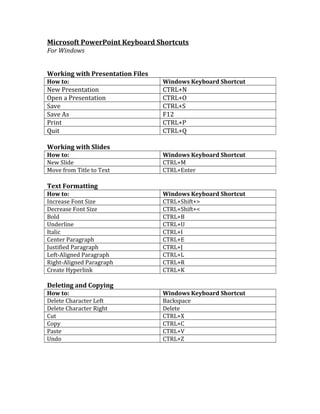
Microsoft PowerPoint Keyboard Shortcuts
For Windows
Working with Presentation Files
How to: Windows Keyboard Shortcut
New Presentation CTRL+N
Open a Presentation CTRL+O
Save CTRL+S
Save As F12
Print CTRL+P
Quit CTRL+Q
Working with Slides
How to: Windows Keyboard Shortcut
New Slide CTRL+M
Move from Title to Text CTRL+Enter
Text Formatting
How to: Windows Keyboard Shortcut
Increase Font Size CTRL+Shift+>
Decrease Font Size CTRL+Shift+<
Bold CTRL+B
Underline CTRL+U
Italic CTRL+I
Center Paragraph CTRL+E
Justified Paragraph CTRL+J
Left-Aligned Paragraph CTRL+L
Right-Aligned Paragraph CTRL+R
Create Hyperlink CTRL+K
Deleting and Copying
How to: Windows Keyboard Shortcut
Delete Character Left Backspace
Delete Character Right Delete
Cut CTRL+X
Copy CTRL+C
Paste CTRL+V
Undo CTRL+Z
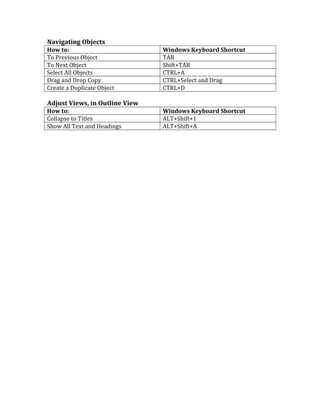
Navigating Objects
How to: Windows Keyboard Shortcut
To Previous Object TAB
To Next Object Shift+TAB
Select All Objects CTRL+A
Drag and Drop Copy CTRL+Select and Drag
Create a Duplicate Object CTRL+D
Adjust Views, in Outline View
How to: Windows Keyboard Shortcut
Collapse to Titles ALT+Shift+1
Show All Text and Headings ALT+Shift+A

Powerpointkeyboardshortcuts 120405034358-phpapp02

  • 1.
    Microsoft PowerPoint KeyboardShortcuts For Windows Working with Presentation Files How to: Windows Keyboard Shortcut New Presentation CTRL+N Open a Presentation CTRL+O Save CTRL+S Save As F12 Print CTRL+P Quit CTRL+Q Working with Slides How to: Windows Keyboard Shortcut New Slide CTRL+M Move from Title to Text CTRL+Enter Text Formatting How to: Windows Keyboard Shortcut Increase Font Size CTRL+Shift+> Decrease Font Size CTRL+Shift+< Bold CTRL+B Underline CTRL+U Italic CTRL+I Center Paragraph CTRL+E Justified Paragraph CTRL+J Left-Aligned Paragraph CTRL+L Right-Aligned Paragraph CTRL+R Create Hyperlink CTRL+K Deleting and Copying How to: Windows Keyboard Shortcut Delete Character Left Backspace Delete Character Right Delete Cut CTRL+X Copy CTRL+C Paste CTRL+V Undo CTRL+Z
  • 2.
    Navigating Objects How to:Windows Keyboard Shortcut To Previous Object TAB To Next Object Shift+TAB Select All Objects CTRL+A Drag and Drop Copy CTRL+Select and Drag Create a Duplicate Object CTRL+D Adjust Views, in Outline View How to: Windows Keyboard Shortcut Collapse to Titles ALT+Shift+1 Show All Text and Headings ALT+Shift+A