Badry Waleed El- 
PhD Candidate ,Mechatronics Department, ASU 
https://eg.linkedin.com/in/wbadry 
Simulation demos and materials are concession to the presenter. Kindly distribute it for 
educational purposes
Practical Utilization 
Simulation demos and materials are concession to the presenter. Kindly distribute it for 
educational purposes
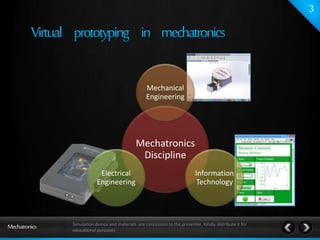
Mechanical 
Engineering 
Mechatronics 
Discipline 
Information 
Technology 
Electrical 
Engineering 
Simulation demos and materials are concession to the presenter. Kindly distribute it for 
educational purposes
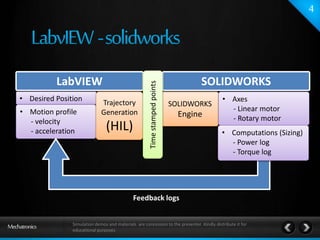
LabVIEW 
Motion 
Controller 
• Desired Position 
• Motion profile 
- velocity 
- acceleration 
Trajectory 
Generation 
(HIL) 
SOLIDWORKS 
Engine 
Feedback logs 
SOLIDWORKS 
• Axes 
- Linear motor 
- Rotary motor 
• Computations (Sizing) 
- Power log 
- Torque log 
Time stamped points 
Simulation demos and materials are concession to the presenter. Kindly distribute it for 
educational purposes
SIZING OF LINEAR MOTOR 
Simulation demos and materials are concession to the presenter. Kindly distribute it for 
educational purposes
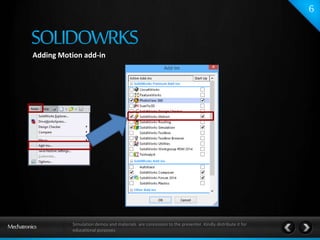
Adding Motion add-in 
Simulation demos and materials are concession to the presenter. Kindly distribute it for 
educational purposes
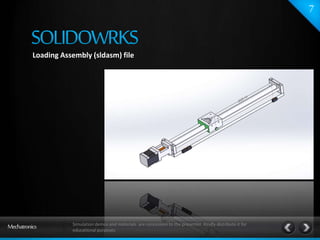
Loading Assembly (sldasm) file 
Simulation demos and materials are concession to the presenter. Kindly distribute it for 
educational purposes
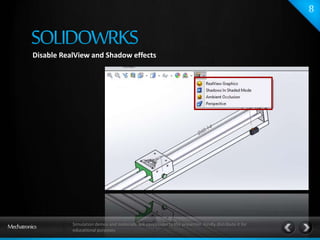
Disable RealView and Shadow effects 
Simulation demos and materials are concession to the presenter. Kindly distribute it for 
educational purposes
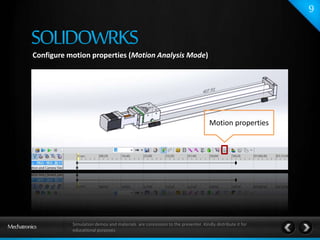
Configure motion properties (Motion Analysis Mode) 
Motion properties 
Simulation demos and materials are concession to the presenter. Kindly distribute it for 
educational purposes
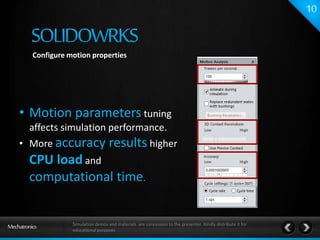
Configure motion properties 
• Motion parameters tuning 
affects simulation performance. 
• More accuracy results higher 
CPU load and 
computational time. 
Simulation demos and materials are concession to the presenter. Kindly distribute it for 
educational purposes
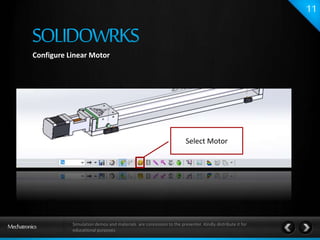
Configure Linear Motor 
Select Motor 
Simulation demos and materials are concession to the presenter. Kindly distribute it for 
educational purposes
Configure motion properties (Motion Analysis Mode) [Linear motor] 
Simulation demos and materials are concession to the presenter. Kindly distribute it for 
educational purposes
SINGLE AXIS 
Simulation demos and materials are concession to the presenter. Kindly distribute it for 
educational purposes
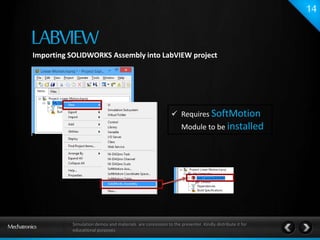
Importing SOLIDWORKS Assembly into LabVIEW project 
 Requires SoftMotion 
Module to be installed 
Simulation demos and materials are concession to the presenter. Kindly distribute it for 
educational purposes
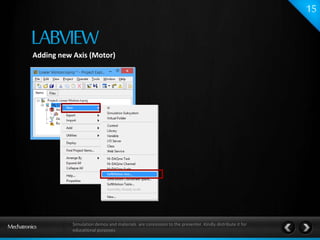
Adding new Axis (Motor) 
Simulation demos and materials are concession to the presenter. Kindly distribute it for 
educational purposes
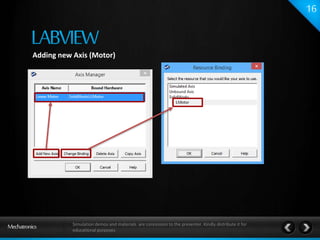
Adding new Axis (Motor) 
Simulation demos and materials are concession to the presenter. Kindly distribute it for 
educational purposes
Configure axis properites 
Simulation demos and materials are concession to the presenter. Kindly distribute it for 
educational purposes
Deploy axis 
 Successful 
deployment checks if 
motors data can be 
accessed in 
SOLIDWORKS 
Simulation demos and materials are concession to the presenter. Kindly distribute it for 
educational purposes
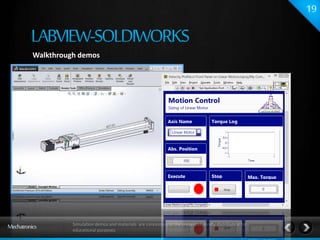
Walkthrough demos 
Simulation demos and materials are concession to the presenter. Kindly distribute it for 
educational purposes
AFTER COMPUTING PEAK AND RMS TORQUE, 
INSERT IT INTO VISUAL SIZER AND GET 
THE MOTOR SIZING REPORT SELECTION 
WITH INERTIA MISMATCH 
Delivery is NEXT WEEK 
Simulation demos and materials are concession to the presenter. Kindly distribute it for 
educational purposes
NOTE : Detailed word document and Demos will be uploaded 
to Mechatronics Facebook group after presentation. 
Simulation demos and materials are concession to the presenter. Kindly distribute it for 
educational purposes

Motion Control with LabVIEW and SOLIDWORKS

  • 1.
    Badry Waleed El- PhD Candidate ,Mechatronics Department, ASU https://eg.linkedin.com/in/wbadry Simulation demos and materials are concession to the presenter. Kindly distribute it for educational purposes
  • 2.
    Practical Utilization Simulationdemos and materials are concession to the presenter. Kindly distribute it for educational purposes
  • 3.
    Mechanical Engineering Mechatronics Discipline Information Technology Electrical Engineering Simulation demos and materials are concession to the presenter. Kindly distribute it for educational purposes
  • 4.
    LabVIEW Motion Controller • Desired Position • Motion profile - velocity - acceleration Trajectory Generation (HIL) SOLIDWORKS Engine Feedback logs SOLIDWORKS • Axes - Linear motor - Rotary motor • Computations (Sizing) - Power log - Torque log Time stamped points Simulation demos and materials are concession to the presenter. Kindly distribute it for educational purposes
  • 5.
    SIZING OF LINEARMOTOR Simulation demos and materials are concession to the presenter. Kindly distribute it for educational purposes
  • 6.
    Adding Motion add-in Simulation demos and materials are concession to the presenter. Kindly distribute it for educational purposes
  • 7.
    Loading Assembly (sldasm)file Simulation demos and materials are concession to the presenter. Kindly distribute it for educational purposes
  • 8.
    Disable RealView andShadow effects Simulation demos and materials are concession to the presenter. Kindly distribute it for educational purposes
  • 9.
    Configure motion properties(Motion Analysis Mode) Motion properties Simulation demos and materials are concession to the presenter. Kindly distribute it for educational purposes
  • 10.
    Configure motion properties • Motion parameters tuning affects simulation performance. • More accuracy results higher CPU load and computational time. Simulation demos and materials are concession to the presenter. Kindly distribute it for educational purposes
  • 11.
    Configure Linear Motor Select Motor Simulation demos and materials are concession to the presenter. Kindly distribute it for educational purposes
  • 12.
    Configure motion properties(Motion Analysis Mode) [Linear motor] Simulation demos and materials are concession to the presenter. Kindly distribute it for educational purposes
  • 13.
    SINGLE AXIS Simulationdemos and materials are concession to the presenter. Kindly distribute it for educational purposes
  • 14.
    Importing SOLIDWORKS Assemblyinto LabVIEW project  Requires SoftMotion Module to be installed Simulation demos and materials are concession to the presenter. Kindly distribute it for educational purposes
  • 15.
    Adding new Axis(Motor) Simulation demos and materials are concession to the presenter. Kindly distribute it for educational purposes
  • 16.
    Adding new Axis(Motor) Simulation demos and materials are concession to the presenter. Kindly distribute it for educational purposes
  • 17.
    Configure axis properites Simulation demos and materials are concession to the presenter. Kindly distribute it for educational purposes
  • 18.
    Deploy axis Successful deployment checks if motors data can be accessed in SOLIDWORKS Simulation demos and materials are concession to the presenter. Kindly distribute it for educational purposes
  • 19.
    Walkthrough demos Simulationdemos and materials are concession to the presenter. Kindly distribute it for educational purposes
  • 20.
    AFTER COMPUTING PEAKAND RMS TORQUE, INSERT IT INTO VISUAL SIZER AND GET THE MOTOR SIZING REPORT SELECTION WITH INERTIA MISMATCH Delivery is NEXT WEEK Simulation demos and materials are concession to the presenter. Kindly distribute it for educational purposes
  • 21.
    NOTE : Detailedword document and Demos will be uploaded to Mechatronics Facebook group after presentation. Simulation demos and materials are concession to the presenter. Kindly distribute it for educational purposes