


Boutique product development company
It is amazing what you can accomplish when you have a client-centric team to deliver outstanding products.
Monkey Talk
Khizra Samad | QA Mentor
Monkey Talk
Topics covered in the presentation


     •   Features & Benefits
     •   Components
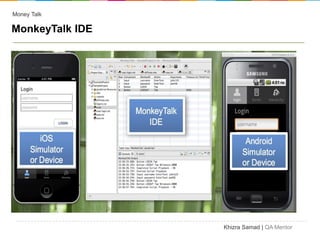
     •   Monkey Talk IDE
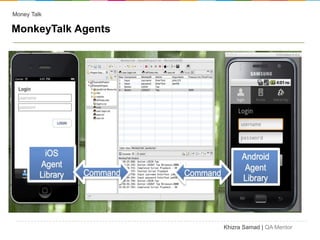
     •   Monkey Talk Agents
     •   Monkey Talk Capabilities
     •   Monkey Talk Android Agent
     •   Connecting to Emulator/Simulator


                                            Khizra Samad | QA Mentor
Money Talk

Introduction


•Previously named "FoneMonkey"


•Tool for automated testing of iOS, Android, HTML5 and Adobe Flex
applications


• MonkeyTalk is an integrated environment for recording, customizing,
running and managing test suites.


                                                    Khizra Samad | QA Mentor
Money Talk

Features and Benefits


    • Free & Open Source

    • Powerful and robust record and playback functions for
        mobile applications

    • Powerful IDE

    • Fully cross platform

    • No jailbreaking needed


                                                    Khizra Samad | QA Mentor
Money Talk

Features and Benefits


•Run on real hardware

•Readable scripts

•Javascript scripts

•Data-driven scripts

•JUnit-compatible XML reports

•HTML reports too


                                Khizra Samad | QA Mentor
Money Talk

Components


 •MonkeyTalk IDE

 •MonkeyTalk Agents


                      Khizra Samad | QA Mentor
Money Talk

MonkeyTalk IDE


                 Khizra Samad | QA Mentor
Money Talk

MonkeyTalk Agents


                    Khizra Samad | QA Mentor
Money Talk

Monkey Talk Capabilities


   • Test suites / Test Case Creation

   • Reusing scripts

   • Data-driving scripts with CSV files

   • Extending MonkeyTalk with JavaScript


                                            Khizra Samad | QA Mentor
Money Talk

MonkeyTalk Android Agent

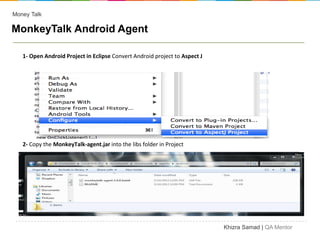
   1- Open Android Project in Eclipse Convert Android project to Aspect J


   2- Copy the MonkeyTalk-agent.jar into the libs folder in Project


                                                                            Khizra Samad | QA Mentor
Money Talk

Installation

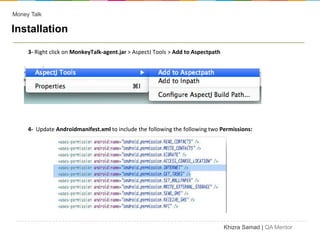
     3- Right click on MonkeyTalk-agent.jar > AspectJ Tools > Add to Aspectpath


     4- Update Androidmanifest.xml to include the following the following two Permissions:


                                                                                  Khizra Samad | QA Mentor
Money Talk

Installation
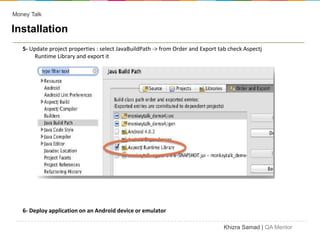
   5- Update project properties : select JavaBuildPath -> from Order and Export tab check Aspectj
       Runtime Library and export it


   6- Deploy application on an Android device or emulator

                                                                                  Khizra Samad | QA Mentor
Money Talk

Connecting to Emulator / Simulator
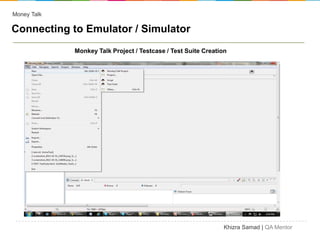
             Monkey Talk Project / Testcase / Test Suite Creation


                                                                Khizra Samad | QA Mentor
Money Talk

    Connecting to Emulator / Simulator

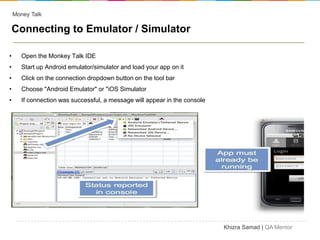
•      Open the Monkey Talk IDE
•      Start up Android emulator/simulator and load your app on it
•      Click on the connection dropdown button on the tool bar
•      Choose "Android Emulator" or "iOS Simulator
•      If connection was successful, a message will appear in the console


                                                                            Khizra Samad | QA Mentor
Money Talk

Connecting to Emulator / Simulator

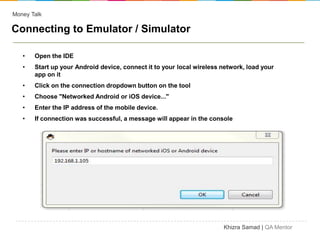
   •   Open the IDE
   •   Start up your Android device, connect it to your local wireless network, load your
       app on it
   •   Click on the connection dropdown button on the tool
   •   Choose "Networked Android or iOS device..."
   •   Enter the IP address of the mobile device.
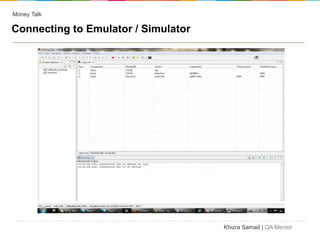
   •   If connection was successful, a message will appear in the console


                                                                       Khizra Samad | QA Mentor
Money Talk

Connecting to Emulator / Simulator


                                     Khizra Samad | QA Mentor
Money Talk

Connecting to Emulator / Simulator


   • Test suites / Test Case Creation

   • Reusing scripts

   • Data-driving scripts with CSV files

   • Extending MonkeyTalk with JavaScript


                                            Khizra Samad | QA Mentor

Monkey talk

  • 1.
    Boutique product developmentcompany It is amazing what you can accomplish when you have a client-centric team to deliver outstanding products.
  • 2.
  • 3.
    Monkey Talk Topics coveredin the presentation • Features & Benefits • Components • Monkey Talk IDE • Monkey Talk Agents • Monkey Talk Capabilities • Monkey Talk Android Agent • Connecting to Emulator/Simulator Khizra Samad | QA Mentor
  • 4.
    Money Talk Introduction •Previously named"FoneMonkey" •Tool for automated testing of iOS, Android, HTML5 and Adobe Flex applications • MonkeyTalk is an integrated environment for recording, customizing, running and managing test suites. Khizra Samad | QA Mentor
  • 5.
    Money Talk Features andBenefits • Free & Open Source • Powerful and robust record and playback functions for mobile applications • Powerful IDE • Fully cross platform • No jailbreaking needed Khizra Samad | QA Mentor
  • 6.
    Money Talk Features andBenefits •Run on real hardware •Readable scripts •Javascript scripts •Data-driven scripts •JUnit-compatible XML reports •HTML reports too Khizra Samad | QA Mentor
  • 7.
    Money Talk Components •MonkeyTalkIDE •MonkeyTalk Agents Khizra Samad | QA Mentor
  • 8.
    Money Talk MonkeyTalk IDE Khizra Samad | QA Mentor
  • 9.
    Money Talk MonkeyTalk Agents Khizra Samad | QA Mentor
  • 10.
    Money Talk Monkey TalkCapabilities • Test suites / Test Case Creation • Reusing scripts • Data-driving scripts with CSV files • Extending MonkeyTalk with JavaScript Khizra Samad | QA Mentor
  • 11.
    Money Talk MonkeyTalk AndroidAgent 1- Open Android Project in Eclipse Convert Android project to Aspect J 2- Copy the MonkeyTalk-agent.jar into the libs folder in Project Khizra Samad | QA Mentor
  • 12.
    Money Talk Installation 3- Right click on MonkeyTalk-agent.jar > AspectJ Tools > Add to Aspectpath 4- Update Androidmanifest.xml to include the following the following two Permissions: Khizra Samad | QA Mentor
  • 13.
    Money Talk Installation 5- Update project properties : select JavaBuildPath -> from Order and Export tab check Aspectj Runtime Library and export it 6- Deploy application on an Android device or emulator Khizra Samad | QA Mentor
  • 14.
    Money Talk Connecting toEmulator / Simulator Monkey Talk Project / Testcase / Test Suite Creation Khizra Samad | QA Mentor
  • 15.
    Money Talk Connecting to Emulator / Simulator • Open the Monkey Talk IDE • Start up Android emulator/simulator and load your app on it • Click on the connection dropdown button on the tool bar • Choose "Android Emulator" or "iOS Simulator • If connection was successful, a message will appear in the console Khizra Samad | QA Mentor
  • 16.
    Money Talk Connecting toEmulator / Simulator • Open the IDE • Start up your Android device, connect it to your local wireless network, load your app on it • Click on the connection dropdown button on the tool • Choose "Networked Android or iOS device..." • Enter the IP address of the mobile device. • If connection was successful, a message will appear in the console Khizra Samad | QA Mentor
  • 17.
    Money Talk Connecting toEmulator / Simulator Khizra Samad | QA Mentor
  • 18.
    Money Talk Connecting toEmulator / Simulator • Test suites / Test Case Creation • Reusing scripts • Data-driving scripts with CSV files • Extending MonkeyTalk with JavaScript Khizra Samad | QA Mentor