MongoDB 3.2 – Document
Validation
LondonMUG–15/9/2015
Agenda
Value of flexible schemas
Downside of flexible schemas
What 3.2 adds
What 3.2 doesn’t add
Options
Production lifecycle to add Document Validation
Demo
Power of flexible schemas
RDBMS MongoDB
{
_id: ObjectId("4c4ba5e5e8aabf3"),
employee_name: {First: "Billy",
Last: "Fish"},
department: "Engineering",
title: "Aquarium design",
pay_band: "C",
benefits: [
{ type: "Health",
plan: "PPO Plus" },
{ type: "Dental",
plan: "Standard" }
]
}
Power of flexible schemas
{
_id:
ObjectId("4c4ba5e5e8aabf3"),
employee_name: {First: "Billy",
Last: "Fish"},
department: "Engineering",
title: "Aquarium design",
pay_band: "C",
benefits: [
{ type: "Health",
plan: "PPO Plus" },
{ type: "Dental",
plan: "Standard" }
]
}
• Relational
– Up-front schema definition phase
– Adding new column takes time to
develop & *lots* of time to roll out in
production
– Existing rows must be reformatted
• MongoDB:
– Start hacking your app right away
– Want to store new type of information?
• Just start adding it
• If it doesn’t apply to all instances
– just leave it out
Power of flexible schemas
{
_id:
ObjectId("4c4ba5e5e8aabf3"),
employee_name: {First: "Billy”,
Middle: "The",
Last: "Fish"},
department: "Engineering",
title: "Aquarium design",
pay_band: "C",
benefits: [
{ type: "Health",
plan: "PPO Plus" },
{ type: "Dental",
plan: "Standard" }
]
}
• Relational
– Up-front schema definition phase
– Adding new column takes time to
develop & *lots* of time to roll out in
production
– Existing rows must be reformatted
• MongoDB:
– Start hacking your app right away
– Want to store new type of information?
• Just start adding it
• If it doesn’t apply to all instances
– just leave it out
6
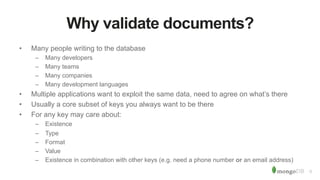
Why validate documents?
• Many people writing to the database
– Many developers
– Many teams
– Many companies
– Many development languages
• Multiple applications want to exploit the same data, need to agree on what’s there
• Usually a core subset of keys you always want to be there
• For any key may care about:
– Existence
– Type
– Format
– Value
– Existence in combination with other keys (e.g. need a phone number or an email address)
7
Data Access Layer
Why validate documents?
• Good to have a ‘contract’ for what’s in a collection
– When reading from the “subscriber” collection, I
know that every document will include a
subscription plan name:
db.subscriptions.find(
name: "Billy Fish",
$and:[{plan:{$exists: true}},
{plan:{$type: 2}}]})
• < MongoDB 3.2, this is an application responsibility
– 3rd party tools like Mongoose can help
• Best implemented as a layer between the application
and driver (Data Access Layer)
App App App
Driver
Database
Get the database to do the work!
9
Document Validation - MongoDB 3.2
• Configure document validation within the database
• Use familiar MongoDB query expressions
• Automatically tests each insert/update; delivers warning or error if a rule is broken
• You choose what keys to validate and how
db.runCommand({
collMod: "contacts",
validator: {
$and: [
{year_of_birth: {$lte: 1994}},
{$or: [
{phone: { $type: ”string"}},
{email: { $type: ”string"}}
]}]
}})
10
Document Validation - MongoDB 3.2
db.getCollectionInfos({name:"contacts"})
[
{
"name": "contacts",
"options": {
"validator": {
"$and": [
{"year_of_birth": {
"$lte": 1994}},
{"$or": [
{"phone": {"$type": ”string"}},
{"email": {"$type": ”string"}}
]}
]},
"validationLevel": "strict",
"validationAction": "error"
}
}
]
11
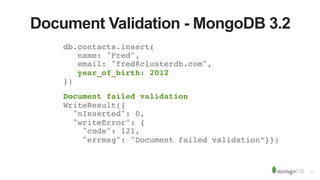
Document Validation - MongoDB 3.2
db.contacts.insert(
name: "Fred",
email: "fred@clusterdb.com",
year_of_birth: 2012
})
Document failed validation
WriteResult({
"nInserted": 0,
"writeError": {
"code": 121,
"errmsg": "Document failed validation”}})
12
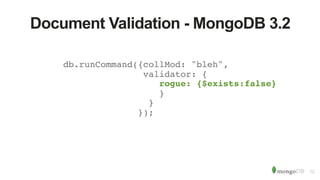
Document Validation - MongoDB 3.2
db.runCommand({collMod: "bleh",
validator: {
rogue: {$exists:false}
}
}
});
13
Document Validation - MongoDB 3.2
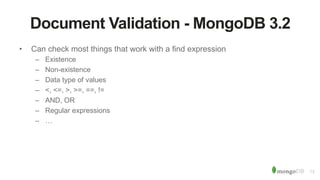
• Can check most things that work with a find expression
– Existence
– Non-existence
– Data type of values
– <, <=, >, >=, ==, !=
– AND, OR
– Regular expressions
– Some geospatial operators (e.g. $geoWithin & $geoIntersects)
– …
14
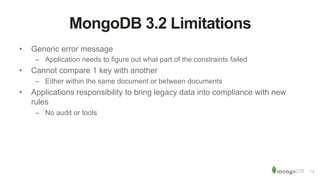
MongoDB 3.2 Limitations
• Generic error message
– Application needs to figure out what part of the constraints failed
• Cannot compare 1 key with another
– Either within the same document or between documents
• Some operations not supported:
– $text, $geoNear, $near, $nearSphere, $where
• Applications responsibility to bring legacy data into compliance with new
rules
– No audit or tools
15
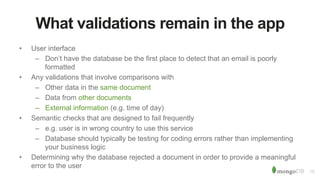
What validations remain in the app
• User interface
– Don’t have the database be the first place to detect that an email is poorly
formatted
• Any validations that involve comparisons with
– Other data in the same document
– Data from other documents
– External information (e.g. time of day)
• Semantic checks that are designed to fail frequently
– e.g. user is in wrong country to use this service
– Database should typically be testing for coding errors rather than implementing
your business logic
• Determining why the database rejected a document in order to provide a meaningful
error to the user
16
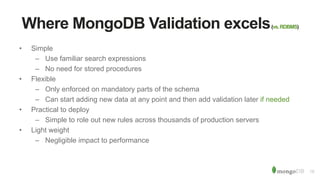
Where MongoDB Validation excels(vs.RDBMS)
• Simple
– Use familiar search expressions
– No need for stored procedures
• Flexible
– Only enforced on mandatory parts of the schema
– Can start adding new data at any point and then add validation later if needed
• Practical to deploy
– Simple to role out new rules across thousands of production servers
• Light weight
– Negligible impact to performance
17
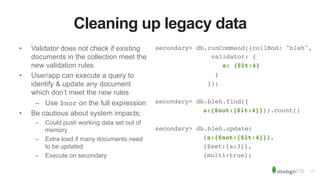
Cleaning up legacy data
• Validator does not check if existing
documents in the collection meet the
new validation rules
• User/app can execute a query to
identify & update any document
which don’t meet the new rules
– Use $nor on the full expression
• Be cautious about system impacts:
– Could push working data set out of
memory
– Extra load if many documents need
to be updated
– Execute on secondary
secondary> db.runCommand({collMod: "bleh",
validator: {
a: {$lt:4}
}
});
secondary> db.bleh.find({
a:{$not:{$lt:4}}}).count()
secondary> db.bleh.update(
{a:{$not:{$lt:4}}},
{$set:{a:3}},
{multi:true})
18
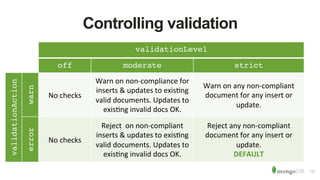
Controlling validation
validationLevel
off moderate strict
validationAction
warn
No checks
Warn on non-compliance for
inserts & updates to existing
valid documents. Updates to
existing invalid docs OK.
Warn on any non-compliant
document for any insert or
update.
error
No checks
Reject on non-compliant
inserts & updates to existing
valid documents. Updates to
existing invalid docs OK.
Reject any non-compliant
document for any insert or
update.
DEFAULT
19
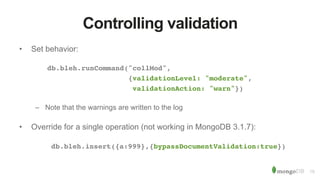
Controlling validation
• Set behavior:
db.bleh.runCommand("collMod",
{validationLevel: "moderate",
validationAction: "warn"})
– Note that the warnings are written to the log
• Override for a single operation (not working in MongoDB 3.1.7):
db.bleh.insert({a:999},{bypassDocumentValidation:true})
20
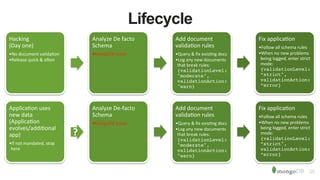
Lifecycle
Hacking
(Day one)
•No document validation
•Release quick & often
Analyze De facto
Schema
•MongoDB Scout
Add document
validation rules
•Query & fix existing docs
•Log any new documents
that break rules:
{validationLevel:
"moderate",
validationAction:
"warn}
Fix application
•Follow all schema rules
•When no new problems
being logged, enter strict
mode:
{validationLevel:
”strict",
validationAction:
”error}
Application uses
new data
(Application
evolves/additional
app)
•If not mandated, stop
here
?
Analyze De-facto
Schema
•MongoDB Scout
Add document
validation rules
•Query & fix existing docs
•Log any new documents
that break rules:
{validationLevel:
"moderate",
validationAction:
"warn}
Fix application
•Follow all schema rules
•When no new problems
being logged, enter strict
mode:
{validationLevel:
”strict",
validationAction:
”error}
21
Versioning of Validations (optional)
• Application can lazily update documents with an older version or with no version set
at all
db.runCommand({
collMod: "contacts",
validator:
{$or: [{version: {"$exists": false}},
{version: 1,
$and: [{Name: {"$exists": true}}]
},
{version: 2,
$and: [{Name: {"$type": ”string"}}]
}
]
}
})
Demo
Next Steps
• “Document Validation and What Dynamic Schema Means” – Eliot Horowitz
– http://www.eliothorowitz.com/blog/2015/09/11/document-validation-and-what-
dynamic-schema-means/
• “Bulletproof Data Management” – MongoDB World 2015
– https://www.mongodb.com/presentations/data-management-3-bulletproof-data-
management
• Documentation
– http://docs.mongodb.org/manual/release-notes/3.1-dev-series/#document-
validation
• Not yet ready for production but download and try MongoDB 3.1!
– https://www.mongodb.org/downloads#development
• Feedback
– https://jira.mongodb.org/
MongoDB Days 2015
October 6, 2015
October 20, 2015
November 5, 2015
December 2, 2015
France
Germany
UK
Silicon Valley
25
London MUG - Plans
• Would like to have a regular cadence
– 4-6 weeks?
• What topics would you like to see covered?
• Anyone interested in running these sessions (with support from MongoDB
team)

Document validation in MongoDB 3.2

  • 1.
    MongoDB 3.2 –Document Validation LondonMUG–15/9/2015
  • 2.
    Agenda Value of flexibleschemas Downside of flexible schemas What 3.2 adds What 3.2 doesn’t add Options Production lifecycle to add Document Validation Demo
  • 3.
    Power of flexibleschemas RDBMS MongoDB { _id: ObjectId("4c4ba5e5e8aabf3"), employee_name: {First: "Billy", Last: "Fish"}, department: "Engineering", title: "Aquarium design", pay_band: "C", benefits: [ { type: "Health", plan: "PPO Plus" }, { type: "Dental", plan: "Standard" } ] }
  • 4.
    Power of flexibleschemas { _id: ObjectId("4c4ba5e5e8aabf3"), employee_name: {First: "Billy", Last: "Fish"}, department: "Engineering", title: "Aquarium design", pay_band: "C", benefits: [ { type: "Health", plan: "PPO Plus" }, { type: "Dental", plan: "Standard" } ] } • Relational – Up-front schema definition phase – Adding new column takes time to develop & *lots* of time to roll out in production – Existing rows must be reformatted • MongoDB: – Start hacking your app right away – Want to store new type of information? • Just start adding it • If it doesn’t apply to all instances – just leave it out
  • 5.
    Power of flexibleschemas { _id: ObjectId("4c4ba5e5e8aabf3"), employee_name: {First: "Billy”, Middle: "The", Last: "Fish"}, department: "Engineering", title: "Aquarium design", pay_band: "C", benefits: [ { type: "Health", plan: "PPO Plus" }, { type: "Dental", plan: "Standard" } ] } • Relational – Up-front schema definition phase – Adding new column takes time to develop & *lots* of time to roll out in production – Existing rows must be reformatted • MongoDB: – Start hacking your app right away – Want to store new type of information? • Just start adding it • If it doesn’t apply to all instances – just leave it out
  • 6.
    6 Why validate documents? •Many people writing to the database – Many developers – Many teams – Many companies – Many development languages • Multiple applications want to exploit the same data, need to agree on what’s there • Usually a core subset of keys you always want to be there • For any key may care about: – Existence – Type – Format – Value – Existence in combination with other keys (e.g. need a phone number or an email address)
  • 7.
    7 Data Access Layer Whyvalidate documents? • Good to have a ‘contract’ for what’s in a collection – When reading from the “subscriber” collection, I know that every document will include a subscription plan name: db.subscriptions.find( name: "Billy Fish", $and:[{plan:{$exists: true}}, {plan:{$type: 2}}]}) • < MongoDB 3.2, this is an application responsibility – 3rd party tools like Mongoose can help • Best implemented as a layer between the application and driver (Data Access Layer) App App App Driver Database
  • 8.
    Get the databaseto do the work!
  • 9.
    9 Document Validation -MongoDB 3.2 • Configure document validation within the database • Use familiar MongoDB query expressions • Automatically tests each insert/update; delivers warning or error if a rule is broken • You choose what keys to validate and how db.runCommand({ collMod: "contacts", validator: { $and: [ {year_of_birth: {$lte: 1994}}, {$or: [ {phone: { $type: ”string"}}, {email: { $type: ”string"}} ]}] }})
  • 10.
    10 Document Validation -MongoDB 3.2 db.getCollectionInfos({name:"contacts"}) [ { "name": "contacts", "options": { "validator": { "$and": [ {"year_of_birth": { "$lte": 1994}}, {"$or": [ {"phone": {"$type": ”string"}}, {"email": {"$type": ”string"}} ]} ]}, "validationLevel": "strict", "validationAction": "error" } } ]
  • 11.
    11 Document Validation -MongoDB 3.2 db.contacts.insert( name: "Fred", email: "fred@clusterdb.com", year_of_birth: 2012 }) Document failed validation WriteResult({ "nInserted": 0, "writeError": { "code": 121, "errmsg": "Document failed validation”}})
  • 12.
    12 Document Validation -MongoDB 3.2 db.runCommand({collMod: "bleh", validator: { rogue: {$exists:false} } } });
  • 13.
    13 Document Validation -MongoDB 3.2 • Can check most things that work with a find expression – Existence – Non-existence – Data type of values – <, <=, >, >=, ==, != – AND, OR – Regular expressions – Some geospatial operators (e.g. $geoWithin & $geoIntersects) – …
  • 14.
    14 MongoDB 3.2 Limitations •Generic error message – Application needs to figure out what part of the constraints failed • Cannot compare 1 key with another – Either within the same document or between documents • Some operations not supported: – $text, $geoNear, $near, $nearSphere, $where • Applications responsibility to bring legacy data into compliance with new rules – No audit or tools
  • 15.
    15 What validations remainin the app • User interface – Don’t have the database be the first place to detect that an email is poorly formatted • Any validations that involve comparisons with – Other data in the same document – Data from other documents – External information (e.g. time of day) • Semantic checks that are designed to fail frequently – e.g. user is in wrong country to use this service – Database should typically be testing for coding errors rather than implementing your business logic • Determining why the database rejected a document in order to provide a meaningful error to the user
  • 16.
    16 Where MongoDB Validationexcels(vs.RDBMS) • Simple – Use familiar search expressions – No need for stored procedures • Flexible – Only enforced on mandatory parts of the schema – Can start adding new data at any point and then add validation later if needed • Practical to deploy – Simple to role out new rules across thousands of production servers • Light weight – Negligible impact to performance
  • 17.
    17 Cleaning up legacydata • Validator does not check if existing documents in the collection meet the new validation rules • User/app can execute a query to identify & update any document which don’t meet the new rules – Use $nor on the full expression • Be cautious about system impacts: – Could push working data set out of memory – Extra load if many documents need to be updated – Execute on secondary secondary> db.runCommand({collMod: "bleh", validator: { a: {$lt:4} } }); secondary> db.bleh.find({ a:{$not:{$lt:4}}}).count() secondary> db.bleh.update( {a:{$not:{$lt:4}}}, {$set:{a:3}}, {multi:true})
  • 18.
    18 Controlling validation validationLevel off moderatestrict validationAction warn No checks Warn on non-compliance for inserts & updates to existing valid documents. Updates to existing invalid docs OK. Warn on any non-compliant document for any insert or update. error No checks Reject on non-compliant inserts & updates to existing valid documents. Updates to existing invalid docs OK. Reject any non-compliant document for any insert or update. DEFAULT
  • 19.
    19 Controlling validation • Setbehavior: db.bleh.runCommand("collMod", {validationLevel: "moderate", validationAction: "warn"}) – Note that the warnings are written to the log • Override for a single operation (not working in MongoDB 3.1.7): db.bleh.insert({a:999},{bypassDocumentValidation:true})
  • 20.
    20 Lifecycle Hacking (Day one) •No documentvalidation •Release quick & often Analyze De facto Schema •MongoDB Scout Add document validation rules •Query & fix existing docs •Log any new documents that break rules: {validationLevel: "moderate", validationAction: "warn} Fix application •Follow all schema rules •When no new problems being logged, enter strict mode: {validationLevel: ”strict", validationAction: ”error} Application uses new data (Application evolves/additional app) •If not mandated, stop here ? Analyze De-facto Schema •MongoDB Scout Add document validation rules •Query & fix existing docs •Log any new documents that break rules: {validationLevel: "moderate", validationAction: "warn} Fix application •Follow all schema rules •When no new problems being logged, enter strict mode: {validationLevel: ”strict", validationAction: ”error}
  • 21.
    21 Versioning of Validations(optional) • Application can lazily update documents with an older version or with no version set at all db.runCommand({ collMod: "contacts", validator: {$or: [{version: {"$exists": false}}, {version: 1, $and: [{Name: {"$exists": true}}] }, {version: 2, $and: [{Name: {"$type": ”string"}}] } ] } })
  • 22.
  • 23.
    Next Steps • “DocumentValidation and What Dynamic Schema Means” – Eliot Horowitz – http://www.eliothorowitz.com/blog/2015/09/11/document-validation-and-what- dynamic-schema-means/ • “Bulletproof Data Management” – MongoDB World 2015 – https://www.mongodb.com/presentations/data-management-3-bulletproof-data- management • Documentation – http://docs.mongodb.org/manual/release-notes/3.1-dev-series/#document- validation • Not yet ready for production but download and try MongoDB 3.1! – https://www.mongodb.org/downloads#development • Feedback – https://jira.mongodb.org/
  • 24.
    MongoDB Days 2015 October6, 2015 October 20, 2015 November 5, 2015 December 2, 2015 France Germany UK Silicon Valley
  • 25.
    25 London MUG -Plans • Would like to have a regular cadence – 4-6 weeks? • What topics would you like to see covered? • Anyone interested in running these sessions (with support from MongoDB team)