Prepared By
Ahasanul Kalam Akib
Software Engineer
1
 Cross-platform
 Document Oriented Database
 High Performance, High Availability And Easy Scalability.
MongoDB works on concept of
 Collection
 Document.
2
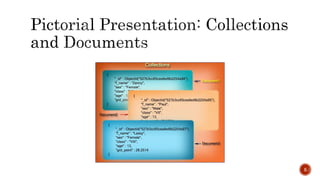
 Collection is a group of MongoDB documents.
 It is the equivalent of an RDBMS table.
 A collection exists within a single database.
 Collections do not enforce a schema.
 Documents within a collection can have different fields.
 All documents in a collection are of similar or related purpose.
3
 A document is a set of key-value pairs.
 Documents have dynamic schema.
4
Dynamic schema
means that documents in the same collection do not need to have the same
set of fields or structure, and common fields in a collection's documents may hold
different types of data.
5
6
7
Example shows the document
structure of a blog site, which
is simply a comma separated
key value pair.
_id is a 12 bytes hexadecimal number which
assures the uniqueness of every document. You can
provide _id while inserting the document. If we
don’t provide then MongoDB provides a unique id
for every document. These 12 bytes-
first 4 bytes for the current timestamp,
next 3 bytes for machine id,
next 2 bytes for process id of MongoDB server and
remaining 3 bytes are simple incremental VALUE.
 Schema less
 Data is stored in the form of JSON style documents. Structure of a single object is
clear.
 No complex joins.
 Index on any attribute
8
9
In RDBMS you need to join three tables
But in MongoDB, data will be shown from
one collection only.
RDBMS schema
MongoDB schema
After installing MongoDB, create a folder named “data” in installation Drive. Then
create a folder named “db” in the “data” folder.
10
From CMD
 Execute command : mongo.exe for run mongoDB
 Then execute command: use DATABASE_NAME for create Database.
The command will create a new database if it doesn't exist, otherwise it will return the existing database.
 To check your currently selected database, use the command: db
 If you want to check your databases list, use the command: show dbs
Your created database (DATABASE_NAME ) is not present in list. To display database, you need to insert at least one document into it.
 For insert data command: db. DATABASE_NAME .insert( { name : “ABC"} )
MongoDB default database is test. If you didn't create any database, then collections will be stored in test database
11
From CMD
 Execute command : use mydb for switch in will be dropped database.
 Then execute command: db.dropDatabase()
12
From CMD
 Execute command: db.createCollection(name, options) for create Collection.
In the command, name is name of collection to be created. Options is a document and is used to specify configuration of collection.
Options parameter is optional, so you need to specify only the name of the collection.
 Execute command: show collections for showing all collection in the database.
13
From CMD
 Execute command : db.COLLECTION_NAME.drop() for drop a collection from the database.
 Then execute command: db.dropDatabase()
14
 String
 Integer
 Boolean
 Double
 Min/Max Keys
 Arrays (used to store arrays or list or multiple values into one key.)
 Timestamp
 Object (used for embedded documents.)
 Null
 Symbol
 Date
 Object Id (Used to store the document’s ID)
 Binary Data
 Code ( JavaScript code )
 Regular Expression
15
From CMD
 Execute command : db.COLLECTION_NAME.insert(document) for insert data into MongoDB collection.
 Then execute command: db.dropDatabase()
16
Here mycol is our collection name, as
created in the previous chapter. If the
collection doesn't exist in the database,
then MongoDB will create this collection
and then insert a document into it.
In the inserted document, if we don't
specify the _id parameter, then
MongoDB assigns a unique ObjectId for
this document.
From CMD
 Execute command : db.COLLECTION_NAME.find() for query data from MongoDB collection.
find() method will display all the documents in a non-structured way.
Apart from find() method, there is findOne() method, that returns only one document.
 db.mycol.find().pretty()
To display the results in a formatted way, you can use pretty() method.
17
18
19
• AND operation in MongoDB
In the find() method, if you pass multiple keys by separating them by ',' then MongoDB
treats it as AND condition.
equivalent where clause will be ' where key1 = ‘value1' AND key2 = ‘value2' ‘.
20
• OR operation in MongoDB
To query documents based on the OR condition, you need to use $or keyword.
equivalent where clause will be ' where key1 = ‘value1’ or key2 = ‘value2' ‘.
21
• AND and OR Together operation in MongoDB
equivalent 'where likes>10 AND (by = 'tutorials point' OR title = 'MongoDB Overview')'
From CMD
 Execute command : db.COLLECTION_NAME.update(SELECTION_CRITERIA, UPDATED_DATA)
for updates the values in the existing document.
22
• By default, MongoDB will update only a single document. To update multiple documents, you need to
set a parameter 'multi' to true.
MongoDB's remove() method is used to remove a document from the collection. remove() method accepts two parameters.
One is deletion criteria and second is justOne flag.
 deletion criteria − (Optional) deletion criteria according to documents will be removed.
 justOne − (Optional) if set to true or 1, then remove only one document.
23
• If there are multiple records and you want to delete only the first record, then set justOne parameter in
remove() method.
In MongoDB, projection means selecting only the necessary data rather than selecting whole of the data of a document.
If a document has 5 fields and you need to show only 3, then select only 3 fields from them.
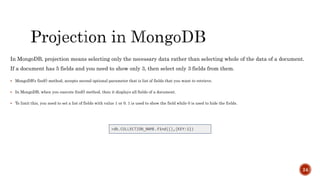
 MongoDB's find() method, accepts second optional parameter that is list of fields that you want to retrieve.
 In MongoDB, when you execute find() method, then it displays all fields of a document.
 To limit this, you need to set a list of fields with value 1 or 0. 1 is used to show the field while 0 is used to hide the fields.
24
To limit the records in MongoDB, you need to use limit() method. The method accepts one number type
argument, which is the number of documents that you want to be displayed.
25
To sort documents in MongoDB, you need to use sort() method. The method accepts a document containing
a list of fields along with their sorting order.
 To specify sorting order 1 and -1 are used.
 1 is used for ascending order while -1 is used for descending order.
26
 First install Mongo Driver using NuGet Package Manager.
 Then we need MongoDB client to interact with the server.
MongoClient dbClient = new MongoClient("mongodb://127.0.0.1:27017");
 For Check Databases in server use the following code:
27
//Database List
var dbList = dbClient.ListDatabases().ToList();
Console.WriteLine("The list of databases are :");
foreach (var item in dbList)
{
Console.WriteLine(item);
}
 For Check Collections in any specific database use the following code:
28
//Get Database and Collection
IMongoDatabase db = dbClient.GetDatabase(“myDatabase");
var collList = db.ListCollections().ToList();
Console.WriteLine("The list of collections are :");
foreach (var item in collList)
{
Console.WriteLine(item);
}
 For create data in specific collection use the following code:
29
var things = db.GetCollection<BsonDocument>(“myCollectionName");
//CREATE
BsonDocument personDoc = new BsonDocument();
//Method 1
BsonElement personFirstNameElement = new BsonElement("FieldName1", “MyValue1");
personDoc.Add(personFirstNameElement);
//Method 2
personDoc.Add(new BsonElement("FieldName2", ”myValue2”));
things.InsertOne(personDoc);
JSON is the preferred input/output format but the documents are stored in BSON (Binary JSON) format in the
database
 For read data in specific collection use the following code:
30
var resultDoc = things.Find(new BsonDocument()).ToList();
// Here things is Collection’s Variable
foreach (var item in resultDoc)
{
Console.WriteLine(item.ToString());
}
 For Update data in specific collection use the following code:
31
//Update
BsonElement updatePersonFirstNameElement = new BsonElement(“UpdatedValueFieldName", “New Value");
BsonDocument updatePersonDoc = new BsonDocument();
updatePersonDoc.Add(updatePersonFirstNameElement);
BsonDocument findPersonDoc = new BsonDocument(new BsonElement(" UpdatedValueFieldName ", “Previous Value"));
var updateDoc = things.FindOneAndReplace(findPersonDoc, updatePersonDoc);
// Here things is Collection’s Variable
Console.WriteLine(updateDoc);
 For delete data in specific collection use the following code:
32
//DELETE
BsonDocument findPersonDoc = new BsonDocument(new BsonElement(“FieldName", “myValue"));
things.FindOneAndDelete(findPersonDoc);
// Here things is Collection’s Variable
 https://www.tutorialspoint.com/mongodb/index.htm
 https://www.c-sharpcorner.com/article/getting-started-with-mongodb-mongodb-with-c-sharp/
33
Thank You…
34

Getting Started with MongoDB

  • 1.
    Prepared By Ahasanul KalamAkib Software Engineer 1
  • 2.
     Cross-platform  DocumentOriented Database  High Performance, High Availability And Easy Scalability. MongoDB works on concept of  Collection  Document. 2
  • 3.
     Collection isa group of MongoDB documents.  It is the equivalent of an RDBMS table.  A collection exists within a single database.  Collections do not enforce a schema.  Documents within a collection can have different fields.  All documents in a collection are of similar or related purpose. 3
  • 4.
     A documentis a set of key-value pairs.  Documents have dynamic schema. 4 Dynamic schema means that documents in the same collection do not need to have the same set of fields or structure, and common fields in a collection's documents may hold different types of data.
  • 5.
  • 6.
  • 7.
    7 Example shows thedocument structure of a blog site, which is simply a comma separated key value pair. _id is a 12 bytes hexadecimal number which assures the uniqueness of every document. You can provide _id while inserting the document. If we don’t provide then MongoDB provides a unique id for every document. These 12 bytes- first 4 bytes for the current timestamp, next 3 bytes for machine id, next 2 bytes for process id of MongoDB server and remaining 3 bytes are simple incremental VALUE.
  • 8.
     Schema less Data is stored in the form of JSON style documents. Structure of a single object is clear.  No complex joins.  Index on any attribute 8
  • 9.
    9 In RDBMS youneed to join three tables But in MongoDB, data will be shown from one collection only. RDBMS schema MongoDB schema
  • 10.
    After installing MongoDB,create a folder named “data” in installation Drive. Then create a folder named “db” in the “data” folder. 10
  • 11.
    From CMD  Executecommand : mongo.exe for run mongoDB  Then execute command: use DATABASE_NAME for create Database. The command will create a new database if it doesn't exist, otherwise it will return the existing database.  To check your currently selected database, use the command: db  If you want to check your databases list, use the command: show dbs Your created database (DATABASE_NAME ) is not present in list. To display database, you need to insert at least one document into it.  For insert data command: db. DATABASE_NAME .insert( { name : “ABC"} ) MongoDB default database is test. If you didn't create any database, then collections will be stored in test database 11
  • 12.
    From CMD  Executecommand : use mydb for switch in will be dropped database.  Then execute command: db.dropDatabase() 12
  • 13.
    From CMD  Executecommand: db.createCollection(name, options) for create Collection. In the command, name is name of collection to be created. Options is a document and is used to specify configuration of collection. Options parameter is optional, so you need to specify only the name of the collection.  Execute command: show collections for showing all collection in the database. 13
  • 14.
    From CMD  Executecommand : db.COLLECTION_NAME.drop() for drop a collection from the database.  Then execute command: db.dropDatabase() 14
  • 15.
     String  Integer Boolean  Double  Min/Max Keys  Arrays (used to store arrays or list or multiple values into one key.)  Timestamp  Object (used for embedded documents.)  Null  Symbol  Date  Object Id (Used to store the document’s ID)  Binary Data  Code ( JavaScript code )  Regular Expression 15
  • 16.
    From CMD  Executecommand : db.COLLECTION_NAME.insert(document) for insert data into MongoDB collection.  Then execute command: db.dropDatabase() 16 Here mycol is our collection name, as created in the previous chapter. If the collection doesn't exist in the database, then MongoDB will create this collection and then insert a document into it. In the inserted document, if we don't specify the _id parameter, then MongoDB assigns a unique ObjectId for this document.
  • 17.
    From CMD  Executecommand : db.COLLECTION_NAME.find() for query data from MongoDB collection. find() method will display all the documents in a non-structured way. Apart from find() method, there is findOne() method, that returns only one document.  db.mycol.find().pretty() To display the results in a formatted way, you can use pretty() method. 17
  • 18.
  • 19.
    19 • AND operationin MongoDB In the find() method, if you pass multiple keys by separating them by ',' then MongoDB treats it as AND condition. equivalent where clause will be ' where key1 = ‘value1' AND key2 = ‘value2' ‘.
  • 20.
    20 • OR operationin MongoDB To query documents based on the OR condition, you need to use $or keyword. equivalent where clause will be ' where key1 = ‘value1’ or key2 = ‘value2' ‘.
  • 21.
    21 • AND andOR Together operation in MongoDB equivalent 'where likes>10 AND (by = 'tutorials point' OR title = 'MongoDB Overview')'
  • 22.
    From CMD  Executecommand : db.COLLECTION_NAME.update(SELECTION_CRITERIA, UPDATED_DATA) for updates the values in the existing document. 22 • By default, MongoDB will update only a single document. To update multiple documents, you need to set a parameter 'multi' to true.
  • 23.
    MongoDB's remove() methodis used to remove a document from the collection. remove() method accepts two parameters. One is deletion criteria and second is justOne flag.  deletion criteria − (Optional) deletion criteria according to documents will be removed.  justOne − (Optional) if set to true or 1, then remove only one document. 23 • If there are multiple records and you want to delete only the first record, then set justOne parameter in remove() method.
  • 24.
    In MongoDB, projectionmeans selecting only the necessary data rather than selecting whole of the data of a document. If a document has 5 fields and you need to show only 3, then select only 3 fields from them.  MongoDB's find() method, accepts second optional parameter that is list of fields that you want to retrieve.  In MongoDB, when you execute find() method, then it displays all fields of a document.  To limit this, you need to set a list of fields with value 1 or 0. 1 is used to show the field while 0 is used to hide the fields. 24
  • 25.
    To limit therecords in MongoDB, you need to use limit() method. The method accepts one number type argument, which is the number of documents that you want to be displayed. 25
  • 26.
    To sort documentsin MongoDB, you need to use sort() method. The method accepts a document containing a list of fields along with their sorting order.  To specify sorting order 1 and -1 are used.  1 is used for ascending order while -1 is used for descending order. 26
  • 27.
     First installMongo Driver using NuGet Package Manager.  Then we need MongoDB client to interact with the server. MongoClient dbClient = new MongoClient("mongodb://127.0.0.1:27017");  For Check Databases in server use the following code: 27 //Database List var dbList = dbClient.ListDatabases().ToList(); Console.WriteLine("The list of databases are :"); foreach (var item in dbList) { Console.WriteLine(item); }
  • 28.
     For CheckCollections in any specific database use the following code: 28 //Get Database and Collection IMongoDatabase db = dbClient.GetDatabase(“myDatabase"); var collList = db.ListCollections().ToList(); Console.WriteLine("The list of collections are :"); foreach (var item in collList) { Console.WriteLine(item); }
  • 29.
     For createdata in specific collection use the following code: 29 var things = db.GetCollection<BsonDocument>(“myCollectionName"); //CREATE BsonDocument personDoc = new BsonDocument(); //Method 1 BsonElement personFirstNameElement = new BsonElement("FieldName1", “MyValue1"); personDoc.Add(personFirstNameElement); //Method 2 personDoc.Add(new BsonElement("FieldName2", ”myValue2”)); things.InsertOne(personDoc); JSON is the preferred input/output format but the documents are stored in BSON (Binary JSON) format in the database
  • 30.
     For readdata in specific collection use the following code: 30 var resultDoc = things.Find(new BsonDocument()).ToList(); // Here things is Collection’s Variable foreach (var item in resultDoc) { Console.WriteLine(item.ToString()); }
  • 31.
     For Updatedata in specific collection use the following code: 31 //Update BsonElement updatePersonFirstNameElement = new BsonElement(“UpdatedValueFieldName", “New Value"); BsonDocument updatePersonDoc = new BsonDocument(); updatePersonDoc.Add(updatePersonFirstNameElement); BsonDocument findPersonDoc = new BsonDocument(new BsonElement(" UpdatedValueFieldName ", “Previous Value")); var updateDoc = things.FindOneAndReplace(findPersonDoc, updatePersonDoc); // Here things is Collection’s Variable Console.WriteLine(updateDoc);
  • 32.
     For deletedata in specific collection use the following code: 32 //DELETE BsonDocument findPersonDoc = new BsonDocument(new BsonElement(“FieldName", “myValue")); things.FindOneAndDelete(findPersonDoc); // Here things is Collection’s Variable
  • 33.
  • 34.