Schema Design & CRUD
Ahmed Elbassel
Email: elbassel.n13@gmail.com
Skype: ahmed_elbassel
Schema design & CRUD
- MongoDB Vs MySql
- Create database and collection
- MongoDB client
- CRUD operations
- Schema Design
- Denormalizing for schema design
MongoDB Vs MySql
MySql MongoDB
Table Collection
Row Document
Column Field
Joins Embedded documents, linking
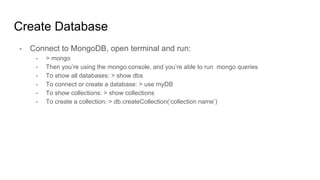
Create Database
- Connect to MongoDB, open terminal and run:
- > mongo
- Then you’re using the mongo console, and you’re able to run mongo queries
- To show all databases: > show dbs
- To connect or create a database: > use myDB
- To show collections: > show collections
- To create a collection: > db.createCollection(‘collection name’)
- RoboMongo
- MongoBooster
- MongoChef
MongoDB client
CRUD Operations - Create
- Create a document:
- db.users.insertOne({name:'ahmed',lname:'bassel'});
- To insert many: db.users.insert([ {..........},{ ..........}, {...........}]);
- If you tried to insert a document with existing _id, it will throw duplicate _id error
- Insert using save: > db.users.save({......})
- If the inserted object does not have an id, then a new object will be inserted.
- If the object has an id, it will replace the object that match the id in the
database.
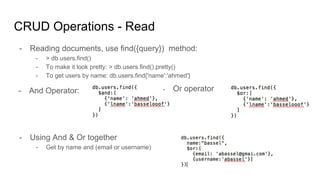
CRUD Operations - Read
- Reading documents, use find({query}) method:
- > db.users.find()
- To make it look pretty: > db.users.find().pretty()
- To get users by name: db.users.find{'name':'ahmed'}
- And Operator: - Or operator
- Using And & Or together
- Get by name and (email or username)
CRUD Operations - Update
- We can use save and update methods.
- Save method is the same previous one.
- Update:
- Query: The selection criteria for the update.
- Update: The modifications to apply.
- Options:
- upsert: Optional. If set to true, creates a new document when no document matches the
query criteria. The default value is false.
- multi: Optional. If set to true, updates multiple documents that meet the query criteria. If
set to false, updates one document, The default value is false.
- writeConcern and collation: advanced, will be discussed in a MongoDB course.
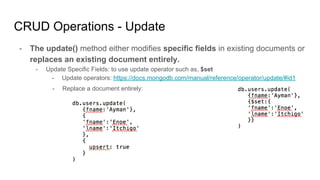
CRUD Operations - Update
- The update() method either modifies specific fields in existing documents or
replaces an existing document entirely.
- Update Specific Fields: to use update operator such as, $set
- Update operators: https://docs.mongodb.com/manual/reference/operator/update/#id1
- Replace a document entirely:
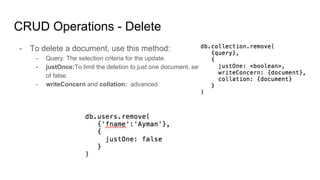
CRUD Operations - Delete
- To delete a document, use this method:
- Query: The selection criteria for the update.
- justOnce:To limit the deletion to just one document, set to true. Omit to use the default value
of false.
- writeConcern and collation: advanced.
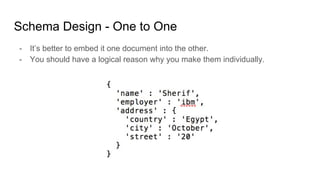
Schema Design - One to One
- It’s better to embed it one document into the other.
- You should have a logical reason why you make them individually.
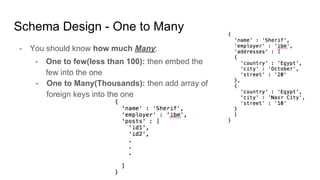
Schema Design - One to Many
- You should know how much Many:
- One to few(less than 100): then embed the
few into the one
- One to Many(Thousands): then add array of
foreign keys into the one
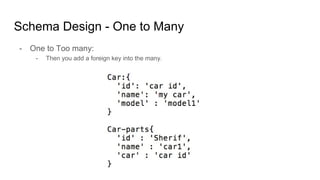
Schema Design - One to Many
- One to Too many:
- Then you add a foreign key into the many.
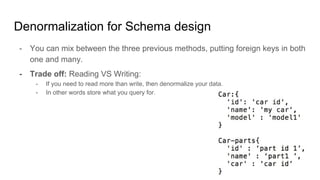
Denormalization for Schema design
- You can mix between the three previous methods, putting foreign keys in both
one and many.
- Trade off: Reading VS Writing:
- If you need to read more than write, then denormalize your data.
- In other words store what you query for.
Questions

11 schema design & crud

  • 1.
    Schema Design &CRUD Ahmed Elbassel Email: elbassel.n13@gmail.com Skype: ahmed_elbassel
  • 2.
    Schema design &CRUD - MongoDB Vs MySql - Create database and collection - MongoDB client - CRUD operations - Schema Design - Denormalizing for schema design
  • 3.
    MongoDB Vs MySql MySqlMongoDB Table Collection Row Document Column Field Joins Embedded documents, linking
  • 4.
    Create Database - Connectto MongoDB, open terminal and run: - > mongo - Then you’re using the mongo console, and you’re able to run mongo queries - To show all databases: > show dbs - To connect or create a database: > use myDB - To show collections: > show collections - To create a collection: > db.createCollection(‘collection name’)
  • 5.
    - RoboMongo - MongoBooster -MongoChef MongoDB client
  • 6.
    CRUD Operations -Create - Create a document: - db.users.insertOne({name:'ahmed',lname:'bassel'}); - To insert many: db.users.insert([ {..........},{ ..........}, {...........}]); - If you tried to insert a document with existing _id, it will throw duplicate _id error - Insert using save: > db.users.save({......}) - If the inserted object does not have an id, then a new object will be inserted. - If the object has an id, it will replace the object that match the id in the database.
  • 7.
    CRUD Operations -Read - Reading documents, use find({query}) method: - > db.users.find() - To make it look pretty: > db.users.find().pretty() - To get users by name: db.users.find{'name':'ahmed'} - And Operator: - Or operator - Using And & Or together - Get by name and (email or username)
  • 8.
    CRUD Operations -Update - We can use save and update methods. - Save method is the same previous one. - Update: - Query: The selection criteria for the update. - Update: The modifications to apply. - Options: - upsert: Optional. If set to true, creates a new document when no document matches the query criteria. The default value is false. - multi: Optional. If set to true, updates multiple documents that meet the query criteria. If set to false, updates one document, The default value is false. - writeConcern and collation: advanced, will be discussed in a MongoDB course.
  • 9.
    CRUD Operations -Update - The update() method either modifies specific fields in existing documents or replaces an existing document entirely. - Update Specific Fields: to use update operator such as, $set - Update operators: https://docs.mongodb.com/manual/reference/operator/update/#id1 - Replace a document entirely:
  • 10.
    CRUD Operations -Delete - To delete a document, use this method: - Query: The selection criteria for the update. - justOnce:To limit the deletion to just one document, set to true. Omit to use the default value of false. - writeConcern and collation: advanced.
  • 11.
    Schema Design -One to One - It’s better to embed it one document into the other. - You should have a logical reason why you make them individually.
  • 12.
    Schema Design -One to Many - You should know how much Many: - One to few(less than 100): then embed the few into the one - One to Many(Thousands): then add array of foreign keys into the one
  • 13.
    Schema Design -One to Many - One to Too many: - Then you add a foreign key into the many.
  • 14.
    Denormalization for Schemadesign - You can mix between the three previous methods, putting foreign keys in both one and many. - Trade off: Reading VS Writing: - If you need to read more than write, then denormalize your data. - In other words store what you query for.
  • 15.