Graph Operations
Rich Cullen
Manager, Solutions Architecture
#MDBE16
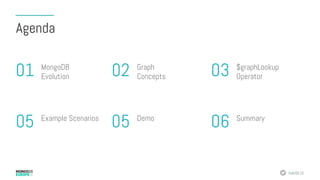
Agenda
MongoDB
Evolution01 $graphLookup
Operator03Graph
Concepts02
Example Scenarios
05 Summary
06Demo
05
MongoDB Evolution
“
I’ve got too many applications. And I’ve got too
many different technologies and tools being used
to build and support those applications.
I want to significantly reduce my technology
surface area.”
#MDBE16
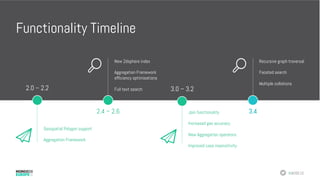
Functionality Timeline
2.0 – 2.2
Geospatial Polygon support
Aggregation Framework
New 2dsphere index
Aggregation Framework
efficiency optimisations
Full text search
2.4 – 2.6
3.0 – 3.2
Join functionality
Increased geo accuracy
New Aggregation operators
Improved case insensitivity
Recursive graph traversal
Faceted search
Multiple collations
3.4
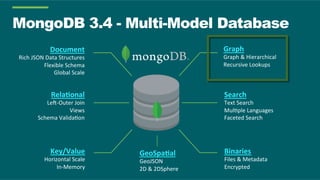
MongoDB 3.4 - Multi-Model Database
Document	
Rich	JSON	Data	Structures	
Flexible	Schema	
Global	Scale	
Rela,onal	
Le9-Outer	Join	
Views	
Schema	Valida?on	
Key/Value	
Horizontal	Scale	
In-Memory	
Search	
Text	Search	
Mul?ple	Languages	
Faceted	Search	
Binaries	
Files	&	Metadata	
Encrypted	
Graph	
Graph	&	Hierarchical	
Recursive	Lookups	
GeoSpa,al	
GeoJSON	
2D	&	2DSphere
Graph Concepts
#MDBE16
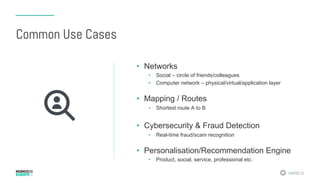
Common Use Cases
•  Networks
•  Social – circle of friends/colleagues
•  Computer network – physical/virtual/application layer
•  Mapping / Routes
•  Shortest route A to B
•  Cybersecurity & Fraud Detection
•  Real-time fraud/scam recognition
•  Personalisation/Recommendation Engine
•  Product, social, service, professional etc.
#MDBE16
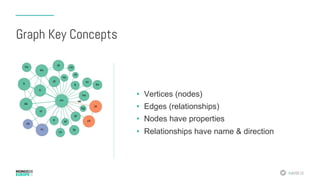
Graph Key Concepts
•  Vertices (nodes)
•  Edges (relationships)
•  Nodes have properties
•  Relationships have name & direction
Why MongoDB For Graph?
#MDBE16
Native Graph Database Strengths
•  Relationships are first class citizens of the
database
•  Index-free adjacency
•  Nodes “point” directly to other nodes
•  Efficient relationship traversal
#MDBE16
Index Free Adjacency
•  Each node maintains direct references to adjacent nodes
•  Bi-directional joins “pre-computed” and stored as relationships
•  Query times independent of overall graph size
•  Query times proportional to graph search area
•  BUT… efficiency relies on native graph data storage
•  Fixed-sized records
•  Pointer-like record IDs
•  File-system and object cache
#MDBE16
Native Graph Database Challenges
•  Complex query languages
•  Lack of widely available skills
•  Poorly optimised for non-traversal queries
•  Difficult to express
•  Inefficient, memory intensive
•  Less often used as System Of Record
•  Synchronisation with SOR required
•  Increased operational complexity
•  Consistency concerns
Data Modeling
#MDBE16
Relational DBs Lack Relationships
•  “Relationships” are actually JOINs
•  Raw business or storage logic and constraints – not semantic
•  JOIN tables, sparse columns, null-checks
•  More JOINS = degraded performance and flexibility
#MDBE16
Relational DBs Lack Relationships
•  How expensive/complex is:
•  Find my friends?
•  Find friends of my friends?
•  Find mutual friends?
•  Find friends of my friends of my friends?
•  And so on…
#MDBE16
NoSQL DBs Lack Relationships
•  “Flat” disconnected documents or key/value pairs
•  “Foreign keys” inferred at application layer
•  Data integrity/quality onus is on the application
•  Suggestions re difficulty of modeling ANY relationships efficiently with
aggregate stores.
•  However…
#MDBE16
Friends Network – Document Style
{
_id: 0,
name: "Bob Smith",
friends: ["Anna Jones", "Chris Green"]
},
{
_id: 1,
name: "Anna Jones",
friends: ["Bob Smith", "Chris Green", "Joe Lee"]
},
{
_id: 2,
name: "Chris Green",
friends: ["Anna Jones", "Bob Smith"]
}
#MDBE16
Schema Design – before $graphLookup
•  Options
•  Store an array of direct children in each node
•  Store parent in each node
•  Store parent and array of ancestors
•  Trade-offs
•  Simple queries…
•  …vs simple updates
5 13 14 16 176
3 15121094
2 7 8 11
1
#MDBE16
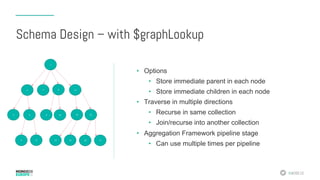
•  Options
•  Store immediate parent in each node
•  Store immediate children in each node
•  Traverse in multiple directions
•  Recurse in same collection
•  Join/recurse into another collection
•  Aggregation Framework pipeline stage
•  Can use multiple times per pipeline
5 13 14 16 176
3 15121094
2 7 8 11
1
Schema Design – with $graphLookup
$graphLookup
#MDBE16
Syntax
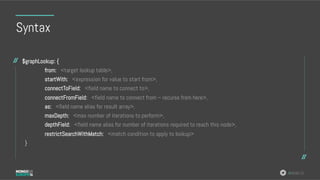
$graphLookup: {
from: <target lookup table>,
startWith: <expression for value to start from>,
connectToField: <field name to connect to>,
connectFromField: <field name to connect from – recurse from here>,
as: <field name alias for result array>,
maxDepth: <max number of iterations to perform>,
depthField: <field name alias for number of iterations required to reach this node>,
restrictSearchWithMatch: <match condition to apply to lookup>
}
#MDBE16
Things To Note
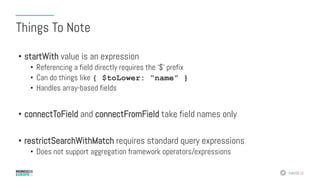
•  startWith value is an expression
•  Referencing a field directly requires the ‘$’ prefix
•  Can do things like { $toLower: “name” }
•  Handles array-based fields
•  connectToField and connectFromField take field names only
•  restrictSearchWithMatch requires standard query expressions
•  Does not support aggregation framework operators/expressions
#MDBE16
Things To Note
•  Cycles are automatically detected
•  Can be used with views:
•  Define a view
•  Recurse across existing view (‘base’ or ‘from’)
•  Supports Collations
Example Scenarios
#MDBE16
Scenario: Calculate Friend Network
{
_id: 0,
name: "Bob Smith",
friends: ["Anna Jones", "Chris Green"]
},
{
_id: 1,
name: "Anna Jones",
friends: ["Bob Smith", "Chris Green", "Joe Lee"]
},
{
_id: 2,
name: "Chris Green",
friends: ["Anna Jones", "Bob Smith"]
}
#MDBE16
Scenario: Calculate Friend Network
[
{
$match: { "name": "Bob Smith" }
},
{
$graphLookup: {
from: "contacts",
startWith: "$friends",
connectToField: "name",
connectFromField: "friends”,
as: "socialNetwork"
}
},
{
$project: { name: 1, friends:1, socialNetwork: "$socialNetwork.name"}
}
]
No maxDepth set
#MDBE16
Scenario: Calculate Friend Network
{
"_id" : 0,
"name" : "Bob Smith",
"friends" : [
"Anna Jones",
"Chris Green"
],
"socialNetwork" : [
"Joe Lee",
"Fred Brown",
"Bob Smith",
"Chris Green",
"Anna Jones"
]
}
Array
#MDBE16
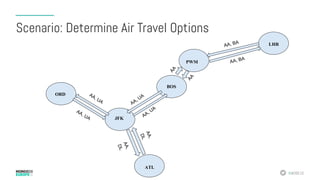
Scenario: Determine Air Travel Options
ORD
JFK
BOS
PWM
LHR
{ "_id" : 0, "airport" : "JFK", "connects" : [ "BOS", "ORD" ] }
{ "_id" : 1, "airport" : "BOS", "connects" : [ "JFK", "PWM" ] }
{ "_id" : 2, "airport" : "ORD", "connects" : [ "JFK" ] }
{ "_id" : 3, "airport" : "PWM", "connects" : [ "BOS", "LHR" ] }
{ "_id" : 4, "airport" : "LHR", "connects" : [ "PWM" ] }
#MDBE16
[
{
"$match": {"name":"Lucy"}
},
{
"$graphLookup": {
from: "airports",
startWith: "$nearestAirport",
connectToField: "airport",
connectFromField: "connects",
maxDepth: 2,
depthField: "numFlights",
as: "destinations”
}
}
]
Scenario: Determine Air Travel Options
Record the number of
recursions
#MDBE16
{
name: "Lucy”,
nearestAirport: "JFK",
destinations: [
{
_id: 0,
airport: "JFK",
connects: ["BOS", "ORD"],
numFlights: 0
},
{
_id: 1,
airport: "BOS",
connects: ["JFK", "PWM"],
numFlights: 1
},
{
_id: 2,
airport: "ORD",
connects: ["JFK"],
numFlights: 1
},
{
_id: 3,
airport: "PWM",
connects: ["BOS", "LHR"],
numFlights: 2
}
]
}
Scenario: Determine Air Travel Options
#MDBE16
ORD
JFK
BOS
PWM
LHR
ATL
AA, BA
AA, BA
Scenario: Determine Air Travel Options
#MDBE16
{ "_id" : 0, "airport" : "JFK", "connects" : [
{ "to" : "BOS", "airlines" : [ "UA", "AA" ] },
{ "to" : "ORD", "airlines" : [ "UA", "AA" ] },
{ "to" : "ATL", "airlines" : [ "AA", "DL" ] }] }
{ "_id" : 1, "airport" : "BOS", "connects" : [
{ "to" : "JFK", "airlines" : [ "UA", "AA" ] },
{ "to" : "PWM", "airlines" : [ "AA" ] } ]] }
{ "_id" : 2, "airport" : "ORD", "connects" : [
{ "to" : "JFK", "airlines" : [ "UA”,"AA" ] }] }
{ "_id" : 3, "airport" : "PWM", "connects" : [
{ "to" : "BOS", "airlines" : [ "AA" ] }] }
Scenario: Determine Air Travel Options
#MDBE16
[
{
"$match":{"name":"Lucy"}
},
{
"$graphLookup": {
from: "airports",
startWith: "$nearestAirport",
connectToField: "airport",
connectFromField: "connects.to”,
maxDepth: 2,
depthField: "numFlights”,
restrictSearchWithMatch: {"connects.airlines":"UA"},
as: ”UAdestinations"
}
}
]
Scenario: Determine Air Travel Options
We’ve added a filter
#MDBE16
{
"name" : "Lucy",
"from" : "JFK",
"UAdestinations" : [
{ "_id" : 2, "airport" : "ORD", "numFlights" : NumberLong(1) },
{ "_id" : 1, "airport" : "BOS", "numFlights" : NumberLong(1) }
]
}
Scenario: Determine Air Travel Options
#MDBE16
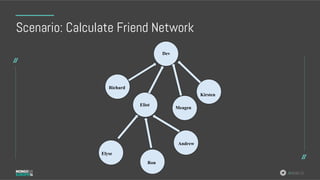
Scenario: Calculate Friend Network
Andrew
Ron
MeagenEliot
Dev
Elyse
Richard
Eliot
Kirsten
#MDBE16
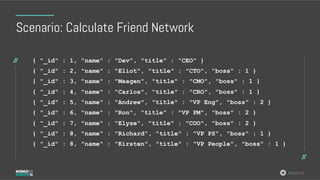
Scenario: Calculate Friend Network
{ "_id" : 1, "name" : "Dev", "title" : "CEO" }
{ "_id" : 2, "name" : "Eliot", "title" : "CTO", "boss" : 1 }
{ "_id" : 3, "name" : "Meagen", "title" : "CMO", "boss" : 1 }
{ "_id" : 4, "name" : "Carlos", "title" : "CRO", "boss" : 1 }
{ "_id" : 5, "name" : "Andrew", "title" : "VP Eng", "boss" : 2 }
{ "_id" : 6, "name" : "Ron", "title" : "VP PM", "boss" : 2 }
{ "_id" : 7, "name" : "Elyse", "title" : "COO", "boss" : 2 }
{ "_id" : 8, "name" : "Richard", "title" : "VP PS", "boss" : 1 }
{ "_id" : 8, "name" : "Kirsten", "title" : "VP People", "boss" : 1 }
#MDBE16
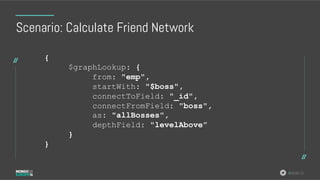
Scenario: Calculate Friend Network
{
$graphLookup: {
from: "emp",
startWith: "$boss",
connectToField: "_id",
connectFromField: "boss",
as: "allBosses",
depthField: "levelAbove”
}
}
#MDBE16
Scenario: Calculate Friend Network
{
"_id" : 5,
"name" : "Andrew",
"title" : "VP Eng",
"boss" : 2,
"allBosses" : [
{
"_id" : 1,
"name" : "Dev",
"title" : "CEO",
"levelAbove" : NumberLong(1)
},
{
"_id" : 2,
"name" : "Eliot",
"title" : "CTO",
"boss" : 1,
"levelAbove" : NumberLong(0)
}
]
}
#MDBE16
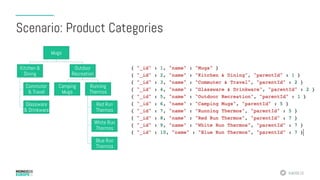
Scenario: Product Categories
Mugs
Kitchen &
Dining
Commuter
& Travel
Glassware
& Drinkware
Outdoor
Recreation
Camping
Mugs
Running
Thermos
Red Run
Thermos
White Run
Thermos
Blue Run
Thermos
#MDBE16
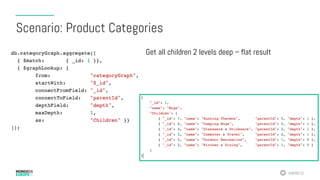
Scenario: Product Categories
Get all children 2 levels deep – flat result
#MDBE16
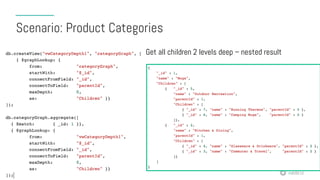
Scenario: Product Categories
Get all children 2 levels deep – nested result
#MDBE16
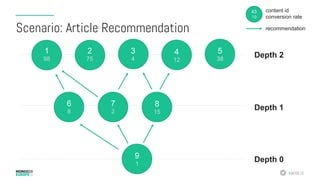
Scenario: Article Recommendation
1
98
9
1
8
15
7
2
6
8
5
38
4
12
3
4
2
75
Depth 1
Depth 2
Depth 0
43
19
content id
conversion rate
recommendation
#MDBE16
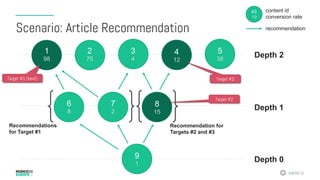
Scenario: Article Recommendation
1
98
9
1
8
15
7
2
6
8
5
38
4
12
3
4
2
75
Depth 1
Depth 2
Depth 0
43
19
content id
conversion rate
recommendation
Recommendations
for Target #1
Recommendation for
Targets #2 and #3
Target #1 (best)
Target #2
Target #3
#MDBE16
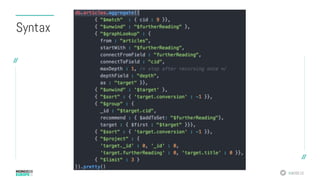
Syntax
#MDBE16
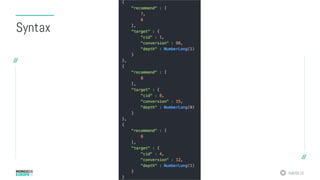
Syntax
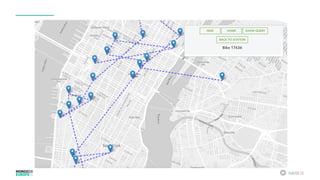
Demo
#MDBE16
Summary
#MDBE16
MongoDB $graphLookup
•  Efficient, index-based recursive queries
•  Familiar, intuitive query language
•  Use a single System Of Record
•  Cater for all query types
•  No added operational overhead
•  No synchronisation requirements
•  Reduced technology surface area
Queries & Results

MongoDB Europe 2016 - Graph Operations with MongoDB

  • 1.
  • 2.
  • 3.
  • 4.
    “ I’ve got toomany applications. And I’ve got too many different technologies and tools being used to build and support those applications. I want to significantly reduce my technology surface area.”
  • 5.
    #MDBE16 Functionality Timeline 2.0 –2.2 Geospatial Polygon support Aggregation Framework New 2dsphere index Aggregation Framework efficiency optimisations Full text search 2.4 – 2.6 3.0 – 3.2 Join functionality Increased geo accuracy New Aggregation operators Improved case insensitivity Recursive graph traversal Faceted search Multiple collations 3.4
  • 6.
    MongoDB 3.4 -Multi-Model Database Document Rich JSON Data Structures Flexible Schema Global Scale Rela,onal Le9-Outer Join Views Schema Valida?on Key/Value Horizontal Scale In-Memory Search Text Search Mul?ple Languages Faceted Search Binaries Files & Metadata Encrypted Graph Graph & Hierarchical Recursive Lookups GeoSpa,al GeoJSON 2D & 2DSphere
  • 7.
  • 8.
    #MDBE16 Common Use Cases • Networks •  Social – circle of friends/colleagues •  Computer network – physical/virtual/application layer •  Mapping / Routes •  Shortest route A to B •  Cybersecurity & Fraud Detection •  Real-time fraud/scam recognition •  Personalisation/Recommendation Engine •  Product, social, service, professional etc.
  • 9.
    #MDBE16 Graph Key Concepts • Vertices (nodes) •  Edges (relationships) •  Nodes have properties •  Relationships have name & direction
  • 10.
  • 11.
    #MDBE16 Native Graph DatabaseStrengths •  Relationships are first class citizens of the database •  Index-free adjacency •  Nodes “point” directly to other nodes •  Efficient relationship traversal
  • 12.
    #MDBE16 Index Free Adjacency • Each node maintains direct references to adjacent nodes •  Bi-directional joins “pre-computed” and stored as relationships •  Query times independent of overall graph size •  Query times proportional to graph search area •  BUT… efficiency relies on native graph data storage •  Fixed-sized records •  Pointer-like record IDs •  File-system and object cache
  • 13.
    #MDBE16 Native Graph DatabaseChallenges •  Complex query languages •  Lack of widely available skills •  Poorly optimised for non-traversal queries •  Difficult to express •  Inefficient, memory intensive •  Less often used as System Of Record •  Synchronisation with SOR required •  Increased operational complexity •  Consistency concerns
  • 14.
  • 15.
    #MDBE16 Relational DBs LackRelationships •  “Relationships” are actually JOINs •  Raw business or storage logic and constraints – not semantic •  JOIN tables, sparse columns, null-checks •  More JOINS = degraded performance and flexibility
  • 16.
    #MDBE16 Relational DBs LackRelationships •  How expensive/complex is: •  Find my friends? •  Find friends of my friends? •  Find mutual friends? •  Find friends of my friends of my friends? •  And so on…
  • 17.
    #MDBE16 NoSQL DBs LackRelationships •  “Flat” disconnected documents or key/value pairs •  “Foreign keys” inferred at application layer •  Data integrity/quality onus is on the application •  Suggestions re difficulty of modeling ANY relationships efficiently with aggregate stores. •  However…
  • 18.
    #MDBE16 Friends Network –Document Style { _id: 0, name: "Bob Smith", friends: ["Anna Jones", "Chris Green"] }, { _id: 1, name: "Anna Jones", friends: ["Bob Smith", "Chris Green", "Joe Lee"] }, { _id: 2, name: "Chris Green", friends: ["Anna Jones", "Bob Smith"] }
  • 19.
    #MDBE16 Schema Design –before $graphLookup •  Options •  Store an array of direct children in each node •  Store parent in each node •  Store parent and array of ancestors •  Trade-offs •  Simple queries… •  …vs simple updates 5 13 14 16 176 3 15121094 2 7 8 11 1
  • 20.
    #MDBE16 •  Options •  Storeimmediate parent in each node •  Store immediate children in each node •  Traverse in multiple directions •  Recurse in same collection •  Join/recurse into another collection •  Aggregation Framework pipeline stage •  Can use multiple times per pipeline 5 13 14 16 176 3 15121094 2 7 8 11 1 Schema Design – with $graphLookup
  • 21.
  • 22.
    #MDBE16 Syntax $graphLookup: { from: <targetlookup table>, startWith: <expression for value to start from>, connectToField: <field name to connect to>, connectFromField: <field name to connect from – recurse from here>, as: <field name alias for result array>, maxDepth: <max number of iterations to perform>, depthField: <field name alias for number of iterations required to reach this node>, restrictSearchWithMatch: <match condition to apply to lookup> }
  • 23.
    #MDBE16 Things To Note • startWith value is an expression •  Referencing a field directly requires the ‘$’ prefix •  Can do things like { $toLower: “name” } •  Handles array-based fields •  connectToField and connectFromField take field names only •  restrictSearchWithMatch requires standard query expressions •  Does not support aggregation framework operators/expressions
  • 24.
    #MDBE16 Things To Note • Cycles are automatically detected •  Can be used with views: •  Define a view •  Recurse across existing view (‘base’ or ‘from’) •  Supports Collations
  • 25.
  • 26.
    #MDBE16 Scenario: Calculate FriendNetwork { _id: 0, name: "Bob Smith", friends: ["Anna Jones", "Chris Green"] }, { _id: 1, name: "Anna Jones", friends: ["Bob Smith", "Chris Green", "Joe Lee"] }, { _id: 2, name: "Chris Green", friends: ["Anna Jones", "Bob Smith"] }
  • 27.
    #MDBE16 Scenario: Calculate FriendNetwork [ { $match: { "name": "Bob Smith" } }, { $graphLookup: { from: "contacts", startWith: "$friends", connectToField: "name", connectFromField: "friends”, as: "socialNetwork" } }, { $project: { name: 1, friends:1, socialNetwork: "$socialNetwork.name"} } ] No maxDepth set
  • 28.
    #MDBE16 Scenario: Calculate FriendNetwork { "_id" : 0, "name" : "Bob Smith", "friends" : [ "Anna Jones", "Chris Green" ], "socialNetwork" : [ "Joe Lee", "Fred Brown", "Bob Smith", "Chris Green", "Anna Jones" ] } Array
  • 29.
    #MDBE16 Scenario: Determine AirTravel Options ORD JFK BOS PWM LHR { "_id" : 0, "airport" : "JFK", "connects" : [ "BOS", "ORD" ] } { "_id" : 1, "airport" : "BOS", "connects" : [ "JFK", "PWM" ] } { "_id" : 2, "airport" : "ORD", "connects" : [ "JFK" ] } { "_id" : 3, "airport" : "PWM", "connects" : [ "BOS", "LHR" ] } { "_id" : 4, "airport" : "LHR", "connects" : [ "PWM" ] }
  • 30.
    #MDBE16 [ { "$match": {"name":"Lucy"} }, { "$graphLookup": { from:"airports", startWith: "$nearestAirport", connectToField: "airport", connectFromField: "connects", maxDepth: 2, depthField: "numFlights", as: "destinations” } } ] Scenario: Determine Air Travel Options Record the number of recursions
  • 31.
    #MDBE16 { name: "Lucy”, nearestAirport: "JFK", destinations:[ { _id: 0, airport: "JFK", connects: ["BOS", "ORD"], numFlights: 0 }, { _id: 1, airport: "BOS", connects: ["JFK", "PWM"], numFlights: 1 }, { _id: 2, airport: "ORD", connects: ["JFK"], numFlights: 1 }, { _id: 3, airport: "PWM", connects: ["BOS", "LHR"], numFlights: 2 } ] } Scenario: Determine Air Travel Options
  • 32.
  • 33.
    #MDBE16 { "_id" :0, "airport" : "JFK", "connects" : [ { "to" : "BOS", "airlines" : [ "UA", "AA" ] }, { "to" : "ORD", "airlines" : [ "UA", "AA" ] }, { "to" : "ATL", "airlines" : [ "AA", "DL" ] }] } { "_id" : 1, "airport" : "BOS", "connects" : [ { "to" : "JFK", "airlines" : [ "UA", "AA" ] }, { "to" : "PWM", "airlines" : [ "AA" ] } ]] } { "_id" : 2, "airport" : "ORD", "connects" : [ { "to" : "JFK", "airlines" : [ "UA”,"AA" ] }] } { "_id" : 3, "airport" : "PWM", "connects" : [ { "to" : "BOS", "airlines" : [ "AA" ] }] } Scenario: Determine Air Travel Options
  • 34.
    #MDBE16 [ { "$match":{"name":"Lucy"} }, { "$graphLookup": { from: "airports", startWith:"$nearestAirport", connectToField: "airport", connectFromField: "connects.to”, maxDepth: 2, depthField: "numFlights”, restrictSearchWithMatch: {"connects.airlines":"UA"}, as: ”UAdestinations" } } ] Scenario: Determine Air Travel Options We’ve added a filter
  • 35.
    #MDBE16 { "name" : "Lucy", "from": "JFK", "UAdestinations" : [ { "_id" : 2, "airport" : "ORD", "numFlights" : NumberLong(1) }, { "_id" : 1, "airport" : "BOS", "numFlights" : NumberLong(1) } ] } Scenario: Determine Air Travel Options
  • 36.
    #MDBE16 Scenario: Calculate FriendNetwork Andrew Ron MeagenEliot Dev Elyse Richard Eliot Kirsten
  • 37.
    #MDBE16 Scenario: Calculate FriendNetwork { "_id" : 1, "name" : "Dev", "title" : "CEO" } { "_id" : 2, "name" : "Eliot", "title" : "CTO", "boss" : 1 } { "_id" : 3, "name" : "Meagen", "title" : "CMO", "boss" : 1 } { "_id" : 4, "name" : "Carlos", "title" : "CRO", "boss" : 1 } { "_id" : 5, "name" : "Andrew", "title" : "VP Eng", "boss" : 2 } { "_id" : 6, "name" : "Ron", "title" : "VP PM", "boss" : 2 } { "_id" : 7, "name" : "Elyse", "title" : "COO", "boss" : 2 } { "_id" : 8, "name" : "Richard", "title" : "VP PS", "boss" : 1 } { "_id" : 8, "name" : "Kirsten", "title" : "VP People", "boss" : 1 }
  • 38.
    #MDBE16 Scenario: Calculate FriendNetwork { $graphLookup: { from: "emp", startWith: "$boss", connectToField: "_id", connectFromField: "boss", as: "allBosses", depthField: "levelAbove” } }
  • 39.
    #MDBE16 Scenario: Calculate FriendNetwork { "_id" : 5, "name" : "Andrew", "title" : "VP Eng", "boss" : 2, "allBosses" : [ { "_id" : 1, "name" : "Dev", "title" : "CEO", "levelAbove" : NumberLong(1) }, { "_id" : 2, "name" : "Eliot", "title" : "CTO", "boss" : 1, "levelAbove" : NumberLong(0) } ] }
  • 40.
    #MDBE16 Scenario: Product Categories Mugs Kitchen& Dining Commuter & Travel Glassware & Drinkware Outdoor Recreation Camping Mugs Running Thermos Red Run Thermos White Run Thermos Blue Run Thermos
  • 41.
    #MDBE16 Scenario: Product Categories Getall children 2 levels deep – flat result
  • 42.
    #MDBE16 Scenario: Product Categories Getall children 2 levels deep – nested result
  • 43.
    #MDBE16 Scenario: Article Recommendation 1 98 9 1 8 15 7 2 6 8 5 38 4 12 3 4 2 75 Depth1 Depth 2 Depth 0 43 19 content id conversion rate recommendation
  • 44.
    #MDBE16 Scenario: Article Recommendation 1 98 9 1 8 15 7 2 6 8 5 38 4 12 3 4 2 75 Depth1 Depth 2 Depth 0 43 19 content id conversion rate recommendation Recommendations for Target #1 Recommendation for Targets #2 and #3 Target #1 (best) Target #2 Target #3
  • 45.
  • 46.
  • 47.
  • 48.
  • 49.
  • 50.
    #MDBE16 MongoDB $graphLookup •  Efficient,index-based recursive queries •  Familiar, intuitive query language •  Use a single System Of Record •  Cater for all query types •  No added operational overhead •  No synchronisation requirements •  Reduced technology surface area
  • 52.