Exploring the Aggregation Framework
Jay Runkel
Solutions Architect
jay.runkel@mongodb.com
@jayrunkel
Agenda
1. Analytics in MongoDB?
2. Aggregation Framework
3. Aggregation Framework in Action
– US Census Data
4. Aggregation Framework Options
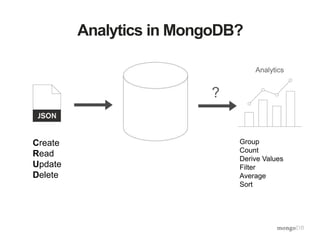
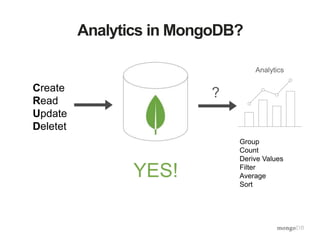
Analytics in MongoDB?
Create
Read
Update
Delete
Analytics
?
Group
Count
Derive Values
Filter
Average
Sort
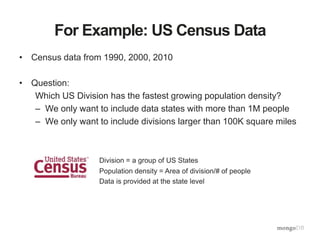
For Example: US Census Data
• Census data from 1990, 2000, 2010
• Question:
Which US Division has the fastest growing population density?
– We only want to include data states with more than 1M people
– We only want to include divisions larger than 100K square miles
Division = a group of US States
Population density = Area of division/# of people
Data is provided at the state level
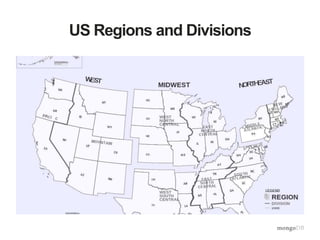
US Regions and Divisions
How would we solve this in SQL?
• SELECT GROUP BY HAVING
What About MongoDB?
Aggregation Framework
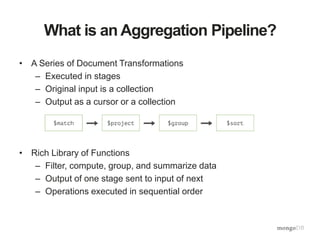
What is an Aggregation Pipeline?
• A Series of Document Transformations
– Executed in stages
– Original input is a collection
– Output as a cursor or a collection
• Rich Library of Functions
– Filter, compute, group, and summarize data
– Output of one stage sent to input of next
– Operations executed in sequential order
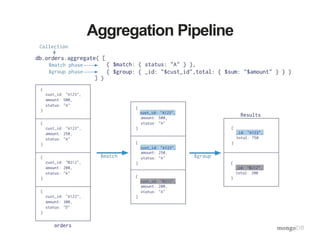
Aggregation Pipeline
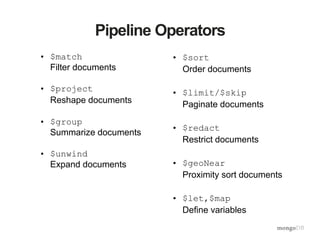
Pipeline Operators
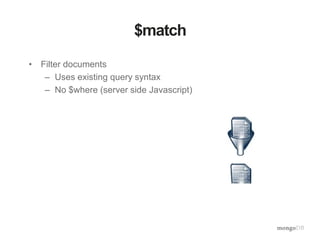
• $match
Filter documents
• $project
Reshape documents
• $group
Summarize documents
• $unwind
Expand documents
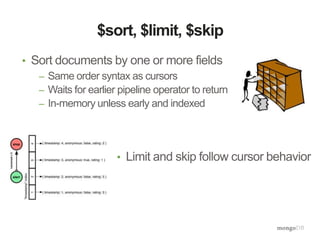
• $sort
Order documents
• $limit/$skip
Paginate documents
• $redact
Restrict documents
• $geoNear
Proximity sort documents
• $let,$map
Define variables
Aggregation Framework in Action
(let’s play with the census data)
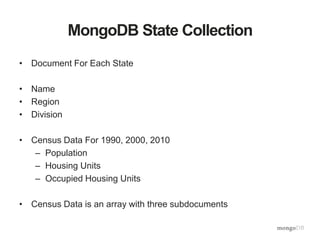
MongoDB State Collection
• Document For Each State
• Name
• Region
• Division
• Census Data For 1990, 2000, 2010
– Population
– Housing Units
– Occupied Housing Units
• Census Data is an array with three subdocuments
Document Model
{ "_id" : ObjectId("54e23c7b28099359f5661525"),
"name" : "California",
"region" : "West",
"data" : [
{"totalPop" : 33871648,
"totalHouse" : 12214549,
"occHouse" : 11502870,
"year" : 2000},
{"totalPop" : 37253956,
"totalHouse" : 13680081,
"occHouse" : 12577498,
"year" : 2010},
{"totalPop" : 29760021,
"totalHouse" : 11182882,
"occHouse" : 29008161,
"year" : 1990}
],
…
}
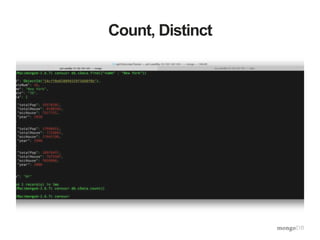
Count, Distinct
Total US Area
db.cData.aggregate([
{"$group" : {"_id" : null,
"totalArea" : {$sum : "$areaM"},
"avgArea" : {$avg : "$areaM"}}}])
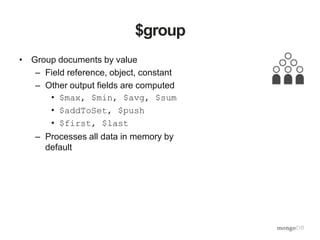
$group
• Group documents by value
– Field reference, object, constant
– Other output fields are computed
• $max, $min, $avg, $sum
• $addToSet, $push
• $first, $last
– Processes all data in memory by
default
Area By Region
db.cData.aggregate([
{"$group" : {"_id" : "$region",
"totalArea" : {$sum : "$areaM"},
"avgArea" : {$avg : "$areaM"},
"numStates" : {$sum : 1},
"states" : {$push : "$name"}}}
])
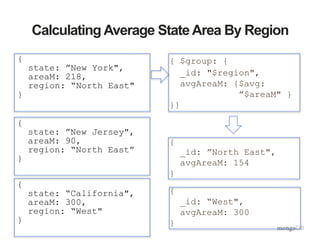
Calculating Average StateArea By Region
{ $group: {
_id: "$region",
avgAreaM: {$avg:
”$areaM" }
}}
{
_id: ”North East",
avgAreaM: 154
}
{
_id: “West",
avgAreaM: 300
}
{
state: ”New York",
areaM: 218,
region: “North East"
}
{
state: ”New Jersey",
areaM: 90,
region: “North East”
}
{
state: “California",
areaM: 300,
region: “West"
}
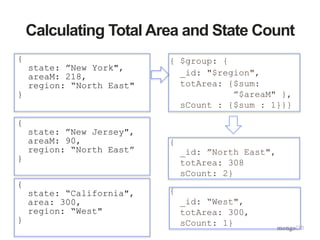
Calculating Total Area and State Count
{ $group: {
_id: "$region",
totArea: {$sum:
”$areaM" },
sCount : {$sum : 1}}}
{
_id: ”North East",
totArea: 308
sCount: 2}
{
_id: “West",
totArea: 300,
sCount: 1}
{
state: ”New York",
areaM: 218,
region: “North East"
}
{
state: ”New Jersey",
areaM: 90,
region: “North East”
}
{
state: “California",
area: 300,
region: “West"
}
Total US Population By Year
db.cData.aggregate(
[{$unwind : "$data"},
{$group : {"_id" : "$data.year",
"totalPop" : {$sum : "$data.totalPop"}}},
{$sort : {"totalPop" : 1}}
])
$unwind
• Operate on an array field
– Create documents from array elements
• Array replaced by element value
• Missing/empty fields → no output
• Non-array fields → error
– Pipe to $group to aggregate
$unwind
{ $unwind: $census }
{ state: “New York,
census: 1990}
{
state: ”New York",
census: [1990, 2000,
2010]
}
{
state: ”New Jersey",
census: [1990, 2000]
}
{
state: “California",
census: [1980, 1990,
2000, 2010]
}
{
state: ”Delaware",
census: [1990, 2000]
}
{ state: “New York,
census: 2000}
{ state: “New York,
census: 2010}
{ state: “New Jersey,
census: 1990}
{ state: “New Jersey,
census: 2000}
…
Southern State Population By Year
db.cData.aggregate(
[{$match : {"region" : "South"}},
{$unwind : "$data"},
{$group : {"_id" : "$data.year",
"totalPop” : {"$sum” :
"$data.totalPop"}}}])
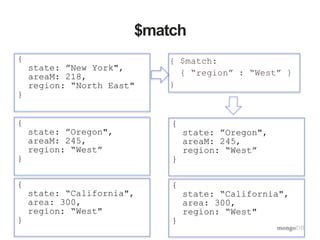
$match
• Filter documents
– Uses existing query syntax
– No $where (server side Javascript)
$match
{ $match:
{ “region” : “West” }
}
{
state: ”New York",
areaM: 218,
region: “North East"
}
{
state: ”Oregon",
areaM: 245,
region: “West”
}
{
state: “California",
area: 300,
region: “West"
}
{
state: ”Oregon",
areaM: 245,
region: “West”
}
{
state: “California",
area: 300,
region: “West"
}
Population Delta By State from 1990 to 2010
db.cData.aggregate(
[{$unwind : "$data"},
{$sort : {"data.year" : 1}},
{$group : {"_id" : "$name",
"pop1990" : {"$first" : "$data.totalPop"},
"pop2010" : {"$last" : "$data.totalPop"}}},
{$project : {"_id" : 0,
"name" : "$_id",
"delta" : {"$subtract" :
["$pop2010", "$pop1990"]},
"pop1990" : 1,
"pop2010” : 1}
}]
)
Population Delta By State from 1990 to 2010
db.cData.aggregate(
[{$unwind : "$data"},
{$sort : {"data.year" : 1}},
{$group : {"_id" : "$name",
"pop1990" : {"$first" : "$data.totalPop"},
"pop2010" : {"$last" : "$data.totalPop"}}},
{$project : {"_id" : 0,
"name" : "$_id",
"delta" : {"$subtract" :
["$pop2010", "$pop1990"]},
"pop1990" : 1,
"pop2010” : 1}
}]
)
$sort, $limit, $skip
• Sort documents by one or more fields
– Same order syntax as cursors
– Waits for earlier pipeline operator to return
– In-memory unless early and indexed
• Limit and skip follow cursor behavior
Population Delta By State from 1990 to 2010
db.cData.aggregate(
[{$unwind : "$data"},
{$sort : {"data.year" : 1}},
{$group : {"_id" : "$name",
"pop1990" : {"$first" : "$data.totalPop"},
"pop2010" : {"$last" : "$data.totalPop"}}},
{$project : {"_id" : 0,
"name" : "$_id",
"delta" : {"$subtract" :
["$pop2010", "$pop1990"]},
"pop1990" : 1,
"pop2010” : 1}
}]
)
$first, $last
• Collection operations like $push and $addToSet
• Must be used in $group
• $first and $last determined by document order
• Typically used with $sort to ensure ordering is
known
Population Delta By State from 1990 to 2010
db.cData.aggregate(
[{$unwind : "$data"},
{$sort : {"data.year" : 1}},
{$group : {"_id" : "$name",
"pop1990" : {"$first" : "$data.totalPop"},
"pop2010" : {"$last" : "$data.totalPop"}}},
{$project : {"_id" : 0,
"name" : "$_id",
"delta" : {"$subtract" :
["$pop2010", "$pop1990"]},
"pop1990" : 1,
"pop2010” : 1}
}]
)
$project
• Reshape Documents
– Include, exclude or rename fields
– Inject computed fields
– Create sub-document fields
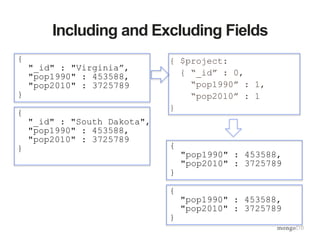
Including and Excluding Fields
{ $project:
{ “_id” : 0,
“pop1990” : 1,
“pop2010” : 1
}
{
"_id" : "Virginia”,
"pop1990" : 453588,
"pop2010" : 3725789
}
{
"_id" : "South Dakota",
"pop1990" : 453588,
"pop2010" : 3725789
} {
"pop1990" : 453588,
"pop2010" : 3725789
}
{
"pop1990" : 453588,
"pop2010" : 3725789
}
{
”name" : “South Dakota”,
”delta" : 118176
}
Renaming and Computing Fields
{ $project:
{ “_id” : 0,
“pop1990” : 0,
“pop2010” : 0,
“name” : “$_id”,
"delta" :
{"$subtract" :
["$pop2010",
"$pop1990"]}}
}
{
"_id" : "Virginia”,
"pop1990" : 6187358,
"pop2010" : 8001024
}
{
"_id" : "South Dakota",
"pop1990" : 696004,
"pop2010" : 814180
}
{
”name" : “Virginia”,
”delta" : 1813666
}
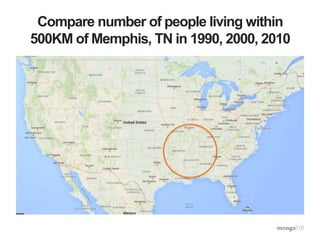
Compare number of people living within
500KM of Memphis, TN in 1990, 2000, 2010
Compare number of people living within
500KM of Memphis, TN in 1990, 2000, 2010
db.cData.aggregate([
{$geoNear : {
"near" : {"type" : "Point", "coordinates" : [90, 35]},
“distanceField” : "dist.calculated",
“maxDistance” : 500000,
“includeLocs” : "dist.location",
“spherical” : true }},
{$unwind : "$data"},
{$group : {"_id" : "$data.year",
"totalPop" : {"$sum" : "$data.totalPop"},
"states" : {"$addToSet" : "$name"}}},
{$sort : {"_id" : 1}}
])
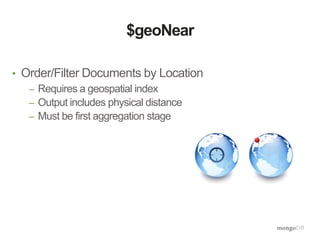
$geoNear
• Order/Filter Documents by Location
– Requires a geospatial index
– Output includes physical distance
– Must be first aggregation stage
{
"_id" : ”Tennessee",
"pop1990" : 4877185,
"pop2010" : 6346105,
“center” :
{“type” : “Point”,
“coordinates” :
[86.6, 37.8]}
}
{
"_id" : "Virginia”,
"pop1990" : 6187358,
"pop2010" : 8001024,
“center” :
{“type” : “Point”,
“coordinates” :
[78.6, 37.5]}
}
$geoNear
{$geoNear : {
"near”: {"type”: "Point",
"coordinates”:
[90, 35]},
maxDistance : 500000,
spherical : true }}
{
"_id" : ”Tennessee",
"pop1990" : 4877185,
"pop2010" : 6346105,
“center” :
{“type” : “Point”,
“coordinates” :
[86.6, 37.8]}
}
What if I want to save the results to a
collection?
db.cData.aggregate([
{$geoNear : {
"near" : {"type" : "Point", "coordinates" : [90, 35]},
“distanceField” : "dist.calculated",
“maxDistance” : 500000,
“includeLocs” : "dist.location",
“spherical” : true }},
{$unwind : "$data"},
{$group : {"_id" : "$data.year",
"totalPop" : {"$sum" : "$data.totalPop"},
"states" : {"$addToSet" : "$name"}}},
{$sort : {"_id" : 1}},
{$out : “peopleNearMemphis”}
])
$out
db.cData.aggregate([<pipeline stages>,
{“$out” : “resultsCollection”}])
• Save aggregation results to a new collection
• New aggregation uses:
• Transform documents - ETL
Back To The Original Question
• Which US Division has the fastest growing population density?
– We only want to include data states with more than 1M people
– We only want to include divisions larger than 100K square miles
Division with Fastest Growing Pop Density
db.cData.aggregate(
[{$match : {"data.totalPop" : {"$gt" : 1000000}}},
{$unwind : "$data"},
{$sort : {"data.year" : 1}},
{$group : {"_id" : "$name",
"pop1990" : {"$first" : "$data.totalPop"},
"pop2010" : {"$last" : "$data.totalPop"},
"areaM" : {"$first" : "$areaM"},
"division" : {"$first" : "$division"}}},
{$group : {"_id" : "$division",
"totalPop1990" : {"$sum" : "$pop1990"},
"totalPop2010" : {"$sum" : "$pop2010"},
"totalAreaM" : {"$sum" : "$areaM"}}},
{$match : {"totalAreaM" : {"$gt" : 100000}}},
{$project : {"_id" : 0,
"division" : "$_id",
"density1990" : {"$divide" : ["$totalPop1990", "$totalAreaM"]},
"density2010" : {"$divide" : ["$totalPop2010", "$totalAreaM"]},
"denDelta" : {"$subtract" : [{"$divide" : ["$totalPop2010",
"$totalAreaM"]},
{"$divide" : ["$totalPop1990”,
"$totalAreaM"]}]},
"totalAreaM" : 1,
"totalPop1990" : 1,
"totalPop2010" : 1}},
{$sort : {"denDelta" : -1}}])
Aggregate Options
Aggregate options
db.cData.aggregate([<pipeline stages>],
{‘explain’ : false
'allowDiskUse' : true,
'cursor' : {'batchSize' : 5}})
explain – similar to find().explain()
allowDiskUse – enable use of disk to store intermediate
results
cursor – specify the size of the initial result
Aggregation and Sharding
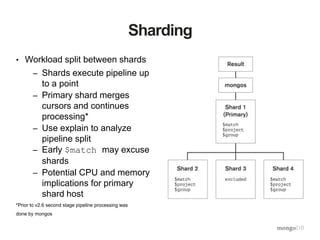
Sharding
• Workload split between shards
– Shards execute pipeline up
to a point
– Primary shard merges
cursors and continues
processing*
– Use explain to analyze
pipeline split
– Early $match may excuse
shards
– Potential CPU and memory
implications for primary
shard host
*Prior to v2.6 second stage pipeline processing was
done by mongos
Summary
Analytics in MongoDB?
Create
Read
Update
Deletet
Analytics
?
Group
Count
Derive Values
Filter
Average
Sort
YES!
Framework Use Cases
• Basic aggregation queries
• Ad-hoc reporting
• Real-time analytics
• Visualizing and reshaping data
Questions?
jay.runkel@mongodb.com
@jayrunkel

Agg framework selectgroup feb2015 v2

  • 1.
    Exploring the AggregationFramework Jay Runkel Solutions Architect jay.runkel@mongodb.com @jayrunkel
  • 2.
    Agenda 1. Analytics inMongoDB? 2. Aggregation Framework 3. Aggregation Framework in Action – US Census Data 4. Aggregation Framework Options
  • 3.
  • 4.
    For Example: USCensus Data • Census data from 1990, 2000, 2010 • Question: Which US Division has the fastest growing population density? – We only want to include data states with more than 1M people – We only want to include divisions larger than 100K square miles Division = a group of US States Population density = Area of division/# of people Data is provided at the state level
  • 5.
    US Regions andDivisions
  • 6.
    How would wesolve this in SQL? • SELECT GROUP BY HAVING
  • 7.
  • 8.
  • 9.
    What is anAggregation Pipeline? • A Series of Document Transformations – Executed in stages – Original input is a collection – Output as a cursor or a collection • Rich Library of Functions – Filter, compute, group, and summarize data – Output of one stage sent to input of next – Operations executed in sequential order
  • 10.
  • 11.
    Pipeline Operators • $match Filterdocuments • $project Reshape documents • $group Summarize documents • $unwind Expand documents • $sort Order documents • $limit/$skip Paginate documents • $redact Restrict documents • $geoNear Proximity sort documents • $let,$map Define variables
  • 12.
    Aggregation Framework inAction (let’s play with the census data)
  • 13.
    MongoDB State Collection •Document For Each State • Name • Region • Division • Census Data For 1990, 2000, 2010 – Population – Housing Units – Occupied Housing Units • Census Data is an array with three subdocuments
  • 14.
    Document Model { "_id": ObjectId("54e23c7b28099359f5661525"), "name" : "California", "region" : "West", "data" : [ {"totalPop" : 33871648, "totalHouse" : 12214549, "occHouse" : 11502870, "year" : 2000}, {"totalPop" : 37253956, "totalHouse" : 13680081, "occHouse" : 12577498, "year" : 2010}, {"totalPop" : 29760021, "totalHouse" : 11182882, "occHouse" : 29008161, "year" : 1990} ], … }
  • 15.
  • 16.
    Total US Area db.cData.aggregate([ {"$group": {"_id" : null, "totalArea" : {$sum : "$areaM"}, "avgArea" : {$avg : "$areaM"}}}])
  • 17.
    $group • Group documentsby value – Field reference, object, constant – Other output fields are computed • $max, $min, $avg, $sum • $addToSet, $push • $first, $last – Processes all data in memory by default
  • 18.
    Area By Region db.cData.aggregate([ {"$group": {"_id" : "$region", "totalArea" : {$sum : "$areaM"}, "avgArea" : {$avg : "$areaM"}, "numStates" : {$sum : 1}, "states" : {$push : "$name"}}} ])
  • 19.
    Calculating Average StateAreaBy Region { $group: { _id: "$region", avgAreaM: {$avg: ”$areaM" } }} { _id: ”North East", avgAreaM: 154 } { _id: “West", avgAreaM: 300 } { state: ”New York", areaM: 218, region: “North East" } { state: ”New Jersey", areaM: 90, region: “North East” } { state: “California", areaM: 300, region: “West" }
  • 20.
    Calculating Total Areaand State Count { $group: { _id: "$region", totArea: {$sum: ”$areaM" }, sCount : {$sum : 1}}} { _id: ”North East", totArea: 308 sCount: 2} { _id: “West", totArea: 300, sCount: 1} { state: ”New York", areaM: 218, region: “North East" } { state: ”New Jersey", areaM: 90, region: “North East” } { state: “California", area: 300, region: “West" }
  • 21.
    Total US PopulationBy Year db.cData.aggregate( [{$unwind : "$data"}, {$group : {"_id" : "$data.year", "totalPop" : {$sum : "$data.totalPop"}}}, {$sort : {"totalPop" : 1}} ])
  • 22.
    $unwind • Operate onan array field – Create documents from array elements • Array replaced by element value • Missing/empty fields → no output • Non-array fields → error – Pipe to $group to aggregate
  • 23.
    $unwind { $unwind: $census} { state: “New York, census: 1990} { state: ”New York", census: [1990, 2000, 2010] } { state: ”New Jersey", census: [1990, 2000] } { state: “California", census: [1980, 1990, 2000, 2010] } { state: ”Delaware", census: [1990, 2000] } { state: “New York, census: 2000} { state: “New York, census: 2010} { state: “New Jersey, census: 1990} { state: “New Jersey, census: 2000} …
  • 24.
    Southern State PopulationBy Year db.cData.aggregate( [{$match : {"region" : "South"}}, {$unwind : "$data"}, {$group : {"_id" : "$data.year", "totalPop” : {"$sum” : "$data.totalPop"}}}])
  • 25.
    $match • Filter documents –Uses existing query syntax – No $where (server side Javascript)
  • 26.
    $match { $match: { “region”: “West” } } { state: ”New York", areaM: 218, region: “North East" } { state: ”Oregon", areaM: 245, region: “West” } { state: “California", area: 300, region: “West" } { state: ”Oregon", areaM: 245, region: “West” } { state: “California", area: 300, region: “West" }
  • 27.
    Population Delta ByState from 1990 to 2010 db.cData.aggregate( [{$unwind : "$data"}, {$sort : {"data.year" : 1}}, {$group : {"_id" : "$name", "pop1990" : {"$first" : "$data.totalPop"}, "pop2010" : {"$last" : "$data.totalPop"}}}, {$project : {"_id" : 0, "name" : "$_id", "delta" : {"$subtract" : ["$pop2010", "$pop1990"]}, "pop1990" : 1, "pop2010” : 1} }] )
  • 28.
    Population Delta ByState from 1990 to 2010 db.cData.aggregate( [{$unwind : "$data"}, {$sort : {"data.year" : 1}}, {$group : {"_id" : "$name", "pop1990" : {"$first" : "$data.totalPop"}, "pop2010" : {"$last" : "$data.totalPop"}}}, {$project : {"_id" : 0, "name" : "$_id", "delta" : {"$subtract" : ["$pop2010", "$pop1990"]}, "pop1990" : 1, "pop2010” : 1} }] )
  • 29.
    $sort, $limit, $skip •Sort documents by one or more fields – Same order syntax as cursors – Waits for earlier pipeline operator to return – In-memory unless early and indexed • Limit and skip follow cursor behavior
  • 30.
    Population Delta ByState from 1990 to 2010 db.cData.aggregate( [{$unwind : "$data"}, {$sort : {"data.year" : 1}}, {$group : {"_id" : "$name", "pop1990" : {"$first" : "$data.totalPop"}, "pop2010" : {"$last" : "$data.totalPop"}}}, {$project : {"_id" : 0, "name" : "$_id", "delta" : {"$subtract" : ["$pop2010", "$pop1990"]}, "pop1990" : 1, "pop2010” : 1} }] )
  • 31.
    $first, $last • Collectionoperations like $push and $addToSet • Must be used in $group • $first and $last determined by document order • Typically used with $sort to ensure ordering is known
  • 32.
    Population Delta ByState from 1990 to 2010 db.cData.aggregate( [{$unwind : "$data"}, {$sort : {"data.year" : 1}}, {$group : {"_id" : "$name", "pop1990" : {"$first" : "$data.totalPop"}, "pop2010" : {"$last" : "$data.totalPop"}}}, {$project : {"_id" : 0, "name" : "$_id", "delta" : {"$subtract" : ["$pop2010", "$pop1990"]}, "pop1990" : 1, "pop2010” : 1} }] )
  • 33.
    $project • Reshape Documents –Include, exclude or rename fields – Inject computed fields – Create sub-document fields
  • 34.
    Including and ExcludingFields { $project: { “_id” : 0, “pop1990” : 1, “pop2010” : 1 } { "_id" : "Virginia”, "pop1990" : 453588, "pop2010" : 3725789 } { "_id" : "South Dakota", "pop1990" : 453588, "pop2010" : 3725789 } { "pop1990" : 453588, "pop2010" : 3725789 } { "pop1990" : 453588, "pop2010" : 3725789 }
  • 35.
    { ”name" : “SouthDakota”, ”delta" : 118176 } Renaming and Computing Fields { $project: { “_id” : 0, “pop1990” : 0, “pop2010” : 0, “name” : “$_id”, "delta" : {"$subtract" : ["$pop2010", "$pop1990"]}} } { "_id" : "Virginia”, "pop1990" : 6187358, "pop2010" : 8001024 } { "_id" : "South Dakota", "pop1990" : 696004, "pop2010" : 814180 } { ”name" : “Virginia”, ”delta" : 1813666 }
  • 36.
    Compare number ofpeople living within 500KM of Memphis, TN in 1990, 2000, 2010
  • 37.
    Compare number ofpeople living within 500KM of Memphis, TN in 1990, 2000, 2010 db.cData.aggregate([ {$geoNear : { "near" : {"type" : "Point", "coordinates" : [90, 35]}, “distanceField” : "dist.calculated", “maxDistance” : 500000, “includeLocs” : "dist.location", “spherical” : true }}, {$unwind : "$data"}, {$group : {"_id" : "$data.year", "totalPop" : {"$sum" : "$data.totalPop"}, "states" : {"$addToSet" : "$name"}}}, {$sort : {"_id" : 1}} ])
  • 38.
    $geoNear • Order/Filter Documentsby Location – Requires a geospatial index – Output includes physical distance – Must be first aggregation stage
  • 39.
    { "_id" : ”Tennessee", "pop1990": 4877185, "pop2010" : 6346105, “center” : {“type” : “Point”, “coordinates” : [86.6, 37.8]} } { "_id" : "Virginia”, "pop1990" : 6187358, "pop2010" : 8001024, “center” : {“type” : “Point”, “coordinates” : [78.6, 37.5]} } $geoNear {$geoNear : { "near”: {"type”: "Point", "coordinates”: [90, 35]}, maxDistance : 500000, spherical : true }} { "_id" : ”Tennessee", "pop1990" : 4877185, "pop2010" : 6346105, “center” : {“type” : “Point”, “coordinates” : [86.6, 37.8]} }
  • 40.
    What if Iwant to save the results to a collection? db.cData.aggregate([ {$geoNear : { "near" : {"type" : "Point", "coordinates" : [90, 35]}, “distanceField” : "dist.calculated", “maxDistance” : 500000, “includeLocs” : "dist.location", “spherical” : true }}, {$unwind : "$data"}, {$group : {"_id" : "$data.year", "totalPop" : {"$sum" : "$data.totalPop"}, "states" : {"$addToSet" : "$name"}}}, {$sort : {"_id" : 1}}, {$out : “peopleNearMemphis”} ])
  • 41.
    $out db.cData.aggregate([<pipeline stages>, {“$out” :“resultsCollection”}]) • Save aggregation results to a new collection • New aggregation uses: • Transform documents - ETL
  • 42.
    Back To TheOriginal Question • Which US Division has the fastest growing population density? – We only want to include data states with more than 1M people – We only want to include divisions larger than 100K square miles
  • 43.
    Division with FastestGrowing Pop Density db.cData.aggregate( [{$match : {"data.totalPop" : {"$gt" : 1000000}}}, {$unwind : "$data"}, {$sort : {"data.year" : 1}}, {$group : {"_id" : "$name", "pop1990" : {"$first" : "$data.totalPop"}, "pop2010" : {"$last" : "$data.totalPop"}, "areaM" : {"$first" : "$areaM"}, "division" : {"$first" : "$division"}}}, {$group : {"_id" : "$division", "totalPop1990" : {"$sum" : "$pop1990"}, "totalPop2010" : {"$sum" : "$pop2010"}, "totalAreaM" : {"$sum" : "$areaM"}}}, {$match : {"totalAreaM" : {"$gt" : 100000}}}, {$project : {"_id" : 0, "division" : "$_id", "density1990" : {"$divide" : ["$totalPop1990", "$totalAreaM"]}, "density2010" : {"$divide" : ["$totalPop2010", "$totalAreaM"]}, "denDelta" : {"$subtract" : [{"$divide" : ["$totalPop2010", "$totalAreaM"]}, {"$divide" : ["$totalPop1990”, "$totalAreaM"]}]}, "totalAreaM" : 1, "totalPop1990" : 1, "totalPop2010" : 1}}, {$sort : {"denDelta" : -1}}])
  • 44.
  • 45.
    Aggregate options db.cData.aggregate([<pipeline stages>], {‘explain’: false 'allowDiskUse' : true, 'cursor' : {'batchSize' : 5}}) explain – similar to find().explain() allowDiskUse – enable use of disk to store intermediate results cursor – specify the size of the initial result
  • 46.
  • 47.
    Sharding • Workload splitbetween shards – Shards execute pipeline up to a point – Primary shard merges cursors and continues processing* – Use explain to analyze pipeline split – Early $match may excuse shards – Potential CPU and memory implications for primary shard host *Prior to v2.6 second stage pipeline processing was done by mongos
  • 48.
  • 49.
  • 50.
    Framework Use Cases •Basic aggregation queries • Ad-hoc reporting • Real-time analytics • Visualizing and reshaping data
  • 51.