Securing Your Deployment with
MongoDB Enterprise
Mat Keep
Director, MongoDB Product Team
mat.keep@mongodb.com
@matkeep
Agenda
• Data Security Landscape
• Best Practices for Securing MongoDB
• Resources to Get Started
Takeaway
• Attacks are happening more frequently. Breaches are
getting larger
• Governments are responding with new regulations
• MongoDB feature set and best practices strengthen your
defenses
The Art Of Securing A System
“If you know the enemy and know yourself,
you need not fear the result of a hundred battles.
If you know yourself but not the enemy,
for every victory gained you will also suffer a defeat.
If you know neither the enemy nor yourself,
you will succumb in every battle.”
Sun Tzu, The Art of War 500 BC
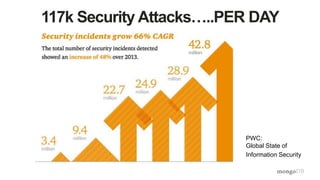
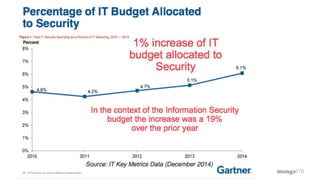
117k Security Attacks…..PER DAY
PWC:
Global State of
Information Security
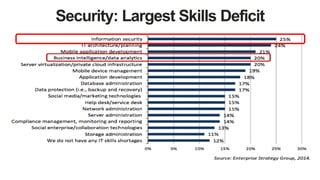
Security: Largest Skills Deficit
• Data growth: 40 trillion GBs (40
ZBs) generated by 2020. 6TB for
every person on earth (IDC)
• Technology diversity: Over 280
data stores available.
• High growth threats: nation states,
organized crime. Less brute force,
more phishing & malware
Increased Attack Surface Area
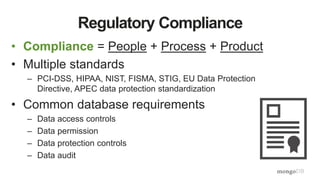
• Compliance = People + Process + Product
• Multiple standards
– PCI-DSS, HIPAA, NIST, FISMA, STIG, EU Data Protection
Directive, APEC data protection standardization
• Common database requirements
– Data access controls
– Data permission
– Data protection controls
– Data audit
Regulatory Compliance
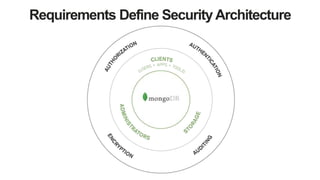
Requirements Define Security Architecture
Securing MongoDB
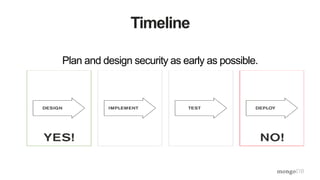
Timeline
Plan and design security as early as possible.
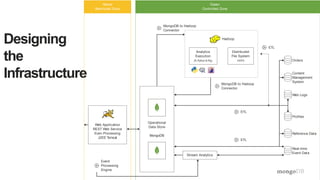
Designing
the
Infrastructure
Hadoop
Event
Processing
Engine
Analytics
Execution
(R,Python & Pig)
Distributed
File System
HDFS
Stream Analytics
Yellow
Restricted Zone
Green
Controlled Zone
Web Application
REST Web Service
Even Processing
J2EE Tomcat
MongoDB to Hadoop
Connector
MongoDB to Hadoop
Connector
ETL
ETL
Orders
ETL
Operational
Data Store
MongoDB
Content
Management
System
Web Logs
Profiles
Reference Data
Real-time
Event Data
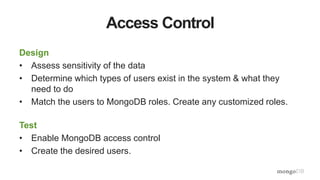
Access Control
Design
• Assess sensitivity of the data
• Determine which types of users exist in the system & what they
need to do
• Match the users to MongoDB roles. Create any customized roles.
Test
• Enable MongoDB access control
• Create the desired users.
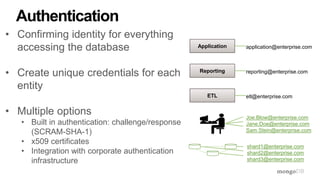
• Confirming identity for everything
accessing the database
• Create unique credentials for each
entity
• Multiple options
• Built in authentication: challenge/response
(SCRAM-SHA-1)
• x509 certificates
• Integration with corporate authentication
infrastructure
Authentication
Application
Reporting
ETL
application@enterprise.com
reporting@enterprise.com
etl@enterprise.com
Joe.Blow@enterprise.com
Jane.Doe@enterprise.com
Sam.Stein@enterprise.com
shard1@enterprise.com
shard2@enterprise.com
shard3@enterprise.com
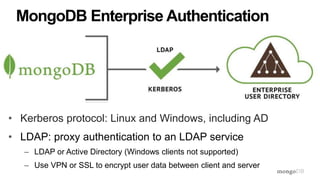
• Kerberos protocol: Linux and Windows, including AD
• LDAP: proxy authentication to an LDAP service
– LDAP or Active Directory (Windows clients not supported)
– Use VPN or SSL to encrypt user data between client and server
MongoDB Enterprise Authentication
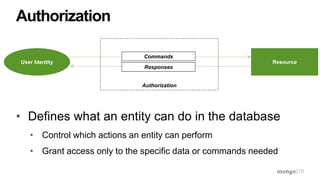
• Defines what an entity can do in the database
• Control which actions an entity can perform
• Grant access only to the specific data or commands needed
Authorization
User Identity Resource
Commands
Responses
Authorization
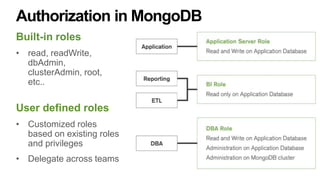
Authorization in MongoDB
Built-in roles
• read, readWrite,
dbAdmin,
clusterAdmin, root,
etc..
User defined roles
• Customized roles
based on existing roles
and privileges
• Delegate across teams
Authorization: MongoDB Field Level Redaction
User 1
- Confidentia
l
- Secret
{ _id: ‘xyz’,
field1: {
level: [ “Confidential” ],
data: 123
},
field2: {
level: [ “Top Secret” ],
data: 456
},
field3: {
level: [ “Unclassified” ],
data: 789
}
}
User 2
- Top Secret
- Secret
- Confidentia
l
User 3
- Unclassified
FieldLevelAccessControl
• Enables a single document to store data with multiple
security levels
Redaction in Action
User 1
- Confidentia
l
- Secret
{ _id: ‘xyz’,
field1: {
level: [ “Confidential” ],
data: 123
},
field2: {
level: [ “Top Secret” ],
data: 456
},
field3: {
level: [ “Unclassified” ],
data: 789
}
}
User 2
- Top Secret
- Secret
- Confidentia
l
User 3
- Unclassified
FieldLevelAccessControl
Redaction in Action
User 1
- Confidentia
l
- Secret
{ _id: ‘xyz’,
field1: {
level: [ “Confidential” ],
data: 123
},
field2: {
level: [ “Top Secret” ],
data: 456
},
field3: {
level: [ “Unclassified” ],
data: 789
}
}
User 2
- Top Secret
- Secret
- Confidentia
l
User 3
- Unclassified
FieldLevelAccessControl
Redaction in Action
User 1
- Confidentia
l
- Secret
{ _id: ‘xyz’,
field1: {
level: [ “Confidential” ],
data: 123
},
field2: {
level: [ “Top Secret” ],
data: 456
},
field3: {
level: [ “Unclassified” ],
data: 789
}
}
User 2
- Top Secret
- Secret
- Confidentia
l
User 3
- Unclassified
FieldLevelAccessControl
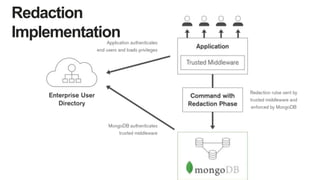
Redaction
Implementation: Implementation
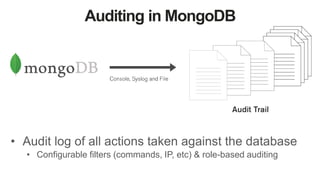
Auditing in MongoDB
• Audit log of all actions taken against the database
• Configurable filters (commands, IP, etc) & role-based auditing
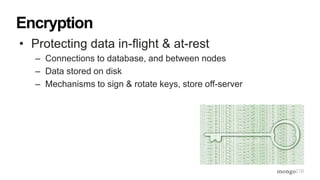
• Protecting data in-flight & at-rest
– Connections to database, and between nodes
– Data stored on disk
– Mechanisms to sign & rotate keys, store off-server
Encryption
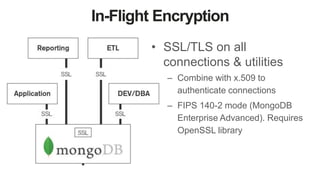
In-Flight Encryption
• SSL/TLS on all
connections & utilities
– Combine with x.509 to
authenticate connections
– FIPS 140-2 mode (MongoDB
Enterprise Advanced). Requires
OpenSSL library
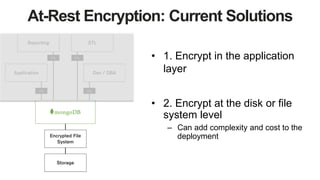
At-Rest Encryption: Current Solutions
• 1. Encrypt in the application
layer
• 2. Encrypt at the disk or file
system level
– Can add complexity and cost to the
deployment
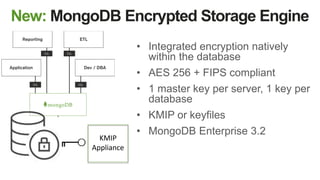
New: MongoDB Encrypted Storage Engine
• Integrated encryption natively
within the database
• AES 256 + FIPS compliant
• 1 master key per server, 1 key per
database
• KMIP or keyfiles
• MongoDB Enterprise 3.2
KMIP
Appliance
MongoDB
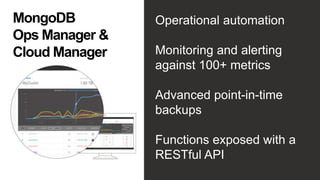
Ops Manager &
Cloud Manager
Operational automation
Monitoring and alerting
against 100+ metrics
Advanced point-in-time
backups
Functions exposed with a
RESTful API
• Network filters: Router ACLs and Firewall
• Bind IP Addresses: limits network interfaces
• Run in VPN
• Dedicated OS user account: don’t run as root
• File system permissions: protect data, configuration &
keyfiles
Environmental Control
Putting it all Together
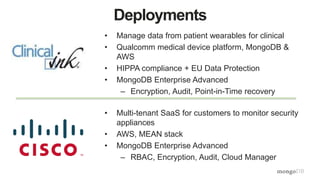
Deployments
• Manage data from patient wearables for clinical
• Qualcomm medical device platform, MongoDB &
AWS
• HIPPA compliance + EU Data Protection
• MongoDB Enterprise Advanced
– Encryption, Audit, Point-in-Time recovery
• Multi-tenant SaaS for customers to monitor security
appliances
• AWS, MEAN stack
• MongoDB Enterprise Advanced
– RBAC, Encryption, Audit, Cloud Manager
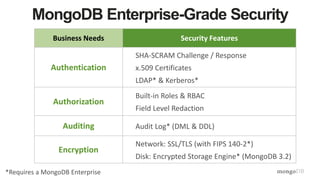
Business Needs Security Features
Authentication
SHA-SCRAM Challenge / Response
x.509 Certificates
LDAP* & Kerberos*
Authorization
Built-in Roles & RBAC
Field Level Redaction
Auditing Audit Log* (DML & DDL)
Encryption
Network: SSL/TLS (with FIPS 140-2*)
Disk: Encrypted Storage Engine* (MongoDB 3.2)
MongoDB Enterprise-Grade Security
*Requires a MongoDB Enterprise
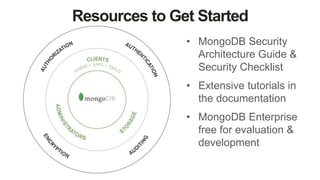
Resources to Get Started
• MongoDB Security
Architecture Guide &
Security Checklist
• Extensive tutorials in
the documentation
• MongoDB Enterprise
free for evaluation &
development
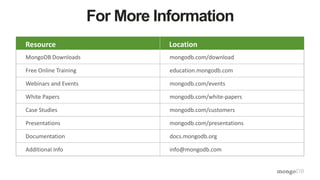
For More Information
Resource Location
MongoDB Downloads mongodb.com/download
Free Online Training education.mongodb.com
Webinars and Events mongodb.com/events
White Papers mongodb.com/white-papers
Case Studies mongodb.com/customers
Presentations mongodb.com/presentations
Documentation docs.mongodb.org
Additional Info info@mongodb.com
Resource Location
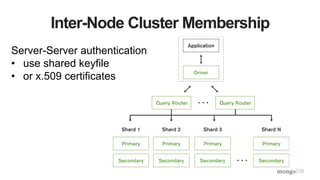
Inter-Node Cluster Membership
Server-Server authentication
• use shared keyfile
• or x.509 certificates
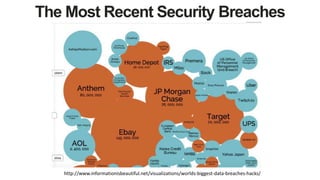
The Most Recent Security Breaches
http://www.informationisbeautiful.net/visualizations/worlds-biggest-data-breaches-hacks/

MongoDB Days UK: Securing Your Deployment with MongoDB Enterprise

  • 1.
    Securing Your Deploymentwith MongoDB Enterprise Mat Keep Director, MongoDB Product Team mat.keep@mongodb.com @matkeep
  • 2.
    Agenda • Data SecurityLandscape • Best Practices for Securing MongoDB • Resources to Get Started
  • 3.
    Takeaway • Attacks arehappening more frequently. Breaches are getting larger • Governments are responding with new regulations • MongoDB feature set and best practices strengthen your defenses
  • 4.
    The Art OfSecuring A System “If you know the enemy and know yourself, you need not fear the result of a hundred battles. If you know yourself but not the enemy, for every victory gained you will also suffer a defeat. If you know neither the enemy nor yourself, you will succumb in every battle.” Sun Tzu, The Art of War 500 BC
  • 5.
    117k Security Attacks…..PERDAY PWC: Global State of Information Security
  • 7.
  • 8.
    • Data growth:40 trillion GBs (40 ZBs) generated by 2020. 6TB for every person on earth (IDC) • Technology diversity: Over 280 data stores available. • High growth threats: nation states, organized crime. Less brute force, more phishing & malware Increased Attack Surface Area
  • 9.
    • Compliance =People + Process + Product • Multiple standards – PCI-DSS, HIPAA, NIST, FISMA, STIG, EU Data Protection Directive, APEC data protection standardization • Common database requirements – Data access controls – Data permission – Data protection controls – Data audit Regulatory Compliance
  • 10.
  • 11.
  • 12.
    Timeline Plan and designsecurity as early as possible.
  • 13.
    Designing the Infrastructure Hadoop Event Processing Engine Analytics Execution (R,Python & Pig) Distributed FileSystem HDFS Stream Analytics Yellow Restricted Zone Green Controlled Zone Web Application REST Web Service Even Processing J2EE Tomcat MongoDB to Hadoop Connector MongoDB to Hadoop Connector ETL ETL Orders ETL Operational Data Store MongoDB Content Management System Web Logs Profiles Reference Data Real-time Event Data
  • 14.
    Access Control Design • Assesssensitivity of the data • Determine which types of users exist in the system & what they need to do • Match the users to MongoDB roles. Create any customized roles. Test • Enable MongoDB access control • Create the desired users.
  • 15.
    • Confirming identityfor everything accessing the database • Create unique credentials for each entity • Multiple options • Built in authentication: challenge/response (SCRAM-SHA-1) • x509 certificates • Integration with corporate authentication infrastructure Authentication Application Reporting ETL application@enterprise.com reporting@enterprise.com etl@enterprise.com Joe.Blow@enterprise.com Jane.Doe@enterprise.com Sam.Stein@enterprise.com shard1@enterprise.com shard2@enterprise.com shard3@enterprise.com
  • 16.
    • Kerberos protocol:Linux and Windows, including AD • LDAP: proxy authentication to an LDAP service – LDAP or Active Directory (Windows clients not supported) – Use VPN or SSL to encrypt user data between client and server MongoDB Enterprise Authentication
  • 17.
    • Defines whatan entity can do in the database • Control which actions an entity can perform • Grant access only to the specific data or commands needed Authorization User Identity Resource Commands Responses Authorization
  • 18.
    Authorization in MongoDB Built-inroles • read, readWrite, dbAdmin, clusterAdmin, root, etc.. User defined roles • Customized roles based on existing roles and privileges • Delegate across teams
  • 19.
    Authorization: MongoDB FieldLevel Redaction User 1 - Confidentia l - Secret { _id: ‘xyz’, field1: { level: [ “Confidential” ], data: 123 }, field2: { level: [ “Top Secret” ], data: 456 }, field3: { level: [ “Unclassified” ], data: 789 } } User 2 - Top Secret - Secret - Confidentia l User 3 - Unclassified FieldLevelAccessControl • Enables a single document to store data with multiple security levels
  • 20.
    Redaction in Action User1 - Confidentia l - Secret { _id: ‘xyz’, field1: { level: [ “Confidential” ], data: 123 }, field2: { level: [ “Top Secret” ], data: 456 }, field3: { level: [ “Unclassified” ], data: 789 } } User 2 - Top Secret - Secret - Confidentia l User 3 - Unclassified FieldLevelAccessControl
  • 21.
    Redaction in Action User1 - Confidentia l - Secret { _id: ‘xyz’, field1: { level: [ “Confidential” ], data: 123 }, field2: { level: [ “Top Secret” ], data: 456 }, field3: { level: [ “Unclassified” ], data: 789 } } User 2 - Top Secret - Secret - Confidentia l User 3 - Unclassified FieldLevelAccessControl
  • 22.
    Redaction in Action User1 - Confidentia l - Secret { _id: ‘xyz’, field1: { level: [ “Confidential” ], data: 123 }, field2: { level: [ “Top Secret” ], data: 456 }, field3: { level: [ “Unclassified” ], data: 789 } } User 2 - Top Secret - Secret - Confidentia l User 3 - Unclassified FieldLevelAccessControl
  • 23.
  • 24.
    Auditing in MongoDB •Audit log of all actions taken against the database • Configurable filters (commands, IP, etc) & role-based auditing
  • 25.
    • Protecting datain-flight & at-rest – Connections to database, and between nodes – Data stored on disk – Mechanisms to sign & rotate keys, store off-server Encryption
  • 26.
    In-Flight Encryption • SSL/TLSon all connections & utilities – Combine with x.509 to authenticate connections – FIPS 140-2 mode (MongoDB Enterprise Advanced). Requires OpenSSL library
  • 27.
    At-Rest Encryption: CurrentSolutions • 1. Encrypt in the application layer • 2. Encrypt at the disk or file system level – Can add complexity and cost to the deployment
  • 28.
    New: MongoDB EncryptedStorage Engine • Integrated encryption natively within the database • AES 256 + FIPS compliant • 1 master key per server, 1 key per database • KMIP or keyfiles • MongoDB Enterprise 3.2 KMIP Appliance
  • 29.
    MongoDB Ops Manager & CloudManager Operational automation Monitoring and alerting against 100+ metrics Advanced point-in-time backups Functions exposed with a RESTful API
  • 30.
    • Network filters:Router ACLs and Firewall • Bind IP Addresses: limits network interfaces • Run in VPN • Dedicated OS user account: don’t run as root • File system permissions: protect data, configuration & keyfiles Environmental Control
  • 31.
  • 32.
    Deployments • Manage datafrom patient wearables for clinical • Qualcomm medical device platform, MongoDB & AWS • HIPPA compliance + EU Data Protection • MongoDB Enterprise Advanced – Encryption, Audit, Point-in-Time recovery • Multi-tenant SaaS for customers to monitor security appliances • AWS, MEAN stack • MongoDB Enterprise Advanced – RBAC, Encryption, Audit, Cloud Manager
  • 33.
    Business Needs SecurityFeatures Authentication SHA-SCRAM Challenge / Response x.509 Certificates LDAP* & Kerberos* Authorization Built-in Roles & RBAC Field Level Redaction Auditing Audit Log* (DML & DDL) Encryption Network: SSL/TLS (with FIPS 140-2*) Disk: Encrypted Storage Engine* (MongoDB 3.2) MongoDB Enterprise-Grade Security *Requires a MongoDB Enterprise
  • 34.
    Resources to GetStarted • MongoDB Security Architecture Guide & Security Checklist • Extensive tutorials in the documentation • MongoDB Enterprise free for evaluation & development
  • 36.
    For More Information ResourceLocation MongoDB Downloads mongodb.com/download Free Online Training education.mongodb.com Webinars and Events mongodb.com/events White Papers mongodb.com/white-papers Case Studies mongodb.com/customers Presentations mongodb.com/presentations Documentation docs.mongodb.org Additional Info info@mongodb.com Resource Location
  • 37.
    Inter-Node Cluster Membership Server-Serverauthentication • use shared keyfile • or x.509 certificates
  • 38.
    The Most RecentSecurity Breaches http://www.informationisbeautiful.net/visualizations/worlds-biggest-data-breaches-hacks/