

Lead Security Engineer, MongoDB
Andreas Nilsson
Creating a single view:
Securing the Application
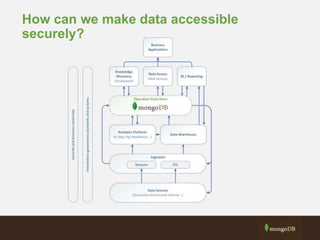
How can we make data accessible
securely?
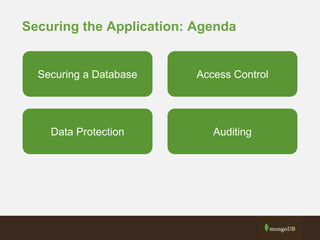
Securing the Application: Agenda
Securing a Database Access Control
Data Protection Auditing
The Art of Securing a System
“If you know the enemy and know yourself,
you need not fear the result of a hundred battles.
If you know yourself but not the enemy,
for every victory gained you will also suffer a defeat.
If you know neither the enemy nor yourself,
you will succumb in every battle.”
Sun Tzu, The Art of War 500 BC
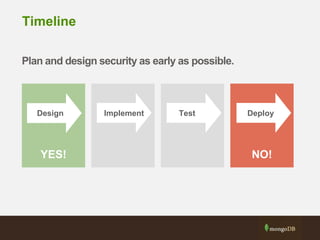
Timeline
Plan and design security as early as possible.
ImplementDesign Test Deploy
YES! NO!
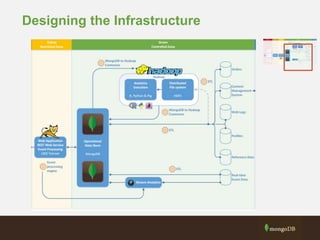
Designing the Infrastructure
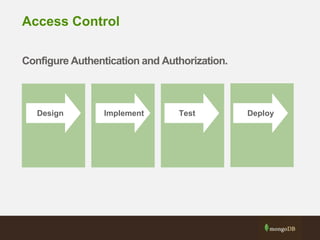
Access Control
Configure Authentication and Authorization.
ImplementDesign Test Deploy
Enable Access Control
Design
• Determine which types of users exist in the system.
• Match the users to MongoDB roles. Create any customized
roles.
Deployment
• Start/restart MongoDB with access control enabled.
• Create the desired users.
MongoDB configuration
Authentication - Who are you in MongoDB?
• Application user, administrator, backup job,
monitoring agent.
Authorization - What can you do in MongoDB?
• CRUD operations, configure the database,
manage sharding, user management.
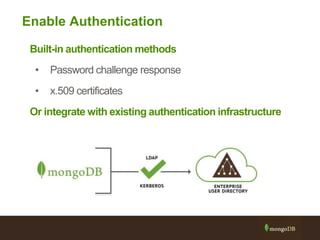
Enable Authentication
Built-in authentication methods
• Password challenge response
• x.509 certificates
Or integrate with existing authentication infrastructure
Role Based Access Control
Builtin roles
• read, readWrite, dbAdmin, clusterAdmin, root, etc..
User defined roles
• Customized roles based on existing roles and privileges.
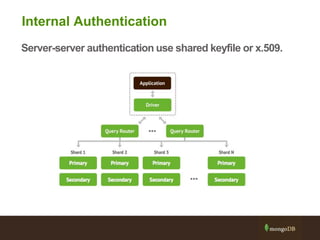
Internal Authentication
Server-server authentication use shared keyfile or x.509.
Field Level Redaction - $redact
$redact
• New aggregation framework operator
• Conditionally filter user documents
Use cases
• Implement user-based document level, content filtering.
• Create egress filter, redacting sensitive information.
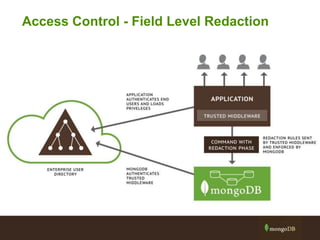
Access Control - Field Level Redaction
Note: Need to understand the application better
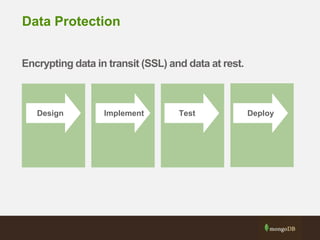
Data Protection
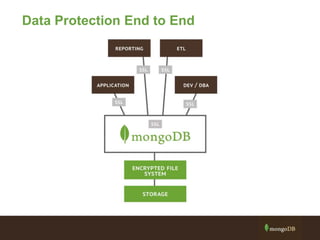
Encrypting data in transit (SSL) and data at rest.
ImplementDesign Test Deploy
Data Protection End to End
Transport Encryption with SSL
• Possible to protect client-server, server-server communications with
SSL.
• Support for commercially and internally issued x.509 certificates
• Possible to run the server in FIPS 140-2 mode.
• Support for mixed SSL and non-SSL clusters.
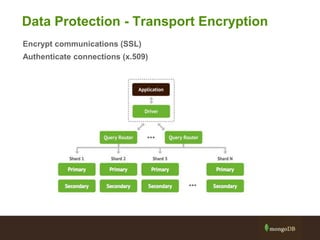
Data Protection - Transport Encryption
Encrypt communications (SSL)
Authenticate connections (x.509)
Data Protection - Encryption at rest
Alternatives
• Encrypt data client side
• Use partner solution for file and OS level encryption
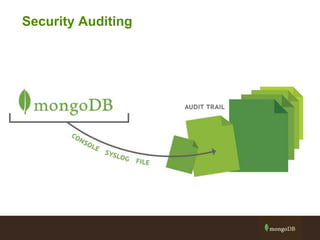
Security Auditing
The Audit Log
• Security events can be written to either the console, the
syslog
or a file (JSON/BSON)
• By default, all security events are written to audit log when
enabled.
• Events include Authentication failures and some
commands.
• Access control is not required for auditing.
• They are separate components.
Audit Log Properties
• Can filter based off of different criteria
– Action Type, TimeFrame, IP Address/Port, Users
• Events Have Total Order Per Connection
• Audit Guarantees (AKA Writes/config)
– Audit event written to disk BEFORE writing to the journal
– A write will not complete before it has been audited
Some final tips…
Some tips along the way…
1. Do not directly expose database servers to the Internet
2. Design and configure access control
3. Enable SSL
4. Disable any unnecessary interfaces
5. Lock down database files and minimize account privileges
What did we talk about?
Securing a Database Access Control
Data Protection Auditing
Next steps
• MongoDB Security Manual -
http://docs.mongodb.org/manual/core/security-introduction/
• MongoDB Security Whitepaper -
http://info.mongodb.com/rs/mongodb/images/MongoDB_Security_Archi
tecture_WP.pdf
Lead Security Engineer, MongoDB
Andreas Nilsson
#MongoDBWorld
Thank You

Webinar: Creating a Single View: Securing Your Deployment

  • 1.
    Lead Security Engineer,MongoDB Andreas Nilsson Creating a single view: Securing the Application
  • 2.
    How can wemake data accessible securely?
  • 3.
    Securing the Application:Agenda Securing a Database Access Control Data Protection Auditing
  • 4.
    The Art ofSecuring a System “If you know the enemy and know yourself, you need not fear the result of a hundred battles. If you know yourself but not the enemy, for every victory gained you will also suffer a defeat. If you know neither the enemy nor yourself, you will succumb in every battle.” Sun Tzu, The Art of War 500 BC
  • 5.
    Timeline Plan and designsecurity as early as possible. ImplementDesign Test Deploy YES! NO!
  • 6.
  • 7.
    Access Control Configure Authenticationand Authorization. ImplementDesign Test Deploy
  • 8.
    Enable Access Control Design •Determine which types of users exist in the system. • Match the users to MongoDB roles. Create any customized roles. Deployment • Start/restart MongoDB with access control enabled. • Create the desired users.
  • 9.
    MongoDB configuration Authentication -Who are you in MongoDB? • Application user, administrator, backup job, monitoring agent. Authorization - What can you do in MongoDB? • CRUD operations, configure the database, manage sharding, user management.
  • 10.
    Enable Authentication Built-in authenticationmethods • Password challenge response • x.509 certificates Or integrate with existing authentication infrastructure
  • 11.
    Role Based AccessControl Builtin roles • read, readWrite, dbAdmin, clusterAdmin, root, etc.. User defined roles • Customized roles based on existing roles and privileges.
  • 12.
  • 13.
    Field Level Redaction- $redact $redact • New aggregation framework operator • Conditionally filter user documents Use cases • Implement user-based document level, content filtering. • Create egress filter, redacting sensitive information.
  • 14.
    Access Control -Field Level Redaction Note: Need to understand the application better
  • 15.
    Data Protection Encrypting datain transit (SSL) and data at rest. ImplementDesign Test Deploy
  • 16.
  • 17.
    Transport Encryption withSSL • Possible to protect client-server, server-server communications with SSL. • Support for commercially and internally issued x.509 certificates • Possible to run the server in FIPS 140-2 mode. • Support for mixed SSL and non-SSL clusters.
  • 18.
    Data Protection -Transport Encryption Encrypt communications (SSL) Authenticate connections (x.509)
  • 19.
    Data Protection -Encryption at rest Alternatives • Encrypt data client side • Use partner solution for file and OS level encryption
  • 20.
  • 21.
    The Audit Log •Security events can be written to either the console, the syslog or a file (JSON/BSON) • By default, all security events are written to audit log when enabled. • Events include Authentication failures and some commands. • Access control is not required for auditing. • They are separate components.
  • 22.
    Audit Log Properties •Can filter based off of different criteria – Action Type, TimeFrame, IP Address/Port, Users • Events Have Total Order Per Connection • Audit Guarantees (AKA Writes/config) – Audit event written to disk BEFORE writing to the journal – A write will not complete before it has been audited
  • 23.
  • 24.
    Some tips alongthe way… 1. Do not directly expose database servers to the Internet 2. Design and configure access control 3. Enable SSL 4. Disable any unnecessary interfaces 5. Lock down database files and minimize account privileges
  • 25.
    What did wetalk about? Securing a Database Access Control Data Protection Auditing
  • 26.
    Next steps • MongoDBSecurity Manual - http://docs.mongodb.org/manual/core/security-introduction/ • MongoDB Security Whitepaper - http://info.mongodb.com/rs/mongodb/images/MongoDB_Security_Archi tecture_WP.pdf
  • 27.
    Lead Security Engineer,MongoDB Andreas Nilsson #MongoDBWorld Thank You

Editor's Notes

  • #3 Common process, tooling and management across the data lifecycle from ingestion to presentation Ensuring data provenance Supporting repeatable transformation processes Enabling reliable access for real-time query and reporting
  • #4 Common process, tooling and management across the data lifecycle from ingestion to presentation Ensuring data provenance Supporting repeatable transformation processes Enabling reliable access for real-time query and reporting
  • #5 Call to action is about thinking where there is opportunity and what are you anchoring your data hub around?
  • #6 Call to action is about thinking where there is opportunity and what are you anchoring your data hub around?
  • #8 Call to action is about thinking where there is opportunity and what are you anchoring your data hub around?
  • #9 Call to action is about thinking where there is opportunity and what are you anchoring your data hub around?
  • #10 Call to action is about thinking where there is opportunity and what are you anchoring your data hub around?
  • #11 Call to action is about thinking where there is opportunity and what are you anchoring your data hub around?
  • #12 Call to action is about thinking where there is opportunity and what are you anchoring your data hub around?
  • #13 Call to action is about thinking where there is opportunity and what are you anchoring your data hub around?
  • #14 Call to action is about thinking where there is opportunity and what are you anchoring your data hub around?
  • #15 Call to action is about thinking where there is opportunity and what are you anchoring your data hub around?
  • #16 Call to action is about thinking where there is opportunity and what are you anchoring your data hub around?
  • #18 Call to action is about thinking where there is opportunity and what are you anchoring your data hub around?
  • #19 Call to action is about thinking where there is opportunity and what are you anchoring your data hub around?
  • #20 Call to action is about thinking where there is opportunity and what are you anchoring your data hub around?
  • #21 Call to action is about thinking where there is opportunity and what are you anchoring your data hub around?
  • #25 Call to action is about thinking where there is opportunity and what are you anchoring your data hub around?
  • #26 Common process, tooling and management across the data lifecycle from ingestion to presentation Ensuring data provenance Supporting repeatable transformation processes Enabling reliable access for real-time query and reporting
  • #27 Call to action is about thinking where there is opportunity and what are you anchoring your data hub around?