QUARTER
1
PERFORMING COMPUTER
OPERATIONS
LESSON 3
LESSON 3
OCCUPATIONAL HEALTH AND SAFETY (OHS)
GUIDELINES AND PROCEDURE
OBJECTIVES:
At the end of this module, student will be able to:
1. Identify the basic safety precautions and
procedures inside the laboratory.
2. Plan a task to ensure that OHS guidelines and
procedures are followed .
PLAN AND PREPARE FOR TASK TO BE
UNDERTAKEN
• TASK IDENTIFICATION
What is the importance of planning?
• Your ability to plan properly will enable you to attain your
target or purpose goal.
• You should also give importance to preparation.
• GOOD PREPARATION - will boost your confidence
•As a COMPUTER SYSTEM SERVICING STUDENT,
you also need to familiarize with the materials
and tools involve in order to really attain the
good result of the task given in avoidance of
lagging when performing the task you are
about to be undertaken.
THE FOLLOWING ARE SOME FACTORS TO BE
CONSIDERED WHEN YOU PLAN AND PREPARE FOR
THE TASKS:
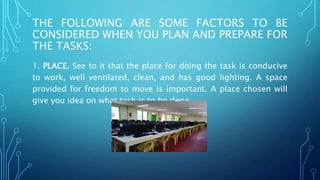
1. PLACE. See to it that the place for doing the task is conducive
to work, well ventilated, clean, and has good lighting. A space
provided for freedom to move is important. A place chosen will
give you idea on what task is to be done.
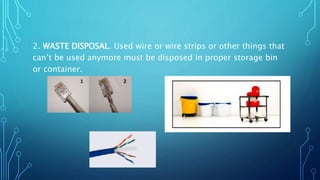
2. WASTE DISPOSAL. Used wire or wire strips or other things that
can’t be used anymore must be disposed in proper storage bin
or container.
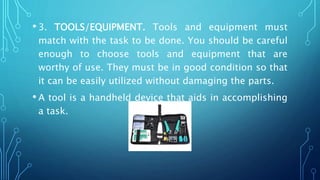
• 3. TOOLS/EQUIPMENT. Tools and equipment must
match with the task to be done. You should be careful
enough to choose tools and equipment that are
worthy of use. They must be in good condition so that
it can be easily utilized without damaging the parts.
• A tool is a handheld device that aids in accomplishing
a task.
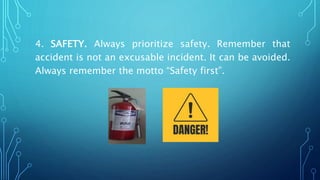
4. SAFETY. Always prioritize safety. Remember that
accident is not an excusable incident. It can be avoided.
Always remember the motto “Safety first”.
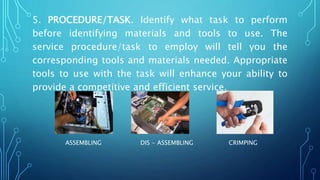
5. PROCEDURE/TASK. Identify what task to perform
before identifying materials and tools to use. The
service procedure/task to employ will tell you the
corresponding tools and materials needed. Appropriate
tools to use with the task will enhance your ability to
provide a competitive and efficient service.
ASSEMBLING DIS - ASSEMBLING CRIMPING
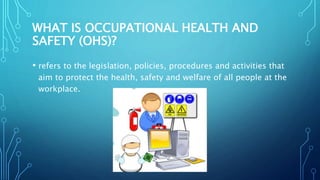
WHAT IS OCCUPATIONAL HEALTH AND
SAFETY (OHS)?
• refers to the legislation, policies, procedures and activities that
aim to protect the health, safety and welfare of all people at the
workplace.
REASONS FOR OCCUPATIONAL
SAFETY AND STANDARDS ARE:
• Moral – an employee should not have to risk injury at
work, nor should others have associated with the work
environment.
• Economic – many governments realize that poor
occupational safety and health performance results in
cost to state
• Legal – OHS requirements maybe reinforced in civil
law and/or criminal law
SAFETY PROCEDURES(OHS)
1. To prevent electrical shock hazard, disconnect the power
cable from the electrical outlet before relocating the system
2. When adding and removing devices to or from the system,
ensure that the power cables for the devices are unplugged
before the signal cables are connected. If possible, disconnect
all power cables from the existing system before you add a
device
3. Make sure that your power supply is set to the correct
voltage in your area
4. Before installing the Motherboard and adding a device on it,
5. To avoid short circuits, keep paper clips, screws,
and staples away from connectors, slots, sockets and
circuitry
6. Avoid dust, humidity, and temperature extremes.
Do not place the product in any area where it may
become wet
7. Always ground or discharge yourself before
touching any part of the computer
8. Do not work alone so that there’s someone who can
take care of you in case of accident or emergency.
10.Always full the cable connector on the handle and not on
the cable itself
11.Use only rubber shoes when standing on the ground or
in a concrete floor
12.Make sure that the pins are properly aligned when
connecting a cable connector.
13.Always power off and unplug the computer before
working on it.
14. Take away any liquid such as mineral water or soft
drinks near your working area or near computers.
15. Contingency measures during workplace accidents, fire
SAFETY PRECAUTIONS:
1.Do not work alone so that there is someone to
be incharge in case of emergency.
2.Always power off the computer and unplug
the computer before working on it.
3.Take away any liquid near your working area
to avoid getting electrocuted or accidentally
damaging computer parts.
4.Be careful with tools that may cause short
circuit.
5. Always ground or discharge yourself
before touching any part of the compu
ter
6.Do not use excessive force if things don’t
quite slip into place.
7.Clean the area before and after using it to
maintain sanitation and prevent accidents.
8.Hold the components on the edges and do not
touch the Integrated Circuit (IC) parts.
9. Always wear personal protective equipments
(PPE) in accordance with the organization’s OHS
procedures and practices.
10. Make sure that the
pins are properly aligned when connecting
a cable connector.
11. Contingency measures during
workplace accidents, fire and other
emergencies are recognized.
12. Use brush, compressed air or blower in
5S AND 3RS
1. SEIRI (Sort)
Taking out and disposing
unnecessary items.
Some Seiri practice:
Sorting and evaluation
criteria
Disposal tags
Designated storage area
Material list
2. SEITON (Systematized)
Arrangement /organization
of necessary items in good
order for use. Advantage of
arranging tools, supplies and
materials systematically
•Prevent loss and waste of
time
•Easy find and pick up of
necessary items
•Ensure first-come-first
serve basis
3. SEISO (Sweep)
Cleaning of the work place, including tools and equipments.
Seiso also means cleaning even if things are Not Dirty, because a
regular cleaning schedule will prevent things from having chance
to get dirty. It is recommendable to allot time (say a few minutes)
every day to clean the work place. It is much easier and faster if
done on a daily basis. It is good discipline to leave the work
place cleaner than when it found
Big Seiso (Clean Up) Day
•3-5 minutes cleaning daily
•Assign owner to each machine
•Combine cleaning with inspection
•Make daily maintenance clear providing visible instructions
•Provide necessary tools or critical points of cleaning
4. SEIKETSU
(Standardized)
Maintaining the work
place in high standard
of housekeeping and
organization.
Visual management,
Standardization
5. SHITSUKE (Self- discipline)
Maintaining the work place in
high standard of housekeeping
and organization.
Visual management,
Standardization
•Doing things spontaneously
without being told.
•Doing the job alone will not be
futile, unless you are not doing it
effectively.
•The difference you are making
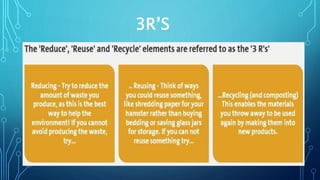
3R’S

MODULE 3 AND 4. PERFORMING COMPUTER OPERATIONS

  • 1.
  • 2.
    LESSON 3 OCCUPATIONAL HEALTHAND SAFETY (OHS) GUIDELINES AND PROCEDURE OBJECTIVES: At the end of this module, student will be able to: 1. Identify the basic safety precautions and procedures inside the laboratory. 2. Plan a task to ensure that OHS guidelines and procedures are followed .
  • 3.
    PLAN AND PREPAREFOR TASK TO BE UNDERTAKEN • TASK IDENTIFICATION What is the importance of planning? • Your ability to plan properly will enable you to attain your target or purpose goal. • You should also give importance to preparation. • GOOD PREPARATION - will boost your confidence
  • 4.
    •As a COMPUTERSYSTEM SERVICING STUDENT, you also need to familiarize with the materials and tools involve in order to really attain the good result of the task given in avoidance of lagging when performing the task you are about to be undertaken.
  • 5.
    THE FOLLOWING ARESOME FACTORS TO BE CONSIDERED WHEN YOU PLAN AND PREPARE FOR THE TASKS: 1. PLACE. See to it that the place for doing the task is conducive to work, well ventilated, clean, and has good lighting. A space provided for freedom to move is important. A place chosen will give you idea on what task is to be done.
  • 6.
    2. WASTE DISPOSAL.Used wire or wire strips or other things that can’t be used anymore must be disposed in proper storage bin or container.
  • 7.
    • 3. TOOLS/EQUIPMENT.Tools and equipment must match with the task to be done. You should be careful enough to choose tools and equipment that are worthy of use. They must be in good condition so that it can be easily utilized without damaging the parts. • A tool is a handheld device that aids in accomplishing a task.
  • 8.
    4. SAFETY. Alwaysprioritize safety. Remember that accident is not an excusable incident. It can be avoided. Always remember the motto “Safety first”.
  • 9.
    5. PROCEDURE/TASK. Identifywhat task to perform before identifying materials and tools to use. The service procedure/task to employ will tell you the corresponding tools and materials needed. Appropriate tools to use with the task will enhance your ability to provide a competitive and efficient service. ASSEMBLING DIS - ASSEMBLING CRIMPING
  • 10.
    WHAT IS OCCUPATIONALHEALTH AND SAFETY (OHS)? • refers to the legislation, policies, procedures and activities that aim to protect the health, safety and welfare of all people at the workplace.
  • 11.
    REASONS FOR OCCUPATIONAL SAFETYAND STANDARDS ARE: • Moral – an employee should not have to risk injury at work, nor should others have associated with the work environment. • Economic – many governments realize that poor occupational safety and health performance results in cost to state • Legal – OHS requirements maybe reinforced in civil law and/or criminal law
  • 12.
    SAFETY PROCEDURES(OHS) 1. Toprevent electrical shock hazard, disconnect the power cable from the electrical outlet before relocating the system 2. When adding and removing devices to or from the system, ensure that the power cables for the devices are unplugged before the signal cables are connected. If possible, disconnect all power cables from the existing system before you add a device 3. Make sure that your power supply is set to the correct voltage in your area 4. Before installing the Motherboard and adding a device on it,
  • 13.
    5. To avoidshort circuits, keep paper clips, screws, and staples away from connectors, slots, sockets and circuitry 6. Avoid dust, humidity, and temperature extremes. Do not place the product in any area where it may become wet 7. Always ground or discharge yourself before touching any part of the computer 8. Do not work alone so that there’s someone who can take care of you in case of accident or emergency.
  • 14.
    10.Always full thecable connector on the handle and not on the cable itself 11.Use only rubber shoes when standing on the ground or in a concrete floor 12.Make sure that the pins are properly aligned when connecting a cable connector. 13.Always power off and unplug the computer before working on it. 14. Take away any liquid such as mineral water or soft drinks near your working area or near computers. 15. Contingency measures during workplace accidents, fire
  • 15.
    SAFETY PRECAUTIONS: 1.Do notwork alone so that there is someone to be incharge in case of emergency. 2.Always power off the computer and unplug the computer before working on it. 3.Take away any liquid near your working area to avoid getting electrocuted or accidentally damaging computer parts. 4.Be careful with tools that may cause short circuit.
  • 16.
    5. Always groundor discharge yourself before touching any part of the compu ter 6.Do not use excessive force if things don’t quite slip into place. 7.Clean the area before and after using it to maintain sanitation and prevent accidents. 8.Hold the components on the edges and do not touch the Integrated Circuit (IC) parts.
  • 17.
    9. Always wearpersonal protective equipments (PPE) in accordance with the organization’s OHS procedures and practices. 10. Make sure that the pins are properly aligned when connecting a cable connector. 11. Contingency measures during workplace accidents, fire and other emergencies are recognized. 12. Use brush, compressed air or blower in
  • 18.
    5S AND 3RS 1.SEIRI (Sort) Taking out and disposing unnecessary items. Some Seiri practice: Sorting and evaluation criteria Disposal tags Designated storage area Material list 2. SEITON (Systematized) Arrangement /organization of necessary items in good order for use. Advantage of arranging tools, supplies and materials systematically •Prevent loss and waste of time •Easy find and pick up of necessary items •Ensure first-come-first serve basis
  • 19.
    3. SEISO (Sweep) Cleaningof the work place, including tools and equipments. Seiso also means cleaning even if things are Not Dirty, because a regular cleaning schedule will prevent things from having chance to get dirty. It is recommendable to allot time (say a few minutes) every day to clean the work place. It is much easier and faster if done on a daily basis. It is good discipline to leave the work place cleaner than when it found Big Seiso (Clean Up) Day •3-5 minutes cleaning daily •Assign owner to each machine •Combine cleaning with inspection •Make daily maintenance clear providing visible instructions •Provide necessary tools or critical points of cleaning
  • 20.
    4. SEIKETSU (Standardized) Maintaining thework place in high standard of housekeeping and organization. Visual management, Standardization 5. SHITSUKE (Self- discipline) Maintaining the work place in high standard of housekeeping and organization. Visual management, Standardization •Doing things spontaneously without being told. •Doing the job alone will not be futile, unless you are not doing it effectively. •The difference you are making
  • 21.

Editor's Notes

  • #4 If we are identifying the different task, we are doing planning. Planning plays the most important role of achieving a successful task. Many successful entrepreneurs have realized their success through proper and careful planning. aside from planning Good preparation -because it means that you are ready to do the task because you have sufficient knowledge about it.
  • #8 Tools range from a traditional metal cutting part of a machine to an element of a computer program that activates and controls a particular function.
  • #11 Knowing OHS is essential to minimize the hazards and risks not only to students, trainers and other people within the training institution but others who will be affected.