Module 2M10W7045Yang Xiyue
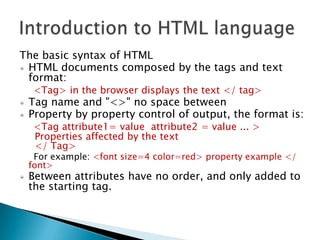
The basic syntax of HTMLHTML documents composed by the tags and text format:<Tag> in the browser displays the text </ tag>Tag name and "<>" no space betweenProperty by property control of output, the format is:<Tag attribute1= value  attribute2 =value ... >  Properties affected by the text  </ Tag>     For example: <font size=4 color=red> property example </   font>Between attributes have no order, and only added to the starting tag.Introduction to HTML language
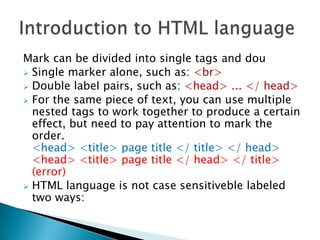
Mark can be divided into single tags and douSingle marker alone, such as: <br>
Double label pairs, such as: <head> ... </ head>
For the same piece of text, you can use multiple nested tags to work together to produce a certain effect, but need to pay attention to mark the order.<head> <title> page title </ title> </ head><head> <title> page title </ head> </ title> (error)
HTML language is not case sensitiveble labeled two ways:Introduction to HTML language
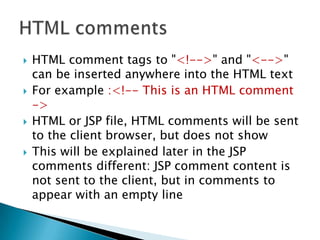
HTML comment tags to "<!-->" and "<-->" can be inserted anywhere into the HTML textFor example :<!-- This is an HTML comment ->HTML or JSP file, HTML comments will be sent to the client browser, but does not showThis will be explained later in the JSP comments different: JSP comment content is not sent to the client, but in comments to appear with an empty lineHTML comments
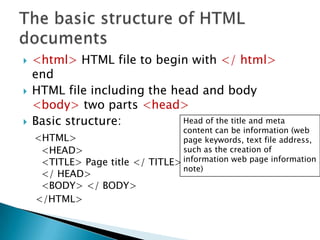
<html> HTML file to begin with </ html> endHTML file including the head and body <body> two parts <head>Basic structure:<HTML>   <HEAD>   <TITLE> Page title </ TITLE>   </ HEAD>   <BODY> </ BODY>    </HTML>The basic structure of HTML documentsHead of the title and meta content can be information (web page keywords, text file address, such as the creation of information web page information note)
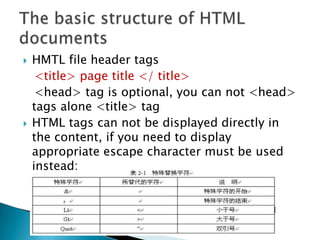
HMTL file header tags   <title> page title </ title><head> tag is optional, you can not <head> tags alone <title> tagHTML tags can not be displayed directly in the content, if you need to display appropriate escape character must be used instead:The basic structure of HTML documents
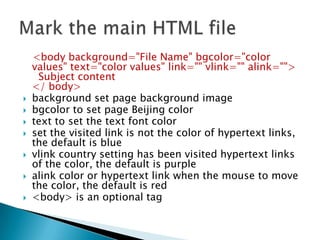
   <body background="File Name" bgcolor="color values" text="color values" link="" vlink="" alink="">  Subject content</ body>background set page background imagebgcolor to set page Beijing colortext to set the text font colorset the visited link is not the color of hypertext links, the default is bluevlinkcountry setting has been visited hypertext links of the color, the default is purplealinkcolor or hypertext link when the mouse to move the color, the default is red<body> is an optional tagMark the main HTML file
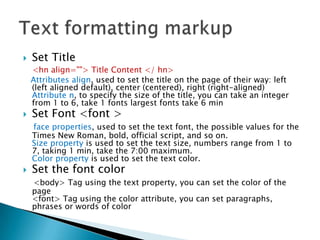
Set Title<hn align=""> Title Content </ hn>Attributes align, used to set the title on the page of their way: left (left aligned default), center (centered), right (right-aligned)Attribute n, to specify the size of the title, you can take an integer from 1 to 6, take 1 fonts largest fonts take 6 minSet Font <font >face properties, used to set the text font, the possible values ​​for the Times New Roman, bold, official script, and so on.Size property is used to set the text size, numbers range from 1 to 7, taking 1 min, take the 7:00 maximum.Color property is used to set the text color.Set the font color<body> Tag using the text property, you can set the color of the page<font> Tag using the color attribute, you can set paragraphs, phrases or words of colorText formatting markup
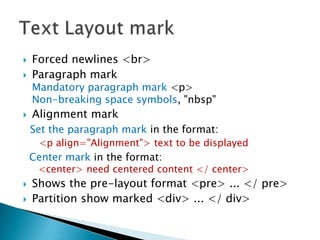
Forced newlines <br> Paragraph markMandatory paragraph mark <p>Non-breaking space symbols, "nbsp"Alignment markSet the paragraph mark in the format:  <p align="Alignment"> text to be displayedCenter mark in the format:<center> need centered content </ center>Shows the pre-layout format <pre> ... </ pre>Partition show marked <div> ... </ div>Text Layout mark

Module 2

  • 1.
  • 2.
    The basic syntaxof HTMLHTML documents composed by the tags and text format:<Tag> in the browser displays the text </ tag>Tag name and "<>" no space betweenProperty by property control of output, the format is:<Tag attribute1= value attribute2 =value ... > Properties affected by the text </ Tag> For example: <font size=4 color=red> property example </ font>Between attributes have no order, and only added to the starting tag.Introduction to HTML language
  • 3.
    Mark can bedivided into single tags and douSingle marker alone, such as: <br>
  • 4.
    Double label pairs,such as: <head> ... </ head>
  • 5.
    For the samepiece of text, you can use multiple nested tags to work together to produce a certain effect, but need to pay attention to mark the order.<head> <title> page title </ title> </ head><head> <title> page title </ head> </ title> (error)
  • 6.
    HTML language isnot case sensitiveble labeled two ways:Introduction to HTML language
  • 7.
    HTML comment tagsto "<!-->" and "<-->" can be inserted anywhere into the HTML textFor example :<!-- This is an HTML comment ->HTML or JSP file, HTML comments will be sent to the client browser, but does not showThis will be explained later in the JSP comments different: JSP comment content is not sent to the client, but in comments to appear with an empty lineHTML comments
  • 8.
    <html> HTML fileto begin with </ html> endHTML file including the head and body <body> two parts <head>Basic structure:<HTML> <HEAD> <TITLE> Page title </ TITLE> </ HEAD> <BODY> </ BODY> </HTML>The basic structure of HTML documentsHead of the title and meta content can be information (web page keywords, text file address, such as the creation of information web page information note)
  • 9.
    HMTL file headertags <title> page title </ title><head> tag is optional, you can not <head> tags alone <title> tagHTML tags can not be displayed directly in the content, if you need to display appropriate escape character must be used instead:The basic structure of HTML documents
  • 10.
    <body background="File Name" bgcolor="color values" text="color values" link="" vlink="" alink="">  Subject content</ body>background set page background imagebgcolor to set page Beijing colortext to set the text font colorset the visited link is not the color of hypertext links, the default is bluevlinkcountry setting has been visited hypertext links of the color, the default is purplealinkcolor or hypertext link when the mouse to move the color, the default is red<body> is an optional tagMark the main HTML file
  • 11.
    Set Title<hn align="">Title Content </ hn>Attributes align, used to set the title on the page of their way: left (left aligned default), center (centered), right (right-aligned)Attribute n, to specify the size of the title, you can take an integer from 1 to 6, take 1 fonts largest fonts take 6 minSet Font <font >face properties, used to set the text font, the possible values ​​for the Times New Roman, bold, official script, and so on.Size property is used to set the text size, numbers range from 1 to 7, taking 1 min, take the 7:00 maximum.Color property is used to set the text color.Set the font color<body> Tag using the text property, you can set the color of the page<font> Tag using the color attribute, you can set paragraphs, phrases or words of colorText formatting markup
  • 12.
    Forced newlines <br>Paragraph markMandatory paragraph mark <p>Non-breaking space symbols, "nbsp"Alignment markSet the paragraph mark in the format:  <p align="Alignment"> text to be displayedCenter mark in the format:<center> need centered content </ center>Shows the pre-layout format <pre> ... </ pre>Partition show marked <div> ... </ div>Text Layout mark