KKEEMMEENNTTEERRIIAANN PPEELLAAJJAARRAANN MMAALLAAYYSSIIAA
SSeellff AAcccceessss LLeeaarrnniinngg MMoodduullee
CCoommppuutteerr SSooffttwwaarree
PUSAT PERKEMBANGAN KURIKULUM
KEMENTERIAN PELAJARAN MALAYSIA
IIICCCTTT LLLiiittteeerrraaacccyyy fffooorrr
SSSeeecccooonnndddaaarrryyy SSSccchhhoooooolll
PPPrrrooogggrrraaammmmmmeee
ICTL for Secondary School – Computer Software Module
1
MODULE 1
Introduction to Computer Software
Curriculum Development Centre
Ministry of Education Malaysia
ICTL for Secondary School – Computer Software Module
2
1. Name of Module : Introduction to Computer Software
2. Learning Outcomes : The students should be able to
a. state the definition of software
b. state the usage of software
c. list different types of software
3. Knowledge and Skills
a. Definition of software
b. Know the usage of software
c. Give examples of types of software
4. Module Summary
At the end of the module, students should be able to define software, know the
usage of software and list down the different types of software
5. This module contains acitivities;
Activity 1: Definition of Software
Activity 2: Usage of Software
Activity 3: Types of Software
ICTL for Secondary School – Computer Software Module
3
Activity 1: Definition Of Software
Software is also called a computer program. It consists of a series of instructions that
tells the hardware of a computer what to do or how to do it. For example , some instruction
direct the computer to allow you to input data from a keyboard and store it in the memory.
Other instructions cause data stored in memory to be used in calculations.
Activity 2: Usage Of Software
Software is used so that you can interact with the program through its user interface. This
user interface controls how you enter data, instructions and how information is displayed on
the screen.
Activity 3: Types Of Software
There are two types of software
1. System Software
System Software is used to control and manage computer devices and operations. It
consists of :
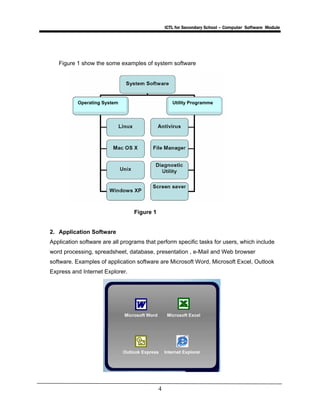
o Operating System
A set of programs that coordinates all the activities among the computer
hardware devices
o Utility Programme
A type of system software that allows a user to perform maintenance-
type tasks
ICTL for Secondary School – Computer Software Module
4
Figure 1 show the some examples of system software
Figure 1
2. Application Software
Application software are all programs that perform specific tasks for users, which include
word processing, spreadsheet, database, presentation , e-Mail and Web browser
software. Examples of application software are Microsoft Word, Microsoft Excel, Outlook
Express and Internet Explorer.
Operating System Utility Programme

Module 1 introduction 20 to 20 comp 20 software

  • 1.
    KKEEMMEENNTTEERRIIAANN PPEELLAAJJAARRAANN MMAALLAAYYSSIIAA SSeellffAAcccceessss LLeeaarrnniinngg MMoodduullee CCoommppuutteerr SSooffttwwaarree PUSAT PERKEMBANGAN KURIKULUM KEMENTERIAN PELAJARAN MALAYSIA IIICCCTTT LLLiiittteeerrraaacccyyy fffooorrr SSSeeecccooonnndddaaarrryyy SSSccchhhoooooolll PPPrrrooogggrrraaammmmmmeee
  • 2.
    ICTL for SecondarySchool – Computer Software Module 1 MODULE 1 Introduction to Computer Software Curriculum Development Centre Ministry of Education Malaysia
  • 3.
    ICTL for SecondarySchool – Computer Software Module 2 1. Name of Module : Introduction to Computer Software 2. Learning Outcomes : The students should be able to a. state the definition of software b. state the usage of software c. list different types of software 3. Knowledge and Skills a. Definition of software b. Know the usage of software c. Give examples of types of software 4. Module Summary At the end of the module, students should be able to define software, know the usage of software and list down the different types of software 5. This module contains acitivities; Activity 1: Definition of Software Activity 2: Usage of Software Activity 3: Types of Software
  • 4.
    ICTL for SecondarySchool – Computer Software Module 3 Activity 1: Definition Of Software Software is also called a computer program. It consists of a series of instructions that tells the hardware of a computer what to do or how to do it. For example , some instruction direct the computer to allow you to input data from a keyboard and store it in the memory. Other instructions cause data stored in memory to be used in calculations. Activity 2: Usage Of Software Software is used so that you can interact with the program through its user interface. This user interface controls how you enter data, instructions and how information is displayed on the screen. Activity 3: Types Of Software There are two types of software 1. System Software System Software is used to control and manage computer devices and operations. It consists of : o Operating System A set of programs that coordinates all the activities among the computer hardware devices o Utility Programme A type of system software that allows a user to perform maintenance- type tasks
  • 5.
    ICTL for SecondarySchool – Computer Software Module 4 Figure 1 show the some examples of system software Figure 1 2. Application Software Application software are all programs that perform specific tasks for users, which include word processing, spreadsheet, database, presentation , e-Mail and Web browser software. Examples of application software are Microsoft Word, Microsoft Excel, Outlook Express and Internet Explorer. Operating System Utility Programme