DebuggersDebuggers
Module 4
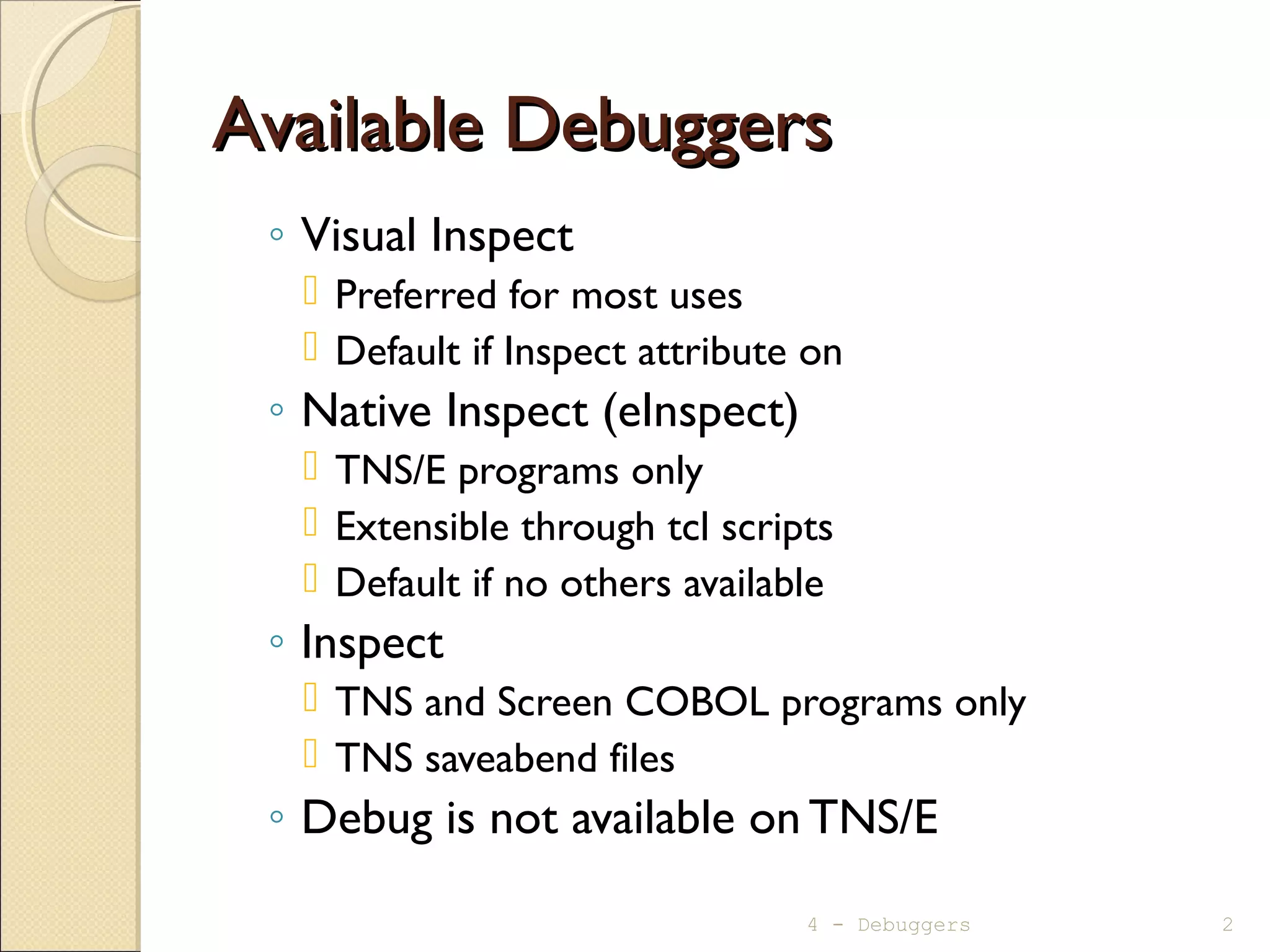
Available DebuggersAvailable Debuggers
◦ Visual Inspect
 Preferred for most uses
 Default if Inspect attribute on
◦ Native Inspect (eInspect)
 TNS/E programs only
 Extensible through tcl scripts
 Default if no others available
◦ Inspect
 TNS and Screen COBOL programs only
 TNS saveabend files
◦ Debug is not available on TNS/E
4 - Debuggers 2
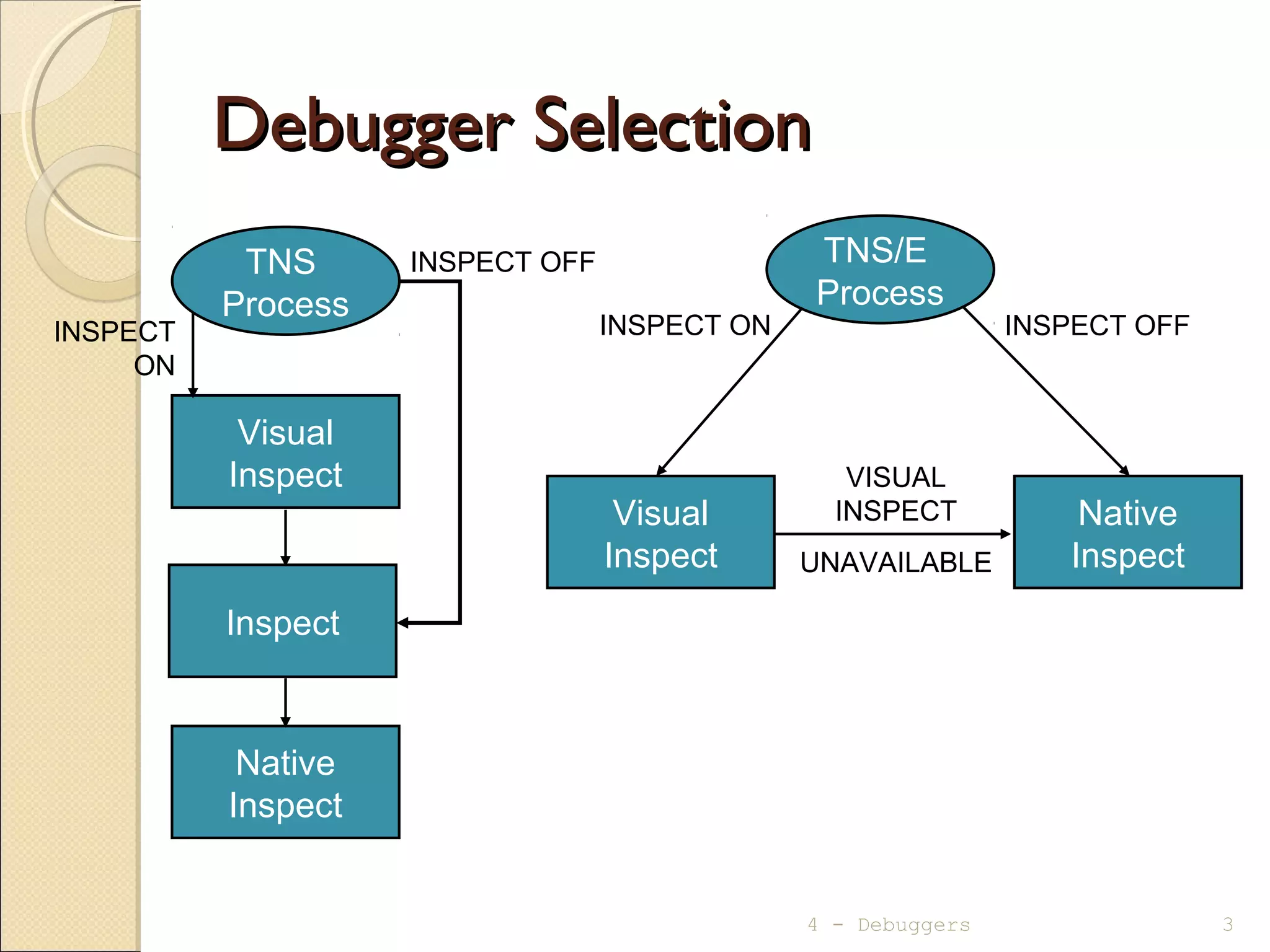
Debugger SelectionDebugger Selection
4 - Debuggers 3
TNS/E
Process
Visual
Inspect
Inspect
Native
Inspect
Native
Inspect
INSPECT ON INSPECT OFF
VISUAL
INSPECT
UNAVAILABLE
INSPECT
ON
INSPECT OFFTNS
Process
Visual
Inspect
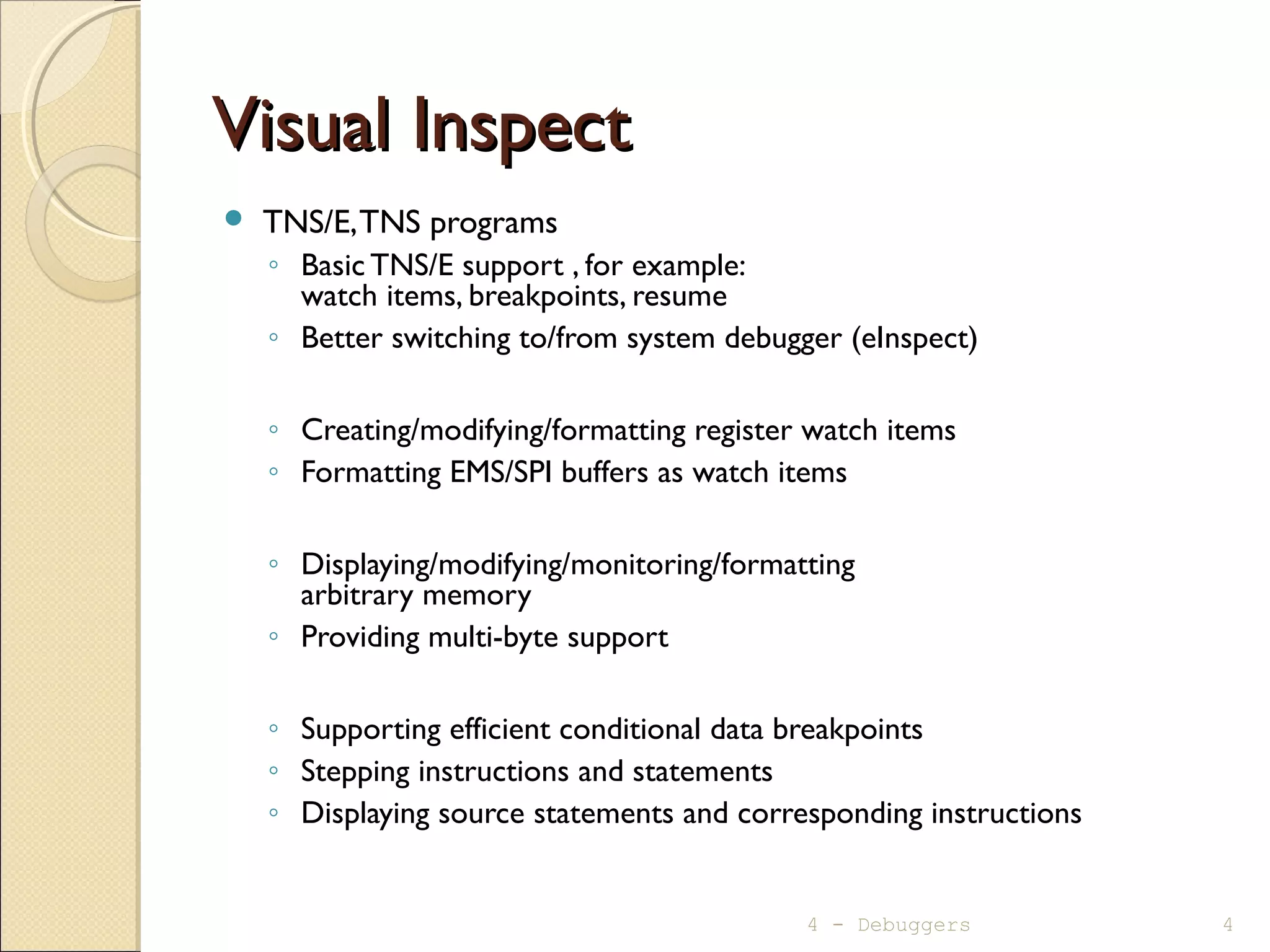
Visual InspectVisual Inspect
 TNS/E,TNS programs
◦ Basic TNS/E support , for example:
watch items, breakpoints, resume
◦ Better switching to/from system debugger (eInspect)
◦ Creating/modifying/formatting register watch items
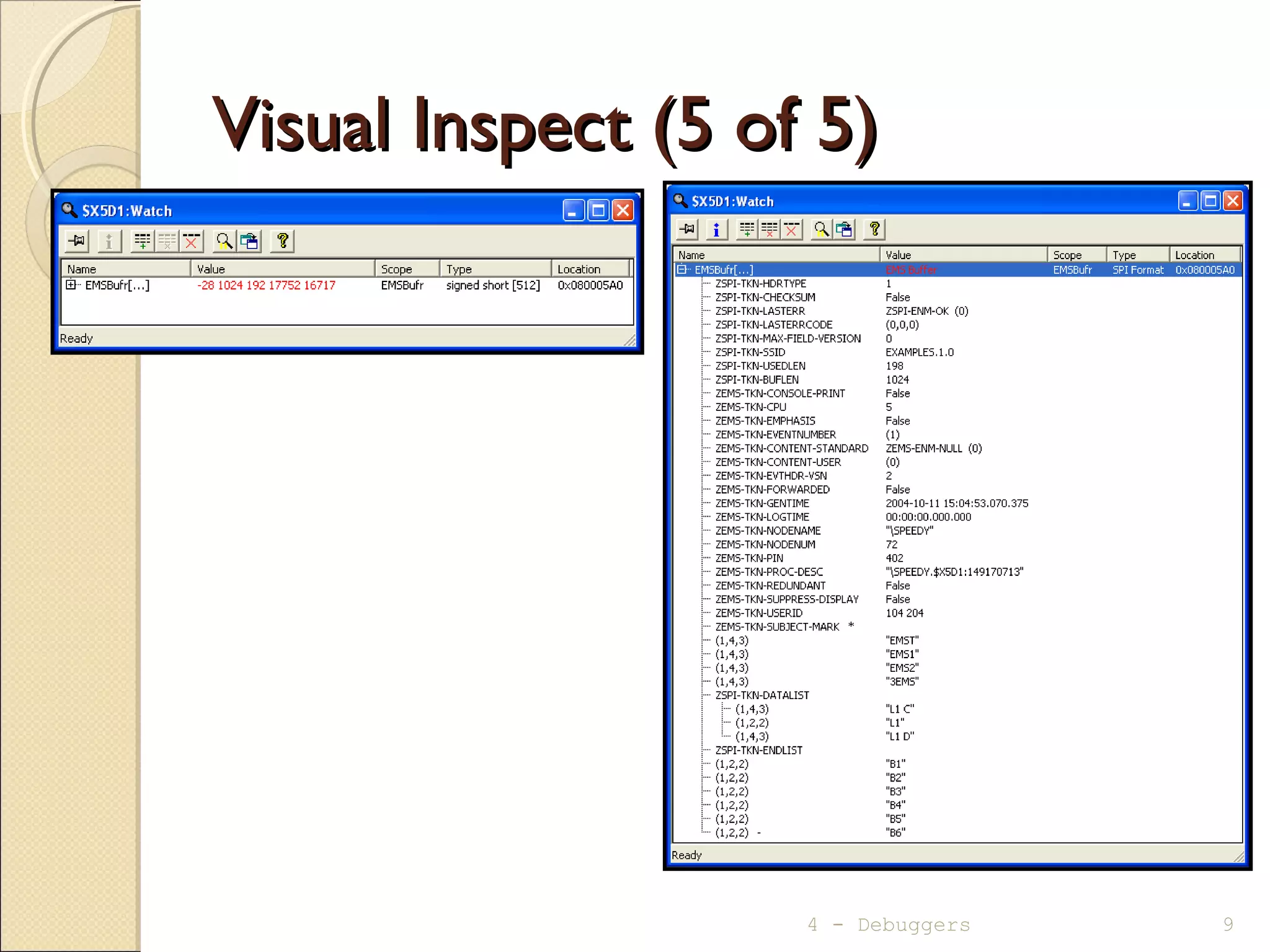
◦ Formatting EMS/SPI buffers as watch items
◦ Displaying/modifying/monitoring/formatting
arbitrary memory
◦ Providing multi-byte support
◦ Supporting efficient conditional data breakpoints
◦ Stepping instructions and statements
◦ Displaying source statements and corresponding instructions
4 - Debuggers 4
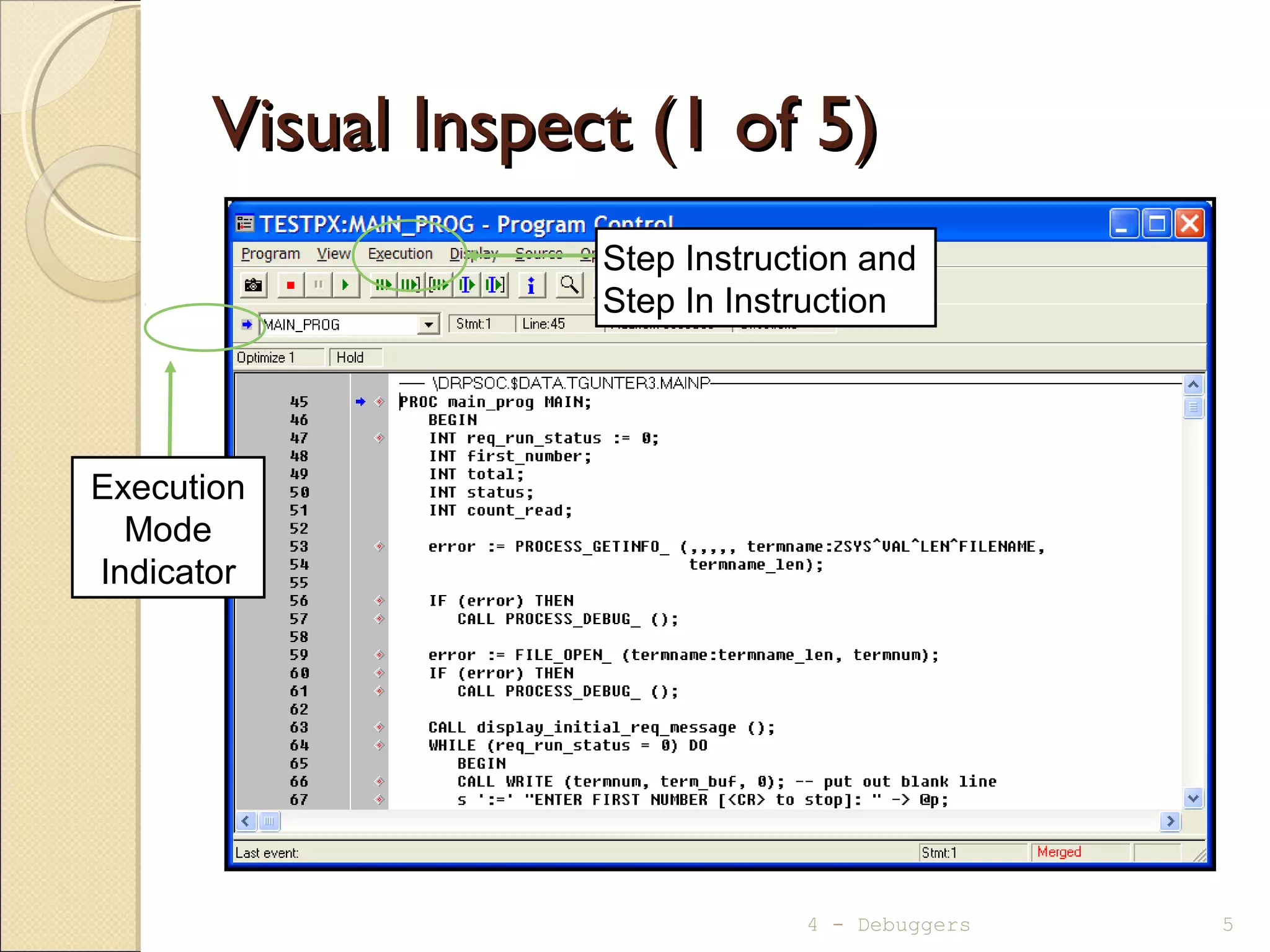
Visual Inspect (1 of 5)Visual Inspect (1 of 5)
4 - Debuggers 5
Execution
Mode
Indicator
Step Instruction and
Step In Instruction
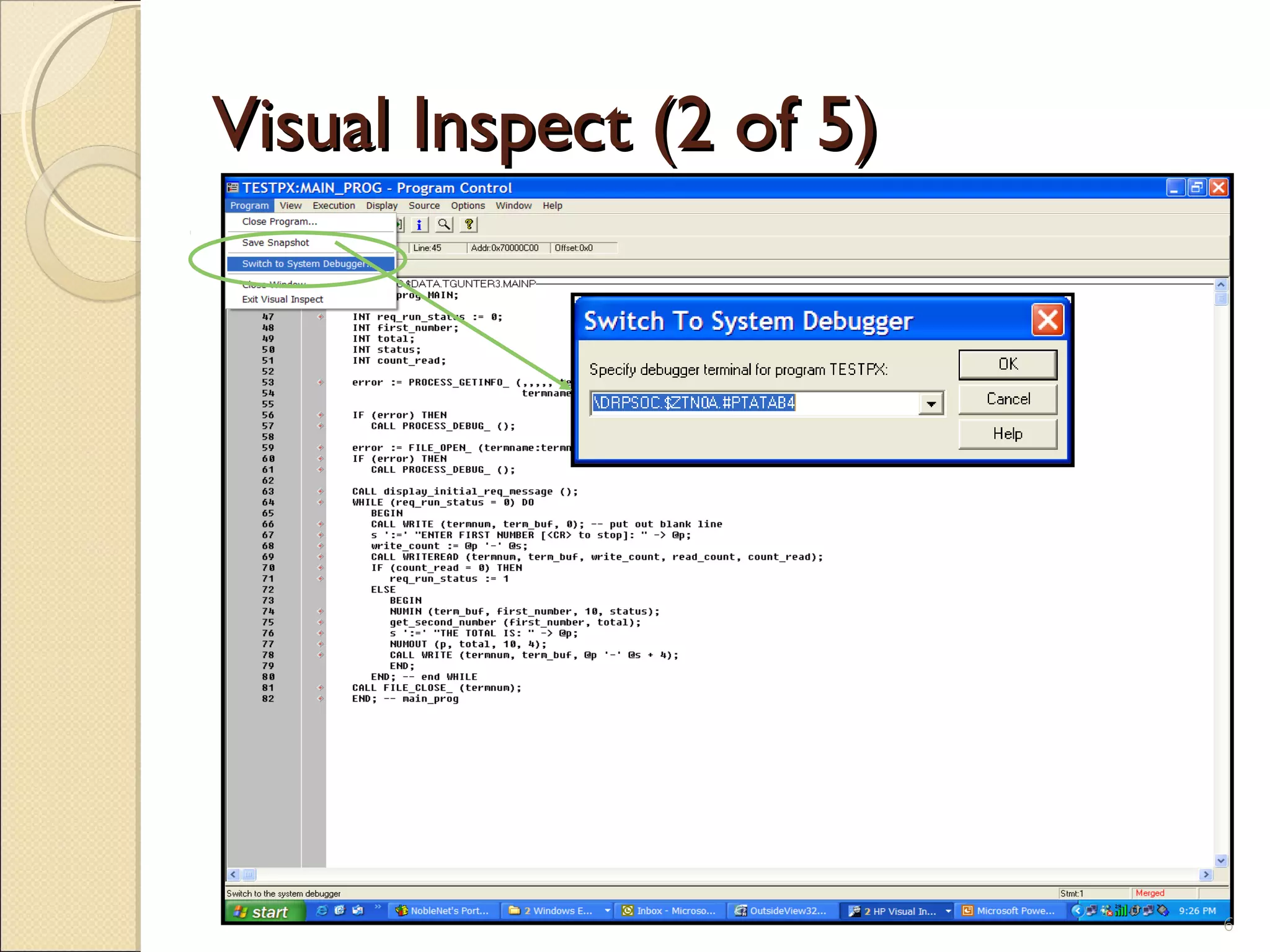
Visual Inspect (2 of 5)Visual Inspect (2 of 5)
6
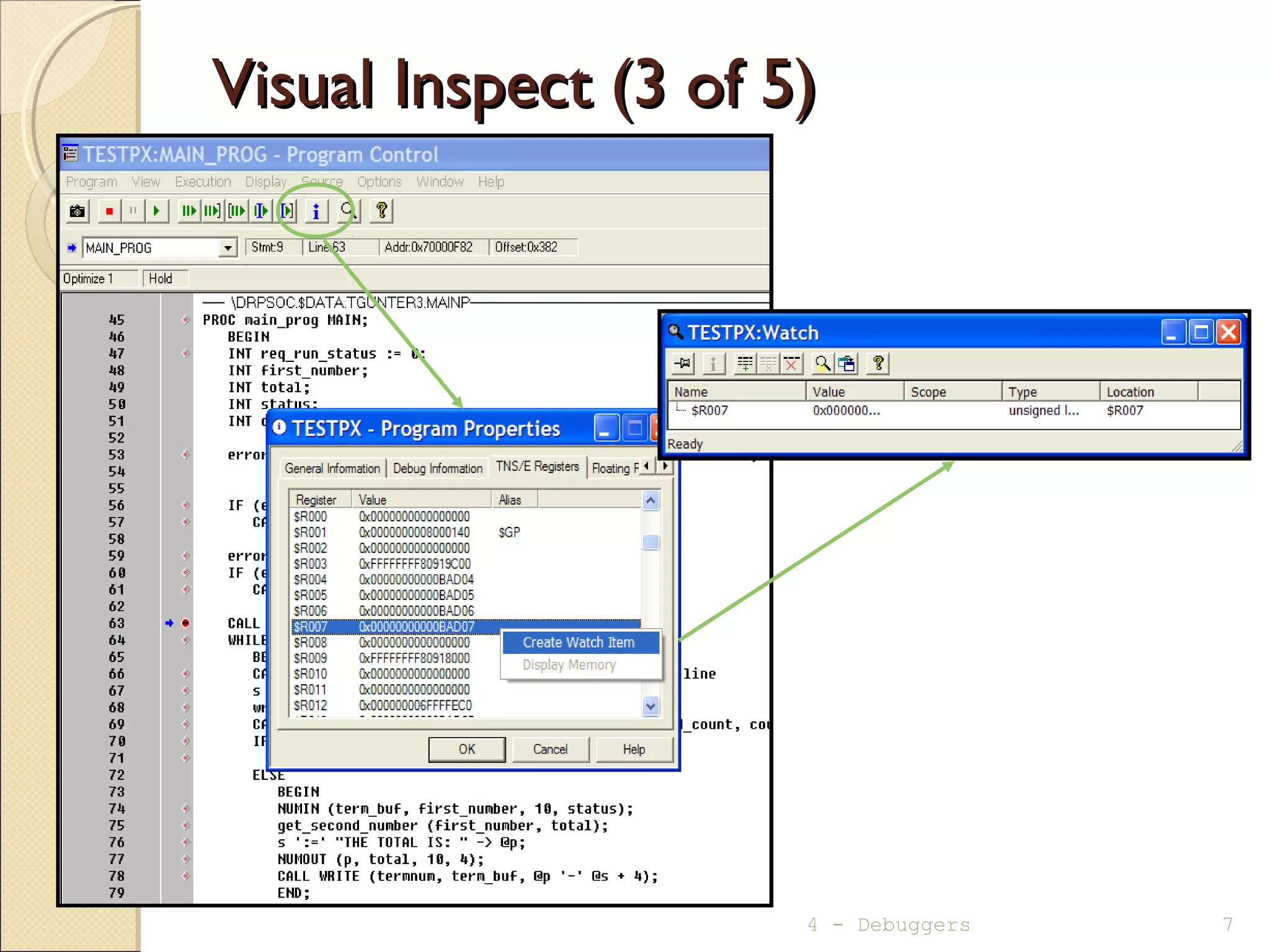
Visual Inspect (3 of 5)Visual Inspect (3 of 5)
4 - Debuggers 7
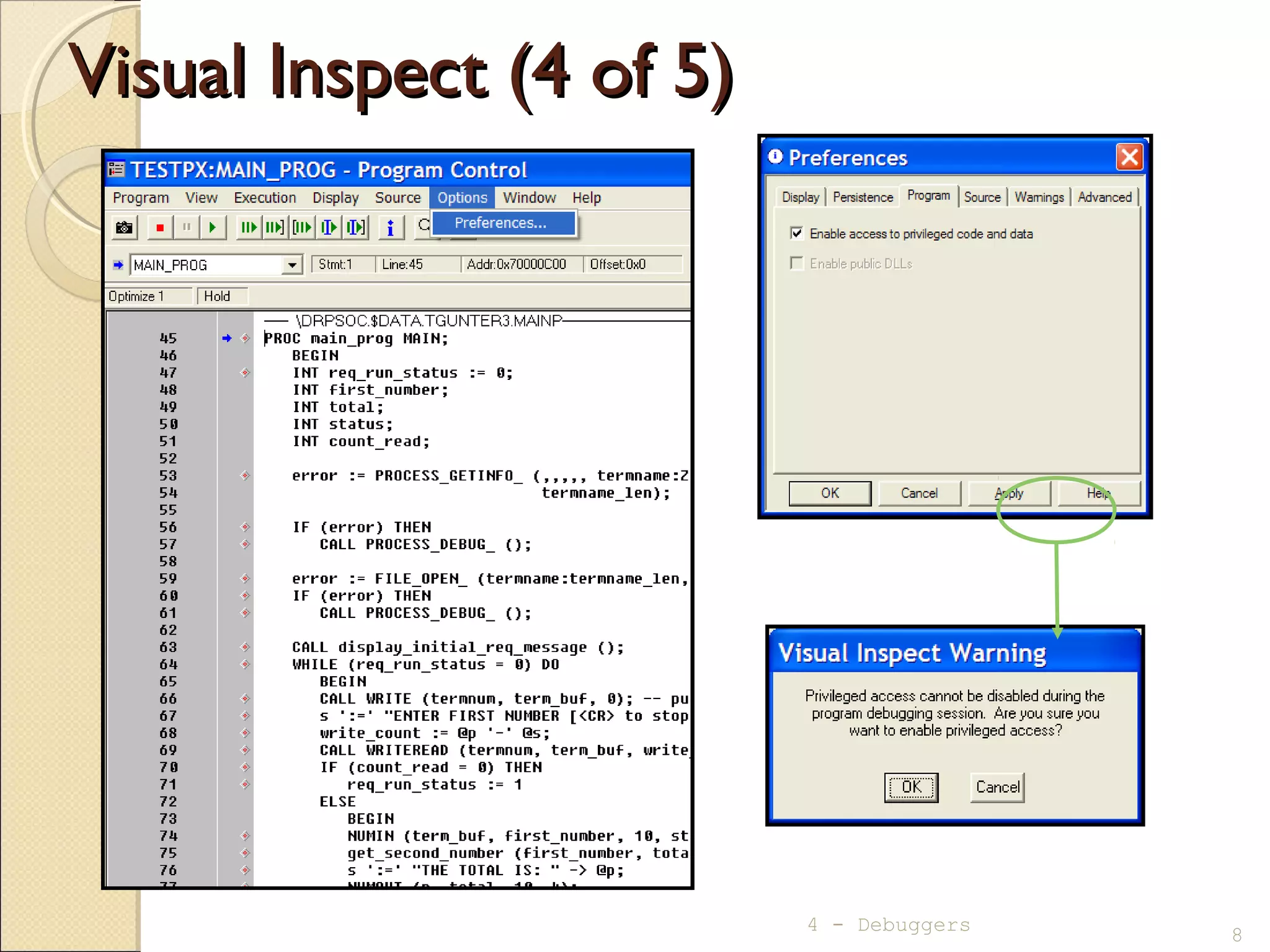
Visual Inspect (4 of 5)Visual Inspect (4 of 5)
8
4 - Debuggers
Visual Inspect (5 of 5)Visual Inspect (5 of 5)
4 - Debuggers 9
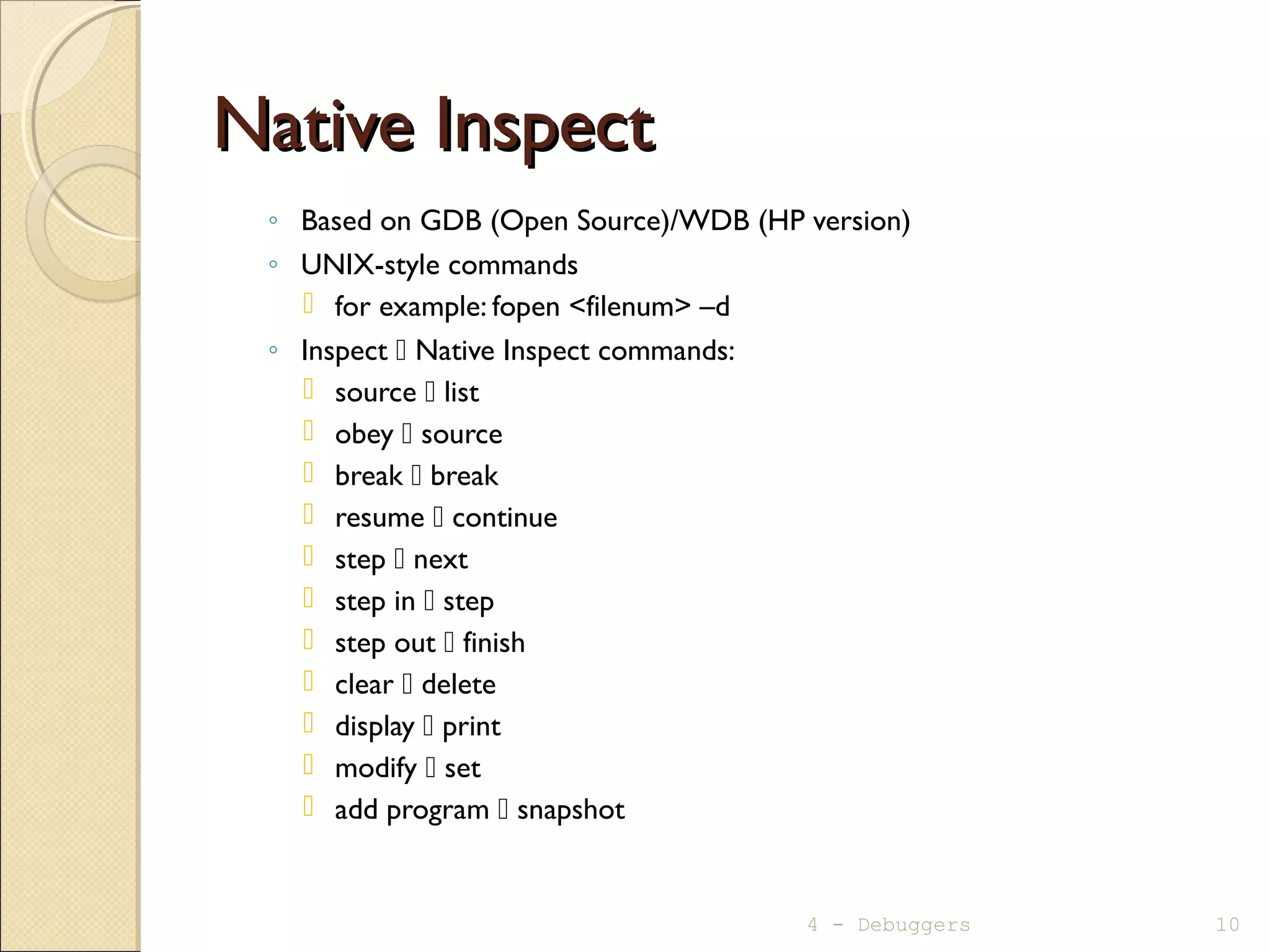
Native InspectNative Inspect
◦ Based on GDB (Open Source)/WDB (HP version)
◦ UNIX-style commands
 for example: fopen <filenum> –d
◦ Inspect  Native Inspect commands:
 source  list
 obey  source
 break  break
 resume  continue
 step  next
 step in  step
 step out  finish
 clear  delete
 display  print
 modify  set
 add program  snapshot
4 - Debuggers 10
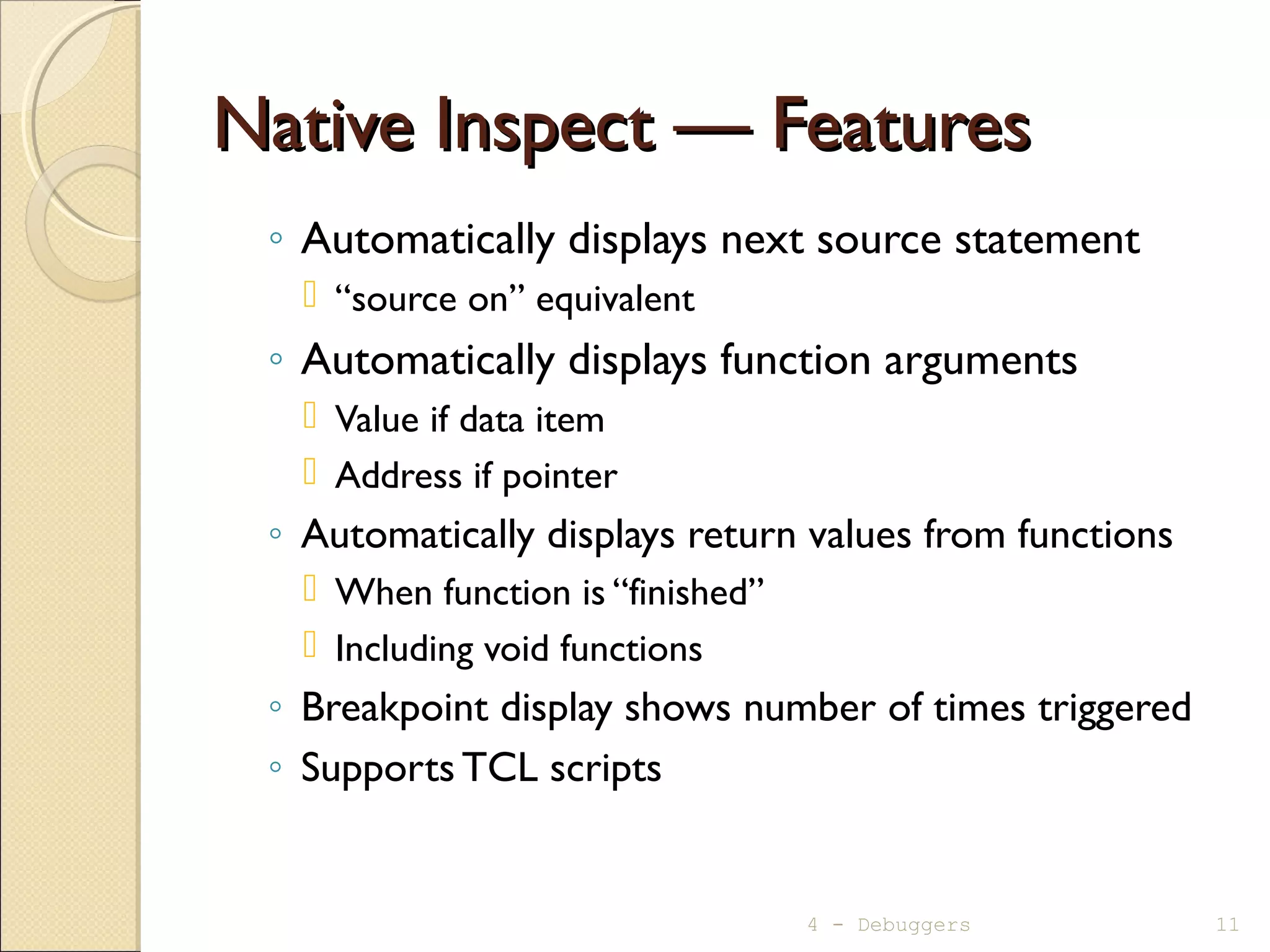
Native Inspect — FeaturesNative Inspect — Features
◦ Automatically displays next source statement
 “source on” equivalent
◦ Automatically displays function arguments
 Value if data item
 Address if pointer
◦ Automatically displays return values from functions
 When function is “finished”
 Including void functions
◦ Breakpoint display shows number of times triggered
◦ Supports TCL scripts
4 - Debuggers 11
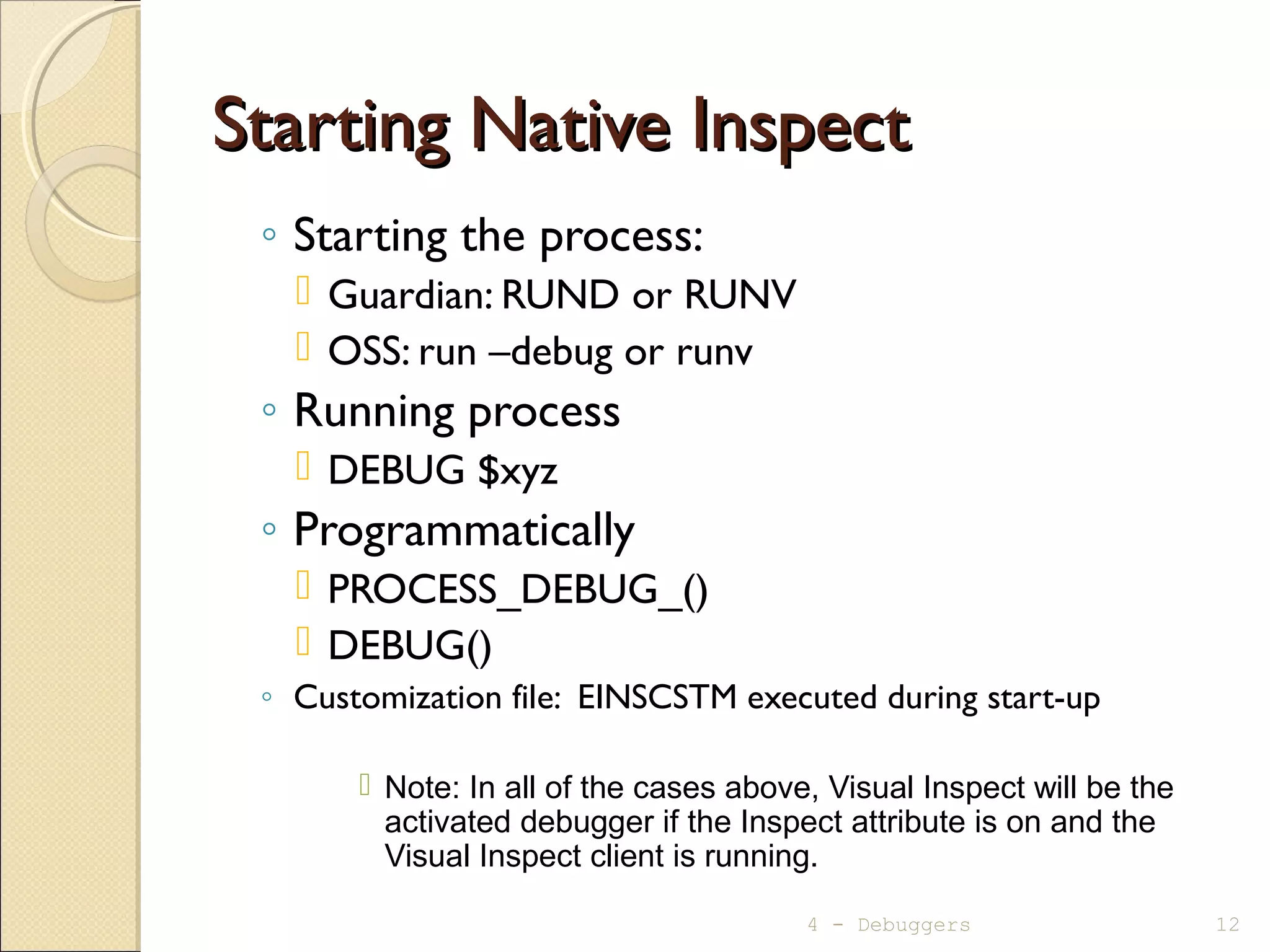
Starting Native InspectStarting Native Inspect
◦ Starting the process:
 Guardian: RUND or RUNV
 OSS: run –debug or runv
◦ Running process
 DEBUG $xyz
◦ Programmatically
 PROCESS_DEBUG_()
 DEBUG()
◦ Customization file: EINSCSTM executed during start-up
 Note: In all of the cases above, Visual Inspect will be the
activated debugger if the Inspect attribute is on and the
Visual Inspect client is running.
4 - Debuggers 12
Native Inspect - HelpNative Inspect - Help
 help [<topic>]
(eInspect 2,372):help
Native Inspect help
The following are major topics from which you can
choose:
all -- List all Native Inspect commands.
help -- Help on help
source -- Source in a Tcl script file.
target process -- Commands that support process
debugging.
target snapshot -- Commands that support snapshot
analysis.
Type "help" followed by the keyword of the topic or
Native Inspect command you want to browse.
4 - Debuggers 13
Native Inspect – BreakpointsNative Inspect – Breakpoints
◦ Setting:
 break {function | paragraph | [source-file:]line#} [if cond-exp]
(eInspect 2,372):break get_second_number
Breakpoint 2 at 0x70000ba0:1: file DAGGER.$DATA00.TERRYG.CALLC,
line 6.
(eInspect 2,372):b callc:8 if second_number== 99
Breakpoint 3 at 0x70000bf0:1: file DAGGER.$DATA00.TERRYG.CALLC,
line 8.
◦ Displaying:
 info break
(eInspect 2,372):info b
Num Type Disp Enb Glb Address What
2 breakpoint keep y n 0x70000ba1 in get_second_number
at DAGGER.$DATA00.TERRYG.CALLC:6 breakpoint already hit 1 time
3 breakpoint keep y n 0x70000bf1 in get_second_number
at DAGGER.$DATA00.TERRYG.CALLC:8 stop only if second_number == 99
◦ Clearing:
 delete [breakpoint#] - Deletes all breakpoints if no number given
4 - Debuggers 14
Native Inspect – Execution ControlNative Inspect – Execution Control
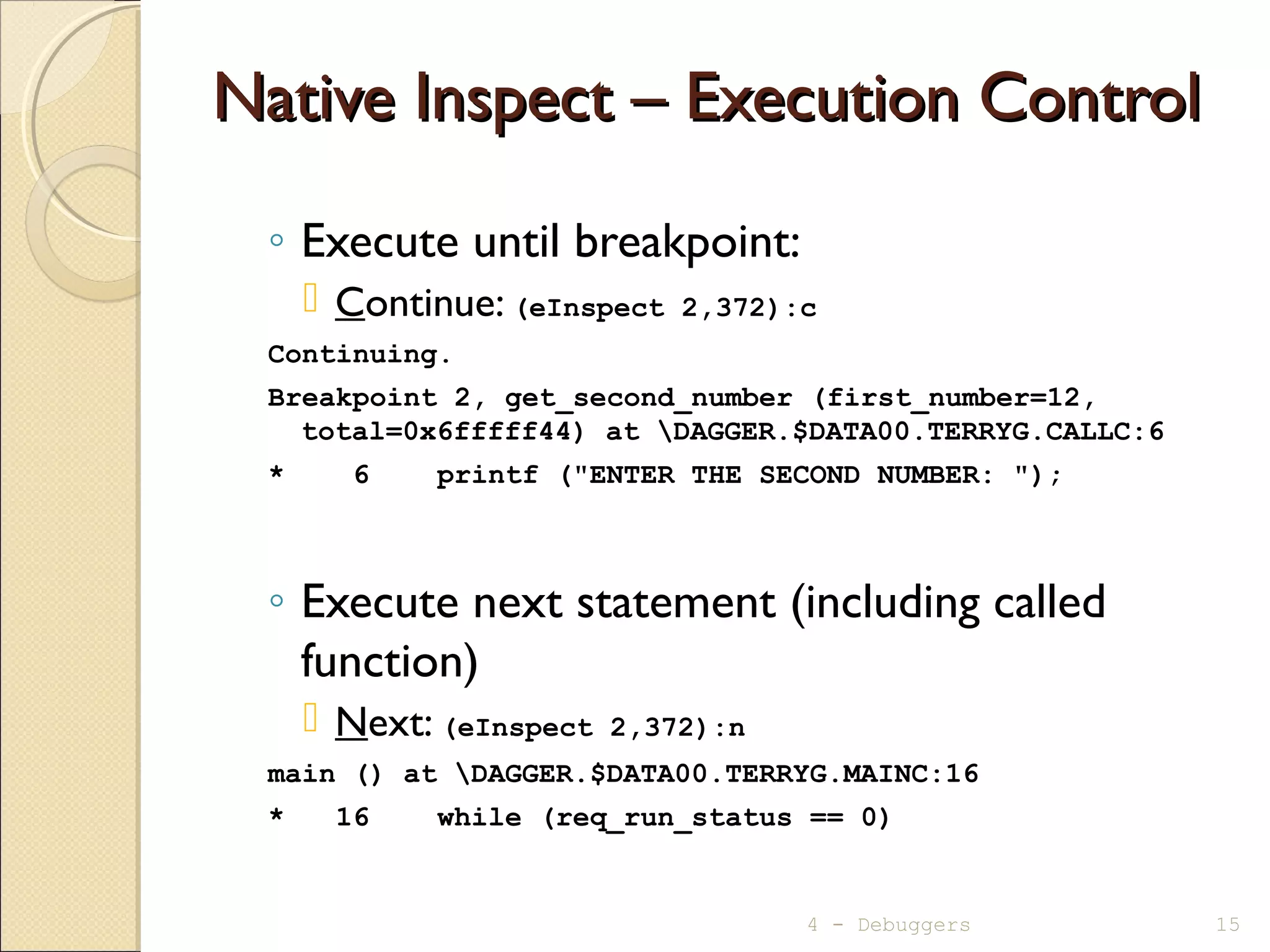
◦ Execute until breakpoint:
 Continue: (eInspect 2,372):c
Continuing.
Breakpoint 2, get_second_number (first_number=12,
total=0x6fffff44) at DAGGER.$DATA00.TERRYG.CALLC:6
* 6 printf ("ENTER THE SECOND NUMBER: ");
◦ Execute next statement (including called
function)
 Next: (eInspect 2,372):n
main () at DAGGER.$DATA00.TERRYG.MAINC:16
* 16 while (req_run_status == 0)
4 - Debuggers 15
Native Inspect – Execution ControlNative Inspect – Execution Control
◦ Execute to a specified location:
 until function | paragraph | [source-file:]line#
◦ Execute the remainder of a function (stop on
return to calling function):
 fin[ish]
(eInspect 2,372):finish
Run till exit from #0 get_second_number (first_number=12,
total=0x6fffff44)
at DAGGER.$DATA00.TERRYG.CALLC:6
ENTER THE SECOND NUMBER: 34
THE NUMBERS ENTERED WERE: 12 & 34
0x70000af0:0 in main () at DAGGER.$DATA00.TERRYG.MAINC:24
* 24 get_second_number (first_number, &total);
Value returned is $1 = 34
4 - Debuggers 16
Commands at a BreakpointCommands at a Breakpoint
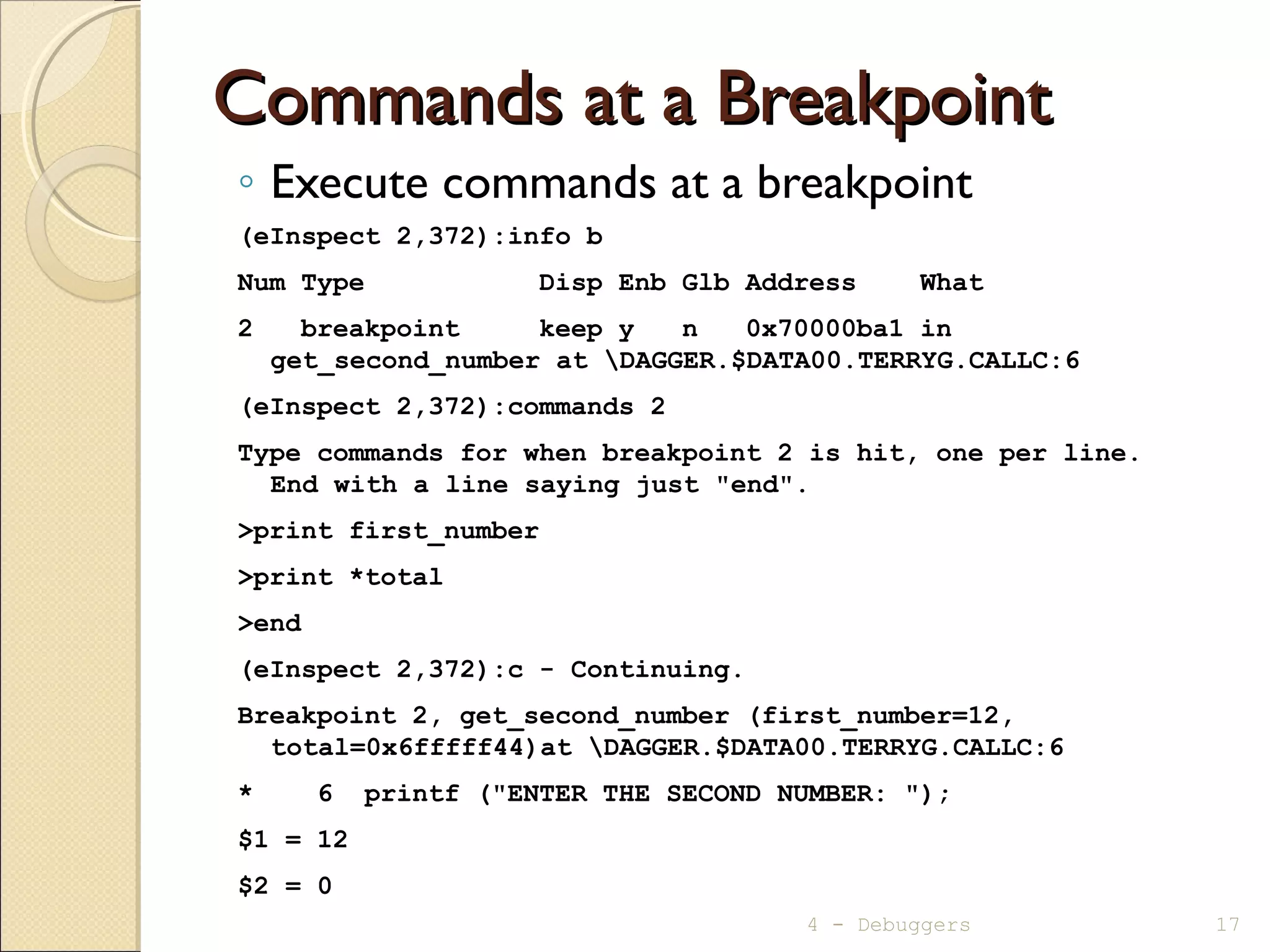
◦ Execute commands at a breakpoint
(eInspect 2,372):info b
Num Type Disp Enb Glb Address What
2 breakpoint keep y n 0x70000ba1 in
get_second_number at DAGGER.$DATA00.TERRYG.CALLC:6
(eInspect 2,372):commands 2
Type commands for when breakpoint 2 is hit, one per line.
End with a line saying just "end".
>print first_number
>print *total
>end
(eInspect 2,372):c - Continuing.
Breakpoint 2, get_second_number (first_number=12,
total=0x6fffff44)at DAGGER.$DATA00.TERRYG.CALLC:6
* 6 printf ("ENTER THE SECOND NUMBER: ");
$1 = 12
$2 = 0
4 - Debuggers 17
Native Inspect – Data DisplayNative Inspect – Data Display
◦ Local variables orWorking Storage
 info locals
(eInspect 2,372):info locals
req_run_status = 0
first_number = 12
total = 46
(eInspect 0,779):info locals
REQ-RUN-STATUS = 0
warning: Invalid or Uninitialized zoned decimal value: FIRST-NUMBER = 000
◦ Other variables
 print [/format-letter] <variable-name > | <condition-name>
 format-letter is o(octal), x(hex), d(decimal), u(unsigned decimal),
t(binary), f(float), a(address), i(instruction), c(char) and s(string).
(eInspect 2,372):p total
$2 = 46
(eInspect 2,372):p /x total
$3 = 0x2e
4 - Debuggers 18
Native Inspect – Data DisplayNative Inspect – Data Display
◦ Arrays
 print <array-name>@<n>
 set print elements <n> (default is 200)
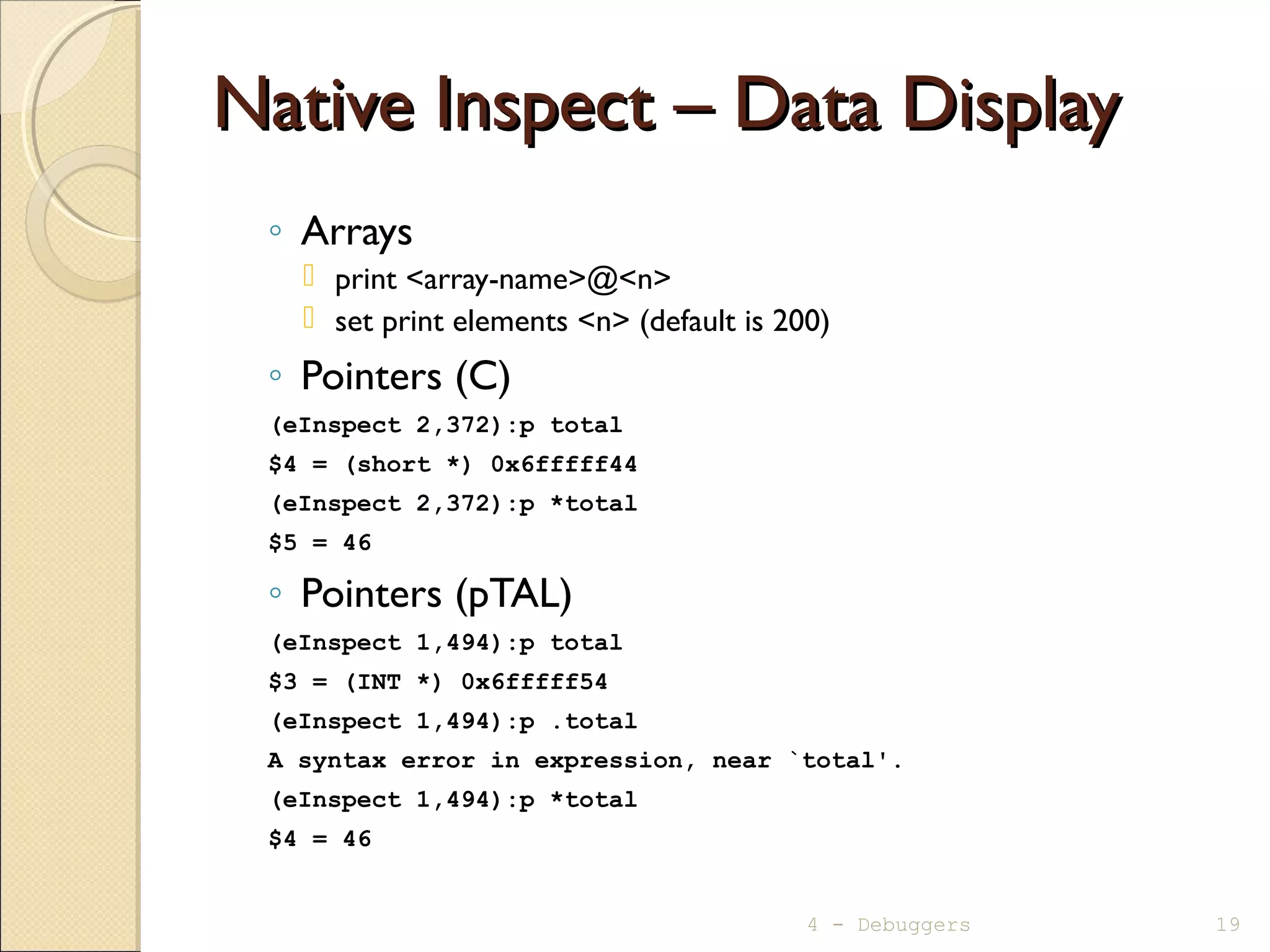
◦ Pointers (C)
(eInspect 2,372):p total
$4 = (short *) 0x6fffff44
(eInspect 2,372):p *total
$5 = 46
◦ Pointers (pTAL)
(eInspect 1,494):p total
$3 = (INT *) 0x6fffff54
(eInspect 1,494):p .total
A syntax error in expression, near `total'.
(eInspect 1,494):p *total
$4 = 46
4 - Debuggers 19
Native Inspect –Variable Information DisplayNative Inspect –Variable Information Display
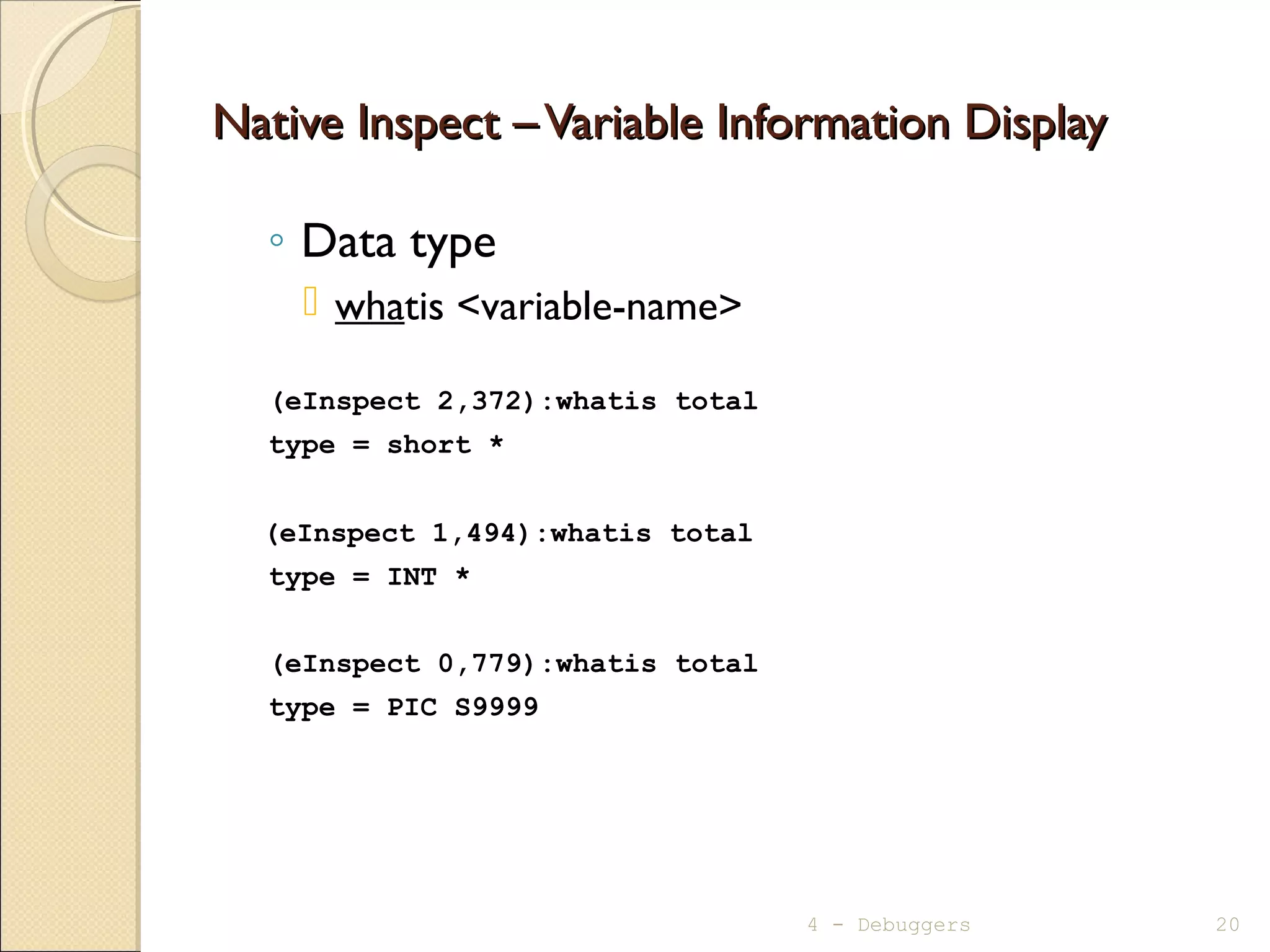
◦ Data type
 whatis <variable-name>
(eInspect 2,372):whatis total
type = short *
(eInspect 1,494):whatis total
type = INT *
(eInspect 0,779):whatis total
type = PIC S9999
4 - Debuggers 20
Native Inspect – Data ModificationNative Inspect – Data Modification
◦ Modifying variable or pointer
 set [variable] <variable-name>=<new-value>
(eInspect 2,372):set *total=999
4 - Debuggers 21
Native Inspect – Source Statements DisplayNative Inspect – Source Statements Display
◦ list [ [<source-file>:]line#
| [<source-file>:]function ]
eInspect 2,372):l
15 display_initial_req_message ();
16 while (req_run_status == 0)
17 {
18 printf ("ENTER FIRST NUMBER [or 0 to stop]: ");
19 scanf ("%hi", &first_number);
* 20 if (first_number == 0)
21 req_run_status = 1;
22 else
23 {
24 get_second_number (first_number, &total);
(eInspect 2,372):l
25 printf ("THE TOTAL IS: %hin", total);
26 }
27 } /* end while */
28 } /* end main */
4 - Debuggers 22
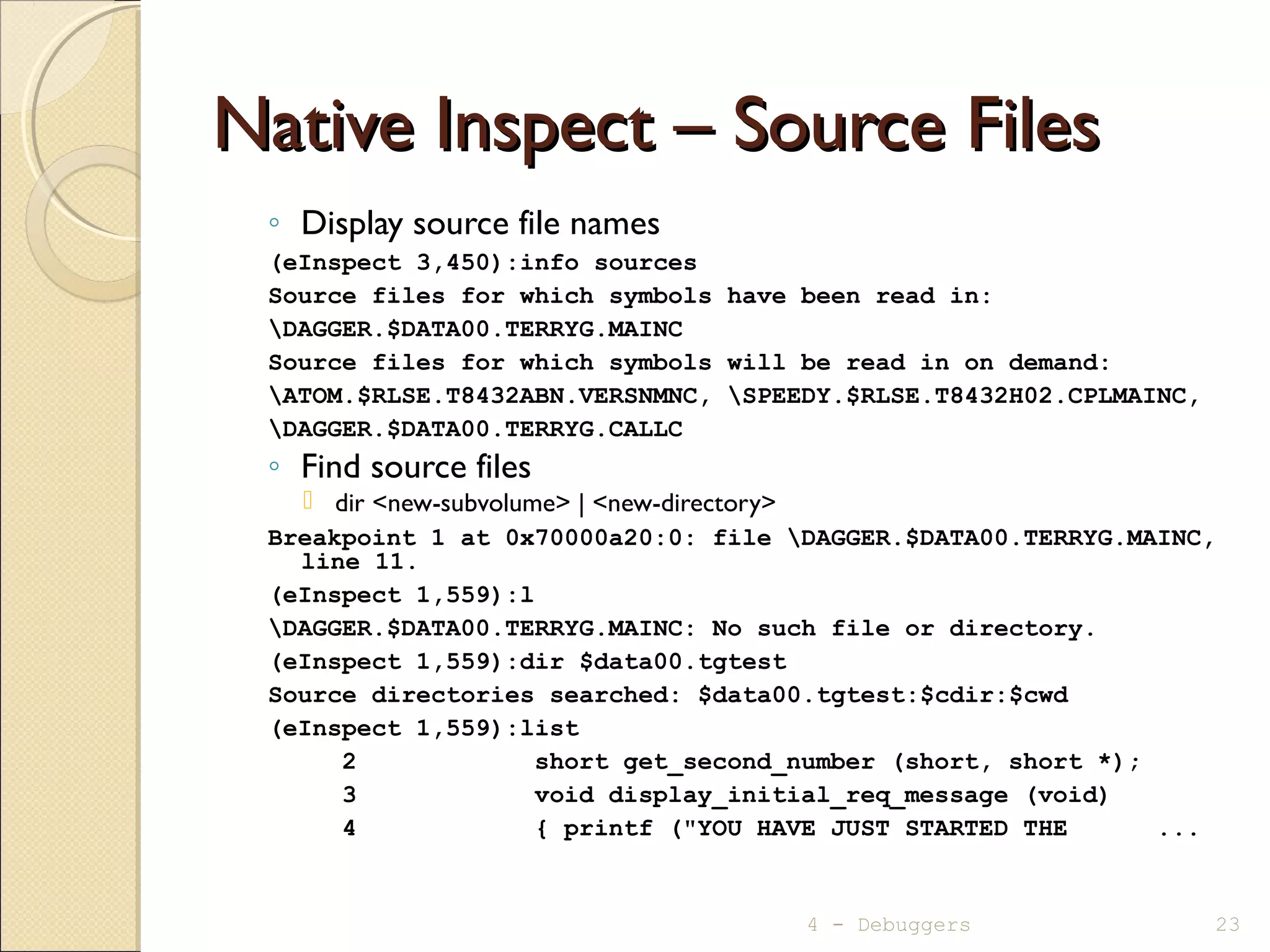
Native Inspect – Source FilesNative Inspect – Source Files
◦ Display source file names
(eInspect 3,450):info sources
Source files for which symbols have been read in:
DAGGER.$DATA00.TERRYG.MAINC
Source files for which symbols will be read in on demand:
ATOM.$RLSE.T8432ABN.VERSNMNC, SPEEDY.$RLSE.T8432H02.CPLMAINC,
DAGGER.$DATA00.TERRYG.CALLC
◦ Find source files
 dir <new-subvolume> | <new-directory>
Breakpoint 1 at 0x70000a20:0: file DAGGER.$DATA00.TERRYG.MAINC,
line 11.
(eInspect 1,559):l
DAGGER.$DATA00.TERRYG.MAINC: No such file or directory.
(eInspect 1,559):dir $data00.tgtest
Source directories searched: $data00.tgtest:$cdir:$cwd
(eInspect 1,559):list
2 short get_second_number (short, short *);
3 void display_initial_req_message (void)
4 { printf ("YOU HAVE JUST STARTED THE ...
4 - Debuggers 23
Native Inspect – Function Names (C)Native Inspect – Function Names (C)
◦ info functions [<wildcard-string>]
(eInspect 12,372):info functions
All defined functions:
File ATOM.$RLSE.T8432ABN.VERSNMNC:
void T8432H02_21MAY2008_CCPLMAIN();
File SPEEDY.$RLSE.T8432H02.CPLMAINC:
void _MAIN();
void __INIT__1_C();
File DAGGER.$DATA00.TERRYG.CALLC:
short get_second_number(short, short *);
File DAGGER.$DATA00.TERRYG.MAINC:
void display_initial_req_message();
int main();
Non-debugging symbols:
0x700008e0 .plt
4 - Debuggers 24
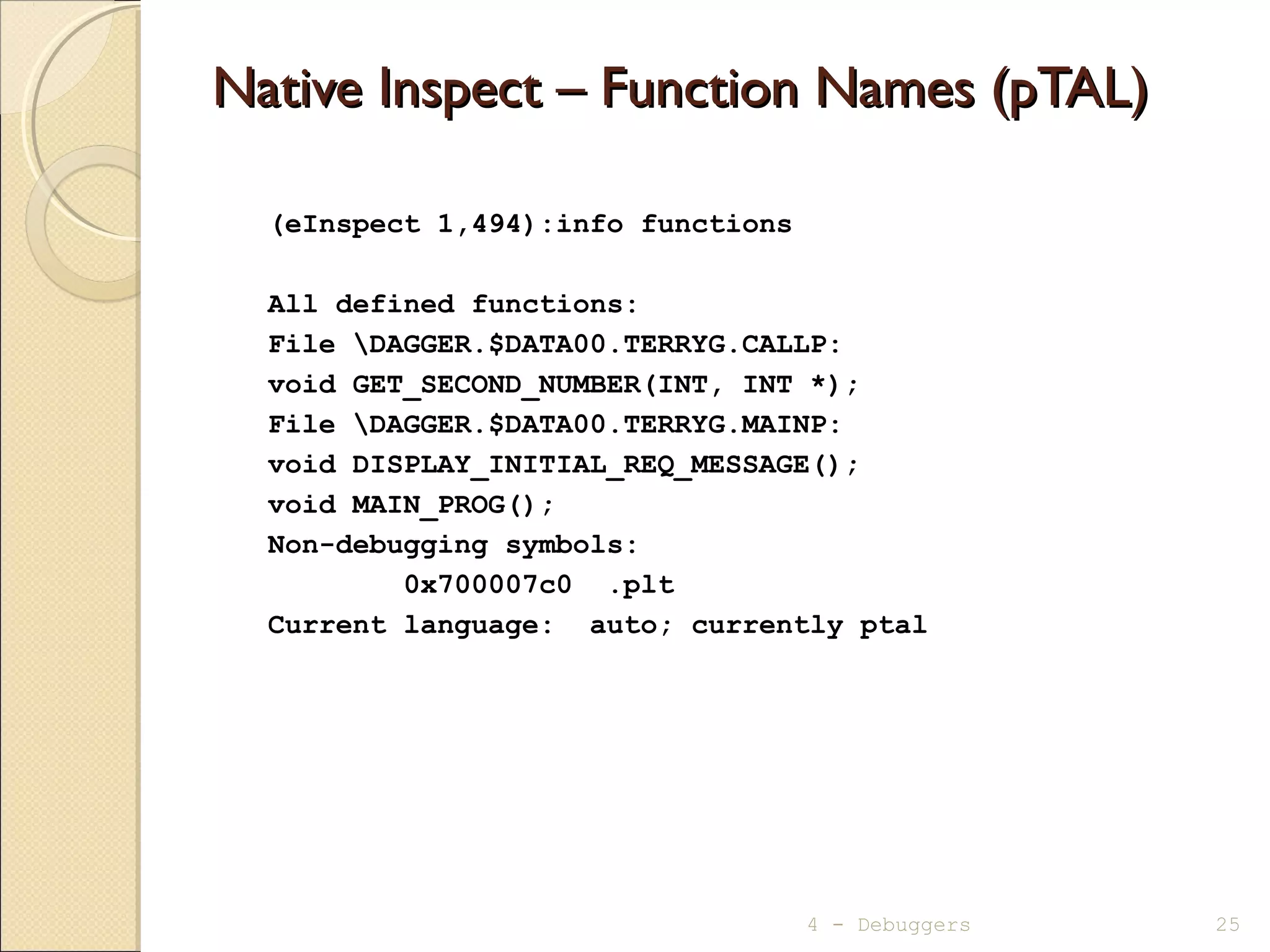
Native Inspect – Function Names (pTAL)Native Inspect – Function Names (pTAL)
(eInspect 1,494):info functions
All defined functions:
File DAGGER.$DATA00.TERRYG.CALLP:
void GET_SECOND_NUMBER(INT, INT *);
File DAGGER.$DATA00.TERRYG.MAINP:
void DISPLAY_INITIAL_REQ_MESSAGE();
void MAIN_PROG();
Non-debugging symbols:
0x700007c0 .plt
Current language: auto; currently ptal
4 - Debuggers 25
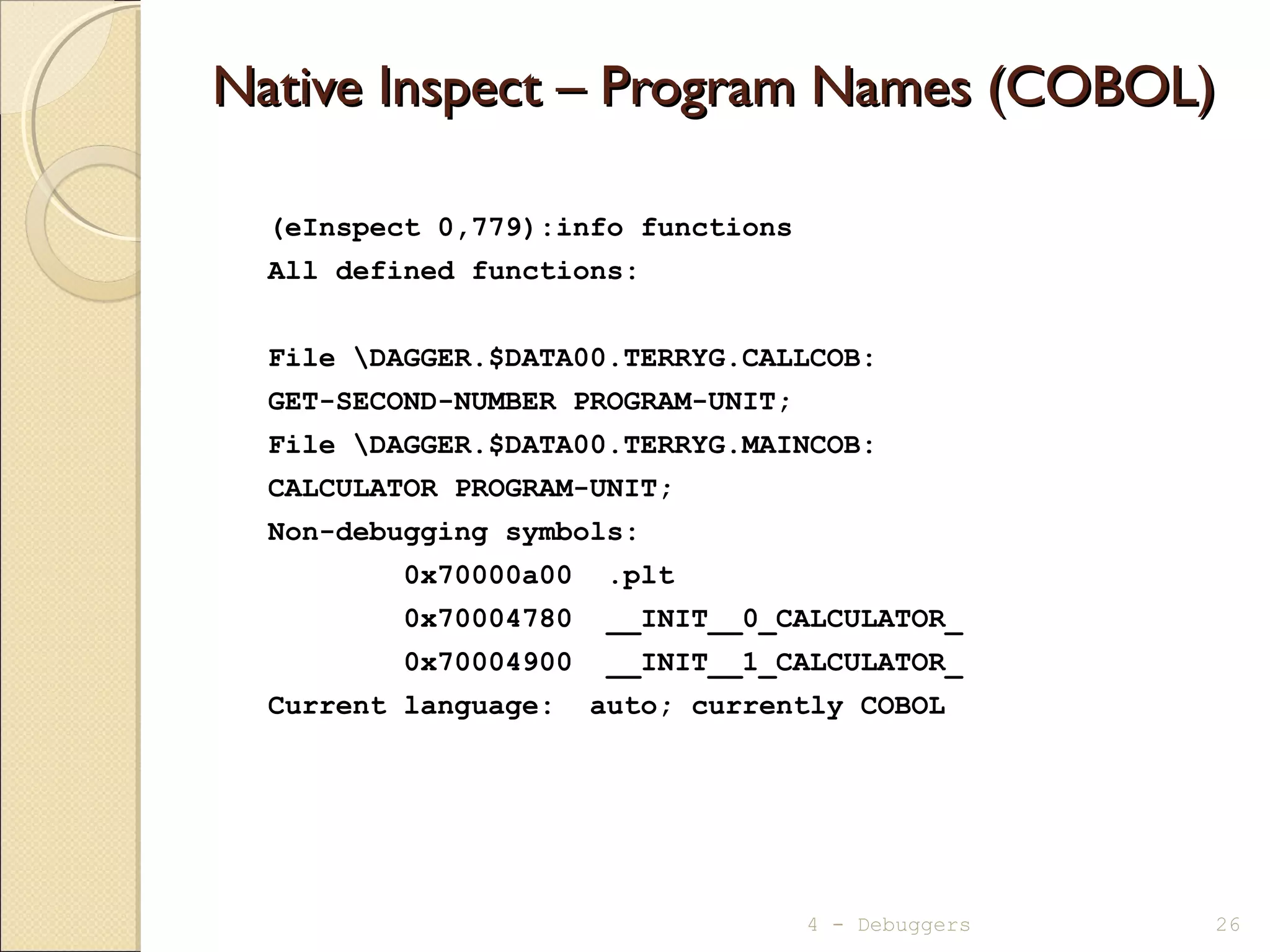
Native Inspect – Program Names (COBOL)Native Inspect – Program Names (COBOL)
(eInspect 0,779):info functions
All defined functions:
File DAGGER.$DATA00.TERRYG.CALLCOB:
GET-SECOND-NUMBER PROGRAM-UNIT;
File DAGGER.$DATA00.TERRYG.MAINCOB:
CALCULATOR PROGRAM-UNIT;
Non-debugging symbols:
0x70000a00 .plt
0x70004780 __INIT__0_CALCULATOR_
0x70004900 __INIT__1_CALCULATOR_
Current language: auto; currently COBOL
4 - Debuggers 26
Native Inspect – Open File InformationNative Inspect – Open File Information
 fopen [<filenum> [-d] ]
(eInspect 2,372):fopen
FileNum LastErr Name
1 0 DAGGER.$ZTN0.#PTWNEAK
(eInspect 2,372):fopen 1 -d
Name DAGGER.$ZTN0.#PTWNEAK
Filenum 1
General File Information.
Device Type 0
Device Subtype 30
Object Type -1
Logical Device Number -1
Open Access 0
Open Exclusion 0
Open Nowait Depth 0
Open Sync Depth 1
Open Options 0
Physical Record Length 132 Bytes
Outstanding Requests 0
Error 0
Error Detail 0
4 - Debuggers 27
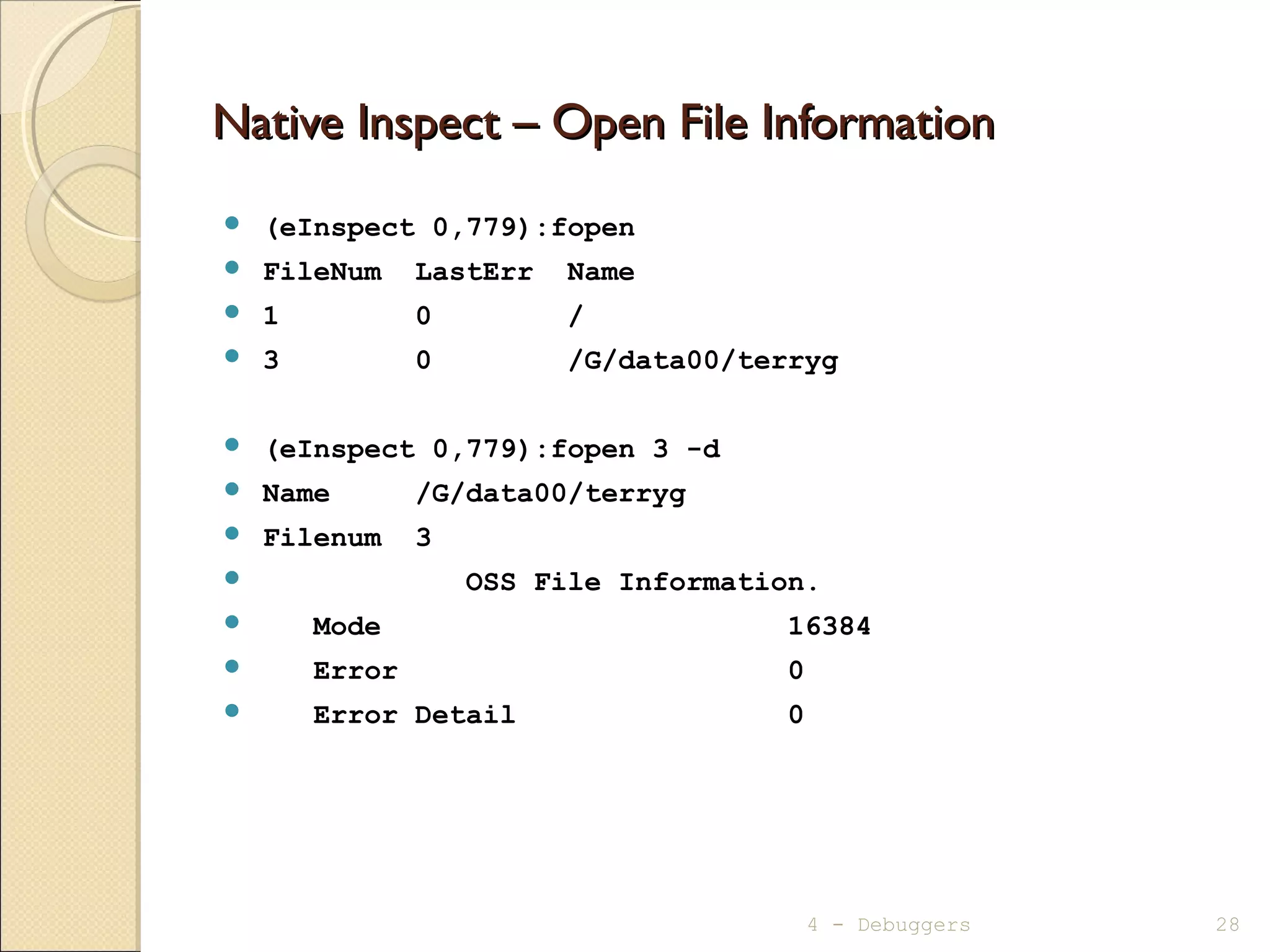
Native Inspect – Open File InformationNative Inspect – Open File Information
 (eInspect 0,779):fopen
 FileNum LastErr Name
 1 0 /
 3 0 /G/data00/terryg
 (eInspect 0,779):fopen 3 -d
 Name /G/data00/terryg
 Filenum 3
 OSS File Information.
 Mode 16384
 Error 0
 Error Detail 0
4 - Debuggers 28
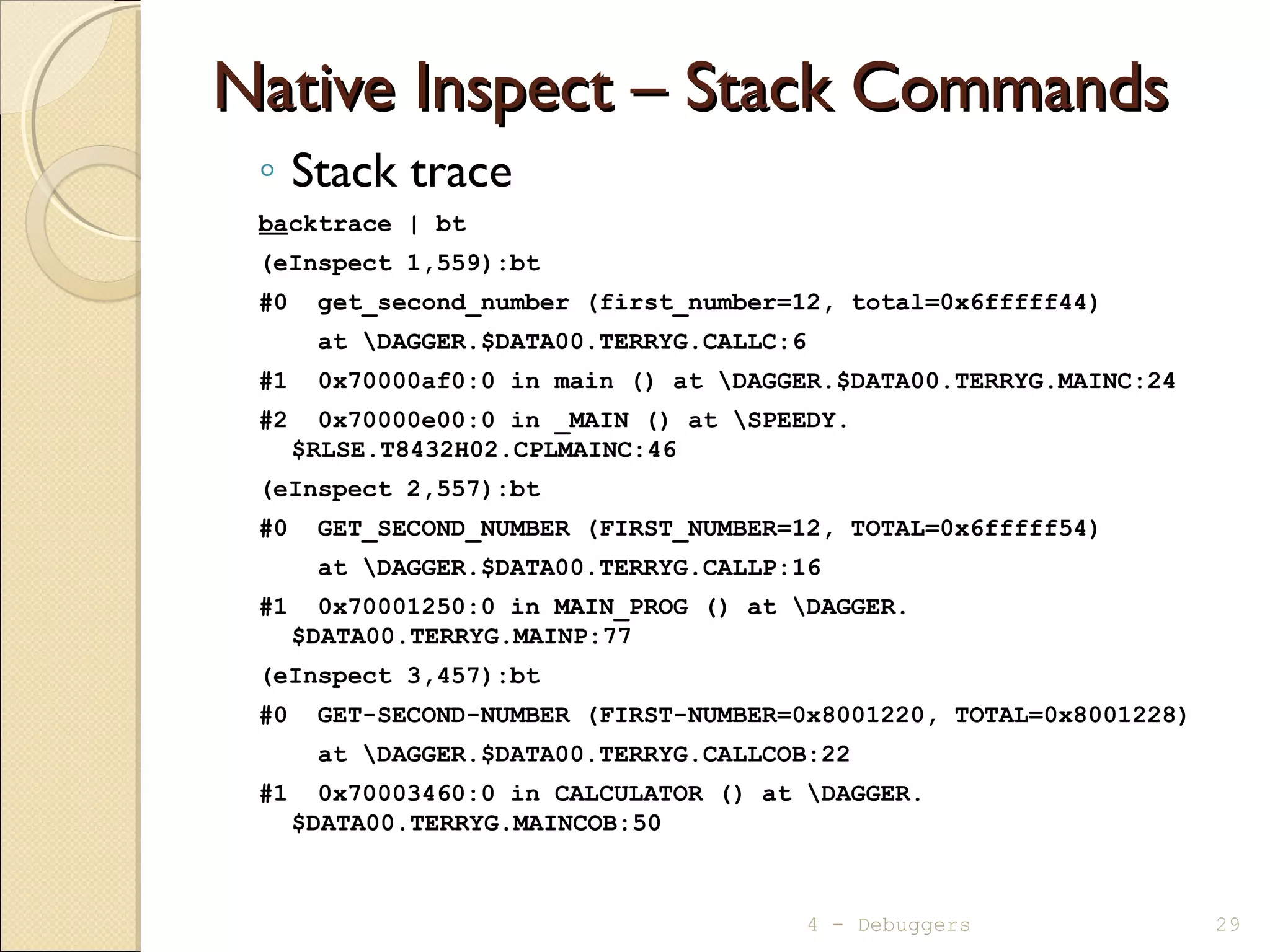
Native Inspect – Stack CommandsNative Inspect – Stack Commands
◦ Stack trace
backtrace | bt
(eInspect 1,559):bt
#0 get_second_number (first_number=12, total=0x6fffff44)
at DAGGER.$DATA00.TERRYG.CALLC:6
#1 0x70000af0:0 in main () at DAGGER.$DATA00.TERRYG.MAINC:24
#2 0x70000e00:0 in _MAIN () at SPEEDY.
$RLSE.T8432H02.CPLMAINC:46
(eInspect 2,557):bt
#0 GET_SECOND_NUMBER (FIRST_NUMBER=12, TOTAL=0x6fffff54)
at DAGGER.$DATA00.TERRYG.CALLP:16
#1 0x70001250:0 in MAIN_PROG () at DAGGER.
$DATA00.TERRYG.MAINP:77
(eInspect 3,457):bt
#0 GET-SECOND-NUMBER (FIRST-NUMBER=0x8001220, TOTAL=0x8001228)
at DAGGER.$DATA00.TERRYG.CALLCOB:22
#1 0x70003460:0 in CALCULATOR () at DAGGER.
$DATA00.TERRYG.MAINCOB:50
4 - Debuggers 29
Miscellaneous CommandsMiscellaneous Commands
◦ Change to a different debugger
 switch
 ChangesTNS/E process toVisual Inspect
 ChangesTNS process to Inspect
◦ Create a snapshot/saveabend file
 save <filename[!]>
◦ Open a snapshot/saveabend file
 snapshot <filename>
4 - Debuggers 30
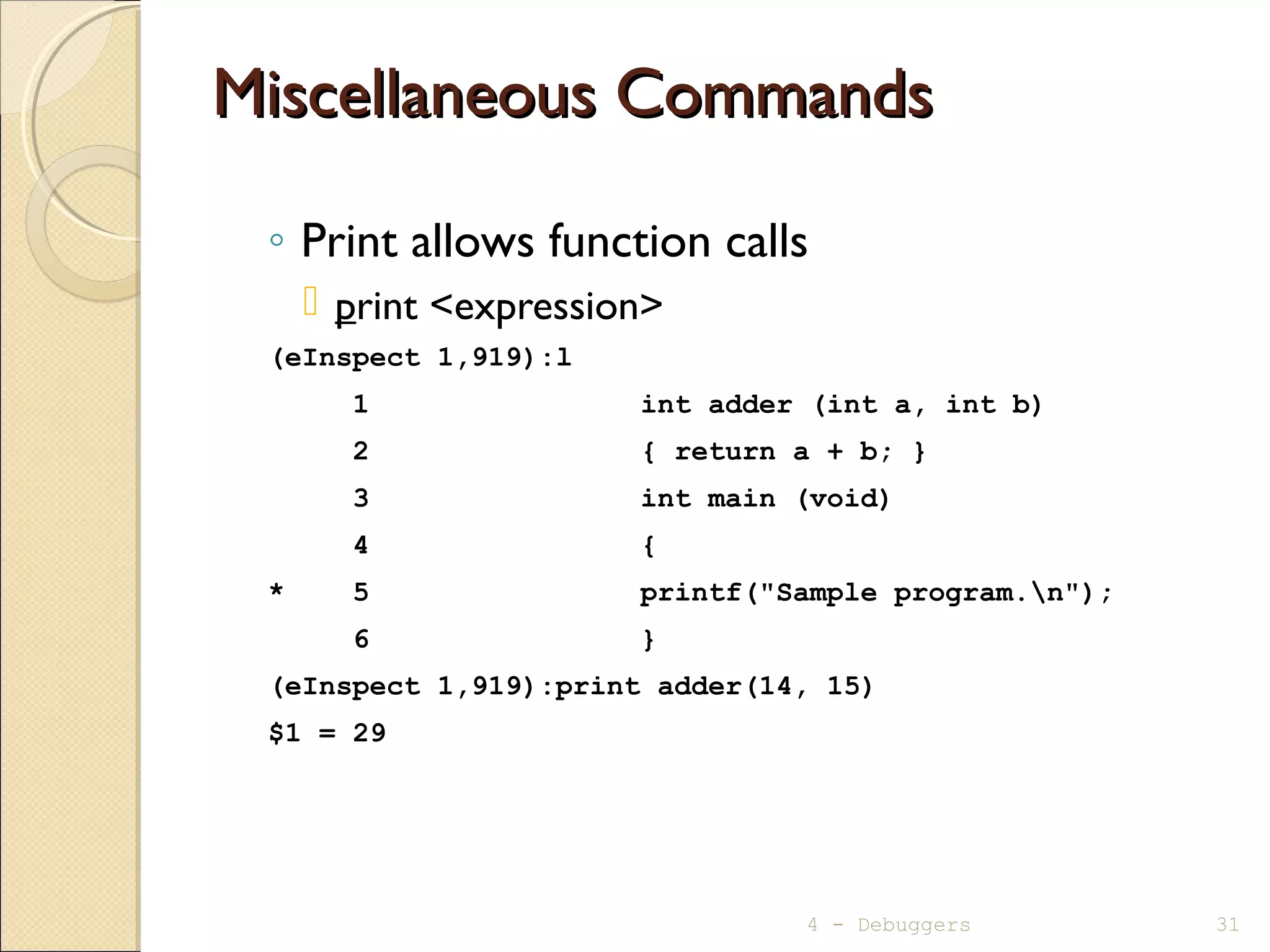
Miscellaneous CommandsMiscellaneous Commands
◦ Print allows function calls
 print <expression>
(eInspect 1,919):l
1 int adder (int a, int b)
2 { return a + b; }
3 int main (void)
4 {
* 5 printf("Sample program.n");
6 }
(eInspect 1,919):print adder(14, 15)
$1 = 29
4 - Debuggers 31
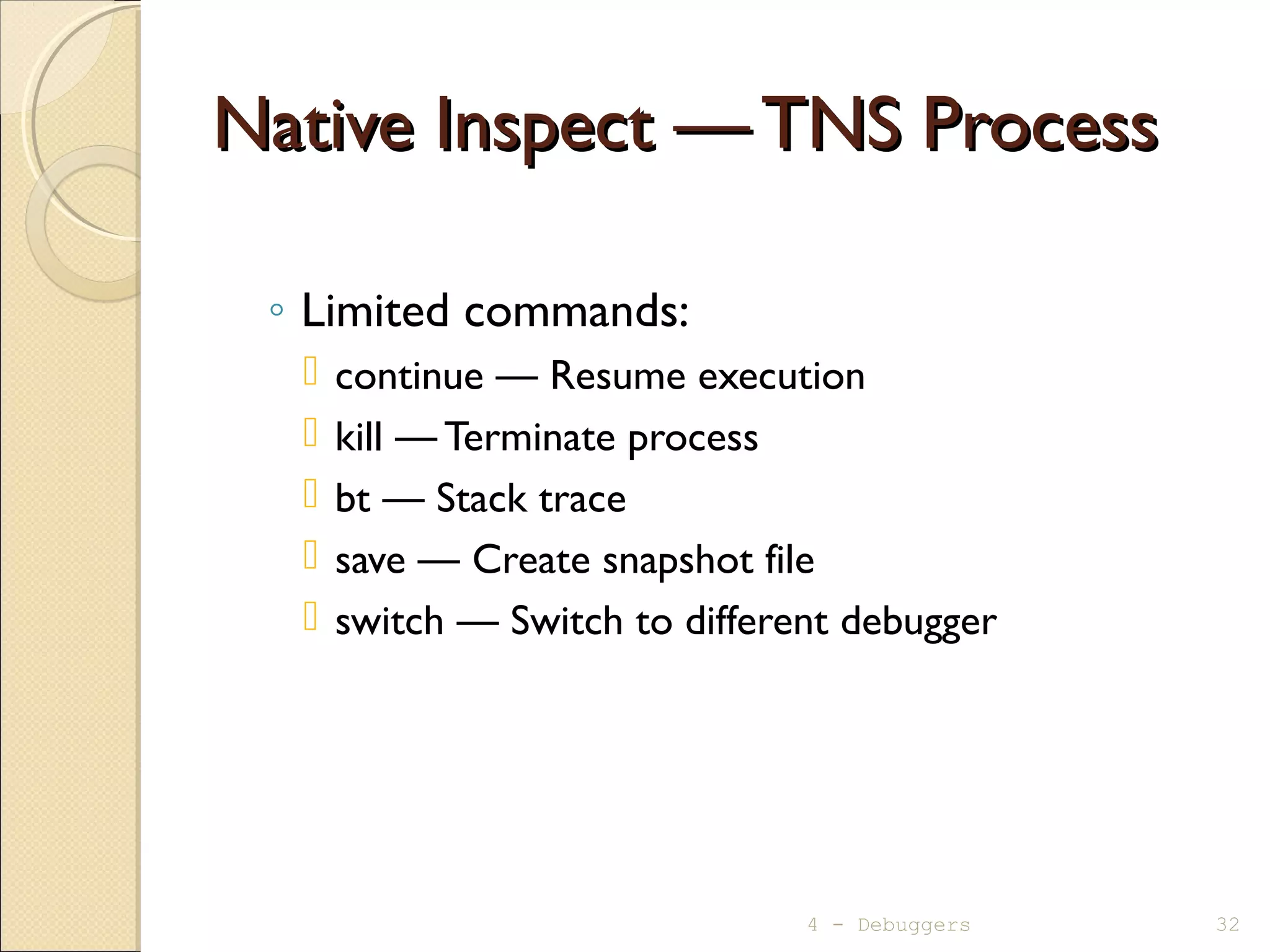
Native Inspect —TNS ProcessNative Inspect —TNS Process
◦ Limited commands:
 continue — Resume execution
 kill — Terminate process
 bt — Stack trace
 save — Create snapshot file
 switch — Switch to different debugger
4 - Debuggers 32
Questions ?Questions ?
33
4 - Debuggers 34

Mod04 debuggers

  • 1.
  • 2.
    Available DebuggersAvailable Debuggers ◦Visual Inspect  Preferred for most uses  Default if Inspect attribute on ◦ Native Inspect (eInspect)  TNS/E programs only  Extensible through tcl scripts  Default if no others available ◦ Inspect  TNS and Screen COBOL programs only  TNS saveabend files ◦ Debug is not available on TNS/E 4 - Debuggers 2
  • 3.
    Debugger SelectionDebugger Selection 4- Debuggers 3 TNS/E Process Visual Inspect Inspect Native Inspect Native Inspect INSPECT ON INSPECT OFF VISUAL INSPECT UNAVAILABLE INSPECT ON INSPECT OFFTNS Process Visual Inspect
  • 4.
    Visual InspectVisual Inspect TNS/E,TNS programs ◦ Basic TNS/E support , for example: watch items, breakpoints, resume ◦ Better switching to/from system debugger (eInspect) ◦ Creating/modifying/formatting register watch items ◦ Formatting EMS/SPI buffers as watch items ◦ Displaying/modifying/monitoring/formatting arbitrary memory ◦ Providing multi-byte support ◦ Supporting efficient conditional data breakpoints ◦ Stepping instructions and statements ◦ Displaying source statements and corresponding instructions 4 - Debuggers 4
  • 5.
    Visual Inspect (1of 5)Visual Inspect (1 of 5) 4 - Debuggers 5 Execution Mode Indicator Step Instruction and Step In Instruction
  • 6.
    Visual Inspect (2of 5)Visual Inspect (2 of 5) 6
  • 7.
    Visual Inspect (3of 5)Visual Inspect (3 of 5) 4 - Debuggers 7
  • 8.
    Visual Inspect (4of 5)Visual Inspect (4 of 5) 8 4 - Debuggers
  • 9.
    Visual Inspect (5of 5)Visual Inspect (5 of 5) 4 - Debuggers 9
  • 10.
    Native InspectNative Inspect ◦Based on GDB (Open Source)/WDB (HP version) ◦ UNIX-style commands  for example: fopen <filenum> –d ◦ Inspect  Native Inspect commands:  source  list  obey  source  break  break  resume  continue  step  next  step in  step  step out  finish  clear  delete  display  print  modify  set  add program  snapshot 4 - Debuggers 10
  • 11.
    Native Inspect —FeaturesNative Inspect — Features ◦ Automatically displays next source statement  “source on” equivalent ◦ Automatically displays function arguments  Value if data item  Address if pointer ◦ Automatically displays return values from functions  When function is “finished”  Including void functions ◦ Breakpoint display shows number of times triggered ◦ Supports TCL scripts 4 - Debuggers 11
  • 12.
    Starting Native InspectStartingNative Inspect ◦ Starting the process:  Guardian: RUND or RUNV  OSS: run –debug or runv ◦ Running process  DEBUG $xyz ◦ Programmatically  PROCESS_DEBUG_()  DEBUG() ◦ Customization file: EINSCSTM executed during start-up  Note: In all of the cases above, Visual Inspect will be the activated debugger if the Inspect attribute is on and the Visual Inspect client is running. 4 - Debuggers 12
  • 13.
    Native Inspect -HelpNative Inspect - Help  help [<topic>] (eInspect 2,372):help Native Inspect help The following are major topics from which you can choose: all -- List all Native Inspect commands. help -- Help on help source -- Source in a Tcl script file. target process -- Commands that support process debugging. target snapshot -- Commands that support snapshot analysis. Type "help" followed by the keyword of the topic or Native Inspect command you want to browse. 4 - Debuggers 13
  • 14.
    Native Inspect –BreakpointsNative Inspect – Breakpoints ◦ Setting:  break {function | paragraph | [source-file:]line#} [if cond-exp] (eInspect 2,372):break get_second_number Breakpoint 2 at 0x70000ba0:1: file DAGGER.$DATA00.TERRYG.CALLC, line 6. (eInspect 2,372):b callc:8 if second_number== 99 Breakpoint 3 at 0x70000bf0:1: file DAGGER.$DATA00.TERRYG.CALLC, line 8. ◦ Displaying:  info break (eInspect 2,372):info b Num Type Disp Enb Glb Address What 2 breakpoint keep y n 0x70000ba1 in get_second_number at DAGGER.$DATA00.TERRYG.CALLC:6 breakpoint already hit 1 time 3 breakpoint keep y n 0x70000bf1 in get_second_number at DAGGER.$DATA00.TERRYG.CALLC:8 stop only if second_number == 99 ◦ Clearing:  delete [breakpoint#] - Deletes all breakpoints if no number given 4 - Debuggers 14
  • 15.
    Native Inspect –Execution ControlNative Inspect – Execution Control ◦ Execute until breakpoint:  Continue: (eInspect 2,372):c Continuing. Breakpoint 2, get_second_number (first_number=12, total=0x6fffff44) at DAGGER.$DATA00.TERRYG.CALLC:6 * 6 printf ("ENTER THE SECOND NUMBER: "); ◦ Execute next statement (including called function)  Next: (eInspect 2,372):n main () at DAGGER.$DATA00.TERRYG.MAINC:16 * 16 while (req_run_status == 0) 4 - Debuggers 15
  • 16.
    Native Inspect –Execution ControlNative Inspect – Execution Control ◦ Execute to a specified location:  until function | paragraph | [source-file:]line# ◦ Execute the remainder of a function (stop on return to calling function):  fin[ish] (eInspect 2,372):finish Run till exit from #0 get_second_number (first_number=12, total=0x6fffff44) at DAGGER.$DATA00.TERRYG.CALLC:6 ENTER THE SECOND NUMBER: 34 THE NUMBERS ENTERED WERE: 12 & 34 0x70000af0:0 in main () at DAGGER.$DATA00.TERRYG.MAINC:24 * 24 get_second_number (first_number, &total); Value returned is $1 = 34 4 - Debuggers 16
  • 17.
    Commands at aBreakpointCommands at a Breakpoint ◦ Execute commands at a breakpoint (eInspect 2,372):info b Num Type Disp Enb Glb Address What 2 breakpoint keep y n 0x70000ba1 in get_second_number at DAGGER.$DATA00.TERRYG.CALLC:6 (eInspect 2,372):commands 2 Type commands for when breakpoint 2 is hit, one per line. End with a line saying just "end". >print first_number >print *total >end (eInspect 2,372):c - Continuing. Breakpoint 2, get_second_number (first_number=12, total=0x6fffff44)at DAGGER.$DATA00.TERRYG.CALLC:6 * 6 printf ("ENTER THE SECOND NUMBER: "); $1 = 12 $2 = 0 4 - Debuggers 17
  • 18.
    Native Inspect –Data DisplayNative Inspect – Data Display ◦ Local variables orWorking Storage  info locals (eInspect 2,372):info locals req_run_status = 0 first_number = 12 total = 46 (eInspect 0,779):info locals REQ-RUN-STATUS = 0 warning: Invalid or Uninitialized zoned decimal value: FIRST-NUMBER = 000 ◦ Other variables  print [/format-letter] <variable-name > | <condition-name>  format-letter is o(octal), x(hex), d(decimal), u(unsigned decimal), t(binary), f(float), a(address), i(instruction), c(char) and s(string). (eInspect 2,372):p total $2 = 46 (eInspect 2,372):p /x total $3 = 0x2e 4 - Debuggers 18
  • 19.
    Native Inspect –Data DisplayNative Inspect – Data Display ◦ Arrays  print <array-name>@<n>  set print elements <n> (default is 200) ◦ Pointers (C) (eInspect 2,372):p total $4 = (short *) 0x6fffff44 (eInspect 2,372):p *total $5 = 46 ◦ Pointers (pTAL) (eInspect 1,494):p total $3 = (INT *) 0x6fffff54 (eInspect 1,494):p .total A syntax error in expression, near `total'. (eInspect 1,494):p *total $4 = 46 4 - Debuggers 19
  • 20.
    Native Inspect –VariableInformation DisplayNative Inspect –Variable Information Display ◦ Data type  whatis <variable-name> (eInspect 2,372):whatis total type = short * (eInspect 1,494):whatis total type = INT * (eInspect 0,779):whatis total type = PIC S9999 4 - Debuggers 20
  • 21.
    Native Inspect –Data ModificationNative Inspect – Data Modification ◦ Modifying variable or pointer  set [variable] <variable-name>=<new-value> (eInspect 2,372):set *total=999 4 - Debuggers 21
  • 22.
    Native Inspect –Source Statements DisplayNative Inspect – Source Statements Display ◦ list [ [<source-file>:]line# | [<source-file>:]function ] eInspect 2,372):l 15 display_initial_req_message (); 16 while (req_run_status == 0) 17 { 18 printf ("ENTER FIRST NUMBER [or 0 to stop]: "); 19 scanf ("%hi", &first_number); * 20 if (first_number == 0) 21 req_run_status = 1; 22 else 23 { 24 get_second_number (first_number, &total); (eInspect 2,372):l 25 printf ("THE TOTAL IS: %hin", total); 26 } 27 } /* end while */ 28 } /* end main */ 4 - Debuggers 22
  • 23.
    Native Inspect –Source FilesNative Inspect – Source Files ◦ Display source file names (eInspect 3,450):info sources Source files for which symbols have been read in: DAGGER.$DATA00.TERRYG.MAINC Source files for which symbols will be read in on demand: ATOM.$RLSE.T8432ABN.VERSNMNC, SPEEDY.$RLSE.T8432H02.CPLMAINC, DAGGER.$DATA00.TERRYG.CALLC ◦ Find source files  dir <new-subvolume> | <new-directory> Breakpoint 1 at 0x70000a20:0: file DAGGER.$DATA00.TERRYG.MAINC, line 11. (eInspect 1,559):l DAGGER.$DATA00.TERRYG.MAINC: No such file or directory. (eInspect 1,559):dir $data00.tgtest Source directories searched: $data00.tgtest:$cdir:$cwd (eInspect 1,559):list 2 short get_second_number (short, short *); 3 void display_initial_req_message (void) 4 { printf ("YOU HAVE JUST STARTED THE ... 4 - Debuggers 23
  • 24.
    Native Inspect –Function Names (C)Native Inspect – Function Names (C) ◦ info functions [<wildcard-string>] (eInspect 12,372):info functions All defined functions: File ATOM.$RLSE.T8432ABN.VERSNMNC: void T8432H02_21MAY2008_CCPLMAIN(); File SPEEDY.$RLSE.T8432H02.CPLMAINC: void _MAIN(); void __INIT__1_C(); File DAGGER.$DATA00.TERRYG.CALLC: short get_second_number(short, short *); File DAGGER.$DATA00.TERRYG.MAINC: void display_initial_req_message(); int main(); Non-debugging symbols: 0x700008e0 .plt 4 - Debuggers 24
  • 25.
    Native Inspect –Function Names (pTAL)Native Inspect – Function Names (pTAL) (eInspect 1,494):info functions All defined functions: File DAGGER.$DATA00.TERRYG.CALLP: void GET_SECOND_NUMBER(INT, INT *); File DAGGER.$DATA00.TERRYG.MAINP: void DISPLAY_INITIAL_REQ_MESSAGE(); void MAIN_PROG(); Non-debugging symbols: 0x700007c0 .plt Current language: auto; currently ptal 4 - Debuggers 25
  • 26.
    Native Inspect –Program Names (COBOL)Native Inspect – Program Names (COBOL) (eInspect 0,779):info functions All defined functions: File DAGGER.$DATA00.TERRYG.CALLCOB: GET-SECOND-NUMBER PROGRAM-UNIT; File DAGGER.$DATA00.TERRYG.MAINCOB: CALCULATOR PROGRAM-UNIT; Non-debugging symbols: 0x70000a00 .plt 0x70004780 __INIT__0_CALCULATOR_ 0x70004900 __INIT__1_CALCULATOR_ Current language: auto; currently COBOL 4 - Debuggers 26
  • 27.
    Native Inspect –Open File InformationNative Inspect – Open File Information  fopen [<filenum> [-d] ] (eInspect 2,372):fopen FileNum LastErr Name 1 0 DAGGER.$ZTN0.#PTWNEAK (eInspect 2,372):fopen 1 -d Name DAGGER.$ZTN0.#PTWNEAK Filenum 1 General File Information. Device Type 0 Device Subtype 30 Object Type -1 Logical Device Number -1 Open Access 0 Open Exclusion 0 Open Nowait Depth 0 Open Sync Depth 1 Open Options 0 Physical Record Length 132 Bytes Outstanding Requests 0 Error 0 Error Detail 0 4 - Debuggers 27
  • 28.
    Native Inspect –Open File InformationNative Inspect – Open File Information  (eInspect 0,779):fopen  FileNum LastErr Name  1 0 /  3 0 /G/data00/terryg  (eInspect 0,779):fopen 3 -d  Name /G/data00/terryg  Filenum 3  OSS File Information.  Mode 16384  Error 0  Error Detail 0 4 - Debuggers 28
  • 29.
    Native Inspect –Stack CommandsNative Inspect – Stack Commands ◦ Stack trace backtrace | bt (eInspect 1,559):bt #0 get_second_number (first_number=12, total=0x6fffff44) at DAGGER.$DATA00.TERRYG.CALLC:6 #1 0x70000af0:0 in main () at DAGGER.$DATA00.TERRYG.MAINC:24 #2 0x70000e00:0 in _MAIN () at SPEEDY. $RLSE.T8432H02.CPLMAINC:46 (eInspect 2,557):bt #0 GET_SECOND_NUMBER (FIRST_NUMBER=12, TOTAL=0x6fffff54) at DAGGER.$DATA00.TERRYG.CALLP:16 #1 0x70001250:0 in MAIN_PROG () at DAGGER. $DATA00.TERRYG.MAINP:77 (eInspect 3,457):bt #0 GET-SECOND-NUMBER (FIRST-NUMBER=0x8001220, TOTAL=0x8001228) at DAGGER.$DATA00.TERRYG.CALLCOB:22 #1 0x70003460:0 in CALCULATOR () at DAGGER. $DATA00.TERRYG.MAINCOB:50 4 - Debuggers 29
  • 30.
    Miscellaneous CommandsMiscellaneous Commands ◦Change to a different debugger  switch  ChangesTNS/E process toVisual Inspect  ChangesTNS process to Inspect ◦ Create a snapshot/saveabend file  save <filename[!]> ◦ Open a snapshot/saveabend file  snapshot <filename> 4 - Debuggers 30
  • 31.
    Miscellaneous CommandsMiscellaneous Commands ◦Print allows function calls  print <expression> (eInspect 1,919):l 1 int adder (int a, int b) 2 { return a + b; } 3 int main (void) 4 { * 5 printf("Sample program.n"); 6 } (eInspect 1,919):print adder(14, 15) $1 = 29 4 - Debuggers 31
  • 32.
    Native Inspect —TNSProcessNative Inspect —TNS Process ◦ Limited commands:  continue — Resume execution  kill — Terminate process  bt — Stack trace  save — Create snapshot file  switch — Switch to different debugger 4 - Debuggers 32
  • 33.
  • 34.

Editor's Notes

  • #2 NonStop H-Series and J-Series Operating Systems Application Migration Debuggers 4 - Debuggers
  • #3 NonStop H-Series and J-Series Operating Systems Application Migration Debuggers 4 - Debuggers
  • #4 NonStop H-Series and J-Series Operating Systems Application Migration Debuggers 4 - Debuggers
  • #5 NonStop H-Series and J-Series Operating Systems Application Migration Debuggers 4 - Debuggers
  • #6 NonStop H-Series and J-Series Operating Systems Application Migration Debuggers 4 - Debuggers
  • #7 NonStop H-Series and J-Series Operating Systems Application Migration Debuggers 4 - Debuggers
  • #8 NonStop H-Series and J-Series Operating Systems Application Migration Debuggers 4 - Debuggers
  • #9 NonStop H-Series and J-Series Operating Systems Application Migration Debuggers 4 - Debuggers
  • #10 NonStop H-Series and J-Series Operating Systems Application Migration Debuggers 4 - Debuggers
  • #11 NonStop H-Series and J-Series Operating Systems Application Migration Debuggers 4 - Debuggers
  • #12 NonStop H-Series and J-Series Operating Systems Application Migration Debuggers 4 - Debuggers
  • #13 NonStop H-Series and J-Series Operating Systems Application Migration Debuggers 4 - Debuggers
  • #14 NonStop H-Series and J-Series Operating Systems Application Migration Debuggers 4 - Debuggers
  • #15 NonStop H-Series and J-Series Operating Systems Application Migration Debuggers 4 - Debuggers
  • #16 NonStop H-Series and J-Series Operating Systems Application Migration Debuggers 4 - Debuggers
  • #17 NonStop H-Series and J-Series Operating Systems Application Migration Debuggers 4 - Debuggers
  • #18 NonStop H-Series and J-Series Operating Systems Application Migration Debuggers 4 - Debuggers
  • #19 NonStop H-Series and J-Series Operating Systems Application Migration Debuggers 4 - Debuggers
  • #20 NonStop H-Series and J-Series Operating Systems Application Migration Debuggers 4 - Debuggers
  • #21 NonStop H-Series and J-Series Operating Systems Application Migration Debuggers 4 - Debuggers
  • #22 NonStop H-Series and J-Series Operating Systems Application Migration Debuggers 4 - Debuggers
  • #23 NonStop H-Series and J-Series Operating Systems Application Migration Debuggers 4 - Debuggers
  • #24 NonStop H-Series and J-Series Operating Systems Application Migration Debuggers 4 - Debuggers
  • #25 NonStop H-Series and J-Series Operating Systems Application Migration Debuggers 4 - Debuggers
  • #26 NonStop H-Series and J-Series Operating Systems Application Migration Debuggers 4 - Debuggers
  • #27 NonStop H-Series and J-Series Operating Systems Application Migration Debuggers 4 - Debuggers
  • #28 NonStop H-Series and J-Series Operating Systems Application Migration Debuggers 4 - Debuggers
  • #29 NonStop H-Series and J-Series Operating Systems Application Migration Debuggers 4 - Debuggers
  • #30 NonStop H-Series and J-Series Operating Systems Application Migration Debuggers 4 - Debuggers
  • #31 NonStop H-Series and J-Series Operating Systems Application Migration Debuggers 4 - Debuggers
  • #32 NonStop H-Series and J-Series Operating Systems Application Migration Debuggers 4 - Debuggers
  • #33 NonStop H-Series and J-Series Operating Systems Application Migration Debuggers 4 - Debuggers
  • #34 NonStop H-Series and J-Series Operating Systems Application Migration Debuggers 4 - Debuggers
  • #35 NonStop H-Series and J-Series Operating Systems Application Migration Debuggers 4 - Debuggers