Lean	React	-
Patterns	for	High	Performance
Devon	Bernard
VP	of	Engineering	@	Enlitic
What	if	all	websites	had
airplane	mode
ReactJS
Why?
1. Increases	developer	productivity
• Separation	of	concerns	between	state	and	DOM
• More	modular	and	isolates	business	logic	by	component	(not	by	page)
2. Faster	and	smoother	rendering	of	page	elements
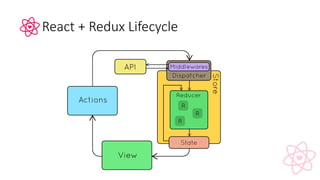
React	+	Redux	Lifecycle
Redux
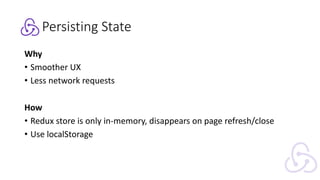
Persisting	State
Why
• Smoother	UX
• Less	network	requests
How
• Redux	store	is	only	in-memory,	disappears	on	page	refresh/close
• Use	localStorage
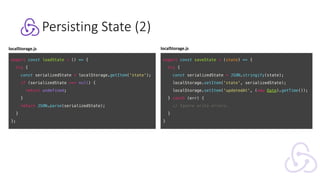
Persisting	State	(2)
export const saveState = (state) => {
try {
const serializedState = JSON.stringify(state);
localStorage.setItem('state', serializedState);
localStorage.setItem('updatedAt', (new Date).getTime());
} catch (err) {
// Ignore write errors.
}
}
export const loadState = () => {
try {
const serializedState = localStorage.getItem('state');
if (serializedState === null) {
return undefined;
}
return JSON.parse(serializedState);
}
};
localStorage.js localStorage.js
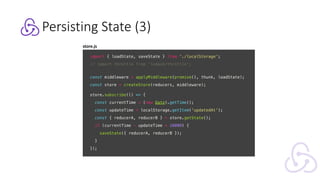
Persisting	State	(3)
import { loadState, saveState } from './localStorage';
// import throttle from 'lodash/throttle';
const middleware = applyMiddleware(promise(), thunk, loadState);
const store = createStore(reducers, middleware);
store.subscribe(() => {
const currentTime = (new Date).getTime();
const updateTime = localStorage.getItem('updatedAt');
const { reducerA, reducerB } = store.getState();
if (currentTime - updateTime > 10000) {
saveState({ reducerA, reducerB });
}
});
store.js
const libraries = [
{
id: 1,
city: 'New York'
},
{
id: 2,
city: 'San Francisco'
}
];
const libraries = [
{
id: 1, city: 'New York',
books: [
{
id: 1, title: 'Moby Dick',
author: 'Herman Melville'
}, {
id: 2, title: 'The Odyssey',
author: 'Homer'
}
]
}, {
id: 2, city: 'San Francisco',
books: [
{
id: 2, title: 'The Odyssey',
author: 'Homer'
} ...
]
} ...];
const libraries = [
{
id: 1, city: 'New York',
books: [
{
id: 1, title: 'Moby Dick',
author: {name: 'Herman Melville’, ...}
}, {
id: 2, title: 'The Odyssey',
author: {name: 'Homer’, ...}
}
]
}, {
id: 2, city: 'San Francisco',
books: [
{
id: 2, title: 'The Odyssey',
author: {name: 'Homer’, ...}
},...
]
} ...];
const libraries = [
{
id:1, city: 'New York',
books: [1, 2]
}, {
id: 2, city: 'San Francisco',
books: [2,3]
}
];
const books = [
{ id: 1, title: 'Moby Dick', author: 1 },
{ id: 2, title: 'The Odyssey', author: 2}
];
const authors = [
{ id: 1, name: 'Herman Melville', ...},
{ id: 2, name: 'Homer', ...}
];
const libraries = {
1: { city: 'New York', books: [1,2] },
2: { city: 'San Francisco', books: [2,3] }
};
const books {
1: { title: 'Moby Dick', author: 1 },
2: { title: 'The Odyssey', author: 2 }
};
const authors = {
1: { name: 'Herman Melville', ...},
2: { name: 'Homer', ...}
};
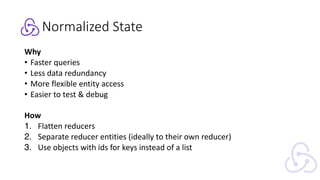
Normalized	State
Why
• Faster	queries
• Less	data	redundancy
• More	flexible	entity	access
• Easier	to	test	&	debug
How
1. Flatten	reducers
2. Separate	reducer	entities	(ideally	to	their	own	reducer)
3. Use	objects	with	ids	for	keys	instead	of	a	list
Normalized	State	(2)
https://github.com/paularmstrong/normalizr
{
”id": "123",
"author": {
"id": "1",
”name": "Paul"
},
"title": "My awesome blog post",
"comments": [
{
"id": "324",
"commenter": {
"id": "2",
"name": "Nicole"
}
}
]
}
+
import { normalize, schema }
from 'normalizr';
const user = new schema.Entity(
'users');
const comment = new schema.Entity(
'comments', {
commenter: user
});
const article = new schema.Entity(
'articles', {
author: user,
comments: [ comment ]
});
const normalizedData = normalize(
originalData, article);
{
result: "123",
entities: {
"articles": {
"123": {
id: "123",
author: "1",
title: "My awesome blog post",
comments: [ "324" ]
}
},
"users": {
"1": { "id": "1", "name": "Paul" },
"2": { "id": "2", "name": "Nicole" }
},
"comments": {
"324": { id: "324", "commenter": "2" }
}}}
=>
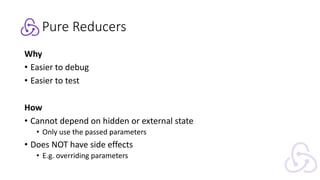
Pure	Reducers
Why
• Easier	to	debug
• Easier	to	test
How
• Cannot	depend	on	hidden	or	external	state
• Only	use	the	passed	parameters
• Does	NOT	have	side	effects
• E.g.	overriding	parameters
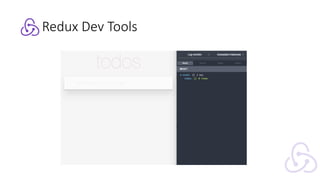
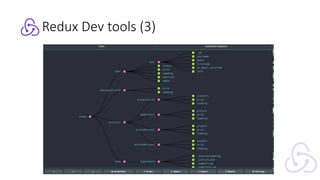
Redux	Dev	Tools
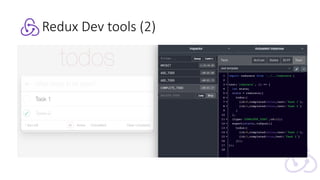
Redux	Dev	tools	(2)
Redux	Dev	tools	(3)
Components
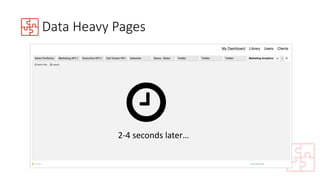
Data	Heavy	Pages
Data	Heavy	Pages
2-4	seconds	later…
!
Data	Heavy	Pages
2-4	seconds	later…
!
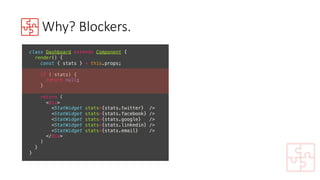
Why?	Blockers.
class Dashboard extends Component {
render() {
const { stats } = this.props;
if (!stats) {
return null;
}
return (
<div>
<StatWidget stats={stats.twitter} />
<StatWidget stats={stats.facebook} />
<StatWidget stats={stats.google} />
<StatWidget stats={stats.linkedin} />
<StatWidget stats={stats.email} />
</div>
)
}
}
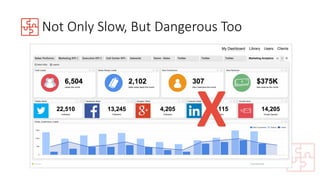
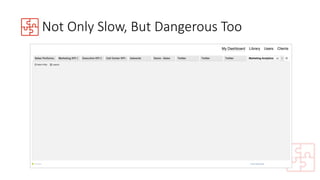
Not	Only	Slow,	But	Dangerous	Too
X
Not	Only	Slow,	But	Dangerous	Too
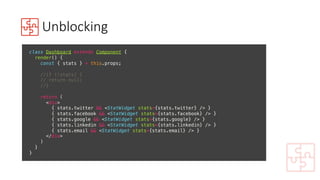
Unblocking
class Dashboard extends Component {
render() {
const { stats } = this.props;
//if (!stats) {
// return null;
//}
return (
<div>
{ stats.twitter && <StatWidget stats={stats.twitter} /> }
{ stats.facebook && <StatWidget stats={stats.facebook} /> }
{ stats.google && <StatWidget stats={stats.google} /> }
{ stats.linkedin && <StatWidget stats={stats.linkedin} /> }
{ stats.email && <StatWidget stats={stats.email} /> }
</div>
)
}
}
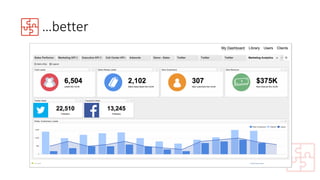
…better
…better
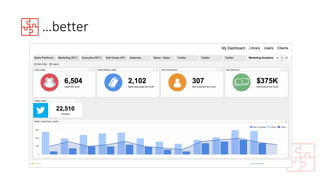
…better
…better
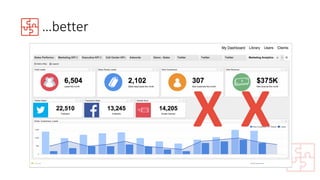
X X
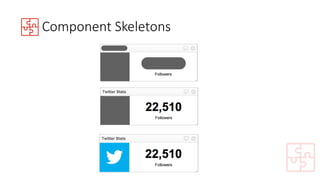
Component	Skeletons
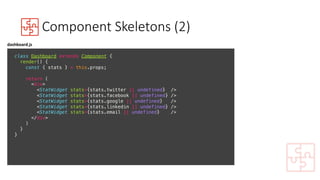
Component	Skeletons	(2)
class Dashboard extends Component {
render() {
const { stats } = this.props;
return (
<div>
<StatWidget stats={stats.twitter || undefined} />
<StatWidget stats={stats.facebook || undefined} />
<StatWidget stats={stats.google || undefined} />
<StatWidget stats={stats.linkedin || undefined} />
<StatWidget stats={stats.email || undefined} />
</div>
)
}
}
dashboard.js
Component	Skeletons	(3)
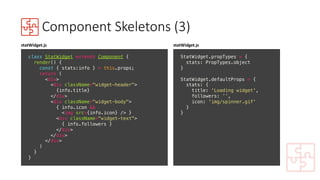
class StatWidget extends Component {
render() {
const { stats:info } = this.props;
return (
<div>
<div className="widget-header">
{info.title}
</div>
<div className="widget-body">
{ info.icon &&
<img src={info.icon} /> }
<div className="widget-text">
{ info.followers }
</div>
</div>
</div>
)
}
}
statWidget.js
StatWidget.propTypes = {
stats: PropTypes.object
}
StatWidget.defaultProps = {
stats: {
title: 'Loading widget',
followers: ’’,
icon: 'img/spinner.gif'
}
}
statWidget.js
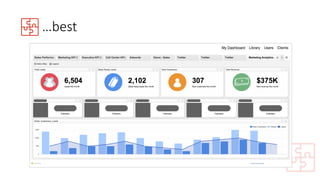
…best
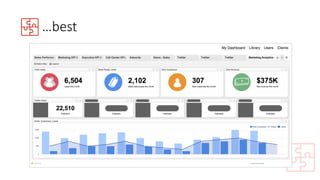
…best
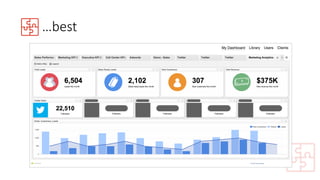
…best
…best
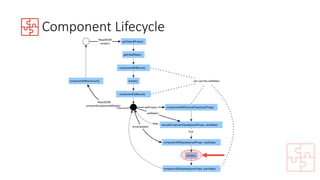
Component	Lifecycle
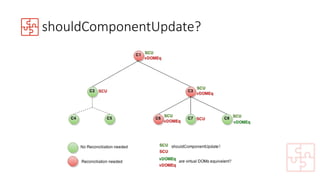
shouldComponentUpdate?
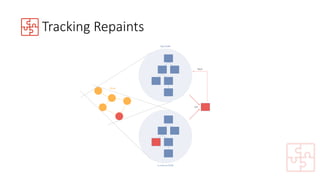
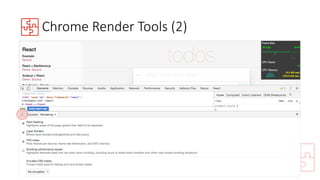
Tracking	Repaints
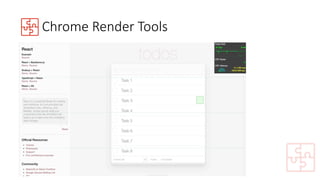
Chrome	Render	Tools
Chrome	Render	Tools	(2)
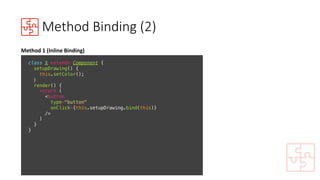
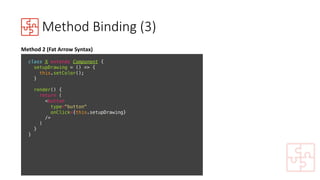
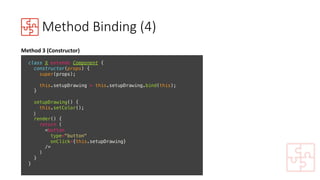
Method	Binding
^^	Uncaught	TypeError:	Cannot	read	
property	'setColor'	of	null
class X extends Component {
setupDrawing() {
// Some logic
this.setColor();
// More logic
}
setColor() { ... }
render() {
return (
<button
type="button"
onClick={this.setupDrawing}
/>
)
}
}
Issue
Callbacks	and	event	handlers	are	passing	a	
different	scope	and	‘this’	to	your	component	
methods
Method	Binding	(2)
class X extends Component {
setupDrawing() {
this.setColor();
}
render() {
return (
<button
type="button"
onClick={this.setupDrawing.bind(this)}
/>
)
}
}
Method	1	(Inline	Binding)
Method	Binding	(3)
class X extends Component {
setupDrawing = () => {
this.setColor();
}
render() {
return (
<button
type="button"
onClick={this.setupDrawing}
/>
)
}
}
Method	2	(Fat	Arrow	Syntax)
Method	Binding	(4)
class X extends Component {
constructor(props) {
super(props);
this.setupDrawing = this.setupDrawing.bind(this);
}
setupDrawing() {
this.setColor();
}
render() {
return (
<button
type="button"
onClick={this.setupDrawing}
/>
)
}
}
Method	3	(Constructor)
Actions
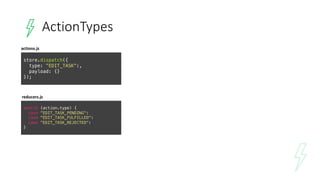
ActionTypes
store.dispatch({
type: ”EDIT_TASK":,
payload: {}
});
actions.js
reducers.js
switch (action.type) {
case ”EDIT_TASK_PENDING":
case "EDIT_TASK_FULFILLED":
case ”EDIT_TASK_REJECTED":
}
ActionTypes (2)
const THUNK_TYPES = ['EDIT_TASK']; // network actions
const ACTION_TYPES = ['CLEAR_TASK']; // local actions
// Combine all local and network actions
class ActionTypes {
constructor() {
THUNK_TYPES.forEach((action) => {
this[action] = action;
this[`${action}_PENDING`] = `${action}_PENDING`;
this[`${action}_REJECTED`] = `${action}_REJECTED`;
this[`${action}_FULFILLED`] = `${action}_FULFILLED`;
});
ACTION_TYPES.forEach((action) => {
this[action] = action;
});
}
};
const actionTypes = new ActionTypes();
export default actionTypes;
store.dispatch({
type: ActionTypes.EDIT_TASK,
payload: {}
});
actions.js
reducers.js
switch (action.type) {
case ActionTypes.EDIT_TASK_PENDING:
case ActionTypes.EDIT_TASK_FULFILLED:
case ActionTypes.EDIT_TASK_REJECTED:
}
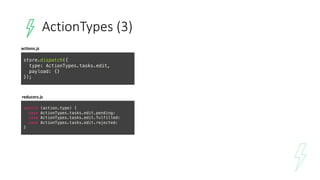
ActionTypes (3)
store.dispatch({
type: ActionTypes.tasks.edit,
payload: {}
});
actions.js
reducers.js
switch (action.type) {
case ActionTypes.tasks.edit.pending:
case ActionTypes.tasks.edit.fulfilled:
case ActionTypes.tasks.edit.rejected:
}
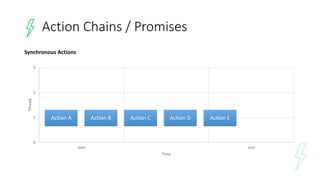
0
1
2
3
start end
Thread
Time
Action	Chains	/	Promises
Action	A Action	B Action	C Action	D Action	E
Synchronous	Actions
0
1
2
3
start end
Thread
Time
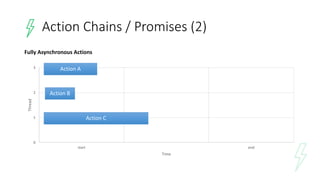
Action	A
Action	B
Action	C
Fully	Asynchronous	Actions
Action	Chains	/	Promises	(2)
0
1
2
3
start end
Thread
Time
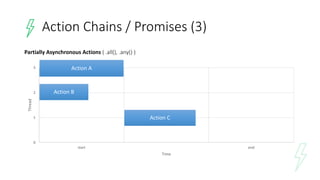
Partially	Asynchronous	Actions	(	.all(),	.any()	)
Action	Chains	/	Promises	(3)
Action	A
Action	B
Action	C
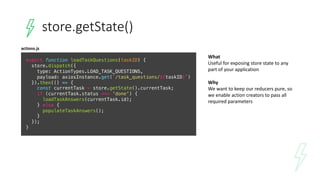
store.getState()
What
Useful	for	exposing	store	state	to	any	
part	of	your	application
Why
We	want	to	keep	our	reducers	pure,	so	
we	enable	action	creators	to	pass	all	
required	parameters
export function loadTaskQuestions(taskID) {
store.dispatch({
type: ActionTypes.LOAD_TASK_QUESTIONS,
payload: axiosInstance.get(`/task_questions/${taskID}`)
}).then(() => {
const currentTask = store.getState().currentTask;
if (currentTask.status === 'done') {
loadTaskAnswers(currentTask.id);
} else {
populateTaskAnswers();
}
});
}
actions.js
General
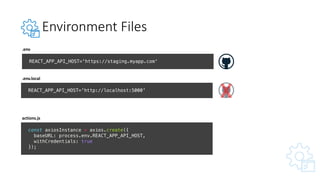
Environment	Files
REACT_APP_API_HOST='https://staging.myapp.com'
REACT_APP_API_HOST='http://localhost:5000'
.env
.env.local
const axiosInstance = axios.create({
baseURL: process.env.REACT_APP_API_HOST,
withCredentials: true
});
actions.js
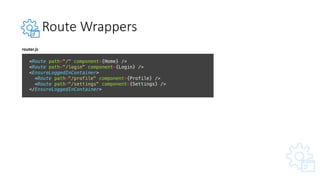
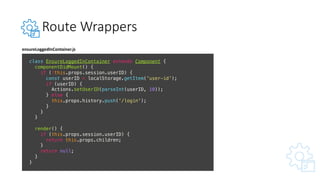
Route	Wrappers
<Route path="/" component={Home} />
<Route path="/login" component={Login} />
<EnsureLoggedInContainer>
<Route path="/profile" component={Profile} />
<Route path="/settings" component={Settings} />
</EnsureLoggedInContainer>
router.js
Route	Wrappers
class EnsureLoggedInContainer extends Component {
componentDidMount() {
if (!this.props.session.userID) {
const userID = localStorage.getItem('user-id');
if (userID) {
Actions.setUserID(parseInt(userID, 10));
} else {
this.props.history.push('/login');
}
}
}
render() {
if (this.props.session.userID) {
return this.props.children;
}
return null;
}
}
ensureLoggedInContainer.js
Offline	First	– Web	Workers
Javascript that	runs	in	the	background	that	can	be	used	for	hijacking	network	requests	and	caching	source	code
var staticCacheName = ’my-app-v1';
self.addEventListener('install', (event) => {
self.skipWaiting();
event.waitUntil(
caches.open(staticCacheName)
.then((cache) => {
return cache.addAll([
'./',
'js/bundle.min.js',
'css/main.css',
'imgs/CaltrainMap.png'
]);
})
);
});
webworker.js
if ('serviceWorker' in navigator) {
navigator.serviceWorker.register('./sw.min.js')
}
index.js
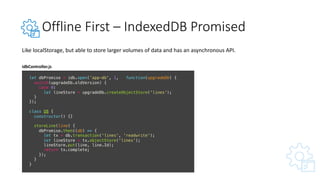
Offline	First	– IndexedDB Promised
Like	localStorage,	but	able	to	store	larger	volumes	of	data	and	has	an	asynchronous	API.
let dbPromise = idb.open(’app-db', 1, function(upgradeDb) {
switch(upgradeDb.oldVersion) {
case 0:
let lineStore = upgradeDb.createObjectStore('lines');
}
});
class DB {
constructor() {}
storeLine(line) {
dbPromise.then((db) => {
let tx = db.transaction('lines', 'readwrite');
let lineStore = tx.objectStore('lines');
lineStore.put(line, line.Id);
return tx.complete;
});
}
}
idbController.js
Guess	that	utility!
• Get	your	entire	team	to	use	the	same	coding	standard
• Prevent	developers	from	shipping	un-optimized	code
• Educate	your	team	about	best	practices	and	how	to	improve	their	code
• 100%	free
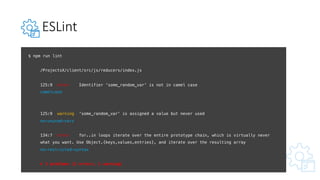
ESLint
$ npm run lint
/ProjectsX/client/src/js/reducers/index.js
125:9 error Identifier 'some_random_var' is not in camel case
camelcase
125:9 warning 'some_random_var' is assigned a value but never used
no-unused-vars
134:7 error for..in loops iterate over the entire prototype chain, which is virtually never
what you want. Use Object.{keys,values,entries}, and iterate over the resulting array
no-restricted-syntax
✖ 3 problems (2 errors, 1 warning)
ESLint (2)
https://eslint.org/docs/rules/no-unused-vars
ESLint
https://github.com/airbnb/javascript
$ npm install --save-dev eslint eslint-config-airbnb eslint-plugin-jsx-a11y eslint-plugin-react
module.exports = {
"parser": "babel-eslint",
"extends": "airbnb",
"plugins": [
"react",
"jsx-a11y”
],
"rules": {}
};
.eslintrc
Devon	Bernard
VP	of	Engineering	@	Enlitic
" devon@enlitic.com	
# @devonwbernard
Thank	you!
Any	questions?

Lean React - Patterns for High Performance [ploneconf2017]