Cisco Training Solutions


Cisco UCM Mobility Services


Daniel Kirillov
CCNP, CCIP, CCDP, CCSP, CCVP, CCNPW
daniil.kirillov@flane.ru                19-Nov-2012
www.flane.ru
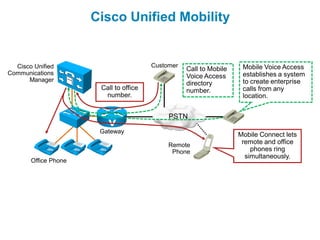
Cisco Unified Mobility


  Cisco Unified                         Customer                     Mobile Voice Access
                                                   Call to Mobile
Communications                                                       establishes a system
                                                   Voice Access
      Manager                                                        to create enterprise
                                                   directory
                       Call to office              number.           calls from any
                        number.                                      location.


                                             PSTN

                       Gateway
                                                                    Mobile Connect lets
                                             Remote                  remote and office
                                              Phone                     phones ring
                                                                      simultaneously.
       Office Phone
Mobile Connect
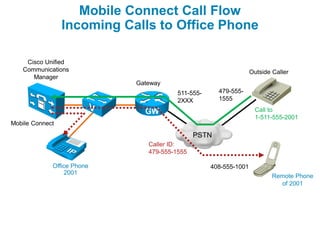
Mobile Connect Call Flow
                 Incoming Calls to Office Phone

    Cisco Unified
   Communications                                                 Outside Caller
      Manager
                            Gateway
                                        511-555-     479-555-
                                        2XXX         1555
                                                                    Call to
                                                                    1-511-555-2001
Mobile Connect
                                              PSTN
                               Caller ID:
                               479-555-1555

             Office Phone                          408-555-1001
                 2001
                                                                          Remote Phone
                                                                            of 2001
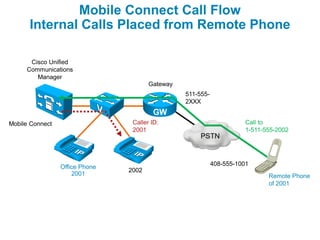
Mobile Connect Call Flow
      Internal Calls Placed from Remote Phone

      Cisco Unified
     Communications
        Manager
                                       Gateway
                                                 511-555-
                                                 2XXX


Mobile Connect                   Caller ID:                            Call to
                                 2001                                  1-511-555-2002
                                                      PSTN


                                                            408-555-1001
                 Office Phone
                                2002
                     2001                                                     Remote Phone
                                                                              of 2001
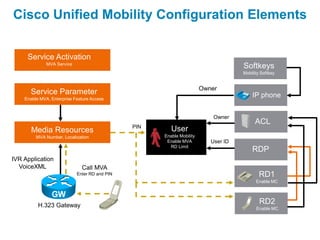
Cisco Unified Mobility Configuration Elements


     Service Activation
              MVA Service
                                                                                    Softkeys
                                                                                    Mobility Softkey


                                                                       Owner
      Service Parameter                                                                 IP phone
    Enable MVA, Enterprise Feature Access


                                                                           Owner
                                                                                          ACL
                                               PIN
       Media Resources                                  User
         MVA Number, Localization                    Enable Mobility
                                                      Enable MVA          User ID
                                                       RD Limit
                                                                                        RDP
IVR Application
  VoiceXML                    Call MVA
                            Enter RD and PIN                                                RD1
                                                                                          Enable MC


          H.323 Gateway
                                                                                            RD2
                                                                                          Enable MC
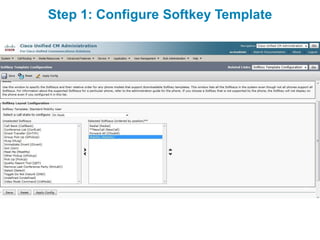
Step 1: Configure Softkey Template
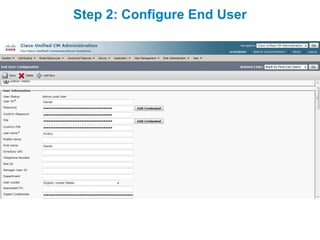
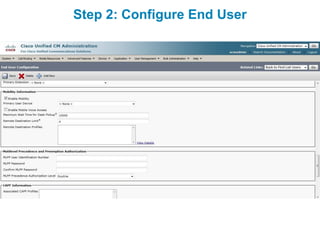
Step 2: Configure End User
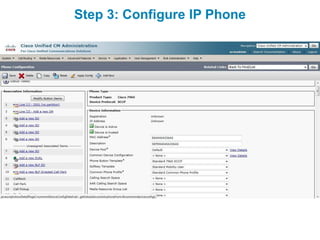
Step 3: Configure IP Phone
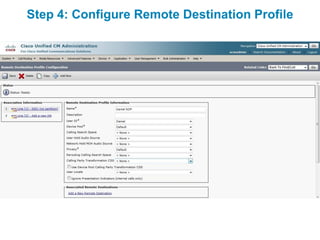
Step 4: Configure Remote Destination Profile
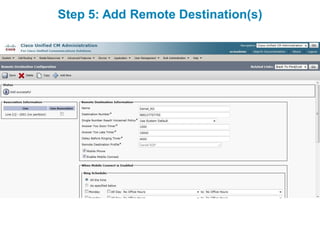
Step 5: Add Remote Destination(s)
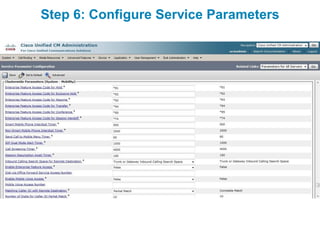
Step 6: Configure Service Parameters
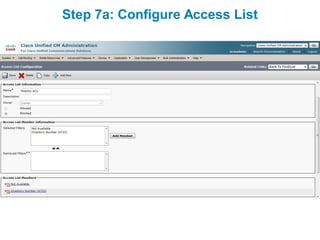
Step 7a: Configure Access List
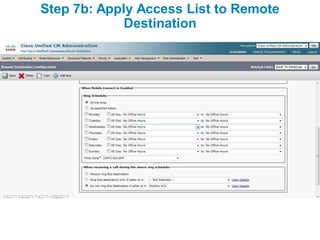
Step 7b: Apply Access List to Remote
             Destination
Mobile Voice Access
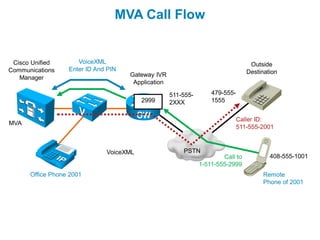
MVA Call Flow


 Cisco Unified       VoiceXML                                                     Outside
Communications    Enter ID And PIN                                               Destination
   Manager                           Gateway IVR
                                      Application

                                                    511-555-       479-555-
                                         2999       2XXX           1555


                                                                              Caller ID:
MVA
                                                                              511-555-2001


                              VoiceXML                  PSTN
                                                                       Call to           408-555-1001
                                                               1-511-555-2999
      Office Phone 2001                                                                Remote
                                                                                       Phone of 2001
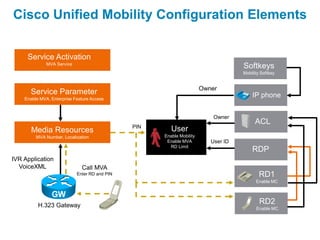
Cisco Unified Mobility Configuration Elements


     Service Activation
              MVA Service
                                                                                    Softkeys
                                                                                    Mobility Softkey


                                                                       Owner
      Service Parameter                                                                 IP phone
    Enable MVA, Enterprise Feature Access


                                                                           Owner
                                                                                          ACL
                                               PIN
       Media Resources                                  User
         MVA Number, Localization                    Enable Mobility
                                                      Enable MVA          User ID
                                                       RD Limit
                                                                                        RDP
IVR Application
  VoiceXML                    Call MVA
                            Enter RD and PIN                                                RD1
                                                                                          Enable MC


          H.323 Gateway
                                                                                            RD2
                                                                                          Enable MC
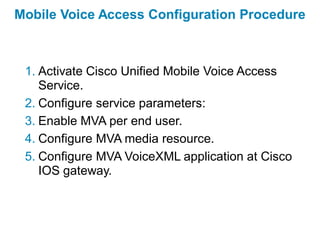
Mobile Voice Access Configuration Procedure


 1. Activate Cisco Unified Mobile Voice Access
    Service.
 2. Configure service parameters:
 3. Enable MVA per end user.
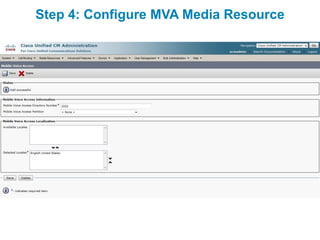
 4. Configure MVA media resource.
 5. Configure MVA VoiceXML application at Cisco
    IOS gateway.
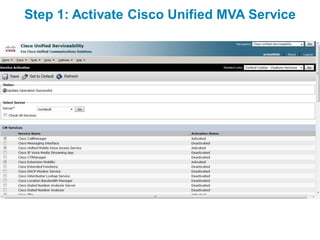
Step 1: Activate Cisco Unified MVA Service
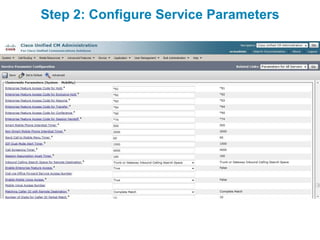
Step 2: Configure Service Parameters
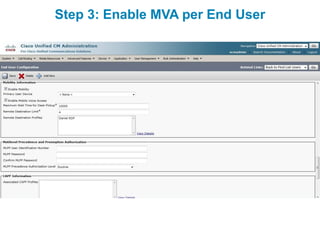
Step 3: Enable MVA per End User
Step 4: Configure MVA Media Resource
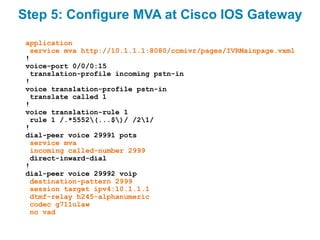
Step 5: Configure MVA at Cisco IOS Gateway
 application
  service mva http://10.1.1.1:8080/ccmivr/pages/IVRMainpage.vxml
 !
 voice-port 0/0/0:15
  translation-profile incoming pstn-in
 !
 voice translation-profile pstn-in
  translate called 1
 !
 voice translation-rule 1
  rule 1 /.*5552(...$)/ /21/
 !
 dial-peer voice 29991 pots
  service mva
  incoming called-number 2999
  direct-inward-dial
 !
 dial-peer voice 29992 voip
  destination-pattern 2999
  session target ipv4:10.1.1.1
  dtmf-relay h245-alphanumeric
  codec g711ulaw
  no vad
Device Mobility
Device Mobility Characteristics

 Device Mobility can be used in multisite environments with
  centralized call processing.
 Device Mobility allows users to roam between sites with their
  Cisco IP phones (typically Cisco IP Communicator or Cisco
  Unified Wireless Phones).
 IP phones are assigned with a location-specific IP address by
  DHCP.
 Cisco Unified Communications Manager determines the physical
  location of the IP phone based on the IP address used by the IP
  phone.
 Based on the physical location of the IP phone, the appropriate
  device configuration is applied.
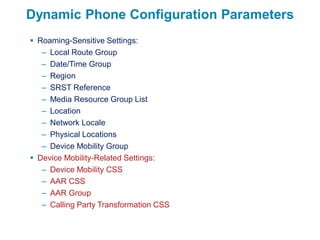
Dynamic Phone Configuration Parameters
 Roaming-Sensitive Settings:
   – Local Route Group
   – Date/Time Group
   – Region
   – SRST Reference
   – Media Resource Group List
   – Location
   – Network Locale
   – Physical Locations
   – Device Mobility Group
 Device Mobility-Related Settings:
   – Device Mobility CSS
   – AAR CSS
   – AAR Group
   – Calling Party Transformation CSS
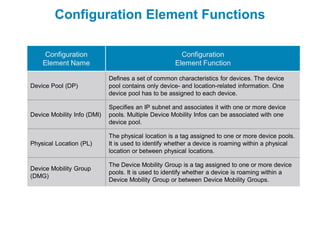
Configuration Element Functions

     Configuration                                     Configuration
    Element Name                                     Element Function

                             Defines a set of common characteristics for devices. The device
Device Pool (DP)             pool contains only device- and location-related information. One
                             device pool has to be assigned to each device.

                             Specifies an IP subnet and associates it with one or more device
Device Mobility Info (DMI)   pools. Multiple Device Mobility Infos can be associated with one
                             device pool.

                             The physical location is a tag assigned to one or more device pools.
Physical Location (PL)       It is used to identify whether a device is roaming within a physical
                             location or between physical locations.

                             The Device Mobility Group is a tag assigned to one or more device
Device Mobility Group
                             pools. It is used to identify whether a device is roaming within a
(DMG)
                             Device Mobility Group or between Device Mobility Groups.
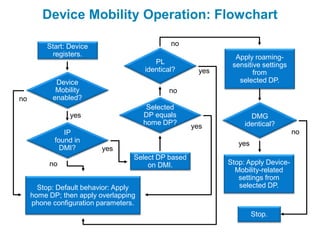
Device Mobility Operation: Flowchart

         Start: Device                         no
          registers.                                           Apply roaming-
                                          PL                  sensitive settings
                                       identical?      yes           from
            Device                                              selected DP.
            Mobility                          no
no         enabled?
                                        Selected
                yes                    DP equals                    DMG
                                       home DP?                   identical?
                                                     yes
               IP                                                                  no
            found in                                            yes
              DMI?        yes
                                   Select DP based
          no                           on DMI.               Stop: Apply Device-
                                                               Mobility-related
                                                                settings from
       Stop: Default behavior: Apply                            selected DP.
     home DP; then apply overlapping
     phone configuration parameters.
                                                                      Stop.
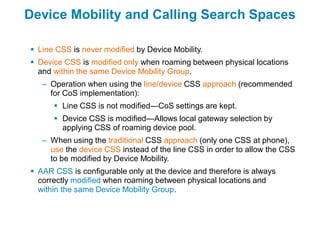
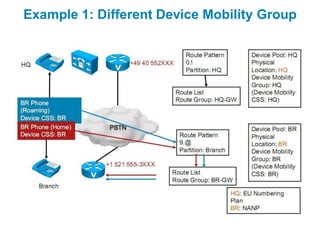
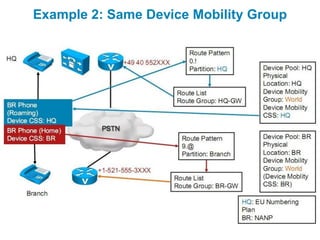
Device Mobility and Calling Search Spaces

 Line CSS is never modified by Device Mobility.
 Device CSS is modified only when roaming between physical locations
  and within the same Device Mobility Group.
   – Operation when using the line/device CSS approach (recommended
     for CoS implementation):
       Line CSS is not modified—CoS settings are kept.
       Device CSS is modified—Allows local gateway selection by
        applying CSS of roaming device pool.
   – When using the traditional CSS approach (only one CSS at phone),
     use the device CSS instead of the line CSS in order to allow the CSS
     to be modified by Device Mobility.
 AAR CSS is configurable only at the device and therefore is always
  correctly modified when roaming between physical locations and
  within the same Device Mobility Group.
Example 1: Different Device Mobility Group
Example 2: Same Device Mobility Group
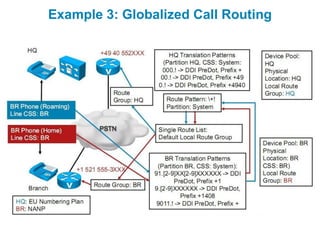
Example 3: Globalized Call Routing
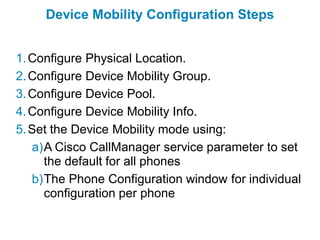
Device Mobility Configuration Steps


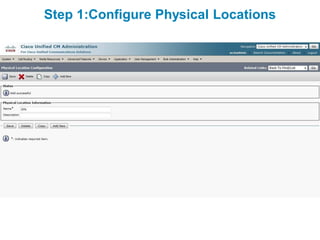
1. Configure Physical Location.
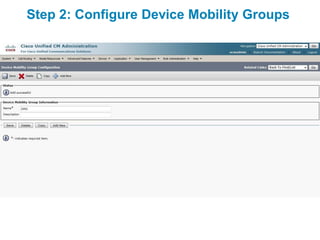
2. Configure Device Mobility Group.
3. Configure Device Pool.
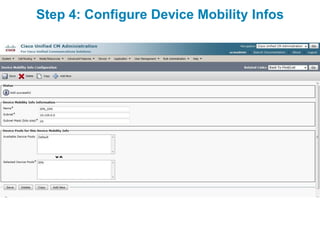
4. Configure Device Mobility Info.
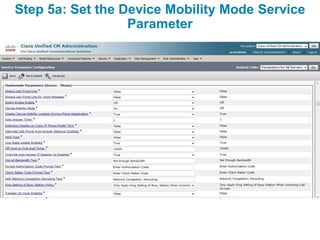
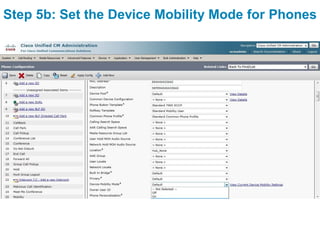
5. Set the Device Mobility mode using:
   a)A Cisco CallManager service parameter to set
     the default for all phones
   b)The Phone Configuration window for individual
     configuration per phone
Step 1:Configure Physical Locations
Step 2: Configure Device Mobility Groups
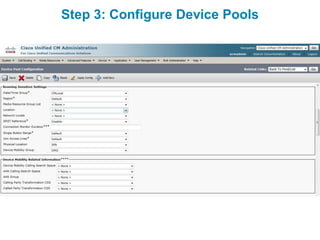
Step 3: Configure Device Pools
Step 4: Configure Device Mobility Infos
Step 5a: Set the Device Mobility Mode Service
                  Parameter
Step 5b: Set the Device Mobility Mode for Phones
Extension Mobility
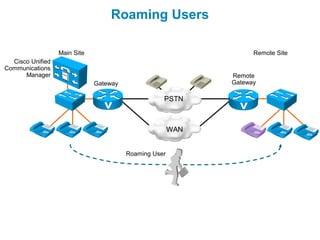
Roaming Users

                  Main Site                                        Remote Site
  Cisco Unified
Communications
      Manager                                                Remote
                              Gateway                        Gateway

                                                   PSTN


                                                       WAN


                                        Roaming User
Issues with Roaming Users

 Extensions are traditionally bound to constant devices.
 User gets wrong extension on that phone.
 User gets wrong calling privileges.
 User does not have speed dials available.
 User has wrong services assigned.
 Message Waiting Indicator (MWI) status will not work
  with different extension.
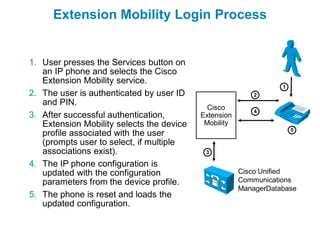
Extension Mobility Login Process


1. User presses the Services button on
   an IP phone and selects the Cisco
   Extension Mobility service.
                                                                  1
2. The user is authenticated by user ID                    2
   and PIN.
                                             Cisco         4
3. After successful authentication,        Extension
   Extension Mobility selects the device    Mobility
                                                                      5
   profile associated with the user
   (prompts user to select, if multiple
   associations exist).                     3

4. The IP phone configuration is
   updated with the configuration                      Cisco Unified
   parameters from the device profile.                 Communications
                                                       ManagerDatabase
5. The phone is reset and loads the
   updated configuration.
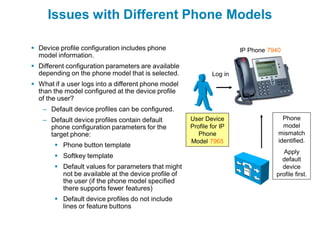
Issues with Different Phone Models

 Device profile configuration includes phone                         IP Phone 7940
  model information.
 Different configuration parameters are available
  depending on the phone model that is selected.             Log in
 What if a user logs into a different phone model
  than the model configured at the device profile
  of the user?
   – Default device profiles can be configured.
   – Default device profiles contain default         User Device                    Phone
     phone configuration parameters for the          Profile for IP                 model
     target phone:                                      Phone                     mismatch
                                                     Model 7965                   identified.
        Phone button template
                                                                                    Apply
        Softkey template                                                          default
        Default values for parameters that might                                  device
         not be available at the device profile of                               profile first.
         the user (if the phone model specified
         there supports fewer features)
        Default device profiles do not include
         lines or feature buttons
Extension Mobility and Calling Search Spaces

   Device CSS is never modified by Extension Mobility.
   Line CSS is always modified by Extension Mobility:
     – Operation when using the line/device CSS approach (recommended
       for class of service [CoS] implementation):
         Line CSS of user device profile is applied—CoS settings of the
          user are enforced.
         Device CSS is not modified—Allows local gateway selection
          depending on used device (at any location).
   When using the traditional CSS approach (only one CSS at phone),
    the same CSS (either device or line) is used all the time, which causes
    problems in multisite environments with different CoS for users.
   AAR CSS is configurable only at the device and is never updated by
    Extension Mobility – allows local gateway to be used for AAR calls.
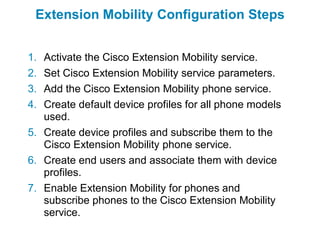
Extension Mobility Configuration Steps


1. Activate the Cisco Extension Mobility service.
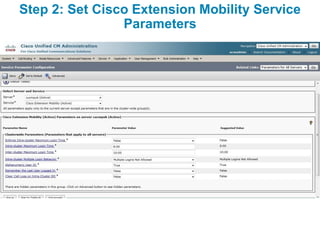
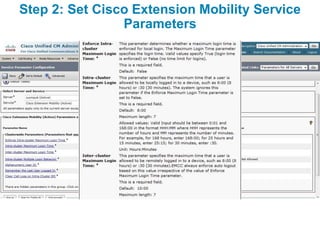
2. Set Cisco Extension Mobility service parameters.
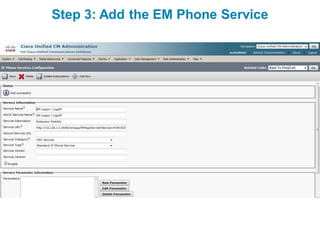
3. Add the Cisco Extension Mobility phone service.
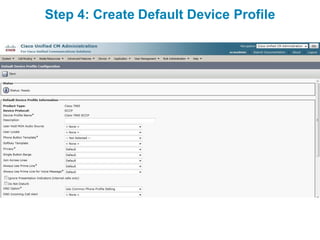
4. Create default device profiles for all phone models
   used.
5. Create device profiles and subscribe them to the
   Cisco Extension Mobility phone service.
6. Create end users and associate them with device
   profiles.
7. Enable Extension Mobility for phones and
   subscribe phones to the Cisco Extension Mobility
   service.
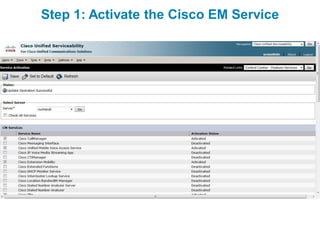
Step 1: Activate the Cisco EM Service
Step 2: Set Cisco Extension Mobility Service
                Parameters
Step 2: Set Cisco Extension Mobility Service
                Parameters
Step 3: Add the EM Phone Service
Step 4: Create Default Device Profile
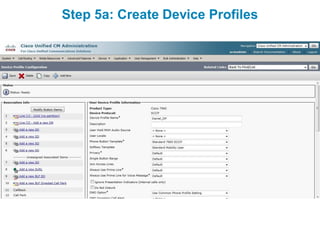
Step 5a: Create Device Profiles
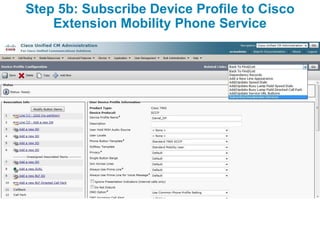
Step 5b: Subscribe Device Profile to Cisco
    Extension Mobility Phone Service
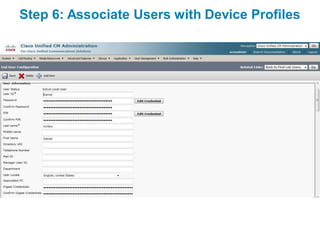
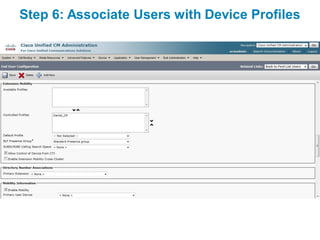
Step 6: Associate Users with Device Profiles
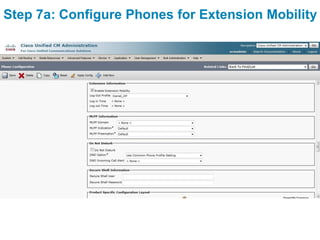
Step 7a: Configure Phones for Extension Mobility
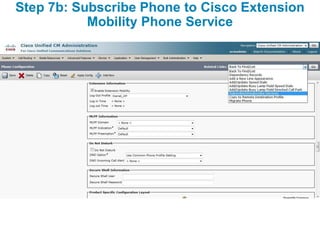
Step 7b: Subscribe Phone to Cisco Extension
           Mobility Phone Service
Extension Mobility
  Cross Cluster
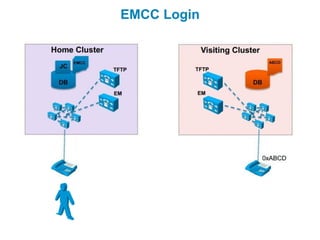
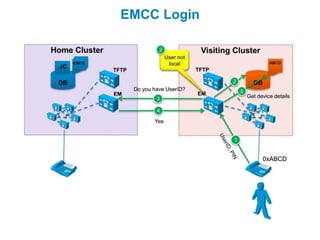
EMCC Login
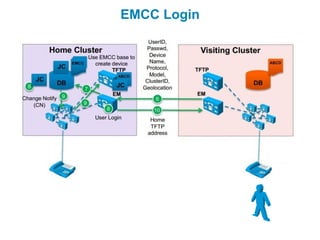
EMCC Login
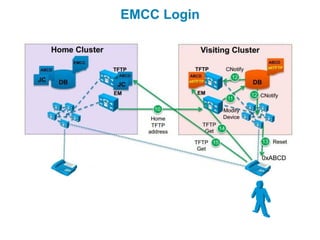
EMCC Login
EMCC Login
Cisco Training Solutions


Cisco UCM Mobility Services


Daniel Kirillov
CCNP, CCIP, CCDP, CCSP, CCVP, CCNPW
daniil.kirillov@flane.ru                19-Nov-2012
www.flane.ru

Cisco UCM Mobility Services

  • 1.
    Cisco Training Solutions CiscoUCM Mobility Services Daniel Kirillov CCNP, CCIP, CCDP, CCSP, CCVP, CCNPW daniil.kirillov@flane.ru 19-Nov-2012 www.flane.ru
  • 2.
  • 3.
    Cisco Unified Mobility Cisco Unified Customer Mobile Voice Access Call to Mobile Communications establishes a system Voice Access Manager to create enterprise directory Call to office number. calls from any number. location. PSTN Gateway Mobile Connect lets Remote remote and office Phone phones ring simultaneously. Office Phone
  • 4.
  • 5.
    Mobile Connect CallFlow Incoming Calls to Office Phone Cisco Unified Communications Outside Caller Manager Gateway 511-555- 479-555- 2XXX 1555 Call to 1-511-555-2001 Mobile Connect PSTN Caller ID: 479-555-1555 Office Phone 408-555-1001 2001 Remote Phone of 2001
  • 6.
    Mobile Connect CallFlow Internal Calls Placed from Remote Phone Cisco Unified Communications Manager Gateway 511-555- 2XXX Mobile Connect Caller ID: Call to 2001 1-511-555-2002 PSTN 408-555-1001 Office Phone 2002 2001 Remote Phone of 2001
  • 7.
    Cisco Unified MobilityConfiguration Elements Service Activation MVA Service Softkeys Mobility Softkey Owner Service Parameter IP phone Enable MVA, Enterprise Feature Access Owner ACL PIN Media Resources User MVA Number, Localization Enable Mobility Enable MVA User ID RD Limit RDP IVR Application VoiceXML Call MVA Enter RD and PIN RD1 Enable MC H.323 Gateway RD2 Enable MC
  • 8.
    Step 1: ConfigureSoftkey Template
  • 9.
  • 10.
  • 11.
  • 12.
    Step 4: ConfigureRemote Destination Profile
  • 13.
    Step 5: AddRemote Destination(s)
  • 14.
    Step 6: ConfigureService Parameters
  • 15.
    Step 7a: ConfigureAccess List
  • 16.
    Step 7b: ApplyAccess List to Remote Destination
  • 17.
  • 18.
    MVA Call Flow Cisco Unified VoiceXML Outside Communications Enter ID And PIN Destination Manager Gateway IVR Application 511-555- 479-555- 2999 2XXX 1555 Caller ID: MVA 511-555-2001 VoiceXML PSTN Call to 408-555-1001 1-511-555-2999 Office Phone 2001 Remote Phone of 2001
  • 19.
    Cisco Unified MobilityConfiguration Elements Service Activation MVA Service Softkeys Mobility Softkey Owner Service Parameter IP phone Enable MVA, Enterprise Feature Access Owner ACL PIN Media Resources User MVA Number, Localization Enable Mobility Enable MVA User ID RD Limit RDP IVR Application VoiceXML Call MVA Enter RD and PIN RD1 Enable MC H.323 Gateway RD2 Enable MC
  • 20.
    Mobile Voice AccessConfiguration Procedure 1. Activate Cisco Unified Mobile Voice Access Service. 2. Configure service parameters: 3. Enable MVA per end user. 4. Configure MVA media resource. 5. Configure MVA VoiceXML application at Cisco IOS gateway.
  • 21.
    Step 1: ActivateCisco Unified MVA Service
  • 22.
    Step 2: ConfigureService Parameters
  • 23.
    Step 3: EnableMVA per End User
  • 24.
    Step 4: ConfigureMVA Media Resource
  • 25.
    Step 5: ConfigureMVA at Cisco IOS Gateway application service mva http://10.1.1.1:8080/ccmivr/pages/IVRMainpage.vxml ! voice-port 0/0/0:15 translation-profile incoming pstn-in ! voice translation-profile pstn-in translate called 1 ! voice translation-rule 1 rule 1 /.*5552(...$)/ /21/ ! dial-peer voice 29991 pots service mva incoming called-number 2999 direct-inward-dial ! dial-peer voice 29992 voip destination-pattern 2999 session target ipv4:10.1.1.1 dtmf-relay h245-alphanumeric codec g711ulaw no vad
  • 26.
  • 27.
    Device Mobility Characteristics Device Mobility can be used in multisite environments with centralized call processing.  Device Mobility allows users to roam between sites with their Cisco IP phones (typically Cisco IP Communicator or Cisco Unified Wireless Phones).  IP phones are assigned with a location-specific IP address by DHCP.  Cisco Unified Communications Manager determines the physical location of the IP phone based on the IP address used by the IP phone.  Based on the physical location of the IP phone, the appropriate device configuration is applied.
  • 28.
    Dynamic Phone ConfigurationParameters  Roaming-Sensitive Settings: – Local Route Group – Date/Time Group – Region – SRST Reference – Media Resource Group List – Location – Network Locale – Physical Locations – Device Mobility Group  Device Mobility-Related Settings: – Device Mobility CSS – AAR CSS – AAR Group – Calling Party Transformation CSS
  • 29.
    Configuration Element Functions Configuration Configuration Element Name Element Function Defines a set of common characteristics for devices. The device Device Pool (DP) pool contains only device- and location-related information. One device pool has to be assigned to each device. Specifies an IP subnet and associates it with one or more device Device Mobility Info (DMI) pools. Multiple Device Mobility Infos can be associated with one device pool. The physical location is a tag assigned to one or more device pools. Physical Location (PL) It is used to identify whether a device is roaming within a physical location or between physical locations. The Device Mobility Group is a tag assigned to one or more device Device Mobility Group pools. It is used to identify whether a device is roaming within a (DMG) Device Mobility Group or between Device Mobility Groups.
  • 30.
    Device Mobility Operation:Flowchart Start: Device no registers. Apply roaming- PL sensitive settings identical? yes from Device selected DP. Mobility no no enabled? Selected yes DP equals DMG home DP? identical? yes IP no found in yes DMI? yes Select DP based no on DMI. Stop: Apply Device- Mobility-related settings from Stop: Default behavior: Apply selected DP. home DP; then apply overlapping phone configuration parameters. Stop.
  • 31.
    Device Mobility andCalling Search Spaces  Line CSS is never modified by Device Mobility.  Device CSS is modified only when roaming between physical locations and within the same Device Mobility Group. – Operation when using the line/device CSS approach (recommended for CoS implementation):  Line CSS is not modified—CoS settings are kept.  Device CSS is modified—Allows local gateway selection by applying CSS of roaming device pool. – When using the traditional CSS approach (only one CSS at phone), use the device CSS instead of the line CSS in order to allow the CSS to be modified by Device Mobility.  AAR CSS is configurable only at the device and therefore is always correctly modified when roaming between physical locations and within the same Device Mobility Group.
  • 32.
    Example 1: DifferentDevice Mobility Group
  • 33.
    Example 2: SameDevice Mobility Group
  • 34.
  • 35.
    Device Mobility ConfigurationSteps 1. Configure Physical Location. 2. Configure Device Mobility Group. 3. Configure Device Pool. 4. Configure Device Mobility Info. 5. Set the Device Mobility mode using: a)A Cisco CallManager service parameter to set the default for all phones b)The Phone Configuration window for individual configuration per phone
  • 36.
  • 37.
    Step 2: ConfigureDevice Mobility Groups
  • 38.
    Step 3: ConfigureDevice Pools
  • 39.
    Step 4: ConfigureDevice Mobility Infos
  • 40.
    Step 5a: Setthe Device Mobility Mode Service Parameter
  • 41.
    Step 5b: Setthe Device Mobility Mode for Phones
  • 42.
  • 43.
    Roaming Users Main Site Remote Site Cisco Unified Communications Manager Remote Gateway Gateway PSTN WAN Roaming User
  • 44.
    Issues with RoamingUsers  Extensions are traditionally bound to constant devices.  User gets wrong extension on that phone.  User gets wrong calling privileges.  User does not have speed dials available.  User has wrong services assigned.  Message Waiting Indicator (MWI) status will not work with different extension.
  • 45.
    Extension Mobility LoginProcess 1. User presses the Services button on an IP phone and selects the Cisco Extension Mobility service. 1 2. The user is authenticated by user ID 2 and PIN. Cisco 4 3. After successful authentication, Extension Extension Mobility selects the device Mobility 5 profile associated with the user (prompts user to select, if multiple associations exist). 3 4. The IP phone configuration is updated with the configuration Cisco Unified parameters from the device profile. Communications ManagerDatabase 5. The phone is reset and loads the updated configuration.
  • 46.
    Issues with DifferentPhone Models  Device profile configuration includes phone IP Phone 7940 model information.  Different configuration parameters are available depending on the phone model that is selected. Log in  What if a user logs into a different phone model than the model configured at the device profile of the user? – Default device profiles can be configured. – Default device profiles contain default User Device Phone phone configuration parameters for the Profile for IP model target phone: Phone mismatch Model 7965 identified.  Phone button template Apply  Softkey template default  Default values for parameters that might device not be available at the device profile of profile first. the user (if the phone model specified there supports fewer features)  Default device profiles do not include lines or feature buttons
  • 47.
    Extension Mobility andCalling Search Spaces  Device CSS is never modified by Extension Mobility.  Line CSS is always modified by Extension Mobility: – Operation when using the line/device CSS approach (recommended for class of service [CoS] implementation):  Line CSS of user device profile is applied—CoS settings of the user are enforced.  Device CSS is not modified—Allows local gateway selection depending on used device (at any location).  When using the traditional CSS approach (only one CSS at phone), the same CSS (either device or line) is used all the time, which causes problems in multisite environments with different CoS for users.  AAR CSS is configurable only at the device and is never updated by Extension Mobility – allows local gateway to be used for AAR calls.
  • 48.
    Extension Mobility ConfigurationSteps 1. Activate the Cisco Extension Mobility service. 2. Set Cisco Extension Mobility service parameters. 3. Add the Cisco Extension Mobility phone service. 4. Create default device profiles for all phone models used. 5. Create device profiles and subscribe them to the Cisco Extension Mobility phone service. 6. Create end users and associate them with device profiles. 7. Enable Extension Mobility for phones and subscribe phones to the Cisco Extension Mobility service.
  • 49.
    Step 1: Activatethe Cisco EM Service
  • 50.
    Step 2: SetCisco Extension Mobility Service Parameters
  • 51.
    Step 2: SetCisco Extension Mobility Service Parameters
  • 52.
    Step 3: Addthe EM Phone Service
  • 53.
    Step 4: CreateDefault Device Profile
  • 54.
    Step 5a: CreateDevice Profiles
  • 55.
    Step 5b: SubscribeDevice Profile to Cisco Extension Mobility Phone Service
  • 56.
    Step 6: AssociateUsers with Device Profiles
  • 57.
    Step 6: AssociateUsers with Device Profiles
  • 58.
    Step 7a: ConfigurePhones for Extension Mobility
  • 59.
    Step 7b: SubscribePhone to Cisco Extension Mobility Phone Service
  • 60.
    Extension Mobility Cross Cluster
  • 61.
  • 62.
  • 63.
  • 64.
  • 65.
    Cisco Training Solutions CiscoUCM Mobility Services Daniel Kirillov CCNP, CCIP, CCDP, CCSP, CCVP, CCNPW daniil.kirillov@flane.ru 19-Nov-2012 www.flane.ru